

Microsoft has fixed CVE-2026-55140, a Critical-rated Microsoft Office remote code execution vulnerability that can be triggered through the Preview Pane. The flaw affects supported Office releases on Windows and macOS, including Microsoft 365 Apps for enterprise, Office 2016, Office 2019, and Office LTSC 2021 and 2024.
Detailed in Microsoft’s July 14, 2026 security advisory, the vulnerability is a heap-based buffer overflow that can corrupt memory when Office processes malicious content. Microsoft assigned it a CVSS 3.1 score of 7.8 and classified the technical impact as remote code execution, potentially giving an attacker the same privileges as the user running Office.
The immediate action is straightforward: update every affected Office installation, including devices where Office applications are rarely opened but remain installed. Preview Pane exposure makes document-handling workflows particularly important because users may not need to deliberately open a file in an Office application to encounter the vulnerable processing path.
CVE-2026-55140 is categorized as remote code execution, but Microsoft’s CVSS vector identifies the attack vector as local rather than network-based. That distinction does not mean an attacker must already have physical or authenticated access to the computer.
Instead, the attacker must deliver a specially crafted Office document and persuade the targeted user or another application to process it. Email attachments, files downloaded from a website, documents placed on a shared drive, and content delivered through collaboration services are all plausible routes into that local processing stage.
The vulnerability also requires user interaction, according to Microsoft’s CVSS assessment. However, Microsoft identifies the Preview Pane as an attack vector, reducing the amount of interaction potentially needed. Selecting a malicious file in File Explorer or previewing an attachment may be enough to expose the vulnerable Office component, depending on the document type and system configuration.
That makes this more consequential than an Office bug that requires a user to open a document, dismiss warnings, and enable active content. Macros are not the central issue described here, and disabling VBA should not be treated as a substitute for installing the security update.
Microsoft says the underlying weakness is CWE-122, a heap-based buffer overflow. In practical terms, Office can write more data into a memory region than that region was allocated to hold. Carefully constructed input may turn the resulting corruption into code execution rather than merely crashing the application.
Successful exploitation could allow an attacker to read or alter files accessible to the current user, install software where permissions permit, or use the compromised Office process as an initial foothold. Accounts with local administrator rights create a greater potential impact than standard-user accounts, reinforcing the value of keeping everyday users out of privileged groups.
The CVSS vector is
Microsoft’s initial exploitability assessment says exploitation is less likely. The vulnerability was not publicly disclosed before the July update, and Microsoft had not detected active exploitation when the advisory was published. The exploit-code maturity assessment was unproven, meaning no confirmed public proof-of-concept was part of the available disclosure information.
That is useful prioritization data, but it is not a reason to defer the patch indefinitely. Office document vulnerabilities are attractive phishing tools, and the advisory now gives attackers a confirmed vulnerability class, affected-product list, and patched code to compare against older binaries.
Zero Day Initiative’s July 2026 security update review placed CVE-2026-55140 among a large group of Office remote code execution fixes released this month. Its analysis similarly highlighted the Preview Pane route and advised organizations to patch Office and restart affected systems.
The vulnerability record’s confidence level is effectively high because Microsoft, as the product vendor and CVE numbering authority, has confirmed the flaw, identified its weakness class, published affected-product data, and shipped corrections. What remains limited is not confidence in the vulnerability’s existence, but public technical detail about the precise file format, vulnerable component, and steps required to achieve reliable code execution.
Affected products include:
Managed Microsoft 365 Apps deployments should be checked through Microsoft Intune, Configuration Manager, the Microsoft 365 Apps admin center, or the organization’s existing vulnerability-management platform. Devices that have not connected recently, shared workstations, virtual desktop images, and dormant laptops deserve special attention because they can miss normal update deadlines.
Office 2016 requires additional scrutiny. Microsoft’s vulnerability data identifies 16.0.5561.1000 as the corrected version boundary, so administrators should verify the installed build rather than relying solely on Windows Update history.
Mac administrators need to confirm that Office has reached at least build 16.111.26071215. Depending on how the organization manages macOS, that may involve Microsoft AutoUpdate, an MDM policy, or a packaged application deployment.
Email gateways and endpoint security products should continue blocking executable and suspicious archive formats, but CVE-2026-55140 reinforces the importance of inspecting ordinary-looking Office files as well. Attackers do not necessarily need macros when the file parser itself contains a memory-corruption vulnerability.
Protected View, Mark of the Web enforcement, Microsoft Defender for Office 365, and attack-surface reduction rules remain worthwhile layers. None should be assumed to repair the underlying heap overflow, and Microsoft has not presented them as replacements for the July update.
Administrators should also review whether Office is installed on servers or utility systems where it is not operationally required. Removing unused Office installations eliminates an application attack surface that otherwise has to be inventoried and patched every month.
Because Microsoft advises installing all applicable Office updates when multiple packages are offered, update workflows should not stop after the first successful Office patch reports as installed. Organizations using MSI-based Office releases should verify that every relevant component update has been applied and then restart the device to ensure patched binaries are loaded.
The absence of known exploitation on July 14, 2026 gives IT departments a deployment window, not an exemption. For CVE-2026-55140, the finish line is a verified patched Office build on every Windows and Mac endpoint—not merely an approved update waiting in the software-distribution queue.
Detailed in Microsoft’s July 14, 2026 security advisory, the vulnerability is a heap-based buffer overflow that can corrupt memory when Office processes malicious content. Microsoft assigned it a CVSS 3.1 score of 7.8 and classified the technical impact as remote code execution, potentially giving an attacker the same privileges as the user running Office.
The immediate action is straightforward: update every affected Office installation, including devices where Office applications are rarely opened but remain installed. Preview Pane exposure makes document-handling workflows particularly important because users may not need to deliberately open a file in an Office application to encounter the vulnerable processing path.
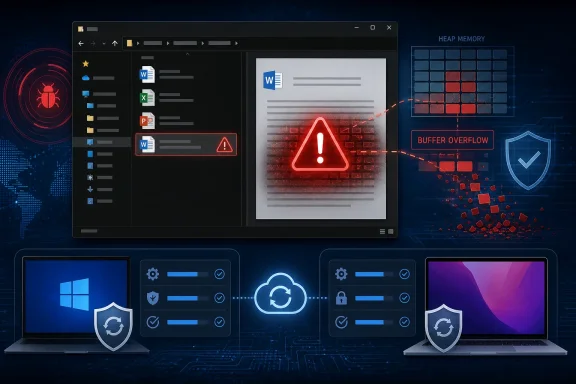 A Malicious Document Is the Delivery Mechanism
CVE-2026-55140 is categorized as remote code execution, but Microsoft’s CVSS vector identifies the attack vector as local rather than network-based. That distinction does not mean an attacker must already have physical or authenticated access to the computer.Instead, the attacker must deliver a specially crafted Office document and persuade the targeted user or another application to process it. Email attachments, files downloaded from a website, documents placed on a shared drive, and content delivered through collaboration services are all plausible routes into that local processing stage.
The vulnerability also requires user interaction, according to Microsoft’s CVSS assessment. However, Microsoft identifies the Preview Pane as an attack vector, reducing the amount of interaction potentially needed. Selecting a malicious file in File Explorer or previewing an attachment may be enough to expose the vulnerable Office component, depending on the document type and system configuration.
That makes this more consequential than an Office bug that requires a user to open a document, dismiss warnings, and enable active content. Macros are not the central issue described here, and disabling VBA should not be treated as a substitute for installing the security update.
Microsoft says the underlying weakness is CWE-122, a heap-based buffer overflow. In practical terms, Office can write more data into a memory region than that region was allocated to hold. Carefully constructed input may turn the resulting corruption into code execution rather than merely crashing the application.
Successful exploitation could allow an attacker to read or alter files accessible to the current user, install software where permissions permit, or use the compromised Office process as an initial foothold. Accounts with local administrator rights create a greater potential impact than standard-user accounts, reinforcing the value of keeping everyday users out of privileged groups.
Critical Rating, High CVSS Score
Microsoft rates CVE-2026-55140 as Critical even though its CVSS base score is 7.8, which falls within the numerical High range. The difference reflects the fact that vendor severity ratings incorporate product-specific risk and common attack scenarios rather than simply mirroring the CVSS label.The CVSS vector is
CVSS:3.1/AV:L/AC:L/PR:N/UI:R/S:U/C:H/I:H/A:H. It describes an attack with low complexity that requires no prior privileges but does require user interaction. A successful attack can have a high effect on confidentiality, integrity, and availability.Microsoft’s initial exploitability assessment says exploitation is less likely. The vulnerability was not publicly disclosed before the July update, and Microsoft had not detected active exploitation when the advisory was published. The exploit-code maturity assessment was unproven, meaning no confirmed public proof-of-concept was part of the available disclosure information.
That is useful prioritization data, but it is not a reason to defer the patch indefinitely. Office document vulnerabilities are attractive phishing tools, and the advisory now gives attackers a confirmed vulnerability class, affected-product list, and patched code to compare against older binaries.
Zero Day Initiative’s July 2026 security update review placed CVE-2026-55140 among a large group of Office remote code execution fixes released this month. Its analysis similarly highlighted the Preview Pane route and advised organizations to patch Office and restart affected systems.
The vulnerability record’s confidence level is effectively high because Microsoft, as the product vendor and CVE numbering authority, has confirmed the flaw, identified its weakness class, published affected-product data, and shipped corrections. What remains limited is not confidence in the vulnerability’s existence, but public technical detail about the precise file format, vulnerable component, and steps required to achieve reliable code execution.
The Affected Office Estate Is Broad
CVE-2026-55140 crosses both perpetual-license and subscription editions of Office. Microsoft’s published affected-product data includes 32-bit and 64-bit Windows installations as well as current Office releases for macOS.Affected products include:
- Microsoft 365 Apps for enterprise on 32-bit and 64-bit Windows systems is affected and should be updated to the current security release for its servicing channel.
- Microsoft Office 2016 on Windows is affected below version 16.0.5561.1000.
- Microsoft Office 2019 on 32-bit and 64-bit Windows systems is affected.
- Microsoft Office LTSC 2021 and Office LTSC 2024 on Windows are affected.
- Microsoft 365 Office applications for Mac are affected below version 16.111.26071215.
- Microsoft Office LTSC for Mac 2021 and Office LTSC for Mac 2024 are affected below version 16.111.26071215.
Managed Microsoft 365 Apps deployments should be checked through Microsoft Intune, Configuration Manager, the Microsoft 365 Apps admin center, or the organization’s existing vulnerability-management platform. Devices that have not connected recently, shared workstations, virtual desktop images, and dormant laptops deserve special attention because they can miss normal update deadlines.
Office 2016 requires additional scrutiny. Microsoft’s vulnerability data identifies 16.0.5561.1000 as the corrected version boundary, so administrators should verify the installed build rather than relying solely on Windows Update history.
Mac administrators need to confirm that Office has reached at least build 16.111.26071215. Depending on how the organization manages macOS, that may involve Microsoft AutoUpdate, an MDM policy, or a packaged application deployment.
Preview Pane Exposure Changes the Interim Playbook
Where immediate patching is impossible, administrators should reduce opportunities for users to preview or process untrusted Office documents. Disabling File Explorer’s Preview Pane and avoiding attachment previews can lower exposure during the deployment window, but those steps are temporary risk controls rather than complete remediation.Email gateways and endpoint security products should continue blocking executable and suspicious archive formats, but CVE-2026-55140 reinforces the importance of inspecting ordinary-looking Office files as well. Attackers do not necessarily need macros when the file parser itself contains a memory-corruption vulnerability.
Protected View, Mark of the Web enforcement, Microsoft Defender for Office 365, and attack-surface reduction rules remain worthwhile layers. None should be assumed to repair the underlying heap overflow, and Microsoft has not presented them as replacements for the July update.
Administrators should also review whether Office is installed on servers or utility systems where it is not operationally required. Removing unused Office installations eliminates an application attack surface that otherwise has to be inventoried and patched every month.
Because Microsoft advises installing all applicable Office updates when multiple packages are offered, update workflows should not stop after the first successful Office patch reports as installed. Organizations using MSI-based Office releases should verify that every relevant component update has been applied and then restart the device to ensure patched binaries are loaded.
The absence of known exploitation on July 14, 2026 gives IT departments a deployment window, not an exemption. For CVE-2026-55140, the finish line is a verified patched Office build on every Windows and Mac endpoint—not merely an approved update waiting in the software-distribution queue.
References
- Primary source: MSRC
Published: 2026-07-14T07:00:00-07:00
Security Update Guide - Microsoft Security Response Center
 msrc.microsoft.com
- Official source: support.microsoft.com
Description of the security update for Office 2016: July 14, 2026 (KB5002273) | Microsoft Support
Description of the security update for Office 2016: July 14, 2026 (KB5002273)support.microsoft.com - Related coverage: techradar.com
Worrying Microsoft Office security flaw patched - update now or risk hackers accessing your files | TechRadar
Microsoft forced to issue an emergency patchwww.techradar.com - Related coverage: pcgamer.com
Microsoft announces that Office has two critical security vulnerabilities, and here's where you can find patches to fix them | PC Gamer
Both also require local access to exploit, so while they're bad, they're not super bad.www.pcgamer.com
