

For an NVIDIA GeForce RTX 3070 gaming PC, the best CPU depends more on whether you are upgrading an existing AM4 or LGA1700 system, or building a new AM5 PC, than on a promised “zero bottleneck” percentage. This guide covers RTX 3070 systems running Windows 10 64-bit or Windows 11 and focuses on balanced CPU pairings for 1080p high-refresh and 1440p gaming as of July 15, 2026.
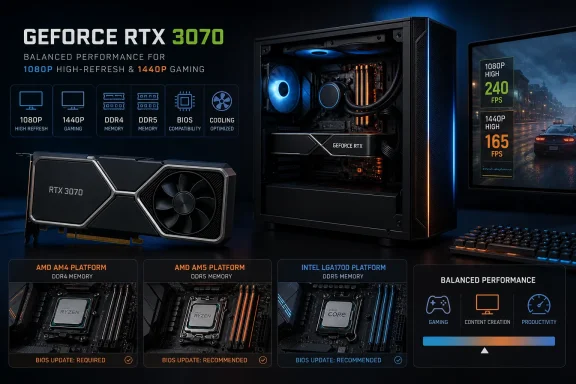
An RTX 3070 has 8GB of GDDR6 memory and is usually the limiting component in demanding 1440p games, especially with high-quality settings, ray tracing, or modern texture packs. At 1080p with a 144Hz, 165Hz, or 240Hz monitor, the processor matters more because the GPU can render frames faster.
Do not buy a flagship CPU simply to eliminate a theoretical bottleneck. A balanced CPU should:
Choose it when you want a new AM5 platform without paying extra for gaming performance your RTX 3070 may not consistently expose. AM5 uses DDR5 memory, but AMD has committed to support the socket through 2029.
This is often preferable to the Ryzen 5 7600X when the lower total platform cost, quieter cooling, or lower power draw matters more than small performance differences.
For gaming alone, it is not mandatory. Buy it for the broader workload, not because the RTX 3070 requires eight cores.
With an RTX 3070, it is often excessive at 1440p ultra settings because the graphics card becomes the limit. It makes sense if you plan a future GPU upgrade or prioritize the highest possible 1080p frame rates.
Do not replace a working Ryzen 5 7600 or Ryzen 5 9600X solely to install one for an RTX 3070. The upgrade is most noticeable in CPU-limited games or after a later graphics-card upgrade.
It is especially useful for upgrades from first-generation Ryzen, Ryzen 2000, older Intel Core systems, or a four-core CPU. Confirm motherboard BIOS support before purchase.
Do not pay a large premium for the 5600X over the 5600. In a typical RTX 3070 gaming build, the difference is usually not large enough to justify it.
Use a decent tower air cooler; AMD does not include one with every retail package.
It is more compelling than the 5800X for gaming when the prices are close. Check BIOS support carefully, as older AM4 boards may need an update before the processor can boot.
For a new purchase, the 5700X is generally the quieter, easier AM4 recommendation; the 5700X3D is the better gaming-focused upgrade.
It is a very capable RTX 3070 companion for high-refresh 1080p and 1440p gaming. Remember that the “F” suffix means it has no integrated graphics, so you cannot use the PC for display output if the RTX 3070 is removed or fails.
Use the 12600K if the price gap is small. Both models require an aftermarket CPU cooler.
It can draw substantially more power than 65W AMD alternatives under turbo loads. Pair it with a capable cooler and do not assume an entry-level boxed cooler is sufficient.
It is suitable for an RTX 3070, but the “F” suffix again means no integrated graphics. Verify that your motherboard firmware supports 14th-generation processors before installation.
If you choose a 13th- or 14th-generation Intel desktop processor, update the motherboard BIOS and use the board vendor’s Intel Default Settings. Intel has published mitigations for instability affecting some 13th- and 14th-generation desktop processors. This is a required maintenance step, not optional performance tuning.
Before buying a 600-series AM5 motherboard for a Ryzen 9000 CPU, confirm whether the board ships with an updated BIOS. AMD notes that some 600-series boards require a BIOS update for Ryzen 9000 support.
Before installing a higher-power CPU, check:
 Choose the right class of CPU first
An RTX 3070 has 8GB of GDDR6 memory and is usually the limiting component in demanding 1440p games, especially with high-quality settings, ray tracing, or modern texture packs. At 1080p with a 144Hz, 165Hz, or 240Hz monitor, the processor matters more because the GPU can render frames faster.Do not buy a flagship CPU simply to eliminate a theoretical bottleneck. A balanced CPU should:
- Keep frame times stable in CPU-heavy games.
- Leave enough resources for Discord, browser tabs, recording, or streaming.
- Match your existing motherboard and memory where possible.
- Fit the cooling and power supply you already own.
- Leave budget for a future graphics-card upgrade if that is your goal.
The 15 best CPU pairings for the RTX 3070
1. AMD Ryzen 5 9600X — best new-build balance
The Ryzen 5 9600X is the sensible default for a new RTX 3070 build. Its six Zen 5 cores and 12 threads are enough for high-refresh 1080p gaming and strong 1440p performance, while its 65W default TDP makes cooling comparatively straightforward.Choose it when you want a new AM5 platform without paying extra for gaming performance your RTX 3070 may not consistently expose. AM5 uses DDR5 memory, but AMD has committed to support the socket through 2029.
2. AMD Ryzen 5 7600 — best lower-power AM5 option
The Ryzen 5 7600 remains a highly practical AM5 choice. It has six cores and 12 threads, a 65W TDP, integrated graphics for troubleshooting, and enough gaming performance to pair cleanly with an RTX 3070.This is often preferable to the Ryzen 5 7600X when the lower total platform cost, quieter cooling, or lower power draw matters more than small performance differences.
3. AMD Ryzen 7 9700X — best AM5 choice for gaming and multitasking
The Ryzen 7 9700X adds two cores over the 9600X while retaining a 65W default TDP. It is a strong option for an RTX 3070 owner who games while streaming, captures gameplay locally, runs virtual machines, or uses productivity applications regularly.For gaming alone, it is not mandatory. Buy it for the broader workload, not because the RTX 3070 requires eight cores.
4. AMD Ryzen 7 9800X3D — best maximum-FPS choice
The Ryzen 7 9800X3D is a premium gaming processor with eight cores, 16 threads, Zen 5 architecture, and 96MB of L3 cache. It is excellent for CPU-bound games, simulation titles, competitive esports games, and achieving strong minimum frame rates.With an RTX 3070, it is often excessive at 1440p ultra settings because the graphics card becomes the limit. It makes sense if you plan a future GPU upgrade or prioritize the highest possible 1080p frame rates.
5. AMD Ryzen 7 7800X3D — strong gaming upgrade if priced well
The Ryzen 7 7800X3D is still an excellent AM5 gaming CPU. It offers eight cores, 16 threads, and AMD 3D V-Cache. It is particularly attractive when it costs meaningfully less than the 9800X3D.Do not replace a working Ryzen 5 7600 or Ryzen 5 9600X solely to install one for an RTX 3070. The upgrade is most noticeable in CPU-limited games or after a later graphics-card upgrade.
6. AMD Ryzen 5 5600 — best budget AM4 upgrade
For an existing AM4 system, the Ryzen 5 5600 is a very cost-effective RTX 3070 pairing. Its six Zen 3 cores and 12 threads remain capable for mainstream 1080p and 1440p gaming.It is especially useful for upgrades from first-generation Ryzen, Ryzen 2000, older Intel Core systems, or a four-core CPU. Confirm motherboard BIOS support before purchase.
7. AMD Ryzen 5 5600X — best AM4 alternative when similarly priced
The Ryzen 5 5600X is closely related to the 5600 and is still suitable for an RTX 3070. Choose whichever is cheaper after accounting for a cooler, motherboard support, and local availability.Do not pay a large premium for the 5600X over the 5600. In a typical RTX 3070 gaming build, the difference is usually not large enough to justify it.
8. AMD Ryzen 7 5700X — best general-purpose AM4 CPU
The Ryzen 7 5700X supplies eight cores and 16 threads at a 65W TDP. It is one of the best choices for an AM4 owner who wants better background-task performance than a Ryzen 5 5600 without moving to a new motherboard and DDR5 memory.Use a decent tower air cooler; AMD does not include one with every retail package.
9. AMD Ryzen 7 5700X3D — best high-end AM4 gaming upgrade
The Ryzen 7 5700X3D is the AM4 option to consider for games that benefit heavily from extra cache. Its eight cores, 16 threads, and 3D V-Cache can improve frame consistency and CPU-limited performance without requiring an AM5 rebuild.It is more compelling than the 5800X for gaming when the prices are close. Check BIOS support carefully, as older AM4 boards may need an update before the processor can boot.
10. AMD Ryzen 7 5800X — capable, but usually not the first AM4 pick
The Ryzen 7 5800X remains competent, but it has a higher 105W TDP than the 5700X and lacks the cache advantage of the 5700X3D. It is worth considering only when heavily discounted or already owned.For a new purchase, the 5700X is generally the quieter, easier AM4 recommendation; the 5700X3D is the better gaming-focused upgrade.
11. Intel Core i5-12600KF — best value Intel platform choice
The Core i5-12600KF has six Performance-cores, four Efficient-cores, and 16 threads in total. It supports either DDR4-3200 or DDR5-4800 depending on the motherboard, making it flexible for lower-cost upgrades.It is a very capable RTX 3070 companion for high-refresh 1080p and 1440p gaming. Remember that the “F” suffix means it has no integrated graphics, so you cannot use the PC for display output if the RTX 3070 is removed or fails.
12. Intel Core i5-12600K — choose this version for integrated graphics
The Core i5-12600K performs similarly to the 12600KF but includes Intel UHD Graphics. That is valuable when troubleshooting an RTX 3070, updating motherboard firmware, or diagnosing a no-display problem.Use the 12600K if the price gap is small. Both models require an aftermarket CPU cooler.
13. Intel Core i7-12700K — best older Intel option for heavier workloads
The Core i7-12700K provides eight Performance-cores, four Efficient-cores, and 20 threads. It is more than enough for an RTX 3070 and can be useful for video work, compilation, or gaming while streaming.It can draw substantially more power than 65W AMD alternatives under turbo loads. Pair it with a capable cooler and do not assume an entry-level boxed cooler is sufficient.
14. Intel Core i5-14400F — practical locked Intel CPU
The Core i5-14400F is a sensible option if you find it at the right price with a compatible LGA1700 motherboard. Its hybrid design has six Performance-cores, four Efficient-cores, and 16 threads.It is suitable for an RTX 3070, but the “F” suffix again means no integrated graphics. Verify that your motherboard firmware supports 14th-generation processors before installation.
15. Intel Core i5-14600K — fast, but plan cooling and firmware
The Core i5-14600K is powerful for gaming and multitasking, with six Performance-cores and eight Efficient-cores. It can drive very high frame rates with an RTX 3070, but it needs a quality cooler and sensible motherboard power settings.If you choose a 13th- or 14th-generation Intel desktop processor, update the motherboard BIOS and use the board vendor’s Intel Default Settings. Intel has published mitigations for instability affecting some 13th- and 14th-generation desktop processors. This is a required maintenance step, not optional performance tuning.
Match the CPU to your current platform
Keep AM4 if you already own it
AM4 remains the best value route if you already have a compatible motherboard and DDR4 memory.- Identify the motherboard model in Settings > System > About, or use the manufacturer’s support utility.
- Visit the motherboard maker’s CPU support list.
- Confirm the exact BIOS version required for your selected CPU.
- Update the BIOS while the existing, supported CPU is still installed.
- Install the replacement processor and cooler.
- In BIOS, enable the correct memory profile: XMP, DOCP, or EXPO where available.
Build AM5 for the longest upgrade path
AM5 requires a new motherboard and DDR5 memory, so it is usually a full-platform purchase. Choose Ryzen 5 7600, Ryzen 5 9600X, Ryzen 7 9700X, or an X3D chip based on budget and future GPU plans.Before buying a 600-series AM5 motherboard for a Ryzen 9000 CPU, confirm whether the board ships with an updated BIOS. AMD notes that some 600-series boards require a BIOS update for Ryzen 9000 support.
Choose LGA1700 only when the total deal is right
LGA1700 can make sense when you already own a compatible DDR4 motherboard and memory, or find a processor-and-board bundle at a substantial discount. It is less attractive as a long-term upgrade platform because its practical CPU upgrade path is limited compared with AM5.Verify whether your RTX 3070 is actually CPU-limited
Do not replace a CPU based only on a bottleneck calculator. Test the games you play.- Install the current NVIDIA Game Ready Driver.
- Open the game and select the resolution and settings you normally use.
- Press Alt+R to open the NVIDIA performance overlay if enabled, or use a trusted hardware-monitoring tool.
- Play the same demanding area for several minutes.
- Watch GPU utilization, frame rate, and frame-time behavior.
- GPU use regularly stays well below its normal high load level.
- One or more CPU cores are heavily loaded.
- Lowering resolution or graphics settings does not raise frame rate much.
- Stutters persist even though average FPS appears acceptable.
- GPU use remains high during gameplay.
- Reducing resolution, ray tracing, or GPU-heavy settings raises FPS.
- The CPU is not consistently saturated.
Check power, cooling, and installation compatibility
NVIDIA rates the RTX 3070 Founders Edition at 220W and recommends a 650W system power supply, based on a high-end test configuration. Board-partner RTX 3070 cards may have different power connectors and power limits.Before installing a higher-power CPU, check:
- Your power supply has the required PCIe connectors for the specific RTX 3070 model.
- The CPU cooler supports the socket: AM4, AM5, or LGA1700.
- The case has clearance for the cooler and sufficient airflow.
- The motherboard BIOS supports the selected CPU.
- You are not reusing DDR4 memory on AM5; AM5 requires DDR5.
- You are not placing a DDR5 kit in a DDR4 Intel motherboard, or the reverse.
Final selection shortcut
Choose the Ryzen 5 5600 or Ryzen 7 5700X if you are preserving an AM4 build. Choose the Ryzen 7 5700X3D if you want the strongest gaming-focused AM4 upgrade. Choose the Ryzen 5 9600X for a well-balanced new AM5 RTX 3070 system. Choose the Ryzen 7 9800X3D only when you target very high 1080p frame rates or expect to replace the RTX 3070 with a much faster GPU later.References
- Primary source: Propel RC
Published: 2026-07-15T16:47:36+00:00
15 Best CPUs for RTX 3070 2026: Complete Guide
Discover the best CPUs for RTX 3070 in 2026. We tested 15 processors for optimal pairing, no bottlenecks, and best gaming performance at 1080p and 1440p.www.propelrc.com - Related coverage: amd.com