

OpenAI’s GPT-5.6 rollout gives Windows users three distinct models—Sol, Terra, and Luna—but the practical choice depends less on a simple “smartest wins” ranking than on where you use ChatGPT, whether you are paying for it, and how much reasoning a task genuinely needs.
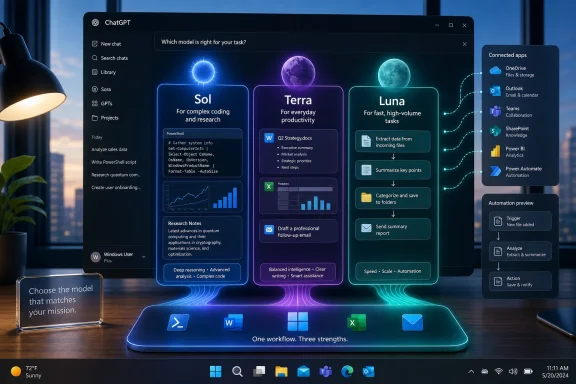
As Mashable reported after the July 9 launch, the new family replaces the old “one flagship plus a mini” mental model with durable capability tiers. OpenAI positions Sol as the flagship for demanding work, Terra as the balanced default, and Luna as the fast, low-cost option. The important catch is that the three models are not exposed identically across ordinary ChatGPT, ChatGPT Work, Codex, and the API.
For most people using the Windows ChatGPT app or the web interface for ordinary conversations, there may be no real Sol-versus-Terra-versus-Luna choice at all. OpenAI’s current help documentation says standard ChatGPT conversations on eligible paid plans use GPT-5.6 Sol through its reasoning settings; Terra and Luna are instead selectable in ChatGPT Work, Codex, and the API.
GPT-5.6 Sol is OpenAI’s high-capability model, aimed at complex coding, research, cybersecurity, scientific work, computer use, planning, and longer-running agent workflows. In regular ChatGPT, it powers the Medium, High, and Extra High reasoning modes for eligible subscribers. Pro users receive Sol Pro, a higher-end option intended for the hardest and most persistent tasks.
That positioning matters to Windows developers and IT professionals. Sol is the version to use when asking an assistant to trace a failure across PowerShell logs, reason through an Intune deployment problem, draft and test a multi-step migration plan, review an application’s codebase, or reconcile conflicting documentation. These are assignments where a plausible but shallow answer can waste more time than a slower response ever would.
It is not necessarily the right model for a quick command syntax reminder, a rewrite of an email, a meeting summary, or a simple explanation of a Windows setting. Sending every routine interaction to a frontier reasoning model is the AI equivalent of opening Visual Studio to edit a text file: workable, but needlessly expensive in time and usage allowance.
OpenAI charges API customers $5 per million input tokens and $30 per million output tokens for Sol. That output price is five times Luna’s, a meaningful difference for organizations building copilots, internal help desks, analysis pipelines, or agent workflows at volume. ChatGPT subscribers do not see a per-token invoice, but they will still encounter plan-specific limits and availability rules.
That makes Terra a practical fit for the kinds of tasks that sit between casual chat and high-stakes engineering: turning a pile of support notes into a KB draft, summarizing a Teams transcript, converting an Excel requirement into a PowerShell outline, extracting action items from documents, or producing a first-pass comparison of Windows hardware options.
Terra is also the relevant model for free and Go users of Codex, according to OpenAI’s July 2026 availability guidance. That distinction is easy to miss because GPT-5.6’s naming implies that all three models are simply choices in the familiar ChatGPT model picker. They are not. Standard ChatGPT remains more curated, while Work and Codex provide the wider set of model and effort controls for paid accounts.
For admins, the model’s appeal is predictability. Terra is the tier to standardize on when a workload needs solid reasoning but not maximum deliberation on every request. In an internal workflow, that could mean generating ticket summaries, classifying requests, transforming reports, or supporting an employee self-service experience—provided the organization has appropriately reviewed data handling, app connections, and user permissions.
That does not relegate Luna to novelty questions. A well-scoped job can be a good Luna job: classifying incoming requests, cleaning up text fields, routing tickets, generating first drafts from templates, creating structured data from repeated documents, or answering straightforward product questions from a vetted knowledge base. The key phrase is well-scoped. Luna is a poor choice when the task requires intricate multi-stage reasoning, careful security judgment, or a result that will be executed without human review.
For developers, Luna is the model that makes it financially realistic to experiment with AI in large-volume product features. A Windows utility that translates plain-language requests into simple search filters, a help portal that performs low-risk summarization, or a desktop workflow that processes thousands of uniform records can benefit from the lower unit economics. The savings disappear quickly if poorly designed prompts force repeated corrections or escalation to a stronger model.
The tiering should therefore be viewed as routing guidance, not a prestige ladder. Use Luna when the answer can be checked cheaply, Terra when day-to-day quality matters, and Sol when getting the reasoning right is itself the core value.
On the new ChatGPT desktop app, the broader ambition is to unify Chat, Work, and Codex in one place. Work’s Computer Use feature can operate across desktop apps, tools, and the browser in the background, subject to user guidance and approval. That is potentially useful for repetitive knowledge work, but it also changes the security conversation: an agent connected to Microsoft 365, Google Workspace, files, or browser sessions has access worth governing.
OpenAI’s July 9 announcement said Work was rolling out first on web and mobile to paid tiers, excluding Free and Go, with Pro, Pro Lite, Enterprise, and Edu users first in line. Its current GPT-5.6 help page similarly lists Sol, Terra, and Luna in Work for Plus, Pro, Business, and Enterprise users. Mashable’s report said Work on desktop was available to everyone, including free users, but OpenAI’s own availability documentation does not present free-tier model access that way. The safest conclusion is that availability is still rolling out and can differ by product surface, plan, region, and account.
Enterprise and Education administrators should also note that OpenAI said Work was off by default during an initial two-week preview for those workspaces. That is a sensible pause point: test whether task logs, connector permissions, retention settings, approval steps, and identity controls meet policy before turning an agent loose on production data.
GPT-Live, meanwhile, is a separate voice-model launch rather than a fourth GPT-5.6 tier. The new GPT-Live-1 and GPT-Live-1 mini models can listen and speak simultaneously, making interruptions and rapid back-and-forth more natural. OpenAI says GPT-Live delegates complex requests to a frontier model in the background; at launch, that background model is GPT-5.5, not necessarily GPT-5.6 Sol.
For Windows users, the immediate decision is straightforward: choose Sol for consequential, complicated work; Terra for most productive everyday tasks in Work, Codex, or the API; and Luna for controlled, repeatable volume. The more consequential deadline is August 9, when Atlas users will need to have completed their move to ChatGPT’s newer desktop and browser-based workflow.
As Mashable reported after the July 9 launch, the new family replaces the old “one flagship plus a mini” mental model with durable capability tiers. OpenAI positions Sol as the flagship for demanding work, Terra as the balanced default, and Luna as the fast, low-cost option. The important catch is that the three models are not exposed identically across ordinary ChatGPT, ChatGPT Work, Codex, and the API.
For most people using the Windows ChatGPT app or the web interface for ordinary conversations, there may be no real Sol-versus-Terra-versus-Luna choice at all. OpenAI’s current help documentation says standard ChatGPT conversations on eligible paid plans use GPT-5.6 Sol through its reasoning settings; Terra and Luna are instead selectable in ChatGPT Work, Codex, and the API.
 Sol Is for the Work You Would Rather Not Redo
GPT-5.6 Sol is OpenAI’s high-capability model, aimed at complex coding, research, cybersecurity, scientific work, computer use, planning, and longer-running agent workflows. In regular ChatGPT, it powers the Medium, High, and Extra High reasoning modes for eligible subscribers. Pro users receive Sol Pro, a higher-end option intended for the hardest and most persistent tasks.That positioning matters to Windows developers and IT professionals. Sol is the version to use when asking an assistant to trace a failure across PowerShell logs, reason through an Intune deployment problem, draft and test a multi-step migration plan, review an application’s codebase, or reconcile conflicting documentation. These are assignments where a plausible but shallow answer can waste more time than a slower response ever would.
It is not necessarily the right model for a quick command syntax reminder, a rewrite of an email, a meeting summary, or a simple explanation of a Windows setting. Sending every routine interaction to a frontier reasoning model is the AI equivalent of opening Visual Studio to edit a text file: workable, but needlessly expensive in time and usage allowance.
OpenAI charges API customers $5 per million input tokens and $30 per million output tokens for Sol. That output price is five times Luna’s, a meaningful difference for organizations building copilots, internal help desks, analysis pipelines, or agent workflows at volume. ChatGPT subscribers do not see a per-token invoice, but they will still encounter plan-specific limits and availability rules.
Terra Is the Everyday Default, Especially in Work and Codex
Terra is the model most WindowsForum readers should treat as the default when it is available. OpenAI describes it as balanced for everyday work and says its performance is competitive with GPT-5.5 while costing less. At the API level, Terra costs $2.50 per million input tokens and $15 per million output tokens.That makes Terra a practical fit for the kinds of tasks that sit between casual chat and high-stakes engineering: turning a pile of support notes into a KB draft, summarizing a Teams transcript, converting an Excel requirement into a PowerShell outline, extracting action items from documents, or producing a first-pass comparison of Windows hardware options.
Terra is also the relevant model for free and Go users of Codex, according to OpenAI’s July 2026 availability guidance. That distinction is easy to miss because GPT-5.6’s naming implies that all three models are simply choices in the familiar ChatGPT model picker. They are not. Standard ChatGPT remains more curated, while Work and Codex provide the wider set of model and effort controls for paid accounts.
For admins, the model’s appeal is predictability. Terra is the tier to standardize on when a workload needs solid reasoning but not maximum deliberation on every request. In an internal workflow, that could mean generating ticket summaries, classifying requests, transforming reports, or supporting an employee self-service experience—provided the organization has appropriately reviewed data handling, app connections, and user permissions.
Luna Is Not “Bad AI”—It Is the Volume Tier
Luna is OpenAI’s fastest and lowest-cost GPT-5.6 model, priced at $1 per million input tokens and $6 per million output tokens. It is designed for high-throughput, lower-complexity work where speed and cost control matter more than squeezing out the best possible result from every prompt.That does not relegate Luna to novelty questions. A well-scoped job can be a good Luna job: classifying incoming requests, cleaning up text fields, routing tickets, generating first drafts from templates, creating structured data from repeated documents, or answering straightforward product questions from a vetted knowledge base. The key phrase is well-scoped. Luna is a poor choice when the task requires intricate multi-stage reasoning, careful security judgment, or a result that will be executed without human review.
For developers, Luna is the model that makes it financially realistic to experiment with AI in large-volume product features. A Windows utility that translates plain-language requests into simple search filters, a help portal that performs low-risk summarization, or a desktop workflow that processes thousands of uniform records can benefit from the lower unit economics. The savings disappear quickly if poorly designed prompts force repeated corrections or escalation to a stronger model.
The tiering should therefore be viewed as routing guidance, not a prestige ladder. Use Luna when the answer can be checked cheaply, Terra when day-to-day quality matters, and Sol when getting the reasoning right is itself the core value.
ChatGPT Work Turns Model Choice Into a Windows Desktop Decision
The larger change for Windows users is ChatGPT Work, OpenAI’s agent environment for longer tasks involving connected apps, files, browser activity, document creation, and scheduled jobs. OpenAI says Work is powered by GPT-5.6 and incorporates Codex technology, allowing it to research, analyze material across connected services, and produce documents, spreadsheets, presentations, reports, and Sites.On the new ChatGPT desktop app, the broader ambition is to unify Chat, Work, and Codex in one place. Work’s Computer Use feature can operate across desktop apps, tools, and the browser in the background, subject to user guidance and approval. That is potentially useful for repetitive knowledge work, but it also changes the security conversation: an agent connected to Microsoft 365, Google Workspace, files, or browser sessions has access worth governing.
OpenAI’s July 9 announcement said Work was rolling out first on web and mobile to paid tiers, excluding Free and Go, with Pro, Pro Lite, Enterprise, and Edu users first in line. Its current GPT-5.6 help page similarly lists Sol, Terra, and Luna in Work for Plus, Pro, Business, and Enterprise users. Mashable’s report said Work on desktop was available to everyone, including free users, but OpenAI’s own availability documentation does not present free-tier model access that way. The safest conclusion is that availability is still rolling out and can differ by product surface, plan, region, and account.
Enterprise and Education administrators should also note that OpenAI said Work was off by default during an initial two-week preview for those workspaces. That is a sensible pause point: test whether task logs, connector permissions, retention settings, approval steps, and identity controls meet policy before turning an agent loose on production data.
Atlas Has a Real Deadline, While GPT-Live Is a Separate Upgrade
OpenAI is also retiring its standalone Atlas browser as it moves browser-based agent capabilities into ChatGPT and Codex. Atlas is scheduled to stop working on August 9, 2026. Bookmarks, open tabs, history, cookies, and passwords do not automatically transfer, so Atlas users should export anything they need before that date.GPT-Live, meanwhile, is a separate voice-model launch rather than a fourth GPT-5.6 tier. The new GPT-Live-1 and GPT-Live-1 mini models can listen and speak simultaneously, making interruptions and rapid back-and-forth more natural. OpenAI says GPT-Live delegates complex requests to a frontier model in the background; at launch, that background model is GPT-5.5, not necessarily GPT-5.6 Sol.
For Windows users, the immediate decision is straightforward: choose Sol for consequential, complicated work; Terra for most productive everyday tasks in Work, Codex, or the API; and Luna for controlled, repeatable volume. The more consequential deadline is August 9, when Atlas users will need to have completed their move to ChatGPT’s newer desktop and browser-based workflow.
References
- Primary source: Mashable
Published: 2026-07-10T13:09:16+00:00
GPT-5.6 Sol, Terra, and Luna are here. See which one's best for you. | Mashable
OpenAI has launched a new family of LLMs: GPT-5.6 Sol, Terra, and Luna, but they're not all the same.mashable.com - Official source: help.openai.com
ChatGPT’de GPT-5.6 | OpenAI Help Center
GPT-5.6 Sol’un ChatGPT’de nasıl çalıştığını, plana göre hangi seçeneklerin kullanılabildiğini ve kullanım limitleri ile kullanılabilirliğin nasıl işlediğini öğrenin. help.openai.com