

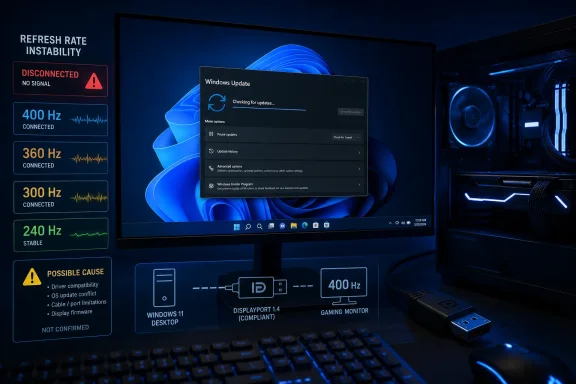
PC Gamer has reported a possible high-refresh-rate display problem after Windows 11’s July 14 cumulative update, KB5101650. The report is anecdotal, but it describes a 400 Hz monitor repeatedly blacking out and reconnecting at 400 Hz, becoming somewhat more stable at 360 Hz and 300 Hz, and working normally at 240 Hz.
KB5101650 is the July 2026 security update for Windows 11 versions 24H2 and 25H2, taking systems to builds 26100.8875 and 26200.8875 respectively. Microsoft lists it as a mandatory cumulative update containing security fixes plus improvements previously delivered in June’s optional preview release.
Neither Microsoft’s KB5101650 release notes nor its Windows Release Health dashboard currently list a known issue involving high-refresh-rate monitors, AMD GPUs, DisplayPort links, or display-driver resets. AMD has likewise not publicly acknowledged such a regression.
That distinction matters. A black-screen-and-reconnect loop at higher refresh rates can result from a marginal DisplayPort cable, a monitor firmware issue, a GPU driver change, DSC/Adaptive Sync behavior, or a Windows graphics regression. Reports on Reddit cited by PC Gamer suggest other users have encountered graphics or display trouble after the update, but they do not establish a single root cause or confirm that KB5101650 is responsible.
The “AI-aided” label also needs some context. Microsoft’s July Patch Tuesday fixed a record 622 CVEs across its products, according to PC Gamer and other security reporting, following Microsoft’s stated use of AI-assisted vulnerability discovery. That does not mean the monthly Windows update was itself generated or repaired by AI, nor is there evidence connecting the larger security payload to the reported refresh-rate problem.
Microsoft says affected systems may experience unexpected shutdowns, poor performance, increased heat, and battery drain. The issue originated with the June 23 preview update, KB5095093, and Microsoft has placed a safeguard hold on the July security update for affected Dell devices while it works with partners on a fix.
That Dell issue is unrelated to PC Gamer’s high-refresh display report, but it confirms that Microsoft is already managing at least one hardware-specific regression in the July servicing stream.
KB5101650 is the July 2026 security update for Windows 11 versions 24H2 and 25H2, taking systems to builds 26100.8875 and 26200.8875 respectively. Microsoft lists it as a mandatory cumulative update containing security fixes plus improvements previously delivered in June’s optional preview release.
 No confirmed display bug
Neither Microsoft’s KB5101650 release notes nor its Windows Release Health dashboard currently list a known issue involving high-refresh-rate monitors, AMD GPUs, DisplayPort links, or display-driver resets. AMD has likewise not publicly acknowledged such a regression.That distinction matters. A black-screen-and-reconnect loop at higher refresh rates can result from a marginal DisplayPort cable, a monitor firmware issue, a GPU driver change, DSC/Adaptive Sync behavior, or a Windows graphics regression. Reports on Reddit cited by PC Gamer suggest other users have encountered graphics or display trouble after the update, but they do not establish a single root cause or confirm that KB5101650 is responsible.
The “AI-aided” label also needs some context. Microsoft’s July Patch Tuesday fixed a record 622 CVEs across its products, according to PC Gamer and other security reporting, following Microsoft’s stated use of AI-assisted vulnerability discovery. That does not mean the monthly Windows update was itself generated or repaired by AI, nor is there evidence connecting the larger security payload to the reported refresh-rate problem.
A separate Dell compatibility hold is real
Microsoft has, however, acknowledged and acted on another KB5101650 compatibility problem. The company is withholding the update from a limited set of Dell PCs with Intel processors after Dell reported an incompatibility involving the Intel Innovation Platform Framework Processor Participant driver.Microsoft says affected systems may experience unexpected shutdowns, poor performance, increased heat, and battery drain. The issue originated with the June 23 preview update, KB5095093, and Microsoft has placed a safeguard hold on the July security update for affected Dell devices while it works with partners on a fix.
That Dell issue is unrelated to PC Gamer’s high-refresh display report, but it confirms that Microsoft is already managing at least one hardware-specific regression in the July servicing stream.
What affected users can do
Users who see display resets only after installing KB5101650 should first confirm the update history and test the simplest variables:- Update or clean-install the GPU driver, and check the monitor’s firmware if the vendor supplies updates.
- Try a certified DisplayPort cable or another port; high-bandwidth modes are less tolerant of cable problems.
- Disable VRR/Adaptive Sync, HDR, or DSC temporarily and retest the target refresh rate.
- If the behavior began immediately after the update and persists, uninstall KB5101650 through Windows Update’s update history, then pause updates only long enough to test and report the regression through Feedback Hub.
References
- Primary source: PC Gamer
Published: 2026-07-17T16:31:25+00:00
I think the latest record-breaking Windows 11 update messed up my monitor | PC Gamer
The morning after the update, its 400 Hz capabilities were no more.www.pcgamer.com