

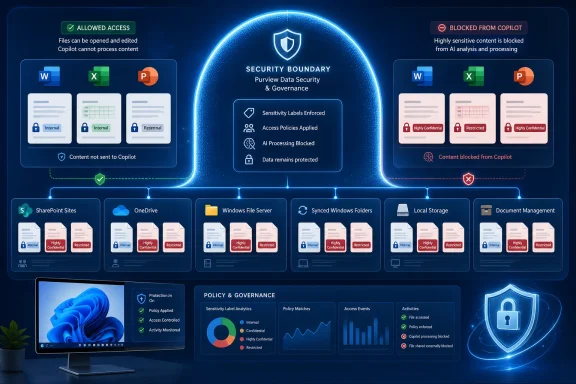
Microsoft Purview Data Loss Prevention policies that block Microsoft 365 Copilot from processing sensitivity-labeled Word, Excel, and PowerPoint files now apply regardless of where those files are stored, according to Microsoft 365 Roadmap ID 557255. The item is marked Launched, with general availability dated April 2026 for Current Channel deployments in worldwide commercial tenants and GCC.
The practical change is straightforward: an organization’s Copilot exclusion policy is no longer tied to a limited set of storage assumptions for protected Office documents. If a file carries one of the sensitivity labels selected in a Purview DLP rule, Copilot in Word, Excel, or PowerPoint can be prevented from using that file’s content.
Microsoft’s roadmap describes the capability as an extension of the existing Purview control to “all storage locations.” That wording matters for organizations that use a mixture of SharePoint Online, OneDrive for Business, synced folders, local working copies, and other document-management paths. The policy decision is intended to travel with the labeled document rather than depend on where the user happens to open it.
This is not a new sensitivity-labeling feature, nor is it a blanket block on opening or sharing a file. It is a refinement to the Microsoft 365 Copilot DLP location and its Prevent Copilot from processing content action.
Administrators create the policy in the Microsoft Purview portal using the custom DLP policy template. They enable the Microsoft 365 Copilot and Copilot Chat location, then configure a rule using the Content contains > Sensitivity labels condition. The selected labels can include an organization’s existing classifications, such as Highly Confidential, Restricted, Legal Privilege, M&A, or Personal.
When the rule matches, Copilot is excluded from processing the protected item’s contents for response generation or summaries. Microsoft Learn notes an important nuance: the item can still surface as a citation in an applicable Copilot response even though its underlying content is not used to construct that response. A citation is therefore not proof that Copilot was permitted to read and reason over the document.
For Windows users working directly in Office, the immediate result is more visible. Microsoft says that when a blocked, labeled file is opened in Word, Excel, or PowerPoint, the Copilot skills in that app are disabled for that document. Some features that do not reference file content or do not invoke a large language model may remain available, but content-aware Copilot work is supposed to stop at the DLP boundary.
Many enterprises do not keep every active document exclusively in the cloud repository where it originated. A user may sync a SharePoint library locally, download a working copy, open an attachment from a line-of-business system, or edit a file in a location dictated by a project workflow. Security teams generally do not want a document’s Copilot eligibility to change because it was moved, synchronized, or opened through a different path.
Roadmap ID 557255 addresses that operational mismatch. Rather than requiring administrators to think primarily in terms of repository coverage, the control is positioned around the sensitivity label attached to the file and the attempt by Copilot in Office to process that file.
That makes the policy more consistent with the purpose of Microsoft Purview Information Protection. A properly applied label is meant to communicate a business classification and, where configured, enforce protection settings across the document lifecycle. Extending the Copilot DLP decision across storage locations brings AI processing closer to that same model.
Microsoft 365 Copilot operates in the security context of the signed-in user. In basic terms, Copilot should not retrieve content the user cannot access. Purview DLP adds another decision after that: content a user can access may still be excluded from Copilot processing because it bears a label the organization has deemed unsuitable for AI summarization, reasoning, or drafting assistance.
That distinction is important for IT administrators trying to avoid overpromising what the feature does. A sensitivity-label DLP rule does not revoke the user’s permission to read a document, prevent a user from manually copying text, or necessarily stop them from uploading content elsewhere. It specifically restricts the Copilot processing path covered by the policy.
The feature also differs from prompt-based protection. Purview can use sensitive information types to block a user from submitting certain data in a Copilot prompt or prevent that prompt from being sent to web search. The sensitivity-label rule focuses instead on whether a file or qualifying email is allowed to serve as content for Copilot.
Microsoft does not permit sensitivity labels and sensitive information types to be combined in the same DLP rule, although administrators can create separate rules in the same policy. That design means policy planning should distinguish between protecting labeled source content and preventing users from typing sensitive values into prompts.
There is also a session behavior to account for in Office. Microsoft’s documentation says the Copilot restriction for Word, Excel, and PowerPoint is evaluated when the file opens. If an administrator or auto-labeling process applies a matching sensitivity label while the document is already open, enforcement begins the next time the file is opened.
That is a small but meaningful detail for incident-response and auto-labeling workflows. Applying a restrictive label is still valuable, but it should not be assumed to shut off an already-open Copilot session instantly. Organizations that depend on automated labeling should validate the timing with their own Office channel, device-management configuration, and document workflows.
The Copilot and Copilot Chat DLP location is also configured separately from ordinary multi-workload DLP policies. When that location is selected, other policy locations are disabled for that specific policy. Microsoft supports DLP alerts, notifications, and simulation mode, so administrators have a way to observe potential matches and tune labels before enforcement.
A sensible validation pass should include:
The practical change is straightforward: an organization’s Copilot exclusion policy is no longer tied to a limited set of storage assumptions for protected Office documents. If a file carries one of the sensitivity labels selected in a Purview DLP rule, Copilot in Word, Excel, or PowerPoint can be prevented from using that file’s content.
Microsoft’s roadmap describes the capability as an extension of the existing Purview control to “all storage locations.” That wording matters for organizations that use a mixture of SharePoint Online, OneDrive for Business, synced folders, local working copies, and other document-management paths. The policy decision is intended to travel with the labeled document rather than depend on where the user happens to open it.
 A label becomes a Copilot boundary
This is not a new sensitivity-labeling feature, nor is it a blanket block on opening or sharing a file. It is a refinement to the Microsoft 365 Copilot DLP location and its Prevent Copilot from processing content action.Administrators create the policy in the Microsoft Purview portal using the custom DLP policy template. They enable the Microsoft 365 Copilot and Copilot Chat location, then configure a rule using the Content contains > Sensitivity labels condition. The selected labels can include an organization’s existing classifications, such as Highly Confidential, Restricted, Legal Privilege, M&A, or Personal.
When the rule matches, Copilot is excluded from processing the protected item’s contents for response generation or summaries. Microsoft Learn notes an important nuance: the item can still surface as a citation in an applicable Copilot response even though its underlying content is not used to construct that response. A citation is therefore not proof that Copilot was permitted to read and reason over the document.
For Windows users working directly in Office, the immediate result is more visible. Microsoft says that when a blocked, labeled file is opened in Word, Excel, or PowerPoint, the Copilot skills in that app are disabled for that document. Some features that do not reference file content or do not invoke a large language model may remain available, but content-aware Copilot work is supposed to stop at the DLP boundary.
The storage restriction was a real deployment problem
Earlier Microsoft documentation for the feature described sensitivity-label protection for Copilot files as applying only to files stored in SharePoint Online and OneDrive for Business. That was a reasonable initial boundary for a service designed around Microsoft 365 grounding data, but it created a gap in real-world Office deployments.Many enterprises do not keep every active document exclusively in the cloud repository where it originated. A user may sync a SharePoint library locally, download a working copy, open an attachment from a line-of-business system, or edit a file in a location dictated by a project workflow. Security teams generally do not want a document’s Copilot eligibility to change because it was moved, synchronized, or opened through a different path.
Roadmap ID 557255 addresses that operational mismatch. Rather than requiring administrators to think primarily in terms of repository coverage, the control is positioned around the sensitivity label attached to the file and the attempt by Copilot in Office to process that file.
That makes the policy more consistent with the purpose of Microsoft Purview Information Protection. A properly applied label is meant to communicate a business classification and, where configured, enforce protection settings across the document lifecycle. Extending the Copilot DLP decision across storage locations brings AI processing closer to that same model.
Permissions still decide access; DLP decides AI use
The rollout does not replace SharePoint permissions, OneDrive sharing controls, Rights Management encryption, endpoint DLP, or Conditional Access. Those controls address different parts of the security chain.Microsoft 365 Copilot operates in the security context of the signed-in user. In basic terms, Copilot should not retrieve content the user cannot access. Purview DLP adds another decision after that: content a user can access may still be excluded from Copilot processing because it bears a label the organization has deemed unsuitable for AI summarization, reasoning, or drafting assistance.
That distinction is important for IT administrators trying to avoid overpromising what the feature does. A sensitivity-label DLP rule does not revoke the user’s permission to read a document, prevent a user from manually copying text, or necessarily stop them from uploading content elsewhere. It specifically restricts the Copilot processing path covered by the policy.
The feature also differs from prompt-based protection. Purview can use sensitive information types to block a user from submitting certain data in a Copilot prompt or prevent that prompt from being sent to web search. The sensitivity-label rule focuses instead on whether a file or qualifying email is allowed to serve as content for Copilot.
Microsoft does not permit sensitivity labels and sensitive information types to be combined in the same DLP rule, although administrators can create separate rules in the same policy. That design means policy planning should distinguish between protecting labeled source content and preventing users from typing sensitive values into prompts.
Policy timing and scope still deserve testing
The storage-location expansion should reduce a notable coverage caveat, but it does not eliminate normal DLP rollout considerations. Microsoft says updates to DLP policies for Microsoft 365 Copilot and Copilot Chat can take up to four hours to appear in the user experience. Enterprises should test newly enforced rules before treating a policy change as immediate.There is also a session behavior to account for in Office. Microsoft’s documentation says the Copilot restriction for Word, Excel, and PowerPoint is evaluated when the file opens. If an administrator or auto-labeling process applies a matching sensitivity label while the document is already open, enforcement begins the next time the file is opened.
That is a small but meaningful detail for incident-response and auto-labeling workflows. Applying a restrictive label is still valuable, but it should not be assumed to shut off an already-open Copilot session instantly. Organizations that depend on automated labeling should validate the timing with their own Office channel, device-management configuration, and document workflows.
The Copilot and Copilot Chat DLP location is also configured separately from ordinary multi-workload DLP policies. When that location is selected, other policy locations are disabled for that specific policy. Microsoft supports DLP alerts, notifications, and simulation mode, so administrators have a way to observe potential matches and tune labels before enforcement.
The Windows management task is now more about labels than locations
For Windows administrators, the best next step is not simply enabling another Copilot toggle. It is verifying that the sensitivity-label taxonomy is usable, consistently published to Office clients, and applied to the documents that actually warrant exclusion.A sensible validation pass should include:
- A labeled Word document opened from each storage workflow used by the organization.
- A labeled Excel workbook and PowerPoint presentation, because Office integrations can differ in practice.
- A policy simulation run before enforcement, followed by a test of the user-facing Copilot behavior.
- A test in which a label is applied while a file is open, then confirmed after the document is closed and reopened.
- Audit and alert review to ensure the Purview team can distinguish expected restrictions from labeling mistakes.
References
- Primary source: Microsoft 365 Roadmap
Published: 2026-07-17T22:12:56.6746119Z
Loading…
www.microsoft.com - Official source: learn.microsoft.com
Data Loss Prevention policy reference | Microsoft Learn
DLP policy component and configuration reference. This article provides a detailed anatomy of a DLP policy.learn.microsoft.com