

Verdict: keep MediCat USB for a personal, offline break-glass drive, but build and maintain a Microsoft ADK/WinPE recovery drive for managed PCs, sensitive data, or professional support work. MediCat remains enormously useful, but its main downloadable payload is still MediCat.USB.v21.12.7z; that is a poor fit when your recovery media must track current Windows servicing, document its contents, and meet a repeatable support standard.
For most Windows enthusiasts, the practical answer is to carry both: a sealed MediCat drive for broad troubleshooting and a separate, controlled WinPE/WinRE drive for the Windows versions you actually support.
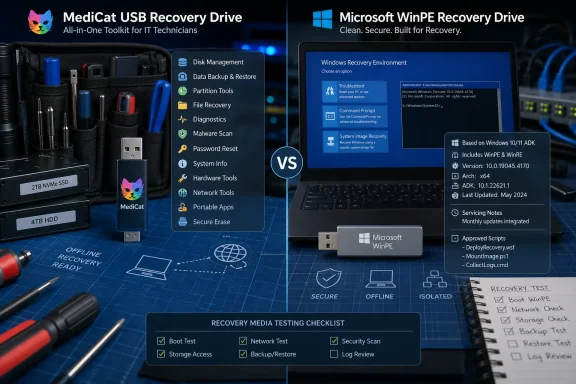
A personal recovery drive has a different job from fleet-approved support media. If a home PC will not boot, a disk needs triage, or an offline copy session is needed before attempting repair, convenience and tool coverage matter more than a tightly controlled bill of materials. MediCat’s Ventoy-based design puts a broad range of recovery environments and utilities on one USB device instead of asking the user to curate several separate drives.
That makes it especially practical for enthusiasts who maintain their own machines, help relatives, or want an offline option when Windows itself is unavailable. The project’s existing package is not merely a Windows installer; it is an all-purpose recovery toolbox. For readers looking for the basic feature rundown, WindowsForum’s earlier MediCat USB rescue toolkit guide remains useful context.
There is also fresh movement around the installation experience. The MediCat installer project’s 3521-BETA release, published about a month ago, adds MD5 verification, selective re-extraction, logs, and scripted installation and verification. Those are meaningful quality-of-life improvements for rebuilding or checking a drive, although the project explicitly advises testing it on a spare drive first.
That warning should be taken literally. A rescue USB is supposed to reduce risk during a failure, not become a new source of it. Do not first attempt a beta installer workflow on the only flash drive holding your working recovery kit.
Microsoft’s current guidance is much more operationally specific. Windows ADK 10.1.26100.2454, released in December 2024 and paired with the latest servicing patch, supports Windows 11 25H2 and 24H2, earlier supported Windows releases, Windows Server 2025, and Windows Server 2022. Microsoft also advises administrators to use the ADK that matches the Windows version being worked on—or, in a mixed environment, the version aligned with the newest OS in the estate.
That guidance matters because recovery media is not a decorative backup. It is the environment from which an administrator may inspect disks, launch repair tasks, work around an unbootable installation, or handle data that cannot leave the device. A managed recovery drive should therefore have a known Windows PE base, a defined servicing history, and a documented set of tools.
Microsoft’s March 10, 2026 Safe OS Dynamic Update for Windows 11 26H1 illustrates the continuing cadence. It updates WinRE, with the expected post-update WinRE version listed as 10.0.28000.1701. An organization does not need to rebuild every USB stick reflexively after every update—but it does need a policy for assessing when its offline recovery environment has drifted too far from supported Windows releases.
MediCat’s strength is breadth; a custom WinPE drive’s strength is accountability. Those are complementary qualities, not interchangeable ones.
Start by defining the support boundary: the newest Windows version your organization must recover and the hardware classes it uses. Microsoft’s rule is straightforward: use the ADK that matches the Windows version in scope, or the newest version in a mixed environment. For organizations supporting Windows 11 25H2, 24H2, Windows Server 2025, and Windows Server 2022, that points to ADK 10.1.26100.2454 with the latest servicing patch.
Next, install the ADK and then the Windows PE add-on. Windows PE is a separate component, and the distinction matters: having deployment tools alone is not the same as having a current bootable preinstallation environment. Build the bootable media from that controlled base, then add only what technicians need.
For a disciplined recovery drive, the approved additions should be narrow and intentional:
Test the finished drive on a spare machine or a nonproduction device. Verify that it starts, sees internal storage, can access required network resources, and performs the recovery actions it was designed for. A USB stick that successfully boots but cannot see a storage controller is not a recovery solution; it is an incident waiting to become longer.
For a home lab, the answer may simply be, “This is my own kit, and I test it.” That is a defensible model. For a consultant touching client machines, a help desk working with employee devices, or an administrator dealing with regulated information, it is not enough.
A controlled WinPE/WinRE drive gives IT teams a cleaner answer. Its Windows base follows Microsoft’s servicing model; its additions can be vetted; its versions can be recorded; and its rebuild process can be repeated. That does not make it inherently more capable at every troubleshooting task. It makes it easier to trust in environments where process, data handling, and reproducibility are part of the job.
The same distinction applies to portable applications. A personal rescue drive can reasonably prioritize “I might need this someday.” A managed drive should prioritize “This tool is approved for this task, maintained by this owner, and tested in this environment.”
Do not let the controlled drive quietly become a second grab-bag USB. Every untracked addition weakens the reason it exists. Conversely, do not judge MediCat by fleet-media standards it was not designed to meet; its value is that it can consolidate a remarkable amount of recovery capability into one offline toolkit.
The decision in 2026 is therefore not whether MediCat is “still good.” It is whether its release cadence and bundled-tool model match the accountability required by the machine in front of you. For personal break-glass recovery, it often does. For managed Windows endpoints, current Microsoft-serviced WinPE or WinRE media is the safer operational baseline.
For most Windows enthusiasts, the practical answer is to carry both: a sealed MediCat drive for broad troubleshooting and a separate, controlled WinPE/WinRE drive for the Windows versions you actually support.
- Identify the newest Windows release in the environment you need to recover.
- Download the matching Microsoft Windows ADK and Windows PE add-on, then apply the latest ADK servicing patch.
- Create bootable Windows PE media and add only the drivers, scripts, and utilities your team has approved.
- Test booting, storage access, networking, and recovery tasks on representative hardware before relying on the drive.
- Record the ADK version, servicing level, included tools, and test date; rebuild the media after relevant Windows recovery-environment servicing updates.
- Keep MediCat on a physically separate USB drive and use it when its broader set of offline utilities is the real advantage.
 MediCat Is Still the Better Personal Rescue Bag
A personal recovery drive has a different job from fleet-approved support media. If a home PC will not boot, a disk needs triage, or an offline copy session is needed before attempting repair, convenience and tool coverage matter more than a tightly controlled bill of materials. MediCat’s Ventoy-based design puts a broad range of recovery environments and utilities on one USB device instead of asking the user to curate several separate drives.That makes it especially practical for enthusiasts who maintain their own machines, help relatives, or want an offline option when Windows itself is unavailable. The project’s existing package is not merely a Windows installer; it is an all-purpose recovery toolbox. For readers looking for the basic feature rundown, WindowsForum’s earlier MediCat USB rescue toolkit guide remains useful context.
There is also fresh movement around the installation experience. The MediCat installer project’s 3521-BETA release, published about a month ago, adds MD5 verification, selective re-extraction, logs, and scripted installation and verification. Those are meaningful quality-of-life improvements for rebuilding or checking a drive, although the project explicitly advises testing it on a spare drive first.
That warning should be taken literally. A rescue USB is supposed to reduce risk during a failure, not become a new source of it. Do not first attempt a beta installer workflow on the only flash drive holding your working recovery kit.
The Payload Age Is the Line Between Convenience and Control
The issue is not that MediCat v21.12 is automatically unsafe or useless. The issue is that it is a large, preassembled payload whose official full USB release lineage stops at v21.12, while the Windows recovery ecosystem continues to receive servicing updates.Microsoft’s current guidance is much more operationally specific. Windows ADK 10.1.26100.2454, released in December 2024 and paired with the latest servicing patch, supports Windows 11 25H2 and 24H2, earlier supported Windows releases, Windows Server 2025, and Windows Server 2022. Microsoft also advises administrators to use the ADK that matches the Windows version being worked on—or, in a mixed environment, the version aligned with the newest OS in the estate.
That guidance matters because recovery media is not a decorative backup. It is the environment from which an administrator may inspect disks, launch repair tasks, work around an unbootable installation, or handle data that cannot leave the device. A managed recovery drive should therefore have a known Windows PE base, a defined servicing history, and a documented set of tools.
Microsoft’s March 10, 2026 Safe OS Dynamic Update for Windows 11 26H1 illustrates the continuing cadence. It updates WinRE, with the expected post-update WinRE version listed as 10.0.28000.1701. An organization does not need to rebuild every USB stick reflexively after every update—but it does need a policy for assessing when its offline recovery environment has drifted too far from supported Windows releases.
MediCat’s strength is breadth; a custom WinPE drive’s strength is accountability. Those are complementary qualities, not interchangeable ones.
Build the Controlled Drive Around Your Support Boundary
The clean alternative is not “download a random WinPE image.” It is a small, deliberately managed recovery platform built with Microsoft’s ADK and Windows PE add-on.Start by defining the support boundary: the newest Windows version your organization must recover and the hardware classes it uses. Microsoft’s rule is straightforward: use the ADK that matches the Windows version in scope, or the newest version in a mixed environment. For organizations supporting Windows 11 25H2, 24H2, Windows Server 2025, and Windows Server 2022, that points to ADK 10.1.26100.2454 with the latest servicing patch.
Next, install the ADK and then the Windows PE add-on. Windows PE is a separate component, and the distinction matters: having deployment tools alone is not the same as having a current bootable preinstallation environment. Build the bootable media from that controlled base, then add only what technicians need.
For a disciplined recovery drive, the approved additions should be narrow and intentional:
- Include storage and network drivers required by the hardware you actually deploy.
- Include organization-approved scripts and utilities that support defined recovery tasks.
- Include documentation that identifies the drive’s build date, ADK version, servicing level, and intended Windows support range.
- Exclude ad hoc tools that have no owner, no update path, or no clear reason to be present.
Test the finished drive on a spare machine or a nonproduction device. Verify that it starts, sees internal storage, can access required network resources, and performs the recovery actions it was designed for. A USB stick that successfully boots but cannot see a storage controller is not a recovery solution; it is an incident waiting to become longer.
Provenance Matters More When Data Is Sensitive
MediCat’s wide collection is valuable precisely because it is broad. But broad collections raise a governance question: can you state exactly what is on the drive, why it is there, who approved it, and when it was last checked?For a home lab, the answer may simply be, “This is my own kit, and I test it.” That is a defensible model. For a consultant touching client machines, a help desk working with employee devices, or an administrator dealing with regulated information, it is not enough.
A controlled WinPE/WinRE drive gives IT teams a cleaner answer. Its Windows base follows Microsoft’s servicing model; its additions can be vetted; its versions can be recorded; and its rebuild process can be repeated. That does not make it inherently more capable at every troubleshooting task. It makes it easier to trust in environments where process, data handling, and reproducibility are part of the job.
The same distinction applies to portable applications. A personal rescue drive can reasonably prioritize “I might need this someday.” A managed drive should prioritize “This tool is approved for this task, maintained by this owner, and tested in this environment.”
Treat the Two Drives as Different Classes of Equipment
The most practical setup is a two-drive strategy. Label one as a personal, offline MediCat kit and preserve it as a broad fallback. Label the other as a controlled recovery drive, assign it an owner, and refresh it against the Windows releases you support.Do not let the controlled drive quietly become a second grab-bag USB. Every untracked addition weakens the reason it exists. Conversely, do not judge MediCat by fleet-media standards it was not designed to meet; its value is that it can consolidate a remarkable amount of recovery capability into one offline toolkit.
The decision in 2026 is therefore not whether MediCat is “still good.” It is whether its release cadence and bundled-tool model match the accountability required by the machine in front of you. For personal break-glass recovery, it often does. For managed Windows endpoints, current Microsoft-serviced WinPE or WinRE media is the safer operational baseline.
References
- Primary source: learn.microsoft.com
Download and install the Windows ADK | Microsoft Learn
Instructions on how to download and install the Windows ADKlearn.microsoft.com - Independent coverage: docs.medicat.dev
Changelog | Medicat Docs
Medicat USB Changelog Most Recent Changelog Version 21.12 Changelog for v21.12: Added: AOMEI Backupper, DiskGenius, EasyUEFI, Macrium Reflect, MiniTool ShadowMaker, and Symantec Ghost boot disks have been have been restored as bootable ISOs. (.wim files, more accurately.) Windows 11 Recovery... docs.medicat.dev
- Independent coverage: support.microsoft.com
KB5079463: Safe OS Dynamic Update for Windows 11, version 26H1: March 10, 2026 | Microsoft Support
KB5079463: Safe OS Dynamic Update for Windows 11, version 26H1: March 10, 2026support.microsoft.com - Independent coverage: medicatusb.com
Medicat USB | Computer Diagnostic and Recovery Toolkit
A toolkit that helps compile a selection of the latest computer diagnostic and recovery tools. medicatusb.com
- Independent coverage: newreleases.io
mon5termatt/medicat_installer 3521-BETA on GitHub
New release mon5termatt/medicat_installer version 3521-BETA C++ installer on GitHub. newreleases.io
- Primary source: WindowsForum
Medicat USB: Your All-in-One Windows Rescue Toolkit | Windows Forum
Medicat USB comes pre-packaged as a complete, bootable Windows rescue environment that can turn a blank flash drive into a one‑stop toolkit for...windowsforum.com