

OpenAI’s $230 Codex Micro is now its first self-branded hardware product, but Windows developers should think of it less as a new computing device than as a dedicated control surface for the Codex coding agent. Built with boutique keyboard maker Work Louder, the limited-run macropad adds RGB agent-status keys, programmable shortcuts, a joystick, and a rotary dial to the desktop workflow behind ChatGPT Codex.
The product arrived July 15 through OpenAI’s Supply Co. storefront, with OpenAI describing it as the
That distinction matters. Codex Micro is not the widely anticipated consumer hardware effort associated with former Apple design chief Jony Ive. It is a specialized Windows and macOS peripheral aimed at a growing problem in agentic software development: keeping track of multiple autonomous coding jobs without repeatedly hunting through application windows and chat threads.
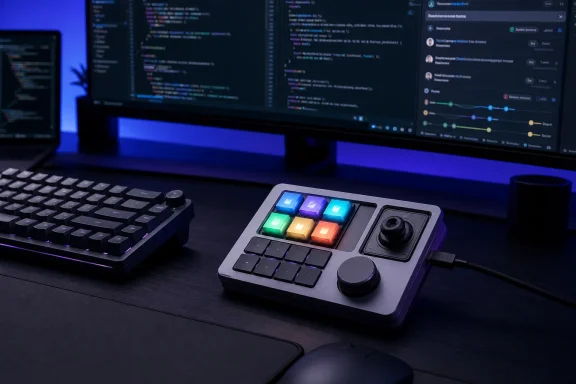
The core of Codex Micro is a set of six illuminated Agent Keys. Each key maps to a Codex chat or agent task and changes color according to its current state, including idle, active processing, completed work, a need for user input, or an error. OpenAI and Work Louder are pitching that as a way to move monitoring into a developer’s peripheral vision.
For developers working in Visual Studio Code, Visual Studio, Windows Terminal, or a browser-based GitHub workflow, the proposition is straightforward: a coding agent can spend minutes or longer reviewing a pull request, investigating a bug, or proposing a refactor. Instead of continually switching back to the ChatGPT desktop app to see whether the task has finished or needs approval, the status is meant to be visible on the desk.
That does not make the hardware essential. The same information remains available in software, and Windows already has plentiful ways to assign shortcuts, use Stream Deck profiles, or build custom automation around keyboard macros. But Codex Micro’s value is in turning an on-screen queue into a physical dashboard, particularly for users who keep several Codex jobs in flight at once.
Work Louder says a single press selects an agent, while a double press brings it into focus. The device also includes an edge light intended to indicate when Codex is listening for voice input. That may be more useful than it sounds for developers using push-to-talk prompts while reading code, testing an application, or working across multiple monitors.
The planar joystick can invoke common Codex workflows, including reviewing pull requests, debugging, and refactoring. The rotary dial is designed to adjust the agent’s reasoning level, allowing users to move between faster, lighter requests and more considered work without navigating a software setting.
OpenAI and Work Louder also include Command Keys for actions such as accepting changes, rejecting output, creating a new chat, activating push-to-talk, and running custom commands. Every control can be remapped, according to Work Louder, and the package includes 32 icon keycaps for matching the physical layout to a particular workflow.
For Windows power users, that flexibility is important. A fixed-function AI accessory would have a narrow shelf life as Codex features evolve. A programmable macropad can remain useful if it can also trigger Windows shortcuts, IDE commands, Git actions, or local scripts. Work Louder says deeper customization is available through its Input utility, with six programmable layers across the keys, dial, and joystick.
The official Codex integration remains the product’s differentiator, however. Work Louder says Codex Micro can be remapped directly within Codex, avoiding a separate configuration application for core agent controls. The practical test will be how much of that integration is exposed to Windows users at launch and whether it remains responsive as the ChatGPT desktop app changes.
The unit has 13 low-profile mechanical switches, a touch sensor, a rotary encoder, and a planar joystick. It supports Bluetooth and USB-C, works with Windows and macOS, and is built from CNC-machined polycarbonate and aluminum with RGB lighting. Buyers can select clicky or silent switches.
That construction helps explain the price, even if it will not settle the question of value. At $230, Codex Micro costs much more than a basic programmable keypad and enters Stream Deck territory, where buyers can get more physical buttons and a display-based interface. Ars Technica noted that the device resembles Work Louder’s existing Creator Micro line, a comparison that will be difficult for OpenAI to escape.
The difference is not the chassis; it is the Codex-native workflow. Users paying the premium are buying live agent indicators, direct controls for a particular AI service, a curated keycap set, and a compact object designed around a specific style of AI-assisted development.
It is much less compelling for someone who primarily uses an AI assistant as an occasional autocomplete tool or asks a few chat questions each day. Those users may find the same shortcuts easier to reach through a keyboard, mouse buttons, AutoHotkey, PowerToys, Stream Deck, or an existing programmable keypad.
There is also an enterprise angle. In managed Windows environments, another USB or Bluetooth peripheral means another device to inventory, support, and potentially restrict. Organizations with tight endpoint policies will want to know whether the controller needs an additional utility, whether remapping is stored on-device, what permissions the ChatGPT desktop application needs, and how voice activation behaves under corporate privacy controls.
The hardware itself does not expand Codex’s capabilities or make its generated code safer. It can make agent activity easier to notice, but human review remains the actual control point. A glowing green key is a completion signal, not evidence that a patch is correct, secure, tested, or ready for production.
That makes the launch lower-risk than a mass-market hardware bet, but it also makes it a useful signal. OpenAI is testing whether AI products become more valuable when their controls leave the screen and become part of a physical workstation.
For Windows developers, Codex Micro will stand or fall on whether that physical layer saves enough context switching to justify another device on the desk. The limited-run release means it is not yet a broad platform play. But if AI-agent supervision becomes a routine part of software work, the macropad may prove to be less of a novelty than an early sketch of the next developer peripheral.
The product arrived July 15 through OpenAI’s Supply Co. storefront, with OpenAI describing it as the
kbd-1.0-codex-micro. Axios first reported the launch as OpenAI’s move into branded hardware, while the company’s own product page makes clear that the target is developers managing several long-running coding tasks rather than ordinary ChatGPT users.That distinction matters. Codex Micro is not the widely anticipated consumer hardware effort associated with former Apple design chief Jony Ive. It is a specialized Windows and macOS peripheral aimed at a growing problem in agentic software development: keeping track of multiple autonomous coding jobs without repeatedly hunting through application windows and chat threads.
 A status board for asynchronous coding work
The core of Codex Micro is a set of six illuminated Agent Keys. Each key maps to a Codex chat or agent task and changes color according to its current state, including idle, active processing, completed work, a need for user input, or an error. OpenAI and Work Louder are pitching that as a way to move monitoring into a developer’s peripheral vision.For developers working in Visual Studio Code, Visual Studio, Windows Terminal, or a browser-based GitHub workflow, the proposition is straightforward: a coding agent can spend minutes or longer reviewing a pull request, investigating a bug, or proposing a refactor. Instead of continually switching back to the ChatGPT desktop app to see whether the task has finished or needs approval, the status is meant to be visible on the desk.
That does not make the hardware essential. The same information remains available in software, and Windows already has plentiful ways to assign shortcuts, use Stream Deck profiles, or build custom automation around keyboard macros. But Codex Micro’s value is in turning an on-screen queue into a physical dashboard, particularly for users who keep several Codex jobs in flight at once.
Work Louder says a single press selects an agent, while a double press brings it into focus. The device also includes an edge light intended to indicate when Codex is listening for voice input. That may be more useful than it sounds for developers using push-to-talk prompts while reading code, testing an application, or working across multiple monitors.
The joystick and dial are the unusual controls
The six status keys are the most visually distinctive feature, but the joystick and dial are the more revealing parts of the product. OpenAI has built the controller around the idea that AI-assisted development is becoming a sequence of repeated operational decisions rather than a single text prompt.The planar joystick can invoke common Codex workflows, including reviewing pull requests, debugging, and refactoring. The rotary dial is designed to adjust the agent’s reasoning level, allowing users to move between faster, lighter requests and more considered work without navigating a software setting.
OpenAI and Work Louder also include Command Keys for actions such as accepting changes, rejecting output, creating a new chat, activating push-to-talk, and running custom commands. Every control can be remapped, according to Work Louder, and the package includes 32 icon keycaps for matching the physical layout to a particular workflow.
For Windows power users, that flexibility is important. A fixed-function AI accessory would have a narrow shelf life as Codex features evolve. A programmable macropad can remain useful if it can also trigger Windows shortcuts, IDE commands, Git actions, or local scripts. Work Louder says deeper customization is available through its Input utility, with six programmable layers across the keys, dial, and joystick.
The official Codex integration remains the product’s differentiator, however. Work Louder says Codex Micro can be remapped directly within Codex, avoiding a separate configuration application for core agent controls. The practical test will be how much of that integration is exposed to Windows users at launch and whether it remains responsive as the ChatGPT desktop app changes.
Hardware familiar to custom-keyboard buyers
Despite OpenAI’s branding, Codex Micro is fundamentally a Work Louder design. The company is already known for compact, configurable input devices aimed at creative professionals and developers, and the Codex product closely follows that established formula.The unit has 13 low-profile mechanical switches, a touch sensor, a rotary encoder, and a planar joystick. It supports Bluetooth and USB-C, works with Windows and macOS, and is built from CNC-machined polycarbonate and aluminum with RGB lighting. Buyers can select clicky or silent switches.
That construction helps explain the price, even if it will not settle the question of value. At $230, Codex Micro costs much more than a basic programmable keypad and enters Stream Deck territory, where buyers can get more physical buttons and a display-based interface. Ars Technica noted that the device resembles Work Louder’s existing Creator Micro line, a comparison that will be difficult for OpenAI to escape.
The difference is not the chassis; it is the Codex-native workflow. Users paying the premium are buying live agent indicators, direct controls for a particular AI service, a curated keycap set, and a compact object designed around a specific style of AI-assisted development.
The appeal is clearest for developers who supervise agents
Codex Micro makes the most sense for a developer who routinely delegates work to several AI agents and then has to review the results. That could include teams using Codex for pull-request analysis, repository-wide refactors, test generation, documentation, bug triage, or exploratory implementation work.It is much less compelling for someone who primarily uses an AI assistant as an occasional autocomplete tool or asks a few chat questions each day. Those users may find the same shortcuts easier to reach through a keyboard, mouse buttons, AutoHotkey, PowerToys, Stream Deck, or an existing programmable keypad.
There is also an enterprise angle. In managed Windows environments, another USB or Bluetooth peripheral means another device to inventory, support, and potentially restrict. Organizations with tight endpoint policies will want to know whether the controller needs an additional utility, whether remapping is stored on-device, what permissions the ChatGPT desktop application needs, and how voice activation behaves under corporate privacy controls.
The hardware itself does not expand Codex’s capabilities or make its generated code safer. It can make agent activity easier to notice, but human review remains the actual control point. A glowing green key is a completion signal, not evidence that a patch is correct, secure, tested, or ready for production.
A deliberately small first step into OpenAI hardware
The most significant part of Codex Micro may be what it is not. It is not a new AI computer, a phone replacement, or a general-purpose assistant device. OpenAI has chosen a narrow, easily understood accessory for its first branded hardware release: a desk controller for developers already using its coding agent.That makes the launch lower-risk than a mass-market hardware bet, but it also makes it a useful signal. OpenAI is testing whether AI products become more valuable when their controls leave the screen and become part of a physical workstation.
For Windows developers, Codex Micro will stand or fall on whether that physical layer saves enough context switching to justify another device on the desk. The limited-run release means it is not yet a broad platform play. But if AI-agent supervision becomes a routine part of software work, the macropad may prove to be less of a novelty than an early sketch of the next developer peripheral.
References
- Primary source: hi-tech.ua
Published: 2026-07-17T14:01:46+00:00
Loading…
hi-tech.ua - Independent coverage: ETV Bharat
Published: 2026-07-17T08:57:10+00:00
Loading…
www.etvbharat.com - Independent coverage: Techgenyz
Published: 2026-07-17T08:04:04+00:00
Loading…
techgenyz.com - Independent coverage: root-nation.com
Published: 2026-07-16T09:31:50+00:00
Loading…
root-nation.com - Independent coverage: yourstory.com
Published: Thu, 16 Jul 2026 08:39:22 GMT
Loading…
yourstory.com - Related coverage: axios.com
Loading…
www.axios.com