

XDA’s July 16 comparison between OpenAI Codex and Anthropic Claude Code lands on a familiar divide in AI-assisted development: reliable task execution does not automatically produce a usable interface.
The article’s author argues that Codex is the stronger agent for backend work, crediting it with closer instruction-following, more deliberate planning and code they consider more dependable. But they stopped short of switching fully because Codex-generated front ends reportedly look generic, under-designed and require too much iterative prompting to become presentable.
That is an experience report, not a benchmark result, and it should be read that way. “Better” coding agents remain heavily dependent on the repository, framework, model version, prompt quality and how much design direction the operator provides. Still, the complaint matters because UI work is increasingly part of what users expect from terminal agents rather than a separate handoff to a designer.
The XDA piece makes a useful distinction: backend tasks often benefit from literal compliance with an explicit request, while frontend work usually involves decisions the requester did not spell out. A feature may work correctly while still needing sensible hierarchy, spacing, typography, responsive behavior, states and visual consistency.
According to the author, Claude Code more often supplies those implicit design choices, producing results that feel more modern on an initial pass. Codex, by contrast, is described as producing serviceable layouts that resemble placeholders rather than completed product UI.
OpenAI’s documentation does not position Codex as a design tool. It describes Codex as a software agent for reading, modifying and running code, with local CLI, IDE, cloud and app-based workflows. Its CLI does, however, accept multimodal inputs including screenshots and diagrams, which is relevant to the workaround described by XDA.
For Windows developers, that approach is workable without abandoning either tool. OpenAI made the Codex app available on Windows in March 2026, while Anthropic documents Claude Code support on Windows 10 and later through WSL or Git for Windows. Both tools can operate close to a local project, but neither removes the need to review changes, run tests and inspect the finished interface across screen sizes.
The broader lesson is not that Codex cannot build frontend code, or that Claude Code always designs better. It is that teams should separate visual direction from code generation when appearance matters. A screenshot, component library, token set or written design brief will generally produce a more repeatable result than “make it look good.”
For admins and developers evaluating coding agents, test them against a real repository and a defined UI task before standardizing on either workflow.
The article’s author argues that Codex is the stronger agent for backend work, crediting it with closer instruction-following, more deliberate planning and code they consider more dependable. But they stopped short of switching fully because Codex-generated front ends reportedly look generic, under-designed and require too much iterative prompting to become presentable.
That is an experience report, not a benchmark result, and it should be read that way. “Better” coding agents remain heavily dependent on the repository, framework, model version, prompt quality and how much design direction the operator provides. Still, the complaint matters because UI work is increasingly part of what users expect from terminal agents rather than a separate handoff to a designer.
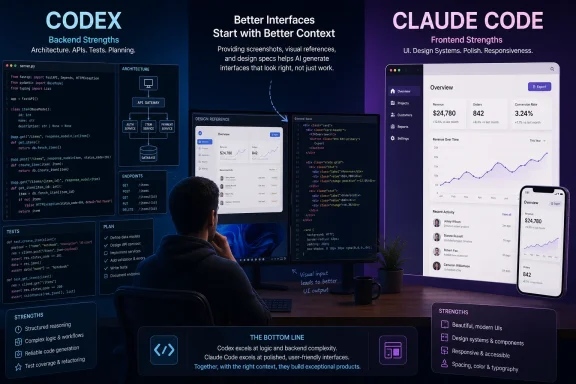 Design is the missing specification
The XDA piece makes a useful distinction: backend tasks often benefit from literal compliance with an explicit request, while frontend work usually involves decisions the requester did not spell out. A feature may work correctly while still needing sensible hierarchy, spacing, typography, responsive behavior, states and visual consistency.According to the author, Claude Code more often supplies those implicit design choices, producing results that feel more modern on an initial pass. Codex, by contrast, is described as producing serviceable layouts that resemble placeholders rather than completed product UI.
OpenAI’s documentation does not position Codex as a design tool. It describes Codex as a software agent for reading, modifying and running code, with local CLI, IDE, cloud and app-based workflows. Its CLI does, however, accept multimodal inputs including screenshots and diagrams, which is relevant to the workaround described by XDA.
A practical workflow split
Rather than asking a coding agent to invent a visual system from a paragraph, the author recommends giving Codex a concrete target: a Figma layout, rendered mockup or reference image. That changes the job from open-ended design generation into implementation and fidelity work.For Windows developers, that approach is workable without abandoning either tool. OpenAI made the Codex app available on Windows in March 2026, while Anthropic documents Claude Code support on Windows 10 and later through WSL or Git for Windows. Both tools can operate close to a local project, but neither removes the need to review changes, run tests and inspect the finished interface across screen sizes.
The broader lesson is not that Codex cannot build frontend code, or that Claude Code always designs better. It is that teams should separate visual direction from code generation when appearance matters. A screenshot, component library, token set or written design brief will generally produce a more repeatable result than “make it look good.”
For admins and developers evaluating coding agents, test them against a real repository and a defined UI task before standardizing on either workflow.
References
- Primary source: XDA
Published: 2026-07-16T17:00:10+00:00
Codex is technically better than Claude Code, but I stopped using it for one specific reason
I'd defend it in any argument except this one www.xda-developers.com
- Official source: docs.anthropic.com
CLI reference - Claude Code Docs
Complete reference for Claude Code command-line interface, including commands and flags.docs.anthropic.com