

A July 18 roundup from Memeburn ranks DeepL as its best overall AI translation tool, with Google Translate recommended for free, broad-coverage use and Microsoft Translator positioned as the practical choice for organizations already working in Teams and Microsoft 365.
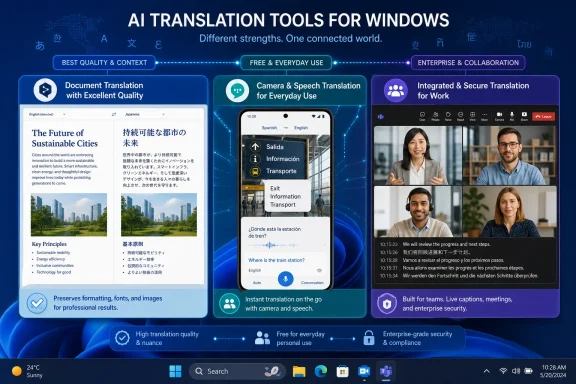
The comparison covers 10 products, but its most useful distinction for Windows users is between standalone translation quality and workflow integration. DeepL remains the pick for polished document and text translations, particularly where tone, terminology, and formatting matter. Google Translate is the obvious no-cost option for travel, quick web lookups, camera translation, and unsupported language pairs. Microsoft Translator is less ambitious as a localization platform but is built into the Microsoft ecosystem many businesses already use.
Memeburn lists Microsoft Translator as supporting more than 129 languages, with text, voice, image, camera, and live-conversation translation features. Its value is not necessarily that it beats DeepL or large language models on every difficult text, but that it works alongside Microsoft’s productivity tools and Azure services.
For Teams-heavy organizations, that means translation and captioning features can be closer to existing meeting and collaboration workflows. The consumer app is free for personal use, while organizations that need programmable or high-volume translation can use Azure’s paid Translator service.
The report also notes a familiar limitation: translation quality varies by language pair. That is especially relevant for lesser-resourced languages, specialized terminology, and formal legal, medical, or technical content.
ChatGPT and Claude are presented as tools for context-sensitive writing rather than simple phrase conversion. They can be useful when a translation also needs adaptation for audience, tone, or technical explanation. That flexibility comes with a risk: generative AI can alter wording, omit details, or invent material. It should not be treated as a certified translator.
Google Translate remains the default free utility for everyday use, with strong camera, speech, offline, and language-coverage features. Memeburn’s test found it adequate for basic document work but less reliable for low-volume speech recognition and jargon-heavy text.
The rankings should be treated as a buying guide rather than a benchmark. The article says it used hands-on tests for products with free tiers, but relied on demos, documentation, and user feedback for paid-only platforms, making direct accuracy comparisons incomplete.
Windows users should choose Microsoft Translator for Microsoft 365 convenience, DeepL for polished documents, and a human reviewer whenever the translated text has legal, safety, financial, or customer-facing consequences.
The comparison covers 10 products, but its most useful distinction for Windows users is between standalone translation quality and workflow integration. DeepL remains the pick for polished document and text translations, particularly where tone, terminology, and formatting matter. Google Translate is the obvious no-cost option for travel, quick web lookups, camera translation, and unsupported language pairs. Microsoft Translator is less ambitious as a localization platform but is built into the Microsoft ecosystem many businesses already use.
 Microsoft Translator: the Windows-centric option
Memeburn lists Microsoft Translator as supporting more than 129 languages, with text, voice, image, camera, and live-conversation translation features. Its value is not necessarily that it beats DeepL or large language models on every difficult text, but that it works alongside Microsoft’s productivity tools and Azure services.For Teams-heavy organizations, that means translation and captioning features can be closer to existing meeting and collaboration workflows. The consumer app is free for personal use, while organizations that need programmable or high-volume translation can use Azure’s paid Translator service.
The report also notes a familiar limitation: translation quality varies by language pair. That is especially relevant for lesser-resourced languages, specialized terminology, and formal legal, medical, or technical content.
DeepL, ChatGPT and Google Translate serve different jobs
DeepL takes the top slot in the comparison because it combines document translation, glossaries, style controls, translation memories, browser support, Microsoft 365 integration, and file-format preservation. According to DeepL’s own documentation, its Windows app and web service can translate whole files while retaining elements such as formatting, images, captions, and fonts.ChatGPT and Claude are presented as tools for context-sensitive writing rather than simple phrase conversion. They can be useful when a translation also needs adaptation for audience, tone, or technical explanation. That flexibility comes with a risk: generative AI can alter wording, omit details, or invent material. It should not be treated as a certified translator.
Google Translate remains the default free utility for everyday use, with strong camera, speech, offline, and language-coverage features. Memeburn’s test found it adequate for basic document work but less reliable for low-volume speech recognition and jargon-heavy text.
The enterprise split
For software localization and large content pipelines, the roundup points to Lokalise, Smartling, Lilt, and Pairaphrase. These are translation-management platforms, not merely translation boxes: they add connectors, terminology controls, review workflows, audit features, and automation for websites, apps, repositories, and document batches.The rankings should be treated as a buying guide rather than a benchmark. The article says it used hands-on tests for products with free tiers, but relied on demos, documentation, and user feedback for paid-only platforms, making direct accuracy comparisons incomplete.
Windows users should choose Microsoft Translator for Microsoft 365 convenience, DeepL for polished documents, and a human reviewer whenever the translated text has legal, safety, financial, or customer-facing consequences.
References
- Primary source: Memeburn
Published: 2026-07-18T13:24:46+00:00
Best AI Translation Tools in 2026: Ranked by Use Case and Accuracy - Memeburn
Discover the 10 best AI translation tools to break language barriers. Compare features, use cases, and translation quality to find the right fit.memeburn.com