

Microsoft 365 Copilot’s July 2026 updates put screen and camera sharing into the enterprise assistant, expand the practical ways Outlook users can refine messages, and add new controls around AI-generated media and internally built agents. The immediate takeaway for Windows users is that Copilot is becoming less of a separate chat window and more of a layer that can work against the mail, documents, visual context, and approved tools already in use.
A report by Zoom Bangla grouped the changes under a broad July feature push. Microsoft’s own Microsoft 365 Copilot release notes and support documentation substantiate much of that picture, while adding important caveats on licensing, rollout, and exactly where some of the claimed “search” intelligence applies.
The standout addition is Vision in Microsoft 365 Copilot. Licensed users can start a voice conversation in Copilot on Windows, share either an entire desktop or individual window, and ask questions about what is on screen. In the Microsoft 365 Copilot mobile app, the equivalent feature uses the phone camera. That makes the feature useful for a dashboard review, an unfamiliar settings dialog, a design mockup, or a physical object viewed through a camera—but it is not an autonomous assistant that can click buttons or operate a PC.
Microsoft describes Vision as a voice-driven experience: the user begins a voice chat, turns on screen sharing or the mobile camera, and asks Copilot for help interpreting what it sees. The assistant can combine the shared visual material with work data available to the signed-in user, which is potentially more useful than generic image analysis for corporate reports and operational dashboards.
For a Windows desktop workflow, that means a user can share a problematic application window and ask for the next steps, or present a dashboard and ask Copilot to identify unusual movement and compare it with material previously available in Microsoft 365. Microsoft’s support guidance also suggests using it to review creative work alongside feedback.
There are meaningful limitations. Vision requires a Microsoft 365 Copilot license, microphone access, and an active voice conversation. Each Vision session is independent; Copilot does not carry screenshots or camera input into a later session. Microsoft also says users must deliberately begin sharing and can stop the share independently of the voice chat.
That last point matters in managed environments. A feature designed around screen sharing should be evaluated like any other workflow that may expose sensitive material. IT teams will want to establish when users may share full desktops rather than individual windows, especially where password managers, administrative consoles, customer systems, or confidential communications could be visible.
Microsoft says the shared visual input is not retained, transcribed, or logged after the session ends, although the voice conversation transcript remains available in chat history and model responses may be stored for safety monitoring. That is a useful privacy boundary, but it does not eliminate the need for training and acceptable-use policy.
The direction is important: rather than asking Copilot to regenerate an entire message, users can increasingly use it to improve the material already written. Microsoft’s Outlook roadmap has described a capability to refine and adjust emails while writing, matching the broader idea in the report that users can tune length, tone, and structure without starting over.
For business users, the useful feature is not merely “write an email for me.” It is preserving the factual intent and recipient-specific detail in a draft while getting help making the message shorter, clearer, more diplomatic, or more structured. That is an incremental gain, but email is precisely the sort of high-volume task where incremental gains compound.
Microsoft is also broadening how Copilot can use mail as context. The company previously introduced ways to add selected messages or highlighted email text directly to Copilot Chat prompts in Outlook. In the July 1 release notes, Microsoft says Copilot Chat in Outlook is expanding from reasoning over one email thread to working across the user’s inbox, calendar, meetings, and other Microsoft 365 enterprise data they can already access.
That is more consequential than simple drafting. A user can ask for the latest updates from a manager, identify follow-ups buried across messages and meetings, or spot gaps in the calendar. It also raises the stakes for tenant configuration, data boundaries, and user understanding: Copilot’s answer can only be as sound as the permissions and underlying mail hygiene supporting it.
First, Microsoft has renamed the former Agent Mode in Excel to Edit with Copilot in Excel. Available on Windows, the web, and Mac, it lets users ask Copilot through chat to build or modify workbooks with tables, charts, PivotTables, and formulas. Microsoft says the underlying editing experience uses a custom multi-agent approach for complex tasks, but the user-facing result is workbook creation and editing—not a newly announced standalone web-research engine inside Excel.
Second, Microsoft has introduced federated Copilot connectors across Microsoft 365 Chat, Researcher, and Agent Mode in Excel. Those connectors can provide governed, real-time access to supported third-party information sources through the Model Context Protocol. For enterprises, this is the more relevant development: connected information can be surfaced under central admin control rather than copied manually between tools.
Finally, Microsoft has separately announced multi-agent workflows in Copilot, where configured agents can call other agents to complete a more difficult task. That is an important architectural move, but it should not be confused with a guarantee that every Excel query will conduct parallel public-web research, verify sources, and independently fill evidence gaps.
The practical test for Excel users is simpler. Open a workbook, choose Edit with Copilot if it is available in the Copilot tools menu, and ask for an auditable task: create a variance formula, build a PivotTable, clean a data range, or format a report. Review every formula, reference, and chart before treating the output as final. The more consequential new capabilities—connector access and agent coordination—will often depend on tenant configuration rather than appearing identically for every user.
This is not a universal label automatically stamped on every Copilot output. Administrators must enable the policy, titled “Include a watermark when content from Microsoft 365 is generated or altered by AI.” Organizations using Copilot for generated media should treat that distinction seriously: a watermark policy is a governance choice that needs to be configured, communicated, and tested.
The company is also building out the Agent Store as a distribution and control point for AI agents. Agent Builder users can submit internally created agents to an organization catalog, after which an administrator reviews and approves them for publication under the “Built by your org” section of the Agent Store.
That separation between creation and publication is the key safeguard. Makers can iterate on a shared or private agent, but an Agent Store version is a separately managed release. Subsequent changes require resubmission and administrative approval before the broadly available version is updated.
For administrators, the review is not cosmetic. Microsoft says it can include the agent’s capabilities, knowledge sources, sensitivity label, developer information, and metadata about the declarative agent. Approved agents are then made available according to the organization’s settings, while admins can also control, block, or remove permitted agents.
That approach has a clear appeal for Microsoft 365 customers because it lowers the friction of trying AI. The harder work shifts to IT: deciding which data sources are connected, which agents are approved, how screen sharing is used, and when AI-generated media must carry a watermark.
For Windows users, Vision will be the most visible new capability when it reaches their tenant. For admins, the more enduring July story may be the controls around it—because Copilot is no longer just answering prompts. It is steadily gaining access to the context in which work actually happens.
A report by Zoom Bangla grouped the changes under a broad July feature push. Microsoft’s own Microsoft 365 Copilot release notes and support documentation substantiate much of that picture, while adding important caveats on licensing, rollout, and exactly where some of the claimed “search” intelligence applies.
The standout addition is Vision in Microsoft 365 Copilot. Licensed users can start a voice conversation in Copilot on Windows, share either an entire desktop or individual window, and ask questions about what is on screen. In the Microsoft 365 Copilot mobile app, the equivalent feature uses the phone camera. That makes the feature useful for a dashboard review, an unfamiliar settings dialog, a design mockup, or a physical object viewed through a camera—but it is not an autonomous assistant that can click buttons or operate a PC.
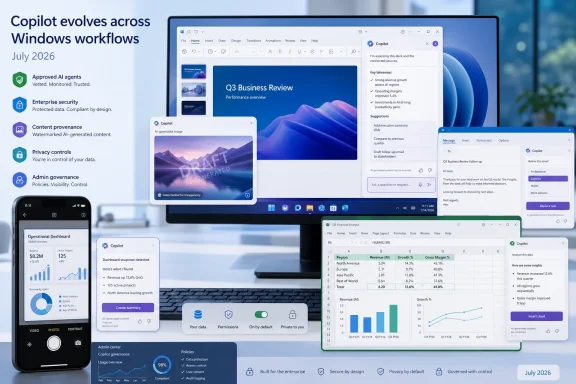 Vision Makes Copilot a Live Screen Companion
Microsoft describes Vision as a voice-driven experience: the user begins a voice chat, turns on screen sharing or the mobile camera, and asks Copilot for help interpreting what it sees. The assistant can combine the shared visual material with work data available to the signed-in user, which is potentially more useful than generic image analysis for corporate reports and operational dashboards.For a Windows desktop workflow, that means a user can share a problematic application window and ask for the next steps, or present a dashboard and ask Copilot to identify unusual movement and compare it with material previously available in Microsoft 365. Microsoft’s support guidance also suggests using it to review creative work alongside feedback.
There are meaningful limitations. Vision requires a Microsoft 365 Copilot license, microphone access, and an active voice conversation. Each Vision session is independent; Copilot does not carry screenshots or camera input into a later session. Microsoft also says users must deliberately begin sharing and can stop the share independently of the voice chat.
That last point matters in managed environments. A feature designed around screen sharing should be evaluated like any other workflow that may expose sensitive material. IT teams will want to establish when users may share full desktops rather than individual windows, especially where password managers, administrative consoles, customer systems, or confidential communications could be visible.
Microsoft says the shared visual input is not retained, transcribed, or logged after the session ends, although the voice conversation transcript remains available in chat history and model responses may be stored for safety monitoring. That is a useful privacy boundary, but it does not eliminate the need for training and acceptable-use policy.
Outlook’s Change Is More About Controlled Revision Than Fresh Drafts
Email assistance is also becoming more contextual. Microsoft’s recent Outlook for Windows release notes say users can draft and refine email in Copilot Chat, including personal Microsoft accounts, while the company has added in-context coaching to help users apply writing suggestions during composition.The direction is important: rather than asking Copilot to regenerate an entire message, users can increasingly use it to improve the material already written. Microsoft’s Outlook roadmap has described a capability to refine and adjust emails while writing, matching the broader idea in the report that users can tune length, tone, and structure without starting over.
For business users, the useful feature is not merely “write an email for me.” It is preserving the factual intent and recipient-specific detail in a draft while getting help making the message shorter, clearer, more diplomatic, or more structured. That is an incremental gain, but email is precisely the sort of high-volume task where incremental gains compound.
Microsoft is also broadening how Copilot can use mail as context. The company previously introduced ways to add selected messages or highlighted email text directly to Copilot Chat prompts in Outlook. In the July 1 release notes, Microsoft says Copilot Chat in Outlook is expanding from reasoning over one email thread to working across the user’s inbox, calendar, meetings, and other Microsoft 365 enterprise data they can already access.
That is more consequential than simple drafting. A user can ask for the latest updates from a manager, identify follow-ups buried across messages and meetings, or spot gaps in the calendar. It also raises the stakes for tenant configuration, data boundaries, and user understanding: Copilot’s answer can only be as sound as the permissions and underlying mail hygiene supporting it.
Excel’s “Multi-Agent Search” Needs a More Careful Reading
The report’s description of “multi-agent search” in Excel overstates what Microsoft has publicly documented as a specific July rollout. Microsoft’s July notes do confirm several related changes, but they are distinct capabilities.First, Microsoft has renamed the former Agent Mode in Excel to Edit with Copilot in Excel. Available on Windows, the web, and Mac, it lets users ask Copilot through chat to build or modify workbooks with tables, charts, PivotTables, and formulas. Microsoft says the underlying editing experience uses a custom multi-agent approach for complex tasks, but the user-facing result is workbook creation and editing—not a newly announced standalone web-research engine inside Excel.
Second, Microsoft has introduced federated Copilot connectors across Microsoft 365 Chat, Researcher, and Agent Mode in Excel. Those connectors can provide governed, real-time access to supported third-party information sources through the Model Context Protocol. For enterprises, this is the more relevant development: connected information can be surfaced under central admin control rather than copied manually between tools.
Finally, Microsoft has separately announced multi-agent workflows in Copilot, where configured agents can call other agents to complete a more difficult task. That is an important architectural move, but it should not be confused with a guarantee that every Excel query will conduct parallel public-web research, verify sources, and independently fill evidence gaps.
The practical test for Excel users is simpler. Open a workbook, choose Edit with Copilot if it is available in the Copilot tools menu, and ask for an auditable task: create a variance formula, build a PivotTable, clean a data range, or format a report. Review every formula, reference, and chart before treating the output as final. The more consequential new capabilities—connector access and agent coordination—will often depend on tenant configuration rather than appearing identically for every user.
Watermarks and the Agent Store Put Governance Alongside Capability
Microsoft’s July 1 Microsoft 365 Copilot notes also include a policy-controlled setting for watermarks on AI-generated or AI-altered video and audio. The company frames it as a transparency measure intended to reduce misattribution and misuse.This is not a universal label automatically stamped on every Copilot output. Administrators must enable the policy, titled “Include a watermark when content from Microsoft 365 is generated or altered by AI.” Organizations using Copilot for generated media should treat that distinction seriously: a watermark policy is a governance choice that needs to be configured, communicated, and tested.
The company is also building out the Agent Store as a distribution and control point for AI agents. Agent Builder users can submit internally created agents to an organization catalog, after which an administrator reviews and approves them for publication under the “Built by your org” section of the Agent Store.
That separation between creation and publication is the key safeguard. Makers can iterate on a shared or private agent, but an Agent Store version is a separately managed release. Subsequent changes require resubmission and administrative approval before the broadly available version is updated.
For administrators, the review is not cosmetic. Microsoft says it can include the agent’s capabilities, knowledge sources, sensitivity label, developer information, and metadata about the declarative agent. Approved agents are then made available according to the organization’s settings, while admins can also control, block, or remove permitted agents.
The Windows Impact Is a Faster Merge of AI and Existing Work
July’s changes do not add up to one dramatic new Copilot application. They instead remove boundaries between assistant and workflow: Outlook drafts become editable AI-assisted artifacts, a Windows desktop can become a temporary visual prompt, Excel can be changed through chat, and organizational agents can move through a formal approval path.That approach has a clear appeal for Microsoft 365 customers because it lowers the friction of trying AI. The harder work shifts to IT: deciding which data sources are connected, which agents are approved, how screen sharing is used, and when AI-generated media must carry a watermark.
For Windows users, Vision will be the most visible new capability when it reaches their tenant. For admins, the more enduring July story may be the controls around it—because Copilot is no longer just answering prompts. It is steadily gaining access to the context in which work actually happens.
References
- Primary source: iNews Zoombangla
Published: 2026-07-18T19:52:01+00:00
Microsoft Copilot Gets Vision, Email Refinement, and Search Upgrades in July 2026
Microsoft is rolling out new Copilot capabilities across Microsoft 365 in July 2026, including email refinement in Outlook, vision support that lets Copilot see what’s on your screen, and improved search in Excel. The updates show Microsoft’s bet on making AI useful inside existing...inews.zoombangla.com - Official source: support.microsoft.com
Get started with vision capabilities in Microsoft 365 Copilot | Microsoft Support
Learn about using vision capabilities and sharing your screen with Microsoft 365 Copilot.support.microsoft.com - Official source: learn.microsoft.com
Submit agents from Agent Builder to your org catalog | Microsoft Learn
Learn how to submit agents built with Agent Builder to your organization's catalog for admin review and publication in the Microsoft 365 Copilot Agent Store.learn.microsoft.com - Official source: developer.microsoft.com
Microsoft 365 Copilot | Extend and Customize Copilot
Extend, enrich, and customize Microsoft Microsoft 365 Copilot. Explore Copilot extensibility options such as agents, API plugins, and Copilot connectors to expand AI-powered productivity, skills, and creativity.developer.microsoft.com - Official source: microsoft.com
</rdf:Alt> </dc:title> <dc:description> <rdf:Alt> <rdf:li xml:lang="x-default"/> </rdf:Alt> </dc:description> <dc:creator> <rdf:Seq> <rdf:li>Lukas V
</rdf:Alt> </dc:description> <dc:creator> <rdf:Seq> <rdf:li>Lukas Velushwww.microsoft.com
- Official source: cdn-dynmedia-1.microsoft.com