

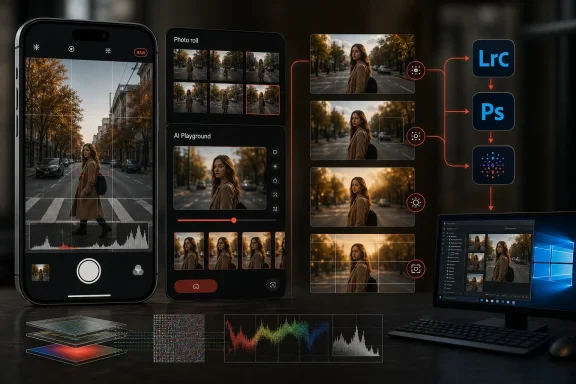
Adobe has taken Project Indigo, its experimental iPhone camera app built around restrained, natural-looking computational photography, and added an optional generative AI studio directly beside the camera roll. The new AI Playground can remove distracting objects, simulate shallow depth of field, change lighting, restyle photographs, critique compositions, suggest a better reshoot, and execute free-form text instructions. More surprisingly, Adobe is powering the experiment with Google’s Nano Banana image-editing models rather than relying exclusively on its own Firefly platform—a decision that turns a modest mobile-camera update into a revealing test of where photography, cloud AI, and Adobe’s broader creative ecosystem are heading.
The app was developed by Adobe’s Nextcam team, which includes computational-photography researchers with experience building earlier generations of smartphone camera technology. Rather than reject computation, Indigo attempted to make that computation less visible. Adobe described the intended result as a natural, “SLR-like” look suitable not only for a phone screen but also for larger displays.
That distinction matters. A conventional third-party manual camera app may provide control over shutter speed, ISO, white balance, and focus, but it can lose some of the multi-frame processing that makes modern phone cameras effective in difficult light. Indigo was designed to combine manual photographic controls with burst capture, alignment, denoising, tone mapping, and raw output.
This is an important starting point for understanding the AI Playground update. Indigo is not moving from unprocessed reality to artificial intelligence; it is moving from AI-assisted capture into explicit generative transformation. The controversy concerns where that boundary should sit, not whether software should participate in image formation at all.
Adobe’s original approach tried to preserve the appearance of conventional photography while using computation behind the scenes. AI Playground exposes a different philosophy: software should not merely render the scene more effectively but may also interpret, critique, reconstruct, and alter it.
This placement is strategically significant. Most generative editing begins after a user leaves the camera, opens an editor, imports an image, chooses a tool, and waits for a cloud service. Indigo collapses that workflow into the moments immediately following the shutter press, while the photographer may still be standing in front of the subject.
That creates a closed feedback loop:
Object Editing can remove categories of unwanted elements, including background people, vehicles, signs, and clutter. It can also simulate shallow depth of field by defocusing the background, providing a portrait-like effect without relying entirely on a traditional depth map.
Styles can reinterpret the photograph as an illustration or alter its photographic atmosphere. Examples include pen-and-ink rendering, colored washes, and golden-hour lighting. Because these tools regenerate pixels, they may change details rather than simply applying a deterministic color preset.
Custom Edit is the most open-ended component. Users can type or dictate a request, save useful prompts, rerun them for alternative outputs, and combine operations that Adobe has not exposed as dedicated buttons.
The app can produce a critique that identifies strengths and weaknesses in a photograph. It can also recommend editing changes or explain how the user might take the picture again. Suggested adjustments could involve framing, camera position, lens selection, subject placement, distracting backgrounds, or lighting.
A conventional editor assumes the image already exists and must be improved afterward. A camera-aware assistant can recommend changing the physical conditions before another photograph is taken. That gives generative and multimodal AI a potential educational role rather than limiting it to synthetic content production.
Adobe says it is working on prompts that account for the lenses and limitations of individual phone models. That is essential because a useful mobile photography coach must understand details such as:
Adobe’s decision to use a Google model should not automatically be interpreted as an abandonment of Firefly. Major creative applications increasingly operate as model marketplaces or orchestration layers, selecting different models for different workloads. Adobe itself has been expanding support for third-party generative systems across parts of its product portfolio.
Even so, Indigo is an unusually symbolic place to demonstrate that strategy. Camera software sits close to the evidentiary origins of an image, while Firefly has become central to Adobe’s public promises around creator-friendly AI, commercial usability, and content provenance.
By using Google’s technology inside an Adobe-designed experience, the company can focus on areas where it has particular expertise:
The risk is that Adobe becomes dependent on external model providers for strategically important features. Model availability, pricing, safety restrictions, performance, and licensing conditions can all change. Adobe has acknowledged in corporate disclosures that third-party AI introduces additional intellectual-property, privacy, cost, and reputational exposure.
AI Playground can then take that carefully rendered photograph and remove people, reconstruct hidden backgrounds, replace atmospheric conditions, alter lighting, or reimagine the scene as an illustration. On the surface, that looks like a contradiction.
The contradiction becomes less severe if Indigo is understood as an experimental imaging laboratory rather than a manifesto for photographic purity. Adobe has consistently positioned the app as a place to test technologies that might later influence Lightroom or other products. The natural camera pipeline and the generative workspace are separate experiments housed in the same application.
That opt-out is more than a user-interface courtesy. It protects Indigo’s existing identity and gives photographers who dislike generative alteration a way to continue using the app. Adobe would risk alienating the app’s core audience if every image passed through an AI editing layer by default.
The distinction should remain visible as the project develops:
The company says it will not inspect users’ prompts or images as part of that analytics collection, upload those materials to Adobe’s servers for the stated research telemetry, or use them to train AI models. Because users do not sign in, Adobe describes the collected interaction analytics as anonymous.
Those assurances are useful, but consumers should still distinguish between Adobe’s analytics policy and the processing required to generate an AI result. Generative editing generally involves more data handling than an ordinary local color adjustment, and the precise flow may vary depending on how the partner model is deployed.
That approach has several benefits. It reduces onboarding friction, allows Adobe to observe behavior from people outside its subscriber base, and prevents the experiment from feeling like an immediate attempt to sell a subscription.
There are also limitations. Without a persistent identity, Adobe cannot easily synchronize prompts, preferences, edits, or AI history across devices. If AI Playground evolves into a paid product, the company will eventually need an entitlement system, account integration, or platform-based purchase mechanism.
Privacy expectations will become more demanding at that stage. Users will want clear answers about retention, regional processing, partner access, model training, deleted content, and whether prompts or photographs become part of account-level personalization.
Generative editing is especially challenging because it does not merely conceal an unwanted object. It invents a plausible replacement for the region behind that object. The result may look visually coherent even when the reconstructed content never existed.
Indigo’s Custom Edit capability extends that concern. A request to remove fog, for example, could prompt a model to generate an unobstructed landscape based on contextual expectations rather than captured visual information. The output may be attractive, but it is no longer a straightforward record of the scene.
Effective provenance requires more than adding a generic “AI used” flag. Ideally, a receiving application should be able to establish:
A minor facial change may be acceptable in an explicitly stylized illustration. It is much more problematic in a family photograph, professional headshot, evidence image, or historical record. The person may remain recognizable while details of expression, age, skin texture, jewelry, clothing, or physical features subtly shift.
The same problem applies to products, architecture, text, and logos. Generative models can alter labels, misplace windows, invent reflections, distort hands, or replace readable writing with nonsense. A result that looks convincing at phone-screen size may reveal serious errors on a desktop monitor.
A deterministic exposure adjustment produces predictable output. A generative prompt may yield different backgrounds, facial details, lighting directions, or object boundaries on each run. This makes it harder to recreate a specific result, automate a professional workflow, or document exactly how an image was produced.
Adobe could eventually mitigate this with seed controls, version history, edit recipes, region locking, and preservation masks. Until then, users should regard Playground outputs as generated alternatives rather than precise corrections.
Remote inference introduces latency, network dependence, and operating cost. A feature that feels immediate on Wi-Fi may behave differently over a congested mobile connection. Free experimentation also becomes difficult to sustain when every request consumes server resources.
Adobe openly indicates that AI Playground cannot remain free indefinitely if it becomes popular. This suggests that the test is evaluating not only creative behavior but also demand, usage frequency, acceptable waiting times, and potential pricing.
AI Playground strengthens the possibility of a capture-to-cloud Adobe workflow. A user could photograph a scene in Indigo, receive composition advice, perform a quick generative cleanup, move the image into Lightroom for color work, and later continue on Windows.
For WindowsForum readers, the key issue is not that Indigo currently begins on an iPhone. It is that Adobe is designing a workflow whose mobile capture stage may feed directly into Windows-based Lightroom and Photoshop production. Edits, credentials, raw assets, and generated variants could eventually travel across that chain.
That abstraction may be the future of Creative Cloud. Photoshop might automatically select one model for inpainting, another for typography, another for facial consistency, and Firefly for commercially controlled generation. Users would interact with task-oriented controls while Adobe handles model routing.
Such a system could improve output quality, but it also creates new questions. Creative professionals may need to know which model touched a client asset, what contractual terms apply, whether the generated material is eligible for indemnification, and where processing occurred.
Adobe must therefore balance simplicity for consumers with transparency for professional and enterprise customers.
For Google, the value is not limited to usage volume. Integration with Adobe provides evidence that its models can support third-party creative products and demanding image-editing scenarios. It also positions Google as an infrastructure and model provider for companies that might otherwise build exclusively in-house.
Adobe, meanwhile, gains access to fast-moving external research without waiting for Firefly to match every competing capability. The arrangement is pragmatic, though it may encourage customers to view AI models as interchangeable suppliers rather than as the central value of Adobe’s platform.
AI Playground widens that challenge. Apple has been cautious about how deeply generative modification should be integrated into its core camera experience, while third-party developers can move more aggressively through optional applications.
Apple still controls crucial platform capabilities, including camera APIs, background processing, hardware acceleration, privacy permissions, and App Store distribution. If apps such as Indigo attract sustained demand, Apple can respond by expanding its own capture controls, editing tools, provenance systems, or developer frameworks.
Windows applications will increasingly need to display authenticity information and distinguish among original captures, computationally enhanced photographs, and generative derivatives. File Explorer, Photos, browsers, social applications, and professional editors could all become points where provenance is preserved—or lost.
The broader competitive battle is therefore not only about who provides the best AI eraser. It is about who controls the image from capture through editing, synchronization, verification, and publication.
A tourist might remove background pedestrians, a parent might soften a distracting environment, and a hobbyist might ask for composition advice before trying the shot again. Voice dictation makes free-form editing particularly accessible on a small screen.
The strongest consumer benefit may be timing. Suggestions are more valuable when the photographer can still move two steps to the left, switch lenses, adjust framing, or wait for a distracting person to leave. Once the user has returned home, the opportunity to improve the real capture is gone.
Consumers should preserve the original file whenever an image has personal, financial, legal, or historical importance. Generative versions are best treated as derivatives. The original remains the strongest record of what the sensor actually observed.
Adobe should make that relationship obvious in the filmstrip. Generated variants should not silently overwrite source images, and export interfaces should clearly distinguish originals from altered copies.
A marketing team may welcome instant object removal, relighting, and style variations. A legal department may still ask whether a third-party model processed unreleased product photography, whether the training data was properly licensed, and whether the final asset contains protected visual material.
Professional adoption will depend on Adobe’s ability to answer those questions at the account and file level. Creative Cloud administrators may eventually need controls that permit Firefly while blocking partner models, disable specific categories of edits, require content credentials, or restrict cloud inference for confidential assets.
Possible professional applications include:
Usage patterns will matter as much as raw participation. Adobe will be watching whether people repeatedly use practical tools such as distractor removal and photo critique or spend most of their time generating novelty styles. That distinction could determine whether AI Playground evolves into a serious photography assistant or a lightweight creative-entertainment feature.
Pricing will influence behavior. Users are more likely to request multiple variations when experimentation feels free. Per-generation limits encourage careful prompting but may make nondeterministic output frustrating, particularly when several attempts are needed to obtain an acceptable edit.
Transparency will be crucial. Professionals should not have to inspect release notes to discover which model processed an image. Clear labeling inside the application and embedded edit metadata would make the multi-model strategy easier to trust.
It would also deepen Adobe’s relationship with Google. An Android Indigo app using Google AI could benefit from closer platform integration, although hardware fragmentation would make device-aware photographic advice more difficult.
Windows users should watch for better continuity among Indigo, Lightroom mobile, Lightroom desktop, Photoshop, and cloud storage. A successful cross-device workflow would allow the original raw file, generated alternatives, provenance information, prompts, and edit history to travel together rather than arriving on the PC as disconnected JPEGs.
Windows software will also need to recognize that information. If authenticity metadata survives capture but disappears when a file enters another application, sync service, or social platform, its practical value falls sharply.
Project Indigo’s AI Playground is not merely another object eraser added to a camera app. It is Adobe’s test of whether generative models belong in the brief interval between pressing the shutter and deciding whether a photograph is worth keeping—and whether a creative-software company can combine its own imaging expertise with a rival’s AI without surrendering control of the workflow. The most successful version of that future will not be the camera that fabricates the most convincing scene, but the one that helps users take better photographs, labels every synthetic intervention honestly, preserves the original evidence, and carries that trust intact from the phone to Lightroom, Photoshop, and the Windows desktop.
 Background
Project Indigo began as an answer to overprocessed smartphone photos
Adobe launched Project Indigo for iPhone in June 2025 through Adobe Labs. Its original proposition was deliberately conservative: use advanced computational photography to overcome the physical limitations of a phone camera without producing the aggressive sharpening, exaggerated colors, flattened shadows, and conspicuous HDR appearance associated with some default camera pipelines.The app was developed by Adobe’s Nextcam team, which includes computational-photography researchers with experience building earlier generations of smartphone camera technology. Rather than reject computation, Indigo attempted to make that computation less visible. Adobe described the intended result as a natural, “SLR-like” look suitable not only for a phone screen but also for larger displays.
That distinction matters. A conventional third-party manual camera app may provide control over shutter speed, ISO, white balance, and focus, but it can lose some of the multi-frame processing that makes modern phone cameras effective in difficult light. Indigo was designed to combine manual photographic controls with burst capture, alignment, denoising, tone mapping, and raw output.
Its definition of natural photography was already computational
Project Indigo has never been a “zero processing” camera. Each press of the shutter can capture several images, align them, and merge information from those frames to reduce noise and preserve dynamic range. The app also applies semantic adjustments, although Adobe characterizes those interventions as restrained.This is an important starting point for understanding the AI Playground update. Indigo is not moving from unprocessed reality to artificial intelligence; it is moving from AI-assisted capture into explicit generative transformation. The controversy concerns where that boundary should sit, not whether software should participate in image formation at all.
Adobe’s original approach tried to preserve the appearance of conventional photography while using computation behind the scenes. AI Playground exposes a different philosophy: software should not merely render the scene more effectively but may also interpret, critique, reconstruct, and alter it.
What Adobe Is Adding to Project Indigo
AI Playground sits immediately after capture
The experimental workspace appears inside Project Indigo’s filmstrip and full-screen review interface. Eligible users can open it by selecting the sparkle control beneath a photograph captured with Indigo. Imported images are not currently the focus of the experiment; Adobe is restricting the feature to photographs taken within its own app.This placement is strategically significant. Most generative editing begins after a user leaves the camera, opens an editor, imports an image, chooses a tool, and waits for a cloud service. Indigo collapses that workflow into the moments immediately following the shutter press, while the photographer may still be standing in front of the subject.
That creates a closed feedback loop:
- The user captures an image in Project Indigo.
- AI Playground evaluates or transforms the result.
- The user accepts an edit, requests another variation, or reads the generated guidance.
- If the original composition is weak, the user can reshoot while the scene is still available.
- The finished image can then be shared or moved into a larger Adobe workflow.
The tools are organized around four functions
Adobe divides AI Playground into Object Editing, Styles, Photo Guidance, and Custom Edit. Each section represents a different level of intervention, ranging from familiar cleanup operations to transformations that can substantially change the meaning of an image.Object Editing can remove categories of unwanted elements, including background people, vehicles, signs, and clutter. It can also simulate shallow depth of field by defocusing the background, providing a portrait-like effect without relying entirely on a traditional depth map.
Styles can reinterpret the photograph as an illustration or alter its photographic atmosphere. Examples include pen-and-ink rendering, colored washes, and golden-hour lighting. Because these tools regenerate pixels, they may change details rather than simply applying a deterministic color preset.
Custom Edit is the most open-ended component. Users can type or dictate a request, save useful prompts, rerun them for alternative outputs, and combine operations that Adobe has not exposed as dedicated buttons.
Photo Guidance Could Be the Most Consequential Feature
The AI does more than manipulate pixels
Object removal and style transfer are familiar ideas. Google Photos, Samsung Gallery, Microsoft Designer, Adobe Photoshop, and numerous web-based services already offer variations on those capabilities. Indigo’s more distinctive experiment is AI-generated photographic guidance at the point of capture.The app can produce a critique that identifies strengths and weaknesses in a photograph. It can also recommend editing changes or explain how the user might take the picture again. Suggested adjustments could involve framing, camera position, lens selection, subject placement, distracting backgrounds, or lighting.
A conventional editor assumes the image already exists and must be improved afterward. A camera-aware assistant can recommend changing the physical conditions before another photograph is taken. That gives generative and multimodal AI a potential educational role rather than limiting it to synthetic content production.
Device awareness will determine whether the advice is useful
Generic photography advice can quickly become frustrating on a phone. An AI assistant might recommend changing the physical aperture, using a focal length that the device does not possess, or zooming in optically when the available camera would only perform a digital crop.Adobe says it is working on prompts that account for the lenses and limitations of individual phone models. That is essential because a useful mobile photography coach must understand details such as:
- The phone’s available main, ultrawide, and telephoto cameras.
- The minimum focusing distance of each lens.
- Whether a selected magnification uses optical capture, sensor cropping, or computational super-resolution.
- The absence of a mechanically adjustable aperture on most smartphone cameras.
- The trade-offs among exposure time, ISO, motion blur, and multi-frame merging.
- Whether the user can physically reshoot or must rely on an edit.
Google AI Inside an Adobe Camera
Nano Banana powers the initial experiment
The Project Indigo 1.1 release notes identify Google’s Nano Banana image-editing models as the technology behind AI Playground. That clarification is important because Adobe’s own description of the research experiment initially emphasized the workflow and capabilities more than the model branding.Adobe’s decision to use a Google model should not automatically be interpreted as an abandonment of Firefly. Major creative applications increasingly operate as model marketplaces or orchestration layers, selecting different models for different workloads. Adobe itself has been expanding support for third-party generative systems across parts of its product portfolio.
Even so, Indigo is an unusually symbolic place to demonstrate that strategy. Camera software sits close to the evidentiary origins of an image, while Firefly has become central to Adobe’s public promises around creator-friendly AI, commercial usability, and content provenance.
The partnership exposes Adobe’s evolving platform strategy
Adobe historically controlled many layers of the professional image workflow: raw conversion, cataloging, color management, editing, compositing, export, and asset delivery. Generative AI complicates that model because no single vendor is guaranteed to have the strongest system for every task.By using Google’s technology inside an Adobe-designed experience, the company can focus on areas where it has particular expertise:
- Adobe controls the capture pipeline and image metadata.
- Adobe designs the buttons, prompts, and interaction model.
- Adobe understands Lightroom and Photoshop workflows.
- Adobe can evaluate how photographers use the generated results.
- Google supplies the underlying image-generation or image-editing intelligence.
The risk is that Adobe becomes dependent on external model providers for strategically important features. Model availability, pricing, safety restrictions, performance, and licensing conditions can all change. Adobe has acknowledged in corporate disclosures that third-party AI introduces additional intellectual-property, privacy, cost, and reputational exposure.
The Natural-Look Paradox
Indigo now contains two competing ideas of photography
Project Indigo earned attention because it appeared to push back against the conspicuously processed smartphone aesthetic. It promised subtle tone mapping, controlled saturation, gentler sharpening, raw files, and a result closer to what photographers might expect from a larger dedicated camera.AI Playground can then take that carefully rendered photograph and remove people, reconstruct hidden backgrounds, replace atmospheric conditions, alter lighting, or reimagine the scene as an illustration. On the surface, that looks like a contradiction.
The contradiction becomes less severe if Indigo is understood as an experimental imaging laboratory rather than a manifesto for photographic purity. Adobe has consistently positioned the app as a place to test technologies that might later influence Lightroom or other products. The natural camera pipeline and the generative workspace are separate experiments housed in the same application.
Optionality is doing critical reputational work
Adobe is not forcing generative editing into every Indigo capture. Only a small percentage of users are initially receiving access, participation can be declined, and the original camera experience remains available.That opt-out is more than a user-interface courtesy. It protects Indigo’s existing identity and gives photographers who dislike generative alteration a way to continue using the app. Adobe would risk alienating the app’s core audience if every image passed through an AI editing layer by default.
The distinction should remain visible as the project develops:
- Computational capture combines real sensor observations to reduce noise or improve dynamic range.
- Semantic rendering adjusts regions such as skies, faces, or subjects while retaining the photographed scene.
- Generative editing may invent pixels, reconstruct objects, remove evidence, or change conditions that existed at capture.
- Artistic transformation deliberately converts a photograph into a new visual form.
Privacy and Data Handling
Adobe is limiting the first test
Adobe says the initial experiment is free, requires no sign-in, and is available to only a small randomly selected portion of Indigo’s user base for a limited period. Participants must agree to share information about their button presses so Adobe can study how the Playground is used.The company says it will not inspect users’ prompts or images as part of that analytics collection, upload those materials to Adobe’s servers for the stated research telemetry, or use them to train AI models. Because users do not sign in, Adobe describes the collected interaction analytics as anonymous.
Those assurances are useful, but consumers should still distinguish between Adobe’s analytics policy and the processing required to generate an AI result. Generative editing generally involves more data handling than an ordinary local color adjustment, and the precise flow may vary depending on how the partner model is deployed.
No account lowers friction but complicates continuity
Removing the Adobe account requirement makes Indigo unusually accessible. Users can install the app, capture photographs, and potentially test AI Playground without entering an existing Creative Cloud relationship.That approach has several benefits. It reduces onboarding friction, allows Adobe to observe behavior from people outside its subscriber base, and prevents the experiment from feeling like an immediate attempt to sell a subscription.
There are also limitations. Without a persistent identity, Adobe cannot easily synchronize prompts, preferences, edits, or AI history across devices. If AI Playground evolves into a paid product, the company will eventually need an entitlement system, account integration, or platform-based purchase mechanism.
Privacy expectations will become more demanding at that stage. Users will want clear answers about retention, regional processing, partner access, model training, deleted content, and whether prompts or photographs become part of account-level personalization.
Authenticity, Metadata, and the Meaning of a Photo
Removal tools can change documentary meaning
Deleting a trash can from a holiday snapshot may seem harmless. Removing a person, vehicle, sign, fence, cloud formation, or piece of contextual evidence from a newsworthy image can materially change what the picture communicates.Generative editing is especially challenging because it does not merely conceal an unwanted object. It invents a plausible replacement for the region behind that object. The result may look visually coherent even when the reconstructed content never existed.
Indigo’s Custom Edit capability extends that concern. A request to remove fog, for example, could prompt a model to generate an unobstructed landscape based on contextual expectations rather than captured visual information. The output may be attractive, but it is no longer a straightforward record of the scene.
Adobe is pursuing content credentials
Adobe says it is working to attach authenticity metadata to images edited through AI Playground, using technology associated with its Content Authenticity Initiative. That effort could help downstream applications identify that generative changes occurred.Effective provenance requires more than adding a generic “AI used” flag. Ideally, a receiving application should be able to establish:
- Which device and application captured the original.
- Whether the file has retained a verifiable connection to that capture.
- What type of generative operation was performed.
- Which application performed the edit.
- Whether the metadata remains intact after sharing, resizing, or platform conversion.
- Whether a consumer can inspect the history without specialized software.
Technical Limits of Generative Camera Editing
Identity drift remains a serious weakness
Adobe’s own examples acknowledge that a person’s face can change slightly when a photograph is restyled. This phenomenon, often described as identity drift, occurs because the model regenerates parts of the image rather than preserving every original pixel.A minor facial change may be acceptable in an explicitly stylized illustration. It is much more problematic in a family photograph, professional headshot, evidence image, or historical record. The person may remain recognizable while details of expression, age, skin texture, jewelry, clothing, or physical features subtly shift.
The same problem applies to products, architecture, text, and logos. Generative models can alter labels, misplace windows, invent reflections, distort hands, or replace readable writing with nonsense. A result that looks convincing at phone-screen size may reveal serious errors on a desktop monitor.
Repeatability is not guaranteed
AI Playground lets users press a control again to receive a different result. That variability can be enjoyable during creative exploration, but it differs sharply from conventional photo editing.A deterministic exposure adjustment produces predictable output. A generative prompt may yield different backgrounds, facial details, lighting directions, or object boundaries on each run. This makes it harder to recreate a specific result, automate a professional workflow, or document exactly how an image was produced.
Adobe could eventually mitigate this with seed controls, version history, edit recipes, region locking, and preservation masks. Until then, users should regard Playground outputs as generated alternatives rather than precise corrections.
Cloud inference affects speed and cost
Indigo’s original imaging pipeline performs substantial computation on the device, including multi-frame processing and AI-assisted features. Large generative editing models, however, can impose heavier memory and processing demands than a phone can comfortably handle.Remote inference introduces latency, network dependence, and operating cost. A feature that feels immediate on Wi-Fi may behave differently over a congested mobile connection. Free experimentation also becomes difficult to sustain when every request consumes server resources.
Adobe openly indicates that AI Playground cannot remain free indefinitely if it becomes popular. This suggests that the test is evaluating not only creative behavior but also demand, usage frequency, acceptable waiting times, and potential pricing.
Impact on Adobe’s Creative Ecosystem
Indigo could become the front door to Lightroom
Project Indigo already integrates with Lightroom mobile. Users can send a JPEG or DNG into Lightroom, retain embedded SDR and HDR looks, and continue editing through Adobe’s established adjustment system.AI Playground strengthens the possibility of a capture-to-cloud Adobe workflow. A user could photograph a scene in Indigo, receive composition advice, perform a quick generative cleanup, move the image into Lightroom for color work, and later continue on Windows.
For WindowsForum readers, the key issue is not that Indigo currently begins on an iPhone. It is that Adobe is designing a workflow whose mobile capture stage may feed directly into Windows-based Lightroom and Photoshop production. Edits, credentials, raw assets, and generated variants could eventually travel across that chain.
The model marketplace could spread to desktop software
Adobe has already shown a willingness to integrate partner models into creative products. Indigo demonstrates how that approach can become invisible to less technical users: rather than choosing a model first, the user chooses an outcome such as removing clutter or changing the lighting.That abstraction may be the future of Creative Cloud. Photoshop might automatically select one model for inpainting, another for typography, another for facial consistency, and Firefly for commercially controlled generation. Users would interact with task-oriented controls while Adobe handles model routing.
Such a system could improve output quality, but it also creates new questions. Creative professionals may need to know which model touched a client asset, what contractual terms apply, whether the generated material is eligible for indemnification, and where processing occurred.
Adobe must therefore balance simplicity for consumers with transparency for professional and enterprise customers.
Competitive Implications
Google gains another route into creative workflows
Google’s involvement gives Nano Banana a high-profile role in a photography application operated by one of the world’s most influential creative-software companies. That expands Google’s reach beyond its own Photos and Pixel experiences.For Google, the value is not limited to usage volume. Integration with Adobe provides evidence that its models can support third-party creative products and demanding image-editing scenarios. It also positions Google as an infrastructure and model provider for companies that might otherwise build exclusively in-house.
Adobe, meanwhile, gains access to fast-moving external research without waiting for Firefly to match every competing capability. The arrangement is pragmatic, though it may encourage customers to view AI models as interchangeable suppliers rather than as the central value of Adobe’s platform.
Apple faces pressure inside its own ecosystem
Indigo runs on Apple hardware while offering an alternative to Apple’s camera processing and Photos editing experience. Adobe’s natural-look pipeline already challenged Apple by suggesting that iPhone sensors could produce a different photographic aesthetic when paired with another company’s software.AI Playground widens that challenge. Apple has been cautious about how deeply generative modification should be integrated into its core camera experience, while third-party developers can move more aggressively through optional applications.
Apple still controls crucial platform capabilities, including camera APIs, background processing, hardware acceleration, privacy permissions, and App Store distribution. If apps such as Indigo attract sustained demand, Apple can respond by expanding its own capture controls, editing tools, provenance systems, or developer frameworks.
Microsoft remains relevant even without a Windows camera app
Microsoft is not directly competing in premium smartphone camera capture, but it participates in the downstream workflow through Windows, OneDrive, Microsoft Photos, Designer, Copilot, and cloud AI services. Images created or modified on phones commonly end up on Windows PCs, where users organize, share, print, or further edit them.Windows applications will increasingly need to display authenticity information and distinguish among original captures, computationally enhanced photographs, and generative derivatives. File Explorer, Photos, browsers, social applications, and professional editors could all become points where provenance is preserved—or lost.
The broader competitive battle is therefore not only about who provides the best AI eraser. It is about who controls the image from capture through editing, synchronization, verification, and publication.
Consumer Impact
Casual photographers gain powerful tools with less friction
For ordinary users, the immediate appeal is straightforward. AI Playground can potentially rescue a photograph without requiring knowledge of layers, masks, selection tools, depth maps, or professional retouching.A tourist might remove background pedestrians, a parent might soften a distracting environment, and a hobbyist might ask for composition advice before trying the shot again. Voice dictation makes free-form editing particularly accessible on a small screen.
The strongest consumer benefit may be timing. Suggestions are more valuable when the photographer can still move two steps to the left, switch lenses, adjust framing, or wait for a distracting person to leave. Once the user has returned home, the opportunity to improve the real capture is gone.
Users may overestimate what the AI preserves
Convenience can obscure the distinction between correction and invention. A button labeled “remove clutter” sounds modest, but the generated replacement may contain details inferred by the model rather than recorded by the camera.Consumers should preserve the original file whenever an image has personal, financial, legal, or historical importance. Generative versions are best treated as derivatives. The original remains the strongest record of what the sensor actually observed.
Adobe should make that relationship obvious in the filmstrip. Generated variants should not silently overwrite source images, and export interfaces should clearly distinguish originals from altered copies.
Enterprise and Professional Impact
Businesses need predictable governance
An experimental consumer app can tolerate variation and playful results. Enterprise workflows require documentation, access control, retention rules, model transparency, regional compliance, and consistent output.A marketing team may welcome instant object removal, relighting, and style variations. A legal department may still ask whether a third-party model processed unreleased product photography, whether the training data was properly licensed, and whether the final asset contains protected visual material.
Professional adoption will depend on Adobe’s ability to answer those questions at the account and file level. Creative Cloud administrators may eventually need controls that permit Firefly while blocking partner models, disable specific categories of edits, require content credentials, or restrict cloud inference for confidential assets.
Photographers may value guidance more than generation
Experienced photographers are unlikely to replace Lightroom or Photoshop with a simplified camera playground. They may nevertheless find value in immediate technical analysis, especially if the advice becomes device-aware and grounded in capture metadata.Possible professional applications include:
- The app could warn that the selected lens is operating in a weak digital-zoom range.
- It could recommend Night mode when high ISO would cause excessive noise.
- It could identify highlight clipping, motion risk, or an unbalanced composition.
- It could suggest moving the subject rather than fabricating background blur.
- It could compare a new frame against an earlier attempt and explain whether the reshoot improved.
Strengths and Opportunities
Adobe’s experiment combines several ideas that competitors often deliver as separate applications. Its most promising attributes extend beyond generative image manipulation.- The point-of-capture workflow is genuinely useful. Advice and edits arrive while the scene may still be available, allowing users to improve the original rather than relying entirely on synthetic repair.
- Participation remains optional. Existing Indigo users can retain the natural camera experience without being forced into generative editing.
- The feature requires no account during the test. Low-friction access should produce broader behavioral data and make the tools easier for casual users to evaluate.
- Photo Guidance introduces an educational dimension. Device-aware coaching could help people understand lenses, composition, light, and camera limitations.
- Adobe can connect capture to professional editing. Indigo, Lightroom, Photoshop, cloud storage, and Windows desktop workflows create a stronger end-to-end proposition than a standalone AI camera filter.
- Partner models allow rapid experimentation. Using Google’s technology lets Adobe test advanced capabilities without restricting every project to Firefly.
- Content credentials could improve transparency. If applied consistently and preserved downstream, provenance metadata could help distinguish capture from generation.
- The Labs model gives Adobe room to learn. A limited rollout reduces the impact of technical failures, unpopular design decisions, or unexpectedly high inference costs.
Risks and Concerns
The same features that make AI Playground compelling also create technical, ethical, and commercial problems.- Generative edits may be mistaken for authentic capture. Object removal, reconstruction, and relighting can change the factual meaning of an image.
- Identity drift can damage personal photographs. Restyling may subtly alter faces, expressions, clothing, or distinctive features.
- Third-party model dependence introduces uncertainty. Adobe does not fully control Google’s future pricing, availability, safety policies, licensing posture, or technical direction.
- Free access is temporary. A popular feature could eventually require a subscription, generative credits, or usage-based payment.
- Privacy explanations must remain precise. Anonymous Adobe analytics do not by themselves describe every stage of partner-model processing.
- AI advice can sound authoritative while being wrong. Recommendations that ignore device limits or scene context may teach poor habits.
- Provenance metadata can be removed. Content credentials improve transparency but cannot prevent screenshots, metadata stripping, or deliberate deception.
- The natural-camera identity could become diluted. Indigo risks losing its distinctive appeal if generative features dominate its development or interface.
- Cloud dependence may undermine responsiveness. Network delays and service outages conflict with the immediate nature of mobile photography.
- Enterprise customers need stronger controls. Professional use will require administrative policies, model disclosure, data-governance options, and auditable edit histories.
What to Watch Next
The size and duration of the rollout
Adobe is initially limiting AI Playground to a small percentage of Indigo users for a few weeks. The first indicator of success will be whether the company expands that pool, extends free access, or begins another test with revised controls.Usage patterns will matter as much as raw participation. Adobe will be watching whether people repeatedly use practical tools such as distractor removal and photo critique or spend most of their time generating novelty styles. That distinction could determine whether AI Playground evolves into a serious photography assistant or a lightweight creative-entertainment feature.
The eventual business model
Adobe has indicated that a popular version cannot remain free forever. The company could include a limited number of operations with Creative Cloud, sell mobile generative credits, offer a standalone subscription, or use AI Playground as an entry point into Lightroom.Pricing will influence behavior. Users are more likely to request multiple variations when experimentation feels free. Per-generation limits encourage careful prompting but may make nondeterministic output frustrating, particularly when several attempts are needed to obtain an acceptable edit.
Firefly’s role alongside partner models
The use of Google’s models raises the question of whether future Indigo features will offer a model selector or route tasks automatically. Adobe could reserve Firefly for workflows emphasizing commercial safety and use partner systems for capabilities where they currently perform better.Transparency will be crucial. Professionals should not have to inspect release notes to discover which model processed an image. Clear labeling inside the application and embedded edit metadata would make the multi-model strategy easier to trust.
Android and cross-platform expansion
Adobe said at Indigo’s original launch that an Android version was planned. Android support would substantially broaden the experiment and provide access to a wider range of camera hardware, image processors, lens configurations, and device performance levels.It would also deepen Adobe’s relationship with Google. An Android Indigo app using Google AI could benefit from closer platform integration, although hardware fragmentation would make device-aware photographic advice more difficult.
Windows users should watch for better continuity among Indigo, Lightroom mobile, Lightroom desktop, Photoshop, and cloud storage. A successful cross-device workflow would allow the original raw file, generated alternatives, provenance information, prompts, and edit history to travel together rather than arriving on the PC as disconnected JPEGs.
Better preservation and verification controls
Future versions need unmistakable indicators for generatively altered images. Adobe should preserve originals automatically, provide side-by-side comparison, expose an edit history, and attach durable content credentials whenever the model changes scene content.Windows software will also need to recognize that information. If authenticity metadata survives capture but disappears when a file enters another application, sync service, or social platform, its practical value falls sharply.
Project Indigo’s AI Playground is not merely another object eraser added to a camera app. It is Adobe’s test of whether generative models belong in the brief interval between pressing the shutter and deciding whether a photograph is worth keeping—and whether a creative-software company can combine its own imaging expertise with a rival’s AI without surrendering control of the workflow. The most successful version of that future will not be the camera that fabricates the most convincing scene, but the one that helps users take better photographs, labels every synthetic intervention honestly, preserves the original evidence, and carries that trust intact from the phone to Lightroom, Photoshop, and the Windows desktop.
References
- Primary source: The Verge
Published: 2026-07-20T16:00:00+00:00
Adobe’s ‘natural look’ camera app embraces generative AI | The Verge
The Adobe Indigo camera app is being updated with a suite of generative AI tools that provide feedback, apply AI filters, and more.www.theverge.com
- Independent coverage: The Tech Buzz
Published: 2026-07-20T17:00:15.487103
Adobe's Indigo Camera App Pivots to AI-Enhanced Editing | The Tech Buzz
Adobe adds third-party generative AI tools to experimental iPhone camera appwww.techbuzz.ai - Related coverage: community.adobe.com
- Related coverage: research.adobe.com
- Related coverage: gadgets360.com
- Related coverage: 9to5mac.com
Adobe explains why Indigo doesn't yet support the iPhone 17
Back in the summer, Adobe launched the Indigo camera app in response to complaints about the artificial look of typical...9to5mac.com