

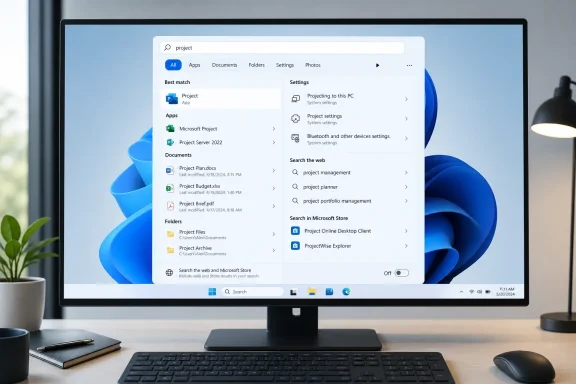
Microsoft’s latest Windows 11 Search experiment removes promotional content from web results, gives users a switch for web and Microsoft Store suggestions, and puts local apps, files, and settings ahead of online material when they are the stronger match. Rolling out gradually to Windows Insiders in the Experimental channel since July 13, 2026, the redesign may look like a modest interface cleanup, but it addresses one of the operating system’s most persistent complaints: Windows Search too often behaves like a Bing discovery surface when users simply want to find something on their own PC.
Windows Search has spent more than two decades evolving from a straightforward file-finding utility into a broad discovery layer spanning applications, settings, documents, cloud storage, Microsoft Store listings, web pages, news, and online suggestions. Each expansion made sense when considered separately, but their combined effect often left Windows 11 users unsure whether a query would search the computer, Microsoft’s services, or both.
Windows 11 intensified that tension by integrating web-driven content directly into the taskbar Search experience. The Search home page could display highlights, trending material, recommendations, Bing-powered information, and promotional elements before the user had typed a meaningful query.
Windows 8 expanded search across apps and online sources, reflecting Microsoft’s push toward connected experiences. Windows 10 then tied taskbar Search more closely to Bing and, for a time, Cortana, establishing the basic hybrid model that Windows 11 inherited.
The technical ambition was reasonable. A single query box capable of finding a spreadsheet, launching an application, opening a control panel, and answering an online question could reduce friction. The difficulty came from deciding which type of result deserved priority.
When online suggestions appear ahead of those items, Search can feel less intelligent rather than more capable. The problem is not merely visual clutter; it is a mismatch between the user’s likely goal and the ranking system’s response.
That mismatch has contributed to a broader perception that Windows 11 places Microsoft’s commercial priorities above predictable desktop behavior. Search became a particularly visible example because it sits at the center of everyday interaction with the operating system.
The company is distributing these changes through a Controlled Feature Rollout in the Experimental channel. As a result, two Insiders running the same preview build may not immediately receive the same Search experience.
That distinction matters because Search should be an action-oriented surface. If a panel opens before the user enters a query, every card, recommendation, animation, or headline added to that panel creates a potential distraction from the intended task.
A calmer home screen also improves visual predictability. Users can open Search and immediately understand where to type, rather than first interpreting a changing selection of online content.
This is the basis for describing the redesign as an ad-free or cleaner Windows Search experience. However, Microsoft has not announced the complete removal of every possible commercial suggestion from every Windows surface.
The precise change is narrower and more defensible: promotional content is being removed from the Search Box’s web-result experience. Microsoft Store suggestions may still appear when enabled, and web results remain available unless the user turns them off.
Better labeling also reduces the risk of opening a browser when the user expected a local tool. Windows Search has previously presented online and local results in ways that could look too similar at a glance, particularly during rapid keyboard-driven use.
That sounds obvious, but Windows Search has not always behaved that way. Its ranking system has sometimes treated an online query suggestion as more useful than an installed application or a directly matching system item.
This change recognizes the context in which Search operates. A browser address bar reasonably assumes web intent, but a search box embedded in the Windows taskbar should begin with the computer itself.
Local-first ranking does not require Microsoft to eliminate connected search. It simply establishes a sensible hierarchy:
Search systems often hesitate to process very short strings because they can produce a large number of weak matches. Better handling therefore requires more than reducing a minimum character limit; Windows must rank those results efficiently enough to prevent a flood of irrelevant files.
For Microsoft 365 and OneDrive users, that is a practical compromise. A document’s physical storage location matters less than whether Search can find it quickly, particularly when Files On-Demand makes cloud content appear integrated with File Explorer.
The key is transparency. Search must distinguish a locally available file from an online or connected result, especially when opening the latter could trigger a download, require authentication, or fail without internet access.
The experimental update introduces a direct control in Settings > Privacy & security > Search. From there, users can decide whether web and Microsoft Store suggestions appear alongside local results.
It also establishes user choice as part of the official product design rather than treating local-only search as an edge case. That is an important philosophical shift, even if Microsoft could eventually refine the control further.
The setting should also reduce dependence on third-party debloating scripts. Those tools can be useful, but broad scripts sometimes disable unrelated Windows components or apply changes that become difficult to troubleshoot later.
Administrators may likewise want more granular policy options. An organization could permit approved cloud and intranet search providers while prohibiting consumer web suggestions and Store content.
The experiment therefore solves the central problem without necessarily representing the final control model. Feedback from Insiders will likely determine whether Microsoft separates these categories before wider deployment.
Microsoft will need to document the behavior clearly, including whether disabling suggestions prevents query transmission or merely hides the resulting content. Users deserve to understand the distinction between an interface preference and a data-processing control.
For enterprises in regulated industries, that distinction is particularly important. A local-only visual experience is not equivalent to a guarantee that search terms remain on the device.
These changes suggest the company understands that Search’s reputation rests on whether it consistently produces the expected result, not simply whether the panel looks quieter.
Fuzzy matching is especially valuable for keyboard-driven users who open Search, type several characters, and press Enter without pausing. A good launcher should tolerate a small mistake without redirecting the query to the web.
The challenge is avoiding false positives. If matching becomes too permissive, Search may launch the wrong application or bury an exact file match beneath loosely related items. Microsoft will need to balance tolerance with precision.
Improved ranking could make the Windows 11 configuration experience feel substantially more coherent. A user should not need to remember whether a feature is called “Add or remove programs,” “Installed apps,” “Programs and Features,” or something else in the current release.
Microsoft describes the current work as an initial round, with further tuning expected. That caution is appropriate because settings terminology changes over time, varies by language, and may differ between consumer and managed editions.
Separating local discovery from the health of web services should be a priority. Installed applications and indexed files ought to remain searchable even during network problems, Bing outages, account-authentication failures, or Microsoft Store interruptions.
That makes optimistic rollout predictions premature. Insider features sometimes reach stable PCs quickly, but others spend months under evaluation or disappear after testing.
A controlled rollout can help detect problems that ordinary build testing misses. Search behavior depends on installed applications, language packs, indexing configuration, account type, enterprise policies, cloud storage, hardware performance, and regional settings.
The downside is confusion. Insiders may install the correct build and still not see the new interface, making community troubleshooting more difficult.
Experimental builds can contain incomplete features, compatibility problems, regressions, and interfaces that change without notice. Leaving an early preview path may also require waiting for build numbers to align with a stable channel or performing a clean Windows installation.
Users who depend on their PC for work, school, accessibility, or gaming should wait for a broader release. A cleaner search panel is useful, but it is not worth destabilizing an otherwise reliable system.
Forced activation can produce missing controls, broken layouts, inconsistent dependencies, or behavior that changes after an update. It also makes bug reports less useful because the resulting configuration may not match Microsoft’s supported test groups.
Many experienced Windows users already rely on alternatives such as Start menu typing, File Explorer, PowerToys Run, third-party launchers, pinned applications, desktop shortcuts, or the Run dialog. Restoring confidence in built-in Search would reduce the need to maintain parallel workflows.
Cleaner ranking also reduces accidental browser launches. That is particularly valuable on lower-powered devices where opening a browser session can consume noticeably more memory, CPU time, and battery than launching a lightweight local utility.
Microsoft should ensure that the redesign also works well with Narrator, keyboard focus indicators, high-contrast themes, text scaling, and magnification. A visually simpler panel is not automatically more accessible if result labels or controls are poorly exposed to assistive technologies.
The redesigned interface may make better use of available index data, but it cannot return a file the indexing system has not cataloged unless another search path discovers it. Microsoft must continue improving the underlying Windows Search service as well as the visible Search Box.
A local-first Search experience could reduce accidental diversion to public web results and make managed Windows devices feel more purpose-built. However, enterprises will judge the feature by its administrative controls rather than its appearance.
Administrators will want answers to several questions:
Permissions provide another complication. Search should never expose a document title, preview, or metadata to a user who lacks access, even temporarily. Results must respond quickly when permissions change or an employee moves between groups.
The ideal enterprise experience combines local applications, device settings, synchronized files, and authorized cloud content while excluding consumer promotions. Microsoft’s new ranking model is a step in that direction, but implementation details will determine whether it meets that standard.
Search also protects organizations from interface churn. Microsoft can reorganize a settings page without breaking an employee’s workflow if the same natural-language query still reaches the correct destination.
Removing promotions from Search aligns with that campaign, but trust will depend on sustained behavior. Users have seen Windows experiments appear, disappear, return under different labels, or expand after initially limited rollouts.
That creates a strong expectation that core operating-system surfaces should serve the owner’s intent first. Recommendations for Microsoft 365, Edge, OneDrive, Game Pass, Bing, or Store applications can therefore feel intrusive even when Microsoft considers them helpful suggestions rather than conventional advertisements.
Search is especially sensitive because queries reveal immediate intent. If a local application query leads to an online promotion, users may interpret the result as Microsoft redirecting attention for commercial reasons.
If the clean experience requires users to opt out of clutter, criticism will continue. If local-first ranking and promotion-free results become the default, Microsoft can credibly argue that it has changed the product rather than merely added another escape hatch.
The company should label Store suggestions, sponsored content, partner promotions, and ordinary web results consistently. Users should not need to reverse-engineer why a result appeared.
A less cluttered Search Box could establish a clean division between deterministic lookup and conversational assistance. Alternatively, Microsoft could eventually replace today’s recommendations with AI prompts, summaries, or suggested actions that recreate the same clutter under a different name.
Copilot is better suited to ambiguous or multi-step requests. A user might ask how to reduce battery consumption, compare documents, summarize a file, or change several settings to improve accessibility.
Microsoft should preserve that distinction. Search must remain fast and deterministic even if Copilot becomes more deeply integrated into Windows.
Windows should indicate when a result comes from local indexing, a connected account, the web, Microsoft Store, or an AI-generated interpretation. Clear provenance becomes more important as the interface grows more capable.
That would not necessarily be negative. The deciding factor will be whether users control those additions and whether local results continue to win when they are the obvious match.
Microsoft’s experiment acknowledges that relevance and restraint can be competitive features.
Microsoft does not need to reproduce every advanced launcher feature. It does need to deliver dependable basics so users do not install another tool merely to open Notepad or find a settings page.
Microsoft’s own PowerToys Run illustrates the demand for a focused keyboard launcher. The contrast between that utility and the historically busier taskbar Search experience has made Windows’ design inconsistency especially apparent.
Linux desktop environments also demonstrate the value of modularity. Users can often choose a launcher or search provider that matches their workflow rather than accepting one tightly coupled commercial discovery model.
Windows has a much broader hardware and software ecosystem, making its search challenge more complex. That scale explains some difficulty, but it does not excuse weak local ranking or unclear result provenance.
A move into the Dev, Beta, or Release Preview channels would signal growing confidence, though channel names alone do not guarantee a particular retail release date. Microsoft increasingly ships Windows features through servicing updates rather than waiting for one annual feature package.
The most useful implementation would include separate policies for web results, Store suggestions, cloud files, organizational search providers, search highlights, diagnostic data, and user overrides.
The final retail design may therefore differ between the United States, the European Economic Area, and other regions. Microsoft should minimize that fragmentation where possible because inconsistent behavior complicates support and documentation.
Cleaning Search while leaving the rest of Windows untouched would still be useful, but it would not fully answer the criticism that the operating system feels overloaded with upsells. A broader reduction would demonstrate that Microsoft has adopted a consistent design philosophy.
If later updates quietly restore recommendation cards or use the cleared space for persistent Copilot promotion, skepticism will prove justified. Windows users are not merely evaluating one preview interface; they are assessing whether Microsoft can maintain a boundary between useful integration and unwanted promotion.
Microsoft’s cleaner Windows Search Box is a welcome correction because it starts from a simple principle that should never have become controversial: when someone searches from the Windows desktop, the operating system should first help them find what is on their computer. The experiment will earn lasting significance only if Microsoft carries that principle into stable releases, protects it with transparent controls, applies it consistently across Windows 11, and resists the temptation to refill every newly cleared space with the next service it wants users to discover.
 Background
Windows Search has spent more than two decades evolving from a straightforward file-finding utility into a broad discovery layer spanning applications, settings, documents, cloud storage, Microsoft Store listings, web pages, news, and online suggestions. Each expansion made sense when considered separately, but their combined effect often left Windows 11 users unsure whether a query would search the computer, Microsoft’s services, or both.Windows 11 intensified that tension by integrating web-driven content directly into the taskbar Search experience. The Search home page could display highlights, trending material, recommendations, Bing-powered information, and promotional elements before the user had typed a meaningful query.
From local utility to online portal
Older versions of Windows treated desktop search primarily as a way to locate files, programs, and system tools. Windows Vista introduced a more prominent indexed search model, while Windows 7 refined the Start menu into an efficient application and settings launcher.Windows 8 expanded search across apps and online sources, reflecting Microsoft’s push toward connected experiences. Windows 10 then tied taskbar Search more closely to Bing and, for a time, Cortana, establishing the basic hybrid model that Windows 11 inherited.
The technical ambition was reasonable. A single query box capable of finding a spreadsheet, launching an application, opening a control panel, and answering an online question could reduce friction. The difficulty came from deciding which type of result deserved priority.
Windows 11’s relevance problem
Users generally approach taskbar Search with strong local intent. A query such as “Word,” “Bluetooth,” “Downloads,” or the first few letters of a document name usually means that the user wants an installed application, a system setting, a folder, or a file.When online suggestions appear ahead of those items, Search can feel less intelligent rather than more capable. The problem is not merely visual clutter; it is a mismatch between the user’s likely goal and the ranking system’s response.
That mismatch has contributed to a broader perception that Windows 11 places Microsoft’s commercial priorities above predictable desktop behavior. Search became a particularly visible example because it sits at the center of everyday interaction with the operating system.
What Microsoft Is Actually Testing
The new Windows Search Box is more than a cosmetic refresh. Microsoft is changing the home screen, result labels, ranking behavior, query handling, reliability, and the controls governing online suggestions.The company is distributing these changes through a Controlled Feature Rollout in the Experimental channel. As a result, two Insiders running the same preview build may not immediately receive the same Search experience.
A calmer Search home
The redesigned home screen reduces the amount of material competing for attention when Search first opens. Recent searches remain accessible, but the interface is intended to make the search field and relevant history the primary focus.That distinction matters because Search should be an action-oriented surface. If a panel opens before the user enters a query, every card, recommendation, animation, or headline added to that panel creates a potential distraction from the intended task.
A calmer home screen also improves visual predictability. Users can open Search and immediately understand where to type, rather than first interpreting a changing selection of online content.
Promotional content removed from web results
Microsoft says promotional content has been removed from web results in the experimental design. Instead of placing related products or promotions ahead of the answer, Search should present the most relevant web result more directly.This is the basis for describing the redesign as an ad-free or cleaner Windows Search experience. However, Microsoft has not announced the complete removal of every possible commercial suggestion from every Windows surface.
The precise change is narrower and more defensible: promotional content is being removed from the Search Box’s web-result experience. Microsoft Store suggestions may still appear when enabled, and web results remain available unless the user turns them off.
Clearer result categories
The experimental Search Box more explicitly identifies whether an item is an application, setting, local file, web result, or Microsoft Store suggestion. This helps users understand what will happen before clicking.Better labeling also reduces the risk of opening a browser when the user expected a local tool. Windows Search has previously presented online and local results in ways that could look too similar at a glance, particularly during rapid keyboard-driven use.
Local Search Returns to the Foreground
The most important change may not be the removal of promotional material. It is Microsoft’s decision to prioritize local content whenever that content represents the stronger match.That sounds obvious, but Windows Search has not always behaved that way. Its ranking system has sometimes treated an online query suggestion as more useful than an installed application or a directly matching system item.
Applications, files, and settings come first
Under the revised ranking approach, applications, settings, and files should appear above web and Store suggestions when the local item more closely matches the query. Familiar system destinations such as This PC and Recycle Bin are also supposed to become easier to discover.This change recognizes the context in which Search operates. A browser address bar reasonably assumes web intent, but a search box embedded in the Windows taskbar should begin with the computer itself.
Local-first ranking does not require Microsoft to eliminate connected search. It simply establishes a sensible hierarchy:
- Windows should first identify a strong match among installed applications, settings, files, and system locations.
- It should consider cloud-connected files when they closely match the query and the relevant account is available.
- It should present web and Store material when those categories are enabled and genuinely useful.
- It should clearly label each result so the user understands where a click will lead.
Short file-name searches improve
Microsoft is adding support for two-character file searches, helping users find documents and folders with unusually short names. This may sound minor, but short queries frequently occur with project codes, drive labels, initials, version names, and abbreviated business documents.Search systems often hesitate to process very short strings because they can produce a large number of weak matches. Better handling therefore requires more than reducing a minimum character limit; Windows must rank those results efficiently enough to prevent a flood of irrelevant files.
Connected files remain part of the design
The new model is local-first, not strictly local-only. Microsoft says cloud and connected files can appear when they are the stronger match.For Microsoft 365 and OneDrive users, that is a practical compromise. A document’s physical storage location matters less than whether Search can find it quickly, particularly when Files On-Demand makes cloud content appear integrated with File Explorer.
The key is transparency. Search must distinguish a locally available file from an online or connected result, especially when opening the latter could trigger a download, require authentication, or fail without internet access.
Users Gain Control Over Web and Store Suggestions
Windows 11 has long offered incomplete or awkward ways to limit Bing integration in Search. Some users resorted to registry modifications, Group Policy settings, third-party utilities, firewall rules, or unsupported configuration tools simply to make taskbar Search behave as a local launcher.The experimental update introduces a direct control in Settings > Privacy & security > Search. From there, users can decide whether web and Microsoft Store suggestions appear alongside local results.
Why an ordinary setting matters
A visible Settings switch is preferable to a hidden registry value for several reasons. It is discoverable, supported, reversible, and less likely to break after a cumulative update.It also establishes user choice as part of the official product design rather than treating local-only search as an edge case. That is an important philosophical shift, even if Microsoft could eventually refine the control further.
The setting should also reduce dependence on third-party debloating scripts. Those tools can be useful, but broad scripts sometimes disable unrelated Windows components or apply changes that become difficult to troubleshoot later.
One switch may not satisfy everyone
Microsoft’s description groups web and Microsoft Store suggestions into the same control. Some users may prefer separate switches so they can retain Store application discovery while blocking general web results, or keep web answers while removing Store recommendations.Administrators may likewise want more granular policy options. An organization could permit approved cloud and intranet search providers while prohibiting consumer web suggestions and Store content.
The experiment therefore solves the central problem without necessarily representing the final control model. Feedback from Insiders will likely determine whether Microsoft separates these categories before wider deployment.
Privacy and data-flow implications
Turning off web suggestions may do more than simplify the result list. It can also reduce uncertainty about whether text entered into taskbar Search is being processed as an online query.Microsoft will need to document the behavior clearly, including whether disabling suggestions prevents query transmission or merely hides the resulting content. Users deserve to understand the distinction between an interface preference and a data-processing control.
For enterprises in regulated industries, that distinction is particularly important. A local-only visual experience is not equivalent to a guarantee that search terms remain on the device.
Search Quality Goes Beyond Removing Ads
A clean interface cannot compensate for weak matching. Microsoft is therefore testing improvements to typo tolerance, partial-word recognition, settings ranking, file discovery, and reliability.These changes suggest the company understands that Search’s reputation rests on whether it consistently produces the expected result, not simply whether the panel looks quieter.
More forgiving application matching
The updated Search Box should better handle dropped letters, extra characters, partial words, and common typing mistakes. Microsoft uses a query similar to “utlook” as an example of Search still recognizing Outlook.Fuzzy matching is especially valuable for keyboard-driven users who open Search, type several characters, and press Enter without pausing. A good launcher should tolerate a small mistake without redirecting the query to the web.
The challenge is avoiding false positives. If matching becomes too permissive, Search may launch the wrong application or bury an exact file match beneath loosely related items. Microsoft will need to balance tolerance with precision.
Settings discovery receives another ranking pass
Windows settings remain divided between the modern Settings application and legacy management surfaces such as Control Panel, Device Manager, advanced dialogs, and Microsoft Management Console tools. Search acts as a bridge across those layers.Improved ranking could make the Windows 11 configuration experience feel substantially more coherent. A user should not need to remember whether a feature is called “Add or remove programs,” “Installed apps,” “Programs and Features,” or something else in the current release.
Microsoft describes the current work as an initial round, with further tuning expected. That caution is appropriate because settings terminology changes over time, varies by language, and may differ between consumer and managed editions.
Reliability is part of relevance
The experiment also includes work intended to reduce crashes and loading failures. Search cannot be considered dependable if the correct result appears only after a delay, if the panel opens blank, or if an online component prevents local results from loading.Separating local discovery from the health of web services should be a priority. Installed applications and indexed files ought to remain searchable even during network problems, Bing outages, account-authentication failures, or Microsoft Store interruptions.
The Experimental Channel Changes the Timeline
The redesigned Search Box is not yet a standard Windows 11 feature. It is being tested in the Experimental channel, which Microsoft uses for early work that may change significantly or never reach production in its current form.That makes optimistic rollout predictions premature. Insider features sometimes reach stable PCs quickly, but others spend months under evaluation or disappear after testing.
Controlled Feature Rollout explained
Microsoft is enabling the Search improvements gradually rather than switching them on for every eligible Insider simultaneously. This allows the company to compare reliability, engagement, performance, and feedback across different groups.A controlled rollout can help detect problems that ordinary build testing misses. Search behavior depends on installed applications, language packs, indexing configuration, account type, enterprise policies, cloud storage, hardware performance, and regional settings.
The downside is confusion. Insiders may install the correct build and still not see the new interface, making community troubleshooting more difficult.
Preview builds are not production recommendations
Enthusiasts may be tempted to join the Experimental channel specifically to obtain local-first Search. That would be a poor trade for most primary PCs.Experimental builds can contain incomplete features, compatibility problems, regressions, and interfaces that change without notice. Leaving an early preview path may also require waiting for build numbers to align with a stable channel or performing a clean Windows installation.
Users who depend on their PC for work, school, accessibility, or gaming should wait for a broader release. A cleaner search panel is useful, but it is not worth destabilizing an otherwise reliable system.
Feature flags are equally unsuitable for most users
The Search changes may be associated with feature flags, and enthusiast tools can sometimes force-enable hidden Windows experiments. Doing so bypasses the staged deployment Microsoft uses to limit exposure.Forced activation can produce missing controls, broken layouts, inconsistent dependencies, or behavior that changes after an update. It also makes bug reports less useful because the resulting configuration may not match Microsoft’s supported test groups.
Consumer Impact
For consumers, the redesign promises fewer distractions and faster navigation. The largest benefit may be psychological: Search could become a trustworthy habit again instead of a surface users avoid.Many experienced Windows users already rely on alternatives such as Start menu typing, File Explorer, PowerToys Run, third-party launchers, pinned applications, desktop shortcuts, or the Run dialog. Restoring confidence in built-in Search would reduce the need to maintain parallel workflows.
Better for keyboard-first use
An effective Search Box should support a rapid sequence: press the Windows key, type several characters, confirm the expected result, and press Enter. Every unexpected web card or shifting recommendation slows that sequence.Cleaner ranking also reduces accidental browser launches. That is particularly valuable on lower-powered devices where opening a browser session can consume noticeably more memory, CPU time, and battery than launching a lightweight local utility.
Accessibility benefits
Reduced visual clutter can help users with attention, cognitive-processing, or visual-tracking difficulties. A stable layout with clearly identified result types lowers the effort required to interpret the screen.Microsoft should ensure that the redesign also works well with Narrator, keyboard focus indicators, high-contrast themes, text scaling, and magnification. A visually simpler panel is not automatically more accessible if result labels or controls are poorly exposed to assistive technologies.
Less clutter does not fix indexing
Users should not expect the experiment to solve every Windows Search complaint. File indexing scope, excluded folders, database health, content filters, storage performance, and cloud synchronization can still affect whether a document appears.The redesigned interface may make better use of available index data, but it cannot return a file the indexing system has not cataloged unless another search path discovers it. Microsoft must continue improving the underlying Windows Search service as well as the visible Search Box.
Enterprise and Education Impact
Organizations have different priorities from home users. They need predictable policy enforcement, low support overhead, strong privacy documentation, and reliable separation between business data and consumer services.A local-first Search experience could reduce accidental diversion to public web results and make managed Windows devices feel more purpose-built. However, enterprises will judge the feature by its administrative controls rather than its appearance.
Group Policy and management requirements
IT departments need policy settings that map cleanly to the new user controls. Those policies should be configurable through Group Policy, mobile device management, and modern configuration systems used for Windows fleets.Administrators will want answers to several questions:
- Can web results be disabled independently of Microsoft Store suggestions?
- Can users override the organization’s policy?
- Does the policy apply to existing profiles as well as new deployments?
- Are consumer Microsoft accounts treated differently from work or school accounts?
- Can approved organizational search providers remain available?
- What diagnostic data is generated when users search locally?
Cloud files complicate the local-first promise
Businesses increasingly store documents in OneDrive, SharePoint, Teams, and other connected repositories. Search must surface those resources without blurring the boundary between local indexing and organization-wide discovery.Permissions provide another complication. Search should never expose a document title, preview, or metadata to a user who lacks access, even temporarily. Results must respond quickly when permissions change or an employee moves between groups.
The ideal enterprise experience combines local applications, device settings, synchronized files, and authorized cloud content while excluding consumer promotions. Microsoft’s new ranking model is a step in that direction, but implementation details will determine whether it meets that standard.
Support and training advantages
A consistent Search experience can reduce help-desk calls. If employees can reliably find VPN settings, printers, installed tools, accessibility controls, and approved documents, they need fewer instructions describing the exact navigation path through Settings.Search also protects organizations from interface churn. Microsoft can reorganize a settings page without breaking an employee’s workflow if the same natural-language query still reaches the correct destination.
Microsoft’s Trust Problem
Microsoft has increasingly described Windows reliability and quality as foundations of user trust. The company’s 2026 Windows messaging has emphasized clearer Insider expectations, stronger feedback signals, improved reliability, and better Search.Removing promotions from Search aligns with that campaign, but trust will depend on sustained behavior. Users have seen Windows experiments appear, disappear, return under different labels, or expand after initially limited rollouts.
Promotions changed the user relationship
Advertising inside a free service is generally understood as part of the bargain. Windows is different because users often obtain it through the purchase of a PC, buy a retail license, or receive it as part of a commercial agreement.That creates a strong expectation that core operating-system surfaces should serve the owner’s intent first. Recommendations for Microsoft 365, Edge, OneDrive, Game Pass, Bing, or Store applications can therefore feel intrusive even when Microsoft considers them helpful suggestions rather than conventional advertisements.
Search is especially sensitive because queries reveal immediate intent. If a local application query leads to an online promotion, users may interpret the result as Microsoft redirecting attention for commercial reasons.
Trust requires durable defaults
A Settings toggle is valuable, but defaults remain powerful. Most users never inspect every privacy, recommendation, notification, and personalization setting after purchasing a PC.If the clean experience requires users to opt out of clutter, criticism will continue. If local-first ranking and promotion-free results become the default, Microsoft can credibly argue that it has changed the product rather than merely added another escape hatch.
Terminology must remain precise
Microsoft calls the removed material “promotional content,” while media coverage and users may call it advertising. The difference is not trivial because a product recommendation can serve a commercial purpose even when it is not a paid placement from an outside advertiser.The company should label Store suggestions, sponsored content, partner promotions, and ordinary web results consistently. Users should not need to reverse-engineer why a result appeared.
Copilot and the Future of Windows Discovery
The Search cleanup arrives while Microsoft continues investing heavily in Copilot and AI-assisted interaction. That creates both an opportunity and a concern.A less cluttered Search Box could establish a clean division between deterministic lookup and conversational assistance. Alternatively, Microsoft could eventually replace today’s recommendations with AI prompts, summaries, or suggested actions that recreate the same clutter under a different name.
Search and Copilot serve different purposes
Traditional search works best when the user knows or partly knows the target. Typing “Device Manager,” “budget.xlsx,” or “Bluetooth” should produce a direct, predictable result.Copilot is better suited to ambiguous or multi-step requests. A user might ask how to reduce battery consumption, compare documents, summarize a file, or change several settings to improve accessibility.
Microsoft should preserve that distinction. Search must remain fast and deterministic even if Copilot becomes more deeply integrated into Windows.
AI ranking needs transparency
Machine-learning systems already influence result ordering, but generative AI introduces new uncertainties. An AI answer can summarize the wrong file, infer an incorrect action, or suggest a cloud service when a local tool would be more appropriate.Windows should indicate when a result comes from local indexing, a connected account, the web, Microsoft Store, or an AI-generated interpretation. Clear provenance becomes more important as the interface grows more capable.
Cleanup may create room for future features
It is possible that Microsoft is simplifying Search partly to prepare for more structured AI integration. A cleaner foundation would make it easier to add optional Copilot actions without stacking them on top of existing news, recommendations, promotions, and web cards.That would not necessarily be negative. The deciding factor will be whether users control those additions and whether local results continue to win when they are the obvious match.
Competitive Implications
Windows Search does not compete only with other operating systems. It competes with every launcher, indexing utility, file manager, browser, and workflow tool users install because the built-in experience failed to meet their needs.Microsoft’s experiment acknowledges that relevance and restraint can be competitive features.
Third-party launchers set a higher bar
Power users often choose tools that open instantly, rank local applications predictably, support plugins, perform calculations, search browser bookmarks, and execute commands. Their interfaces typically avoid news feeds and promotional cards.Microsoft does not need to reproduce every advanced launcher feature. It does need to deliver dependable basics so users do not install another tool merely to open Notepad or find a settings page.
Microsoft’s own PowerToys Run illustrates the demand for a focused keyboard launcher. The contrast between that utility and the historically busier taskbar Search experience has made Windows’ design inconsistency especially apparent.
Apple and desktop Linux offer useful comparisons
Competing desktop platforms generally present system search as a productivity utility first, even when they incorporate online knowledge, application stores, or cloud data. Their implementations are not universally superior, but they reinforce the expectation that a desktop query should prioritize the device and the user’s content.Linux desktop environments also demonstrate the value of modularity. Users can often choose a launcher or search provider that matches their workflow rather than accepting one tightly coupled commercial discovery model.
Windows has a much broader hardware and software ecosystem, making its search challenge more complex. That scale explains some difficulty, but it does not excuse weak local ranking or unclear result provenance.
Strengths and Opportunities
The experimental redesign provides Microsoft with a chance to make Search a dependable foundation for the next phase of Windows rather than another contested promotional surface.- The calmer home screen reduces cognitive overhead. Users can focus on entering a query instead of processing changing content before they begin.
- Local-first ranking better reflects taskbar context. Installed applications, files, settings, and system locations should take priority when they closely match the query.
- Promotional web content no longer displaces useful answers. This improves both speed and perceived integrity.
- A supported Settings control reduces the need for registry edits. Users can disable web and Store suggestions without relying on unofficial modifications.
- Improved typo handling makes Search a better launcher. Small errors should no longer turn an application query into an irrelevant web search.
- Clear category labels reduce accidental navigation. Users can distinguish a file from a Store listing or online result before clicking.
- Better settings ranking can unify old and new Windows interfaces. Search can bridge modern Settings pages and legacy administrative tools.
- Cloud-file integration remains available where useful. Microsoft can preserve connected productivity without allowing it to overwhelm local intent.
- The redesign creates a cleaner foundation for optional AI features. Copilot could handle complex requests while conventional Search remains predictable.
Risks and Concerns
The changes are promising, but Microsoft has not yet demonstrated that the design will survive testing, reach stable Windows 11 releases unchanged, or remain free of future commercial expansion.- The feature remains experimental. Microsoft may revise, postpone, or cancel elements before general availability.
- “Promotional content removed” is not the same as “Windows contains no ads.” Other recommendation and upsell surfaces remain outside the scope of this Search test.
- Web and Store suggestions may need separate controls. Combining them could force users into an unnecessarily broad choice.
- Privacy behavior requires clearer documentation. Microsoft should state whether disabling online suggestions also prevents query transmission.
- Cloud results can create ambiguity. Users must be able to identify files that require connectivity, authentication, or downloading.
- Fuzzy matching can introduce false positives. Greater tolerance for typing mistakes must not weaken exact-match ranking.
- Controlled rollouts complicate testing and support. Insiders may receive different experiences while using the same build.
- AI integration could reintroduce clutter. Copilot prompts and generated recommendations may eventually occupy the space vacated by promotions.
- Defaults could undermine the improvement. A clean experience will have limited impact if web and Store content remains aggressively enabled on new installations.
- The Search Box cannot compensate for a damaged index. Microsoft still needs to improve the underlying indexing service, performance, and troubleshooting tools.
What to Watch Next
The next several months should reveal whether Microsoft views cleaner Search as a permanent product principle or a limited experiment. The strongest evidence will come from stable builds, default settings, policy documentation, and the company’s treatment of other Windows surfaces.Wider Insider testing
Microsoft will first evaluate telemetry and feedback from Experimental channel devices. The company may adjust ranking thresholds, interface spacing, result labels, and the placement of the online-content control before expanding availability.A move into the Dev, Beta, or Release Preview channels would signal growing confidence, though channel names alone do not guarantee a particular retail release date. Microsoft increasingly ships Windows features through servicing updates rather than waiting for one annual feature package.
Enterprise policy documentation
Administrators should watch for corresponding policy definitions and management documentation. A consumer Settings switch is not sufficient for large deployments.The most useful implementation would include separate policies for web results, Store suggestions, cloud files, organizational search providers, search highlights, diagnostic data, and user overrides.
Regional differences
Windows behavior can vary by region because of regulatory requirements, service availability, and market-specific integrations. Search already has different provider possibilities in parts of Europe, where competition rules have pushed Microsoft toward greater interoperability.The final retail design may therefore differ between the United States, the European Economic Area, and other regions. Microsoft should minimize that fragmentation where possible because inconsistent behavior complicates support and documentation.
Start, taskbar, and lock-screen cleanup
Users will naturally ask whether the same restraint will reach other Windows 11 surfaces. The Start menu, Settings application, account notifications, File Explorer, lock screen, and setup experience have all hosted recommendations or service prompts at various times.Cleaning Search while leaving the rest of Windows untouched would still be useful, but it would not fully answer the criticism that the operating system feels overloaded with upsells. A broader reduction would demonstrate that Microsoft has adopted a consistent design philosophy.
The final defaults
The most consequential detail will be what happens on a new retail Windows 11 installation. If promotional web content remains absent, local results receive priority, and the online-suggestion setting is easy to find, the redesign will represent meaningful progress.If later updates quietly restore recommendation cards or use the cleared space for persistent Copilot promotion, skepticism will prove justified. Windows users are not merely evaluating one preview interface; they are assessing whether Microsoft can maintain a boundary between useful integration and unwanted promotion.
Microsoft’s cleaner Windows Search Box is a welcome correction because it starts from a simple principle that should never have become controversial: when someone searches from the Windows desktop, the operating system should first help them find what is on their computer. The experiment will earn lasting significance only if Microsoft carries that principle into stable releases, protects it with transparent controls, applies it consistently across Windows 11, and resists the temptation to refill every newly cleared space with the next service it wants users to discover.
References
- Primary source: explosion.com
Published: 2026-07-21T10:05:04+00:00
Microsoft Tests a Cleaner Windows Search Box Without Ads — Explosion
Microsoft is testing a cleaner Windows 11 search box that removes ads and recommended content clutter, starting with Windows Insider testers.www.explosion.com - Related coverage: windowscentral.com
Microsoft rolls out 6 helpful new Windows 11 Insider features for early July, including one built to protect your PC from disaster | Windows Central
Microsoft's latest Insider builds in early July introduce Cloud rebuild, big Search improvements, Taskbar customization, and more changes.www.windowscentral.com - Official source: blogs.windows.com
Improving Windows Search Box, with less clutter and more control
Hello Windows Insiders, You’ve been asking for search that is faster, more relevant, and easier to use—whether you’re opening an app, finding a file, or changing a setting. Because the Windows Search Box is where many people start, we focusedblogs.windows.com - Related coverage: notebookcheck.net
Windows 11 gets completely revamped search without ads - Notebookcheck News
Microsoft is responding to the criticism and is fundamentally overhauling the search feature in Windows 11. In the latest Windows Insider preview version, the search box no longer displays ads, and is designed to find local search results, such as settings, apps, and files, much more reliably... www.notebookcheck.net
- Official source: learn.microsoft.com
Windows 11 Insider Experimental Preview ビルド 26300.8772 - Windows Insider Program | Microsoft Learn
Windows 11 Insider Experimental Preview ビルド 26300.8772 のリリース ノートlearn.microsoft.com - Related coverage: windowslatest.com
Microsoft just decluttered Windows 11 Search after years of MSN tiles, ads, and trivia
Microsoft rolls out a decluttered Windows 11 Search to Insiders with web and Store toggles, local-first results, and typo-friendly search. www.windowslatest.com