

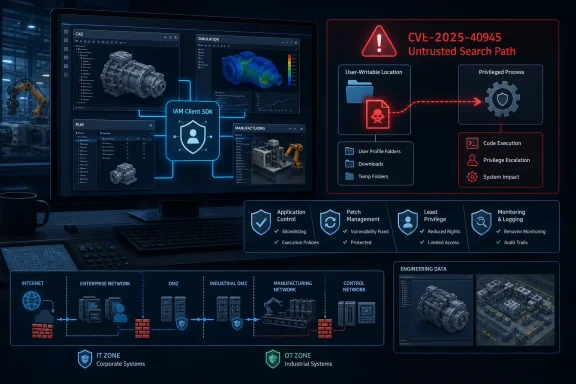
Siemens has issued and expanded guidance for a Windows-focused local privilege-escalation vulnerability in its IAM Client SDK, a shared component embedded across a broad range of engineering, simulation, design, and manufacturing products. Tracked as CVE-2025-40945, the flaw is an untrusted search path issue that can enable an authenticated local attacker to execute code with elevated privileges under specific conditions. The advisory carries a CVSS v3.1 score of 6.7, classified as Medium, but its practical importance is higher than that label may suggest for organizations running Siemens software on shared engineering workstations, jump hosts, virtual desktops, or systems bridging enterprise IT and operational technology environments.
The July 2026 Siemens advisory concerns the IAM Client SDK rather than one isolated desktop application. That distinction is fundamental: IAM Client functions as a common authentication and identity-related building block used by multiple Siemens products, meaning one underlying flaw can surface in several parts of an organization’s product lifecycle management, computer-aided design, simulation, and manufacturing software estate.
The weakness is categorized as CWE-426, Untrusted Search Path. In practical Windows terms, this class of issue occurs when software looks for a program, library, helper component, or other critical resource using a search path that can be influenced by an attacker. If a malicious file is placed in a location consulted before the intended trusted file, the vulnerable software may load or execute the attacker-controlled file instead.
However, local privilege escalation vulnerabilities are often valuable after an attacker gains an initial foothold. A compromised standard user account, a malicious insider, a contractor with workstation access, or malware that has already landed through phishing can potentially use a local escalation weakness to move from limited rights to more consequential control of the affected Windows system.
That breadth explains why a defect in a shared identity component deserves attention beyond its CVSS number. A vulnerability in an identity-adjacent SDK can expose a repeated weak point in environments that otherwise appear to be protected by separate application boundaries.
When a shared library or SDK contains a flaw, the remediation unit is not necessarily the library alone. The vendor may need to issue product-specific installers, maintenance packs, updates, or hotfixes for every application that bundles the vulnerable version. As a result, organizations can face a staggered remediation schedule even when the root cause is shared.
For defenders, the key operational takeaway is not whether the advisory is “new” in a news-cycle sense. It is whether the affected IAM Client versions exist anywhere in the organization, whether a vendor-supported update is available for each installation, and whether the organization can safely deploy it without disrupting active engineering or production programs.
The vulnerability should therefore be understood as a post-compromise amplifier. It may not be the first route into a workstation, but it could be useful to an attacker who already has access and wants to gain a more privileged foothold.
A search path problem emerges when software implicitly searches multiple directories and one or more of those directories are user-controlled or insufficiently protected. If the application runs with higher privileges than the attacker and loads a malicious resource from that location, the attacker’s code may inherit the application’s privileges.
This category overlaps conceptually with well-known DLL search order hijacking problems, but defenders should not assume the exact mechanism is a generic DLL preload case unless Siemens provides that detail. The advisory identifies the broader CWE-426 classification, which covers unsafe resolution of critical resources through attacker-influenced paths.
For example, a process intended to launch an executable under a directory such as
The secure engineering principle is straightforward: applications should use fully qualified paths, quote command-line paths correctly, avoid inheriting unsafe environment settings, and ensure that all directories consulted during privileged execution are protected against untrusted writes.
Organizations should treat the stated version numbers as minimum secure baselines for this vulnerability, not merely optional feature updates.
The advisory vector is AV:L/AC:L/PR:H/UI:N/S:U/C:H/I:H/A:H. The local attack vector and high privileges required decrease the base score, while the potential impact to confidentiality, integrity, and availability remains high.
There are several realistic scenarios in which high privileges may already exist but remain constrained:
That property can make the vulnerability useful for automated post-compromise activity. Defenders should not infer that a lack of phishing or social engineering makes an issue less urgent; it may instead indicate that exploitation becomes more deterministic after prerequisite access is established.
The IAM Client advisory should prompt administrators to examine not only installed versions but also the operating conditions of the affected software.
Even when the vulnerable application itself is not a server, the workstation can act as a privileged launch point into a much larger environment. Engineering clients often communicate with file shares, Teamcenter repositories, license servers, databases, and remote compute infrastructure.
Where multiple users access the same system, administrators should determine whether any user can write to locations searched by Siemens applications, whether user profiles are isolated correctly, and whether local administrator rights are granted too broadly for compatibility reasons. A flaw that requires a local authenticated attacker has a different risk profile on a single-user locked-down laptop than on a multi-user engineering terminal.
If multiple users share a golden image or access pooled desktop resources, patching the affected image can be efficient. Conversely, if session hosts are misconfigured and user-writable locations can influence privileged processes, one local issue may affect a larger population of users or expose a shared environment to persistence.
For security operations teams, it is a reminder that endpoint privilege boundaries remain crucial even when an application has no exposed network service.
An effective inventory workflow should distinguish at least four states:
Organizations should test the updates in a representative environment before broad rollout. Testing should include startup behavior, authentication flows, opening existing project data, local and network licensing, file associations, automation scripts, connected repositories, and any validated workflows used for regulated design or manufacturing processes.
That framing makes it easier to agree on a prioritized rollout. Systems used for active production support, supplier collaboration, sensitive defense or energy projects, shared lab access, or remote access should generally receive earlier attention than isolated test systems with no sensitive data.
The correct response is not to assume that every affected workstation is a direct industrial control system. It is to recognize that compromise of engineering assets can influence operational risk through data integrity, access pathways, and trusted workflow relationships.
If an attacker gains elevated access to an endpoint handling these assets, the immediate effect may be data theft or local persistence rather than direct control-system manipulation. But altered designs, manipulated simulation output, stolen credentials, or modified manufacturing documentation can create delayed and difficult-to-detect consequences.
Network segmentation does not fix an unsafe local search path, but it can constrain what an attacker can reach after exploiting a workstation. A compromised engineering endpoint should not automatically have broad and unmanaged connectivity to production systems, remote control assets, data historians, or administrative services.
A VPN is not a substitute for endpoint security. If a vulnerable Siemens application runs on a compromised remote-access endpoint, the VPN may simply provide an attacker with a trusted route into internal resources.
Compensating controls are not equivalent to a vendor fix. They reduce opportunity; they do not remove the vulnerable code path.
Key checks include:
Application control requires careful tuning in engineering environments because legitimate workflows may use custom scripts, internally built tools, macros, compilers, solver extensions, or third-party plug-ins. A poorly designed policy can halt productive work, while an overly permissive policy can provide little real protection.
Security teams should establish a baseline first. Specialized engineering software may legitimately invoke helper tools, solvers, license clients, and automation components that would look abnormal on a typical office PC. Detection logic should therefore be tested with engineering users rather than deployed solely from generic Windows telemetry assumptions.
A disciplined approach reduces both security risk and the chance of avoidable engineering disruption.
Verification should therefore include actual product version checks. This is especially important for products where the vulnerable component is embedded and not visibly listed as “Siemens IAM Client” in Windows’ installed-applications inventory.
Administrators should also monitor whether Siemens publishes more implementation detail about the affected IAM Client behavior. Additional technical specifics could influence compensating-control priorities, such as which directory permissions, process-launch scenarios, or local configuration settings require the closest scrutiny.
For customers, the equivalent lesson is architectural: valuable engineering workloads deserve the same disciplined endpoint management applied to domain controllers, privileged administration workstations, and sensitive developer environments. The applications may look like desktop software, but the data and access they carry make them strategically important systems.
The most effective response is to combine precise product-version inventory, prompt deployment of Siemens’ fixed releases, careful validation of engineering workflows, least-privilege enforcement, protected application paths, and segmentation between engineering and operational environments. Organizations that use this advisory to strengthen those fundamentals will reduce the risk from this search path flaw while improving resilience against the broader class of local compromise techniques that continue to target Windows-based industrial and engineering estates.
 Overview
The July 2026 Siemens advisory concerns the IAM Client SDK rather than one isolated desktop application. That distinction is fundamental: IAM Client functions as a common authentication and identity-related building block used by multiple Siemens products, meaning one underlying flaw can surface in several parts of an organization’s product lifecycle management, computer-aided design, simulation, and manufacturing software estate.The weakness is categorized as CWE-426, Untrusted Search Path. In practical Windows terms, this class of issue occurs when software looks for a program, library, helper component, or other critical resource using a search path that can be influenced by an attacker. If a malicious file is placed in a location consulted before the intended trusted file, the vulnerable software may load or execute the attacker-controlled file instead.
A Local Attack With Elevated Consequences
The published CVSS vector describes a vulnerability requiring local access, high privileges, and no user interaction. That combination matters because it narrows the initial attack path: this is not a browser-based exploit, a network worm, or a defect that an unauthenticated internet user can trigger directly.However, local privilege escalation vulnerabilities are often valuable after an attacker gains an initial foothold. A compromised standard user account, a malicious insider, a contractor with workstation access, or malware that has already landed through phishing can potentially use a local escalation weakness to move from limited rights to more consequential control of the affected Windows system.
The Scope of Affected Siemens Software
The affected product list is unusually wide because Siemens IAM Client is present across several product families. The advisory identifies affected versions of:- COMOS V10.4.5 and V10.6.
- Designcenter NX.
- Simcenter 3D.
- Simcenter Femap V2506 and V2512.
- Simcenter Nastran.
- Simcenter STAR-CCM+.
- Solid Edge SE2025 and SE2026.
- Teamcenter Visualization V2412, V2506, and V2512.
- Tecnomatix Plant Simulation V2404 and V2504.
- Tecnomatix Process Simulate.
Background
Siemens’ industrial software portfolio spans the lifecycle from design and simulation to manufacturing planning and operational execution. The products affected by the IAM Client advisory occupy important places in that chain: NX and Solid Edge are associated with product design, Simcenter products with analysis and simulation, Teamcenter Visualization with product-data access and collaboration, and Tecnomatix applications with digital manufacturing and production planning.That breadth explains why a defect in a shared identity component deserves attention beyond its CVSS number. A vulnerability in an identity-adjacent SDK can expose a repeated weak point in environments that otherwise appear to be protected by separate application boundaries.
Why Shared SDK Vulnerabilities Spread Widely
Software vendors commonly reuse components to avoid rebuilding authentication, licensing, telemetry, update, cryptographic, and communications functions in every product. That model improves consistency and lowers maintenance costs, but it also creates a dependency concentration problem.When a shared library or SDK contains a flaw, the remediation unit is not necessarily the library alone. The vendor may need to issue product-specific installers, maintenance packs, updates, or hotfixes for every application that bundles the vulnerable version. As a result, organizations can face a staggered remediation schedule even when the root cause is shared.
The Publication Timeline Matters
The Siemens advisory was initially released on July 14, 2026, and CISA republished it on July 21, 2026. That sequence is typical for industrial-control-system advisories: a vendor publishes technical remediation information, and CISA increases visibility for operators, asset owners, and security teams.For defenders, the key operational takeaway is not whether the advisory is “new” in a news-cycle sense. It is whether the affected IAM Client versions exist anywhere in the organization, whether a vendor-supported update is available for each installation, and whether the organization can safely deploy it without disrupting active engineering or production programs.
Understanding CVE-2025-40945
CVE-2025-40945 is described as an untrusted search path vulnerability in the Siemens IAM Client SDK. Siemens states that an authenticated user could potentially enable escalation of privilege through local access. The phrase “potentially” is appropriate because successful exploitation of search path flaws usually depends on the specific installation layout, permissions, process behavior, execution context, and available write locations.The vulnerability should therefore be understood as a post-compromise amplifier. It may not be the first route into a workstation, but it could be useful to an attacker who already has access and wants to gain a more privileged foothold.
What an Untrusted Search Path Means on Windows
Windows programs frequently depend on files beyond the main executable. These can include dynamic-link libraries, configuration files, helper executables, plug-ins, scripts, manifest resources, and application-specific modules. A secure application should resolve these resources using controlled locations and explicit paths.A search path problem emerges when software implicitly searches multiple directories and one or more of those directories are user-controlled or insufficiently protected. If the application runs with higher privileges than the attacker and loads a malicious resource from that location, the attacker’s code may inherit the application’s privileges.
This category overlaps conceptually with well-known DLL search order hijacking problems, but defenders should not assume the exact mechanism is a generic DLL preload case unless Siemens provides that detail. The advisory identifies the broader CWE-426 classification, which covers unsafe resolution of critical resources through attacker-influenced paths.
Why “Unquoted” Is Important
The advisory language also characterizes the issue as an unquoted search path vulnerability. In Windows environments, unquoted paths are especially dangerous when directory names contain spaces and an executable or command is invoked without proper quotation and path handling.For example, a process intended to launch an executable under a directory such as
C:\Program Files\Vendor Application\ can behave unexpectedly if the command line is constructed or resolved incorrectly. Depending on the exact implementation, Windows or the calling process may search for unintended executable names or resources. The risk becomes material when an attacker can create a file matching an earlier interpretation of the path.The secure engineering principle is straightforward: applications should use fully qualified paths, quote command-line paths correctly, avoid inheriting unsafe environment settings, and ensure that all directories consulted during privileged execution are protected against untrusted writes.
Affected Products and Fixed Versions
The advisory provides specific remediation thresholds rather than a single IAM Client package version applicable across every product. That means inventory and patch deployment must be performed by product family, release train, and installed version.Organizations should treat the stated version numbers as minimum secure baselines for this vulnerability, not merely optional feature updates.
Design and Simulation Products
For the main design and simulation portfolio, Siemens identifies the following minimum remediated versions:- COMOS V10.4.5 requires V10.4.5.0.2 or later, with patch and update information available through Siemens customer support.
- COMOS V10.6 requires V10.6.1 or later.
- Designcenter NX requires V2512.7000 or later.
- Simcenter 3D requires V2512.7000 or later.
- Simcenter Femap V2506 requires V2506.0003 or later.
- Simcenter Femap V2512 requires V2512.0002 or later.
- Simcenter Nastran requires V2606 or later.
- Simcenter STAR-CCM+ requires V2606 or later.
PLM, Manufacturing, and Design Applications
The remaining affected products have their own fixed versions:- Solid Edge SE2025 requires V225.0.13.3, also described as Update 13 or later.
- Solid Edge SE2026 requires V226.0.04.003, also described as Update 04 or later.
- Teamcenter Visualization V2412 requires V2412.0012 or later.
- Teamcenter Visualization V2506 requires V2506.0009 or later.
- Teamcenter Visualization V2512 requires V2512.2605 or later.
- Tecnomatix Plant Simulation V2404 requires V2404.0022 or later.
- Tecnomatix Plant Simulation V2504 requires V2504.0010 or later.
- Tecnomatix Process Simulate requires V2606 or later.
Why the CVSS Score Needs Context
A CVSS 3.1 base score of 6.7 can create a false sense of routine priority if teams use severity labels as their sole decision mechanism. CVSS is useful for standardization, but it cannot fully represent business context, endpoint role, engineering data sensitivity, or the likelihood that another weakness already provides local execution.The advisory vector is AV:L/AC:L/PR:H/UI:N/S:U/C:H/I:H/A:H. The local attack vector and high privileges required decrease the base score, while the potential impact to confidentiality, integrity, and availability remains high.
High Privileges Required Does Not Mean No Risk
“Privileges Required: High” means the attacker needs substantial existing permissions to exploit the vulnerability as scored. It does not mean the flaw is irrelevant in an enterprise environment.There are several realistic scenarios in which high privileges may already exist but remain constrained:
- An attacker compromises an account belonging to a workstation administrator but seeks SYSTEM-level control or execution in the context of a trusted application.
- A privileged engineering user works across shared workstations, test rigs, remote desktops, or project servers, creating opportunities for persistence or lateral movement.
- Malware has gained elevated but incomplete access and uses local weaknesses to bypass controls, manipulate software behavior, or establish stronger persistence.
- A malicious insider with legitimate access abuses a writable location or weak workstation configuration to execute unauthorized code through a trusted Siemens process.
No User Interaction Is a Meaningful Factor
The CVSS vector also indicates that user interaction is not required. Once an attacker satisfies the local-access and privileges prerequisites, the exploitation path does not rely on persuading another user to click a file, approve a prompt, or open a specially crafted project.That property can make the vulnerability useful for automated post-compromise activity. Defenders should not infer that a lack of phishing or social engineering makes an issue less urgent; it may instead indicate that exploitation becomes more deterministic after prerequisite access is established.
Windows Workstation Exposure
Windows engineering workstations are often complicated systems. They combine standard productivity software with specialized tools, proprietary add-ins, hardware drivers, floating-license clients, PLM integrations, simulation solvers, scripts, compilers, and workflow automation. That complexity increases the chance that security-relevant path settings, permissions, and launch contexts vary from one endpoint to another.The IAM Client advisory should prompt administrators to examine not only installed versions but also the operating conditions of the affected software.
Engineering Endpoints Are High-Value Targets
An attacker who gains elevated control over a design or simulation workstation may have access to intellectual property that is difficult to replace and extremely valuable to competitors or criminal groups. This can include CAD assemblies, finite-element models, manufacturing routings, process plans, bills of materials, design revisions, supplier documentation, and credentials or cached tokens used to access connected systems.Even when the vulnerable application itself is not a server, the workstation can act as a privileged launch point into a much larger environment. Engineering clients often communicate with file shares, Teamcenter repositories, license servers, databases, and remote compute infrastructure.
Shared Devices Complicate Accountability
Many organizations use shared workstations in laboratories, factories, classrooms, project rooms, or outsourced engineering settings. Shared use can weaken the assumptions behind a local-only vulnerability.Where multiple users access the same system, administrators should determine whether any user can write to locations searched by Siemens applications, whether user profiles are isolated correctly, and whether local administrator rights are granted too broadly for compatibility reasons. A flaw that requires a local authenticated attacker has a different risk profile on a single-user locked-down laptop than on a multi-user engineering terminal.
Virtual Desktop Environments Need Separate Review
Virtual desktop infrastructure and remote desktop services are sometimes used to centralize Siemens applications, especially where licensing, graphics acceleration, or data-governance requirements favor controlled access. These environments can reduce data sprawl, but they can also concentrate impact.If multiple users share a golden image or access pooled desktop resources, patching the affected image can be efficient. Conversely, if session hosts are misconfigured and user-writable locations can influence privileged processes, one local issue may affect a larger population of users or expose a shared environment to persistence.
Enterprise Impact
For enterprise IT teams, this advisory is primarily an asset-management and change-control exercise. The challenge is identifying every vulnerable product instance, mapping it to the correct update channel, and validating that patching does not break integrations relied upon by engineering, quality, manufacturing, or suppliers.For security operations teams, it is a reminder that endpoint privilege boundaries remain crucial even when an application has no exposed network service.
Inventory Must Go Beyond Application Names
A conventional software inventory may identify “NX,” “Solid Edge,” or “Teamcenter” without capturing the detailed maintenance version needed to determine exposure. Security teams should request precise build information from endpoint-management platforms, vendor-specific inventory tools, software deployment systems, or local application metadata.An effective inventory workflow should distinguish at least four states:
- Confirmed vulnerable, where the product and version are below Siemens’ remediation threshold.
- Confirmed remediated, where the installed version meets or exceeds the stated fixed release.
- Potentially affected but unverified, where the product is known but version data is incomplete.
- Not applicable, where the product is absent, unsupported, decommissioned, or outside the advisory’s defined scope.
Change Management Cannot Be Skipped
Engineering applications are not always patched on the same cadence as mainstream office suites. A new release may affect plug-ins, macros, solvers, license compatibility, graphics drivers, custom post-processing tools, export formats, or connections to PLM systems.Organizations should test the updates in a representative environment before broad rollout. Testing should include startup behavior, authentication flows, opening existing project data, local and network licensing, file associations, automation scripts, connected repositories, and any validated workflows used for regulated design or manufacturing processes.
Security Teams Need a Business Conversation
A vulnerability notice alone may not persuade an engineering department to accept a disruptive update. Security teams should translate the issue into operationally relevant language: this is a local escalation risk involving a shared identity component across systems holding valuable product and process data.That framing makes it easier to agree on a prioritized rollout. Systems used for active production support, supplier collaboration, sensitive defense or energy projects, shared lab access, or remote access should generally receive earlier attention than isolated test systems with no sensitive data.
Operational Technology and Industrial Security Considerations
Although the affected products are primarily engineering and industrial software applications, the advisory is relevant to organizations that operate in critical manufacturing, chemical, and energy sectors. Those sectors often connect design, planning, simulation, and production environments in ways that create indirect paths toward operational technology.The correct response is not to assume that every affected workstation is a direct industrial control system. It is to recognize that compromise of engineering assets can influence operational risk through data integrity, access pathways, and trusted workflow relationships.
The Engineering-to-Operations Connection
A design tool can feed manufacturing plans. A process simulation package can inform plant modifications. A PLM visualization client can expose product records and metadata. A digital manufacturing application can influence how teams plan, validate, and execute production work.If an attacker gains elevated access to an endpoint handling these assets, the immediate effect may be data theft or local persistence rather than direct control-system manipulation. But altered designs, manipulated simulation output, stolen credentials, or modified manufacturing documentation can create delayed and difficult-to-detect consequences.
Segmentation Remains Necessary
Siemens and CISA both emphasize defense-in-depth practices, including minimizing exposure, placing systems behind firewalls, and separating control environments from business networks. Those practices remain valuable here even though CVE-2025-40945 is locally exploitable.Network segmentation does not fix an unsafe local search path, but it can constrain what an attacker can reach after exploiting a workstation. A compromised engineering endpoint should not automatically have broad and unmanaged connectivity to production systems, remote control assets, data historians, or administrative services.
Secure Remote Access Is Still Part of the Story
Remote access often turns a local endpoint issue into a broader enterprise concern. Engineers may connect through VPNs, virtual desktops, managed laptops, or vendor-support channels. A secure remote-access design should enforce strong authentication, endpoint compliance, least privilege, and timely client updates.A VPN is not a substitute for endpoint security. If a vulnerable Siemens application runs on a compromised remote-access endpoint, the VPN may simply provide an attacker with a trusted route into internal resources.
Practical Mitigation Before Every Patch Is Deployed
Siemens recommends updating affected products to the indicated fixed versions, and that remains the primary remediation. Where an update is not yet available, cannot immediately be tested, or must wait for a scheduled maintenance window, organizations should apply compensating controls based on the local nature of the flaw.Compensating controls are not equivalent to a vendor fix. They reduce opportunity; they do not remove the vulnerable code path.
Reduce the Ability to Plant Malicious Files
The central defensive goal for an untrusted search path problem is to prevent untrusted users from placing attacker-controlled files in directories that a privileged or trusted process may search. Administrators should review permissions on application installation directories, adjacent directories, temporary locations, shared working folders, and any custom paths used by product launchers or add-ins.Key checks include:
- Ensure standard users cannot modify application binaries, executable directories, or trusted plug-in locations.
- Remove broad write permissions from shared directories that may be included in application search behavior.
- Verify that installation paths and system-level environment variables are managed by administrators rather than ordinary users.
- Review custom deployment scripts for unquoted executable paths and unsafe reliance on inherited search paths.
- Limit the use of local administrator privileges on engineering workstations.
Use Application Control Where Feasible
Windows application-control technologies can limit the impact of malicious executable or library placement. Policies based on trusted publishers, signed binaries, approved file paths, or managed application catalogs can make it harder for an attacker to launch an arbitrary payload from user-writable locations.Application control requires careful tuning in engineering environments because legitimate workflows may use custom scripts, internally built tools, macros, compilers, solver extensions, or third-party plug-ins. A poorly designed policy can halt productive work, while an overly permissive policy can provide little real protection.
Monitor for Suspicious Process Behavior
Endpoint detection and response tooling can help identify suspicious activity around Siemens applications, especially unexpected child processes, unsigned libraries, execution from temporary folders, unusual privilege transitions, or modifications in protected application directories.Security teams should establish a baseline first. Specialized engineering software may legitimately invoke helper tools, solvers, license clients, and automation components that would look abnormal on a typical office PC. Detection logic should therefore be tested with engineering users rather than deployed solely from generic Windows telemetry assumptions.
Patch Deployment Strategy
Patching a shared SDK issue across a heterogeneous Siemens estate should be planned as a coordinated program rather than a single emergency reboot. The correct pace depends on exposure, operational dependency, and the availability of vendor-supported fixed versions.A disciplined approach reduces both security risk and the chance of avoidable engineering disruption.
A Recommended Remediation Sequence
- Identify affected software and exact versions. Use endpoint inventory, software deployment records, product administration consoles, and targeted verification on high-value systems.
- Rank systems by business and security impact. Prioritize shared workstations, systems with local administrative users, devices handling sensitive IP, remote-access endpoints, and machines with connectivity to PLM or manufacturing networks.
- Obtain the correct Siemens update for each product train. Do not substitute a similarly named release or assume that another product’s fixed IAM Client build resolves the issue.
- Validate updates in a representative test environment. Include identity, licensing, project compatibility, plug-ins, graphics acceleration, and integration testing.
- Deploy in controlled waves. Start with high-risk systems that have passed validation, then move through business units and lower-risk systems.
- Verify the installed version after deployment. A successful software-distribution job is not enough; confirm the endpoint now meets the stated fixed version.
- Document exceptions and controls. For systems that cannot yet be updated, record the owner, reason, target date, compensating controls, and residual risk acceptance process.
Avoid the “Update Complete” Trap
A patch-management tool may report that a package installed successfully even when the application remains below the required build level, a reboot is pending, or a separate component update was skipped. Siemens environments often have complex installation requirements, including separate maintenance packs or controlled update portals.Verification should therefore include actual product version checks. This is especially important for products where the vulnerable component is embedded and not visibly listed as “Siemens IAM Client” in Windows’ installed-applications inventory.
Strengths and Opportunities
The advisory also presents an opportunity for organizations to improve the overall security posture of their industrial software estate rather than treating the issue as an isolated patch ticket.- The vulnerability has a clear vendor remediation path for many affected releases. Specific minimum fixed versions allow administrators to create precise compliance targets.
- The local attack requirement makes risk reduction achievable through endpoint hardening. Strong least-privilege controls, protected application paths, and application control can meaningfully reduce exploitability while updates are tested.
- The shared-component nature exposes inventory gaps that can now be corrected. Organizations can use this event to create a more accurate record of Siemens software, versions, owners, and dependencies.
- The issue encourages closer cooperation between IT, engineering, and OT security teams. That coordination is valuable far beyond this single CVE because industrial software usually crosses traditional administrative boundaries.
- Modern endpoint telemetry can support validation and detection. Monitoring trusted engineering applications for unusual execution behavior can improve incident visibility without requiring intrusive changes to design workflows.
Risks and Concerns
Despite the availability of fixes for many product versions, several factors can make the vulnerability difficult to resolve quickly in real-world environments.- Patch availability is uneven across products and releases. Siemens indicates that further fixes are being prepared for some affected products, so organizations may need to rely on compensating controls temporarily.
- Legacy versions may be difficult to upgrade. Older engineering deployments can be tied to projects, certifications, legacy operating environments, or plugin ecosystems that do not support immediate migration.
- A shared SDK creates a broad remediation surface. Teams may patch a primary design tool while overlooking a visualization, simulation, or manufacturing application on a different workstation.
- Local vulnerabilities can be chained with more common initial-access methods. Phishing, credential theft, remote-access abuse, or malicious installers can provide the local foothold needed to make escalation flaws useful.
- Engineering workstations often carry excessive privilege. Compatibility exceptions, specialized drivers, legacy installers, and user-managed toolchains can lead to local administrator rights that expand the practical attack surface.
- Data integrity consequences can be subtle. Attackers do not need to cause an outage to create harm; altered design data, simulation settings, or process documentation can create long-lived operational and quality risks.
What to Watch Next
The next development to watch is Siemens’ release of additional fixed versions for products not yet covered by an available update. Organizations should maintain an exception list for every known affected deployment that cannot be remediated immediately and review Siemens guidance as new product-specific patches arrive.Administrators should also monitor whether Siemens publishes more implementation detail about the affected IAM Client behavior. Additional technical specifics could influence compensating-control priorities, such as which directory permissions, process-launch scenarios, or local configuration settings require the closest scrutiny.
Signs of Elevated Priority
Security teams should raise the urgency of remediation when affected systems meet one or more of the following conditions:- The workstation is shared by multiple users or accessible through remote desktop services.
- The affected Siemens product runs with elevated rights or is used by users with local administrator privileges.
- The system holds sensitive product designs, manufacturing data, defense-related information, or regulated records.
- The endpoint has broad access to Teamcenter, file shares, license infrastructure, build systems, or production-adjacent resources.
- The organization has recently experienced phishing, malware, credential compromise, or unauthorized local-access events.
- The application installation directories or associated plug-in paths have permissive write permissions.
A Longer-Term Design Lesson
The deeper lesson is that authentication and identity components should be treated as security-critical software even when they are installed quietly inside a desktop engineering suite. Shared libraries must use explicit, protected paths; avoid unsafe inheritance of process environments; validate load locations; and operate with only the permissions required for their job.For customers, the equivalent lesson is architectural: valuable engineering workloads deserve the same disciplined endpoint management applied to domain controllers, privileged administration workstations, and sensitive developer environments. The applications may look like desktop software, but the data and access they carry make them strategically important systems.
Looking Ahead
CVE-2025-40945 is a manageable vulnerability, but only if organizations recognize its real scope. It is not an internet-exposed emergency affecting every Windows computer, yet it is also not a harmless Medium-severity patch to postpone indefinitely. The affected Siemens products sit close to valuable engineering, manufacturing, and product-lifecycle assets, and the IAM Client SDK’s shared role turns version management into a multi-product security task.The most effective response is to combine precise product-version inventory, prompt deployment of Siemens’ fixed releases, careful validation of engineering workflows, least-privilege enforcement, protected application paths, and segmentation between engineering and operational environments. Organizations that use this advisory to strengthen those fundamentals will reduce the risk from this search path flaw while improving resilience against the broader class of local compromise techniques that continue to target Windows-based industrial and engineering estates.
References
- Primary source: CISA
Published: 2026-07-21T12:00:00+00:00

Siemens IAM Client | CISA
www.cisa.gov