

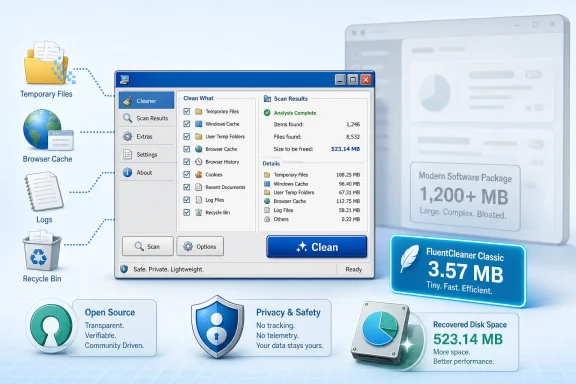
FluentCleaner Classic has arrived as a tiny, free, open-source Windows cleanup utility that deliberately recreates the familiar look and workflow of old-school CCleaner while avoiding the installers, bundled offers, telemetry concerns, and feature sprawl that damaged trust in the category. At only about 3.57 MB unpacked, the new Windows Forms edition is dramatically smaller than the roughly 140 MB modern FluentCleaner package, yet it reportedly uses the same cleaning engine and community-maintained rule databases—making it an intriguing option for Windows 11 users, older-PC enthusiasts, and administrators who want focused file cleanup without installing another sprawling “PC optimization” suite.
Windows has supported third-party maintenance utilities for decades, partly because Microsoft historically scattered storage management, startup control, application removal, browser cleanup, and troubleshooting across several interfaces. Utilities such as CCleaner became popular by consolidating many of those functions into one recognizable window.
The market eventually became less appealing. Many cleaners added subscriptions, background services, advertising, bundled software, aggressive warnings, registry-cleaning claims, driver updaters, and other components that had little to do with deleting temporary files.
That workflow solved a genuine usability problem. Windows included Disk Cleanup, but third-party applications created caches and logs outside the locations Microsoft’s utility understood, while web browsers and media programs accumulated their own disposable data.
CCleaner also developed an interface that millions of users immediately recognized. A vertical navigation bar, category checkboxes, an analysis button, and a results panel created a predictable sequence that was approachable even for nontechnical users.
Others installed persistent monitoring processes, promoted partner software, changed browser preferences, or sold supposed performance improvements that were difficult to measure. The industry increasingly blurred the line between useful maintenance software and potentially unwanted applications.
That history matters because FluentCleaner Classic is not merely adopting a nostalgic visual design. It is attempting to recover the focused, transparent utility model that made early Windows cleaners useful before commercialization transformed many of them into all-purpose optimization platforms.
The word Classic therefore describes both the application’s appearance and its technical foundation. This is not simply a new theme placed over the modern version.
That resemblance will inevitably attract attention. It also serves a practical purpose: a mature interface pattern can be more efficient than a modern design that prioritizes large margins, animations, touch spacing, and decorative elements.
FluentCleaner Classic does not appear to reproduce CCleaner branding or use its original logo. Nevertheless, the visual inspiration is unmistakable, and the developer reportedly describes the project as a deliberate return to the original cleaner experience.
The difference is primarily in the user-interface technology and its dependencies. Classic presents the engine through Windows Forms, while regular FluentCleaner uses WinUI 3 and the supporting Windows App SDK environment.
That separation is sensible software design. A cleaning engine should identify candidates, calculate sizes, enforce exclusions, and execute selected operations independently of the visual framework used to display buttons and lists.
The reported result is striking: approximately 3.57 MB and around 20 files for Classic, compared with roughly 140 MB for the main FluentCleaner distribution. Those numbers refer to the application footprint rather than the storage it may recover during cleaning.
WinUI 3 applications often carry a larger deployment cost because the Windows App SDK includes components needed to deliver modern controls, window behavior, graphics, and application lifecycle features consistently. The size does not necessarily indicate inefficient coding; much of it reflects the price of shipping a newer platform.
Classic takes the opposite approach. It accepts an older visual toolkit in exchange for:
The small footprint still has practical value. It makes the utility easier to inspect, archive, transfer, and run from removable media, while minimizing the absurdity of installing a large maintenance suite to recover a comparatively modest amount of temporary storage.
That does not mean every old Windows release is safe to use online. Compatibility with unsupported operating systems should be viewed as a maintenance advantage for isolated systems, legacy applications, laboratories, repair environments, and migration work—not as an argument against upgrading vulnerable PCs.
This database-driven model is one reason multiple cleaners can support thousands of applications without separately researching and compiling every location into their executable files.
The cleaner then parses those definitions and checks the applicable locations. A well-designed engine should distinguish between detection, analysis, presentation, and deletion rather than blindly processing every matching path.
This approach offers several benefits:
Rule transparency is therefore crucial. Users should be able to determine what a selected entry targets rather than relying on vague labels such as “junk,” “errors,” or “performance problems.”
The main FluentCleaner project has worked toward presenting clearer explanations of entries and paths. Classic will benefit if that transparency remains consistent across both interfaces, especially because its nostalgic appearance may encourage users to treat it as a familiar, proven tool rather than a comparatively new project.
The value of an extensive database lies in choice, not in selecting everything. A cautious cleaner should expose granular categories and let users decide which forms of data they genuinely want removed.
Familiarity reduces the learning curve. It can also create misplaced confidence, making careful labeling and conservative defaults especially important.
FluentCleaner Classic has an opportunity to keep the efficient layout while improving disclosure. Each item should explain whether it contains a reconstructable cache, a diagnostic log, browsing history, saved session state, or potentially important user data.
A modern cleaner wearing a classic interface should retain the past’s efficiency without repeating its ambiguity.
The relationship was not a simple ban on deleting temporary files. Microsoft itself provides multiple storage cleanup mechanisms and now distributes Microsoft PC Manager, which overlaps with parts of the traditional cleaner market.
The bundled applications were not necessarily malware. The concern was that software packaging could result in unexpected installation activity or preference changes, including browser installation and default-browser modifications.
This distinction matters. A PUA classification does not automatically mean an application is malicious; it indicates behavior Microsoft believes may reduce user control or create an unwanted experience.
FluentCleaner Classic avoids much of that controversy by being open source, portable, and narrowly focused. It reportedly includes no partner offers, browser bundles, advertising platform, or mandatory account system.
CCleaner nevertheless eventually appeared in the Microsoft Store. Its arrival demonstrated that Microsoft’s position was not that every third-party cleaner was inherently unacceptable, but that distribution practices, safety, and policy compliance mattered.
FluentCleaner’s developer has taken a notably skeptical position on registry cleaning. The main project’s registry-related area has reportedly existed to make the point that registry cleaners are unnecessary rather than to promise magical repairs.
That decision may be one of FluentCleaner Classic’s most important advantages. A utility that deletes disposable files is easier to justify than one that interprets harmless registry remnants as urgent defects.
FluentCleaner Classic is therefore not filling a complete absence. It is competing on coverage, portability, transparency, and control.
Cleanup Recommendations provides a more interactive view of temporary files, large or unused files, cloud-synchronized content, and infrequently used applications. These tools understand Windows servicing data better than a third-party cleaner and should generally be the first choice for operating-system cleanup.
Their limitation is application coverage. Microsoft cannot reasonably maintain detailed cleanup definitions for every third-party utility, browser fork, media application, development environment, and niche program.
Disk Cleanup has the advantage of being a Microsoft component with knowledge of Windows servicing categories. FluentCleaner Classic should supplement it rather than attempt to replace it for sensitive operating-system data.
This creates an interesting contradiction. Microsoft previously objected to problematic behavior within the cleaner industry, yet it now acknowledges that users want a consolidated maintenance dashboard.
The difference is trust and scope. Microsoft can integrate with Windows-supported mechanisms, whereas third-party applications must infer which data is safe to remove. FluentCleaner Classic responds by emphasizing open code, inspectable rules, a portable package, and no commercial upselling.
Users should approach FluentCleaner Classic as a precision maintenance tool, not as a cure for every performance problem.
For the first run, select only clearly disposable categories such as standard temporary files, crash dumps that are no longer needed, old logs, and browser caches. Avoid broad history, session, password, cookie, and recent-file categories until their effects are understood.
A careful process should include:
Performance can improve when a system drive is critically full, a cache is corrupted, or an application has accumulated an unusually large amount of data. In most other cases, startup applications, limited memory, thermal throttling, malware, failing storage, driver problems, or outdated hardware are more likely explanations for poor performance.
Users should run without elevation when possible and grant administrative privileges only when a selected operation clearly requires them. A cleaner should not demand permanent high privileges merely for convenience.
The portable format also makes the application easy to test and remove. Deleting its folder should be substantially simpler than untangling a conventional optimizer that installs services, scheduled tasks, browser components, and update agents.
Thumbnail caches will regenerate, but doing so can temporarily make folders feel slower. Shader caches may also rebuild, potentially causing short-lived stutter in games or graphics applications.
Logs can be invaluable while diagnosing crashes. Clearing them immediately before seeking technical support may erase the evidence needed to identify a failing driver, application fault, or update problem.
A community-maintained rule database introduces both flexibility and supply-chain risk. Administrators must know exactly which database version was used and whether its definitions changed between scans.
Command-line capabilities in the broader FluentCleaner project could support repeatable workflows if Classic exposes equivalent functionality. However, unattended deletion should use tightly controlled allowlists rather than every available rule.
FluentCleaner Classic is more compelling as a targeted supplement for third-party application debris, troubleshooting, or technician-led remediation. It should not displace Microsoft-supported storage policies merely because its interface is more familiar.
The project should clearly document whether differences are cosmetic, framework-related, or behavioral. Users need to know whether choosing Classic sacrifices capabilities beyond the modern interface.
A useful future model would assign classifications such as safe cache, privacy-sensitive, session-affecting, diagnostic, and advanced. That would help users understand consequences before selecting an entry.
The developer will need to maintain clear release channels, signed binaries where feasible, published hashes, and prominent warnings about unofficial mirrors. Microsoft Defender reputation may initially treat new or infrequently downloaded builds cautiously even when they contain no malicious behavior.
Microsoft’s own PC Manager proves that the company does not oppose cleanup utilities in principle. FluentCleaner Classic’s best defense is to remain transparent, conservative, and free of the commercial behavior that created tension around earlier products.
If Classic becomes more popular than the flagship FluentCleaner interface, it could send a broader message to Windows developers: users may value low dependency counts, fast startup, and information density more than perfect visual conformity with Windows 11.
FluentCleaner Classic is compelling not because Windows 11 suddenly needs another one-click optimizer, but because it challenges what a maintenance utility has become. By combining a familiar CCleaner-style workflow with open code, community definitions, a tiny Windows Forms package, and an explicit rejection of registry-cleaning mythology and bundled offers, it offers a cleaner vision for cleaning software itself. Its success will depend on cautious defaults, trustworthy database updates, and disciplined development, but if those foundations hold, this 3.57 MB throwback could become a useful modern companion to Storage Sense, Disk Cleanup, and Microsoft PC Manager—particularly for Windows enthusiasts who want to know exactly what is consuming space and exactly what will disappear when they click Clean.
Despite sharing the cleaning core, Classic does not yet have full feature parity. Version 1.0.0 is English-only and lacks the modern edition’s theme picker, settings import/export, portable-mode indicator, Winappx support, interactive terminal, Rule Lab, and AI-assisted custom cleaner generation. Users needing those capabilities should remain on the WinUI 3 edition, while Classic currently targets those prioritizing portability, compatibility, and minimal dependencies.

 www.neowin.net
 Background
Windows has supported third-party maintenance utilities for decades, partly because Microsoft historically scattered storage management, startup control, application removal, browser cleanup, and troubleshooting across several interfaces. Utilities such as CCleaner became popular by consolidating many of those functions into one recognizable window.The market eventually became less appealing. Many cleaners added subscriptions, background services, advertising, bundled software, aggressive warnings, registry-cleaning claims, driver updaters, and other components that had little to do with deleting temporary files.
Why CCleaner became a Windows institution
CCleaner’s early success came from simplicity. Users could select categories such as browser caches, temporary files, recently used lists, log files, and Recycle Bin contents, scan for removable data, review the result, and then perform the cleanup.That workflow solved a genuine usability problem. Windows included Disk Cleanup, but third-party applications created caches and logs outside the locations Microsoft’s utility understood, while web browsers and media programs accumulated their own disposable data.
CCleaner also developed an interface that millions of users immediately recognized. A vertical navigation bar, category checkboxes, an analysis button, and a results panel created a predictable sequence that was approachable even for nontechnical users.
How the category lost credibility
Over time, the cleaner market became associated with questionable promises. Some utilities implied that hundreds of harmless registry references represented severe faults, then demanded payment to “repair” them.Others installed persistent monitoring processes, promoted partner software, changed browser preferences, or sold supposed performance improvements that were difficult to measure. The industry increasingly blurred the line between useful maintenance software and potentially unwanted applications.
That history matters because FluentCleaner Classic is not merely adopting a nostalgic visual design. It is attempting to recover the focused, transparent utility model that made early Windows cleaners useful before commercialization transformed many of them into all-purpose optimization platforms.
What FluentCleaner Classic Actually Is
FluentCleaner Classic is a separate presentation of the broader FluentCleaner project, built by developer Belim under the builtbybel identity. It is designed around a conventional Windows interface rather than the modern WinUI 3 framework used by the primary FluentCleaner release.The word Classic therefore describes both the application’s appearance and its technical foundation. This is not simply a new theme placed over the modern version.
A deliberate visual throwback
The application closely resembles the older CCleaner layout, including its navigation structure, category organization, scan controls, and results area. Users familiar with classic PC maintenance tools should understand the basic workflow almost immediately.That resemblance will inevitably attract attention. It also serves a practical purpose: a mature interface pattern can be more efficient than a modern design that prioritizes large margins, animations, touch spacing, and decorative elements.
FluentCleaner Classic does not appear to reproduce CCleaner branding or use its original logo. Nevertheless, the visual inspiration is unmistakable, and the developer reportedly describes the project as a deliberate return to the original cleaner experience.
The same engine in a smaller shell
The most important claim is that Classic uses the same core cleaning engine as the regular FluentCleaner release. If maintained consistently, this means users should not have to choose between the modern interface and the classic one based on cleaning coverage.The difference is primarily in the user-interface technology and its dependencies. Classic presents the engine through Windows Forms, while regular FluentCleaner uses WinUI 3 and the supporting Windows App SDK environment.
That separation is sensible software design. A cleaning engine should identify candidates, calculate sizes, enforce exclusions, and execute selected operations independently of the visual framework used to display buttons and lists.
Why Windows Forms Makes the App So Small
FluentCleaner Classic is built with Windows Forms and .NET Framework 4.8, technologies that are already present or readily supported across a wide range of Windows installations. By contrast, a packaged modern Windows application may need to ship substantial framework components or depend on separately installed runtimes.The reported result is striking: approximately 3.57 MB and around 20 files for Classic, compared with roughly 140 MB for the main FluentCleaner distribution. Those numbers refer to the application footprint rather than the storage it may recover during cleaning.
Framework reuse versus bundled dependencies
Windows Forms is mature, stable, and deeply integrated with the traditional Windows desktop. It lacks some of WinUI 3’s modern visual capabilities, but it can rely on infrastructure that many systems already have.WinUI 3 applications often carry a larger deployment cost because the Windows App SDK includes components needed to deliver modern controls, window behavior, graphics, and application lifecycle features consistently. The size does not necessarily indicate inefficient coding; much of it reflects the price of shipping a newer platform.
Classic takes the opposite approach. It accepts an older visual toolkit in exchange for:
- A much smaller download and extracted footprint.
- Fewer external runtime requirements.
- Broader compatibility with older Windows systems.
- Faster distribution in portable or administrative toolkits.
- A lower likelihood of framework-related startup failures.
Small does not automatically mean fast
Application size and runtime performance are different measurements. A 3.57 MB executable is not guaranteed to scan a drive more quickly than a 140 MB application, because scan speed depends on rule parsing, file-system access, storage latency, exclusion logic, and the number of locations examined.The small footprint still has practical value. It makes the utility easier to inspect, archive, transfer, and run from removable media, while minimizing the absurdity of installing a large maintenance suite to recover a comparatively modest amount of temporary storage.
Compatibility as a feature
Supporting .NET Framework 4.8 may make FluentCleaner Classic useful beyond fully updated Windows 11 machines. It can potentially run on older Windows configurations where modern Windows App SDK dependencies are unavailable, inconvenient, or prohibited.That does not mean every old Windows release is safe to use online. Compatibility with unsupported operating systems should be viewed as a maintenance advantage for isolated systems, legacy applications, laboratories, repair environments, and migration work—not as an argument against upgrading vulnerable PCs.
The Winapp2 and Winapp3 Cleaning Databases
FluentCleaner’s coverage comes from the Winapp2 ecosystem, a long-running community project that maintains declarative cleaning rules for Windows applications. Instead of hard-coding every supported browser, media player, utility, and development tool into the main program, the engine reads structured definitions describing disposable locations.This database-driven model is one reason multiple cleaners can support thousands of applications without separately researching and compiling every location into their executable files.
How declarative cleaning works
A cleaning definition can identify an application, associate it with a category, and describe file paths or registry locations connected to caches, logs, histories, crash reports, thumbnails, or other potentially removable data. Environment variables and wildcard patterns can make one definition work across different usernames and installation paths.The cleaner then parses those definitions and checks the applicable locations. A well-designed engine should distinguish between detection, analysis, presentation, and deletion rather than blindly processing every matching path.
This approach offers several benefits:
- Definitions can be updated without rebuilding the entire application.
- Community members can add support for newly released software.
- Advanced users can inspect the rules before using them.
- Alternative databases can be loaded when they follow the expected format.
- Errors can be corrected at the rule level instead of requiring engine changes.
Community maintenance has trade-offs
A community database can respond quickly, but its quality depends on review, testing, and conservative definitions. Application vendors can change directory structures at any time, and a path once used exclusively for disposable cache data may later contain persistent settings.Rule transparency is therefore crucial. Users should be able to determine what a selected entry targets rather than relying on vague labels such as “junk,” “errors,” or “performance problems.”
The main FluentCleaner project has worked toward presenting clearer explanations of entries and paths. Classic will benefit if that transparency remains consistent across both interfaces, especially because its nostalgic appearance may encourage users to treat it as a familiar, proven tool rather than a comparatively new project.
Winapp3 and extended coverage
Winapp3-style definitions can broaden the available cleaning catalogue, but broader coverage is not always better. Every additional target increases the possibility of clearing useful state, including recent-document histories, session information, authentication tokens, thumbnail databases, application logs, or recovery data.The value of an extensive database lies in choice, not in selecting everything. A cautious cleaner should expose granular categories and let users decide which forms of data they genuinely want removed.
The CCleaner Resemblance Is More Than Cosmetic
Calling FluentCleaner Classic a CCleaner lookalike understates the strategic logic. The classic CCleaner interface encoded a simple maintenance workflow that newer applications often complicate.Familiarity reduces the learning curve. It can also create misplaced confidence, making careful labeling and conservative defaults especially important.
The traditional scan-and-review workflow
A sensible cleaning session should follow a predictable order:- The user selects specific applications and data categories.
- The program analyzes matching locations without deleting anything.
- The results show the estimated amount of recoverable space.
- The user reviews unexpected or sensitive entries.
- Only confirmed categories are removed.
Familiarity must not become imitation without improvement
Classic maintenance software had weaknesses as well as strengths. Lists could become overwhelming, explanations were often terse, and users were encouraged to select every checkbox in pursuit of the largest possible cleanup number.FluentCleaner Classic has an opportunity to keep the efficient layout while improving disclosure. Each item should explain whether it contains a reconstructable cache, a diagnostic log, browsing history, saved session state, or potentially important user data.
A modern cleaner wearing a classic interface should retain the past’s efficiency without repeating its ambiguity.
Microsoft’s Complicated History With CCleaner
The suggestion that Microsoft “hated” CCleaner simplifies a longer technical and policy dispute. Microsoft’s objections have focused on risky registry modification, bundled applications, potentially unwanted software behavior, and the support complications created when third-party tools alter Windows components.The relationship was not a simple ban on deleting temporary files. Microsoft itself provides multiple storage cleanup mechanisms and now distributes Microsoft PC Manager, which overlaps with parts of the traditional cleaner market.
The potentially unwanted application dispute
In July 2020, Microsoft Defender began identifying certain Piriform installers as potentially unwanted applications. Microsoft’s published explanation focused on bundled products offered alongside utilities such as CCleaner, Defraggler, Recuva, and Speccy.The bundled applications were not necessarily malware. The concern was that software packaging could result in unexpected installation activity or preference changes, including browser installation and default-browser modifications.
This distinction matters. A PUA classification does not automatically mean an application is malicious; it indicates behavior Microsoft believes may reduce user control or create an unwanted experience.
FluentCleaner Classic avoids much of that controversy by being open source, portable, and narrowly focused. It reportedly includes no partner offers, browser bundles, advertising platform, or mandatory account system.
The Microsoft community-link controversy
Microsoft’s community forums also reportedly blocked or discouraged links to CCleaner for a period, reflecting broader concern about recommendations that could lead inexperienced users to modify their systems aggressively. That stance helped create the impression of institutional hostility.CCleaner nevertheless eventually appeared in the Microsoft Store. Its arrival demonstrated that Microsoft’s position was not that every third-party cleaner was inherently unacceptable, but that distribution practices, safety, and policy compliance mattered.
Registry cleaning remains the dividing line
Microsoft has long warned that incorrect Registry modification can cause serious problems and that it does not support the use of registry cleaners that rely on unsupported extraction or modification methods. The Windows Registry is an active configuration database, not a pile of ordinary files that becomes meaningfully faster when unused references are removed.FluentCleaner’s developer has taken a notably skeptical position on registry cleaning. The main project’s registry-related area has reportedly existed to make the point that registry cleaners are unnecessary rather than to promise magical repairs.
That decision may be one of FluentCleaner Classic’s most important advantages. A utility that deletes disposable files is easier to justify than one that interprets harmless registry remnants as urgent defects.
How It Compares With Windows 11’s Built-In Tools
Windows 11 already contains capable storage-management features, including Storage Sense, Cleanup Recommendations, the Temporary Files page, application storage breakdowns, and the longstanding Disk Cleanup utility. Microsoft PC Manager adds another official interface for cleanup, startup management, security checks, and related maintenance.FluentCleaner Classic is therefore not filling a complete absence. It is competing on coverage, portability, transparency, and control.
Storage Sense and Cleanup Recommendations
Storage Sense can automatically remove temporary files and aged Recycle Bin contents, while also managing locally cached cloud files according to configured rules. It is particularly useful because it can operate automatically when storage runs low or on a schedule.Cleanup Recommendations provides a more interactive view of temporary files, large or unused files, cloud-synchronized content, and infrequently used applications. These tools understand Windows servicing data better than a third-party cleaner and should generally be the first choice for operating-system cleanup.
Their limitation is application coverage. Microsoft cannot reasonably maintain detailed cleanup definitions for every third-party utility, browser fork, media application, development environment, and niche program.
Disk Cleanup remains relevant
The classiccleanmgr.exe utility remains available on supported Windows releases and can remove categories such as temporary files, Recycle Bin contents, thumbnails, and certain Windows system files. Its “Clean up system files” mode is especially useful after updates.Disk Cleanup has the advantage of being a Microsoft component with knowledge of Windows servicing categories. FluentCleaner Classic should supplement it rather than attempt to replace it for sensitive operating-system data.
Microsoft PC Manager changes the competitive picture
Microsoft PC Manager openly occupies territory that was once dominated by third-party optimizers. It combines deep cleanup, startup controls, storage analysis, Windows security links, pop-up management, and access to built-in tools.This creates an interesting contradiction. Microsoft previously objected to problematic behavior within the cleaner industry, yet it now acknowledges that users want a consolidated maintenance dashboard.
The difference is trust and scope. Microsoft can integrate with Windows-supported mechanisms, whereas third-party applications must infer which data is safe to remove. FluentCleaner Classic responds by emphasizing open code, inspectable rules, a portable package, and no commercial upselling.
Safe Use on Windows 11
Open-source software is not automatically harmless, and cleanup operations are inherently destructive. Once cache files, logs, session data, or histories are deleted, restoring them may be difficult or impossible.Users should approach FluentCleaner Classic as a precision maintenance tool, not as a cure for every performance problem.
A conservative first run
Before cleaning, close browsers and applications whose data will be scanned. Open programs may lock files, immediately recreate caches, or store unsaved state in temporary locations.For the first run, select only clearly disposable categories such as standard temporary files, crash dumps that are no longer needed, old logs, and browser caches. Avoid broad history, session, password, cookie, and recent-file categories until their effects are understood.
A careful process should include:
- Create a current backup of important personal data.
- Download the release only from the developer’s official repository.
- Scan the extracted files with Microsoft Defender.
- Run an analysis without immediately deleting the results.
- Review the largest entries and verify their paths.
- Clean a small group of unambiguous categories.
- Reopen affected applications and confirm they behave normally.
- Expand the selection gradually on future runs.
Do not expect dramatic performance gains
Removing temporary files primarily recovers storage and may reduce privacy traces. It does not normally transform a healthy modern PC into a faster machine.Performance can improve when a system drive is critically full, a cache is corrupted, or an application has accumulated an unusually large amount of data. In most other cases, startup applications, limited memory, thermal throttling, malware, failing storage, driver problems, or outdated hardware are more likely explanations for poor performance.
Think carefully before elevating permissions
Some system locations require administrator rights. Elevation gives the application greater access, increasing both its cleaning reach and the consequences of an incorrect rule.Users should run without elevation when possible and grant administrative privileges only when a selected operation clearly requires them. A cleaner should not demand permanent high privileges merely for convenience.
Consumer Impact
For home users, FluentCleaner Classic’s strongest appeal is its rejection of the modern optimization-suite business model. There is no obvious need for an account, subscription, permanent background service, or bundled “health” dashboard.The portable format also makes the application easy to test and remove. Deleting its folder should be substantially simpler than untangling a conventional optimizer that installs services, scheduled tasks, browser components, and update agents.
Useful scenarios for home PCs
The utility may be especially helpful when:- A browser or creative application has accumulated an unusually large cache.
- A small SSD has limited free space after years of application use.
- Multiple user-installed programs leave temporary data outside Windows’ standard cleanup locations.
- A user wants to inspect cleanup definitions rather than trust a black-box scan.
- An older PC cannot conveniently run the modern FluentCleaner package.
- A repair technician needs a small portable tool for controlled maintenance.
Where consumers can get into trouble
Cookies and site data may look disposable but often contain authentication state and user preferences. Removing them can sign users out of websites, reset consent settings, and disrupt web applications.Thumbnail caches will regenerate, but doing so can temporarily make folders feel slower. Shader caches may also rebuild, potentially causing short-lived stutter in games or graphics applications.
Logs can be invaluable while diagnosing crashes. Clearing them immediately before seeking technical support may erase the evidence needed to identify a failing driver, application fault, or update problem.
Enterprise and Technician Considerations
FluentCleaner Classic’s small footprint and compatibility make it potentially attractive to support technicians, but enterprise adoption requires more than a convenient executable. Organizations need predictable behavior, version control, auditability, licensing clarity, and a reliable update process.A community-maintained rule database introduces both flexibility and supply-chain risk. Administrators must know exactly which database version was used and whether its definitions changed between scans.
Portability helps controlled support work
A compact utility can fit into a technician toolkit, recovery drive, or approved software repository. It may also run in environments where installing the Windows App SDK is undesirable.Command-line capabilities in the broader FluentCleaner project could support repeatable workflows if Classic exposes equivalent functionality. However, unattended deletion should use tightly controlled allowlists rather than every available rule.
Enterprises should pin and test definitions
Organizations should not automatically download the newest community database directly onto production endpoints. A safer process is to:- Review database changes in a staging environment.
- Test definitions against the organization’s standard application image.
- Exclude diagnostic and business-critical data.
- Pin an approved database version.
- Record the utility and rule versions in support logs.
- Deploy cleanup only to affected device groups.
- Maintain backups or rollback procedures where practical.
Built-in policy remains preferable at scale
Storage Sense can be configured through enterprise management tools and Group Policy-backed settings, providing a supported mechanism for routine Windows storage maintenance. That integration makes it a better default for large fleets.FluentCleaner Classic is more compelling as a targeted supplement for third-party application debris, troubleshooting, or technician-led remediation. It should not displace Microsoft-supported storage policies merely because its interface is more familiar.
Strengths and Opportunities
FluentCleaner Classic arrives with a focused proposition that many Windows utilities have abandoned: do one job, remain small, and let users see what is being removed.- Its 3.57 MB footprint is exceptionally modest compared with modern desktop applications and the main FluentCleaner package.
- Its open-source model enables inspection of both the application logic and the community cleaning definitions.
- Its portable design reduces installation overhead and avoids persistent services that continue consuming resources after cleanup.
- Its CCleaner-inspired layout lowers the learning curve for users already familiar with traditional Windows maintenance tools.
- Its shared engine should maintain feature parity with modern FluentCleaner while giving users a choice of interface frameworks.
- Its Winapp-compatible databases provide extensive application coverage that Windows’ built-in tools cannot easily match.
- Its rejection of registry-cleaning promises improves credibility in a software category plagued by exaggerated claims.
- Its Windows Forms foundation expands compatibility for legacy machines, repair environments, and restricted systems.
- Its lack of advertising and partner offers directly addresses the behavior that caused Microsoft to classify some cleaner installers as potentially unwanted.
- Its architecture could support specialist editions for technicians, privacy-conscious users, and approved enterprise workflows.
Risks and Concerns
The application’s small size and open code do not eliminate the dangers of deleting data. Most of the meaningful risks come from definitions, defaults, update integrity, and user expectations rather than the visual framework.- An incorrect community rule could delete persistent application data if a vendor changes how a directory is used.
- Users may select every category without reading it, assuming a larger cleanup result automatically means a healthier PC.
- The familiar CCleaner-like interface may create excessive trust among people who have not evaluated this specific project.
- Clearing cookies and session files can sign users out or remove important browser state.
- Deleting logs may obstruct troubleshooting and incident-response investigations.
- Portable applications still face supply-chain threats, including fake repositories, repackaged downloads, and malicious advertisements.
- Running with administrator rights magnifies mistakes by exposing protected system and shared application locations.
- Database updates can change behavior independently of the executable, complicating testing and reproducibility.
- Older Windows compatibility may encourage continued use of unsupported systems, even though a cleaner cannot compensate for missing security updates.
- Users may mistake storage recovery for system optimization and overlook malware, failing hardware, memory pressure, or excessive startup software.
What to Watch Next
FluentCleaner Classic’s long-term value will depend less on its first 3.57 MB release than on how the project manages updates. Cleaner software operates at the boundary between convenience and data loss, so maintenance discipline matters more than visual polish.Feature parity between Classic and modern editions
The developer says both editions share the same engine and databases, but interface divergence can emerge over time. New filtering controls, rule explanations, exclusions, scheduling options, and command-line features must be exposed consistently if the two versions are to remain functionally equivalent.The project should clearly document whether differences are cosmetic, framework-related, or behavioral. Users need to know whether choosing Classic sacrifices capabilities beyond the modern interface.
Database governance
As the Winapp ecosystem expands, review procedures will become increasingly important. High-risk rules should receive stronger scrutiny than simple cache definitions, and each change should identify what application version was tested.A useful future model would assign classifications such as safe cache, privacy-sensitive, session-affecting, diagnostic, and advanced. That would help users understand consequences before selecting an entry.
Security and authenticity
Popularity inevitably attracts impersonators. A CCleaner-like utility is particularly easy to promote through misleading advertisements because users already recognize the visual concept.The developer will need to maintain clear release channels, signed binaries where feasible, published hashes, and prominent warnings about unofficial mirrors. Microsoft Defender reputation may initially treat new or infrequently downloaded builds cautiously even when they contain no malicious behavior.
Microsoft’s response
There is no reason to expect Microsoft to object merely because an application resembles an older cleaner. The key questions will be whether it modifies protected components, bundles unrelated products, triggers potentially unwanted application criteria, or makes unsupported performance claims.Microsoft’s own PC Manager proves that the company does not oppose cleanup utilities in principle. FluentCleaner Classic’s best defense is to remain transparent, conservative, and free of the commercial behavior that created tension around earlier products.
Whether the classic interface finds an audience
WinUI 3 is visually aligned with Windows 11, but modern design is not always more usable. Many enthusiasts prefer dense, responsive desktop interfaces that show more information without excessive whitespace.If Classic becomes more popular than the flagship FluentCleaner interface, it could send a broader message to Windows developers: users may value low dependency counts, fast startup, and information density more than perfect visual conformity with Windows 11.
FluentCleaner Classic is compelling not because Windows 11 suddenly needs another one-click optimizer, but because it challenges what a maintenance utility has become. By combining a familiar CCleaner-style workflow with open code, community definitions, a tiny Windows Forms package, and an explicit rejection of registry-cleaning mythology and bundled offers, it offers a cleaner vision for cleaning software itself. Its success will depend on cautious defaults, trustworthy database updates, and disciplined development, but if those foundations hold, this 3.57 MB throwback could become a useful modern companion to Storage Sense, Disk Cleanup, and Microsoft PC Manager—particularly for Windows enthusiasts who want to know exactly what is consuming space and exactly what will disappear when they click Clean.
Update: Additional details (July 21, 2026)
FluentCleaner Classic’s initial release is version 1.0.0. The developer says both editions shareFluentCleaner.Core, targeting .NET Standard 2.0, but Classic’s package contains about 20 files versus 243 in the roughly 140 MB self-contained modern edition. The developer also reports that approximately 14% of feedback involved users who could not start, or struggled to run, the WinUI 3 application—a compatibility issue the Windows Forms edition aims to address.Despite sharing the cleaning core, Classic does not yet have full feature parity. Version 1.0.0 is English-only and lacks the modern edition’s theme picker, settings import/export, portable-mode indicator, Winappx support, interactive terminal, Rule Lab, and AI-assisted custom cleaner generation. Users needing those capabilities should remain on the WinUI 3 edition, while Classic currently targets those prioritizing portability, compatibility, and minimal dependencies.
This new free light Windows 11 cleaning app looks just like one Microsoft really hated | Neowin
There is a new lightweight third-party Windows 11 tool that very much resembles another popular app that Microsoft absolutely despised.
www.neowin.net
References
- Primary source: Neowin
Published: 2026-07-21T15:16:01+00:00
This new free light Windows 11 cleaning app looks just like one Microsoft really hated - Neowin
There is a new lightweight third-party Windows 11 tool that very much resembles another popular app that Microsoft absolutely despised.
www.neowin.net
- Official source: support.microsoft.com
Protect your PC from unwanted software | Microsoft Support
Learn how to identify, remove, and prevent unwanted software on your PC. support.microsoft.com
- Official source: techcommunity.microsoft.com
- Official source: learn.microsoft.com
Can't remove, uninstall, or reinstall Microsoft Store app - Windows Client | Microsoft Learn
This article describes Microsoft Support policy on removing or uninstalling Microsoft Store App from Windows 10 devices.learn.microsoft.com - Related coverage: windowscentral.com
Why Windows 11 users are switching to Fluent Cleaner, the sleek CCleaner alternative that actually feels native | Windows Central
Fluent Cleaner feels like the PC maintenance utility Windows users have been missing for years.www.windowscentral.com - Related coverage: app-direct-www-cloudfront.s3.amazonaws.com
Introducing Windows 10 for IT Professionals Technical Overview
PDF documentapp-direct-www-cloudfront.s3.amazonaws.com
Last edited:
