

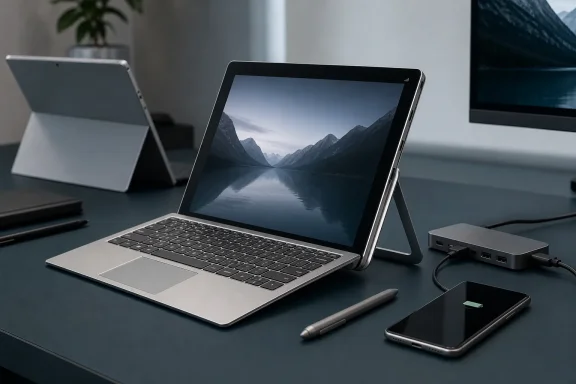
The HP Spectre x2 arrived in late 2015 with an unusually clear proposition: take Microsoft’s increasingly influential Surface Pro formula, preserve the detachable tablet and adjustable kickstand, and fix several practical shortcomings that Microsoft had left unresolved. Its aluminum keyboard, fanless Intel Core m platform, integrated LTE, dual USB-C ports, and keyboard-inclusive pricing made it more than another Surface imitation. Viewed from July 2026, this decade-old preview is also a revealing snapshot of the moment when Windows PC makers stopped resisting Microsoft’s hardware ideas and began improving them—sometimes in ways that would shape premium mobile computing for years.
Microsoft did not invent the convertible PC, the Windows tablet, or the detachable keyboard. PC manufacturers had experimented with rotating displays, pen computers, slate PCs, and keyboard docks long before the first Surface appeared in 2012. What Microsoft did was consolidate those ideas into a recognizable modern template built around a thin tablet, a full desktop operating system, an integrated kickstand, and a lightweight magnetic keyboard cover.
The formula became substantially more convincing with the Surface Pro 3 in 2014. Its larger 12-inch-class display, more flexible kickstand, improved proportions, and emphasis on replacing a conventional laptop gave the wider PC industry a target to follow.
By October 2015, Microsoft was preparing to ship the Surface Pro 4, while Lenovo had announced the Miix 700 and Dell was expanding its detachable portfolio. HP entered this increasingly crowded field with the Spectre x2, a premium Windows 10 detachable that looked familiar from across a room but diverged from Microsoft’s approach in several consequential ways.
That timing placed HP directly inside one of the most important periods in Windows hardware history. Windows 10 had launched only a few months earlier, Intel’s sixth-generation Core processors were entering new systems, USB-C was still unfamiliar to many buyers, and PC manufacturers were searching for products that could answer both Apple’s mobile hardware and Microsoft’s increasingly ambitious Surface line.
The Spectre x2 was therefore not simply another premium laptop. It represented HP’s interpretation of what a post-Surface Windows PC should become.
That similarity did not make the Spectre x2 a thoughtless clone. Once Microsoft demonstrated consumer interest in the detachable format, the meaningful question was no longer whether another manufacturer had borrowed the concept. It was whether that manufacturer had solved real problems better.
The design was elegant, but it also illustrated a persistent weakness of detachable computers. A stand-and-keyboard arrangement occupies more depth on a desk than a laptop hinge, and it is less stable on a lap, airplane tray, sofa cushion, or other confined surface.
On a solid desk, the Spectre x2 could provide a convincing notebook experience. Away from one, the conventional clamshell remained mechanically superior.
The Spectre x2 accepted that reality more honestly than some competing products. Its substantial keyboard, desktop-class connectivity ambitions, and mobile broadband option suggested that HP was designing a highly portable PC that could become a tablet, rather than an oversized tablet expected to replace a PC through accessories.
That difference mattered because the keyboard determines whether a detachable is merely capable of running desktop applications or comfortable enough to serve as a primary productivity computer.
Even so, the 1.5-millimeter figure communicated HP’s priorities. Microsoft advertised its redesigned Surface Pro 4 Type Cover with improved spacing and a better trackpad, but HP was attempting to bring the feel of its premium notebooks into the detachable category.
For writers, students, administrators, and mobile professionals, this could outweigh differences in display resolution or benchmark performance. A marginally faster processor does little to compensate for a keyboard that becomes tiring during a long report or remote support session.
It also exposed an unavoidable compromise. Because the accessory had no conventional hinge and relied on the tablet’s kickstand for support, it could not reproduce the structural unity of a normal laptop. HP improved the part under the user’s hands without eliminating the limitations inherent to the detachable format.
That distinction was commercially important. A Windows productivity tablet without a keyboard was an incomplete proposition for most buyers, yet accessory pricing allowed manufacturers to advertise lower entry figures.
HP’s $799 starting price therefore represented more than an aggressive number. It presented the complete computer at the point of sale rather than separating an essential component to make the base price appear more attractive.
The absence of a fan gave the Spectre x2 several immediate advantages. It operated silently, eliminated moving cooling components, reduced the need for large ventilation openings, and avoided the sudden fan noise that could make a supposedly tablet-like computer feel like a compressed laptop.
A fanless design was particularly attractive in classrooms, meetings, recording environments, bedrooms, and quiet offices. It also supported the conceptual promise of a tablet, since users did not expect an iPad-like slate to begin blowing hot air during routine activity.
The base Core m3 version of the Surface Pro 4 was also fanless, so HP did not hold an absolute advantage across every configuration. The broader Spectre x2 range, however, maintained fanless operation while offering higher-binned Core m options.
Sustained workloads told a different story. Large code compilations, extended photo exports, video encoding, complex spreadsheet calculations, virtual machines, and modern games could expose the limited thermal envelope.
The Core m7 badge could also create unrealistic expectations. Although its branding suggested proximity to a mainstream Core i7, it remained a low-power Y-series processor operating within a dramatically tighter power budget.
In October 2015, this was a bold decision. USB-C was emerging on products such as Apple’s 12-inch MacBook and Google’s hardware, but most Windows users still owned USB-A flash drives, printers, mice, external disks, card readers, and phone cables.
The Spectre x2’s port placement allowed charging from either side, an ergonomic detail that remains useful on modern laptops. It also anticipated the eventual expectation that one compact connector should carry power, data, and video.
This did not mean every USB-C accessory would work identically. The connector’s physical shape never guaranteed a specific data rate, display mode, charging level, or Thunderbolt capability. That ambiguity would become one of the standard’s most enduring frustrations.
For an individual buyer, that might have been a tolerable price for a thinner device. For a business, replacing or adapting a large inventory of USB peripherals could complicate deployment and increase support calls.
The Spectre x2 was consequently ahead of the market, but not necessarily ahead of every customer. A future-facing port configuration can be both technically correct and operationally inconvenient.
In hindsight, HP made the more prescient choice. USB-C became central to laptops, phones, tablets, docks, monitors, and charging systems, while Mini DisplayPort and many proprietary power connectors gradually receded.
That omission was striking because a highly portable computer benefits disproportionately from independent connectivity. A detachable designed for mobile work should not become substantially less useful whenever trusted Wi-Fi disappears.
An integrated modem allowed the PC to connect more like a smartphone. For field workers, journalists, sales representatives, consultants, and frequent travelers, that convenience could materially improve the device’s value.
LTE also supported business continuity. If a local internet connection failed, a mobile-equipped PC could remain online without improvised networking.
The trade-offs included carrier dependence, recurring subscription costs, regional model differences, antenna complexity, and additional support requirements. Some international configurations also differed from the Verizon-focused United States offering, so buyers had to verify the exact model rather than assume every Spectre x2 contained active cellular hardware.
That gap demonstrated where HP had allocated its budget. The Spectre x2 emphasized the keyboard, connectivity, silence, LTE, and package price; Surface emphasized display density, pen integration, performance options, and the cohesion of Microsoft’s hardware ecosystem.
Nevertheless, text, pen strokes, photographs, and interface elements appeared sharper on the Surface Pro 4. The 3:2 aspect ratio also provided more vertical workspace than a conventional widescreen panel, benefiting document editing, browsing, and portrait-mode reading.
For buyers prioritizing visual quality, Microsoft’s advantage was significant. For those prioritizing keyboard value and connectivity, HP’s compromises could still make sense.
Support, however, did not automatically equal leadership. Microsoft integrated Surface Pen deeply into its hardware identity, applications, marketing, and Windows features. HP offered useful capability, but Surface presented the more mature pen-centered experience.
This distinction remains relevant across Windows devices. A stylus can appear on a specification sheet while varying widely in latency, pressure response, palm rejection, storage, button behavior, and software integration.
The explanation offered at the time was that Microsoft had communicated some Windows Hello requirements too late for PC manufacturers to redesign their front camera systems. Whether viewed as a coordination problem or a product-planning miss, the result showed the challenges of launching new hardware alongside a rapidly evolving Windows platform.
It also highlighted Microsoft’s dual role. The company was simultaneously defining Windows capabilities, building competing Surface hardware, and depending on OEM partners to implement the same technologies.
Detachable keyboards often function merely as input devices, but HP treated the keyboard as part of the multimedia system. The benefit disappeared when the tablet was detached, yet it strengthened the common laptop-mode experience.
This discrepancy was common across the industry. Manufacturer tests frequently used controlled brightness, local video playback, optimized settings, and preproduction configurations that did not represent every user’s daily workload.
A thin chassis also limited physical battery capacity. Manufacturers could improve efficiency, but they could not completely escape the relationship between battery volume and runtime.
The Spectre x2 therefore exposed a recurring mobile PC lesson: fanless operation and a low-wattage processor do not automatically produce all-day endurance.
Actual runtime depended on whether the user watched stored video, edited documents offline, joined video calls, browsed complex sites, or maintained simultaneous Wi-Fi and cellular activity. A single “up to” figure could not capture those differences.
Owners should inspect the chassis for separation, deformation, an elevated screen, an expanding keyboard gap, or unusual heat. A swollen battery should not be punctured, compressed, or repeatedly charged; the machine should be powered down and handled through an appropriate repair or recycling channel.
Surface provided a broader performance ceiling, including actively cooled Core i5 and Core i7 models, up to 16GB of memory, and storage reaching 1TB. It also delivered the superior display and stronger first-party pen story.
HP’s top configurations could become expensive enough to approach faster Surface models. At that point, the included keyboard, LTE, silent operation, and USB-C flexibility had to carry more of the value argument.
The base and middle configurations were arguably the Spectre x2’s strongest territory. They aligned the fanless design with realistic office workloads without charging heavily for a processor badge that passive cooling could not fully exploit.
It also demanded compromises. Lap use remained awkward, legacy accessories needed an adapter, the screen trailed Surface in resolution, and real battery life could fall short of the headline claim.
The Spectre-branded x2 was primarily a premium consumer product, but its design ideas fed naturally into HP’s enterprise detachables, particularly the Elite x2 family. Repairability, security, manageability, warranty options, and predictable lifecycle support would become more important as the format matured.
For corporate IT departments, integrated LTE and USB-C docking hinted at a future in which a mobile employee could carry one thin PC, connect securely from almost anywhere, and attach to a desk setup through a single cable.
The product also anticipated the industry’s movement toward complete mobile workstations built around standardized docking.
HP’s implementation lacked the bandwidth and universality of later standards, but the conceptual direction was correct. The traditional collection of dedicated charging, display, and data ports was beginning to consolidate.
Later Windows devices added LTE and 5G, while modern standby, cloud synchronization, eSIM support, and web-based work made persistent connectivity more important. The Spectre x2 recognized early that mobility without networking was only partial mobility.
This progress validates HP’s goal while exposing the limitations of the original hardware. The design philosophy aged well; the processor performance did not.
Windows 10 reached end of support on October 14, 2025. That date did not cause functioning Spectre x2 computers to stop booting, but it changed the security and maintenance calculation for anyone still using one online.
The machine’s modest CPU, maximum 8GB of memory, aging storage, and passive cooling also limit the practical benefit of forcing a newer operating system onto it. An unsupported installation may run, but “runs” and “provides a dependable supported platform” are not equivalent.
Security does not depend exclusively on operating-system patches, but the absence of normal platform servicing increases exposure over time. Browser updates, application patching, account protections, and network controls cannot permanently substitute for a supported operating system.
The Spectre x2 can still be an interesting secondary machine for enthusiasts. It should not be mistaken for a cost-effective replacement for a supported modern PC unless its limitations are fully understood.
Modern processors and displays have improved dramatically, but physical design constraints remain stubborn.
Future progress will depend on several developments:
That relationship remains central to Windows. Microsoft uses Surface to demonstrate ideas, while partners compete on price, ports, materials, displays, repairability, connectivity, and form factor. The healthiest outcomes occur when those partners do more than imitate.
The Spectre x2 also showed the danger of optimizing around a momentary technology window. Its USB-C strategy aged gracefully, but its processor and operating-system path did not. Long-term value requires both innovative hardware and a credible support horizon.
The 2015 HP Spectre x2 deserves to be remembered not as a Surface copy, but as a thoughtful critique of Surface expressed through hardware. HP included the keyboard users actually needed, embraced USB-C before it became conventional, offered LTE when mobile productivity demanded it, and delivered silent operation in a premium detachable. Its modest sustained performance, uneven battery endurance, lower-resolution display, awkward Windows Hello arrangement, and present-day support limitations prevent it from becoming a timeless classic, yet its strongest ideas now look less experimental than prophetic. More than ten years later, the Spectre x2 remains evidence that the best Windows hardware competition begins when manufacturers stop asking how closely they can follow Microsoft and start asking what Microsoft forgot.
 Background
Microsoft did not invent the convertible PC, the Windows tablet, or the detachable keyboard. PC manufacturers had experimented with rotating displays, pen computers, slate PCs, and keyboard docks long before the first Surface appeared in 2012. What Microsoft did was consolidate those ideas into a recognizable modern template built around a thin tablet, a full desktop operating system, an integrated kickstand, and a lightweight magnetic keyboard cover.The formula became substantially more convincing with the Surface Pro 3 in 2014. Its larger 12-inch-class display, more flexible kickstand, improved proportions, and emphasis on replacing a conventional laptop gave the wider PC industry a target to follow.
By October 2015, Microsoft was preparing to ship the Surface Pro 4, while Lenovo had announced the Miix 700 and Dell was expanding its detachable portfolio. HP entered this increasingly crowded field with the Spectre x2, a premium Windows 10 detachable that looked familiar from across a room but diverged from Microsoft’s approach in several consequential ways.
The importance of the original timing
The Spectre x2 preview was published on October 13, 2015, one week after Microsoft announced the Surface Pro 4 and Surface Book. HP planned to begin selling the device through its website and Best Buy on November 8, with prices starting at $799.That timing placed HP directly inside one of the most important periods in Windows hardware history. Windows 10 had launched only a few months earlier, Intel’s sixth-generation Core processors were entering new systems, USB-C was still unfamiliar to many buyers, and PC manufacturers were searching for products that could answer both Apple’s mobile hardware and Microsoft’s increasingly ambitious Surface line.
The Spectre x2 was therefore not simply another premium laptop. It represented HP’s interpretation of what a post-Surface Windows PC should become.
A Surface-Inspired Design With HP’s Own Priorities
The broad architecture was unmistakable. The computer’s processor, memory, storage, battery, cameras, and display all lived inside the tablet portion, while an integrated kickstand supported the screen and a magnetic keyboard completed the laptop configuration.That similarity did not make the Spectre x2 a thoughtless clone. Once Microsoft demonstrated consumer interest in the detachable format, the meaningful question was no longer whether another manufacturer had borrowed the concept. It was whether that manufacturer had solved real problems better.
The U-shaped kickstand
HP used a distinctive U-shaped metal stand rather than a broad panel covering much of the tablet’s rear. The mechanism allowed the screen to operate at a wide range of angles while giving the Spectre x2 a visual identity separate from Surface.The design was elegant, but it also illustrated a persistent weakness of detachable computers. A stand-and-keyboard arrangement occupies more depth on a desk than a laptop hinge, and it is less stable on a lap, airplane tray, sofa cushion, or other confined surface.
On a solid desk, the Spectre x2 could provide a convincing notebook experience. Away from one, the conventional clamshell remained mechanically superior.
Tablet-first did not always mean tablet-friendly
At roughly 12 inches, devices in this category were large enough for desktop applications but not especially comfortable as handheld tablets. Their Windows software, widescreen layouts, weight distribution, and accessory dependence made them productivity machines first and casual consumption tablets second.The Spectre x2 accepted that reality more honestly than some competing products. Its substantial keyboard, desktop-class connectivity ambitions, and mobile broadband option suggested that HP was designing a highly portable PC that could become a tablet, rather than an oversized tablet expected to replace a PC through accessories.
The Keyboard Was the Defining Advantage
The original preview correctly concentrated on the keyboard. Microsoft’s Type Cover had improved significantly by the Surface Pro 4 generation, but it was still a thin accessory designed around portability and flexibility. HP instead built a more traditional backlit keyboard with an aluminum upper surface and approximately 1.5 millimeters of key travel.That difference mattered because the keyboard determines whether a detachable is merely capable of running desktop applications or comfortable enough to serve as a primary productivity computer.
More than a specification
Key travel alone does not establish keyboard quality. Keycap stability, spacing, actuation force, deck rigidity, layout, palm-rest depth, and touchpad behavior all influence the typing experience.Even so, the 1.5-millimeter figure communicated HP’s priorities. Microsoft advertised its redesigned Surface Pro 4 Type Cover with improved spacing and a better trackpad, but HP was attempting to bring the feel of its premium notebooks into the detachable category.
For writers, students, administrators, and mobile professionals, this could outweigh differences in display resolution or benchmark performance. A marginally faster processor does little to compensate for a keyboard that becomes tiring during a long report or remote support session.
Aluminum above, fabric below
The Spectre x2 keyboard combined a metal typing surface with a fabric underside. That construction balanced rigidity and portability while protecting the display when folded closed.It also exposed an unavoidable compromise. Because the accessory had no conventional hinge and relied on the tablet’s kickstand for support, it could not reproduce the structural unity of a normal laptop. HP improved the part under the user’s hands without eliminating the limitations inherent to the detachable format.
The importance of inclusion
HP included the keyboard in the advertised package. Microsoft generally treated the Surface Pro Type Cover as a separate purchase, making the real cost of a usable Surface higher than the tablet’s headline price.That distinction was commercially important. A Windows productivity tablet without a keyboard was an incomplete proposition for most buyers, yet accessory pricing allowed manufacturers to advertise lower entry figures.
HP’s $799 starting price therefore represented more than an aggressive number. It presented the complete computer at the point of sale rather than separating an essential component to make the base price appear more attractive.
Fanless Computing and the Core m Trade-Off
HP built the original Spectre x2 around Intel’s sixth-generation Core m processors, including variants from the Core m3, m5, and m7 families. These were low-power, dual-core Skylake chips designed for thin and fanless systems.The absence of a fan gave the Spectre x2 several immediate advantages. It operated silently, eliminated moving cooling components, reduced the need for large ventilation openings, and avoided the sudden fan noise that could make a supposedly tablet-like computer feel like a compressed laptop.
Silence was a premium feature
In 2015, fan noise remained a common weakness in thin Windows machines. Short bursts of activity could trigger audible cooling, while sustained loads sometimes produced both noise and uncomfortable surface temperatures.A fanless design was particularly attractive in classrooms, meetings, recording environments, bedrooms, and quiet offices. It also supported the conceptual promise of a tablet, since users did not expect an iPad-like slate to begin blowing hot air during routine activity.
The base Core m3 version of the Surface Pro 4 was also fanless, so HP did not hold an absolute advantage across every configuration. The broader Spectre x2 range, however, maintained fanless operation while offering higher-binned Core m options.
Burst speed versus sustained performance
Core m processors were designed to accelerate briefly and then reduce speed as heat accumulated. That behavior worked well for opening applications, rendering ordinary web pages, editing documents, and processing short tasks.Sustained workloads told a different story. Large code compilations, extended photo exports, video encoding, complex spreadsheet calculations, virtual machines, and modern games could expose the limited thermal envelope.
The Core m7 badge could also create unrealistic expectations. Although its branding suggested proximity to a mainstream Core i7, it remained a low-power Y-series processor operating within a dramatically tighter power budget.
The correct workload mattered
The Spectre x2 was best understood as a quiet mobile productivity computer, not a workstation compressed into a tablet. Its performance profile favored the following sequence:- It accelerated quickly for short interactive work.
- It completed common office and browser tasks without fan noise.
- It reduced clock speeds when sustained heat exceeded the passive cooling system’s capacity.
- It recovered performance after the workload declined and the chassis dissipated heat.
USB-C Arrived Before the Ecosystem Was Ready
The Spectre x2 included two USB-C ports, either of which could be used for charging. They also supported external storage, displays, and other peripherals, while HP supplied an adapter for traditional USB-A devices.In October 2015, this was a bold decision. USB-C was emerging on products such as Apple’s 12-inch MacBook and Google’s hardware, but most Windows users still owned USB-A flash drives, printers, mice, external disks, card readers, and phone cables.
Two ports were more practical than one
Including USB-C was forward-looking; including two ports made it usable. A single-port computer could force the owner to choose between charging and attaching a peripheral unless a hub or dock was available.The Spectre x2’s port placement allowed charging from either side, an ergonomic detail that remains useful on modern laptops. It also anticipated the eventual expectation that one compact connector should carry power, data, and video.
This did not mean every USB-C accessory would work identically. The connector’s physical shape never guaranteed a specific data rate, display mode, charging level, or Thunderbolt capability. That ambiguity would become one of the standard’s most enduring frustrations.
The dongle problem began early
HP’s included USB-A adapter reduced the immediate inconvenience, but it did not erase it. Users still had to carry and keep track of a small accessory to connect existing equipment.For an individual buyer, that might have been a tolerable price for a thinner device. For a business, replacing or adapting a large inventory of USB peripherals could complicate deployment and increase support calls.
The Spectre x2 was consequently ahead of the market, but not necessarily ahead of every customer. A future-facing port configuration can be both technically correct and operationally inconvenient.
Surface took the conservative route
The Surface Pro 4 retained a full-size USB 3.0 port, Mini DisplayPort, microSD expansion, and Microsoft’s proprietary Surface Connect interface. This arrangement worked with established accessories and Microsoft’s docking ecosystem, but it lacked the Spectre x2’s connector symmetry and broader vision of standardized charging.In hindsight, HP made the more prescient choice. USB-C became central to laptops, phones, tablets, docks, monitors, and charging systems, while Mini DisplayPort and many proprietary power connectors gradually receded.
Built-In LTE Addressed a Genuine Mobile Need
The Verizon LTE option distinguished the Spectre x2 from most premium Windows detachables of its generation. Microsoft offered mobile broadband on certain Surface 3 configurations, but the Surface Pro 4 did not provide an integrated LTE choice at launch.That omission was striking because a highly portable computer benefits disproportionately from independent connectivity. A detachable designed for mobile work should not become substantially less useful whenever trusted Wi-Fi disappears.
LTE reduced friction
Tethering through a phone was possible in 2015, but it consumed phone battery power, required additional steps, and could disconnect unpredictably. Public Wi-Fi introduced security concerns and often demanded captive-portal authentication.An integrated modem allowed the PC to connect more like a smartphone. For field workers, journalists, sales representatives, consultants, and frequent travelers, that convenience could materially improve the device’s value.
Enterprise implications
Corporate buyers could pair mobile connectivity with VPN access, device management, and controlled data plans. The result was a system able to reach company services without depending on a café, hotel, conference, or customer network.LTE also supported business continuity. If a local internet connection failed, a mobile-equipped PC could remain online without improvised networking.
The trade-offs included carrier dependence, recurring subscription costs, regional model differences, antenna complexity, and additional support requirements. Some international configurations also differed from the Verizon-focused United States offering, so buyers had to verify the exact model rather than assume every Spectre x2 contained active cellular hardware.
Display, Pen, Cameras, and Audio
The Spectre x2 used a 12-inch Full HD display, while the Surface Pro 4 offered a 12.3-inch PixelSense panel with a much higher 2736-by-1824 resolution and a productivity-friendly 3:2 aspect ratio. HP’s screen was adequate for office work and media, but Microsoft held the stronger specification.That gap demonstrated where HP had allocated its budget. The Spectre x2 emphasized the keyboard, connectivity, silence, LTE, and package price; Surface emphasized display density, pen integration, performance options, and the cohesion of Microsoft’s hardware ecosystem.
Resolution was not the whole story
A lower-resolution display could reduce graphics workload and potentially improve battery efficiency. It also caused fewer scaling complications at a time when some Windows desktop applications still handled high-density screens poorly.Nevertheless, text, pen strokes, photographs, and interface elements appeared sharper on the Surface Pro 4. The 3:2 aspect ratio also provided more vertical workspace than a conventional widescreen panel, benefiting document editing, browsing, and portrait-mode reading.
For buyers prioritizing visual quality, Microsoft’s advantage was significant. For those prioritizing keyboard value and connectivity, HP’s compromises could still make sense.
Active Pen support
The Spectre x2 supported an active pen, reflecting Windows 10’s renewed emphasis on handwriting and digital ink. Pen input could assist with note-taking, document annotation, diagrams, signatures, and creative work.Support, however, did not automatically equal leadership. Microsoft integrated Surface Pen deeply into its hardware identity, applications, marketing, and Windows features. HP offered useful capability, but Surface presented the more mature pen-centered experience.
This distinction remains relevant across Windows devices. A stylus can appear on a specification sheet while varying widely in latency, pressure response, palm rejection, storage, button behavior, and software integration.
Windows Hello’s awkward camera arrangement
The rear-facing camera supported Windows Hello, while the front camera reportedly did not. That was an odd implementation because facial authentication is most useful when the user is looking directly at the display.The explanation offered at the time was that Microsoft had communicated some Windows Hello requirements too late for PC manufacturers to redesign their front camera systems. Whether viewed as a coordination problem or a product-planning miss, the result showed the challenges of launching new hardware alongside a rapidly evolving Windows platform.
It also highlighted Microsoft’s dual role. The company was simultaneously defining Windows capabilities, building competing Surface hardware, and depending on OEM partners to implement the same technologies.
Speakers in both halves
HP placed Bang & Olufsen-branded speakers in the tablet and keyboard, allowing the attached configuration to provide a broader audio arrangement. This was a clever use of space in an accessory that otherwise contained no processor or main battery.Detachable keyboards often function merely as input devices, but HP treated the keyboard as part of the multimedia system. The benefit disappeared when the tablet was detached, yet it strengthened the common laptop-mode experience.
Battery Claims Met the Reality of Thin Hardware
HP advertised up to 12 hours of battery life, a strong figure for a fanless Windows detachable in 2015. Independent testing later found that real-world endurance could be considerably shorter, particularly under browser-heavy or mixed productivity workloads.This discrepancy was common across the industry. Manufacturer tests frequently used controlled brightness, local video playback, optimized settings, and preproduction configurations that did not represent every user’s daily workload.
Why low-power processors did not guarantee long life
Core m reduced processor consumption, but the CPU was only one part of the system. The display, wireless radios, storage, memory, background applications, Windows maintenance tasks, browser activity, and cellular modem all consumed energy.A thin chassis also limited physical battery capacity. Manufacturers could improve efficiency, but they could not completely escape the relationship between battery volume and runtime.
The Spectre x2 therefore exposed a recurring mobile PC lesson: fanless operation and a low-wattage processor do not automatically produce all-day endurance.
LTE could amplify variability
An integrated modem increased mobility but could also raise power consumption, especially in weak-signal areas. The radio might work harder to maintain a connection, while cloud synchronization and background traffic continued wherever the device traveled.Actual runtime depended on whether the user watched stored video, edited documents offline, joined video calls, browsed complex sites, or maintained simultaneous Wi-Fi and cellular activity. A single “up to” figure could not capture those differences.
Long-term battery aging
A decade later, surviving Spectre x2 units face a more basic problem: lithium-ion batteries lose capacity with age and use. Even a lightly used device may have substantially less runtime than when new, and battery swelling can become a safety concern.Owners should inspect the chassis for separation, deformation, an elevated screen, an expanding keyboard gap, or unusual heat. A swollen battery should not be punctured, compressed, or repeatedly charged; the machine should be powered down and handled through an appropriate repair or recycling channel.
Value Compared With Surface Pro 4
The $799 starting price included the Spectre x2 keyboard, making HP’s package immediately competitive with Surface Pro 4 configurations that required a separately purchased Type Cover. HP also offered storage capacities ranging from 128GB to 512GB and memory configurations up to 8GB.Surface provided a broader performance ceiling, including actively cooled Core i5 and Core i7 models, up to 16GB of memory, and storage reaching 1TB. It also delivered the superior display and stronger first-party pen story.
Comparing complete systems
The fairest comparison had to include all required components:- The Spectre x2 included its aluminum keyboard, reducing the difference between advertised price and usable price.
- The Surface Pro 4 generally required a separate Type Cover purchase, although it included a Surface Pen with most configurations.
- HP offered integrated LTE on relevant models, avoiding an external hotspot or phone-tethering dependency.
- Microsoft offered substantially faster processor options, making Surface more appropriate for demanding workloads.
- Surface delivered a sharper 3:2 display, while HP offered two versatile USB-C ports.
The danger of badge-based comparisons
Comparing a Core m7 Spectre x2 with a Core i5 Surface Pro 4 solely by model name or price could mislead buyers. The processors occupied different thermal classes and targeted different performance profiles.HP’s top configurations could become expensive enough to approach faster Surface models. At that point, the included keyboard, LTE, silent operation, and USB-C flexibility had to carry more of the value argument.
The base and middle configurations were arguably the Spectre x2’s strongest territory. They aligned the fanless design with realistic office workloads without charging heavily for a processor badge that passive cooling could not fully exploit.
Consumer and Enterprise Impact
For consumers, the Spectre x2 offered a premium Windows computer that could function as a notebook, media tablet, handwriting surface, and connected travel device. Its keyboard-inclusive price made the buying decision easier to understand.It also demanded compromises. Lap use remained awkward, legacy accessories needed an adapter, the screen trailed Surface in resolution, and real battery life could fall short of the headline claim.
Consumer use cases
The strongest consumer scenarios included:- Students could carry one device for typed notes, handwritten annotation, streaming, and web research.
- Travelers could use LTE without draining a phone through prolonged tethering.
- Home users could connect a monitor and peripherals through USB-C while retaining tablet portability.
- Writers could benefit from a more rigid keyboard than thin fabric-covered alternatives.
- Noise-sensitive users could work without fan activity.
Enterprise appeal
HP’s established commercial relationships gave the concept relevance beyond retail shelves. Businesses were accustomed to buying HP hardware, obtaining service, and maintaining standardized fleets.The Spectre-branded x2 was primarily a premium consumer product, but its design ideas fed naturally into HP’s enterprise detachables, particularly the Elite x2 family. Repairability, security, manageability, warranty options, and predictable lifecycle support would become more important as the format matured.
For corporate IT departments, integrated LTE and USB-C docking hinted at a future in which a mobile employee could carry one thin PC, connect securely from almost anywhere, and attach to a desk setup through a single cable.
What the Spectre x2 Predicted Correctly
Several of HP’s 2015 decisions look remarkably modern in 2026. USB-C charging is now normal across premium Windows PCs, integrated mobile connectivity remains valuable, fanless systems have become more capable, and keyboard quality continues to distinguish serious productivity devices from novelty convertibles.The product also anticipated the industry’s movement toward complete mobile workstations built around standardized docking.
USB-C became foundational
The Spectre x2’s dual-port implementation foreshadowed today’s one-cable desk setups. A modern USB-C or Thunderbolt connection can provide power, external displays, storage, networking, audio, and peripheral access through a dock or monitor.HP’s implementation lacked the bandwidth and universality of later standards, but the conceptual direction was correct. The traditional collection of dedicated charging, display, and data ports was beginning to consolidate.
Always-connected computing persisted
LTE did not become universal in Windows laptops, partly because of carrier plans, cost, regional complexity, and inconsistent consumer demand. Even so, the need for independent connectivity never disappeared.Later Windows devices added LTE and 5G, while modern standby, cloud synchronization, eSIM support, and web-based work made persistent connectivity more important. The Spectre x2 recognized early that mobility without networking was only partial mobility.
Quiet computing became more capable
The 2015 Core m platform required substantial performance compromises to achieve fanless operation. Modern low-power silicon can deliver far greater responsiveness, media capability, and battery efficiency under passive or near-silent cooling.This progress validates HP’s goal while exposing the limitations of the original hardware. The design philosophy aged well; the processor performance did not.
Strengths and Opportunities
The Spectre x2’s enduring significance comes from how clearly it identified weaknesses in the early Surface model and attempted to correct them.- The included keyboard made pricing more honest. Buyers received the component necessary for normal Windows productivity without adding an immediate accessory purchase.
- The aluminum keyboard improved rigidity and typing confidence. It moved the detachable closer to the feel of a premium notebook.
- Dual USB-C ports anticipated standardized charging and docking. Charging from either side was convenient, and two ports reduced contention between power and peripherals.
- Integrated LTE served genuine mobile workflows. The device could remain connected without depending on public Wi-Fi or a phone hotspot.
- Fanless operation eliminated noise. For routine productivity, silence was a meaningful quality-of-life advantage.
- The kickstand provided flexible viewing angles. It supported desk work, video viewing, drawing, and touch interaction without a separate case.
- The design broadened competition around Surface. HP showed that Windows OEMs could adopt Microsoft’s template while differentiating through practical hardware choices.
- The concept pointed toward single-cable workstations. With the appropriate adapter or dock, the tablet could transition from mobile use to a desktop environment.
Risks and Concerns
The same decisions that made the Spectre x2 distinctive also created limitations that became more visible after launch and more serious with age.- Core m performance could decline under sustained load. Passive cooling was ideal for silence but poorly suited to long, processor-intensive tasks.
- Battery life did not consistently match the 12-hour claim. Real-world use could produce substantially shorter results.
- The Full HD display trailed Surface Pro 4. Microsoft offered greater sharpness and a more useful 3:2 aspect ratio.
- USB-C arrived before accessory compatibility was straightforward. Users depended on adapters, and the connector did not clearly communicate every supported capability.
- Lap use remained compromised. The kickstand and detachable keyboard required more space and stability than a laptop hinge.
- Windows Hello implementation was awkward. A biometric-capable rear camera did not provide the natural face-login experience users expected.
- Configuration differences caused purchasing confusion. LTE availability, storage, processor, and regional specifications varied among models.
- Aging batteries create safety and reliability concerns. Any surviving unit should be checked for swelling and severe capacity loss.
- Modern operating-system support is problematic. The sixth-generation Intel processors are outside Microsoft’s normal supported processor baseline for Windows 11.
- Replacement accessories can be difficult to source. A damaged proprietary keyboard, charger, kickstand component, or battery may cost more to replace than the computer is worth.
The Spectre x2 in 2026
The original Spectre x2 now belongs to a difficult generation of otherwise capable Windows hardware. Its sixth-generation Intel Core m processors fall below the generally supported eighth-generation Intel threshold for Windows 11, leaving standard Windows 10 installations at the end of their regular support lifecycle.Windows 10 reached end of support on October 14, 2025. That date did not cause functioning Spectre x2 computers to stop booting, but it changed the security and maintenance calculation for anyone still using one online.
Unsupported Windows 11 installations
Technically experienced owners may install Windows 11 through unsupported methods, but that path carries caveats. Microsoft does not guarantee full compatibility, feature-update delivery, driver behavior, or support on hardware outside the official requirements.The machine’s modest CPU, maximum 8GB of memory, aging storage, and passive cooling also limit the practical benefit of forcing a newer operating system onto it. An unsupported installation may run, but “runs” and “provides a dependable supported platform” are not equivalent.
Continued Windows 10 use
An owner choosing to retain Windows 10 should evaluate available security-update options, browser support, application requirements, and the sensitivity of work performed on the device. A computer used only for local media or controlled offline tasks presents a different risk profile from one handling banking, corporate credentials, email, and confidential documents.Security does not depend exclusively on operating-system patches, but the absence of normal platform servicing increases exposure over time. Browser updates, application patching, account protections, and network controls cannot permanently substitute for a supported operating system.
Alternative operating systems
A lightweight Linux distribution may extend the useful life of the hardware, especially for browsing, writing, terminal work, and media playback. Compatibility must be tested carefully because detachable PCs can present problems involving touch, cameras, orientation sensors, suspend behavior, audio, LTE modems, and proprietary keyboard connections.The Spectre x2 can still be an interesting secondary machine for enthusiasts. It should not be mistaken for a cost-effective replacement for a supported modern PC unless its limitations are fully understood.
What to Watch Next
The Spectre x2’s history remains relevant because the industry continues to debate the same questions: whether detachable computers can truly replace laptops, whether essential keyboards should be sold separately, how much performance users will trade for silence, and whether mobile broadband should be standard.Modern processors and displays have improved dramatically, but physical design constraints remain stubborn.
The future of Windows detachables
Windows detachables continue to work best for users who genuinely need pen input or tablet operation alongside desktop applications. Buyers who spend nearly all their time typing may still be better served by a conventional laptop or a 360-degree convertible with a rigid hinge.Future progress will depend on several developments:
- More efficient processors must deliver sustained performance without requiring noisy cooling.
- Keyboard accessories must become more stable on laps and confined surfaces.
- Manufacturers should state complete system prices, including essential keyboards and pens.
- Cellular options need simpler activation, broader carrier compatibility, and clearer pricing.
- USB-C capability labels must communicate charging, display, and data support unambiguously.
- Repairability and battery replacement must improve if premium devices are expected to remain useful for many years.
- Windows must continue adapting its interface without weakening traditional desktop productivity.
Lessons for Microsoft and its partners
Microsoft’s Surface family proved that first-party hardware could move the entire Windows ecosystem. HP’s response proved that OEMs could take Microsoft’s blueprint and identify opportunities the platform owner had missed.That relationship remains central to Windows. Microsoft uses Surface to demonstrate ideas, while partners compete on price, ports, materials, displays, repairability, connectivity, and form factor. The healthiest outcomes occur when those partners do more than imitate.
The Spectre x2 also showed the danger of optimizing around a momentary technology window. Its USB-C strategy aged gracefully, but its processor and operating-system path did not. Long-term value requires both innovative hardware and a credible support horizon.
The 2015 HP Spectre x2 deserves to be remembered not as a Surface copy, but as a thoughtful critique of Surface expressed through hardware. HP included the keyboard users actually needed, embraced USB-C before it became conventional, offered LTE when mobile productivity demanded it, and delivered silent operation in a premium detachable. Its modest sustained performance, uneven battery endurance, lower-resolution display, awkward Windows Hello arrangement, and present-day support limitations prevent it from becoming a timeless classic, yet its strongest ideas now look less experimental than prophetic. More than ten years later, the Spectre x2 remains evidence that the best Windows hardware competition begins when manufacturers stop asking how closely they can follow Microsoft and start asking what Microsoft forgot.
References
- Primary source: thurrott.com
Published: 2015-10-13T16:01:29+00:00
HP Spectre x2 Preview - Thurrott.com
Yes, the HP Spectre x2 is a "tablet-first" 2-in-1 PC with a kickstand and a clip-on keyboard cover. But HP also offers improvements over Surface Pro.www.thurrott.com