

Logitech’s Australian Father’s Day guide for 2026 is less a conventional gift list than a map of how personal computing has changed. Spanning a foldable travel mouse, an ultra-portable keyboard, premium productivity controls, multi-platform audio, a hybrid mechanical-and-analogue keyboard, and a direct-drive racing system, the selection targets fathers whose Windows PCs now serve as offices, entertainment centres, creative workstations, and gaming machines. The most revealing feature is not any single product, but Logitech’s assumption that work and play increasingly happen at the same desk.
Australia will celebrate Father’s Day on Sunday, September 6, 2026, giving Logitech and its retail partners several weeks to position existing products around a major seasonal buying period. The guide covers five product pairings or standalone recommendations, with Australian pricing extending from AUD $129.95 for individual portable accessories to AUD $1,199.95 for the flagship racing system.
At the accessible end are the Mobi Fold mouse and Keys-To-Go 2 keyboard, each priced at AUD $129.95. Logitech presents them as a compact mobile-working combination for people who regularly move between the home, office, cafés, client sites, and shared workspaces.
The middle of the range includes familiar productivity and gaming categories. The MX Keys S keyboard costs AUD $229.95, the MX Master 4 mouse is AUD $199.95, the Logitech G G512X 75 keyboard is AUD $299.95, and the Astro A50 headset is positioned at AUD $599.95.
At the top sits the Logitech G RS50 Race System at AUD $1,199.95. Adding the AUD $259.95 RS Pedals lifts the combined price to AUD $1,459.90 before discounts, delivery, or other rig components, illustrating how far Logitech has moved beyond inexpensive PC accessories.
That distinction matters because seasonal guides are designed to simplify buying decisions rather than explain every technical compromise. Logitech has selected products that support a broader narrative—portability, personalisation, multi-device control, and premium gaming—but buyers still need to evaluate compatibility, ergonomics, software requirements, and value.
That hierarchy has changed. Modern laptops have become powerful and increasingly interchangeable, while peripherals determine how a person physically interacts with Windows for eight or more hours each day.
Logitech now operates across several layers of the market:
On Windows, Logitech’s ecosystem includes Logi Options+ for productivity devices and G HUB for compatible gaming hardware. Those applications can unlock button remapping, app-specific commands, lighting controls, sensitivity adjustments, haptic settings, and other features that are not available through standard Windows menus.
The advantage is deeper customisation. The disadvantage is that part of the product’s long-term value depends on software maintenance, account policies, firmware quality, and compatibility with future Windows releases.
At AUD $259.90 for the pair, this is not an impulse-buy travel kit. Logitech is asking buyers to value reduced bulk, device flexibility, and a more comfortable mobile setup over the lower cost of generic Bluetooth accessories.
A folding structure attempts to separate packed size from working size. That is an intelligent approach, but it introduces mechanical questions that do not exist with a solid mouse body, including hinge durability, resistance to dust and debris, and how the product feels after thousands of opening and closing cycles.
Logitech has also described on-device intelligence intended to distinguish the folding action from deliberate clicking. That detail illustrates the engineering complexity hidden behind a simple concept: a transformable mouse must know when the user is packing it away and when the user is trying to select something.
The keyboard’s appeal is not that it replaces a full-size desktop model. Its value lies in being light enough to carry consistently, because the best travel keyboard is ultimately the one that does not get left at home.
There are inevitable compromises. A thin portable keyboard offers less key travel, reduced spacing, and fewer dedicated controls than a full-size board, and buyers with large hands or demanding typing workloads should ideally try it before committing.
The combination targets users who spend substantial time in Microsoft 365, browsers, development tools, creative applications, analytics platforms, and communication software. It is less about raw speed than reducing friction across thousands of repeated actions.
For Windows professionals, consistency may be its biggest strength. A keyboard that feels predictable across long documents, spreadsheets, email, and chat can be more valuable than one with dramatic switches or elaborate lighting.
The board’s subdued sound also suits shared homes and open offices. That benefit has become more relevant as video meetings and flexible work have blurred the boundary between personal and communal spaces.
Its haptic system can provide tactile signals for supported actions rather than limiting feedback to clicks and wheel movement. On compatible Windows 11 configurations, native haptic integration can extend that idea to operating-system events such as window manipulation and supported application interactions.
The feature has practical potential. A subtle pulse can confirm that an action has completed, indicate movement between interface targets, or make a software overlay feel more physically defined.
However, haptics are useful only when they communicate meaningful information. Excessive vibration, inconsistent application support, or poorly chosen feedback patterns could turn a promising productivity feature into a distraction.
The feature is particularly relevant to:
That proposition acknowledges a common problem: many people want one keyboard that is pleasant for writing and responsive enough for competitive play. Historically, buyers often had to choose between a restrained productivity board and a gaming model optimised for speed, lighting, and aggressive key response.
For Windows users, this can be an effective middle ground. Function keys remain accessible, arrow-key navigation stays straightforward, and the board occupies less desk space during games.
The missing number pad will still matter to accountants, data-entry workers, engineers, and anyone who enters numerical information extensively. A compact gaming-friendly footprint is not automatically a productivity upgrade.
Rapid trigger allows a key to reset based on movement rather than requiring it to return to a fixed reset point. In fast games, that can make repeated directional inputs feel more immediate.
For office typing, extremely sensitive actuation can cause accidental inputs. Logitech’s proposed switch flexibility therefore has merit: the user can favour deliberate mechanical feedback for writing and faster analogue behaviour where gaming performance benefits from it.
A successful hybrid keyboard should make its dual role obvious:
That capability responds to a genuine household problem. A player may own a Windows gaming PC, an Xbox connected to the living-room television, and a PlayStation used for exclusive titles, yet have no interest in managing three separate headsets.
A base station acts as the central connection point, reducing cable changes and letting the headset move between platforms. The convenience becomes especially valuable when systems share the same display, desk, or entertainment cabinet.
One-button switching also reduces wear on ports and cables. It is a small operational improvement that becomes significant over years of use.
The most important considerations include:
Yet gaming aesthetics and a large physical profile may not suit every professional environment. Users should also check how reliably Windows restores the correct input and output devices after waking, docking, or switching platforms.
Direct-drive hardware connects the steering wheel more directly to the motor instead of relying on gears or belts to transmit force. That design can produce stronger, faster, and more detailed feedback, allowing players to feel changes in grip, kerbs, impacts, weight transfer, and road texture.
At the other end, Logitech’s premium direct-drive equipment can cost substantially more. The RS50 therefore occupies a strategic middle position: serious enough for an enthusiast rig, but intended to be more attainable than top-tier hardware.
Eight newton-metres is significant torque for a home setup. It can provide a convincing experience, but it also requires secure mounting and sensible force settings.
The real purchasing sequence should therefore be:
The best settings vary by title. A realistic simulator may expose detailed physics output, while an arcade racer may deliver a simpler or more exaggerated feel.
TRUEFORCE support can add higher-frequency effects in compatible games, but it should be viewed as an enhancement rather than a guarantee of universal behaviour. Buyers should evaluate the games they actually play, not just the maximum capabilities printed on the box.
A premium mouse or headset can be physically excellent and still feel unreliable if Windows repeatedly selects the wrong device or suppresses required background services.
Companion software remains necessary for deeper customisation. Logi Options+ and G HUB can expose features that Windows Settings does not understand, but they also add update processes, background components, and possible troubleshooting points.
The ideal arrangement is layered:
Bluetooth reduces receiver clutter, although dedicated receivers can offer more predictable performance in crowded wireless environments. Buyers should map their ports and connection methods before assembling a multi-product Logitech setup.
The key is matching the gift to the recipient’s actual routine. Expensive technology can feel impersonal or burdensome when it requires space, configuration, and additional purchases that the recipient did not request.
The A50 focuses on platform switching, and the RS50 attempts to transform racing games into a more physical hobby. These are distinct problems, even though Logitech places them under one seasonal umbrella.
Buyers should still avoid choosing solely by discount percentage. Compatibility, comfort, repairability, and long-term software support matter more than a dramatic sale label.
Standardising quality peripherals can improve comfort, reduce unwanted noise, and give employees consistent controls across office and home environments. It can also create new support responsibilities.
IT administrators should determine whether employees require the full consumer utility or can use a centrally managed business configuration. Peripheral firmware also belongs in the organisation’s maintenance strategy, particularly when devices affect authentication, communication, or accessibility.
Corporate procurement should offer alternatives rather than treating one premium model as universally correct. The same applies to compact keyboards, which may save space but remove keys required for specialised roles.
The market should also watch how Logitech develops the RS racing ecosystem. A modular range can make upgrades more affordable over time, but only if components remain compatible and customers can understand which hubs, wheels, pedals, and platform variants work together.
Finally, the Mobi Fold will test whether consumers want transformable PC accessories. Success could encourage more manufacturers to experiment with folding, collapsing, or modular mice and keyboards designed around smaller mobile workspaces.
Logitech’s 2026 Father’s Day guide ultimately captures a peripheral market that is no longer peripheral in importance. From the AUD $129.95 Keys-To-Go 2 to the AUD $1,199.95 RS50 Race System, each recommendation argues that the devices surrounding a Windows PC can change how, where, and why that computer is used. The strongest purchases will not necessarily be the most expensive ones, but those that remove a recurring frustration without introducing new complexity—and as Windows workstations continue to merge professional, creative, and gaming roles, that balance between capability and convenience will define the next generation of personal computing hardware.
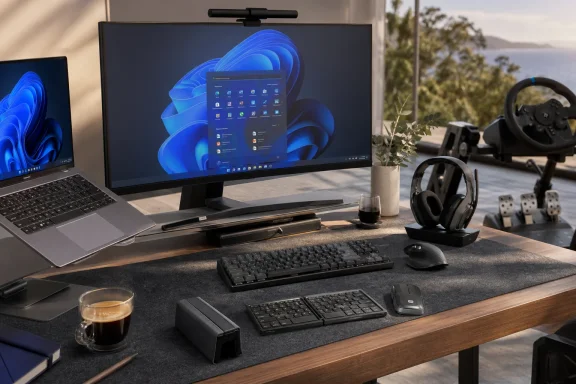 Overview
Australia will celebrate Father’s Day on Sunday, September 6, 2026, giving Logitech and its retail partners several weeks to position existing products around a major seasonal buying period. The guide covers five product pairings or standalone recommendations, with Australian pricing extending from AUD $129.95 for individual portable accessories to AUD $1,199.95 for the flagship racing system.At the accessible end are the Mobi Fold mouse and Keys-To-Go 2 keyboard, each priced at AUD $129.95. Logitech presents them as a compact mobile-working combination for people who regularly move between the home, office, cafés, client sites, and shared workspaces.
The middle of the range includes familiar productivity and gaming categories. The MX Keys S keyboard costs AUD $229.95, the MX Master 4 mouse is AUD $199.95, the Logitech G G512X 75 keyboard is AUD $299.95, and the Astro A50 headset is positioned at AUD $599.95.
At the top sits the Logitech G RS50 Race System at AUD $1,199.95. Adding the AUD $259.95 RS Pedals lifts the combined price to AUD $1,459.90 before discounts, delivery, or other rig components, illustrating how far Logitech has moved beyond inexpensive PC accessories.
A guide rather than a launch event
None of this should be mistaken for a coordinated wave of new product announcements. The Father’s Day campaign packages products from different categories and release cycles into use-case-driven recommendations.That distinction matters because seasonal guides are designed to simplify buying decisions rather than explain every technical compromise. Logitech has selected products that support a broader narrative—portability, personalisation, multi-device control, and premium gaming—but buyers still need to evaluate compatibility, ergonomics, software requirements, and value.
The five headline recommendations
The guide can be understood as five different profiles:- The mobile worker receives the Mobi Fold mouse and Keys-To-Go 2 keyboard.
- The dedicated racing enthusiast is directed toward the RS50 Race System and optional RS Pedals.
- The work-and-gaming keyboard user is offered the G512X 75.
- The multi-platform player is targeted with the Astro A50 headset and its PLAYSYNC base station.
- The desktop professional is steered toward the MX Keys S and MX Master 4.
From Basic Peripherals to Personal Computing Platforms
Logitech built much of its reputation on dependable mice, keyboards, webcams, and speakers. For decades, those categories were often treated as secondary purchases: a computer was the important investment, while the keyboard and mouse were inexpensive necessities bundled with it or bought later.That hierarchy has changed. Modern laptops have become powerful and increasingly interchangeable, while peripherals determine how a person physically interacts with Windows for eight or more hours each day.
The rise of premium input hardware
The success of product families such as Logitech MX demonstrated that professionals would pay more for better scrolling, device switching, programmable controls, quieter operation, and carefully shaped hardware. Gaming customers followed a parallel path, paying premiums for lower latency, mechanical switches, high-resolution sensors, wireless performance, and specialised software.Logitech now operates across several layers of the market:
- It sells simple accessories for mainstream home and office use.
- It offers MX products for professionals, developers, creators, and advanced multitaskers.
- It uses Logitech G to address competitive and enthusiast gaming.
- It sells Astro-branded audio equipment for premium console and PC users.
- It increasingly competes in simulation hardware, where a peripheral can cost as much as a complete mainstream computer.
Software changes the value proposition
Today’s premium peripheral is rarely just a piece of hardware. Configuration applications, firmware, profiles, automation tools, game integration, and operating-system support can materially affect its usefulness.On Windows, Logitech’s ecosystem includes Logi Options+ for productivity devices and G HUB for compatible gaming hardware. Those applications can unlock button remapping, app-specific commands, lighting controls, sensitivity adjustments, haptic settings, and other features that are not available through standard Windows menus.
The advantage is deeper customisation. The disadvantage is that part of the product’s long-term value depends on software maintenance, account policies, firmware quality, and compatibility with future Windows releases.
Mobile Work Moves Beyond the Laptop
The Mobi Fold and Keys-To-Go 2 pairing is the clearest expression of Logitech’s mobile-computing strategy. Rather than focusing on a single workstation, it assumes the user may work from several locations during the same week.At AUD $259.90 for the pair, this is not an impulse-buy travel kit. Logitech is asking buyers to value reduced bulk, device flexibility, and a more comfortable mobile setup over the lower cost of generic Bluetooth accessories.
Mobi Fold’s unusual mechanical design
The Mobi Fold is Logitech’s first ultra-portable foldable mouse. It folds flat for storage and then opens into a larger, more conventional ergonomic form for use, addressing the fundamental weakness of many travel mice: the smaller they become in a bag, the less comfortable they tend to feel in the hand.A folding structure attempts to separate packed size from working size. That is an intelligent approach, but it introduces mechanical questions that do not exist with a solid mouse body, including hinge durability, resistance to dust and debris, and how the product feels after thousands of opening and closing cycles.
Logitech has also described on-device intelligence intended to distinguish the folding action from deliberate clicking. That detail illustrates the engineering complexity hidden behind a simple concept: a transformable mouse must know when the user is packing it away and when the user is trying to select something.
Keys-To-Go 2 prioritises portability
Keys-To-Go 2 is a thin wireless keyboard designed for tablets, phones, laptops, and other supported devices. Its built-in cover protects the keys in transit, while compatibility across Windows, Android, ChromeOS, iPadOS, iOS, and macOS makes it practical in mixed-device households.The keyboard’s appeal is not that it replaces a full-size desktop model. Its value lies in being light enough to carry consistently, because the best travel keyboard is ultimately the one that does not get left at home.
There are inevitable compromises. A thin portable keyboard offers less key travel, reduced spacing, and fewer dedicated controls than a full-size board, and buyers with large hands or demanding typing workloads should ideally try it before committing.
A better Windows travel routine
A Windows user assembling the pair would typically follow this sequence:- Pair the keyboard and mouse with the primary laptop or tablet.
- Configure any supported shortcuts before leaving the main workstation.
- Test sleep, wake, and reconnection behaviour on battery power.
- Pack the devices where their hinges, keys, and surfaces will not be crushed by chargers.
- Carry a suitable USB-C charger or confirm the expected battery arrangements.
MX Remains Logitech’s Productivity Anchor
The MX Keys S and MX Master 4 represent Logitech’s most mature argument for premium office peripherals. Together they cost AUD $429.90, placing the pairing well above a basic wireless keyboard-and-mouse set but below many specialised gaming or simulation purchases.The combination targets users who spend substantial time in Microsoft 365, browsers, development tools, creative applications, analytics platforms, and communication software. It is less about raw speed than reducing friction across thousands of repeated actions.
MX Keys S and the value of consistency
MX Keys S is designed around quiet, fluid typing, smart illumination, multi-device use, and programmable functions. Its low-profile design will feel familiar to users coming from a high-quality laptop keyboard, while still providing a more stable desktop experience.For Windows professionals, consistency may be its biggest strength. A keyboard that feels predictable across long documents, spreadsheets, email, and chat can be more valuable than one with dramatic switches or elaborate lighting.
The board’s subdued sound also suits shared homes and open offices. That benefit has become more relevant as video meetings and flexible work have blurred the boundary between personal and communal spaces.
MX Master 4 brings haptics to Windows work
MX Master 4 is the more technologically ambitious half of the pairing. Logitech introduced it with customisable haptic feedback, an Actions Ring software overlay, programmable controls, MagSpeed scrolling, multi-device support, and a right-handed ergonomic form.Its haptic system can provide tactile signals for supported actions rather than limiting feedback to clicks and wheel movement. On compatible Windows 11 configurations, native haptic integration can extend that idea to operating-system events such as window manipulation and supported application interactions.
The feature has practical potential. A subtle pulse can confirm that an action has completed, indicate movement between interface targets, or make a software overlay feel more physically defined.
However, haptics are useful only when they communicate meaningful information. Excessive vibration, inconsistent application support, or poorly chosen feedback patterns could turn a promising productivity feature into a distraction.
Actions Ring and workflow automation
The Actions Ring places configurable commands around the pointer, reducing the need to move to distant toolbars or remember numerous keyboard shortcuts. In principle, a user can summon app-specific actions near the current cursor position and select the desired command.The feature is particularly relevant to:
- Video editors who repeatedly switch tools.
- Designers working with alignment and object controls.
- Spreadsheet users executing recurring commands.
- Developers navigating applications and virtual desktops.
- Office workers launching templates, captures, or automated sequences.
The G512X 75 Tests the Work-and-Play Keyboard
The Logitech G G512X 75, priced at AUD $299.95, embodies the guide’s central theme more directly than any other product. Logitech says the keyboard allows users to switch between conventional mechanical switches for office tasks and rapid-trigger analogue switches for gaming on the same board.That proposition acknowledges a common problem: many people want one keyboard that is pleasant for writing and responsive enough for competitive play. Historically, buyers often had to choose between a restrained productivity board and a gaming model optimised for speed, lighting, and aggressive key response.
Why the 75 percent format matters
A 75 percent keyboard generally retains function keys, arrow keys, and a compact cluster of navigation controls while removing much of the empty space and dedicated numeric keypad found on a full-size board. It creates more room for mouse movement without imposing all the compromises of a 60 percent layout.For Windows users, this can be an effective middle ground. Function keys remain accessible, arrow-key navigation stays straightforward, and the board occupies less desk space during games.
The missing number pad will still matter to accountants, data-entry workers, engineers, and anyone who enters numerical information extensively. A compact gaming-friendly footprint is not automatically a productivity upgrade.
Mechanical and analogue behaviour
Traditional mechanical switches register a keypress when the switch crosses a fixed actuation point. Analogue or magnetic designs can measure key travel more continuously, enabling adjustable actuation and rapid-trigger behaviour.Rapid trigger allows a key to reset based on movement rather than requiring it to return to a fixed reset point. In fast games, that can make repeated directional inputs feel more immediate.
For office typing, extremely sensitive actuation can cause accidental inputs. Logitech’s proposed switch flexibility therefore has merit: the user can favour deliberate mechanical feedback for writing and faster analogue behaviour where gaming performance benefits from it.
One board, two personalities
The concept will succeed only if switching modes or switch types is genuinely convenient. If changing the experience requires disassembling the keyboard, storing loose components, or repeatedly navigating complicated software, many owners will settle on one configuration and leave it there.A successful hybrid keyboard should make its dual role obvious:
- Work profiles should prioritise stable actuation, restrained lighting, and useful shortcuts.
- Gaming profiles should expose rapid trigger, per-key adjustments, and low-latency behaviour.
- Profile changes should be visible and difficult to trigger accidentally.
- Settings should remain dependable after reboots and software updates.
Astro A50 Targets the Multi-Platform Household
At AUD $599.95, the Logitech G Astro A50 sits firmly in premium headset territory. Its most notable feature in the guide is the PLAYSYNC base station, which Logitech says enables one-button switching among PC, Xbox, and PlayStation systems.That capability responds to a genuine household problem. A player may own a Windows gaming PC, an Xbox connected to the living-room television, and a PlayStation used for exclusive titles, yet have no interest in managing three separate headsets.
Switching is about more than convenience
Audio compatibility across competing platforms is technically complicated. USB implementations, wireless protocols, chat systems, spatial-audio formats, and console licensing can prevent a headset from behaving identically everywhere.A base station acts as the central connection point, reducing cable changes and letting the headset move between platforms. The convenience becomes especially valuable when systems share the same display, desk, or entertainment cabinet.
One-button switching also reduces wear on ports and cables. It is a small operational improvement that becomes significant over years of use.
The premium price needs justification
AUD $599.95 buys considerable flexibility, but it also invites comparisons with excellent wired headphones, dedicated microphones, and less expensive wireless gaming headsets. Buyers should judge the A50 as a complete platform-management solution rather than purely as a pair of headphones.The most important considerations include:
- The headset must remain comfortable during long calls and gaming sessions.
- Microphone quality should be adequate for both team chat and professional meetings.
- Switching should be fast and reliable across all advertised systems.
- Firmware updates should not disrupt previously working connections.
- Replacement cushions, cables, and other wear items should remain available.
Work use is possible, but not invisible
The A50 can participate in the work-and-play narrative because a premium gaming headset can also handle calls, training sessions, and remote collaboration. Its wireless design and base station may be more convenient than repeatedly changing audio devices in Windows.Yet gaming aesthetics and a large physical profile may not suit every professional environment. Users should also check how reliably Windows restores the correct input and output devices after waking, docking, or switching platforms.
RS50 Brings Direct Drive Further Down the Range
The RS50 Race System is the guide’s largest purchase at AUD $1,199.95. Logitech describes it as an 8 Nm direct-drive system with a steering wheel and table clamp, while the related RS Pedals cost another AUD $259.95.Direct-drive hardware connects the steering wheel more directly to the motor instead of relying on gears or belts to transmit force. That design can produce stronger, faster, and more detailed feedback, allowing players to feel changes in grip, kerbs, impacts, weight transfer, and road texture.
A bridge between entry-level and flagship racing
Logitech’s long-running G29, G920, and G923 families helped introduce many users to force-feedback racing. Those systems remain more accessible, but their lower-output mechanisms cannot reproduce the same detail and immediacy as stronger direct-drive bases.At the other end, Logitech’s premium direct-drive equipment can cost substantially more. The RS50 therefore occupies a strategic middle position: serious enough for an enthusiast rig, but intended to be more attainable than top-tier hardware.
Eight newton-metres is significant torque for a home setup. It can provide a convincing experience, but it also requires secure mounting and sensible force settings.
The advertised price is not the whole budget
The race system and pedals total AUD $1,459.90, yet many buyers will need additional equipment. A complete installation may involve a cockpit, wheel stand, monitor arm, larger display, racing seat, shifter, handbrake, clutch module, or platform-specific wheel hub.The real purchasing sequence should therefore be:
- Confirm PC or console compatibility for the exact base and wheel configuration.
- Decide whether a desk can withstand the force or whether a rigid stand is necessary.
- Add pedals and verify how they will be prevented from sliding.
- Measure the available floor space before ordering a cockpit.
- Budget for optional controls only after the core system has been tested.
Windows software and simulation support
On PC, direct-drive hardware depends on drivers, firmware, game profiles, and correct force-feedback settings. Windows users may need to configure wheel rotation, pedal calibration, force strength, damping, and game-specific effects.The best settings vary by title. A realistic simulator may expose detailed physics output, while an arcade racer may deliver a simpler or more exaggerated feel.
TRUEFORCE support can add higher-frequency effects in compatible games, but it should be viewed as an enhancement rather than a guarantee of universal behaviour. Buyers should evaluate the games they actually play, not just the maximum capabilities printed on the box.
Windows 11 Is Becoming Part of the Peripheral Experience
Logitech’s guide may be framed around hardware, but Windows 11 increasingly determines how sophisticated peripherals behave. Device switching, native haptic support, audio routing, Bluetooth reliability, USB power management, and application permissions all influence the daily experience.A premium mouse or headset can be physically excellent and still feel unreliable if Windows repeatedly selects the wrong device or suppresses required background services.
Native integration versus companion software
Native operating-system support offers several advantages. Features can respond more consistently, third-party applications can access standard interfaces, and basic functionality does not depend entirely on one manufacturer’s utility.Companion software remains necessary for deeper customisation. Logi Options+ and G HUB can expose features that Windows Settings does not understand, but they also add update processes, background components, and possible troubleshooting points.
The ideal arrangement is layered:
- Basic input, audio, and connection functions should work without special software.
- Advanced controls should become available after optional installation.
- Profiles should be stored on the device where practical.
- Firmware updates should be recoverable if interrupted.
- Enterprise administrators should have manageable deployment options.
USB and Bluetooth still require planning
A desk containing a wireless mouse, keyboard, headset base, webcam, racing wheel, microphone, and charging cables can quickly exhaust a laptop’s ports. Docking stations help, but high-power or latency-sensitive devices may not behave optimally through every hub.Bluetooth reduces receiver clutter, although dedicated receivers can offer more predictable performance in crowded wireless environments. Buyers should map their ports and connection methods before assembling a multi-product Logitech setup.
Consumer Impact
For consumers, the guide provides a range of recognisable upgrade paths rather than forcing every gift buyer toward the highest-priced item. A portable keyboard is plausible as an individual present, while a racing system is more likely to be a major household purchase.The key is matching the gift to the recipient’s actual routine. Expensive technology can feel impersonal or burdensome when it requires space, configuration, and additional purchases that the recipient did not request.
Different products solve different frustrations
The Mobi Fold addresses bulky travel equipment. Keys-To-Go 2 improves typing on compact mobile devices. MX Keys S and MX Master 4 target repetitive desktop work, while the G512X 75 aims to reconcile typing and gaming preferences.The A50 focuses on platform switching, and the RS50 attempts to transform racing games into a more physical hobby. These are distinct problems, even though Logitech places them under one seasonal umbrella.
Retail discounts may change the hierarchy
Recommended prices provide a useful comparison, but actual Australian retail prices can vary substantially during seasonal promotions. A discounted premium product may offer better value than a lower-tier model held at full price.Buyers should still avoid choosing solely by discount percentage. Compatibility, comfort, repairability, and long-term software support matter more than a dramatic sale label.
Enterprise and Professional Impact
Although the campaign is consumer-focused, several products have implications for IT departments and professional buyers. MX hardware, in particular, is increasingly positioned as part of a managed personal workspace rather than an informal desk accessory.Standardising quality peripherals can improve comfort, reduce unwanted noise, and give employees consistent controls across office and home environments. It can also create new support responsibilities.
Manageability becomes a purchasing criterion
Businesses need to consider how configuration software is installed, updated, and restricted. Programmable buttons and automation features may improve productivity, but security teams will want to understand permissions, cloud dependencies, plugin distribution, and data handling.IT administrators should determine whether employees require the full consumer utility or can use a centrally managed business configuration. Peripheral firmware also belongs in the organisation’s maintenance strategy, particularly when devices affect authentication, communication, or accessibility.
Ergonomics cannot be assumed
Logitech describes the MX Master 4 as ergonomically shaped, but ergonomics are personal. A right-handed sculpted mouse may be excellent for one employee and unsuitable for another due to hand size, grip style, mobility, or left-handed use.Corporate procurement should offer alternatives rather than treating one premium model as universally correct. The same applies to compact keyboards, which may save space but remove keys required for specialised roles.
Strengths and Opportunities
Logitech’s Father’s Day selection succeeds because it reflects real changes in how people use Windows PCs. The products occupy distinct price levels while sharing a coherent emphasis on flexible, personalised computing.- The portfolio addresses multiple budgets. Buyers can choose a single AUD $129.95 accessory or assemble a specialist racing setup costing nearly AUD $1,460 before expansion.
- Work and gaming categories reinforce each other. Logitech can serve the same customer throughout the day rather than competing for only one use case.
- Multi-device features reduce duplication. Portable keyboards, productivity controls, and PLAYSYNC audio can make mixed Windows, mobile, and console environments easier to manage.
- Premium input remains a defensible market. Users who spend hours at a computer can justify paying more for comfort, reliability, and workflow improvements.
- Direct-drive racing creates expansion revenue. The RS50 can lead to pedal, wheel, shifter, cockpit, and accessory purchases over time.
- Windows 11 haptics offer differentiation. MX Master 4 can become more useful as operating-system and application support expands.
- The mobile pairing fits hybrid routines. A foldable mouse and protected keyboard offer a clearer benefit than simply making conventional accessories slightly smaller.
Risks and Concerns
The guide also exposes several tensions in Logitech’s strategy. Premium pricing increases expectations, while greater software sophistication creates more opportunities for friction.- Recommended prices are high for gift purchases. The A50 and RS50 require careful consideration rather than spontaneous seasonal buying.
- Software dependence can shorten practical lifespan. Features tied to Logi Options+, G HUB, plugins, or native Windows integration need continued support.
- Hybrid products can compromise both roles. A keyboard designed for work and gaming may not satisfy users who demand the best dedicated experience in either category.
- Foldable hardware introduces durability questions. Hinges and moving structures must survive years of transport.
- Multi-platform claims can hide configuration complexity. Console editions, ports, licensing, and chat support should be checked before purchase.
- Racing costs can escalate quickly. Pedals, mounting hardware, seats, and accessories may substantially exceed the advertised system price.
- Ergonomics are individual. A premium shape or compact layout is not automatically comfortable for every user.
- Electronic gifting can create unwanted obligations. The recipient may need accounts, updates, desk space, cable management, and troubleshooting time.
What to Watch Next
The most important development will be the expansion of Windows 11 haptic support. If more Microsoft and third-party applications provide useful tactile events, MX Master 4 could establish a new category of productivity feedback rather than remaining an interesting niche device.The market should also watch how Logitech develops the RS racing ecosystem. A modular range can make upgrades more affordable over time, but only if components remain compatible and customers can understand which hubs, wheels, pedals, and platform variants work together.
Three indicators of long-term success
- Software stability will show whether advanced features remain dependable after Windows updates.
- Retail pricing will reveal how much buyers are willing to pay for convenience and cross-platform integration.
- Accessory continuity will determine whether these products function as durable platforms or short product cycles.
Finally, the Mobi Fold will test whether consumers want transformable PC accessories. Success could encourage more manufacturers to experiment with folding, collapsing, or modular mice and keyboards designed around smaller mobile workspaces.
Logitech’s 2026 Father’s Day guide ultimately captures a peripheral market that is no longer peripheral in importance. From the AUD $129.95 Keys-To-Go 2 to the AUD $1,199.95 RS50 Race System, each recommendation argues that the devices surrounding a Windows PC can change how, where, and why that computer is used. The strongest purchases will not necessarily be the most expensive ones, but those that remove a recurring frustration without introducing new complexity—and as Windows workstations continue to merge professional, creative, and gaming roles, that balance between capability and convenience will define the next generation of personal computing hardware.
References
- Primary source: ecommercenews.com.au
Published: 2026-07-22T04:38:00+00:00
Loading…
ecommercenews.com.au - Independent coverage: futurefive.com.au
Published: 2026-07-22T04:38:00+00:00
Loading…
futurefive.com.au - Related coverage: hub.sync.logitech.com
Loading…
hub.sync.logitech.com - Related coverage: logitech.com
Loading…
www.logitech.com