

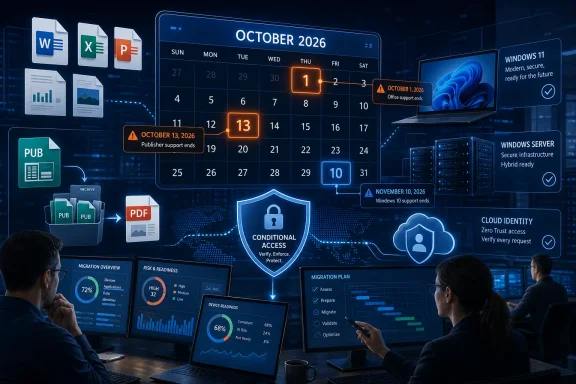
October 2026 will not deliver a single Microsoft end-of-life event so much as a coordinated collision of software, operating-system, server, publishing, and identity-security deadlines. Office LTSC 2021 loses support, Microsoft Publisher disappears from Microsoft 365, Windows Server 2022 leaves mainstream support, Windows 11 releases age out, and legacy Microsoft Entra ID Protection risk policies stop enforcing access decisions—all within a six-week window that begins on October 1. For administrators, the danger is not that every affected product will suddenly stop running; it is that unsupported applications, unenforced security policies, incompatible document archives, and deferred infrastructure upgrades could quietly accumulate into a much more serious operational failure.
Microsoft has always retired products, but the meaning of “end of support” has become more complicated as the company has moved from packaged software toward subscriptions, cloud services, and continuously serviced operating systems. A traditional perpetual application might remain technically usable for years after support ends, while an online feature can be removed centrally on a specific date regardless of what an administrator prefers.
That difference matters in October 2026. The month includes conventional lifecycle transitions, such as Windows Server 2022 moving from mainstream to extended support, alongside genuine service retirements that can remove active protection or functionality.
Microsoft 365, Azure, Entra, and Windows as a service changed that arrangement. Customers increasingly license access to an evolving service rather than purchasing a frozen feature set, giving Microsoft greater control over servicing schedules, security requirements, and feature retirements.
The result is administratively neat for Microsoft but potentially awkward for customers. Several unrelated migration projects can converge on the same change window, competing for testing resources, application owners, budgets, and executive attention.
Publisher also reaches its retirement point in October. Microsoft’s current guidance tells customers to convert existing Publisher files before October 1, particularly where access depends on the Microsoft 365 version of the application.
Windows 10 Enterprise LTSB 2016 and Windows 10 IoT Enterprise LTSB 2016 also reach the end of support on that date. These editions survived beyond the October 14, 2025 deadline that ended standard Windows 10 support, but their additional runway is almost exhausted.
The distinction between editions is crucial. A Windows 11 24H2 Enterprise machine remains supported beyond October 2026, while a 24H2 Pro machine does not; conversely, an Enterprise device still running 23H2 must move by November 10.
After that date, Microsoft will no longer provide security updates, bug fixes, or technical support for the affected products. The software is unlikely to deactivate merely because the calendar changes, but continued use will become progressively harder to defend.
LTSC is not the same as an Office subscription frozen on an old update channel. It is a separately licensed, perpetual release containing a snapshot of Office functionality, followed primarily by security and quality servicing rather than regular feature expansion.
Those choices involve more than different payment methods. Microsoft 365 Apps introduces recurring feature changes, account-based activation, cloud integration, and different servicing channels, while LTSC 2024 retains a more static operational model but omits many cloud-connected capabilities.
Administrators should inventory both installed products and actual application dependencies. A workstation may appear to use only Word and Excel while silently depending on an Access runtime, a Visio viewer, a legacy mail merge, or a third-party plug-in certified only against Office 2021.
The loss will be felt less in large design departments than in schools, churches, community organizations, local governments, small businesses, and administrative teams. These groups often use Publisher for newsletters, certificates, labels, menus, event programs, signs, and printable forms.
A collection of old Publisher documents is therefore not merely an archive. It can represent a future access problem, particularly if the organization expects to revise those materials for recurring events, annual campaigns, or legally required notices.
PDF is the safer format for preserving final appearance, while Word or PowerPoint may be more useful when future editing matters. Complex publications may need to move to dedicated desktop-publishing or design software rather than being forced into a general-purpose Office application.
That distinction should prevent unnecessary panic, but it should not become an excuse for inaction. Extended support preserves security updates at no additional charge, while feature requests, general design changes, and most non-security improvements fall outside the normal servicing model.
However, software vendors, hardware manufacturers, and internal platform teams may adopt more aggressive support schedules. A third-party application could require Windows Server 2025 long before Microsoft stops issuing Server 2022 security fixes.
Existing deployments require a workload-specific decision. Domain controllers, file servers, Hyper-V hosts, application servers, certificate services, Remote Desktop deployments, and clustered workloads all carry different upgrade constraints.
Administrators should also inspect Windows Server 2022 containers. Microsoft aligns those container images with the operating system lifecycle, so container hosts and base images cannot be treated as an unrelated modernization track.
On October 13, Windows 11 version 24H2 Home and Pro stop receiving monthly security and quality updates. Enterprise and Education editions of 24H2 remain supported until October 12, 2027, demonstrating why asset inventories must record edition as well as version.
Automatic deployment reduces the size of the unsupported population, but it does not eliminate upgrade failures. Safeguard holds, insufficient storage, damaged servicing components, incompatible drivers, or unsupported hardware can leave individual devices behind.
The problem is especially relevant to smaller organizations that manage updates but lack mature release engineering. Their devices may be intentionally deferred yet insufficiently monitored, creating a false sense that “Windows Update is enabled” guarantees lifecycle compliance.
A one-version upgrade that provides only limited additional runway may create avoidable work. The target should be selected according to application compatibility, hardware eligibility, deployment readiness, and the support date of the destination release.
October 13, 2026 brings the end for Windows 10 Enterprise LTSB 2016 and Windows 10 IoT Enterprise LTSB 2016. These systems are often embedded in kiosks, medical equipment, industrial controllers, point-of-sale devices, and other environments where replacing the operating system can involve recertifying an entire solution.
A ten-year support promise can also encourage dependency. By the time retirement arrives, the original vendor may be gone, replacement hardware may use different interfaces, and the organization may no longer possess the installation media or expertise needed to rebuild the system.
IT teams should distinguish replaceable endpoints from embedded or regulated systems. The latter require vendor engagement, risk acceptance, network isolation, and potentially a multi-year capital plan rather than a routine feature update.
The affected controls are the legacy user-risk policy and sign-in-risk policy configured directly in ID Protection, formerly called Azure AD Identity Protection. Microsoft wants organizations to implement equivalent risk-based controls in Conditional Access.
User risk estimates the likelihood that an identity itself has been compromised. That broader state can reflect leaked credentials, confirmed malicious activity, or multiple suspicious events associated with the account.
Microsoft recommends creating separate Conditional Access policies for these conditions rather than combining both into one rule. Separate policies make enforcement behavior, exclusions, investigation, and reporting easier to understand.
That flexibility is an advantage, but it also creates complexity. A poorly scoped exclusion, an ordering assumption, an unlicensed user population, or a broad rule activated without testing can either weaken protection or lock legitimate users out.
A safe migration should include the following controls:
The October cluster can also overload change-management processes. Office, Windows, server, identity, and document-conversion projects may have different owners but share the same testing laboratories and maintenance windows.
An expired Office installation on an isolated production machine may be defensible with strict controls. The same installation on an internet-connected administrative workstation processing sensitive data is much harder to explain.
Server modernization may involve new operating-system licenses, application upgrades, cloud consumption commitments, or hardware refreshes. By July 2026, any organization that has not secured funding is already operating within a tight procurement window.
Small businesses sit in the more dangerous middle ground. They may run Microsoft 365, Windows 11 Pro, local Windows Server infrastructure, and Entra-managed identities without dedicated specialists for each platform.
Publisher illustrates the problem particularly well. A business may retain a perpetual installation that still opens
The October deadline should be handled as a portfolio-wide campaign. A repeatable assessment can identify affected tenants, but remediation must account for each customer’s licensing, exclusions, business applications, and risk tolerance.
This evidence helps management understand residual risk and gives support teams a baseline when users report problems. It also prevents a migration from being declared complete merely because deployment software shows a high installation percentage.
The more significant question is how aggressively Microsoft will continue consolidating older tools into Microsoft 365, Conditional Access, and newer Windows servicing models.
Organizations selecting LTSC 2024 should document why Microsoft 365 Apps is unsuitable and when that decision will be revisited. Otherwise, the replacement project may simply reset the same lifecycle problem for another deadline.
Administrators should watch Windows release health, safeguard holds, and vendor certification rather than upgrading solely by version number. A supported release that breaks a critical application is not a successful migration.
Policy backup, change review, naming standards, emergency access, report-only testing, and continuous monitoring should therefore become normal security operations. Treating Conditional Access as a collection of portal checkboxes is no longer adequate.
Organizations finishing the 2026 work should immediately examine their SQL estate. The lesson of Microsoft’s October graveyard is that the next deadline becomes expensive only when nobody looks at it until the final quarter.
October 2026 will not switch off every affected Microsoft product at midnight, but that is precisely what makes the month dangerous: the most serious failures may be gradual, silent, and initially invisible. Unsupported Office installations will keep opening documents, Server 2022 will keep serving workloads under extended support, old Publisher files will remain on storage, and users may keep signing in even after legacy risk policies disappear. Administrators who inventory now, preserve proprietary data, test supported replacements, and validate security enforcement can turn Redmond’s crowded retirement calendar into a controlled modernization program; those who wait for something to break may discover that the reaper arrived weeks earlier and left no alert behind.
 Background
Microsoft has always retired products, but the meaning of “end of support” has become more complicated as the company has moved from packaged software toward subscriptions, cloud services, and continuously serviced operating systems. A traditional perpetual application might remain technically usable for years after support ends, while an online feature can be removed centrally on a specific date regardless of what an administrator prefers.That difference matters in October 2026. The month includes conventional lifecycle transitions, such as Windows Server 2022 moving from mainstream to extended support, alongside genuine service retirements that can remove active protection or functionality.
The long shift from perpetual software
For decades, Microsoft’s enterprise business revolved around versioned products with long, predictable lifecycles. Companies bought Windows Server, Office, SQL Server, Exchange Server, and related software, deployed them locally, and often kept them in service until hardware replacement or regulatory pressure forced an upgrade.Microsoft 365, Azure, Entra, and Windows as a service changed that arrangement. Customers increasingly license access to an evolving service rather than purchasing a frozen feature set, giving Microsoft greater control over servicing schedules, security requirements, and feature retirements.
Why October attracts lifecycle deadlines
Microsoft typically aligns major lifecycle milestones with its monthly security update schedule, commonly known as Patch Tuesday. In 2026, October 13 is the second Tuesday of the month, making it the natural cutoff for several fixed-lifecycle and Windows servicing events.The result is administratively neat for Microsoft but potentially awkward for customers. Several unrelated migration projects can converge on the same change window, competing for testing resources, application owners, budgets, and executive attention.
The October 2026 Deadline Map
The first task for IT departments is to separate the dates and understand what each one actually means. Treating everything as “end of life in October” risks obscuring important differences between a product that stops receiving security fixes and a policy engine that stops protecting sign-ins.October 1: Publisher and Entra policy changes
Microsoft says the legacy user-risk and sign-in-risk policies configured through Entra ID Protection will retire on October 1, 2026. Organizations must recreate their intended controls in Conditional Access rather than assuming Microsoft will transparently migrate them.Publisher also reaches its retirement point in October. Microsoft’s current guidance tells customers to convert existing Publisher files before October 1, particularly where access depends on the Microsoft 365 version of the application.
October 13: The largest wave
The busiest date is October 13, 2026. Office LTSC 2021 reaches the end of support, Windows Server 2022 leaves mainstream support, and Windows 11 version 24H2 Home and Pro reach the end of servicing.Windows 10 Enterprise LTSB 2016 and Windows 10 IoT Enterprise LTSB 2016 also reach the end of support on that date. These editions survived beyond the October 14, 2025 deadline that ended standard Windows 10 support, but their additional runway is almost exhausted.
November 10: A short extension for enterprise Windows
Windows 11 version 23H2 Enterprise, Education, IoT Enterprise, and Enterprise multi-session remain supported until November 10, 2026. That gives affected organizations only four additional weeks after the main October deadline.The distinction between editions is crucial. A Windows 11 24H2 Enterprise machine remains supported beyond October 2026, while a 24H2 Pro machine does not; conversely, an Enterprise device still running 23H2 must move by November 10.
Office LTSC 2021 Reaches the End
Office LTSC 2021 reaches the end of support on October 13, closing a five-year lifecycle that began in September 2021. The deadline covers the long-term servicing versions of Word, Excel, PowerPoint, Outlook, OneNote, Access, Publisher, Skype for Business, Project, and Visio associated with the 2021 generation.After that date, Microsoft will no longer provide security updates, bug fixes, or technical support for the affected products. The software is unlikely to deactivate merely because the calendar changes, but continued use will become progressively harder to defend.
Why LTSC exists
Office Long Term Service Channel is designed for systems that cannot accept frequent functional changes or depend on continuous cloud connectivity. Typical examples include production-floor computers, regulated workstations, laboratory systems, isolated networks, and devices supporting specialized equipment.LTSC is not the same as an Office subscription frozen on an old update channel. It is a separately licensed, perpetual release containing a snapshot of Office functionality, followed primarily by security and quality servicing rather than regular feature expansion.
The supported migration choices
Microsoft’s preferred destination is Microsoft 365 Apps, which receives ongoing feature, security, and compatibility updates. For organizations that cannot or will not adopt subscription Office, Office LTSC 2024 is the supported on-premises replacement.Those choices involve more than different payment methods. Microsoft 365 Apps introduces recurring feature changes, account-based activation, cloud integration, and different servicing channels, while LTSC 2024 retains a more static operational model but omits many cloud-connected capabilities.
Compatibility testing cannot be skipped
Office upgrades have a reputation for appearing straightforward until a business-critical macro, COM add-in, template, database, or document-management integration fails. Access front ends, Outlook extensions, Excel automation, and line-of-business software that generates Office documents deserve particular scrutiny.Administrators should inventory both installed products and actual application dependencies. A workstation may appear to use only Word and Excel while silently depending on an Access runtime, a Visio viewer, a legacy mail merge, or a third-party plug-in certified only against Office 2021.
Microsoft Publisher’s Final Pages
Publisher’s retirement is more disruptive than the end of an ordinary Office version because there is no Publisher 2024 successor. Microsoft is ending the application itself after roughly 35 years, concluding a product line that began during the Windows 3.0 era.The loss will be felt less in large design departments than in schools, churches, community organizations, local governments, small businesses, and administrative teams. These groups often use Publisher for newsletters, certificates, labels, menus, event programs, signs, and printable forms.
A proprietary archive problem
Publisher’s.pub format creates the most urgent complication. Unlike common Office formats, Publisher files are not broadly supported by mainstream productivity applications, and layout-heavy documents rarely convert perfectly into an editable Word file.A collection of old Publisher documents is therefore not merely an archive. It can represent a future access problem, particularly if the organization expects to revise those materials for recurring events, annual campaigns, or legally required notices.
Microsoft’s suggested alternatives
Microsoft points users toward Word and PowerPoint for many common Publisher tasks. Those applications can handle templates, labels, cards, simple brochures, branded layouts, and other lightweight publishing jobs, but neither is a drop-in replacement for every Publisher workflow.PDF is the safer format for preserving final appearance, while Word or PowerPoint may be more useful when future editing matters. Complex publications may need to move to dedicated desktop-publishing or design software rather than being forced into a general-purpose Office application.
A practical conversion sequence
Organizations with substantial Publisher archives should complete a controlled conversion project while supported installations remain available:- Locate every
.pubfile across endpoints, file servers, OneDrive libraries, SharePoint sites, removable media, and departmental archives. - Classify files by business value, distinguishing disposable drafts from active templates, recurring publications, and records that must be preserved.
- Export reference copies to PDF so the original layout remains viewable after Publisher becomes unavailable.
- Create editable replacements in Word, PowerPoint, or another publishing platform where future revisions are likely.
- Compare the converted output against the original, paying attention to fonts, linked images, text overflow, crop settings, and print dimensions.
- Retain controlled access to the original files until legal, records-management, and operational owners approve their disposal.
Windows Server 2022 Leaves Mainstream Support
Windows Server 2022 does not die on October 13, 2026. Instead, it moves from mainstream support to extended support, which continues through October 14, 2031.That distinction should prevent unnecessary panic, but it should not become an excuse for inaction. Extended support preserves security updates at no additional charge, while feature requests, general design changes, and most non-security improvements fall outside the normal servicing model.
What extended support means operationally
A properly patched Windows Server 2022 system can remain in a supported state for another five years. Organizations do not need to perform an emergency fleet-wide migration merely because mainstream support ends.However, software vendors, hardware manufacturers, and internal platform teams may adopt more aggressive support schedules. A third-party application could require Windows Server 2025 long before Microsoft stops issuing Server 2022 security fixes.
Windows Server 2025 becomes the strategic target
Windows Server 2025 is Microsoft’s current Long-Term Servicing Channel release and remains in mainstream support until 2029, followed by extended support into 2034. For new deployments, that longer runway makes Server 2025 the more defensible default unless an application vendor mandates Server 2022.Existing deployments require a workload-specific decision. Domain controllers, file servers, Hyper-V hosts, application servers, certificate services, Remote Desktop deployments, and clustered workloads all carry different upgrade constraints.
Hidden dependencies deserve attention
Server operating systems rarely stand alone. They support agents, backup products, antivirus and endpoint-detection software, storage drivers, databases, management tools, and applications that may have their own compatibility matrices.Administrators should also inspect Windows Server 2022 containers. Microsoft aligns those container images with the operating system lifecycle, so container hosts and base images cannot be treated as an unrelated modernization track.
Windows 11 Servicing Deadlines Multiply
Windows 11’s lifecycle is release-specific and edition-specific, making it less intuitive than the older model of supporting one Windows generation for a decade. A device can run “Windows 11” and still be out of support because its feature release has aged out.On October 13, Windows 11 version 24H2 Home and Pro stop receiving monthly security and quality updates. Enterprise and Education editions of 24H2 remain supported until October 12, 2027, demonstrating why asset inventories must record edition as well as version.
Consumer devices should move automatically
Eligible unmanaged Home and Pro systems are expected to receive Windows 11 version 25H2 automatically as 24H2 approaches retirement. Users can schedule or postpone the restart, but Microsoft generally intervenes when a consumer release nears the end of servicing.Automatic deployment reduces the size of the unsupported population, but it does not eliminate upgrade failures. Safeguard holds, insufficient storage, damaged servicing components, incompatible drivers, or unsupported hardware can leave individual devices behind.
Managed Pro fleets need deliberate action
Businesses using Windows 11 Pro under centralized management cannot rely on consumer-style automatic updating. Administrators must approve and deploy a supported feature release through Windows Update for Business, Microsoft Intune, Configuration Manager, or their chosen patching platform.The problem is especially relevant to smaller organizations that manage updates but lack mature release engineering. Their devices may be intentionally deferred yet insufficiently monitored, creating a false sense that “Windows Update is enabled” guarantees lifecycle compliance.
Enterprise 23H2 has a separate clock
Windows 11 23H2 Enterprise and Education reach the end of servicing on November 10, 2026. Moving to 24H2 is supported, but by late 2026 organizations should evaluate whether 25H2—or a newer release approved for their hardware—is the better destination.A one-version upgrade that provides only limited additional runway may create avoidable work. The target should be selected according to application compatibility, hardware eligibility, deployment readiness, and the support date of the destination release.
Windows 10 Still Has a 2026 Afterlife
Standard support for Windows 10 ended on October 14, 2025, but that did not cause every Windows 10 device to stop receiving updates. Extended Security Updates and specialized long-term servicing editions created several parallel timelines.October 13, 2026 brings the end for Windows 10 Enterprise LTSB 2016 and Windows 10 IoT Enterprise LTSB 2016. These systems are often embedded in kiosks, medical equipment, industrial controllers, point-of-sale devices, and other environments where replacing the operating system can involve recertifying an entire solution.
Long-term servicing is not permanent servicing
The LTSB and LTSC labels are sometimes interpreted as permission to forget about a device indefinitely. In reality, they provide a longer, more static lifecycle with a known end date.A ten-year support promise can also encourage dependency. By the time retirement arrives, the original vendor may be gone, replacement hardware may use different interfaces, and the organization may no longer possess the installation media or expertise needed to rebuild the system.
Hardware eligibility remains a constraint
Some Windows 10-era equipment cannot make a supported transition to Windows 11 because it lacks an approved processor, TPM 2.0, Secure Boot capability, or compatible drivers. For ordinary PCs, replacement may be straightforward; for specialized appliances, the operating system can be tightly coupled to expensive machinery.IT teams should distinguish replaceable endpoints from embedded or regulated systems. The latter require vendor engagement, risk acceptance, network isolation, and potentially a multi-year capital plan rather than a routine feature update.
Entra ID Risk Policies Create the Sharpest Security Risk
The retirement of legacy Entra ID Protection risk policies on October 1 may be the most dangerous item in the calendar because it can remove a security control without breaking ordinary sign-in. Users may continue authenticating normally while compromised accounts no longer receive the expected challenge or block.The affected controls are the legacy user-risk policy and sign-in-risk policy configured directly in ID Protection, formerly called Azure AD Identity Protection. Microsoft wants organizations to implement equivalent risk-based controls in Conditional Access.
User risk and sign-in risk are different
Sign-in risk estimates the likelihood that a specific authentication attempt was not performed by the legitimate user. Signals can include unfamiliar activity, suspicious infrastructure, anonymized network use, atypical travel patterns, and threat intelligence.User risk estimates the likelihood that an identity itself has been compromised. That broader state can reflect leaked credentials, confirmed malicious activity, or multiple suspicious events associated with the account.
Microsoft recommends creating separate Conditional Access policies for these conditions rather than combining both into one rule. Separate policies make enforcement behavior, exclusions, investigation, and reporting easier to understand.
Conditional Access is more capable—and easier to misconfigure
Conditional Access can evaluate user identity, group membership, device state, application, network location, authentication strength, sign-in risk, user risk, and session conditions before allowing access. It can block a request, demand multifactor authentication, require a password change, restrict the session, or apply other controls.That flexibility is an advantage, but it also creates complexity. A poorly scoped exclusion, an ordering assumption, an unlicensed user population, or a broad rule activated without testing can either weaken protection or lock legitimate users out.
Migration must include validation
Creating policies with similar names is not enough. Administrators must verify that the new Conditional Access controls cover the same users and resources, trigger at the intended risk levels, and produce the expected remediation behavior.A safe migration should include the following controls:
- Deploy new risk-based policies in report-only mode first. This exposes likely effects without enforcing them immediately.
- Maintain emergency access accounts. Carefully protected break-glass identities should be excluded from rules that could lock out every administrator.
- Test multifactor authentication registration. A user cannot successfully self-remediate through MFA if no suitable authentication method is registered.
- Separate user-risk and sign-in-risk handling. Different events may require different thresholds and responses.
- Review service and workload identities. Human-user Conditional Access rules do not automatically solve risks involving applications, automation, or service principals.
- Confirm licensing coverage. Full Identity Protection risk capabilities require appropriate Microsoft Entra licensing for the users receiving the benefit.
- Monitor sign-in logs after enforcement. Report-only analysis must be followed by operational monitoring once the policies become active.
Enterprise Impact
Large enterprises are likely to have migration tools, endpoint-management platforms, security teams, and lifecycle governance. Their challenge is scale: thousands of devices, multiple Office deployment channels, acquisitions with separate tenants, legacy business applications, and exceptions scattered across business units.The October cluster can also overload change-management processes. Office, Windows, server, identity, and document-conversion projects may have different owners but share the same testing laboratories and maintenance windows.
Compliance raises the stakes
Unsupported software does not automatically violate every regulatory framework, but it is difficult to justify when security fixes are no longer available. Auditors commonly expect organizations to maintain supported platforms, document exceptions, and apply compensating controls.An expired Office installation on an isolated production machine may be defensible with strict controls. The same installation on an internet-connected administrative workstation processing sensitive data is much harder to explain.
Procurement may become the bottleneck
Licensing and hardware decisions can delay technical work even when the migration path is obvious. Moving from Office LTSC to Microsoft 365 Apps may require subscription approval, while Windows 11 upgrades can expose the need for replacement PCs.Server modernization may involve new operating-system licenses, application upgrades, cloud consumption commitments, or hardware refreshes. By July 2026, any organization that has not secured funding is already operating within a tight procurement window.
Consumer and Small-Business Impact
Consumers face a narrower set of issues, principally Windows 11 24H2 and Publisher. Microsoft can automate much of the Windows upgrade, but Publisher users may not realize that the application and its file format require attention until they try to open an old project.Small businesses sit in the more dangerous middle ground. They may run Microsoft 365, Windows 11 Pro, local Windows Server infrastructure, and Entra-managed identities without dedicated specialists for each platform.
The “it still works” trap
Unsupported software often continues launching, printing, saving, and authenticating. That apparent normality encourages users to postpone migration because the risk remains invisible until an exploit, compatibility change, or recovery incident occurs.Publisher illustrates the problem particularly well. A business may retain a perpetual installation that still opens
.pub files, yet have no supported recovery path if the PC fails and the software cannot be reinstalled cleanly.Managed service providers must inventory every tenant
MSPs should not assume that standardized Microsoft 365 licensing means standardized configuration. Older customers may still have legacy Entra risk policies, mixed Office installations, unmanaged Windows Pro devices, or Publisher archives stored in SharePoint.The October deadline should be handled as a portfolio-wide campaign. A repeatable assessment can identify affected tenants, but remediation must account for each customer’s licensing, exclusions, business applications, and risk tolerance.
Migration Priorities for Administrators
The deadlines are close enough that organizations need a ranked plan rather than several disconnected projects. Identity protection should generally come first because its retirement can silently remove enforcement, followed by document preservation and endpoint or application upgrades.A practical order of operations
- Audit Entra ID Protection immediately. Identify any legacy user-risk or sign-in-risk policies and build Conditional Access replacements.
- Inventory Publisher data before changing Office. Preserve
.pubcontent while functioning Publisher installations remain readily available. - Map Office 2021 dependencies. Record add-ins, macros, Access databases, templates, and integrations before choosing Microsoft 365 Apps or LTSC 2024.
- Identify Windows release and edition combinations. Do not rely on the generic Windows 11 product name.
- Review Windows Server 2022 workloads. Decide which systems can remain under extended support and which should move to Server 2025.
- Escalate blocked systems. Unsupported hardware, vendor restrictions, licensing gaps, and regulatory dependencies require management decisions rather than technical optimism.
- Schedule post-migration validation. Confirm patching, activation, security-policy enforcement, document fidelity, application compatibility, and recovery procedures.
Build evidence, not just plans
Each project should produce measurable evidence: exported device inventories, Conditional Access reports, Office compatibility results, Publisher conversion logs, server application matrices, and approved exception records.This evidence helps management understand residual risk and gives support teams a baseline when users report problems. It also prevents a migration from being declared complete merely because deployment software shows a high installation percentage.
Strengths and Opportunities
The October 2026 lifecycle wave creates substantial work, but it also offers an opportunity to remove technical debt that organizations might otherwise carry for years.- Conditional Access can provide richer protection than the legacy Entra policies. It centralizes identity decisions and can combine risk with device, application, location, authentication, and session context.
- Office modernization can reduce version fragmentation. A controlled migration can replace mixtures of Office 2016, 2019, 2021, and subscription installations with a more consistent platform.
- Publisher retirement can improve records preservation. Converting final publications to PDF creates more durable, widely readable archives.
- Windows upgrades can expose unmanaged devices. Feature-release audits frequently reveal machines missing from endpoint management or patch-compliance reporting.
- Server reviews can drive workload rationalization. Some Server 2022 systems may be better upgraded, consolidated, containerized, moved to a managed service, or retired entirely.
- Lifecycle governance can become continuous. Organizations can replace emergency deadline projects with dashboards that track support dates throughout the year.
Risks and Concerns
The principal risk is fragmentation. Each affected technology has a valid migration path, but executing all of them simultaneously increases the chance that teams will rush testing, overlook exceptions, or misunderstand what Microsoft is retiring.- Legacy Entra policies may stop protecting accounts without an obvious outage. Successful sign-ins do not prove that risk-based enforcement still exists.
- Unsupported Office installations will accumulate unpatched vulnerabilities. Documents, email attachments, add-ins, and embedded content keep Office exposed to hostile input.
- Publisher archives may become practically inaccessible. Proprietary source files are especially vulnerable when the originating application disappears.
- Windows edition confusion can produce false compliance reports. Version 24H2 has different deadlines depending on whether the device runs Pro or Enterprise.
- Server 2022’s extended support may encourage excessive delay. Security updates continue, but innovation, vendor support, and application requirements move forward.
- Automated conversions can damage layouts. PDF preserves appearance but not easy editing, while Word conversion can alter complex formatting.
- Last-minute Conditional Access changes can cause lockouts. Broad policies need report-only analysis, exclusions, emergency accounts, and staged enforcement.
- Licensing assumptions may undermine security designs. Technical availability inside a tenant does not necessarily mean every targeted user is correctly licensed.
What to Watch Next
Microsoft could still clarify individual retirement mechanics or adjust guidance before October, but organizations should not plan around the possibility of a delay. The confirmed dates are close enough that waiting for a final reminder offers little benefit.The more significant question is how aggressively Microsoft will continue consolidating older tools into Microsoft 365, Conditional Access, and newer Windows servicing models.
Office LTSC 2024’s remaining runway
Office LTSC 2024 gives on-premises customers a supported destination, but it should not be interpreted as a return to the decade-long Office lifecycles of the past. Buyers must evaluate its support window before making a large deployment and avoid assuming that “perpetual” means indefinitely maintained.Organizations selecting LTSC 2024 should document why Microsoft 365 Apps is unsuitable and when that decision will be revisited. Otherwise, the replacement project may simply reset the same lifecycle problem for another deadline.
The next Windows feature releases
Windows 11 version 25H2 is the obvious destination for many 24H2 Home and Pro systems, but enterprise estates must consider hardware, application readiness, deployment rings, and the support period available to each edition. Newer releases may offer a longer runway, although they can also introduce a less mature compatibility baseline.Administrators should watch Windows release health, safeguard holds, and vendor certification rather than upgrading solely by version number. A supported release that breaks a critical application is not a successful migration.
Identity controls will keep converging
Microsoft’s direction is clear: Conditional Access is becoming the central policy engine for modern identity protection. That increases consistency, but it also makes Conditional Access configuration a critical control plane whose errors can affect an entire organization.Policy backup, change review, naming standards, emergency access, report-only testing, and continuous monitoring should therefore become normal security operations. Treating Conditional Access as a collection of portal checkboxes is no longer adequate.
October 2027 is not empty
The following October currently looks less congested, but SQL Server 2017 reaches the end of extended support on October 12, 2027. Database migrations can require significantly more preparation than desktop application upgrades, especially where deprecated features, compatibility levels, reporting systems, or vendor applications are involved.Organizations finishing the 2026 work should immediately examine their SQL estate. The lesson of Microsoft’s October graveyard is that the next deadline becomes expensive only when nobody looks at it until the final quarter.
October 2026 will not switch off every affected Microsoft product at midnight, but that is precisely what makes the month dangerous: the most serious failures may be gradual, silent, and initially invisible. Unsupported Office installations will keep opening documents, Server 2022 will keep serving workloads under extended support, old Publisher files will remain on storage, and users may keep signing in even after legacy risk policies disappear. Administrators who inventory now, preserve proprietary data, test supported replacements, and validate security enforcement can turn Redmond’s crowded retirement calendar into a controlled modernization program; those who wait for something to break may discover that the reaper arrived weeks earlier and left no alert behind.
References
- Primary source: The Register
Published: 2026-07-22T10:00:00+00:00
Loading…
www.theregister.com - Official source: learn.microsoft.com
Loading…
learn.microsoft.com - Official source: support.microsoft.com
Microsoft Publisher will no longer be supported after October 2026 | Microsoft Support
Microsoft Publisher will no longer be supported after October 2026support.microsoft.com