

A “best gaming CPUs” guide published on July 21, 2026, places AMD’s Ryzen 7 7800X3D at the top, surrounds it with several aging AM4 processors, and gives Intel only one slot—occupied by a four-year-old Core i5-12600KF. The central advice about balancing CPU and GPU spending remains useful, but the ranking is too outdated and technically inconsistent to serve as a reliable July 2026 buying guide, overlooking the Ryzen 7 9800X3D and 9850X3D, newer Ryzen 9 X3D models, AMD’s recently launched Ryzen 7 7700X3D, the Ryzen 5 7600X3D, and Intel’s current Core Ultra desktop range.
The processor market has changed substantially since the Ryzen 7 7800X3D became the default recommendation for high-end gaming PCs. AMD has expanded its second-generation 3D V-Cache portfolio, Intel has moved its latest desktop products to the Core Ultra brand, and Windows 11 updates have become an increasingly important part of CPU performance testing.
That does not make the 7800X3D slow. It remains an excellent eight-core gaming processor, particularly when discounted, but calling it the “undisputed king” in July 2026 ignores multiple faster successors.
Several omissions are especially difficult to reconcile with the article’s July 2026 publication date:
The emphasis on 1% lows is also appropriate. Average frame rates can hide traversal stutter, simulation spikes, shader-compilation interruptions, background-task interference, and other short-lived problems that players experience as uneven motion.
A useful gaming CPU test should examine:
That does not mean every buyer will experience the same gap. At 4K with demanding visual settings, the GPU may spend far longer rendering each frame, compressing the practical difference between a six-core mainstream CPU and an expensive X3D model.
A benchmark suite weighted toward cache-sensitive games can make X3D processors look overwhelmingly dominant. A suite focused on visually intensive 4K games may show very small differences among competent modern CPUs, which is why a balanced selection matters.
Its second-generation cache layout also gives AMD more flexibility than earlier X3D implementations. The architecture improves clock behavior and thermal handling while retaining the large low-latency cache pool that benefits game workloads.
The 9800X3D is not automatically worthwhile for a 60 Hz 4K system paired with a midrange GPU. Its advantage becomes easier to justify with a very fast graphics card, a high-refresh monitor, simulation-heavy games, or a strong desire to maximize minimum frame rates.
That makes the 9850X3D a luxury purchase. It suits enthusiasts who want the fastest eight-core X3D product and are willing to pay for incremental gains, but it does not invalidate the 9800X3D’s stronger performance-per-dollar position.
Its multi-chip design introduces additional scheduling considerations because not every core complex has the same cache characteristics. Windows, AMD’s chipset software, firmware, and game-detection mechanisms therefore play an important role in directing gaming threads to the appropriate cores.
For a properly configured system, this need not be a deal-breaker. It simply means that the 9950X3D requires more software awareness than the straightforward single-compute-die design of an eight-core X3D processor.
Launch pricing is the danger. If retailers charge too much for the 7700X3D while clearing discounted 7800X3D inventory, the nominally lower-tier processor can become the worse purchase.
Buyers should compare actual checkout prices rather than model hierarchy. A CPU’s recommended price does not account for motherboard bundles, cooler promotions, limited availability, or clearance discounts.
Its six-core configuration nevertheless imposes limits. Gamers who combine CPU-based streaming, development tools, virtual machines, production software, and demanding background tasks may prefer an eight-core processor even if its average gaming result is slightly lower.
The critical distinction is between a specialist and an all-rounder. The 7600X3D is a gaming specialist; the 9700X is the broader general-purpose choice.
Its value depends on more than CPU pricing. AM5 motherboard and DDR5 costs have improved since the platform’s launch, while longer socket support makes it possible to replace the processor later without rebuilding the entire PC.
Claims that the 9600X delivers 95% of the experience of every processor costing twice as much need context. That can be approximately true in GPU-bound 4K games, but it is not representative of cache-sensitive simulations or high-refresh CPU-limited testing.
Its gaming reputation improved after platform updates, including firmware, chipset, and Windows-related optimization. This history demonstrates why CPU reviews should identify the exact software environment: launch-day data may no longer represent current performance.
Cooling decisions should follow measured package power and the desired noise level rather than marketing. Spending an extra $150 on unnecessary cooling while choosing a weaker GPU is usually a poor gaming trade.
Intel’s refreshed 200S Plus models improve the company’s competitive position. They still face an uphill battle against AMD’s X3D products in pure gaming, especially when a fast GPU exposes CPU differences, but they deserve current testing rather than dismissal by omission.
The Core Ultra 7 tier is generally more interesting than the flagship for gaming buyers. It can provide a better balance of price, core resources, and application speed without paying heavily for cores that games may not exploit.
That history justifies caution when buying used hardware, especially if its operating conditions are unknown. It does not justify treating every Intel processor as currently unstable, nor does it apply directly to the older 12600KF in the same way.
Any used 13th- or 14th-generation purchase should include the following checks:
A 5700X or 5800XT can be appropriate for low-cost multithreaded productivity, but the X3D model is usually the stronger final gaming upgrade for someone already owning a compatible AM4 motherboard and DDR4 memory.
A BIOS update may be required before replacing the CPU. Users should perform that update while the old processor is still installed, verify motherboard support, and ensure that the cooler mounting hardware is available.
Staying on AM4 is less compelling when the system also needs more USB connectivity, faster storage expansion, newer networking, additional PCI Express resources, or a long CPU-upgrade path. Platform age affects more than benchmark numbers.
The Ryzen 5 5500 carries additional limitations, including reduced cache and PCI Express 3.0 connectivity. That can matter with certain graphics cards using narrow PCIe interfaces, where moving from PCIe 4.0 to PCIe 3.0 may impose a more visible penalty than it would on a full-width x16 card.
A current test should identify the Windows 11 build, update status, power plan, virtualization configuration, and security features. Reusing old benchmark data under a new publication date is not equivalent to retesting.
Intel systems likewise depend on firmware and operating-system cooperation to distribute work appropriately across performance and efficiency cores. Windows 11 is generally preferable to Windows 10 for recent hybrid architectures because its scheduler has greater awareness of those designs.
The distinction matters because a processor can perform brilliantly in a clean benchmark environment yet lose consistency in an everyday desktop configuration. Extra cores do not always raise peak FPS, but they can protect frame times when other work competes for CPU resources.
The display target matters more than the resolution label alone. A 1080p 60 Hz system has radically different CPU needs from a 1080p 480 Hz esports machine.
Simulation-heavy titles and competitive settings remain exceptions. Buyers should investigate the games they actually play rather than treating resolution as a universal bottleneck prediction.
Upscaling complicates this rule. Performance modes may render internally at a much lower resolution, increasing frame rates and placing more pressure back on the CPU. Frame generation can improve displayed smoothness, but it does not eliminate the need for a sufficiently high underlying simulation and input frame rate.
Other practical factors include:
The Ryzen 9 9950X3D is therefore compelling for a dual-purpose workstation, while the 9800X3D is often the cleaner pure-gaming choice. Enterprise buyers should additionally consider manageability, validated configurations, vendor support, security policy, and application certification rather than assembling systems solely from consumer benchmark charts.
Intel’s current platform also needs to demonstrate how far firmware, Windows optimization, and refreshed silicon can improve real gaming performance. Productivity strength alone will not displace X3D processors from enthusiast gaming recommendations.
Eight strong cores continue to represent a comfortable gaming target. Six cores remain viable for value builds, while 12 or 16 cores should be purchased primarily for workloads beyond gaming rather than speculative future-proofing.
Readers should expect transparent methodology rather than unexplained claims of having tested “dozens” of products. Reproducibility is what turns benchmark data into evidence.
The Ryzen 7 7800X3D remains a formidable gaming CPU, but it is no longer the undisputed champion and should not head an ostensibly current July 2026 ranking without direct comparisons against its Zen 5 X3D successors. For most premium gaming builds, the Ryzen 7 9800X3D is the stronger overall recommendation, the 9850X3D serves enthusiasts chasing the fastest eight-core option, and the 9950X3D is the superior gaming-and-workstation hybrid. Mainstream buyers should compare the 7600X3D, 9600X, 9700X, and current Intel Core Ultra alternatives, while AM4 owners should prioritize the 5700X3D over conventional Zen 3 chips when gaming is the objective. The enduring rule is not to buy the processor with the biggest claims, but to choose the CPU, GPU, monitor, cooling, and platform as one balanced Windows gaming system.
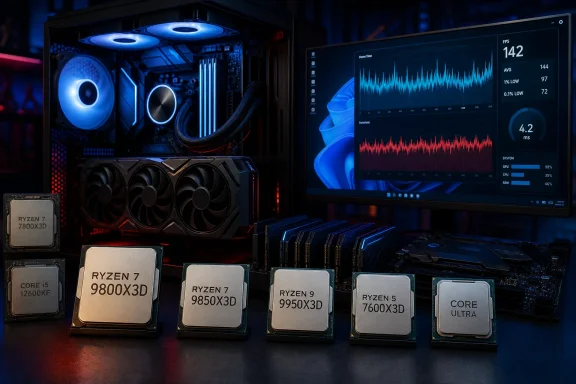 Overview
The processor market has changed substantially since the Ryzen 7 7800X3D became the default recommendation for high-end gaming PCs. AMD has expanded its second-generation 3D V-Cache portfolio, Intel has moved its latest desktop products to the Core Ultra brand, and Windows 11 updates have become an increasingly important part of CPU performance testing.That does not make the 7800X3D slow. It remains an excellent eight-core gaming processor, particularly when discounted, but calling it the “undisputed king” in July 2026 ignores multiple faster successors.
Why the original ranking feels frozen in time
The supplied list reads more like a mixture of 2023, 2024, and early-2025 recommendations than a current 2026 hierarchy. Six of its ten selections use AMD’s older AM4 or first-generation AM5 products, while the only Intel recommendation comes from the Alder Lake generation launched in 2021.Several omissions are especially difficult to reconcile with the article’s July 2026 publication date:
- The Ryzen 7 9850X3D, AMD’s fastest eight-core gaming processor, is absent.
- The Ryzen 7 9800X3D, widely regarded as one of the strongest gaming CPUs available, is absent.
- The Ryzen 9 9950X3D, designed for high-end gaming and heavily threaded work, is absent.
- The Ryzen 7 7700X3D, released in July 2026 after its Computex announcement, is absent.
- The Ryzen 5 7600X3D, one of the most compelling lower-cost gaming processors, is absent.
- Intel’s Core Ultra 200S Plus processors receive no consideration.
What the guide gets right
The article’s broadest conclusion remains sound: the fastest CPU is not automatically the right CPU for every gaming PC. At 1440p and especially 4K, graphics performance usually matters more, provided the processor can deliver stable frame times and keep the GPU adequately supplied.The emphasis on 1% lows is also appropriate. Average frame rates can hide traversal stutter, simulation spikes, shader-compilation interruptions, background-task interference, and other short-lived problems that players experience as uneven motion.
How Gaming CPUs Should Be Judged in 2026
A credible CPU ranking cannot rest on a few average-frame-rate results. Modern processors must be evaluated as part of a platform involving Windows, firmware, memory, cooling, game engines, graphics drivers, and the selected GPU.Average FPS is only the first metric
Average frame rate describes throughput over an entire benchmark run, but it does not fully describe responsiveness or consistency. A processor averaging 180 frames per second can still feel worse than one averaging 170 FPS if the first chip repeatedly produces long frame-time spikes.A useful gaming CPU test should examine:
- Average frame rates across multiple runs.
- 1% and, where repeatability permits, 0.1% low results.
- Frame-time plots rather than only summary numbers.
- CPU package power and temperature.
- Performance with realistic background applications.
- Scaling across different GPUs and resolutions.
- Windows version, BIOS revision, chipset driver, and memory configuration.
Resolution changes what the benchmark means
Testing at 1080p with a flagship GPU is useful for exposing CPU differences. It deliberately reduces the graphics bottleneck, revealing how quickly each processor can prepare game logic, simulation work, draw calls, decompression tasks, and operating-system activity.That does not mean every buyer will experience the same gap. At 4K with demanding visual settings, the GPU may spend far longer rendering each frame, compressing the practical difference between a six-core mainstream CPU and an expensive X3D model.
Game selection can reshape the ranking
Simulation games, strategy titles, competitive shooters, open-world games, and conventional GPU-heavy action games stress processors differently. Microsoft Flight Simulator, city builders, large battles, heavily modified games, and high-refresh esports titles often reward cache capacity or exceptional per-thread performance.A benchmark suite weighted toward cache-sensitive games can make X3D processors look overwhelmingly dominant. A suite focused on visually intensive 4K games may show very small differences among competent modern CPUs, which is why a balanced selection matters.
Corrected Top 10 Gaming CPU Recommendations
No universal list can account for every regional price or bundle, but a defensible July 2026 selection should prioritize current gaming performance, platform cost, upgrade potential, power behavior, and the user’s non-gaming workload.The revised ranking
- AMD Ryzen 7 9800X3D — Best gaming CPU overall.
Its combination of eight Zen 5 cores, second-generation 3D V-Cache, strong frame-time behavior, and mature AM5 platform support makes it the most sensible premium gaming recommendation when priced below the newer 9850X3D. - AMD Ryzen 7 9850X3D — Fastest eight-core gaming CPU.
This higher-clocked successor pushes the architecture further, but its relatively modest gaming uplift over the 9800X3D means value depends heavily on the price difference. - AMD Ryzen 9 9950X3D — Best for gaming and serious productivity.
Buyers who edit video, compile large projects, render scenes, run virtual machines, or perform other heavily threaded work can obtain flagship-class gaming without giving up 16-core productivity. - AMD Ryzen 7 7700X3D — Best new midrange X3D option.
This newly released Zen 4 X3D model extends AMD’s cache-focused gaming line downward, although launch pricing and the cost of nearby alternatives determine whether it is genuinely good value. - AMD Ryzen 5 7600X3D — Best lower-cost gaming specialist.
Six cores are less generous for heavy creation workloads, but the large cache can produce excellent gaming performance and unusually strong 1% lows for its class. - AMD Ryzen 7 9700X — Best balanced eight-core mainstream CPU.
It lacks stacked cache, yet offers good gaming, strong application performance, low nominal power, and a cleaner all-purpose profile than an older Zen 4 eight-core chip. - AMD Ryzen 5 9600X — Best mainstream six-core AM5 CPU.
This remains a sensible foundation for a gaming PC when the budget should favor the graphics card, although it should not be portrayed as almost equal to every premium X3D chip in all CPU-limited conditions. - Intel Core Ultra 7 270K Plus — Best current Intel alternative.
Intel’s refreshed desktop offering deserves consideration for mixed-use systems, platform features, and applications that respond well to its hybrid architecture, even if AMD’s X3D processors retain the clearer pure-gaming advantage. - AMD Ryzen 7 7800X3D — Best previous-generation premium deal.
It remains extremely capable, but it now belongs in a value-dependent legacy position rather than at the unconditional top of the market. - AMD Ryzen 7 5700X3D — Best AM4 gaming upgrade.
For an existing AM4 owner, this is generally a more gaming-focused upgrade than the 5700X or 5800XT because its expanded cache can postpone an expensive motherboard-and-memory replacement.
The Real High-End Contest
The premium gaming market in July 2026 is not a battle between the Ryzen 7 7800X3D and Ryzen 9 9900X. The more relevant comparison involves the 9800X3D, 9850X3D, and 9950X3D.Ryzen 7 9800X3D: the practical flagship
For a system primarily intended to play games, the 9800X3D occupies the strongest position. Eight high-performance cores remain sufficient for mainstream gaming, streaming through modern GPU encoders, voice chat, launchers, browser activity, and ordinary background software.Its second-generation cache layout also gives AMD more flexibility than earlier X3D implementations. The architecture improves clock behavior and thermal handling while retaining the large low-latency cache pool that benefits game workloads.
The 9800X3D is not automatically worthwhile for a 60 Hz 4K system paired with a midrange GPU. Its advantage becomes easier to justify with a very fast graphics card, a high-refresh monitor, simulation-heavy games, or a strong desire to maximize minimum frame rates.
Ryzen 7 9850X3D: fastest, but not always best
The 9850X3D increases peak frequency over the 9800X3D, making it the technically superior eight-core model. In practice, the uplift varies by game and is often much smaller than the specification difference might imply.That makes the 9850X3D a luxury purchase. It suits enthusiasts who want the fastest eight-core X3D product and are willing to pay for incremental gains, but it does not invalidate the 9800X3D’s stronger performance-per-dollar position.
Ryzen 9 9950X3D: for work as well as play
The 9950X3D is the more rational premium purchase when the PC also earns money. Its 16 cores can transform video encoding, CPU rendering, software compilation, virtualized workloads, and demanding multitasking.Its multi-chip design introduces additional scheduling considerations because not every core complex has the same cache characteristics. Windows, AMD’s chipset software, firmware, and game-detection mechanisms therefore play an important role in directing gaming threads to the appropriate cores.
For a properly configured system, this need not be a deal-breaker. It simply means that the 9950X3D requires more software awareness than the straightforward single-compute-die design of an eight-core X3D processor.
The New Midrange X3D Question
AMD’s Ryzen 7 7700X3D complicates the market by bringing eight-core 3D V-Cache performance to a lower tier. Its arrival also makes a July 2026 guide that omits it immediately incomplete.Ryzen 7 7700X3D versus 7800X3D
Both are eight-core Zen 4 processors with stacked cache, so the distinction is primarily one of frequency, binning, pricing, and availability. The 7800X3D should generally be faster, but the cheaper model can be attractive if the savings are substantial.Launch pricing is the danger. If retailers charge too much for the 7700X3D while clearing discounted 7800X3D inventory, the nominally lower-tier processor can become the worse purchase.
Buyers should compare actual checkout prices rather than model hierarchy. A CPU’s recommended price does not account for motherboard bundles, cooler promotions, limited availability, or clearance discounts.
Ryzen 5 7600X3D and six-core longevity
The 7600X3D can be a remarkably effective gaming processor because cache capacity matters more than core count in many titles. It can outperform conventional eight-core chips in cache-sensitive games while drawing relatively modest power.Its six-core configuration nevertheless imposes limits. Gamers who combine CPU-based streaming, development tools, virtual machines, production software, and demanding background tasks may prefer an eight-core processor even if its average gaming result is slightly lower.
The critical distinction is between a specialist and an all-rounder. The 7600X3D is a gaming specialist; the 9700X is the broader general-purpose choice.
Mainstream CPUs and Balanced Builds
Most players do not need a flagship CPU. A well-priced mainstream processor paired with a faster graphics card commonly delivers the better experience, particularly at 1440p and 4K.Ryzen 5 9600X: still a sensible default
The Ryzen 5 9600X combines six Zen 5 cores, 12 threads, AM5 compatibility, DDR5, and modern I/O. It is fast enough for a broad range of gaming systems and leaves more money available for the component that usually determines visual performance.Its value depends on more than CPU pricing. AM5 motherboard and DDR5 costs have improved since the platform’s launch, while longer socket support makes it possible to replace the processor later without rebuilding the entire PC.
Claims that the 9600X delivers 95% of the experience of every processor costing twice as much need context. That can be approximately true in GPU-bound 4K games, but it is not representative of cache-sensitive simulations or high-refresh CPU-limited testing.
Ryzen 7 9700X: two more cores without X3D pricing
The 9700X is preferable when the PC will handle frequent multitasking or productivity work. Eight Zen 5 cores provide additional capacity without the price and complexity of Ryzen 9.Its gaming reputation improved after platform updates, including firmware, chipset, and Windows-related optimization. This history demonstrates why CPU reviews should identify the exact software environment: launch-day data may no longer represent current performance.
Cooling does not need to become a status symbol
A mainstream gaming CPU rarely requires an enormous liquid cooler. Quality tower air cooling is often sufficient, quieter at idle, easier to maintain, and less expensive than a premium all-in-one liquid unit.Cooling decisions should follow measured package power and the desired noise level rather than marketing. Spending an extra $150 on unnecessary cooling while choosing a weaker GPU is usually a poor gaming trade.
Intel’s Position Is More Nuanced Than the Ranking Suggests
Reducing Intel’s entire 2026 gaming presence to the Core i5-12600KF is misleading. Alder Lake can still offer value, but Intel has since released multiple generations and transitioned its current desktop branding to Core Ultra.Core Ultra 200S and 200S Plus
Core Ultra desktop processors use a hybrid arrangement of performance and efficiency cores. Their appeal extends beyond raw game averages to application performance, media capabilities, platform connectivity, and mixed workloads.Intel’s refreshed 200S Plus models improve the company’s competitive position. They still face an uphill battle against AMD’s X3D products in pure gaming, especially when a fast GPU exposes CPU differences, but they deserve current testing rather than dismissal by omission.
The Core Ultra 7 tier is generally more interesting than the flagship for gaming buyers. It can provide a better balance of price, core resources, and application speed without paying heavily for cores that games may not exploit.
The 13th- and 14th-generation stability context
Intel’s 13th- and 14th-generation desktop instability episode remains relevant, but a responsible guide should describe it accurately. Intel and motherboard vendors issued microcode, BIOS, voltage, and default-profile changes intended to address the degradation and instability mechanisms affecting some higher-power processors.That history justifies caution when buying used hardware, especially if its operating conditions are unknown. It does not justify treating every Intel processor as currently unstable, nor does it apply directly to the older 12600KF in the same way.
Any used 13th- or 14th-generation purchase should include the following checks:
- Confirm that the motherboard runs a current BIOS with Intel’s mitigation updates.
- Load the manufacturer’s recommended default power profile rather than an unlimited enthusiast preset.
- Test for decompression errors, application crashes, game instability, and hardware-reported faults.
- Verify warranty status and the seller’s return policy.
- Avoid assuming that a BIOS update can reverse physical degradation that has already occurred.
AM4 Upgrades Still Matter
AM4 remains one of the most successful desktop platforms of the modern era. Its enormous installed base means a final CPU upgrade can still make financial sense, even though a new high-end system should normally use a newer platform.Ryzen 7 5700X3D is the gaming-focused choice
The original list recommends the 5800XT and 5700X for AM4 gaming, yet it omits the 5700X3D. That is a major strategic error because the 5700X3D’s expanded cache directly targets the workload under discussion.A 5700X or 5800XT can be appropriate for low-cost multithreaded productivity, but the X3D model is usually the stronger final gaming upgrade for someone already owning a compatible AM4 motherboard and DDR4 memory.
A BIOS update may be required before replacing the CPU. Users should perform that update while the old processor is still installed, verify motherboard support, and ensure that the cooler mounting hardware is available.
Why staying on AM4 can be rational
Replacing an AM4 CPU alone may cost far less than moving to AM5, which can require a motherboard, DDR5 memory, and potentially a new cooler mounting arrangement. The saved money can fund a graphics-card upgrade that produces a larger improvement at 1440p or 4K.Staying on AM4 is less compelling when the system also needs more USB connectivity, faster storage expansion, newer networking, additional PCI Express resources, or a long CPU-upgrade path. Platform age affects more than benchmark numbers.
The Ryzen 5 5600 remains a conditional bargain
The Ryzen 5 5600 is still useful in extremely price-sensitive systems, particularly when an AM4 board and DDR4 memory are already available. It should not, however, be presented as an ideal new-platform investment without considering the total build’s expected lifespan.The Ryzen 5 5500 carries additional limitations, including reduced cache and PCI Express 3.0 connectivity. That can matter with certain graphics cards using narrow PCIe interfaces, where moving from PCIe 4.0 to PCIe 3.0 may impose a more visible penalty than it would on a full-width x16 card.
Windows 11, Firmware, and Scheduling
Modern CPU performance is inseparable from software configuration. This is particularly true for hybrid Intel designs and multi-compute-die AMD X3D processors.Windows can alter benchmark results
Windows updates can change thread scheduling, branch-prediction behavior, security mitigations, power policies, and application detection. AMD’s Ryzen 9000 launch demonstrated how operating-system and firmware changes can affect measured performance after reviews have already been published.A current test should identify the Windows 11 build, update status, power plan, virtualization configuration, and security features. Reusing old benchmark data under a new publication date is not equivalent to retesting.
Chipset drivers are not optional housekeeping
AMD chipset drivers help Windows understand core topology, power behavior, and preferred scheduling on Ryzen systems. They are especially important for Ryzen 9 X3D processors that combine cache-enhanced and conventional core complexes.Intel systems likewise depend on firmware and operating-system cooperation to distribute work appropriately across performance and efficiency cores. Windows 11 is generally preferable to Windows 10 for recent hybrid architectures because its scheduler has greater awareness of those designs.
Background tasks should be controlled and tested
Reviewers normally minimize uncontrolled background activity to improve repeatability. They should also conduct separate real-world tests with launchers, Discord, browser tabs, security software, capture utilities, and streaming tools active.The distinction matters because a processor can perform brilliantly in a clean benchmark environment yet lose consistency in an everyday desktop configuration. Extra cores do not always raise peak FPS, but they can protect frame times when other work competes for CPU resources.
Matching the CPU to the GPU and Monitor
The best gaming CPU is ultimately the one that supports the desired graphics card, resolution, refresh rate, and game selection without consuming money better spent elsewhere.1080p competitive gaming
Players targeting 240 Hz, 360 Hz, or 480 Hz should prioritize strong CPU performance, low memory latency, and consistent 1% lows. An X3D processor can be justified even at a high price when the user deliberately runs reduced visual settings to maximize responsiveness.The display target matters more than the resolution label alone. A 1080p 60 Hz system has radically different CPU needs from a 1080p 480 Hz esports machine.
1440p gaming
At 1440p, the workload often becomes more balanced. A Ryzen 5 9600X, Ryzen 7 9700X, 7600X3D, or capable Core Ultra model can support powerful GPUs without the system automatically becoming CPU-bound in every game.Simulation-heavy titles and competitive settings remain exceptions. Buyers should investigate the games they actually play rather than treating resolution as a universal bottleneck prediction.
4K gaming
At native 4K with high or ultra settings, graphics performance generally dominates. A modern mainstream CPU can therefore make more sense than a flagship, particularly if the savings enable a higher GPU tier.Upscaling complicates this rule. Performance modes may render internally at a much lower resolution, increasing frame rates and placing more pressure back on the CPU. Frame generation can improve displayed smoothness, but it does not eliminate the need for a sufficiently high underlying simulation and input frame rate.
Consumer and Enterprise Impact
Gaming CPU decisions primarily concern enthusiasts, but the underlying platform choices also affect small businesses, creators, developers, and enterprise-managed workstations.Consumer considerations
Consumers should focus on total system cost, including the processor, motherboard, memory, cooler, power supply, and likely upgrade path. A cheap CPU attached to an expensive dead-end motherboard is not necessarily a bargain.Other practical factors include:
- Integrated graphics can simplify troubleshooting when a discrete GPU fails.
- A boxed cooler can reduce entry cost, although not every included cooler meets strict noise expectations.
- Lower package power can reduce cooling expenses and room heat.
- Mature BIOS support can be more valuable than an unused premium feature.
- Motherboard quality should be judged by connectivity and firmware support, not decorative heatsinks.
Creator and professional considerations
A gaming specialist is not always a good workstation processor. Video encoding, rendering, software compilation, local virtual machines, scientific applications, and content-production tools can scale well beyond eight cores.The Ryzen 9 9950X3D is therefore compelling for a dual-purpose workstation, while the 9800X3D is often the cleaner pure-gaming choice. Enterprise buyers should additionally consider manageability, validated configurations, vendor support, security policy, and application certification rather than assembling systems solely from consumer benchmark charts.
Strengths and Opportunities
The 2026 CPU market gives Windows enthusiasts more viable choices than the supplied ranking suggests.- AMD’s X3D portfolio covers more price levels. Buyers no longer need to treat the 7800X3D as the only route to cache-enhanced gaming.
- AM5 has a longer runway. AMD has extended its stated socket-support horizon through 2029, strengthening the case for a current AM5 motherboard.
- Previous-generation discounts can create excellent value. The 7800X3D, Ryzen 7000 non-X3D chips, and older Intel models can still be smart purchases at sufficiently low prices.
- Mainstream processors are fast enough for premium gaming. A six- or eight-core CPU can support a strong 1440p or 4K build without consuming flagship money.
- Efficiency has become a competitive feature. Lower gaming power can reduce noise, cooling cost, and heat output without compromising responsiveness.
- Windows and firmware improvements can extend useful life. Platform tuning may improve performance after launch, making continued BIOS and chipset support important.
Risks and Concerns
CPU shopping remains vulnerable to misleading specifications, stale rankings, and platform costs hidden behind headline prices.- A publication date does not prove current testing. A guide can carry a July 2026 timestamp while relying on old products, old prices, or unverifiable benchmark data.
- Precise numbers may create false confidence. Frame-rate, temperature, and power claims require full methodology, repeated runs, and test-system disclosure.
- Launch pricing can distort recommendations. A newly released lower-tier model may cost more than a faster outgoing processor.
- Used Intel processors require careful evaluation. BIOS mitigations cannot necessarily repair hardware that has already degraded.
- AM4 savings come with a limited upgrade path. A final drop-in CPU can be economical, but a completely new AM4 build may age sooner.
- Six-core CPUs have less multitasking reserve. They remain effective for gaming but can become constrained by creation work, CPU encoding, virtual machines, or heavily threaded future titles.
- Overbuying the CPU can weaken the entire build. A flagship processor paired with an undersized GPU usually loses to a balanced configuration in demanding 1440p and 4K gaming.
- “Future-proof” is not a measurable guarantee. Socket support, BIOS capacity, motherboard quality, and future processor compatibility can vary despite broad platform commitments.
What to Watch Next
The remainder of 2026 should bring further pricing adjustments as AMD’s expanded X3D lineup settles into the market and retailers clear older Ryzen inventory. The relative value of the 7700X3D, 7800X3D, 9800X3D, and 9850X3D may change more through discounts than through performance discoveries.Late-2026 architectures and refreshes
The next major desktop launches will determine whether AMD can maintain its gaming lead and whether Intel can close the gap without sacrificing efficiency. Until independently tested products reach stores, leaked specifications and projected release windows should not drive an immediate purchase.Intel’s current platform also needs to demonstrate how far firmware, Windows optimization, and refreshed silicon can improve real gaming performance. Productivity strength alone will not displace X3D processors from enthusiast gaming recommendations.
Game engines and core scaling
The transition toward more sophisticated simulation, asset streaming, decompression, and background compilation may gradually reward additional cores. Even so, game performance rarely scales cleanly with core count because some stages remain latency-sensitive or serial.Eight strong cores continue to represent a comfortable gaming target. Six cores remain viable for value builds, while 12 or 16 cores should be purchased primarily for workloads beyond gaming rather than speculative future-proofing.
The growing importance of platform testing
Reviewers will need to test CPUs with current Windows builds, current firmware, representative memory, and multiple GPU tiers. They should also distinguish clean test-bench results from realistic desktop multitasking.Readers should expect transparent methodology rather than unexplained claims of having tested “dozens” of products. Reproducibility is what turns benchmark data into evidence.
The Ryzen 7 7800X3D remains a formidable gaming CPU, but it is no longer the undisputed champion and should not head an ostensibly current July 2026 ranking without direct comparisons against its Zen 5 X3D successors. For most premium gaming builds, the Ryzen 7 9800X3D is the stronger overall recommendation, the 9850X3D serves enthusiasts chasing the fastest eight-core option, and the 9950X3D is the superior gaming-and-workstation hybrid. Mainstream buyers should compare the 7600X3D, 9600X, 9700X, and current Intel Core Ultra alternatives, while AM4 owners should prioritize the 5700X3D over conventional Zen 3 chips when gaming is the objective. The enduring rule is not to buy the processor with the biggest claims, but to choose the CPU, GPU, monitor, cooling, and platform as one balanced Windows gaming system.
References
- Primary source: Propel RC
Published: 2026-07-21T17:12:49+00:00
Loading…
www.propelrc.com - Related coverage: tomsguide.com
Loading…
www.tomsguide.com - Related coverage: pcgamer.com
Best gaming PCs in 2026: We've tested the best current-gen gaming PCs and these are our picks | PC Gamer
Everything you need to know about buying the best prebuilt gaming PC.www.pcgamer.com - Related coverage: tomshardware.com
Loading…
www.tomshardware.com - Related coverage: windowscentral.com
Newegg offers some of our favorite gaming CPUs bundled with motherboards and precious RAM in a limited summer sale | Windows Central
The highly rated AMD Ryzen 9 9900X, Ryzen 7 7800X3D, and Ryzen 5 9600X processors are part of summertime bundle deals.www.windowscentral.com