

Xbox Cloud Gaming has crossed an important threshold in 2026: it is no longer best described as an experiment, yet it still cannot guarantee a console-quality experience for every player. Microsoft has improved image quality, expanded the range of compatible screens, brought the service out of beta, and opened cloud streaming to a much larger selection of owned games. The technology is ready for mainstream use as an access option, but not for universal adoption as a complete replacement for local gaming hardware.
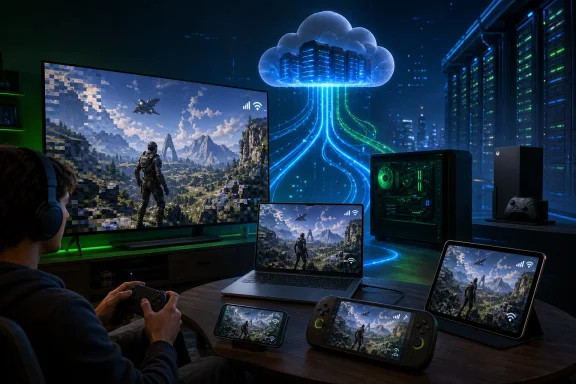
Cloud gaming reverses the traditional relationship between a game and the device displaying it. Instead of rendering graphics on a console, gaming PC, or handheld, Xbox Cloud Gaming runs the title in a Microsoft data center, compresses the resulting video, and sends that stream to the player over the internet.
The player’s controller inputs travel in the opposite direction. Microsoft’s server receives each command, processes it inside the game, renders the next frame, encodes that frame, and sends it back to the screen—all quickly enough that the interaction should feel immediate.
Streams could become soft or blocky during rapid movement. Wi-Fi interference caused stutters, latency varied dramatically by location, and the service’s limited catalog made it feel like an extension of Game Pass rather than a complete alternative to owning hardware.
By late 2025, Microsoft had removed the beta label and extended Xbox Cloud Gaming beyond Game Pass Ultimate to additional Game Pass plans, subject to regional availability and plan-specific limitations. Microsoft also reported substantial year-over-year growth in cloud gaming hours, suggesting that players were increasingly treating streaming as a practical feature rather than a technical curiosity.
That distinction matters because mass adoption does not require every enthusiast to abandon an Xbox Series X or gaming PC. It requires cloud gaming to become dependable enough that ordinary users can launch a game without thinking about the infrastructure behind it.
Every action must therefore complete a tightly timed round trip. Even small delays introduced at multiple stages can accumulate into something the player can feel.
This explains why a speed test showing a high download figure does not automatically guarantee a good experience. Bandwidth matters, but consistency and round-trip latency are often more important than headline speed.
That vertical integration does not eliminate technical limits. It does, however, allow Microsoft to optimize multiple layers of the service together rather than depending on unrelated partners for every component.
In 2026, the gap between local rendering and cloud video remains visible under close inspection, but it has narrowed significantly in normal play. Better encoding, more generous bitrate options, improved network adaptation, and stronger client software have made the service substantially more presentable.
Resolution is only one part of perceived quality. A heavily compressed 1440p stream can look worse than a clean 1080p image, particularly in games containing dense vegetation, particles, film grain, rain, smoke, or rapid camera movement.
Higher bitrate is therefore as important as the larger pixel count. It gives the encoder more data with which to preserve fine detail and reduces the watercolor-like smearing that can appear when a scene changes quickly.
This makes the technology more resilient, but it also creates an experience that can vary from minute to minute. A locally installed game generally produces predictable output; a cloud game may move between crisp and visibly compressed imagery as the network changes.
The trade-off is often acceptable on a phone, tablet, or handheld screen. Compression defects become easier to notice on a large 4K television viewed at close range, where a 1440p stream must be enlarged to fill the panel.
Microsoft has reduced that delay through data center expansion, software optimization, faster encoding, and improved client support. Nevertheless, no cloud platform can repeal the physical and operational constraints of transmitting interactive video across a network.
Display configuration can also be mistakenly blamed on the cloud. A television that adds substantial image-processing delay may make an otherwise reasonable session feel sluggish, which is why Game Mode remains important.
This is the largest obstacle to genuinely universal adoption. Cloud gaming can be mature as a platform and still deliver inconsistent results because the public internet is not a uniform delivery system.
Modern Wi-Fi can work extremely well, especially on uncongested 5GHz or 6GHz bands. However, users should not assume that an expensive broadband plan compensates for an aging router placed at the opposite end of the home.
Mobile networks extend Xbox gaming to places where fixed broadband is unavailable, but performance can change as the user moves between cells or enters a crowded area. A 5G logo is not a guarantee of stable low-latency service.
Supported access points include Windows PCs, Xbox consoles, mobile devices, tablets, browsers, selected smart televisions, Amazon Fire TV hardware, supported handhelds, and certain Meta Quest headsets. Microsoft has also continued working with television platforms to put Xbox access directly into the screen.
This lowers the initial cost of entry, but it does not make gaming free. The player still needs a subscription or eligible game access, a controller, an adequate internet service, and a compatible display.
Even so, the psychological change is significant. When Xbox becomes an application beside Netflix and Disney+, a console is no longer the only doorway into Microsoft’s ecosystem.
For Windows users, this offers a particularly useful alternative to managing installations. A player can try a large game through the cloud, decide whether it deserves local storage, and install it later if improved fidelity or responsiveness is needed.
The disadvantage is that portable use often depends on unpredictable Wi-Fi or cellular networks. Cloud gaming works brilliantly on a handheld at home, but its reliability may fall sharply in hotels, trains, airports, and public hotspots.
Microsoft’s Stream Your Own Game initiative has begun changing that relationship. By April 2026, Microsoft said subscribers across supported Game Pass plans could stream from a library of more than 1,000 compatible games they owned.
There are still important caveats. Buying an Xbox game does not automatically make it streamable, and licensing agreements, technical validation, publisher approval, regional rules, and version differences can all affect eligibility.
The catalog therefore remains curated rather than universal. Microsoft must keep expanding it if cloud access is to become an expected property of buying a digital Xbox game.
It also means the perceived value of cloud gaming is tied to subscription pricing, plan structure, game rotation, and Microsoft’s broader content strategy. If costs rise or cloud benefits become more restricted, users may reassess whether convenience justifies the recurring payment.
This does not mean installations are obsolete. It means players increasingly expect the option to begin immediately and choose the final device later.
Cloud access turns discovery into an interactive process. Instead of watching a trailer, reading reviews, and committing to a lengthy installation, a Game Pass subscriber can start playing and decide within minutes whether the game is worth keeping.
A player might use local hardware for a demanding evening session, continue a slower quest through a laptop while traveling, and perform a short in-game task from a phone. The cloud becomes a connective layer rather than the only rendering method.
Mass adoption depends on these small points of friction remaining rare. Consumers compare the service not with its technical complexity but with the simplicity of pressing a button on a local console.
Whether that is a good trade depends on the household.
The strongest consumer model is therefore hybrid. Cloud gaming handles discovery, portability, secondary screens, and convenience, while local execution remains available for demanding or personally important games.
That reach is valuable in markets where consoles are expensive, distribution is difficult, or mobile devices dominate personal computing.
Developers still need to consider cloud-specific usability. Small interface text that works on a television may become unreadable on a phone, while controls designed around a full gamepad may require touch adaptations or clear accessory guidance.
Microsoft’s support for touch controls and mouse-and-keyboard input helps, but developers cannot assume that one interface fits every cloud device.
Unlike a downloaded game, which primarily uses the customer’s hardware after distribution, a streamed game creates continuing service costs for every hour played. Recent research into cloud gaming economics has highlighted bandwidth as a substantial portion of operating expense, particularly when providers pursue higher resolutions and bitrates.
This creates a difficult scaling problem. Greater adoption improves strategic reach, but it also requires Microsoft to deploy enough capacity to avoid queues and performance degradation during major launches.
Microsoft’s strongest advantage is ecosystem breadth. Its main weakness is that specialist competitors can sometimes deliver higher-end streaming performance to demanding users.
Xbox Cloud Gaming instead emphasizes convenience, Game Pass integration, console-style simplicity, and broad device support. The two services overlap, but their priorities are not identical.
Microsoft’s 1440p improvements narrow the gap, yet demanding users may still prefer a competitor offering higher resolutions, more frame-rate flexibility, or greater control over graphics settings. Xbox does not need to win every benchmark, but persistent quality differences could weaken its claim to be the default cloud platform.
The competition is therefore no longer simply console versus console. It is becoming a contest over accounts, libraries, subscriptions, cross-device continuity, and which company can make its ecosystem easiest to enter.
If it means most players abandoning local hardware and relying exclusively on remote servers, the answer remains no. Too many variables sit outside Microsoft’s control, and too many gaming experiences benefit from the precision, image quality, reliability, and ownership characteristics of local execution.
Cloud gaming can become a default option without becoming the only option. A player may stream most Game Pass discoveries, install favorite competitive games, retain a console for offline use, and use the cloud when away from the primary system.
That is still mass adoption. The mistake is assuming success requires the physical Xbox to disappear.
Several developments will reveal whether the service can move from broad availability to habitual use.
Higher frame-rate streaming could also reduce perceived latency and improve motion clarity. Microsoft must balance those gains against increased bandwidth and server demands.
Microsoft has been adding network quality indicators and more visible streaming controls. Expanding these tools would reduce frustration and help users fix local problems instead of assuming the entire platform is unreliable.
Growth in markets such as Brazil, Argentina, and India demonstrates the opportunity. It also increases pressure to provide a comparable experience rather than treating regional expansion as a simple availability checkbox.
Achieving that goal requires publisher agreements, technical testing, rights management, and regional coordination. Each expansion makes cloud gaming feel less like a temporary Game Pass feature and more like a persistent component of the Xbox platform.
The strongest strategy would preserve consumer choice. Microsoft can promote cloud convenience without weakening the reliability, ownership, and performance advantages that keep dedicated hardware relevant.
Xbox Cloud Gaming in 2026 is ready to become normal, but it is not ready to become mandatory. Its improved 1440p streams, broader Game Pass availability, expanding owned-game catalog, and presence across PCs, consoles, televisions, handhelds, and mobile devices make it one of the most accessible gaming platforms Microsoft has ever built. The mass-market future is not a world in which every game runs exclusively in the cloud; it is a world in which players move between cloud and local hardware without treating them as separate ecosystems. If Microsoft can reduce regional inconsistency, keep subscription value credible, expand ownership support, and invest ahead of demand, Xbox Cloud Gaming may become the primary entry point for millions of players—even while the console and Windows gaming PC remain the preferred destinations for the most demanding experiences.
 Overview
Cloud gaming reverses the traditional relationship between a game and the device displaying it. Instead of rendering graphics on a console, gaming PC, or handheld, Xbox Cloud Gaming runs the title in a Microsoft data center, compresses the resulting video, and sends that stream to the player over the internet.The player’s controller inputs travel in the opposite direction. Microsoft’s server receives each command, processes it inside the game, renders the next frame, encodes that frame, and sends it back to the screen—all quickly enough that the interaction should feel immediate.
From Project xCloud to a production service
Microsoft publicly developed the technology under the Project xCloud name before incorporating it into Xbox Game Pass. The early service demonstrated that demanding Xbox games could run on Android devices, browsers, and low-powered computers, but it also exposed the familiar weaknesses of first-generation cloud gaming.Streams could become soft or blocky during rapid movement. Wi-Fi interference caused stutters, latency varied dramatically by location, and the service’s limited catalog made it feel like an extension of Game Pass rather than a complete alternative to owning hardware.
By late 2025, Microsoft had removed the beta label and extended Xbox Cloud Gaming beyond Game Pass Ultimate to additional Game Pass plans, subject to regional availability and plan-specific limitations. Microsoft also reported substantial year-over-year growth in cloud gaming hours, suggesting that players were increasingly treating streaming as a practical feature rather than a technical curiosity.
The question has changed
A few years ago, the central question was whether cloud gaming worked at all. In 2026, the more useful question is where, for whom, and under what network conditions it works well enough.That distinction matters because mass adoption does not require every enthusiast to abandon an Xbox Series X or gaming PC. It requires cloud gaming to become dependable enough that ordinary users can launch a game without thinking about the infrastructure behind it.
How Xbox Cloud Gaming Works
A cloud gaming session is more technically demanding than a conventional video stream. Netflix can buffer several seconds of video in advance, but an interactive game cannot know which direction the player will turn, which button will be pressed, or what the game engine will render next.Every action must therefore complete a tightly timed round trip. Even small delays introduced at multiple stages can accumulate into something the player can feel.
The end-to-end processing chain
A simplified Xbox Cloud Gaming session follows five sequential steps:- The controller or input device records the player’s action.
- The client sends that input across the local network and internet to Microsoft’s infrastructure.
- The cloud-hosted game processes the command and renders the resulting frame.
- Microsoft’s system encodes and compresses the frame as video.
- The client receives, decodes, and displays the image on the player’s screen.
This explains why a speed test showing a high download figure does not automatically guarantee a good experience. Bandwidth matters, but consistency and round-trip latency are often more important than headline speed.
Why Microsoft has an architectural advantage
Microsoft enters this market with assets that smaller cloud gaming companies cannot easily reproduce. It operates a large global cloud platform, owns the Xbox operating environment, publishes major games, controls Game Pass, and maintains direct relationships with television manufacturers, accessory makers, internet providers, and game developers.That vertical integration does not eliminate technical limits. It does, however, allow Microsoft to optimize multiple layers of the service together rather than depending on unrelated partners for every component.
Streaming Quality Has Improved Substantially
The most visible weakness of earlier Xbox cloud sessions was image quality. A game might technically run at a stable frame rate on Microsoft’s server while reaching the player as a compressed, artifact-heavy stream.In 2026, the gap between local rendering and cloud video remains visible under close inspection, but it has narrowed significantly in normal play. Better encoding, more generous bitrate options, improved network adaptation, and stronger client software have made the service substantially more presentable.
The move to 1440p streaming
Microsoft began rolling out user-selectable resolutions of up to 1440p for supported titles and devices, followed by higher-bitrate 1440p support on Xbox consoles in February 2026. That was a meaningful improvement over the service’s previous emphasis on lower-resolution streaming.Resolution is only one part of perceived quality. A heavily compressed 1440p stream can look worse than a clean 1080p image, particularly in games containing dense vegetation, particles, film grain, rain, smoke, or rapid camera movement.
Higher bitrate is therefore as important as the larger pixel count. It gives the encoder more data with which to preserve fine detail and reduces the watercolor-like smearing that can appear when a scene changes quickly.
Adaptive streaming is doing more work
Xbox Cloud Gaming adjusts stream quality in response to current network conditions. When available bandwidth falls or packets are lost, the service can temporarily reduce quality rather than allowing the session to stop completely.This makes the technology more resilient, but it also creates an experience that can vary from minute to minute. A locally installed game generally produces predictable output; a cloud game may move between crisp and visibly compressed imagery as the network changes.
The trade-off is often acceptable on a phone, tablet, or handheld screen. Compression defects become easier to notice on a large 4K television viewed at close range, where a 1440p stream must be enlarged to fill the panel.
Latency Is Manageable, Not Defeated
Latency remains the defining issue for cloud gaming because it affects how a game feels rather than merely how it looks. Players can tolerate occasional compression more easily than a delay between pressing a button and seeing the expected action.Microsoft has reduced that delay through data center expansion, software optimization, faster encoding, and improved client support. Nevertheless, no cloud platform can repeal the physical and operational constraints of transmitting interactive video across a network.
Genre determines tolerance
Not every game places the same demands on the streaming pipeline. Cloud gaming can feel almost indistinguishable from local play in slower genres while remaining clearly compromised in highly competitive ones.- Turn-based strategy, digital card games, and many management titles are excellent cloud candidates because their mechanics do not depend on split-second reactions.
- Role-playing games, narrative adventures, and slower third-person action games generally perform well on a stable connection.
- Racing games and demanding action titles can be enjoyable, although precise steering, parrying, and timing may expose additional delay.
- Rhythm games, fighting games, and competitive shooters remain more sensitive because a few frames can affect success or failure.
- Professional esports is still best served by local hardware, a wired controller, a low-latency display, and carefully controlled network conditions.
Perception also varies by player
Experienced competitive players often notice delay that casual users ignore. Someone accustomed to a 120Hz monitor, high frame rates, and a low-latency mouse will have a very different baseline from a player using a standard television with motion smoothing enabled.Display configuration can also be mistakenly blamed on the cloud. A television that adds substantial image-processing delay may make an otherwise reasonable session feel sluggish, which is why Game Mode remains important.
Internet Infrastructure Is the Real Gatekeeper
Microsoft can upgrade its servers and applications, but it does not control the full path between those systems and every household. The quality of the last-mile connection, local router, Wi-Fi environment, internet provider, and regional peering arrangement can determine whether Xbox Cloud Gaming feels impressive or frustrating.This is the largest obstacle to genuinely universal adoption. Cloud gaming can be mature as a platform and still deliver inconsistent results because the public internet is not a uniform delivery system.
Stability matters more than raw speed
A smooth cloud gaming session typically depends on several characteristics working together:- The connection must provide sustained bandwidth, not merely reach a high peak during a short speed test.
- Round-trip latency should remain low and consistent throughout the session.
- Packet loss should be minimal, because missing data can create artifacts, stutters, or input disruption.
- Jitter should remain controlled, preventing unpredictable variations in packet arrival time.
- The local network should avoid congestion from downloads, backups, high-resolution video streams, and other demanding traffic.
- The player should be reasonably close, in network terms, to a supported Microsoft cloud location.
Wired Ethernet remains the benchmark
For a television, console, or desktop PC, wired Ethernet usually offers the most reliable result. It avoids interference from neighboring wireless networks, thick walls, household appliances, and poorly positioned access points.Modern Wi-Fi can work extremely well, especially on uncongested 5GHz or 6GHz bands. However, users should not assume that an expensive broadband plan compensates for an aging router placed at the opposite end of the home.
Rural and mobile access remain uneven
Cloud gaming is most convincing in areas with mature fiber, cable, or fixed-wireless infrastructure and nearby data centers. Rural users may face higher latency, restrictive data policies, or fewer provider choices even when their advertised download speeds appear sufficient.Mobile networks extend Xbox gaming to places where fixed broadband is unavailable, but performance can change as the user moves between cells or enters a crowded area. A 5G logo is not a guarantee of stable low-latency service.
Device Compatibility Is a Major Competitive Strength
Xbox Cloud Gaming’s greatest achievement may not be its resolution or server performance. It is the growing number of devices on which the same Xbox identity, saves, achievements, and games can appear.Supported access points include Windows PCs, Xbox consoles, mobile devices, tablets, browsers, selected smart televisions, Amazon Fire TV hardware, supported handhelds, and certain Meta Quest headsets. Microsoft has also continued working with television platforms to put Xbox access directly into the screen.
The television becomes the console
The Xbox app on supported smart TVs represents the clearest expression of Microsoft’s cloud strategy. A consumer can connect a compatible controller, sign in, and play without purchasing a conventional console.This lowers the initial cost of entry, but it does not make gaming free. The player still needs a subscription or eligible game access, a controller, an adequate internet service, and a compatible display.
Even so, the psychological change is significant. When Xbox becomes an application beside Netflix and Disney+, a console is no longer the only doorway into Microsoft’s ecosystem.
Older hardware gains a second life
Cloud streaming can also extend the usefulness of existing devices. An older Xbox One, modest Windows laptop, entry-level tablet, or low-powered living-room device can display games that would be impractical to run locally.For Windows users, this offers a particularly useful alternative to managing installations. A player can try a large game through the cloud, decide whether it deserves local storage, and install it later if improved fidelity or responsiveness is needed.
Handhelds expose both strengths and weaknesses
Portable gaming devices are natural cloud clients because their smaller screens disguise some compression and their local processors consume less power when decoding video than when rendering a demanding game. Streaming can also reduce fan noise and heat.The disadvantage is that portable use often depends on unpredictable Wi-Fi or cellular networks. Cloud gaming works brilliantly on a handheld at home, but its reliability may fall sharply in hotels, trains, airports, and public hotspots.
The Library Is Becoming a Platform, Not Just a Catalog
Xbox Cloud Gaming initially depended heavily on whichever games happened to be included in Game Pass. That approach offered strong value but created uncertainty because games could leave the subscription catalog.Microsoft’s Stream Your Own Game initiative has begun changing that relationship. By April 2026, Microsoft said subscribers across supported Game Pass plans could stream from a library of more than 1,000 compatible games they owned.
Ownership support changes the proposition
The ability to stream purchased games makes Xbox Cloud Gaming more credible as a long-term access platform. Players are no longer limited to treating the cloud as a temporary window into a rotating subscription selection.There are still important caveats. Buying an Xbox game does not automatically make it streamable, and licensing agreements, technical validation, publisher approval, regional rules, and version differences can all affect eligibility.
The catalog therefore remains curated rather than universal. Microsoft must keep expanding it if cloud access is to become an expected property of buying a digital Xbox game.
Game Pass remains the economic engine
Game Pass gives Microsoft a powerful distribution model because cloud access can be bundled into an existing subscription rather than sold as an isolated technical product. That reduces the friction of trying the service and encourages players to move among console, PC, and cloud sessions.It also means the perceived value of cloud gaming is tied to subscription pricing, plan structure, game rotation, and Microsoft’s broader content strategy. If costs rise or cloud benefits become more restricted, users may reassess whether convenience justifies the recurring payment.
Cloud Gaming Matches Modern Player Behavior
Gaming habits have shifted toward immediate access, synchronized accounts, automatic updates, and sessions spread across multiple devices. Xbox Cloud Gaming fits those expectations better than a model in which every title must be downloaded to one machine before it can be played.This does not mean installations are obsolete. It means players increasingly expect the option to begin immediately and choose the final device later.
Instant trials may be the killer feature
One of the best uses of Xbox Cloud Gaming is also one of the least dramatic: testing a game before downloading it. Modern releases can occupy tens or even hundreds of gigabytes, making experimentation costly in both time and storage.Cloud access turns discovery into an interactive process. Instead of watching a trailer, reading reviews, and committing to a lengthy installation, a Game Pass subscriber can start playing and decide within minutes whether the game is worth keeping.
Continuity reduces friction
Cloud saves allow a session to move between an Xbox, Windows PC, browser, television, phone, or handheld where supported. This continuity is more valuable than the abstract promise of playing “anywhere.”A player might use local hardware for a demanding evening session, continue a slower quest through a laptop while traveling, and perform a short in-game task from a phone. The cloud becomes a connective layer rather than the only rendering method.
No downloads does not mean no waiting
Cloud gaming eliminates installation and patching on the client, but it can introduce other delays. Players may encounter session startup time, server queues during peak demand, account checks, title-specific loading screens, or reconnection procedures.Mass adoption depends on these small points of friction remaining rare. Consumers compare the service not with its technical complexity but with the simplicity of pressing a button on a local console.
Consumer Impact
For consumers, Xbox Cloud Gaming lowers the hardware barrier without eliminating it entirely. The service can make high-end games accessible on an inexpensive client device, but the customer effectively substitutes some capital expense with ongoing subscription and connectivity costs.Whether that is a good trade depends on the household.
Who benefits most
Cloud gaming is especially attractive to several groups:- Occasional players can access major games without purchasing a dedicated console.
- Game Pass subscribers can sample titles before committing storage space.
- Families can use additional screens without buying a full console for every room.
- Travelers can continue compatible games on portable devices.
- Owners of aging PCs and consoles can access newer software that their hardware cannot run locally.
- Players with limited storage can avoid repeatedly deleting and reinstalling large games.
Who should keep local hardware
Enthusiasts seeking the highest visual quality, predictable performance, mod support, offline access, or competitive responsiveness still benefit from a console or gaming PC. Local hardware also avoids the risk that a temporary network failure will immediately end a single-player session.The strongest consumer model is therefore hybrid. Cloud gaming handles discovery, portability, secondary screens, and convenience, while local execution remains available for demanding or personally important games.
Enterprise and Developer Implications
Xbox Cloud Gaming is a consumer service, but its expansion also affects game publishers, developers, telecommunications companies, television makers, and Microsoft’s own infrastructure economics. Every additional supported screen potentially expands the addressable Xbox audience beyond console owners.That reach is valuable in markets where consoles are expensive, distribution is difficult, or mobile devices dominate personal computing.
Developers can reach more players
Cloud delivery can expose an Xbox title to consumers who do not own compatible local hardware. It can also reduce the practical barrier created by large downloads, allowing a new release to attract players immediately after appearing in a catalog.Developers still need to consider cloud-specific usability. Small interface text that works on a television may become unreadable on a phone, while controls designed around a full gamepad may require touch adaptations or clear accessory guidance.
Microsoft’s support for touch controls and mouse-and-keyboard input helps, but developers cannot assume that one interface fits every cloud device.
Infrastructure costs rise with success
Cloud gaming shifts computation from consumer hardware into data centers. Every active player needs processing capacity, video encoding, bandwidth, storage access, electricity, cooling, and operational support.Unlike a downloaded game, which primarily uses the customer’s hardware after distribution, a streamed game creates continuing service costs for every hour played. Recent research into cloud gaming economics has highlighted bandwidth as a substantial portion of operating expense, particularly when providers pursue higher resolutions and bitrates.
This creates a difficult scaling problem. Greater adoption improves strategic reach, but it also requires Microsoft to deploy enough capacity to avoid queues and performance degradation during major launches.
The Competitive Landscape
Xbox Cloud Gaming does not operate in isolation. Nvidia GeForce Now, PlayStation’s streaming services, Amazon Luna, Boosteroid, remote-play tools, and other regional offerings compete for users, publishers, infrastructure, and living-room visibility.Microsoft’s strongest advantage is ecosystem breadth. Its main weakness is that specialist competitors can sometimes deliver higher-end streaming performance to demanding users.
Nvidia sets the performance comparison
GeForce Now has built a reputation around premium image quality, high frame-rate options, and PC-class settings on its upper tiers. It appeals particularly to players who already own compatible PC games and want a powerful remote machine.Xbox Cloud Gaming instead emphasizes convenience, Game Pass integration, console-style simplicity, and broad device support. The two services overlap, but their priorities are not identical.
Microsoft’s 1440p improvements narrow the gap, yet demanding users may still prefer a competitor offering higher resolutions, more frame-rate flexibility, or greater control over graphics settings. Xbox does not need to win every benchmark, but persistent quality differences could weaken its claim to be the default cloud platform.
Sony validates the hybrid direction
PlayStation has also expanded cloud functionality, reinforcing the idea that streaming will coexist with dedicated hardware. Sony’s approach remains closely tied to the PlayStation ecosystem, while Microsoft has been more aggressive about presenting Xbox as a service available across many kinds of screens.The competition is therefore no longer simply console versus console. It is becoming a contest over accounts, libraries, subscriptions, cross-device continuity, and which company can make its ecosystem easiest to enter.
Strengths and Opportunities
Xbox Cloud Gaming enters the second half of 2026 with a stronger foundation than at any previous point. Several advantages could turn it into a routine part of mainstream gaming.The clearest advantages
- Broad device compatibility lowers the entry barrier and lets Microsoft reach customers who might never buy an Xbox console.
- Game Pass integration gives users an immediate catalog instead of requiring separate cloud purchases for every title.
- Support for more than 1,000 owned games provides greater continuity than a purely rotating subscription library.
- Up to 1440p streaming improves readability and detail on PCs, consoles, handhelds, and compatible televisions.
- Microsoft’s cloud footprint gives it long-term infrastructure leverage, even though local capacity still varies by region.
- Cloud saves and Xbox identity create a cohesive experience across local and streamed sessions.
- Instant access makes game discovery more efficient, particularly when installations are extremely large.
- Smart TV partnerships could make Xbox visible to millions of non-console households through an interface they already understand.
Risks and Concerns
Cloud gaming’s weaknesses are not limited to technical performance. The model also raises questions about access, consumer control, recurring costs, preservation, privacy, and market concentration.The major unresolved concerns
- Internet dependence can turn a provider outage or household network problem into a complete loss of access.
- Regional inequality means the advertised experience may not exist in areas with distant data centers or weak broadband.
- Data caps can make frequent high-quality streaming expensive or impractical.
- Compression and latency still prevent exact parity with local rendering.
- Server queues may emerge when demand exceeds installed capacity.
- Subscription changes can alter value after consumers have organized their gaming habits around the service.
- Cloud eligibility remains subject to licensing, even when the player owns a digital copy of a game.
- Service centralization gives platform holders greater control over access, availability, and technical conditions.
- Long-term preservation becomes more difficult when a game depends on proprietary server infrastructure that may eventually be retired.
- Environmental claims require careful scrutiny, because centralized hardware can improve utilization but also consumes substantial energy and network capacity.
Is Xbox Cloud Gaming Ready for Mass Adoption?
The answer depends on how mass adoption is defined. If it means millions of people routinely using cloud streaming alongside consoles and PCs, then yes—Xbox Cloud Gaming is ready.If it means most players abandoning local hardware and relying exclusively on remote servers, the answer remains no. Too many variables sit outside Microsoft’s control, and too many gaming experiences benefit from the precision, image quality, reliability, and ownership characteristics of local execution.
A mainstream complement, not a universal replacement
The realistic model resembles video streaming’s effect on physical media, but with an important difference. Interactive games are far less tolerant of network delays than movies and television programs.Cloud gaming can become a default option without becoming the only option. A player may stream most Game Pass discoveries, install favorite competitive games, retain a console for offline use, and use the cloud when away from the primary system.
That is still mass adoption. The mistake is assuming success requires the physical Xbox to disappear.
A practical readiness test
Consumers considering Xbox Cloud Gaming as a primary access method should evaluate it in the games and locations they actually use:- Test several genres rather than judging the service from one title.
- Compare Wi-Fi with wired Ethernet where possible.
- Enable Game Mode on the display and disable unnecessary image processing.
- Try the service during evening peak hours, not only when the network is quiet.
- Check whether the most important owned games are cloud compatible.
- Measure monthly data use if the broadband plan has a cap.
- Keep a local option for competitive, offline, or preservation-sensitive games.
What to Watch Next
The next phase of Xbox Cloud Gaming will be determined less by basic feasibility and more by refinement. Microsoft has proved that it can deliver playable Xbox games to a wide range of screens; it must now make the experience more consistent, transparent, and economically sustainable.Several developments will reveal whether the service can move from broad availability to habitual use.
Higher frame rates and better codecs
Resolution upgrades attract attention, but lower latency and more efficient compression could produce greater practical benefits. Newer codecs can improve image quality at a given bitrate, although device compatibility and decoding requirements complicate deployment.Higher frame-rate streaming could also reduce perceived latency and improve motion clarity. Microsoft must balance those gains against increased bandwidth and server demands.
Clearer network diagnostics
Users need better explanations when a session performs poorly. A generic network warning does not reveal whether the problem is packet loss, Wi-Fi interference, server distance, bandwidth contention, or client decoding.Microsoft has been adding network quality indicators and more visible streaming controls. Expanding these tools would reduce frustration and help users fix local problems instead of assuming the entire platform is unreliable.
Wider regional capacity
Additional countries on a support list matter less than sufficient capacity close to the people living there. Microsoft must continue expanding server availability, improving routing, and managing peak demand if it wants consistent performance beyond major metropolitan areas.Growth in markets such as Brazil, Argentina, and India demonstrates the opportunity. It also increases pressure to provide a comparable experience rather than treating regional expansion as a simple availability checkbox.
More complete ownership support
The Stream Your Own Game catalog has grown rapidly, but the long-term expectation should be straightforward: if a customer buys a supported digital Xbox game, cloud access should usually follow.Achieving that goal requires publisher agreements, technical testing, rights management, and regional coordination. Each expansion makes cloud gaming feel less like a temporary Game Pass feature and more like a persistent component of the Xbox platform.
The fate of dedicated Xbox hardware
Microsoft’s next-generation hardware strategy will show how the company balances local and cloud execution. A future Xbox could use cloud streaming not as a replacement for its processor but as an integrated extension for instant trials, backward compatibility, cross-device movement, and access to games before installation.The strongest strategy would preserve consumer choice. Microsoft can promote cloud convenience without weakening the reliability, ownership, and performance advantages that keep dedicated hardware relevant.
Xbox Cloud Gaming in 2026 is ready to become normal, but it is not ready to become mandatory. Its improved 1440p streams, broader Game Pass availability, expanding owned-game catalog, and presence across PCs, consoles, televisions, handhelds, and mobile devices make it one of the most accessible gaming platforms Microsoft has ever built. The mass-market future is not a world in which every game runs exclusively in the cloud; it is a world in which players move between cloud and local hardware without treating them as separate ecosystems. If Microsoft can reduce regional inconsistency, keep subscription value credible, expand ownership support, and invest ahead of demand, Xbox Cloud Gaming may become the primary entry point for millions of players—even while the console and Windows gaming PC remain the preferred destinations for the most demanding experiences.
References
- Primary source: TheXboxHub
Published: 2026-07-22T13:15:37+00:00
Xbox Cloud Gaming in 2026: Is the Technology Ready for Mass Adoption?
Explore the state of Xbox Cloud Gaming in 2026, including performance, infrastructure, latency, device compatibility, and whether cloud gaming is ready for mainstream use. www.thexboxhub.com
- Related coverage: xbox.com
XBOX Cloud Gaming | XBOX
Stream XBOX games to your phones, tablets, smart TVs and more with XBOX Cloud Gaming. Play free-to-play favorites, plus hundreds of games with XBOX Game Pass.www.xbox.com - Related coverage: news.xbox.com
Xbox November Update: Gaming Copilot Available on Mobile, Full Screen Experience Out Now, and More - XBOX Wire
The Xbox November Update is starting to roll out today, featuring Gaming Copilot (Beta) on the Xbox mobile app, full screen experience (FSE) on more Windows 11 devices, the expansion of Xbox Cloud Gaming into more countries, and more!news.xbox.com - Official source: developer.microsoft.com
GDC 2025: Xbox Cloud Gaming (Beta): Expanding Your Reach, Enhancing Your Game
Xbox Cloud Gaming (Beta) expands your audience, making it possible to deliver your games to millions of new users on the devices they already own.developer.microsoft.com - Related coverage: windowscentral.com
Here's what I think is coming next for Xbox Cloud Gaming | Windows Central
Microsoft is leaning hard into OEM-built third-party Xbox consoles as well as its own first-party Xbox hardware, but what about hardware in the cloud?www.windowscentral.com - Related coverage: tomsguide.com
2026 will be the year of cloud gaming — and we may not even have a choice | Tom's Guide
The RTX-5080 Nvidia GeForce Now Ultimate tier is incredible. Save your money and sign up for $20 a month sub rather than buying a $1,200 graphics card.www.tomsguide.com