

Apple Invites is becoming a little more expressive with an update that adds emoji reactions to RSVP responses and a confetti animation when guests confirm attendance, reinforcing Apple’s preference for polishing everyday interactions rather than radically reshaping a product overnight.
The reported version 1.10 release is modest on paper, but it targets a surprisingly important part of digital event planning: the moment a guest says yes, maybe, or no. Instead of leaving every response as a static administrative entry in a guest list, Apple Invites now turns RSVP activity into a more social, visible part of organizing a gathering.
For hosts planning birthday parties, family reunions, work get-togethers, baby showers, or informal team events, that means a guest list can feel less like a spreadsheet and more like a shared moment. The update also includes the familiar promise of bug fixes and performance improvements, which may matter just as much in an app intended to handle time-sensitive invitations and last-minute changes.
While Apple Invites remains closely tied to Apple’s broader services ecosystem, its web-based RSVP flow gives it relevance beyond iPhone owners. Windows users may not create events through a native Windows application, but they can still receive and respond to an invitation through a modern web browser. That cross-platform guest accessibility is central to whether Apple Invites can work outside an all-Apple social circle.
The new Apple Invites features focus on two related ideas: acknowledgment and celebration.
First, hosts and guests can react to RSVP replies with emoji. A guest confirming attendance at a graduation party, for example, can receive a quick celebratory reaction from the host or from fellow attendees. A “maybe” response can be acknowledged without demanding an immediate follow-up message. A decline can receive a sympathetic or understanding reaction while keeping the conversation lightweight.
Second, Apple Invites now plays an animated confetti effect when a guest replies. It does not change the guest list, add new scheduling tools, or solve complex event-management problems. Its purpose is emotional rather than operational: it makes confirmation feel like an accomplishment and makes the RSVP process more memorable.
That distinction matters. Most invitation platforms concentrate on the functional work of collecting names, tracking attendance, and sending reminders. Apple is trying to make the process of gathering people feel more pleasant, not merely more efficient.
In a category where many apps treat invitation acceptance as a transaction, a confetti animation is a deliberate signal. Apple Invites is positioning itself as a tool for social occasions and personal moments, even when it is also used for practical business meetings or professional gatherings.
A conventional RSVP system typically provides only three core states:
By allowing reactions directly around RSVP activity, Apple Invites can reduce that fragmentation. Hosts do not have to send individual acknowledgments simply to say “great,” “we’ll miss you,” or “thank you for letting us know.” Guests also gain a way to participate in the growing momentum of an event without adding more chat noise.
This is particularly useful when a host shares invitations through multiple channels. A link may be sent through Messages, email, a family group chat, a workplace collaboration platform, or another messaging service. If replies and simple reactions remain connected to the invitation itself, the event page has a better chance of becoming the authoritative record for attendance.
In this case, confetti appears when a guest responds to an event. The effect may be brief, but it changes the tone of the interaction. Confirming attendance is no longer just tapping a status button; it becomes a small celebratory moment.
That approach will not appeal to everyone. People organizing a formal corporate meeting, a sensitive memorial event, or a tightly managed professional function may regard celebratory animation as unnecessary. Yet Apple Invites is not primarily designed as an enterprise event platform. Its core identity is rooted in parties, gatherings, celebrations, and shared experiences.
For those use cases, the animation fits the product’s purpose. It is a reminder that an RSVP is not merely data for the organizer—it represents one more person deciding to show up.
The app is designed to make a traditional invitation more useful after it is sent. Rather than functioning as a static card with a date and address, an Apple Invites event can become a living hub where attendees see updates, respond to the host, access directions, contribute photos, and participate in a collaborative music playlist.
Apple’s approach connects several existing ecosystem services:
Hosts can typically include details such as:
Apple Invites also lets a host manage attendees through categories such as Going, Maybe, Not Going, and Not Responded. The host can remove guests, resend invitation links, update attendee details, and choose whether new participants can automatically join or must receive approval.
For events where a public link could be shared widely, that approval control is important. A link-based invitation system is convenient, but convenience can easily become an access-control issue if a link is forwarded beyond its intended audience.
That means the app is also a value-add feature for Apple’s paid cloud-storage service. The entry-level iCloud+ plan is sufficient for invitation creation, but the product is still gated behind a subscription that some iPhone owners may not already have.
Guests, however, face a far lower barrier. Anyone can respond to an Apple Invites event without needing iCloud+, and guests do not necessarily need to own an Apple device or even have an Apple Account just to RSVP through the web.
This distinction is critical.
It also gives Apple an incentive to keep improving Invites. The service is not simply another free app competing for attention in a crowded App Store; it is a product that can help make iCloud+ feel more complete.
However, the requirement may discourage casual users. Someone who only hosts one or two events each year may find it hard to justify subscribing solely to create a birthday invitation or reunion page. Competing invitation services often offer a basic free tier, sometimes supported by advertising, paid templates, premium design tools, or optional upgrades.
Apple’s model is cleaner, but not necessarily more accessible for every organizer.
That matters for real-world events, where the guest list often includes a mix of:
This does not turn Apple Invites into a full Windows event-management application. It is not a native Microsoft Store app, and Windows users do not receive the same deeply integrated experience as someone using Apple hardware and Apple services. Still, the ability to participate from the web prevents Apple Invites from becoming unusable the moment an organizer invites someone outside the company’s ecosystem.
A recent summer update added capabilities such as cohosting, public guest lists, and additional backgrounds. The addition of an iMessage app also helped hosts share an existing invitation without leaving the Messages environment.
Together, these changes reveal a useful development pattern. Apple Invites is not receiving one giant annual overhaul. Instead, Apple appears to be building the service through smaller, more frequent refinements that address both logistics and social interaction.
A wedding shower may involve multiple relatives. A team gathering may be coordinated by two or three employees. A child’s birthday party may have more than one parent handling the guest list, supplies, food, and event updates. A reunion can require several organizers across different locations.
Without cohosting, the original event creator becomes a bottleneck. Every correction, guest-list change, note, and update has to go through one account. That can become frustrating quickly, especially when planning moves from a casual idea to a complex gathering.
Cohosting makes Apple Invites more practical and shifts it closer to a genuine collaborative planning tool.
But this feature also needs careful handling.
A public guest list may not be appropriate for every occasion. Some people value privacy, especially in workplace settings, health-related events, political gatherings, support groups, family situations, or any event where attendance itself could be sensitive.
Hosts should treat guest-list visibility as a deliberate setting, not an automatic enhancement. Apple Invites is most useful when it gives organizers control, rather than assuming every social event benefits from maximum disclosure.
For users who already rely on Apple’s ecosystem, that can reduce setup time and simplify event follow-up. The invitation begins as a planning document and can continue as a shared memory space after the event has ended.
This is valuable because event planning often includes people with varied levels of technical confidence. A host should not need to learn complicated marketing tools, database concepts, or professional event software just to invite friends to dinner.
The app’s approachable style may be especially attractive for:
Apple Invites fills the space between a calendar entry and a full event-management platform. It can look more polished than a calendar invitation while remaining simpler than professional ticketing or registration software.
The emoji reactions and confetti animation reinforce that distinction. Apple is clearly not trying to make Invites feel like a meeting scheduler.
Apple Invites is not designed around those needs.
A small business could use it for a staff picnic or a simple client gathering, but it is unlikely to replace dedicated services for conferences, paid workshops, fundraisers, large weddings, or events requiring formal registration controls.
Anyone organizing an event should consider the following before sending a link:
An iPhone user inside the Apple ecosystem may have a smoother path into the app, Apple Music collaboration, shared albums, notifications, and other integrated capabilities. A Windows or Android guest may use the browser flow mainly to view details and RSVP.
That is acceptable for an invitation service, but it remains a limitation. The host gets the best experience when using Apple devices and paid Apple cloud services, while everyone else is accommodated as participants.
This is a familiar Apple strategy: make the ecosystem attractive enough that outside users can join, but reserve the most seamless experience for customers already inside it.
As the app develops, Apple will need to preserve that simplicity. More features are welcome when they solve genuine planning problems—such as cohosting, guest approval, flexible attendance settings, and clear updates—but unnecessary complexity could undermine the product’s strongest quality.
The challenge is to expand capability without turning a polished invitation app into a cluttered event dashboard.
For iPad users, Apple Invites remains useful as a larger-screen planning companion, particularly for organizing details, reviewing guest lists, and preparing invitations with photos or custom backgrounds. The experience is naturally best suited to people invested in iCloud+ and Apple’s services.
For Windows users, the most important message is practical: an Apple invitation does not require abandoning a PC or installing Apple hardware. The web RSVP path means recipients can still view an event and respond through a browser. That is essential for family events and mixed-device workplaces where not everyone uses iPhone.
The limitation is on the hosting side. Apple Invites remains fundamentally an Apple-led service, and Windows users do not have a native desktop client that offers the same event-creation workflow. They can participate, but Apple device owners remain the intended organizers.
Emoji reactions make RSVP activity more conversational. Confetti animation adds a lightweight celebration to the act of confirming attendance. Neither feature is essential in the technical sense, but both improve the emotional experience of organizing a gathering.
More importantly, they arrive in a product that has already started to develop practical depth through cohosting, guest-list controls, link sharing, browser-based responses, shared media, and event updates. Apple Invites is becoming a more capable social planning platform without losing its clean, accessible identity.
For iCloud+ subscribers, the service is increasingly compelling as a polished way to create digital invitations and manage smaller events. For guests on Windows, Android, and other non-Apple platforms, web access ensures that an invitation can remain inclusive even when its host is deeply embedded in Apple’s ecosystem.
Apple still has work to do around advanced event controls, privacy clarity, and cross-platform parity. But with each focused update, Apple Invites is moving closer to its most useful role: not as a replacement for enterprise event software, but as a modern, well-designed place where plans become gatherings and guest responses feel like part of the celebration.
The reported version 1.10 release is modest on paper, but it targets a surprisingly important part of digital event planning: the moment a guest says yes, maybe, or no. Instead of leaving every response as a static administrative entry in a guest list, Apple Invites now turns RSVP activity into a more social, visible part of organizing a gathering.
For hosts planning birthday parties, family reunions, work get-togethers, baby showers, or informal team events, that means a guest list can feel less like a spreadsheet and more like a shared moment. The update also includes the familiar promise of bug fixes and performance improvements, which may matter just as much in an app intended to handle time-sensitive invitations and last-minute changes.
While Apple Invites remains closely tied to Apple’s broader services ecosystem, its web-based RSVP flow gives it relevance beyond iPhone owners. Windows users may not create events through a native Windows application, but they can still receive and respond to an invitation through a modern web browser. That cross-platform guest accessibility is central to whether Apple Invites can work outside an all-Apple social circle.
 A Small Update With a Clear Social Purpose
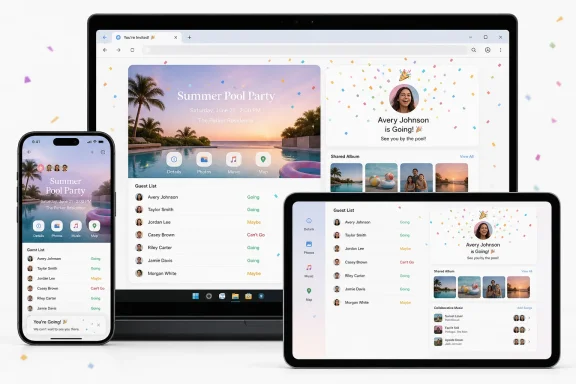
The new Apple Invites features focus on two related ideas: acknowledgment and celebration.First, hosts and guests can react to RSVP replies with emoji. A guest confirming attendance at a graduation party, for example, can receive a quick celebratory reaction from the host or from fellow attendees. A “maybe” response can be acknowledged without demanding an immediate follow-up message. A decline can receive a sympathetic or understanding reaction while keeping the conversation lightweight.
Second, Apple Invites now plays an animated confetti effect when a guest replies. It does not change the guest list, add new scheduling tools, or solve complex event-management problems. Its purpose is emotional rather than operational: it makes confirmation feel like an accomplishment and makes the RSVP process more memorable.
That distinction matters. Most invitation platforms concentrate on the functional work of collecting names, tracking attendance, and sending reminders. Apple is trying to make the process of gathering people feel more pleasant, not merely more efficient.
In a category where many apps treat invitation acceptance as a transaction, a confetti animation is a deliberate signal. Apple Invites is positioning itself as a tool for social occasions and personal moments, even when it is also used for practical business meetings or professional gatherings.
Emoji Reactions Reduce Friction
Emoji reactions may appear trivial, but they serve a useful communication role in group planning.A conventional RSVP system typically provides only three core states:
- Going
- Maybe
- Not going
By allowing reactions directly around RSVP activity, Apple Invites can reduce that fragmentation. Hosts do not have to send individual acknowledgments simply to say “great,” “we’ll miss you,” or “thank you for letting us know.” Guests also gain a way to participate in the growing momentum of an event without adding more chat noise.
This is particularly useful when a host shares invitations through multiple channels. A link may be sent through Messages, email, a family group chat, a workplace collaboration platform, or another messaging service. If replies and simple reactions remain connected to the invitation itself, the event page has a better chance of becoming the authoritative record for attendance.
Confetti Makes Confirmation Feel Intentional
The animated confetti effect is the more visibly “Apple-like” addition. It is a tiny flourish, but one that follows a familiar design pattern across the company’s products: a core action is enhanced with motion to make it feel immediate, friendly, and human.In this case, confetti appears when a guest responds to an event. The effect may be brief, but it changes the tone of the interaction. Confirming attendance is no longer just tapping a status button; it becomes a small celebratory moment.
That approach will not appeal to everyone. People organizing a formal corporate meeting, a sensitive memorial event, or a tightly managed professional function may regard celebratory animation as unnecessary. Yet Apple Invites is not primarily designed as an enterprise event platform. Its core identity is rooted in parties, gatherings, celebrations, and shared experiences.
For those use cases, the animation fits the product’s purpose. It is a reminder that an RSVP is not merely data for the organizer—it represents one more person deciding to show up.
Apple Invites in Context
Apple launched Apple Invites in February 2025 as a dedicated event-planning service built around customized digital invitations, guest management, photo sharing, playlists, event updates, and RSVP tracking.The app is designed to make a traditional invitation more useful after it is sent. Rather than functioning as a static card with a date and address, an Apple Invites event can become a living hub where attendees see updates, respond to the host, access directions, contribute photos, and participate in a collaborative music playlist.
Apple’s approach connects several existing ecosystem services:
- Photos for shared albums and event memories
- Apple Music for collaborative playlists
- Maps for location details and directions
- Weather for local event conditions
- iCloud for hosting, sharing, and web access
- Messages through the Invites iMessage integration
What Apple Invites Does Today
At its foundation, Apple Invites enables organizers to create an event, customize its appearance, add essential information, and share a link with guests. Invitation backgrounds can be based on personal photos, camera images, curated designs, colors, or emoji-based options.Hosts can typically include details such as:
- Event name
- Date and time
- Location
- Description
- Background image or design
- Shared photo album
- Collaborative music playlist
- Guest list and RSVP settings
- Notes or updates for attendees
Apple Invites also lets a host manage attendees through categories such as Going, Maybe, Not Going, and Not Responded. The host can remove guests, resend invitation links, update attendee details, and choose whether new participants can automatically join or must receive approval.
For events where a public link could be shared widely, that approval control is important. A link-based invitation system is convenient, but convenience can easily become an access-control issue if a link is forwarded beyond its intended audience.
The iCloud+ Requirement Is Both a Feature and a Barrier
Apple Invites is free to download, but it is not free in exactly the same way for everyone. The key limitation is that creating an invitation requires an active iCloud+ subscription.That means the app is also a value-add feature for Apple’s paid cloud-storage service. The entry-level iCloud+ plan is sufficient for invitation creation, but the product is still gated behind a subscription that some iPhone owners may not already have.
Guests, however, face a far lower barrier. Anyone can respond to an Apple Invites event without needing iCloud+, and guests do not necessarily need to own an Apple device or even have an Apple Account just to RSVP through the web.
This distinction is critical.
Hosts Need Apple’s Paid Cloud Service
For hosts, Apple Invites operates as part of iCloud+. That arrangement makes business sense for Apple: the app adds tangible lifestyle value to a subscription that some people otherwise associate mainly with cloud storage, private relay capabilities, email features, and backup capacity.It also gives Apple an incentive to keep improving Invites. The service is not simply another free app competing for attention in a crowded App Store; it is a product that can help make iCloud+ feel more complete.
However, the requirement may discourage casual users. Someone who only hosts one or two events each year may find it hard to justify subscribing solely to create a birthday invitation or reunion page. Competing invitation services often offer a basic free tier, sometimes supported by advertising, paid templates, premium design tools, or optional upgrades.
Apple’s model is cleaner, but not necessarily more accessible for every organizer.
Guests Can Participate More Broadly
Apple has wisely avoided making Apple Invites an entirely closed iPhone-only experience. A host can share invitation links through virtually any messaging platform, and guests can RSVP via the web.That matters for real-world events, where the guest list often includes a mix of:
- iPhone users
- Android users
- Windows PC users
- Mac users
- iPad users
- People without an Apple Account
- People who prefer not to install another mobile app
This does not turn Apple Invites into a full Windows event-management application. It is not a native Microsoft Store app, and Windows users do not receive the same deeply integrated experience as someone using Apple hardware and Apple services. Still, the ability to participate from the web prevents Apple Invites from becoming unusable the moment an organizer invites someone outside the company’s ecosystem.
Recent Updates Show a Faster Product Maturation Cycle
The emoji reactions and confetti animation arrive after earlier Apple Invites enhancements that expanded the practical side of event coordination.A recent summer update added capabilities such as cohosting, public guest lists, and additional backgrounds. The addition of an iMessage app also helped hosts share an existing invitation without leaving the Messages environment.
Together, these changes reveal a useful development pattern. Apple Invites is not receiving one giant annual overhaul. Instead, Apple appears to be building the service through smaller, more frequent refinements that address both logistics and social interaction.
Cohosting Solves a Real Planning Problem
Cohosting is one of the most important improvements introduced since Apple Invites launched. Many real events are not managed by one person.A wedding shower may involve multiple relatives. A team gathering may be coordinated by two or three employees. A child’s birthday party may have more than one parent handling the guest list, supplies, food, and event updates. A reunion can require several organizers across different locations.
Without cohosting, the original event creator becomes a bottleneck. Every correction, guest-list change, note, and update has to go through one account. That can become frustrating quickly, especially when planning moves from a casual idea to a complex gathering.
Cohosting makes Apple Invites more practical and shifts it closer to a genuine collaborative planning tool.
Public Guest Lists Add Social Context
Public guest lists can make an invitation more engaging because attendees can see who else is expected. For a casual gathering, that visibility may encourage people to confirm attendance, coordinate rides, reconnect with old friends, or better understand the scale of the event.But this feature also needs careful handling.
A public guest list may not be appropriate for every occasion. Some people value privacy, especially in workplace settings, health-related events, political gatherings, support groups, family situations, or any event where attendance itself could be sensitive.
Hosts should treat guest-list visibility as a deliberate setting, not an automatic enhancement. Apple Invites is most useful when it gives organizers control, rather than assuming every social event benefits from maximum disclosure.
The Strengths of Apple’s Invitation Strategy
Apple Invites has several genuine advantages, particularly for people already using iPhone, iCloud+, Apple Music, and Apple Photos.A Cohesive Design Rather Than a Collection of Separate Tools
The strongest part of Apple Invites is its integration. Instead of creating an invitation in one app, tracking guest responses in another, sharing pictures through a third service, and building a party playlist elsewhere, Apple offers a more unified workflow.For users who already rely on Apple’s ecosystem, that can reduce setup time and simplify event follow-up. The invitation begins as a planning document and can continue as a shared memory space after the event has ended.
A Clean, Consumer-Friendly Interface
Apple’s software design tends to prioritize visual clarity, large touch targets, predictable settings, and minimal friction. Apple Invites follows that style.This is valuable because event planning often includes people with varied levels of technical confidence. A host should not need to learn complicated marketing tools, database concepts, or professional event software just to invite friends to dinner.
The app’s approachable style may be especially attractive for:
- Family celebrations
- School and parent-group activities
- Informal neighborhood events
- Birthday parties
- Holiday gatherings
- Small workplace social functions
- Club meetings
- Casual trips and group outings
Better Than a Bare Calendar Invite for Social Events
A standard calendar invite is functional, but it rarely feels personal. It communicates the essentials—date, time, location, title—but offers little room for personality, shared media, or event-specific interaction.Apple Invites fills the space between a calendar entry and a full event-management platform. It can look more polished than a calendar invitation while remaining simpler than professional ticketing or registration software.
The emoji reactions and confetti animation reinforce that distinction. Apple is clearly not trying to make Invites feel like a meeting scheduler.
Risks, Limitations, and Questions Apple Still Needs to Address
Apple Invites is promising, but it is not yet a universal replacement for established invitation and event-planning platforms.It Is Not a Full Professional Event Platform
The app can work for a business meeting or office celebration, but it lacks many features expected in professional event software. Organizations may need advanced registration forms, ticketing, payment collection, custom fields, attendance limits, waitlists, check-in systems, automated reminder campaigns, analytics, export tools, and integration with customer relationship management systems.Apple Invites is not designed around those needs.
A small business could use it for a staff picnic or a simple client gathering, but it is unlikely to replace dedicated services for conferences, paid workshops, fundraisers, large weddings, or events requiring formal registration controls.
Link Sharing Requires Sensible Security Settings
Invitation links are convenient, but they can be forwarded. If an event is private, hosts should pay attention to approval settings and guest-management options.Anyone organizing an event should consider the following before sending a link:
- Decide whether guests can join automatically or require approval.
- Avoid sharing the invitation link publicly unless the event is intended to be open.
- Review the guest list after significant changes or after a link has been distributed widely.
- Remove attendees who should no longer have access.
- Be mindful of how location information, photos, and public guest visibility are configured.
Cross-Platform Participation Is Good, but Not Equal
Apple deserves credit for allowing web-based RSVP responses. Still, cross-platform access is not identical to feature parity.An iPhone user inside the Apple ecosystem may have a smoother path into the app, Apple Music collaboration, shared albums, notifications, and other integrated capabilities. A Windows or Android guest may use the browser flow mainly to view details and RSVP.
That is acceptable for an invitation service, but it remains a limitation. The host gets the best experience when using Apple devices and paid Apple cloud services, while everyone else is accommodated as participants.
This is a familiar Apple strategy: make the ecosystem attractive enough that outside users can join, but reserve the most seamless experience for customers already inside it.
The App Must Avoid Feature Creep
Apple Invites has a clear appeal because it is focused. It is not overloaded with template marketplaces, advertising, promotional messages, ticket upsells, or complicated campaign tools.As the app develops, Apple will need to preserve that simplicity. More features are welcome when they solve genuine planning problems—such as cohosting, guest approval, flexible attendance settings, and clear updates—but unnecessary complexity could undermine the product’s strongest quality.
The challenge is to expand capability without turning a polished invitation app into a cluttered event dashboard.
What the Update Means for iPhone, iPad, and Windows Users
For iPhone users, the latest Apple Invites update makes a familiar task more personable. Emoji reactions and confetti do not transform event planning, but they make attendance responses feel less mechanical. Combined with shared photos, music, maps, weather, and guest messaging, the app becomes more engaging with each incremental release.For iPad users, Apple Invites remains useful as a larger-screen planning companion, particularly for organizing details, reviewing guest lists, and preparing invitations with photos or custom backgrounds. The experience is naturally best suited to people invested in iCloud+ and Apple’s services.
For Windows users, the most important message is practical: an Apple invitation does not require abandoning a PC or installing Apple hardware. The web RSVP path means recipients can still view an event and respond through a browser. That is essential for family events and mixed-device workplaces where not everyone uses iPhone.
The limitation is on the hosting side. Apple Invites remains fundamentally an Apple-led service, and Windows users do not have a native desktop client that offers the same event-creation workflow. They can participate, but Apple device owners remain the intended organizers.
Apple Invites Is Growing in the Right Direction
The version 1.10 update may look small, yet it reflects a sensible product philosophy. Apple is addressing the human texture of event planning while continuing to build out the management features that make the app useful beyond a one-time novelty.Emoji reactions make RSVP activity more conversational. Confetti animation adds a lightweight celebration to the act of confirming attendance. Neither feature is essential in the technical sense, but both improve the emotional experience of organizing a gathering.
More importantly, they arrive in a product that has already started to develop practical depth through cohosting, guest-list controls, link sharing, browser-based responses, shared media, and event updates. Apple Invites is becoming a more capable social planning platform without losing its clean, accessible identity.
For iCloud+ subscribers, the service is increasingly compelling as a polished way to create digital invitations and manage smaller events. For guests on Windows, Android, and other non-Apple platforms, web access ensures that an invitation can remain inclusive even when its host is deeply embedded in Apple’s ecosystem.
Apple still has work to do around advanced event controls, privacy clarity, and cross-platform parity. But with each focused update, Apple Invites is moving closer to its most useful role: not as a replacement for enterprise event software, but as a modern, well-designed place where plans become gatherings and guest responses feel like part of the celebration.