

The GMKtec G10 mini PC is being promoted as a Prime-exclusive Amazon bargain at roughly $290, but the more useful story is not simply that a compact Windows 11 Pro desktop has dropped in price. It is that this tiny Ryzen-powered system offers an unusually practical mix of upgradeability, multi-monitor connectivity, and wired networking for a desk-bound productivity machine—while also carrying several important caveats that buyers should understand before treating the discount as an automatic win.
The GMKtec G10 is a compact Windows mini PC built around AMD’s Ryzen 5 3500U, a mobile processor with four CPU cores and eight threads. It is not a new chip, nor is it intended to compete with modern high-performance desktop processors. Yet paired with 16GB of dual-channel DDR4 memory, an NVMe SSD, and a sensible assortment of ports, it can still make a credible replacement for a basic home-office tower, an aging all-in-one PC, or a large laptop permanently tethered to a monitor.
At the advertised price, the configuration includes:
That is the real appeal of a mini PC such as this: it turns an existing monitor, keyboard, mouse, and Ethernet connection into a complete Windows workstation without adding a bulky tower beneath the desk.
Price-history data for the 16GB/256GB G10 configuration shows that it has appeared at lower prices in earlier promotions. That means $290 is best interpreted as a current deal price, not necessarily a once-in-a-lifetime low or an unprecedented value.
That distinction matters because the AMD Ryzen 5 3500U is an older platform. A buyer spending close to $300 should compare the G10 with mini PCs based on newer processors such as the Ryzen 5 5500U, Ryzen 5 5625U, Ryzen 5 6600H, Ryzen 5 7530U, Intel Core i5 mobile chips, or newer Core Ultra designs when they are discounted.
The G10 can still be sensible at this price, particularly if its combination of Windows 11 Pro, two SODIMM slots, two M.2 slots, VESA mounting, 2.5GbE, and compact design matches a specific need. But it is not automatically a better purchase than every competing mini PC simply because the discount label is large.
Still, age does not make it unusable. Four cores and eight threads remain enough for an enormous amount of ordinary Windows work.
With 16GB available, the G10 is much more likely to remain responsive during ordinary multitasking. The dual-channel configuration matters too, because the Radeon Vega 8 graphics use shared system memory. Two memory channels give the integrated GPU more bandwidth than a single-stick configuration.
The practical conclusion is simple: the G10 is a productivity-first computer, not a performance-first computer.
That does not turn the G10 into a gaming PC.
The more appropriate use of the integrated GPU is desktop acceleration and media playback, not high-fidelity rendering. It can drive displays, decode common video formats, and make Windows feel smooth in ordinary use, but it is not designed for contemporary AAA gaming at high settings.
That is a meaningful benefit for:
The HDMI and DisplayPort outputs are positioned as 4K-capable. The USB-C video output requires particular attention: the vendor’s own specifications indicate more limited behavior for that port in some configurations, including a possible 4K at 30Hz ceiling. A 4K display at 30Hz can be usable for static dashboards, office applications, or video playback, but it is noticeably less fluid for mouse movement, scrolling, and general desktop interaction than 60Hz.
Before buying for a three-monitor workstation, it is prudent to verify the exact resolution and refresh-rate support for the specific display combination. The phrase “triple 4K” is technically attractive, but it does not answer the more important question: at what refresh rate, through which ports, and under what real-world workload?
There is also no indication of USB4, Thunderbolt, or OCuLink support. That means this is not a good platform for users who expect to add a high-bandwidth external GPU, a premium Thunderbolt dock, or advanced storage arrays later.
A 2.5GbE connection can be valuable for:
That makes Ethernet the preferred choice for this machine whenever possible. Anyone planning to use it as a home server, game-streaming endpoint, media center, or remote-work desktop should strongly consider a wired connection.
That creates a practical upgrade path.
The second M.2 slot is therefore a major advantage. A buyer can add a larger drive for games, media, virtual machines, backups, or project files without necessarily replacing the original SSD.
A sensible upgrade strategy could look like this:
Windows 11 Pro offers features that can matter to advanced home users and small businesses:
A careful setup process is advisable:
It can work well for modest self-hosted projects. It is particularly suited to services that are lightweight, always on, and not intensely compute-bound.
The older Ryzen platform also lacks the efficiency and media capabilities of newer mini PCs. It may be perfectly adequate for a handful of containers or one or two light virtual machines, but a modern six-core Ryzen system will offer more headroom, better power efficiency, and a longer useful life.
For a first homelab machine, the G10 is approachable. For a serious always-on infrastructure project, spending more on newer hardware may save frustration later.
At around $290, it can be a sensible purchase for buyers who understand its role. It is powerful enough to replace an older household desktop, serve as a small office PC, hide behind a monitor, or power a modest home server. The older Ryzen 5 3500U remains respectable for ordinary Windows 11 work, especially when compared with stripped-down entry-level mini PCs that rely on weaker processors and 8GB memory configurations.
The biggest warning is that this is not a groundbreaking price for groundbreaking hardware. The advertised discount looks more dramatic than the model’s historical pricing suggests, the 256GB SSD is modest, Wi-Fi 5 is dated, and the older integrated graphics should not be mistaken for a modern gaming solution. Triple-display support is useful, but prospective buyers should verify the actual resolution and refresh-rate behavior they need—especially over USB-C—rather than relying on broad “triple 4K” marketing language.
For the right workload, the G10 is a tidy and practical Windows mini PC. For buyers who need longer-term performance headroom, faster wireless networking, modern external expansion, or stronger graphics, paying more for a newer Ryzen-based mini PC is likely to be the wiser investment.
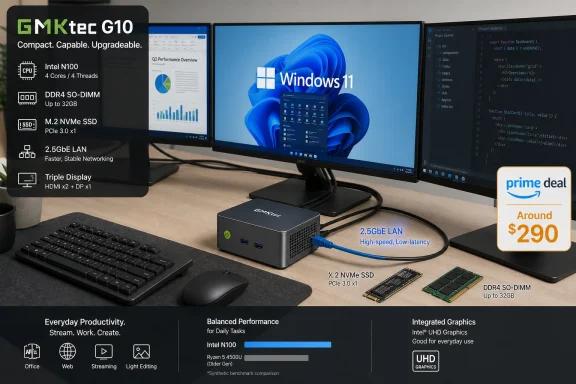 Overview: A Small Desktop With a Big Specification Sheet
The GMKtec G10 is a compact Windows mini PC built around AMD’s Ryzen 5 3500U, a mobile processor with four CPU cores and eight threads. It is not a new chip, nor is it intended to compete with modern high-performance desktop processors. Yet paired with 16GB of dual-channel DDR4 memory, an NVMe SSD, and a sensible assortment of ports, it can still make a credible replacement for a basic home-office tower, an aging all-in-one PC, or a large laptop permanently tethered to a monitor.At the advertised price, the configuration includes:
- AMD Ryzen 5 3500U
- 4 cores / 8 threads
- 2.1GHz base clock
- Up to 3.7GHz boost clock
- Radeon Vega 8 integrated graphics
- 16GB DDR4 memory
- Normally installed as two 8GB SO-DIMM modules
- Dual-channel operation is particularly valuable for integrated graphics
- Upgradeable to as much as 64GB, depending on compatible modules
- 256GB PCIe SSD
- Suitable for Windows, productivity applications, and a modest file collection
- Likely to feel restrictive for larger game libraries, video projects, or extensive local backups
- Two M.2 2280 SSD bays
- One is occupied by the included drive
- One may be available for expansion, depending on the exact retail configuration
- 2.5GbE Ethernet
- A standout feature in a budget-oriented mini desktop
- Windows 11 Pro
- A meaningful inclusion for users who need BitLocker, Remote Desktop host capabilities, Hyper-V, Group Policy controls, or business-oriented management options
- VESA mounting hardware
- Allows the system to sit behind a compatible monitor and effectively disappear from the desk
That is the real appeal of a mini PC such as this: it turns an existing monitor, keyboard, mouse, and Ethernet connection into a complete Windows workstation without adding a bulky tower beneath the desk.
The Deal Needs a Reality Check
The advertised $290 price is certainly lower than a nominal list price around $380, but buyers should be careful with the word usual. Mini PCs are frequently sold through coupons, time-limited discounts, changing configurations, Prime-only promotions, and third-party marketplace listings. In other words, the manufacturer’s suggested price is not always the price these machines actually command in routine sales.Price-history data for the 16GB/256GB G10 configuration shows that it has appeared at lower prices in earlier promotions. That means $290 is best interpreted as a current deal price, not necessarily a once-in-a-lifetime low or an unprecedented value.
That distinction matters because the AMD Ryzen 5 3500U is an older platform. A buyer spending close to $300 should compare the G10 with mini PCs based on newer processors such as the Ryzen 5 5500U, Ryzen 5 5625U, Ryzen 5 6600H, Ryzen 5 7530U, Intel Core i5 mobile chips, or newer Core Ultra designs when they are discounted.
The G10 can still be sensible at this price, particularly if its combination of Windows 11 Pro, two SODIMM slots, two M.2 slots, VESA mounting, 2.5GbE, and compact design matches a specific need. But it is not automatically a better purchase than every competing mini PC simply because the discount label is large.
What Makes the Price More Defensible
The price is more compelling if all of the following are true:- You need a fully assembled Windows desktop, not a barebones kit.
- You already have a monitor and peripherals.
- You value 2.5GbE networking for fast local file transfers or a wired home network.
- You prefer an upgradeable machine over soldered memory and fixed storage.
- You need Windows 11 Pro features rather than Windows 11 Home.
- You want a compact office machine rather than a gaming system.
- You plan to use a single 1080p or 1440p monitor, or multiple displays primarily for documents and browser work.
Ryzen 5 3500U Performance: Still Useful, Clearly Aging
The Ryzen 5 3500U arrived in the laptop market years ago, and that age shows. It uses AMD’s Zen+ generation architecture and a 12nm manufacturing process, rather than the newer Zen 3, Zen 4, or AI-focused architectures seen in more current AMD mobile chips.Still, age does not make it unusable. Four cores and eight threads remain enough for an enormous amount of ordinary Windows work.
Where the G10 Should Feel Comfortable
For everyday computing, the G10 should be capable of handling:- Microsoft 365 or LibreOffice workloads
- Web browsing with a substantial number of tabs
- Email, calendar, and messaging applications
- Remote work platforms such as Teams, Zoom, and web-based meeting services
- Light photo editing
- PDF reading and annotation
- Basic coding and web development
- Online learning platforms
- 4K video streaming
- Remote desktop access
- Lightweight home-server tasks
- Media-center duties beneath a television
With 16GB available, the G10 is much more likely to remain responsive during ordinary multitasking. The dual-channel configuration matters too, because the Radeon Vega 8 graphics use shared system memory. Two memory channels give the integrated GPU more bandwidth than a single-stick configuration.
Where It Will Start to Struggle
The G10 is not a workstation in miniature. Users should expect limits in several areas:- Large RAW photo catalogs and batch exports
- 4K video editing
- Professional motion graphics
- 3D rendering
- Virtual-machine-heavy development setups
- Large database workloads
- Compiling major software projects
- Modern AAA gaming
- AI workloads requiring an NPU or a powerful GPU
- Multiple simultaneous intensive applications while Windows updates run in the background
The practical conclusion is simple: the G10 is a productivity-first computer, not a performance-first computer.
Radeon Vega 8 Graphics: Better Than Basic, Not Built for New Games
The G10’s Radeon Vega 8 integrated graphics are one of its more useful qualities. Compared with the minimal graphics found in many low-cost Intel N-series systems, Vega 8 offers a stronger baseline for display output, video playback, older games, and lighter GPU-accelerated tasks.That does not turn the G10 into a gaming PC.
Reasonable Expectations for Gaming
The system can be suitable for:- Older PC games
- Indie titles
- Emulation of older console generations
- 2D games
- Less demanding esports titles at reduced settings
- Cloud gaming services
- Remote streaming from a more powerful desktop or console
The more appropriate use of the integrated GPU is desktop acceleration and media playback, not high-fidelity rendering. It can drive displays, decode common video formats, and make Windows feel smooth in ordinary use, but it is not designed for contemporary AAA gaming at high settings.
Multi-Monitor Support Is Useful—but Read the Fine Print
GMKtec positions the G10 as a triple-display machine. The port selection includes HDMI, DisplayPort, and USB-C video output, allowing three monitors to be connected at once.That is a meaningful benefit for:
- Spreadsheets and finance dashboards
- Coding workstations
- Remote-support desks
- Monitoring panels
- Research workflows
- Home-office multitasking
- Digital-signage and kiosk scenarios
The HDMI and DisplayPort outputs are positioned as 4K-capable. The USB-C video output requires particular attention: the vendor’s own specifications indicate more limited behavior for that port in some configurations, including a possible 4K at 30Hz ceiling. A 4K display at 30Hz can be usable for static dashboards, office applications, or video playback, but it is noticeably less fluid for mouse movement, scrolling, and general desktop interaction than 60Hz.
Before buying for a three-monitor workstation, it is prudent to verify the exact resolution and refresh-rate support for the specific display combination. The phrase “triple 4K” is technically attractive, but it does not answer the more important question: at what refresh rate, through which ports, and under what real-world workload?
Ports and Networking Are the G10’s Strongest Argument
The G10’s connectivity is arguably more compelling than its processor. Many compact systems in this price range force buyers to compromise on ports, storage expansion, or wired networking. GMKtec’s design instead tries to provide a broad selection in a very small enclosure.Display and Peripheral Connectivity
The desktop includes a useful collection of connections:- HDMI output
- DisplayPort output
- USB-C with display/data capability
- USB-C power input
- Two USB 3.2 Gen 1 Type-A ports
- One USB 2.0 Type-A port
- 3.5mm audio jack
- 2.5GbE RJ45 Ethernet
There is also no indication of USB4, Thunderbolt, or OCuLink support. That means this is not a good platform for users who expect to add a high-bandwidth external GPU, a premium Thunderbolt dock, or advanced storage arrays later.
Why 2.5GbE Is More Than a Marketing Bullet Point
The inclusion of 2.5 Gigabit Ethernet is unusually welcome. Standard Gigabit Ethernet has long been sufficient for broadband internet connections and everyday office networking, but 2.5GbE provides a path to faster local transfers when paired with compatible networking equipment.A 2.5GbE connection can be valuable for:
- Copying files to a NAS
- Editing media stored on a local server
- Backing up PCs across a home network
- Running a compact Proxmox node
- Connecting to a 2.5GbE switch
- Accessing large Steam libraries or media collections from network storage
- Operating a remote desktop host over a wired LAN
- Using the G10 as a lightweight server or appliance
Wireless Is Functional, Not Forward-Looking
The G10 uses Wi-Fi 5 and Bluetooth 5.0. Wi-Fi 5 remains adequate for web browsing, video calls, general streaming, and many office setups. It is not, however, as capable as Wi-Fi 6, Wi-Fi 6E, or newer standards in crowded wireless environments.That makes Ethernet the preferred choice for this machine whenever possible. Anyone planning to use it as a home server, game-streaming endpoint, media center, or remote-work desktop should strongly consider a wired connection.
Upgradeability Is the Feature That Extends Its Life
The GMKtec G10 is more serviceable than many cheap Windows mini PCs. It uses standard DDR4 SO-DIMM memory and accepts M.2 2280 NVMe SSDs, rather than relying entirely on soldered components.That creates a practical upgrade path.
Memory Upgrades
The system supports up to 64GB of DDR4 memory. Most mainstream buyers will have little reason to go beyond the included 16GB, but upgrades can make sense for:- Running virtual machines
- Hosting containers
- Using RAM-intensive browser and office workloads
- Running a local development environment
- Operating a lightweight home server
- Reducing memory pressure when multitasking across several displays
Storage Upgrades
The included 256GB SSD is the least generous part of the promoted configuration. After Windows 11, recovery partitions, updates, applications, and a basic set of personal files, usable capacity can shrink quickly.The second M.2 slot is therefore a major advantage. A buyer can add a larger drive for games, media, virtual machines, backups, or project files without necessarily replacing the original SSD.
A sensible upgrade strategy could look like this:
- Keep the original SSD for Windows and essential programs.
- Add a 1TB or 2TB NVMe drive for personal data and larger applications.
- Configure File History, OneDrive, another cloud service, or a network backup location.
- Leave enough free space on the system drive for Windows updates and maintenance.
Windows 11 Pro Is Valuable, but the Setup Deserves Scrutiny
A preinstalled copy of Windows 11 Pro is one of the G10’s most attractive inclusions. Retail Windows 11 Pro licenses are expensive enough that their presence dramatically changes the apparent value equation—at least on paper.Windows 11 Pro offers features that can matter to advanced home users and small businesses:
- BitLocker drive encryption
- Remote Desktop host functionality
- Hyper-V virtualization
- Windows Sandbox
- Group Policy management
- More flexible update and deployment controls
- Domain and Azure AD joining in supported scenarios
Do Not Assume Every Preinstalled Windows Image Is Perfect
The caution is not about whether Windows 11 Pro can run on the G10. It can. The caution is about the normal due diligence associated with lesser-known mini PC brands and marketplace hardware.A careful setup process is advisable:
- Run Windows Update repeatedly until all available updates are installed.
- Check Device Manager for unknown devices or driver errors.
- Verify activation status under Windows Settings.
- Create a recovery drive or a full disk image once the system is stable.
- Install drivers from the manufacturer or component vendors only when necessary.
- Check the BIOS version and look for official firmware updates.
- Change default passwords if the system is ever used for remote access or server duties.
- Review preinstalled applications and remove software that is not needed.
- Test sleep, wake, Wi-Fi, Bluetooth, displays, audio, and Ethernet during the return window.
Is It a Good Proxmox or Home-Server Machine?
The G10’s low power draw, compact design, 2.5GbE Ethernet, upgradeable memory, and dual-SSD potential make it tempting as a Proxmox, Docker, Home Assistant, Pi-hole, Jellyfin, or lightweight NAS-adjacent box.It can work well for modest self-hosted projects. It is particularly suited to services that are lightweight, always on, and not intensely compute-bound.
Sensible Home-Lab Roles
The G10 can be a good fit for:- Home Assistant
- Pi-hole or AdGuard Home
- Tailscale endpoint
- Lightweight Linux server
- Small Docker host
- Basic file sharing
- Network backup target
- Remote desktop jump box
- Home media library with limited transcoding requirements
- Virtualization practice lab
- Personal Git server
- Small web-development environment
The Limits for Server Work
The machine has one Ethernet port, not dual 2.5GbE ports. That matters for anyone hoping to use it as a dedicated router, firewall, or more advanced network appliance. A USB Ethernet adapter can add another interface, but that is less elegant and may introduce driver or reliability considerations.The older Ryzen platform also lacks the efficiency and media capabilities of newer mini PCs. It may be perfectly adequate for a handful of containers or one or two light virtual machines, but a modern six-core Ryzen system will offer more headroom, better power efficiency, and a longer useful life.
For a first homelab machine, the G10 is approachable. For a serious always-on infrastructure project, spending more on newer hardware may save frustration later.
Who Should Buy the GMKtec G10?
The G10 makes the most sense for a clearly defined group of Windows users.Strong Fits
- Home-office workers who already own a monitor, keyboard, and mouse
- Students needing a compact desktop for assignments and online classes
- Families replacing an old tower PC
- Users building a low-clutter VESA-mounted workstation
- People who need multiple monitors for documents, research, spreadsheets, or administration
- Home users with a 2.5GbE NAS or switch
- Hobbyists creating a compact Windows or Linux lab machine
- Media-center users who prioritize compact size and basic 4K playback
- Buyers who value upgradeable RAM and storage
Buyers Who Should Look Elsewhere
- Serious PC gamers
- Video editors and 3D artists
- Users needing USB4, Thunderbolt, or external GPU support
- Anyone requiring Wi-Fi 6E or the latest wireless hardware
- Users who expect multiple high-refresh 4K displays
- Buyers seeking the strongest possible performance near $300
- Businesses that require long-term enterprise support, formal certification, and predictable on-site warranty service
- Anyone who wants a completely maintenance-free PC experience
The Bottom Line
The GMKtec G10 Ryzen 5 mini PC is a compact, capable, and unusually expandable Windows 11 Pro desktop for basic productivity, media playback, multi-monitor office work, and light home-lab experimentation. Its strongest assets are not raw CPU performance but rather 16GB of dual-channel memory, user-upgradeable storage, 2.5GbE Ethernet, VESA mounting, and a port selection that makes it easy to build a clean desk setup.At around $290, it can be a sensible purchase for buyers who understand its role. It is powerful enough to replace an older household desktop, serve as a small office PC, hide behind a monitor, or power a modest home server. The older Ryzen 5 3500U remains respectable for ordinary Windows 11 work, especially when compared with stripped-down entry-level mini PCs that rely on weaker processors and 8GB memory configurations.
The biggest warning is that this is not a groundbreaking price for groundbreaking hardware. The advertised discount looks more dramatic than the model’s historical pricing suggests, the 256GB SSD is modest, Wi-Fi 5 is dated, and the older integrated graphics should not be mistaken for a modern gaming solution. Triple-display support is useful, but prospective buyers should verify the actual resolution and refresh-rate behavior they need—especially over USB-C—rather than relying on broad “triple 4K” marketing language.
For the right workload, the G10 is a tidy and practical Windows mini PC. For buyers who need longer-term performance headroom, faster wireless networking, modern external expansion, or stronger graphics, paying more for a newer Ryzen-based mini PC is likely to be the wiser investment.
References
- Primary source: Kotaku
Published: 2026-07-22T15:15:50+00:00
Loading…
kotaku.com - Related coverage: gmktec.com
Loading…
www.gmktec.com - Related coverage: gmktec.my
Loading…
gmktec.my - Related coverage: techradar.com
Loading…
www.techradar.com - Related coverage: windowsforum.com
Loading…
windowsforum.com - Related coverage: newegg.com
Loading…
www.newegg.com