

Zoom users on Windows should treat the latest security update as urgent: the company has patched a critical account-takeover vulnerability in its Windows software that can be exploited remotely without an attacker first authenticating to Zoom. Tracked as CVE-2026-53412, the issue carries a CVSS 3.1 score of 9.8 out of 10 and affects older releases of the Zoom Workplace desktop client, the Zoom VDI Client, and the Zoom Meeting SDK for Windows.
The key point is simple. If a Windows PC runs an affected Zoom component and has not been updated, the potential impact is far beyond a failed meeting join or an inconvenient application crash. The flaw could allow an unauthenticated attacker to take over a Zoom user account through network access under the right conditions. Zoom has deliberately withheld exploit mechanics, a sensible decision that limits useful detail for would-be attackers while organizations work through patch deployment.
This is not an advisory to postpone until the next general maintenance window. Windows administrators, managed service providers, developers using Zoom’s Meeting SDK, and individual users should verify their installed version and move to a patched release immediately.
CVE-2026-53412 is classified as an improper input validation flaw. That category may sound generic, but its consequences depend entirely on the affected application’s role and the reachable attack surface. In this instance, the reported impact is serious: an attacker may be able to conduct an account takeover over a network.
The published CVSS vector is especially significant:
For Windows users, the concern is amplified by Zoom’s position as a communications and collaboration platform. A compromised account can expose more than meeting access. Depending on an organization’s Zoom configuration, it can put meeting schedules, chat history, cloud recordings, shared collaboration content, contact details, phone functions, and administrative workflows at risk.
The affected version ranges are:
The branch-specific VDI releases deserve special attention. Enterprises running virtual desktop infrastructure often maintain carefully controlled software baselines and may not move immediately to an entirely new major release. Zoom’s availability of fixes in the 7.0, 6.6, and 6.5 VDI branches is useful because it gives IT teams a supported patch route without forcing a broader platform migration at the same time.
Still, that convenience should not become an excuse for slow remediation. A virtual desktop deployment can represent a high-value target: a single underlying image or golden template may serve many users, and a missed update can leave an entire pool exposed.
The practical impact will vary with the user’s permissions and the company’s Zoom configuration. An ordinary personal account and a privileged enterprise administrator account are not equal targets. But attackers do not need every compromised account to be an administrator account for an incident to become costly. A standard employee account can still provide useful intelligence, meeting access, trusted messaging channels, and a foothold for targeted fraud.
When those controls are incomplete or incorrect, crafted input can push the application into behavior its developers did not intend.
For CVE-2026-53412, the publicly available description intentionally stays high level. It confirms the weakness type and the possible account-takeover consequence but does not disclose the malformed inputs, protocol flows, affected endpoints, or conditions necessary to turn the weakness into a working exploit.
That restraint should be read correctly.
Zoom’s decision not to provide detailed technical mechanics is therefore understandable. It is also a reminder that organizations should avoid relying on detection signatures alone. If the vendor does not publish the exact request pattern or exploit sequence, security teams cannot reasonably assume that endpoint protection, network intrusion detection, or a web proxy will catch every attempted attack.
Patching is the primary mitigation.
Race-condition flaws arise when software makes an assumption about the order or timing of operations that an attacker can manipulate. A program may verify a condition, then later act on an outdated assumption after the environment has changed. In installation and removal workflows, that can be especially dangerous because installers often run with elevated permissions and modify protected locations, services, registry keys, or system-wide configuration.
This is a different threat model from CVE-2026-53412:
Zoom Rooms deployments warrant special scrutiny because conference-room systems are often physically accessible to many people, maintained less frequently than employee laptops, and treated as appliances rather than conventional Windows endpoints. That operational mindset can lead to patching gaps.
A Windows-based room controller or conference-room PC may also have a distinct security posture:
VDI environments add complexity because the Zoom client experience is split between the virtual desktop and the local endpoint. Performance optimization components, plugin versions, virtual desktop images, and host configurations can all affect whether a deployment is complete and consistent.
The patching lesson is clear: administrators must inventory both sides of the VDI implementation. Updating only the client in the virtual desktop image may not be sufficient if the locally installed VDI plugin remains vulnerable. Similarly, updating endpoints without refreshing the gold image can result in the flaw returning when desktops are reprovisioned.
The practical objective is to shrink the vulnerable population quickly while proving that patched versions remain installed after endpoint restarts, image refreshes, remote-worker reconnections, and automated deployment cycles.
In many organizations, Zoom can appear in several forms:
This matters because version 7.0.0 itself has previously been involved in a separate Zoom Workplace chat connectivity issue on certain configurations. Windows users should not hunt for an old initial 7.0.0 package simply because it is listed as the security boundary. The correct practice is to obtain the current vendor-supported installer or managed update that contains the security fix and any subsequent reliability corrections.
For VDI, the correct target may be a current patched build in the approved 7.0, 6.6, or 6.5 branch. Organizations that standardize on a specific branch should confirm the exact revision deployed, not infer safety from the major version alone.
For VDI deployments, verify:
For high-risk accounts, such as executive assistants, finance staff, IT administrators, legal teams, sales leadership, and Zoom administrators, organizations should consider accelerated remediation and tighter access restrictions until compliance is verified.
The most dangerous period for many vulnerabilities begins after a patch is released. Security researchers and attackers can compare vulnerable and fixed software versions, analyze code changes, and develop proof-of-concept techniques. The time between disclosure and widespread patching is often when organizations are most exposed.
A vulnerability does not need to appear in a public list of known exploited flaws before it deserves attention. CVE-2026-53412 combines several attributes that security teams should take seriously:
The company also grouped the critical issue with related high-severity Windows fixes, giving IT teams a clearer view of the month’s broader remediation needs. Organizations should take advantage of that opportunity to update the complete Zoom Windows estate rather than narrowly addressing one CVE and leaving adjacent components behind.
There are, however, limitations inherent in a deliberately sparse bulletin. Administrators do not have full visibility into exploit preconditions, attack traffic, or affected functionality. That makes it harder to prioritize compensating controls for systems that cannot be patched immediately.
The appropriate response is caution, not speculation. Avoid inventing an attack scenario that has not been confirmed. At the same time, avoid minimizing the warning because a detailed proof of concept has not been released. The verified facts already support a high-priority update decision.
The accompanying fixes for CVE-2026-53409, CVE-2026-53410, and CVE-2026-53411 reinforce the need for a complete Zoom Windows update cycle covering standard clients, Zoom Rooms, virtual desktop infrastructure, local VDI plugins, and developer dependencies.
For individual users, the action is straightforward: update Zoom Workplace through the official application update mechanism or install the newest supported Windows release. For organizations, the task is broader but equally clear: inventory every Zoom component, patch the approved deployment branch, refresh VDI images, verify compliance centrally, and review account protections around the collaboration platform.
In a Windows environment where communication tools carry sensitive meetings, identity data, recordings, chat history, and business workflows, a critical account-takeover flaw is not routine maintenance. It is an immediate security priority.
The key point is simple. If a Windows PC runs an affected Zoom component and has not been updated, the potential impact is far beyond a failed meeting join or an inconvenient application crash. The flaw could allow an unauthenticated attacker to take over a Zoom user account through network access under the right conditions. Zoom has deliberately withheld exploit mechanics, a sensible decision that limits useful detail for would-be attackers while organizations work through patch deployment.
This is not an advisory to postpone until the next general maintenance window. Windows administrators, managed service providers, developers using Zoom’s Meeting SDK, and individual users should verify their installed version and move to a patched release immediately.
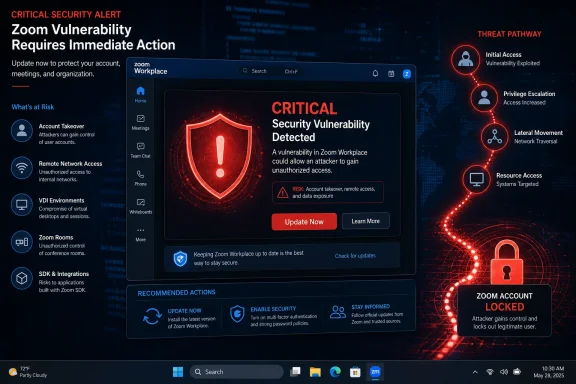 Overview: A Critical Windows Zoom Vulnerability With Account-Takeover Potential
CVE-2026-53412 is classified as an improper input validation flaw. That category may sound generic, but its consequences depend entirely on the affected application’s role and the reachable attack surface. In this instance, the reported impact is serious: an attacker may be able to conduct an account takeover over a network.The published CVSS vector is especially significant:
- Network reachable — the attack does not require physical access to the target machine.
- Low attack complexity — the vulnerability is not described as depending on unusually fragile timing or exotic preconditions.
- No privileges required — the attacker does not need to sign in first.
- No user interaction required — the victim is not necessarily required to click a malicious link, approve a prompt, or open a file.
- High impact to confidentiality, integrity, and availability — the score reflects potential exposure of account data, abuse of account capabilities, and possible disruption.
For Windows users, the concern is amplified by Zoom’s position as a communications and collaboration platform. A compromised account can expose more than meeting access. Depending on an organization’s Zoom configuration, it can put meeting schedules, chat history, cloud recordings, shared collaboration content, contact details, phone functions, and administrative workflows at risk.
Affected Zoom Products and Version Thresholds
The vulnerability affects multiple Zoom components on Windows, rather than only the familiar consumer desktop application. That broader scope matters because large organizations commonly deploy different Zoom packages across physical PCs, virtual desktops, conference rooms, and internally developed software.The affected version ranges are:
| Product | Vulnerable Versions | Secure Baseline |
|---|---|---|
| Zoom Workplace for Windows | Earlier than 7.0.0 | 7.0.0 or later |
| Zoom VDI Client for Windows | Earlier than 7.0.10, 6.6.15, or 6.5.18, depending on release branch | Applicable patched build in the deployed branch |
| Zoom Meeting SDK for Windows | Earlier than 7.0.0 | 7.0.0 or later |
Still, that convenience should not become an excuse for slow remediation. A virtual desktop deployment can represent a high-value target: a single underlying image or golden template may serve many users, and a missed update can leave an entire pool exposed.
Zoom Workplace Is More Than a Meeting Client
The name Zoom Workplace reflects the company’s attempt to consolidate a wider set of tools under one desktop application. In a typical environment, that can include:- Video meetings and webinars
- Team chat
- VoIP and business phone capabilities
- Calendar and mail integrations
- Whiteboards and collaboration features
- Document-sharing workflows
- AI-assisted productivity functions
- Account-linked settings, contacts, and communication data
The practical impact will vary with the user’s permissions and the company’s Zoom configuration. An ordinary personal account and a privileged enterprise administrator account are not equal targets. But attackers do not need every compromised account to be an administrator account for an incident to become costly. A standard employee account can still provide useful intelligence, meeting access, trusted messaging channels, and a foothold for targeted fraud.
What “Improper Input Validation” Means in This Case
Input validation is a core software security responsibility. Applications receive data constantly: network traffic, metadata, authentication-related messages, configuration values, meeting information, file paths, client requests, and inter-process communications. Before acting on that data, software must check that it is well formed, expected, permitted, and safe in context.When those controls are incomplete or incorrect, crafted input can push the application into behavior its developers did not intend.
For CVE-2026-53412, the publicly available description intentionally stays high level. It confirms the weakness type and the possible account-takeover consequence but does not disclose the malformed inputs, protocol flows, affected endpoints, or conditions necessary to turn the weakness into a working exploit.
That restraint should be read correctly.
The Lack of Technical Detail Is Not a Reason to Downgrade the Risk
Security bulletins often omit exploit particulars during the early period after disclosure. The goal is to give defenders enough information to patch while reducing the chance of a ready-made exploitation guide spreading faster than updates.Zoom’s decision not to provide detailed technical mechanics is therefore understandable. It is also a reminder that organizations should avoid relying on detection signatures alone. If the vendor does not publish the exact request pattern or exploit sequence, security teams cannot reasonably assume that endpoint protection, network intrusion detection, or a web proxy will catch every attempted attack.
Patching is the primary mitigation.
Account Takeover Is a Business Problem, Not Merely a Technical One
The phrase account takeover can be deceptively concise. In a collaboration platform, it can lead to several categories of harm:- Impersonation: Attackers may communicate as a trusted employee, executive, partner, or IT administrator.
- Meeting intrusion: Unauthorized attendees may attempt to enter meetings or alter meeting-related activity.
- Information exposure: Calendars, chat content, recordings, participant lists, and shared resources may be accessible depending on account rights.
- Fraud enablement: A compromised communication channel can make phishing, invoice fraud, payroll diversion, or credential theft much more convincing.
- Persistence: If attackers can modify account settings or add authentication methods, simply changing a password may not fully evict them.
- Reputational damage: Confidential calls or recordings exposed through a trusted platform can create compliance and customer-confidence problems.
Three Additional High-Severity Windows Vulnerabilities Were Patched
The July security updates do not address CVE-2026-53412 alone. Zoom also issued fixes for three high-severity Windows vulnerabilities. Although they do not share the same unauthenticated, network-based account-takeover profile, they are important in enterprise patch planning because they affect adjacent Zoom components and privilege boundaries.CVE-2026-53410: Race Condition in Windows Zoom Clients
CVE-2026-53410 is described as a race condition affecting Zoom clients for Windows. The reported scenario involves a locally logged-in user gaining elevated privileges during installation or uninstallation.Race-condition flaws arise when software makes an assumption about the order or timing of operations that an attacker can manipulate. A program may verify a condition, then later act on an outdated assumption after the environment has changed. In installation and removal workflows, that can be especially dangerous because installers often run with elevated permissions and modify protected locations, services, registry keys, or system-wide configuration.
This is a different threat model from CVE-2026-53412:
- It requires local access rather than network-only reachability.
- It is relevant where a malicious user, compromised standard account, or attacker with initial foothold can interact with installation processes.
- It may enable privilege escalation, turning a limited foothold into broader control of the Windows system.
CVE-2026-53409: Improper Privilege Management in Zoom Rooms for Windows
CVE-2026-53409 affects Zoom Rooms for Windows and is categorized as an improper privilege-management issue. The available information indicates that an authenticated user with local access could potentially elevate privileges.Zoom Rooms deployments warrant special scrutiny because conference-room systems are often physically accessible to many people, maintained less frequently than employee laptops, and treated as appliances rather than conventional Windows endpoints. That operational mindset can lead to patching gaps.
A Windows-based room controller or conference-room PC may also have a distinct security posture:
- Shared physical environments
- Kiosk-like or locked-down accounts
- Peripheral devices such as cameras, microphones, and displays
- Remote management agents
- Dedicated network segments
- Longer lifecycle expectations
- Less frequent hands-on user interaction
CVE-2026-53411: Input Validation Issue in the Zoom Workplace VDI Plugin
CVE-2026-53411 is another improper input validation vulnerability, this time in the Zoom Workplace VDI Plugin. The reported impact involves the potential for authenticated local users to elevate privileges.VDI environments add complexity because the Zoom client experience is split between the virtual desktop and the local endpoint. Performance optimization components, plugin versions, virtual desktop images, and host configurations can all affect whether a deployment is complete and consistent.
The patching lesson is clear: administrators must inventory both sides of the VDI implementation. Updating only the client in the virtual desktop image may not be sufficient if the locally installed VDI plugin remains vulnerable. Similarly, updating endpoints without refreshing the gold image can result in the flaw returning when desktops are reprovisioned.
Why Windows Administrators Need to Act Quickly
The severity of CVE-2026-53412 justifies rapid action, but urgency should be paired with disciplined change management. An unplanned software update rolled out blindly can create operational friction; an update delayed unnecessarily can create an avoidable security exposure.The practical objective is to shrink the vulnerable population quickly while proving that patched versions remain installed after endpoint restarts, image refreshes, remote-worker reconnections, and automated deployment cycles.
The Real Challenge Is Asset Visibility
A security bulletin identifies affected products. It does not identify where every instance lives.In many organizations, Zoom can appear in several forms:
- Standard user-installed Zoom Workplace applications
- IT-managed installations through Microsoft Intune, Configuration Manager, or another endpoint platform
- Remote Desktop, Azure Virtual Desktop, Citrix, or Omnissa Horizon environments
- Conference-room systems using Zoom Rooms
- Developer workstations containing the Zoom Meeting SDK
- Build servers or software projects that package the SDK into a custom Windows application
- Devices that have not connected to corporate management tools recently
- Formerly managed or personally owned devices accessing company accounts
Major Version Numbers Can Be Misleading
The existence of a patched threshold at 7.0.0 must be handled carefully. Version 7.0.0 is not necessarily synonymous with “install exactly version 7.0.0.” In fact, organizations should generally deploy the latest supported release available for their environment, provided it is approved through their normal validation process.This matters because version 7.0.0 itself has previously been involved in a separate Zoom Workplace chat connectivity issue on certain configurations. Windows users should not hunt for an old initial 7.0.0 package simply because it is listed as the security boundary. The correct practice is to obtain the current vendor-supported installer or managed update that contains the security fix and any subsequent reliability corrections.
For VDI, the correct target may be a current patched build in the approved 7.0, 6.6, or 6.5 branch. Organizations that standardize on a specific branch should confirm the exact revision deployed, not infer safety from the major version alone.
A Practical Patch Plan for Windows Environments
The following approach balances speed, accountability, and operational safety.1. Identify Every Affected Zoom Component
Start by building an inventory of:- Zoom Workplace for Windows
- Zoom VDI Client for Windows
- Zoom Workplace VDI Plugin
- Zoom Rooms for Windows
- Zoom Meeting SDK for Windows
- Any custom in-house applications that embed the Meeting SDK
2. Establish the Current Installed Version
For a conventional Zoom Workplace installation, users can generally view the version from the application’s profile or help area, typically through an About option. In managed environments, prefer centralized discovery through endpoint management or software inventory tools.For VDI deployments, verify:
- The version in the base desktop image
- The installed VDI client version
- The endpoint plugin version
- The version in non-persistent and persistent pools
- The versions applied to contingency images and disaster-recovery environments
3. Deploy the Latest Approved Patched Release
For affected installations:- Obtain the current supported Zoom update through approved enterprise channels.
- Deploy it using the organization’s standard endpoint-management system where possible.
- Use the appropriate VDI branch update for environments that cannot immediately move to the newest major release.
- Update Zoom Rooms and VDI plugins as distinct components.
- Rebuild or patch golden images before releasing new virtual desktops.
- Update any custom Windows application that embeds an affected Meeting SDK.
- Confirm the update completes successfully after required restarts.
4. Require Version Compliance Before Restoring Exceptions
Some users will inevitably be offline, traveling, in a restricted network environment, or unable to update immediately. Track those devices as explicit exceptions rather than allowing them to disappear into a generic “pending” category.For high-risk accounts, such as executive assistants, finance staff, IT administrators, legal teams, sales leadership, and Zoom administrators, organizations should consider accelerated remediation and tighter access restrictions until compliance is verified.
5. Review Zoom Account Security Controls
Patching removes the known software weakness but does not replace sound account-security practices. Administrators should confirm that:- Multi-factor authentication is enabled and appropriately enforced.
- Zoom administrator accounts use separate, hardened identities where possible.
- SSO integrations and conditional-access policies remain correctly configured.
- Administrator roles follow least-privilege principles.
- External meeting settings reflect business need.
- Cloud recording access and sharing policies are reviewed.
- Account recovery and authentication-method changes generate alerts where supported.
- Logs are retained and reviewed for suspicious sign-ins or configuration changes.
No Public Evidence of Exploitation Is Not a Reason to Wait
At the time of disclosure, there is no confirmed public evidence that the vulnerabilities fixed in this update have been exploited in active attacks. That is welcome news, but it should be interpreted conservatively.The most dangerous period for many vulnerabilities begins after a patch is released. Security researchers and attackers can compare vulnerable and fixed software versions, analyze code changes, and develop proof-of-concept techniques. The time between disclosure and widespread patching is often when organizations are most exposed.
A vulnerability does not need to appear in a public list of known exploited flaws before it deserves attention. CVE-2026-53412 combines several attributes that security teams should take seriously:
- A critical severity classification
- A 9.8 CVSS score
- A remotely reachable attack surface
- No required attacker authentication
- No stated user interaction requirement
- Potential account takeover
- Exposure across Windows desktops, VDI environments, and developer SDK deployments
The Strengths and Limits of Zoom’s Disclosure
Zoom’s handling of the advisory contains several positive elements. The company issued a dedicated critical bulletin, assigned a CVE identifier, provided product and version boundaries, and released fixes across relevant VDI maintenance branches. That level of version specificity is especially helpful to administrators who need to map a bulletin to real managed fleets.The company also grouped the critical issue with related high-severity Windows fixes, giving IT teams a clearer view of the month’s broader remediation needs. Organizations should take advantage of that opportunity to update the complete Zoom Windows estate rather than narrowly addressing one CVE and leaving adjacent components behind.
There are, however, limitations inherent in a deliberately sparse bulletin. Administrators do not have full visibility into exploit preconditions, attack traffic, or affected functionality. That makes it harder to prioritize compensating controls for systems that cannot be patched immediately.
The appropriate response is caution, not speculation. Avoid inventing an attack scenario that has not been confirmed. At the same time, avoid minimizing the warning because a detailed proof of concept has not been released. The verified facts already support a high-priority update decision.
Bottom Line: Patch Zoom on Windows Now
CVE-2026-53412 is a critical Zoom vulnerability that can potentially allow unauthenticated remote account takeover on affected Windows deployments. Zoom Workplace for Windows releases earlier than 7.0.0, vulnerable VDI client builds, and the Windows Meeting SDK should be treated as priority patch targets.The accompanying fixes for CVE-2026-53409, CVE-2026-53410, and CVE-2026-53411 reinforce the need for a complete Zoom Windows update cycle covering standard clients, Zoom Rooms, virtual desktop infrastructure, local VDI plugins, and developer dependencies.
For individual users, the action is straightforward: update Zoom Workplace through the official application update mechanism or install the newest supported Windows release. For organizations, the task is broader but equally clear: inventory every Zoom component, patch the approved deployment branch, refresh VDI images, verify compliance centrally, and review account protections around the collaboration platform.
In a Windows environment where communication tools carry sensitive meetings, identity data, recordings, chat history, and business workflows, a critical account-takeover flaw is not routine maintenance. It is an immediate security priority.
References
- Primary source: Research Snipers
Published: 2026-07-22T11:45:36+00:00
Zoom users beware: Serious vulnerability in the Windows client – Research Snipers
Meeting platform Zoom has warned of a serious security flaw in its Windows software that...researchsnipers.com - Related coverage: community.zoom.com