

Info-Tech Research Group is warning that Microsoft 365 tenants governed mainly through default settings and one-off administrative configurations are increasingly exposed to oversharing, unclear accountability, and uncontrolled content growth—risks that become more consequential as organizations expand use of Microsoft Copilot and other AI-enabled services.
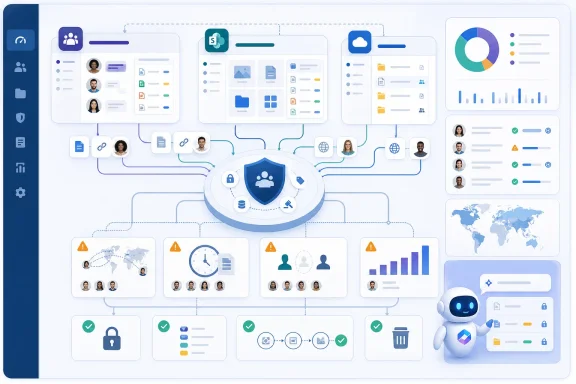
The advisory firm’s Govern Microsoft 365 blueprint argues for a policy-first operating model: establish the business purpose of governance, assign owners for decisions and controls, then map those requirements to the settings used across Microsoft Teams, SharePoint Online, and OneDrive.
The message is not that Microsoft 365 is inherently unsafe or that a new product vulnerability has been identified. The concern is operational. In a large tenant, collaboration services can create sites, teams, files, guests, sharing links, and permissions at a pace that outstrips informal administration. If ownership and lifecycle rules are not defined in advance, the organization can end up with data that is broadly accessible, stale content that is never reviewed, and security controls applied inconsistently between workloads.
AI raises the stakes because it can make already-accessible organizational information easier to find and use. Weak classification, excessive permissions, and unmanaged content are therefore not merely records-management problems; they can affect what information employees can discover through AI-assisted workflows. Organizations preparing to broaden Copilot use should treat existing permissions and content governance as a readiness requirement rather than an after-the-fact cleanup task.
The framework focuses on five practical governance actions:
A workable governance review should start with the highest-risk collaboration paths:
Organizations with mature identity, information-protection, and lifecycle-management practices may already have much of this structure in place. Those that rapidly enabled Teams, SharePoint, OneDrive, or Copilot without a common ownership model should prioritize a governance assessment now. The largest risk is not a single misconfiguration; it is allowing years of permissions, content, and collaboration workspaces to accumulate without a repeatable process for deciding who should have access, how long it should last, and who is responsible for reviewing it.
The advisory firm’s Govern Microsoft 365 blueprint argues for a policy-first operating model: establish the business purpose of governance, assign owners for decisions and controls, then map those requirements to the settings used across Microsoft Teams, SharePoint Online, and OneDrive.
The message is not that Microsoft 365 is inherently unsafe or that a new product vulnerability has been identified. The concern is operational. In a large tenant, collaboration services can create sites, teams, files, guests, sharing links, and permissions at a pace that outstrips informal administration. If ownership and lifecycle rules are not defined in advance, the organization can end up with data that is broadly accessible, stale content that is never reviewed, and security controls applied inconsistently between workloads.
AI raises the stakes because it can make already-accessible organizational information easier to find and use. Weak classification, excessive permissions, and unmanaged content are therefore not merely records-management problems; they can affect what information employees can discover through AI-assisted workflows. Organizations preparing to broaden Copilot use should treat existing permissions and content governance as a readiness requirement rather than an after-the-fact cleanup task.
The framework focuses on five practical governance actions:
- Define governance objectives before selecting controls. Teams, SharePoint, and OneDrive settings should support clear business goals, such as enabling secure external collaboration, protecting regulated data, or reducing unmanaged workspaces.
- Assess the tenant’s current capability and gaps. Organizations need an inventory of where policies, ownership, sharing practices, and technical controls are inconsistent.
- Connect policies to enforceable controls. A written rule without a corresponding configuration, process, or approval path will not reliably change tenant behavior.
- Assign decision ownership. IT, security, compliance, records management, and business units need defined responsibilities for creating, approving, reviewing, and retiring collaboration resources.
- Communicate expectations to users. Governance cannot depend entirely on technical restrictions. Users need understandable guidance on data handling, external sharing, workspace creation, and acceptable use.
A workable governance review should start with the highest-risk collaboration paths:
- Identify where sensitive information is stored and how it is classified.
- Review who can create Teams, Microsoft 365 Groups, SharePoint sites, and shared OneDrive content.
- Examine external sharing defaults, guest access, link types, and approval processes.
- Establish ownership and review requirements for inactive teams, sites, groups, and shared content.
- Validate that acceptable-use rules align with the technical controls actually enabled in the tenant.
- Reassess permissions and data hygiene before deploying AI features to new user groups.
Organizations with mature identity, information-protection, and lifecycle-management practices may already have much of this structure in place. Those that rapidly enabled Teams, SharePoint, OneDrive, or Copilot without a common ownership model should prioritize a governance assessment now. The largest risk is not a single misconfiguration; it is allowing years of permissions, content, and collaboration workspaces to accumulate without a repeatable process for deciding who should have access, how long it should last, and who is responsible for reviewing it.
 References
- Primary source: StreetInsider
Published: 2026-07-22T17:54:07.230646
Weak Microsoft 365 Governance Raises Data and Access Risk as AI and Collaboration Expand, Says Info-Tech Research Group
As Microsoft 365 (M365) adoption accelerates and AI-driven capabilities expand, many organizations continue to struggle with unclear ownership, inconsistent governance, and growing data risks. New insights from global IT research and advisory...www.streetinsider.com - Related coverage: infotech.com
Govern Microsoft 365 | Info-Tech Research Group
Microsoft 365 (M365) adoption has outpaced governance maturity as information-sharing expands within and outside organizations. Without a deli...www.infotech.com