

Microsoft Copilot’s reasoning capabilities are becoming easier to access across consumer and business experiences, but reports that Microsoft has just made OpenAI’s o1 model free for all users and is exposing its complete chain of thought substantially overstate — and in key places misstate — what has changed.
The important development is broader availability of advanced reasoning in the Microsoft ecosystem. Copilot Chat now supports GPT-5.5 Thinking for more complex, multi-step work, while Copilot in SharePoint uses a Microsoft-managed OpenAI reasoning model and Microsoft 365 declarative agents continue to evolve through newer GPT model generations. That is a meaningful shift for Windows, Microsoft 365, and enterprise users. It does not, however, mean every user has unrestricted access to a fixed model, nor does it mean Copilot reveals an AI model’s private internal chain of thought.
The distinction matters. Microsoft is clearly making reasoning-style AI more visible and more practical, but IT leaders and Windows enthusiasts should separate verified product capabilities from the increasingly common marketing shorthand surrounding “thinking” models.
Microsoft’s free-access move for Think Deeper, powered by OpenAI’s o1 reasoning technology, was not a July 2026 announcement. Microsoft began rolling out free and unlimited access to Think Deeper for Copilot users in February 2025.
That earlier decision was significant because it changed the perceived value proposition of consumer Copilot. Advanced reasoning had previously been associated with premium AI subscriptions, limited quotas, or specialist tools. By putting Think Deeper into the mainstream Copilot experience, Microsoft positioned more deliberate AI responses as a practical feature rather than a luxury.
The current story is therefore not that Microsoft has suddenly removed a new o1 paywall. The more accurate narrative is that Microsoft has continued an established strategy:
That is where reasoning models matter.
The model is not simply a faster text generator. It is designed to spend more effort working through tasks where an immediate answer may be incomplete or misleading. That makes it better suited to prompts involving multiple constraints, conflicting requirements, or lengthy source material.
A reasoning-oriented request looks more like this:
For knowledge workers, that can reduce the blank-page problem. For IT teams, it can turn fragmented operational details into a more readable plan. For managers, it can shorten the time required to turn raw information into an actionable briefing.
Users may see a short explanation, a planning preamble, progress indicators, cited sources, structured reasoning summaries, or an answer that breaks its logic into steps. Those features can improve usability and build confidence in an AI response. They are not the same thing as exposing the model’s raw internal chain of thought.
However, an explanation generated for user review is not necessarily a literal transcript of the hidden computational process that produced the answer.
That is not how responsible AI validation should work.
Even a detailed explanation can contain errors. A model can present a persuasive sequence of steps and still start from an incorrect premise. It can overlook a relevant document, misunderstand a policy requirement, apply an outdated technical assumption, or produce a calculation that appears sensible but is wrong.
For professional users, the safest approach is to verify:
Copilot in SharePoint is designed to help users ask questions about content, generate pages and files, create workflows, analyze information, and navigate large document collections through natural language. Microsoft states that the SharePoint experience currently runs on a Microsoft-managed OpenAI reasoning model.
That wording is important.
That has advantages:
This is not a theoretical issue. Microsoft has already cautioned declarative-agent developers that GPT model transitions can affect behavior, especially where prompts require literal, structured, or step-by-step interpretation.
A reasoning model becomes more useful when it can work from:
But it only works well if the SharePoint environment is ready.
If the SharePoint tenant contains duplicated files, outdated policy documents, inconsistent permissions, unclear naming conventions, incomplete metadata, or poorly maintained libraries, Copilot may surface confusion faster than a human user could.
Before expanding Copilot in SharePoint, IT teams should focus on:
A feature may be offered at no extra charge, but that does not automatically mean unrestricted throughput under every condition. Microsoft’s consumer Copilot experiences, enterprise Copilot services, and preview features can have different availability rules, quotas, fair-use protections, tenant requirements, and rollout schedules.
Copilot in SharePoint, for example, has preview usage limits that may be applied on daily and weekly per-user bases. Those limits can change as Microsoft monitors demand and adjusts capacity.
That is normal for a rapidly evolving cloud service. It is also a practical planning consideration.
Declarative agents are custom Copilot experiences built around instructions, knowledge sources, and actions. An organization might create one for HR policy, IT service management, sales enablement, procurement guidance, or internal security procedures.
Microsoft’s documentation indicates that declarative agents have moved through GPT model upgrades, including a transition from GPT-5.0 to GPT-5.1. The company also describes automatic model transitions as an expected part of the service.
An ideal system would quietly select the most appropriate capability:
An agent that once followed instructions literally may later interpret them more broadly. A workflow that was dependable with a specific prompt style may become less consistent. A carefully structured response format may require adjustment after the underlying model is upgraded.
For that reason, organizations building declarative agents should treat prompts and instructions as living assets rather than one-time configuration files.
A strong operational process includes:
Still, Microsoft’s Copilot strategy cannot be explained solely as a reaction to one competitor.
Microsoft is trying to make AI a built-in layer across Windows, Microsoft 365, Teams, SharePoint, Edge, Azure, and developer tools. The company has a substantial advantage when reasoning models are connected to enterprise identity, organizational data, security controls, productivity apps, and collaboration workflows.
The strategic competition is not only about which model scores highest on a benchmark. It is about which platform provides the most useful end-to-end experience.
For Windows users, that means Copilot is increasingly useful for complicated planning, comparison, troubleshooting, research preparation, and structured drafting. For Microsoft 365 users, it means stronger tools for working with documents, email, meetings, spreadsheets, and organizational knowledge.
For SharePoint users, the opportunity is even larger. A well-governed content environment can become a conversational knowledge base, with Copilot helping employees find, summarize, compare, and act on the information they already have permission to access.
But the claim that Microsoft has newly made o1 free for everyone in July 2026, with full chain-of-thought exposure, should not be treated as an accurate description of the product landscape. Free Think Deeper access dates back to February 2025, current Copilot services use evolving and Microsoft-managed model configurations, and user-facing reasoning explanations should not be confused with a raw internal chain-of-thought transcript.
Microsoft’s bigger move is not the removal of a single paywall. It is the normalization of reasoning-class AI across the Windows and Microsoft 365 ecosystem. That may prove more consequential than any individual model label, because the real competition is shifting from chatbots that answer questions to AI systems that help people complete complex work.
The important development is broader availability of advanced reasoning in the Microsoft ecosystem. Copilot Chat now supports GPT-5.5 Thinking for more complex, multi-step work, while Copilot in SharePoint uses a Microsoft-managed OpenAI reasoning model and Microsoft 365 declarative agents continue to evolve through newer GPT model generations. That is a meaningful shift for Windows, Microsoft 365, and enterprise users. It does not, however, mean every user has unrestricted access to a fixed model, nor does it mean Copilot reveals an AI model’s private internal chain of thought.
The distinction matters. Microsoft is clearly making reasoning-style AI more visible and more practical, but IT leaders and Windows enthusiasts should separate verified product capabilities from the increasingly common marketing shorthand surrounding “thinking” models.
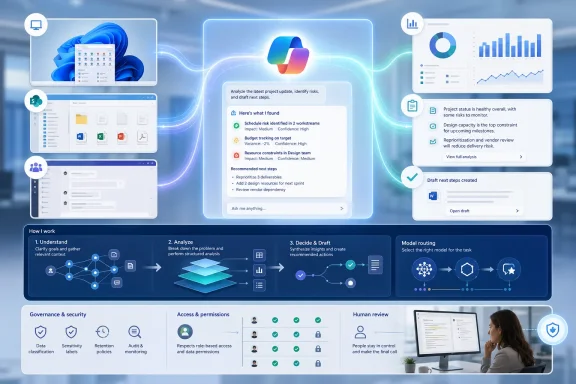 Background: Copilot’s Reasoning Push Began Earlier Than July 2026
Microsoft’s free-access move for Think Deeper, powered by OpenAI’s o1 reasoning technology, was not a July 2026 announcement. Microsoft began rolling out free and unlimited access to Think Deeper for Copilot users in February 2025.That earlier decision was significant because it changed the perceived value proposition of consumer Copilot. Advanced reasoning had previously been associated with premium AI subscriptions, limited quotas, or specialist tools. By putting Think Deeper into the mainstream Copilot experience, Microsoft positioned more deliberate AI responses as a practical feature rather than a luxury.
The current story is therefore not that Microsoft has suddenly removed a new o1 paywall. The more accurate narrative is that Microsoft has continued an established strategy:
- Bring stronger reasoning models into Copilot experiences.
- Make the model selection process less visible for routine work.
- Reserve user attention for the outcome, context, and task rather than model mechanics.
- Use automatic model routing to balance response speed, capability, availability, and cost.
- Extend reasoning support into Microsoft 365 apps, enterprise agents, and SharePoint content workflows.
That is where reasoning models matter.
What GPT-5.5 Thinking Adds to Copilot Chat
Microsoft 365 Copilot Chat now includes GPT-5.5 Thinking, which is intended for deeper reasoning, structured analysis, complex planning, troubleshooting, and multi-step decision support.The model is not simply a faster text generator. It is designed to spend more effort working through tasks where an immediate answer may be incomplete or misleading. That makes it better suited to prompts involving multiple constraints, conflicting requirements, or lengthy source material.
Better fit for multi-step work
For a Windows administrator, a standard Copilot prompt might be:That is a relatively straightforward request. A fast response model is usually appropriate.“How do I reset a local password?”
A reasoning-oriented request looks more like this:
This second task requires the model to identify several dimensions of the problem:“Compare the risks of deploying Windows 11 feature updates through Windows Update for Business, Intune feature update policies, and Configuration Manager in a hybrid environment. Recommend a phased rollout plan for 2,000 devices, including pilot selection, rollback criteria, support communications, and reporting.”
- Deployment architecture
- Device management state
- Change-management requirements
- Risk control
- Rollback planning
- Reporting needs
- Operational sequencing
Practical uses in Microsoft 365
GPT-5.5 Thinking has particular value when Copilot Chat is used with work context. Examples include:- Comparing multiple project plans and identifying dependencies.
- Turning a long document collection into an executive briefing.
- Reviewing a spreadsheet’s assumptions and highlighting inconsistencies.
- Creating a phased remediation plan from audit findings.
- Analyzing different options for a procurement, security, or policy decision.
- Explaining a technical process in an ordered, audience-appropriate way.
- Drafting a risk register based on notes, meeting summaries, and uploaded files.
For knowledge workers, that can reduce the blank-page problem. For IT teams, it can turn fragmented operational details into a more readable plan. For managers, it can shorten the time required to turn raw information into an actionable briefing.
Chain of Thought Is Not the Same as Transparency
One of the most important corrections to the claim surrounding this update involves chain-of-thought visibility.Users may see a short explanation, a planning preamble, progress indicators, cited sources, structured reasoning summaries, or an answer that breaks its logic into steps. Those features can improve usability and build confidence in an AI response. They are not the same thing as exposing the model’s raw internal chain of thought.
What users can reasonably expect to see
In practice, modern AI products may present some combination of the following:- A concise explanation of the approach being taken.
- A list of assumptions.
- A step-by-step solution created for the user.
- An outline of the factors considered.
- Citations or links to source material when grounding is supported.
- A visible indicator that the model is taking additional time to reason.
- A final response divided into analysis, recommendation, risks, and next steps.
However, an explanation generated for user review is not necessarily a literal transcript of the hidden computational process that produced the answer.
Why the distinction matters
The phrase “chain of thought visible” can create the wrong expectation. It suggests that users can audit every internal step taken by the model and independently confirm that the system reached its conclusion in a sound manner.That is not how responsible AI validation should work.
Even a detailed explanation can contain errors. A model can present a persuasive sequence of steps and still start from an incorrect premise. It can overlook a relevant document, misunderstand a policy requirement, apply an outdated technical assumption, or produce a calculation that appears sensible but is wrong.
For professional users, the safest approach is to verify:
- The source data — Is the model working from complete and current information?
- The assumptions — Did it infer details that were not actually provided?
- The recommendation — Does it comply with organizational policy, licensing, security standards, and operational reality?
- The consequences — Has it considered edge cases, rollback, user impact, and access control?
- The final action — Has a qualified human approved the decision before it affects production systems?
Copilot in SharePoint: Reasoning Moves Closer to Enterprise Content
The SharePoint side of the story is arguably more important for organizations than the consumer Copilot model announcement.Copilot in SharePoint is designed to help users ask questions about content, generate pages and files, create workflows, analyze information, and navigate large document collections through natural language. Microsoft states that the SharePoint experience currently runs on a Microsoft-managed OpenAI reasoning model.
That wording is important.
Microsoft manages the model selection
Copilot in SharePoint does not promise customers that every request will always use one specific named model, such as o1, GPT-5.1, or GPT-5.5 Thinking. Microsoft can update or replace the underlying model as the product evolves.That has advantages:
- Customers do not need to manage AI model deployment directly.
- Improvements can arrive without rebuilding SharePoint workflows.
- Microsoft can tune the experience for reliability, speed, safety, and cost.
- The product can adapt as newer reasoning models become available.
This is not a theoretical issue. Microsoft has already cautioned declarative-agent developers that GPT model transitions can affect behavior, especially where prompts require literal, structured, or step-by-step interpretation.
SharePoint’s real value is grounded context
The most meaningful feature is not merely that a reasoning model is involved. It is that Copilot can work with organizational content — subject to permissions, governance settings, and the quality of the content itself.A reasoning model becomes more useful when it can work from:
- Project documents
- Policies and procedures
- Product specifications
- Meeting notes
- Knowledge-base articles
- SharePoint lists
- Metadata-rich document libraries
- Approved templates
- Departmental records
That is a far more valuable scenario than asking a general-purpose chatbot to produce generic onboarding advice.“Summarize the approved onboarding process for contractors, identify documents that have not been updated in two years, and draft a concise checklist for department managers.”
But it only works well if the SharePoint environment is ready.
Content hygiene remains the foundation
Organizations should not expect a reasoning model to compensate for weak information governance.If the SharePoint tenant contains duplicated files, outdated policy documents, inconsistent permissions, unclear naming conventions, incomplete metadata, or poorly maintained libraries, Copilot may surface confusion faster than a human user could.
Before expanding Copilot in SharePoint, IT teams should focus on:
- Removing or archiving obsolete content.
- Defining ownership for high-value sites and libraries.
- Reviewing sensitive-data exposure and permission inheritance.
- Applying consistent document metadata.
- Establishing retention and lifecycle policies.
- Creating clear authoritative locations for policies and procedures.
- Testing Copilot prompts against realistic business scenarios.
- Training users to check cited content and challenge questionable output.
Usage Limits Still Matter
Another area where the “free for all” framing can mislead readers is usage capacity.A feature may be offered at no extra charge, but that does not automatically mean unrestricted throughput under every condition. Microsoft’s consumer Copilot experiences, enterprise Copilot services, and preview features can have different availability rules, quotas, fair-use protections, tenant requirements, and rollout schedules.
Copilot in SharePoint, for example, has preview usage limits that may be applied on daily and weekly per-user bases. Those limits can change as Microsoft monitors demand and adjusts capacity.
That is normal for a rapidly evolving cloud service. It is also a practical planning consideration.
Free access is not identical to guaranteed access
For users, the distinction may only appear during busy periods or when a limit is reached. For enterprise administrators, it can have broader consequences:- A workflow may become temporarily unavailable for some users.
- A pilot group may have a different experience from the broader organization.
- Premium licensing may still be required for adjacent Microsoft 365 Copilot capabilities.
- A model selector may be available in one Copilot surface but not another.
- Features may arrive in preview before general availability.
- Regional availability, compliance needs, and tenant configuration can affect deployment.
Declarative Agents and the Shift to Automatic Model Evolution
The update to Microsoft 365 Copilot declarative agents points to the future of AI productivity: users will increasingly interact with specialized agents rather than manually choose a model for every task.Declarative agents are custom Copilot experiences built around instructions, knowledge sources, and actions. An organization might create one for HR policy, IT service management, sales enablement, procurement guidance, or internal security procedures.
Microsoft’s documentation indicates that declarative agents have moved through GPT model upgrades, including a transition from GPT-5.0 to GPT-5.1. The company also describes automatic model transitions as an expected part of the service.
Why automatic model selection is attractive
The promise is straightforward: users should not need to understand model families, context-window sizes, token budgets, or reasoning effort settings just to obtain useful assistance.An ideal system would quietly select the most appropriate capability:
- A fast model for a simple rewrite.
- A reasoning model for a multi-step troubleshooting plan.
- A grounded model for an internal policy question.
- A visual model for image or presentation work.
- A coding-oriented model for development tasks.
- A research-oriented workflow for source-heavy analysis.
The risk: model changes can alter agent behavior
The downside is that a custom agent may behave differently after a model update even when its instructions have not changed.An agent that once followed instructions literally may later interpret them more broadly. A workflow that was dependable with a specific prompt style may become less consistent. A carefully structured response format may require adjustment after the underlying model is upgraded.
For that reason, organizations building declarative agents should treat prompts and instructions as living assets rather than one-time configuration files.
A strong operational process includes:
- Maintaining a test set of realistic prompts.
- Testing agents after major model changes.
- Recording expected output structure and safety constraints.
- Using explicit instructions for required steps and prohibited actions.
- Monitoring user feedback and failure patterns.
- Keeping a human review path for high-impact workflows.
- Avoiding autonomous actions where the agent’s confidence cannot be independently verified.
Competitive Pressure Is Real, but the Story Is Bigger Than DeepSeek
The rise of lower-cost reasoning models, including competitors from China and elsewhere, has intensified pressure on Microsoft, OpenAI, Google, Anthropic, and other AI platform providers. DeepSeek has helped reinforce the market perception that capable reasoning should not remain rare or prohibitively expensive.Still, Microsoft’s Copilot strategy cannot be explained solely as a reaction to one competitor.
Microsoft is trying to make AI a built-in layer across Windows, Microsoft 365, Teams, SharePoint, Edge, Azure, and developer tools. The company has a substantial advantage when reasoning models are connected to enterprise identity, organizational data, security controls, productivity apps, and collaboration workflows.
The strategic competition is not only about which model scores highest on a benchmark. It is about which platform provides the most useful end-to-end experience.
Microsoft’s strengths
Microsoft’s strongest position comes from integration:- Copilot can appear inside the applications users already work in.
- Microsoft Graph can provide organizational context where permitted.
- Entra identity and Microsoft 365 controls can help manage access.
- SharePoint and OneDrive offer established content repositories.
- Teams gives Copilot a natural collaboration surface.
- Windows remains a major endpoint for business users.
- Azure provides a broad enterprise AI and cloud foundation.
The risks Microsoft still has to manage
The company also faces difficult challenges:- Trust: More capable reasoning can make incorrect answers appear more convincing.
- Governance: Grounding an AI system in enterprise data raises permission and oversharing concerns.
- Consistency: Automatic model changes can affect agent behavior and output quality.
- Latency: Deeper reasoning generally takes more time than quick-response models.
- Cost: Reasoning models are computationally expensive, even if users are not directly billed.
- User confusion: Different Copilot products, licenses, models, and capabilities can be difficult to distinguish.
- Overreliance: Users may accept polished AI output without sufficient validation.
What Windows and Microsoft 365 Users Should Take Away
The practical takeaway is positive but measured. Reasoning AI is becoming a mainstream capability in Copilot, particularly through GPT-5.5 Thinking in Copilot Chat and OpenAI reasoning technology integrated throughout Microsoft’s broader AI portfolio.For Windows users, that means Copilot is increasingly useful for complicated planning, comparison, troubleshooting, research preparation, and structured drafting. For Microsoft 365 users, it means stronger tools for working with documents, email, meetings, spreadsheets, and organizational knowledge.
For SharePoint users, the opportunity is even larger. A well-governed content environment can become a conversational knowledge base, with Copilot helping employees find, summarize, compare, and act on the information they already have permission to access.
But the claim that Microsoft has newly made o1 free for everyone in July 2026, with full chain-of-thought exposure, should not be treated as an accurate description of the product landscape. Free Think Deeper access dates back to February 2025, current Copilot services use evolving and Microsoft-managed model configurations, and user-facing reasoning explanations should not be confused with a raw internal chain-of-thought transcript.
Microsoft’s bigger move is not the removal of a single paywall. It is the normalization of reasoning-class AI across the Windows and Microsoft 365 ecosystem. That may prove more consequential than any individual model label, because the real competition is shifting from chatbots that answer questions to AI systems that help people complete complex work.
References
- Primary source: iNews Zoombangla
Published: 2026-07-23T10:24:07+00:00
Loading…
inews.zoombangla.com - Official source: learn.microsoft.com
Release Notes for Microsoft 365 Copilot | Microsoft Learn
Lists the features that reach General Availability in each release of Microsoft 365 Copilot.learn.microsoft.com - Official source: techcommunity.microsoft.com
Loading…
techcommunity.microsoft.com - Related coverage: systoolsgroup.com
Loading…
www.systoolsgroup.com - Official source: microsoft.com
Loading…
www.microsoft.com - Related coverage: cloudwars.com
Loading…
cloudwars.com