

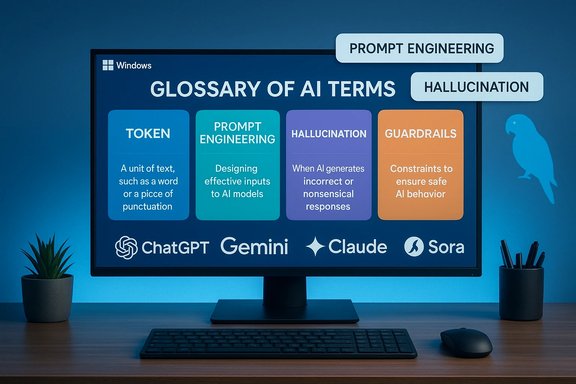
The arrival of a compact, journalism‑style glossary of “61 AI terms” — lately repackaged and syndicated across outlets — is a useful, if incomplete, public service: it condenses a fast‑moving vocabulary into bite‑size definitions and flags the words most readers will encounter while using ChatGPT, Copilot, Gemini and other generative tools. The glossary captures both practical terms (tokens, prompt engineering, multimodal) and cultural shorthand (stochastic parrot, paperclips, foom), mixes technical points with policy language, and points toward the two big stories behind every definition: massive economic promise and real safety limits. Taken together, the piece is a good primer — but several entries compress nuance, some labels are non‑standard or non‑clinical, and a few claims need independent verification before they migrate from explainer prose into operational policy.
The glossary positions generative AI as both ubiquitous and consequential: companies are embedding models into search, productivity suites, creative tools and enterprise APIs, making AI an everyday part of how people find answers and create content. The economic headline in the glossary — that generative AI could be worth up to roughly $4.4 trillion annually — tracks with McKinsey’s published analysis of generative AI use cases and their potential value to the global economy. That estimate (a $2.6–$4.4 trillion range across 63 use cases) is real and widely quoted in industry commentary. At the same time the glossary highlights current product names and features — ChatGPT, Google Gemini, Anthropic’s Claude, Sora — that are actively shaping how people and businesses interact with generative systems. Some of those product facts are time‑sensitive: for example, OpenAI’s Sora (a short‑form text→video tool) and its successor Sora 2 have been rolled into real commercial tests and integrations across apps and platforms. Independently reported evidence confirms Sora’s market debut and subsequent iterations (including a more capable Sora 2) and shows vendors racing to add short‑video generation to consumer and enterprise toolsets. This article summarizes the glossary’s core points, verifies a selection of its largest claims against public reporting, and offers critical, practical analysis for Windows‑centric readers thinking about policy, productivity and security.
Practical point: Windows admins and IT teams must treat agentic capabilities as features with permissioned risk — not as simple UX upgrades. Design agent permissions, audit trails and kill switches before wide rollout.
Recommendation: when communicating policy or moderation approaches, use neutral behavioral descriptions (excessive attachment, boundary violations, delusional claims about chatbot agency) and rely on clinical experts before labeling behaviors as psychiatric.
The next steps for readers who want to move from vocabulary to practice are clear:
Source: cinetotal.com.br ChatGPT Glossary: 61 AI Terms Everyone Should Know | cinetotal.com.br
 Background / Overview
The glossary positions generative AI as both ubiquitous and consequential: companies are embedding models into search, productivity suites, creative tools and enterprise APIs, making AI an everyday part of how people find answers and create content. The economic headline in the glossary — that generative AI could be worth up to roughly $4.4 trillion annually — tracks with McKinsey’s published analysis of generative AI use cases and their potential value to the global economy. That estimate (a $2.6–$4.4 trillion range across 63 use cases) is real and widely quoted in industry commentary. At the same time the glossary highlights current product names and features — ChatGPT, Google Gemini, Anthropic’s Claude, Sora — that are actively shaping how people and businesses interact with generative systems. Some of those product facts are time‑sensitive: for example, OpenAI’s Sora (a short‑form text→video tool) and its successor Sora 2 have been rolled into real commercial tests and integrations across apps and platforms. Independently reported evidence confirms Sora’s market debut and subsequent iterations (including a more capable Sora 2) and shows vendors racing to add short‑video generation to consumer and enterprise toolsets. This article summarizes the glossary’s core points, verifies a selection of its largest claims against public reporting, and offers critical, practical analysis for Windows‑centric readers thinking about policy, productivity and security.What the glossary gets right — a concise summary
- It captures the essentials of generative AI: large language models (LLMs), tokens, transformer models, training data, inference, and temperature — the operating vocabulary anyone using modern chatbots should understand.
- It correctly highlights practical safety and governance concepts: guardrails, AI ethics, AI safety, alignment, prompt injection, and open weights (publicly released model parameters).
- It names current commercial players and features people will see in the wild: ChatGPT, Claude, Google Gemini, Microsoft Copilot, Perplexity, and short‑form generative video tools like Sora.
- It flags common failure modes and cultural memes that affect adoption: hallucination, bias, overfitting, slop (low‑quality mass‑produced AI content), sycophancy, and stochastic parrot.
Verification of key claims and numbers
The economic impact headline: $2.6–$4.4 trillion annually
The glossary cites a McKinsey estimate that generative AI could be worth up to roughly $4.4 trillion per year across a set of identified use cases. That headline number comes from McKinsey’s detailed analysis of 63 use cases (customer operations, marketing and sales, software engineering, R&D, etc.. McKinsey’s public report reproduces the $2.6–$4.4 trillion range and explains it as scenario‑based economic potential, not an immediate guaranteed windfall. Independent coverage by trade outlets and analyst summaries use the same McKinsey framing: large potential gains concentrated in a few business functions, subject to adoption rates and real‑world constraints. Critical nuance: McKinsey’s figure is directional and scenario‑based. It assumes broad adoption and productivity capture; it does not mean every company will see those returns, nor does it account for distributional effects, transitional labor impacts, or second‑order macroeconomic adjustments. Use the number as a planning anchor, not a contract or a forecast for individual firms.OpenAI’s Sora and Sora 2: are these real and current?
The glossary mentions Sora and a Sora 2 iteration. Independent reporting confirms OpenAI released Sora (a text‑to‑video tool) in alpha/limited availability and that the product developed iteratively, with press coverage noting expanded capability and integration experiments across platforms. Industry outlets and product coverage report Sora updates (including Sora 2) in late 2024–2025, and examples show brands piloting Sora in production creative work. Sora’s feature set (short videos, synchronized audio in later iterations, social app flows) is corroborated by multiple technology outlets and product writeups. Critical nuance: the commercial availability, quota limits, and feature set (clip length, audio fidelity, cameo or identity features) have changed quickly in public tests. Claims about specific frame lengths, pricing, or broad platform embedding should be validated against product docs or vendor announcements at the time of deployment.The “stochastic parrot” framing
The glossary includes “stochastic parrot” as a way to explain that LLMs do not truly understand in the human sense. That phrase originates with a 2021 research critique and has entered mainstream discourse as shorthand for statistical mimicry without semantic grounding. The original paper and subsequent coverage frame it as a caution about overclaiming model comprehension and as a prompt to consider training data provenance and downstream harms. So this glossary entry correctly summarizes the core idea.Where the glossary compresses or blurs important distinctions
Agentive vs. agentic vs. autonomous agents
The glossary contrasts “agentive” and “agentic” language and describes autonomous agents and agentive frameworks. In broad technical usage:- Agentic / autonomous agents typically refers to systems that can act on a user’s behalf, chaining tools, APIs and web actions — often under scoped permissions.
- Agentive as a UX term, or as used in some vendor messaging, emphasizes the user‑facing experience and autonomy level.
Practical point: Windows admins and IT teams must treat agentic capabilities as features with permissioned risk — not as simple UX upgrades. Design agent permissions, audit trails and kill switches before wide rollout.
“AI psychosis” and other non‑clinical labels
The glossary lists “AI psychosis” as a non‑clinical term for extreme attachment, delusion or fixation on chatbots. This is not a recognized clinical diagnosis and is best treated as a cultural descriptor rather than a medical term. The entry is helpful to explain the phenomenon of anthropomorphism, but the phrase itself should be used cautiously; equating online behavior with clinical categories can mislead and stigmatize legitimate mental‑health conditions.Recommendation: when communicating policy or moderation approaches, use neutral behavioral descriptions (excessive attachment, boundary violations, delusional claims about chatbot agency) and rely on clinical experts before labeling behaviors as psychiatric.
Hallucinations, “confidence”, and the reasons models lie
The glossary’s definition of hallucination — AI producing wrong answers stated confidently — is accurate as a phenomenon. But the glossary does not fully explain why hallucinations happen: model training optimizes next‑token likelihood, not objective truth. Hallucinations occur because:- Models generalize statistically from training data and sometimes invent facts to satisfy a prompt’s apparent constraints.
- Retrieval or grounding systems may be incomplete or return wrong documents.
- Model routing or temperature settings increase risk of creative but incorrect outputs.
Strengths of the glossary for WindowsForum readers
- Accessibility: Short, plain definitions help Windows power users and admins learn vocabulary quickly.
- Breadth: Covers technical, company, product and cultural terms, giving readers a broad orientation to both tools and debates.
- Practical flags: Includes concrete risks (prompt injection, data privacy, hallucination, guardrails) that are directly relevant to desktop and enterprise settings.
- Actionable language: Terms like “open weights,” “quantization,” and “on‑device inference” point to tradeoffs — performance, cost, and privacy — that are operational for Windows deployments.
Risks and omissions the glossary underplays
- Operational governance: The glossary mentions guardrails and AI safety, but does not give prescriptive steps for enterprise rollout (AgentOps, identity binding, telemetry, telemetry retention, kill switches). Forums and operational writeups emphasize lifecycle governance for agentic deployments.
- Telemetry and privacy tradeoffs: Consumer tiers often log prompts for model improvement; enterprise tiers differ. The glossary warns of data collection but treats it abstractly. Windows admins need concrete controls: non‑training contracts, on‑prem or private model options, data retention SLAs, and DLP integration.
- Regulatory and legal nuance: Intellectual property, rights to transform copyrighted works into training material, and identity/likeness rights for generative video are evolving fast. Entries like “open weights” and “style transfer” imply legal risk but do not map to specific mitigations (licenses, model cards, provenance metadata).
- Quality vs. scale (slop): The glossary names “slop” as low‑quality mass‑produced content, but doesn’t offer detection or mitigation tactics. Content moderation, watermarking, and synthetic‑content provenance (SynthID or equivalents) are rapidly becoming operational requirements.
Practical guidance for Windows users and IT teams
- Prioritize governance before convenience.
- Register and inventory all agentic assistants and GPT integrations.
- Apply least privilege and RBAC: agents that can act should have scoped identities and approval gates.
- Treat AI outputs as drafts, not decisions.
- Build verification steps into workflows: human sign‑off for high‑impact text, deterministic retrieval for facts, and formal citation practices where necessary. Independent audits show assistants make serious sourcing and factual errors in nontrivial percentages of outputs.
- Reduce data exfiltration risk.
- Use enterprise tiers with non‑training guarantees or on‑prem options for sensitive data.
- Disable file attachments or scanning where unneeded; log and monitor prompts for PII leakage.
- Test for prompt injection and adversarial content.
- Insert deliberate malformed inputs in controlled pilots to measure whether agents follow embedded web instructions or sandbox boundaries. The prompt‑injection threat is real and escalates with agentic browsing capabilities.
- Plan for hallucinations and model drift.
- Use retrieval‑augmented generation (RAG) or citation pipelines where accuracy matters.
- Monitor model outputs over time; maintain a glossary and canonical sources for domain terms to reduce semantic drift.
- Prepare the helpdesk and documentation.
- Train support staff to recognize AI‑generated errors, and create guidance on when to escalate outputs to SMEs.
Technical tradeoffs: on‑device models, quantization and open weights
- Open weights let organizations run models locally and audit internal biases; they also increase attack surface and misuse risk.
- Quantization reduces memory and inference cost for local models but can reduce numeric precision and sometimes degrade accuracy. It’s a practical way to run capable LLMs on edge hardware when acceptable accuracy tradeoffs are made.
- On‑device inference improves latency and privacy but can limit model size and feature set; hybrid routing (local fallback + cloud reasoning for heavier tasks) is a common enterprise design pattern. The glossary flags these terms but operational planning requires profiling workloads, latency SLOs and cost tradeoffs before selecting a deployment path.
How to read glossary entries critically (a short checklist)
- Does the entry describe a stable technical definition or a transient marketing term?
- Is the entry normative (what should happen) or descriptive (what does happen)?
- When the entry uses vivid analogies (paperclip maximizer, stochastic parrot), remember they are qualitative tools for thinking, not precise engineering specifications.
- Check time‑sensitive product claims (model releases, clip lengths, availability) against vendor docs the day you plan a rollout — product roadmaps change quickly.
Conclusion — what the glossary delivers and where practitioners must do the work
The “61‑term” ChatGPT glossary is a functional, up‑to‑date entry point for readers who need to speak coherently about the current generation of generative AI. It does what a glossary should: reduce jargon friction and spotlight key safety and policy concerns. For WindowsForum readers — system administrators, IT professionals, creators and power users — the glossary is a springboard, not a system design manual.The next steps for readers who want to move from vocabulary to practice are clear:
- Treat the McKinsey economic range as a planning estimate to prioritize pilots in customer ops, software engineering and R&D where most value concentrates.
- Verify product‑level claims (Sora features, Copilot integrations, model routing, or on‑device model availability) against vendor documentation at the time of deployment; products like Sora and Sora 2 evolve quickly and have real legal and IP implications for creative content.
- Build governance and human‑in‑the‑loop checkpoints before giving agents permission to act autonomously; AgentOps discipline is a core operational requirement for safe scale.
- Use the glossary as an orientation tool, not as the final authority — and flag non‑clinical labels (like “AI psychosis”) as colloquial rather than diagnostic.
Source: cinetotal.com.br ChatGPT Glossary: 61 AI Terms Everyone Should Know | cinetotal.com.br
