

Between June 12 and June 26, 2026, attackers reportedly made more than 81 million login attempts against Microsoft cloud accounts through Azure CLI, compromising at least 78 accounts across 64 organizations by abusing a legacy OAuth password flow. The striking number is not the 81 million; cloud identity systems absorb oceans of noise every day. The real story is that many victims believed they had already bought, configured, and enforced the control that was supposed to make this attack boring: multifactor authentication. This campaign is a reminder that in Microsoft 365 and Azure, “MFA enabled” is not the same thing as “passwords can no longer open doors.”
The reported campaign targeted Microsoft’s Azure command-line interface, a legitimate tool used by administrators, developers, automation scripts, and cloud operators. That choice matters. Attackers did not need to phish a slick web page, defeat a biometric prompt, or exploit a fresh Azure vulnerability; they used a sanctioned client path that many tenants allow because it is part of how real work gets done.
Password spraying is usually described as a low-and-slow brute-force technique, but that phrase undersells what happened here. More than 81 million attempts over roughly two weeks is industrial-scale credential validation. The attackers were reportedly not guessing randomly so much as recycling known username-and-password combinations from prior breaches, then testing whether those passwords still worked in Microsoft cloud environments.
That makes the campaign both crude and depressingly modern. It is crude because the underlying input is still the oldest failure in enterprise security: reused or unrotated passwords. It is modern because the winning move was not the password itself, but the selection of an authentication path where the tenant’s protective intent did not match its actual enforcement.
For WindowsForum readers, the operational lesson is blunt. If your organization treats Microsoft 365 identity as a web-login problem, you are probably undercounting the number of ways a password can be presented to Entra ID. The browser is only one stage; the token endpoint is another.
Microsoft has long advised against using ROPC because it is incompatible with multifactor authentication in the way administrators usually mean it. It does not naturally support the browser-based, challenge-driven, conditional decision tree that most users associate with modern sign-in. It also requires a high degree of trust in the client application, because the application handles the user’s password directly.
That does not make ROPC a magical MFA bypass in every tenant. If a Conditional Access policy is broad and strict enough, the sign-in can fail because the policy requires conditions that the flow cannot satisfy. But if the policy is scoped only to certain apps, users, platforms, locations, or interactive flows, the attacker may find a gap where the tenant’s security posture is more aspirational than real.
This distinction is important because it prevents the wrong panic. The headline version — “MFA bypassed” — is directionally true for affected tenants, but technically incomplete. The deeper problem is that MFA was not universally required across the relevant cloud apps and client types, so the attacker found the place where a password alone still counted.
Huntress’ reporting, as relayed by SC Media and The Hacker News, indicates that some impacted organizations had Conditional Access policies enabled but not configured to cover the Azure CLI ROPC path used in the campaign. In some cases, MFA was reportedly enforced only for particular applications rather than all cloud apps. In others, it applied only to administrators or selected groups, or it was conditional on network location assumptions that did not hold up.
This is the classic enterprise cloud trap: a control exists, a dashboard looks healthier than the underlying reality, and the exception list becomes the effective policy. A security team may honestly say, “We have MFA.” An attacker only needs to discover that “we have MFA” means “we have MFA for the paths we remembered to include.”
Eight affected businesses reportedly had no MFA policy at all, which is the easy part of the story to condemn. The more uncomfortable part is the set of organizations that did deploy MFA and still lost accounts. Those are the cases administrators should study, because they show how quickly a best practice can decay into a checkbox when it is not tested against the full range of authentication flows.
Microsoft’s identity stack is not unique in this respect. Any mature platform accumulates compatibility paths, automation patterns, older grant types, and administrative carve-outs. But Microsoft’s cloud footprint means the blast radius of a subtle identity misconfiguration can span email, Teams, SharePoint, Azure resources, device management, and third-party applications bound to Entra ID.
One ordinary Microsoft 365 account may provide access to mailboxes, internal chats, files, invoices, customer data, contact graphs, and password reset trails. One developer or administrator account may expose cloud subscriptions, secrets, automation pipelines, storage accounts, and service principals. One compromised identity can become a beachhead for consent abuse, mailbox rule persistence, business email compromise, internal phishing, and lateral movement.
The reported spread — 78 accounts across 64 organizations — suggests a campaign optimized for breadth rather than precision. Huntress reportedly observed targeting that appeared based on password prevalence in compromised credential lists, not on a specific industry. That is how much of today’s cloud crime works: attackers do not need to choose victims first when they can test the internet-scale credential landfill and let the valid logins identify the victims for them.
This is also why “we are too small to be targeted” remains one of the most expensive myths in IT. The automation does not care whether a tenant belongs to a regional manufacturer, a school district, a law office, or a software company. If the credentials work and the policy allows the flow, the organization has volunteered itself into the target set.
The issue is not that Azure CLI exists. The issue is that access to powerful clients is often treated as a default entitlement rather than a deliberately governed capability. If every user can authenticate through tooling intended for cloud operators, then attackers can use that same tooling-shaped doorway to validate stolen credentials.
Restricting Azure CLI for non-admin users is therefore not security theater. It is a recognition that not every account needs every client path. Least privilege is usually discussed in terms of data and roles, but it also applies to authentication methods and application access.
There is a cultural issue here as well. Administrators often hesitate to restrict developer and CLI tooling because they fear breaking workflows they do not fully inventory. That fear is rational, but the answer cannot be indefinite openness. The answer is to identify who truly needs command-line cloud access, enforce stronger controls for those users, and block or tightly govern the path for everyone else.
The awkward truth is that many organizations are living in a hybrid identity state. Executives see MFA adoption charts. Users still maintain passwords. Service desks still reset them. Legacy scripts still depend on them. Some cloud apps still tolerate them. Attackers thrive in that gap between the security architecture diagram and the production exception.
ROPC is particularly revealing because it strips away the comforting ceremony of modern authentication. There is no user approving a prompt, no browser redirect that obviously looks suspicious, no phishing page to train against. There is just an automated exchange: username, password, token request.
That means the durable fix is not simply “train users better.” Users should not reuse passwords, and password hygiene still matters, but the campaign shows the limits of relying on human behavior after credentials have already leaked. The tenant must be configured so that a password alone is insufficient wherever the request arrives from.
Security vendors often say “misconfiguration” as if it ends the conversation. It should start one. If a large number of organizations can enable MFA and still leave a credential-only path exposed, the ecosystem has a usability and assurance problem, not merely a customer diligence problem.
The same critique applies to the term “deprecated.” In software, deprecated often means “please stop using this, but we are not ready to break the people who still depend on it.” Attackers read that as “still available.” Enterprises read it as “future cleanup.” Those two interpretations collide in production.
Microsoft has been steadily tightening identity requirements across its cloud estate, including more mandatory MFA pushes for administrative portals and management surfaces. But campaigns like this show why the transition remains messy. The security ideal is universal, phishing-resistant authentication; the operational reality is a long tail of scripts, clients, tenants, and policies that were built when passwords still sat at the center of the model.
A defender looking only at successful interactive web logins may miss the shape of the attack. A defender looking only at impossible travel may miss it if the account is compromised through a non-interactive flow and then used carefully. A defender relying solely on user reports will almost certainly be late.
The right telemetry questions are more specific. Which accounts have successful sign-ins via Azure CLI? Which sign-ins used ROPC or legacy password-based grant patterns? Which users are permitted to use these flows? Which Conditional Access policies were evaluated, and which were not? Which failures came from the same IPv6 ranges or autonomous systems across many accounts?
This is where Microsoft 365 and Entra ID administration becomes less about turning on a feature and more about continuously validating an identity posture. Policies should be tested like firewall rules. Exceptions should expire. Sign-in logs should be reviewed not only for obvious intrusions, but for evidence that the tenant still accepts authentication styles the organization thought it had retired.
Require MFA for all users, not only administrators. Require it for all cloud apps, not only the obvious web portals. Include all relevant client app types and do not assume that modern authentication labels automatically cover every path an attacker might choose. Where possible, move beyond generic MFA toward phishing-resistant methods for privileged users and high-risk roles.
Administrators should also consider restricting Azure CLI access to users who actually need it. That does not mean turning off cloud administration. It means separating the developer, operator, and automation accounts that require command-line access from the broad population of employees who do not.
Credential hygiene still matters, but it should be treated as the backstop rather than the main wall. Force password resets for accounts that show suspicious activity or successful legacy-flow sign-ins. Check whether exposed credentials are still valid. Review mailbox rules, OAuth consents, forwarding settings, privileged role assignments, app registrations, and recent changes made by compromised accounts.
The most important mindset shift is to stop treating MFA as a binary deployment state. A tenant is not “protected by MFA” unless the policies actually force stronger authentication across the flows that matter. Anything less is a partial deployment, and partial deployments are where automated attackers make their living.
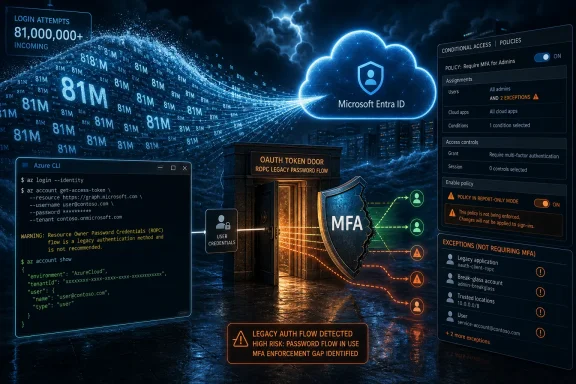 The Azure CLI Became the Front Door Nobody Was Watching Closely Enough
The reported campaign targeted Microsoft’s Azure command-line interface, a legitimate tool used by administrators, developers, automation scripts, and cloud operators. That choice matters. Attackers did not need to phish a slick web page, defeat a biometric prompt, or exploit a fresh Azure vulnerability; they used a sanctioned client path that many tenants allow because it is part of how real work gets done.Password spraying is usually described as a low-and-slow brute-force technique, but that phrase undersells what happened here. More than 81 million attempts over roughly two weeks is industrial-scale credential validation. The attackers were reportedly not guessing randomly so much as recycling known username-and-password combinations from prior breaches, then testing whether those passwords still worked in Microsoft cloud environments.
That makes the campaign both crude and depressingly modern. It is crude because the underlying input is still the oldest failure in enterprise security: reused or unrotated passwords. It is modern because the winning move was not the password itself, but the selection of an authentication path where the tenant’s protective intent did not match its actual enforcement.
For WindowsForum readers, the operational lesson is blunt. If your organization treats Microsoft 365 identity as a web-login problem, you are probably undercounting the number of ways a password can be presented to Entra ID. The browser is only one stage; the token endpoint is another.
ROPC Is the Legacy Escape Hatch That Refuses to Disappear
The campaign reportedly leaned on Resource Owner Password Credentials, or ROPC, an OAuth 2.0 grant type that lets an application collect a username and password directly and exchange them for tokens. In practical terms, it is the old world wearing OAuth clothing: hand over the password, get access if the credentials check out, and avoid the richer interactive sign-in choreography that modern controls depend on.Microsoft has long advised against using ROPC because it is incompatible with multifactor authentication in the way administrators usually mean it. It does not naturally support the browser-based, challenge-driven, conditional decision tree that most users associate with modern sign-in. It also requires a high degree of trust in the client application, because the application handles the user’s password directly.
That does not make ROPC a magical MFA bypass in every tenant. If a Conditional Access policy is broad and strict enough, the sign-in can fail because the policy requires conditions that the flow cannot satisfy. But if the policy is scoped only to certain apps, users, platforms, locations, or interactive flows, the attacker may find a gap where the tenant’s security posture is more aspirational than real.
This distinction is important because it prevents the wrong panic. The headline version — “MFA bypassed” — is directionally true for affected tenants, but technically incomplete. The deeper problem is that MFA was not universally required across the relevant cloud apps and client types, so the attacker found the place where a password alone still counted.
Conditional Access Did Not Fail; Partial Conditional Access Failed
Conditional Access is one of Microsoft’s most important enterprise security controls precisely because it lets administrators express context-aware rules: who is signing in, from where, to which app, using what device, under what risk. That flexibility is powerful. It is also where complexity becomes attack surface.Huntress’ reporting, as relayed by SC Media and The Hacker News, indicates that some impacted organizations had Conditional Access policies enabled but not configured to cover the Azure CLI ROPC path used in the campaign. In some cases, MFA was reportedly enforced only for particular applications rather than all cloud apps. In others, it applied only to administrators or selected groups, or it was conditional on network location assumptions that did not hold up.
This is the classic enterprise cloud trap: a control exists, a dashboard looks healthier than the underlying reality, and the exception list becomes the effective policy. A security team may honestly say, “We have MFA.” An attacker only needs to discover that “we have MFA” means “we have MFA for the paths we remembered to include.”
Eight affected businesses reportedly had no MFA policy at all, which is the easy part of the story to condemn. The more uncomfortable part is the set of organizations that did deploy MFA and still lost accounts. Those are the cases administrators should study, because they show how quickly a best practice can decay into a checkbox when it is not tested against the full range of authentication flows.
Microsoft’s identity stack is not unique in this respect. Any mature platform accumulates compatibility paths, automation patterns, older grant types, and administrative carve-outs. But Microsoft’s cloud footprint means the blast radius of a subtle identity misconfiguration can span email, Teams, SharePoint, Azure resources, device management, and third-party applications bound to Entra ID.
The Numbers Look Small Until You Remember What One Account Can Do
Seventy-eight compromised accounts out of more than 81 million attempts may look like a rounding error. That is the wrong denominator. Attackers do not need a high success rate when the marginal cost of another login attempt is close to zero and the reward for a single working identity can be enormous.One ordinary Microsoft 365 account may provide access to mailboxes, internal chats, files, invoices, customer data, contact graphs, and password reset trails. One developer or administrator account may expose cloud subscriptions, secrets, automation pipelines, storage accounts, and service principals. One compromised identity can become a beachhead for consent abuse, mailbox rule persistence, business email compromise, internal phishing, and lateral movement.
The reported spread — 78 accounts across 64 organizations — suggests a campaign optimized for breadth rather than precision. Huntress reportedly observed targeting that appeared based on password prevalence in compromised credential lists, not on a specific industry. That is how much of today’s cloud crime works: attackers do not need to choose victims first when they can test the internet-scale credential landfill and let the valid logins identify the victims for them.
This is also why “we are too small to be targeted” remains one of the most expensive myths in IT. The automation does not care whether a tenant belongs to a regional manufacturer, a school district, a law office, or a software company. If the credentials work and the policy allows the flow, the organization has volunteered itself into the target set.
Azure CLI Is Not the Villain, but It Is Too Powerful to Leave Unscoped
It would be easy to blame Azure CLI because it is the named tool in the campaign. That would be sloppy. Azure CLI is a legitimate administrative interface, and command-line access is essential for many real environments.The issue is not that Azure CLI exists. The issue is that access to powerful clients is often treated as a default entitlement rather than a deliberately governed capability. If every user can authenticate through tooling intended for cloud operators, then attackers can use that same tooling-shaped doorway to validate stolen credentials.
Restricting Azure CLI for non-admin users is therefore not security theater. It is a recognition that not every account needs every client path. Least privilege is usually discussed in terms of data and roles, but it also applies to authentication methods and application access.
There is a cultural issue here as well. Administrators often hesitate to restrict developer and CLI tooling because they fear breaking workflows they do not fully inventory. That fear is rational, but the answer cannot be indefinite openness. The answer is to identify who truly needs command-line cloud access, enforce stronger controls for those users, and block or tightly govern the path for everyone else.
The Passwordless Future Still Has Password-Shaped Holes
Microsoft, like the rest of the industry, has spent years pushing customers toward passwordless authentication, phishing-resistant MFA, passkeys, FIDO2 security keys, certificate-based authentication, and stronger Conditional Access baselines. Those efforts are necessary. They are also undermined when old password-based flows remain reachable for accounts that have not fully escaped the password era.The awkward truth is that many organizations are living in a hybrid identity state. Executives see MFA adoption charts. Users still maintain passwords. Service desks still reset them. Legacy scripts still depend on them. Some cloud apps still tolerate them. Attackers thrive in that gap between the security architecture diagram and the production exception.
ROPC is particularly revealing because it strips away the comforting ceremony of modern authentication. There is no user approving a prompt, no browser redirect that obviously looks suspicious, no phishing page to train against. There is just an automated exchange: username, password, token request.
That means the durable fix is not simply “train users better.” Users should not reuse passwords, and password hygiene still matters, but the campaign shows the limits of relying on human behavior after credentials have already leaked. The tenant must be configured so that a password alone is insufficient wherever the request arrives from.
Microsoft’s Shared Responsibility Model Has a Sharp Edge
Microsoft will likely argue, with some justification, that ROPC is discouraged, that stronger controls are available, and that customers can configure Conditional Access to block this kind of outcome. That is the logic of the shared responsibility model: Microsoft provides the platform and controls; customers must deploy them correctly. In cloud identity, however, that model has a sharp edge because the defaults, legacy support, licensing boundaries, and admin experience all shape what customers actually do.Security vendors often say “misconfiguration” as if it ends the conversation. It should start one. If a large number of organizations can enable MFA and still leave a credential-only path exposed, the ecosystem has a usability and assurance problem, not merely a customer diligence problem.
The same critique applies to the term “deprecated.” In software, deprecated often means “please stop using this, but we are not ready to break the people who still depend on it.” Attackers read that as “still available.” Enterprises read it as “future cleanup.” Those two interpretations collide in production.
Microsoft has been steadily tightening identity requirements across its cloud estate, including more mandatory MFA pushes for administrative portals and management surfaces. But campaigns like this show why the transition remains messy. The security ideal is universal, phishing-resistant authentication; the operational reality is a long tail of scripts, clients, tenants, and policies that were built when passwords still sat at the center of the model.
Detection Must Move From Failed Logins to Token Path Awareness
Many organizations already monitor failed sign-ins. Fewer are good at understanding which authentication flows, client applications, and token paths are being used across the tenant. That difference matters because the campaign’s signal is not just “many failures.” It is “many failures and some successes through a client and grant type that may not belong in this tenant at all.”A defender looking only at successful interactive web logins may miss the shape of the attack. A defender looking only at impossible travel may miss it if the account is compromised through a non-interactive flow and then used carefully. A defender relying solely on user reports will almost certainly be late.
The right telemetry questions are more specific. Which accounts have successful sign-ins via Azure CLI? Which sign-ins used ROPC or legacy password-based grant patterns? Which users are permitted to use these flows? Which Conditional Access policies were evaluated, and which were not? Which failures came from the same IPv6 ranges or autonomous systems across many accounts?
This is where Microsoft 365 and Entra ID administration becomes less about turning on a feature and more about continuously validating an identity posture. Policies should be tested like firewall rules. Exceptions should expire. Sign-in logs should be reviewed not only for obvious intrusions, but for evidence that the tenant still accepts authentication styles the organization thought it had retired.
The Admin Response Is Boring, Urgent, and Absolutely Necessary
There is no glamour in the practical response to this campaign. It is the work most IT departments already know they should do, squeezed between ticket queues, license renewals, executive requests, and the eternal fear of breaking someone’s workflow. But the remediation list is clear enough that inaction becomes hard to defend.Require MFA for all users, not only administrators. Require it for all cloud apps, not only the obvious web portals. Include all relevant client app types and do not assume that modern authentication labels automatically cover every path an attacker might choose. Where possible, move beyond generic MFA toward phishing-resistant methods for privileged users and high-risk roles.
Administrators should also consider restricting Azure CLI access to users who actually need it. That does not mean turning off cloud administration. It means separating the developer, operator, and automation accounts that require command-line access from the broad population of employees who do not.
Credential hygiene still matters, but it should be treated as the backstop rather than the main wall. Force password resets for accounts that show suspicious activity or successful legacy-flow sign-ins. Check whether exposed credentials are still valid. Review mailbox rules, OAuth consents, forwarding settings, privileged role assignments, app registrations, and recent changes made by compromised accounts.
The most important mindset shift is to stop treating MFA as a binary deployment state. A tenant is not “protected by MFA” unless the policies actually force stronger authentication across the flows that matter. Anything less is a partial deployment, and partial deployments are where automated attackers make their living.
The Lesson From 81 Million Attempts Is Written in the Exceptions
The campaign’s concrete lessons are not exotic, which is precisely why they matter. This was not a cinematic breach; it was a stress test of ordinary cloud identity hygiene at extraordinary scale.- Organizations should verify that Conditional Access requires MFA for all users, all cloud apps, and all relevant client app types, rather than assuming a narrower policy is good enough.
- Administrators should audit successful and failed Azure CLI sign-ins, especially those associated with ROPC or other password-only token flows.
- Tenants should restrict Azure CLI access to accounts and groups with a genuine operational need, instead of leaving powerful client paths broadly available by default.
- Security teams should treat deprecated authentication flows as active risk until they are blocked, monitored, or proven necessary.
- Password resets should be prioritized for accounts with evidence of successful legacy-flow authentication or exposure in known credential lists.
- MFA should be measured by enforcement coverage, not by whether users have registered an authenticator method.
References
- Primary source: SC Media
Published: Thu, 02 Jul 2026 14:45:47 GMT
Massive password spray attack targets Azure CLI, bypasses MFA | brief | SC Media
The attack, which leveraged a deprecated OAuth flow called Resource Owner Password Credentials (ROPC), made over 81 million login attempts between June 12 and June 26, compromising at least 78 Microsoft accounts across 64 organizations.www.scworld.com - Related coverage: thehackernews.com
Azure CLI Password Spray Hits at Least 78 Microsoft Accounts in 81M+ Attempts
Huntress says attackers made 81M Azure CLI password spray attempts from June 12-26, 2026, using ROPC to bypass weak CAPs.thehackernews.com
- Related coverage: purplesec.org
81 Million Login Attempts in 14 Days: Inside the Massive Azure CLI Password Spray Campaign - PurpleSec
A deep technical analysis of the LSHIY password spray campaign that hit 64 organizations via Azure CLI's ROPC flow — how it bypassed MFA, why Conditional Access policies failed, and how to lock down your Microsoft 365 tenant. purplesec.org
- Related coverage: linux.org.hk
Hong Kong Linux User Group - 香港Linux用家協會(HKLUG) > Archive > Massive Azure CLI Attack Exploits Authentication Gap With 81 Million Password Attempts
A sprawling, automated password spray operation has compromised at least 78 Microsoft accounts by hammering the Azure command-line interface (CLI), a primary towww.linux.org.hk - Related coverage: borncity.com
Azure-Angriff: 81 Millionen Login-Versuche, 78 Konten gekapert
Ransomware-Gruppen nutzen aktiv eine Defender-Lücke. Zudem erschüttern massive Password-Spray-Attacken auf Azure die Cloud-Sicherheit.borncity.com - Related coverage: cyberrange.smartpro.edu.vn
Tấn công Password Spray vào Azure CLI: Xâm phạm 78 tài khoản Microsoft
Cảnh báo cuộc tấn công Password Spray quy mô lớn vào Azure CLI với hơn 81 triệu lần thử, lợi dụng giao thức ROPC để xâm nhập tài khoản Microsoft và vượt qua MFA.cyberrange.smartpro.edu.vn
- Related coverage: aha.org
- Related coverage: giac.org
#8m•*fŒù³l^72Y(aÖ‘$8É0ö<9þå6 Îf¾ÉÖÕõ¤iVrÙÍŽ8!g8„/Ñ´t•5bùªb^QE‡ ´ Xݘ ~€qL¥Û
PDF documentwww.giac.org
- Related coverage: thesecurityguy.ch
- Related coverage: azure.github.io

Resource Owner Password Credential - Azure Kubelogin
A Kubernetes credential (exec) plugin implementing azure authentication
azure.github.io
- Related coverage: thalesdocs.com
Resource owner password credentials
www.thalesdocs.com
- Related coverage: devforum.okta.com
Resource owner password credentials cannot be used with MFA enabled - OAuth/OIDC - Okta Developer Community
We would like to use the Resource Owner Flow with MFA. How do we pass the MFA token with the password and/or provide this? devforum.okta.com
- Related coverage: stackoverflow.com
azure ad b2c - Does Resource Owner Password Credentials Flow Work with Accounts from External Identity Providers - Stack Overflow
Following the directions here: https://learn.microsoft.com/en-us/azure/active-directory-b2c/configure-ropc

I'm able to get the ROPC user flow working and testing it from the Azure Portal nets thestackoverflow.com
- Related coverage: identityserver.com
Fact Sheet: The Dangers of Using the Password Grant Type with Mobile Applications | Products and Services for Open.IdentityServer and Duende IdentityServer
Having trouble convincing your colleagues that using the password grant type is a terrible idea? Is the allure of owning the login UI too strong for your design team? Then check out our fact sheet below for quick and easy facts about why you should never use the Resource Owner Password...www.identityserver.com