

Amazon’s recent clearance of a palm‑sized Ryzen mini PC has turned a tidy corner of the bargain market into one of the buzziest shopping opportunities this week, but the real story is less about headline discounts and more about what you’re actually buying: a compact, upgradeable Windows 11 Pro machine built around the AMD Ryzen 7 7730U, loaded with 32GB RAM and a 1TB M.2 SSD, and marketed as a portable mini gaming/workstation. The spec sheet looks compelling for the money, yet several of the product’s claims — from dramatic performanceance deltas to ISV “certifications” — deserve closer scrutiny before anyone clicks “Buy.” This feature verifies the key technical claims, cross‑references independent benchmarks, and lays out a practical buying and testing checklist so Windows users get value instead of surprises.
Mini PCs have become a mainstream alternative to towers and laptops for many desktop users. They promise small footprints, multi‑monitor support, and laptop‑class efficiency — often at lower prices than larger desktops. That trend has created a crowded market where boutique brands and mass‑market sellers release many variants of the same small chassis with different laptop APUs and RAM/storage configurations.
One of those contenders, the ACEMAGIC AM06 Pro (marketed under Acemagic / Acemagician labels in different regions), is currently being promoted aggressively by retailers and marketplaces. The configuration that’s drawing the most attention pairs an AMD Ryzen 7 7730U mobile APU with 32GB DDR4 (dual channel) and a 1TB M.2 2280 SSD, and ships with Windows 11 Pro preinstalled. That SKU claims triple‑display 4K@60Hz support (HDMI 2.0, DP1.4, USB‑C with DP), dual Ethernet, and internal upgrade paths to 64GB RAM and 2TB storage. ACEMAGIC’s own product pages list the AM06 Pro’s features and pricing offers directly. Industry and enthusiast forums have already flagged similar mini‑PC clearance cycles as a recurring phenomenon: bargain clearance listings, thin margins for manufacturers, and SKU confusion that can trip up buyers who don’t verify the details. The Windows mini‑PC community frequently publishes practical checklists and red‑flag indicators for these purchases (warranty clarity, Windows activation confirmation, whether RAM is soldered vs SO‑DIMM, and port verification). Those community best practices remain essential when purchasers or marketplace sellers.
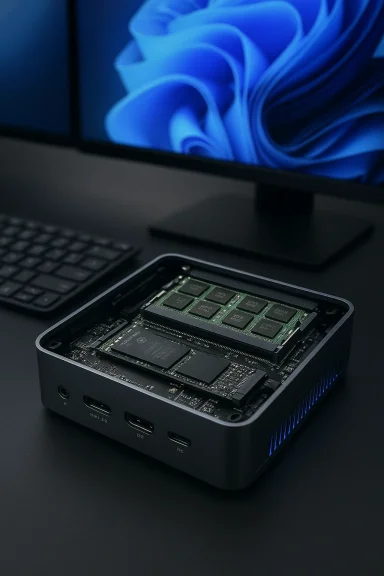
Expandability is a strength here: the AM06 Pro specifies two SO‑DIMM slots (so RAM is user‑replaceable) and at least one M.2 slot. ACEMAGIC states up to 64GB RAM and 2TB internal storage are possible. That matches a common mini‑PC design philosophy — use laptop APUs plus standard SO‑DIMM and M.2 sockets — which preserves field upgrades that many buyers value. A practical red flag: some vendors advertise “1 TB M.2 SSD” but ship SATA‑interface M.2s instead of NVMe PCIe SSDs, or populate only a single SO‑DIMM leaving a user to add the second module. Confirming physical internals (or asking the seller about soldered vs. socketed RAM) avoids surprises. The Windows mini‑PC ecosystem has documented many SKU permutations where product names obscure internal differences — check the SKU string carefully.
Practical buyers should verify SKU details, confirm Windows activation and upgradeability, and use a short 48‑hour testing routine to ensure the hardware matches expectations. Community checklists and forum experience are invaluable here — treat the purchase as you would any cross‑border bargain: verify, test, and keep the returns window open. The mini‑PC market rewards diligence; the rewards can include a supremely capable pocket‑sized Windows 11 Pro machine — but only when buyers do their homework.
Source: Kotaku Forget Mac Mini, Amazon Clears Out Ryzen 7 Mini Gaming PC at Record Low (Windows 11 Pro, 32GB RAM, 1TB SSD) - Kotaku
 Background / Overview
Mini PCs have become a mainstream alternative to towers and laptops for many desktop users. They promise small footprints, multi‑monitor support, and laptop‑class efficiency — often at lower prices than larger desktops. That trend has created a crowded market where boutique brands and mass‑market sellers release many variants of the same small chassis with different laptop APUs and RAM/storage configurations.One of those contenders, the ACEMAGIC AM06 Pro (marketed under Acemagic / Acemagician labels in different regions), is currently being promoted aggressively by retailers and marketplaces. The configuration that’s drawing the most attention pairs an AMD Ryzen 7 7730U mobile APU with 32GB DDR4 (dual channel) and a 1TB M.2 2280 SSD, and ships with Windows 11 Pro preinstalled. That SKU claims triple‑display 4K@60Hz support (HDMI 2.0, DP1.4, USB‑C with DP), dual Ethernet, and internal upgrade paths to 64GB RAM and 2TB storage. ACEMAGIC’s own product pages list the AM06 Pro’s features and pricing offers directly. Industry and enthusiast forums have already flagged similar mini‑PC clearance cycles as a recurring phenomenon: bargain clearance listings, thin margins for manufacturers, and SKU confusion that can trip up buyers who don’t verify the details. The Windows mini‑PC community frequently publishes practical checklists and red‑flag indicators for these purchases (warranty clarity, Windows activation confirmation, whether RAM is soldered vs SO‑DIMM, and port verification). Those community best practices remain essential when purchasers or marketplace sellers.
What the marketing says — and what’s verifiable
Claimed hardware and features
- CPU: AMD Ryzen 7 7730U, 8 cores / 16 threads, boost up to 4.5 GHz. ACEMAGIC lists a 2.0 GHz base and 4.5 GHz turbo for the R7‑7730U in the AM06 Pro.
- RAM: 32GB DDR4 in dual‑channel (2×16GB), expandable to 64GB via two SO‑DIMM slots.
- Storage: 1TB M.2 2280 SSD (single M.2 slot reported; vendor claims up to 2TB supported).
- Graphics/output: Integrated AMD Radeon graphics (Vega family on this SKU) with HDMI 2.0 (4K@60Hz), DisplayPort 1.4 (4K@60Hz), and USB‑C/Type‑C with DP alt‑mode (4K@60Hz).
- Operating system: Windows 11 Pro pre‑installed.
- Cooling/TDP claims: vendor materials advertise a dual‑vent cooling system and a claimed sustained performance envelope around 15–28W TDP without thermal throttling.
Verifying the CPU: official and independent specs
The Ryzen 7 7730U is a mobile APU listed in public CPU databases and AMD product materials as an 8‑core Zen‑3 mobile part. Independent CPU databases and AMD press materials confirm the 7730U’s boost clock up to ~4.5 GHz and a nominal TDP class of 15 W (with vendors often able to configure a higher PL2/boost or cTDP envelope in OEM systems). TechPowerUp lists the 7730U spec sheet, while AMD’s own portfolio and press releases place this chip in the thin‑and‑light/U‑series class. Important nuance: the 15W figure is the nominal U‑series rating; many mini‑PC vendors expose BIOS/firmware options or platform power delivery that allow the SoC to run at elevated sustained power (commonly referred to as cTDP) — that’s why vendor marketing sometimes quotes a 15–28W operational envelope. The hardware can be tuned by system integrators, but the chip’s baseline class remains a low‑power mobile part. AMD’s product literature documents the family TDP conventions.The performance delta claim — tested vs. marketed
Some promotional writeups claim dramatic generation‑level performance gains compared with older APUs (for example, statements like “~35% faster CPU and ~38% better GPU performance vs. the Ryzen 7 5825U” appear in retail blurbs). Independent benchmark aggregators and reviews do not support that magnitude of improvement between the 7730U and the 5825U.- Notebookcheck’s compiled benchmark comparisons and sample runs show moderate differences between the 7730U and 5825U: in many real tests the delta is single‑digit to low‑double‑digit percentages depending on workload, with some tests showing near parity. That is a far cry from a consistent 35–38% uplift.
- Tech4Gamers’ side‑by‑side benchmarks (Cinebench R23, Geekbench 5, etc. measured the 7730U scoring roughly 4–6% higher in multi‑core workloads in typical platforms — again, not the headline 35% number.
- NanoReview and other CPU comparison pages show the two APUs occupy similar slots in the mobile performance hierarchy; single‑thread differences are minimal and multi‑thread gains are modest.
Ports, displays and expandability — what matters and what’s true
ACEMAGIC’s product pages and manuals list a capable complement of I/O: HDMI 2.0, DP 1.4, USB‑C (with DP alt‑mode), multiple USB‑A ports, and dual Ethernet (one 2.5GbE + one 1GbE) on some SKUs. That triple‑4K output claim (HDMI + DP + USB‑C) is believable on the hardware side because the integrated GPU and the platform’s display pipes can support multiple simultaneous 4K outputs at 60Hz — but the real test is in implementation: firmware, board routing, and driver support determine whether all three can deliver sustained 60Hz in practice. Vendor pages and product manuals list these ports explicitly.Expandability is a strength here: the AM06 Pro specifies two SO‑DIMM slots (so RAM is user‑replaceable) and at least one M.2 slot. ACEMAGIC states up to 64GB RAM and 2TB internal storage are possible. That matches a common mini‑PC design philosophy — use laptop APUs plus standard SO‑DIMM and M.2 sockets — which preserves field upgrades that many buyers value. A practical red flag: some vendors advertise “1 TB M.2 SSD” but ship SATA‑interface M.2s instead of NVMe PCIe SSDs, or populate only a single SO‑DIMM leaving a user to add the second module. Confirming physical internals (or asking the seller about soldered vs. socketed RAM) avoids surprises. The Windows mini‑PC ecosystem has documented many SKU permutations where product names obscure internal differences — check the SKU string carefully.
Real‑world use: productivity, content work, and light gaming
Given the 7730U’s architecture and integrated Radeon Vega graphics, the AM06 Pro targets a middle ground: solid productivity and light content tasks, plus esports‑class and older AAA titles at 1080p with lowered settings.- Productivity and multitasking: 32GB RAM is generous for Office, browser tabs, multiple VMs, and most creative apps in moderate workflows. The 8‑core Ryzen 7 will run multi‑threaded tasks well for its class.
- Content creation: For light photo editing and 1080p or short 4K timelines, the machine is capable4K color grading or long renders will push thermals and CPU/GPU limits given the mini chassis and mobile‑APU design.
- Gaming: Expect playable 1080p performance in esports and older AAA titles at modest settings (CS:GO, Dota 2, GTA V with lowered detail). Don’t expect native 4K high‑quality AAA gaming — integrated Vega graphics in U‑class APUs are limited in shader throughput and memory bandwidth compared with modern RDNA mobile iGPUs or discrete cards.
Price and deal analysis
Public retailer pages and ACEMAGIC’s own stores have shown aggressive pricing and periodic clearance offers on the AM06 Pro. Vendor direct pages sometimes list the AM06 Pro around the mid‑$300s to $500 depending on region and currency conversion. ACEMAGIC’s official product pages are advertising discounted pricing and pre‑order promotions in multiple EU/US localized storefronts. Media outlets and deal roundups may cite temporary Amazon reductions (e.g., the Kotaku piece the user provided reported a Prime price near $408). Marketplace prices fluctuate raupons, and Prime member pricing can substantially change the final price. Because of that volatility, price claims are time‑sensitive — verify the live Amazon listing and check the seller identity before purchase. If a price sounds too good to be true from an unknown seller, proceed carefully: warranty and returns matter more on boutique SKUs. Manual reseller listings and third‑party shops may show varied pricing as well.Risks, red flags, and vendor caveats
- Windows activation and software authenticity: boutique mini‑PC sellers sometimes ship machines with OEM‑style activation that may use non‑standard methods or volume licensing workarounds. Confirm Windows 11 Pro activation on arrival → Activation. If the seller cannot confirm genuine activation before purchase, treat that as a risk. Community guidance recommends demanding activation proof.
- Marketing vs. certification: vendor pages that claim the unit is “certified for AutoCAD/Adobe suites” are almost always vendor‑ial ISV certifications typically appear on the ISV’s own pages (Autodesk, Adobe), and a vendor claim alone is insufficient. Treat such “certified” language as a marketing shorthand unless you can find the ISV’s certification list verifying that specific model/driver combination. Some retail pages explicitly repeat “certified” without linking to formal validation; flag those claims with caution.
- Warranty, RMA and firmware updates: boutique vendors may offer limited or region‑specific support. Ask who handles RMAs (manufacturer vs. marketplace seller) and how firmware/BIOS updates are delivered. Long‑term platform security and driver updates are only as reliable as the vendor’s support model. WindowsForum threads emphasize verifying firmware update policies before purchase.
- SKU fragmentation: identical model names can hide different CPUs or soldered RAM vs. SO‑DIMM editions. Confirm the precise SKU string, or request photos of the internal layout if upgradeability matters. Community checklists repeatedly underscore SKU verification as a top‑priority step.
- Preinstalled bloatware or worse: a small set of community reports have flagged unusual preinstalled utilities or odd bundled software on some units from small vendors. Run an initial security scan and inspect installed programs on first boot. If anything looks suspicious, perform a clean Windows install after collecting activation information from the seller.
A practical buyer’s checklist (before you buy)
- Confirm the exact SKU string and seller identity. Ask for a screenshot of the product’s Windows “About” page showing the CPU, RAM, and Windows activation status if possible.
- Verify RAM configuration: does the listing show 2×16GB (dual‑channel) or a single soldered module? If dual SO‑DIMMs are present, future upgrades are possible.
- Confirm storage interface: NVMe PCIe vs. SATA M.2 matters for real throughput. Ask the seller which type of M.2 SSD ships or whether the slot supports NVMe.
- Check the return policy and RMA timeline for your region. Ensure you won’t be stuck with a costly cross‑border return.
- Watch for firmware update channels and how the vendor distributes BIOS updates (download page vs. vendor email support).
- If buying for work with specialized apps (AutoCAD, Adobkflows immediately or procure a unit with manufacturer ISV certification documentation.
First 48 hours: a step‑by‑step testing routine (do this before you accept a return)
- Unbox and photograph everything, including serial numbers and external packaging.
- Boot and confirm Windows activation (Settings → System → Activation). Document the activation screenshot.
- Open System Information / dxdiag / CPU‑Z to confirm the CPU model (Ryzen 7 7730U), RAM channels (dual vs single), and storage interface (NVMe vs SATA).
- Test display outputs: connect each advertised video port to a 4K@60Hz monitor and confirm resolution/refresh in Windows Display Settings.
- Run a light CPU benchmark (Cinebench R23 or CPU‑Z) and a GPU test (e.g., Unigine or a short gaming test) to detect obvious throttling or instability.
- Monitor thermals and fan noise under a 15–20 minute sustained load to check for thermal throttling and fan behavior.
- Confirm network interfaces and run a quick throughput test on wired 1GbE/2.5GbE if present.
- Re‑install Windows cleanly only if you are confident activation can be preserved; save the vendor’s activation screenshot and documentation first.
Verdict — who should buy this and who should look elsewhere
Buyers who will find value:- Users who prioritize compact desktop footprint and multi‑monitor productivity and who want 32GB RAM out of the box for intense multitasking.
- Home office users seeking a small Windows 11 Pro box with solid general performance and upgrade options.
- Buyers on a budget who understand the trade‑offs and will verify activation, firmware, and internal configuration on arrival.
- Gamers seeking high‑frame‑rate 1080p or native 4K AAA gaming performance — a discrete GPU or a different mini‑PC built around RDNA‑class iGPUs or HX‑class APUs is a better match.
- Buyers who need official ISV certification guarantees for complex, time‑sensitive production pipelines unless the vendor provides direct ISV documentation.
- Enterprises needing predictable long‑term firmware and driver support; OEM‑backed devices from major vendors (Dell/Lenovo/HP) remain the safer long‑term choice.
Final takeaways
The Acemagic/AM06 Pro proposition — Ryzen 7 7730U + 32GB DDR4 + 1TB SSD + Windows 11 Pro in a palm‑sized chassis — is an attractive entry point into modern, compact Windows hardware. The device delivers sensible real‑world value for productivity, media, and light gaming. However, several marketing claims require careful decoding: performance gains versus older APUs are modest, ISV “certification” is often vendor marketing rather than formal third‑party validation, and price/sku volatility means the best deals are often fleeting.Practical buyers should verify SKU details, confirm Windows activation and upgradeability, and use a short 48‑hour testing routine to ensure the hardware matches expectations. Community checklists and forum experience are invaluable here — treat the purchase as you would any cross‑border bargain: verify, test, and keep the returns window open. The mini‑PC market rewards diligence; the rewards can include a supremely capable pocket‑sized Windows 11 Pro machine — but only when buyers do their homework.
Source: Kotaku Forget Mac Mini, Amazon Clears Out Ryzen 7 Mini Gaming PC at Record Low (Windows 11 Pro, 32GB RAM, 1TB SSD) - Kotaku
