

The ACEMAGICIAN Vista V1 arrives as another entrant in the ongoing mini‑PC arms race: a palm‑sized Windows 11 Pro machine that promises mainstream desktop features — 16 GB of RAM, an NVMe M.2 SSD, dual‑display outputs and a VESA‑mountable chassis — all packed around a low‑power Intel Alder Lake‑N series CPU and sold at attractively low prices. The sales copy and early reviews trumpet impressive percentage gains over older N‑series silicon and “pro” features for small businesses, but a closer look shows a mix of solid value, marketing stretch, and important caveats buyers should verify before purchasing.
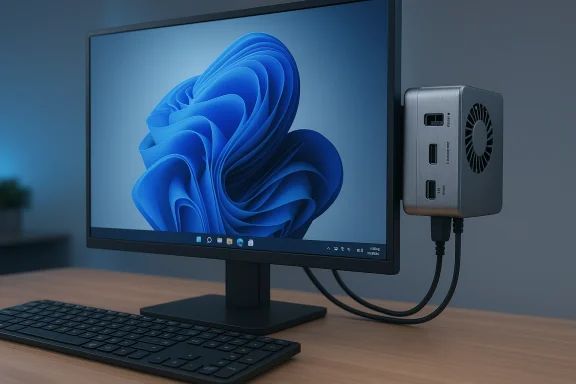
Mini PCs have matured beyond novelty gadgets: a wave of vendors has squeezed useful desktop performance into 100 × 100 × ~33 mm boxes that can sit behind a monitor or on a crowded desk. ACEMAGICIAN’s Vista V1 is one of many of these compact systems that aim to deliver a full Windows 11 Pro experience with enough memory and storage to feel like a real desktop rather than a tinker toy. Multiple retail listings and editorial write‑ups focus on a configuration that pairs an Intel Alder Lake‑N family CPU with 16 GB of DDR4 and an M.2 SSD, along with standard office‑and‑home connectivity. The product copy circulating in deal posts and marketplace listings is partly consistent and partly divergent: most sources identify an N‑series Intel chip (commonly the N150 in recent hands‑on reviews), while some retailer pages and promotional text use alternate model numbers or amplify performance claims. That variability makes it essential for buyers to confirm the exact SKU and the seller’s specification sheet at the point of sale.
Source: eTeknix ACEMAGICIAN Vista V1 Smallest Mini PC Windows 11 Pro
 Background
Mini PCs have matured beyond novelty gadgets: a wave of vendors has squeezed useful desktop performance into 100 × 100 × ~33 mm boxes that can sit behind a monitor or on a crowded desk. ACEMAGICIAN’s Vista V1 is one of many of these compact systems that aim to deliver a full Windows 11 Pro experience with enough memory and storage to feel like a real desktop rather than a tinker toy. Multiple retail listings and editorial write‑ups focus on a configuration that pairs an Intel Alder Lake‑N family CPU with 16 GB of DDR4 and an M.2 SSD, along with standard office‑and‑home connectivity. The product copy circulating in deal posts and marketplace listings is partly consistent and partly divergent: most sources identify an N‑series Intel chip (commonly the N150 in recent hands‑on reviews), while some retailer pages and promotional text use alternate model numbers or amplify performance claims. That variability makes it essential for buyers to confirm the exact SKU and the seller’s specification sheet at the point of sale. Overview: What ACEMAGICIAN promises
- Processor family: Intel Alder Lake‑N series (advertised in some listings as N95, but the bulk of independent coverage identifies the N150 as the shipped SKU).
- Memory and storage (typical retail configuration): 16 GB DDR4 + M.2 2280 SSD (advertised sizes vary from 256 GB to 1 TB across sellers).
- Operating system: Windows 11 Pro preinstalled (claims around the license provenance need checking).
- I/O: Gigabit RJ‑45, USB 3.x Type‑A ports, USB 2.0 ports, HDMI 2.0, DisplayPort 1.4, 3.5 mm audio, DC in; VESA mount included.
- Size and mounting: ~100 × 100 × 33 mm (about 3.9 × 3.9 × 1.3 inches), VESA compatible; lightweight and designed to be tucked behind a monitor.
- Cooling and power: Active cooling with a tiny axial fan and quoted system power draw in the mid‑teens of watts under load; fan noise is reported to be minimal in typical desktop tasks.
Hardware deep‑dive
CPU: Which N‑series chip powers the V1?
Promotional copy tied to some retailer pages has referenced an “Alder Lake‑N95” SKU, with claimed frequencies and percentage gains versus older N parts. Independent reviews and recent hands‑on tests overwhelmingly identify the V1 as shipping with an Intel Celeron/N‑series N150 (Twin Lake) part — a 4‑core, 4‑thread Alder Lake‑N CPU that boosts to the mid‑3 GHz range in short bursts and is tuned for low power envelopes typical of tiny chassis. Published test write‑ups list peak turbo figures around 3.6 GHz for the N150 and note the platform’s efficiency and single‑thread responsiveness improvements over the N100 generation. Because retailer SKUs and listings can vary, the specific vendor claim of “N95” appears to be either a typo or a marketplace variant and should be verified against the unit you are buying. Important nuance: marketing often cites dramatic percentage improvements (for example, “27% faster than N100 in Cinebench R23” or “+30% vs N5105/N5095” for overall performance and GPU), but those numbers are vendor statements or controlled benchmarks. Independent results vary by workload; realistic gains will be workload dependent and smaller for sustained multithreaded tasks where thermal limits in a tiny chassis matter. Treat the percentage claims as directional rather than absolute.Memory and storage
The V1’s common retail configuration with 16 GB DDR4 and an M.2 NVMe SSD is a strong proposition in this class. For everyday multitasking — dozens of browser tabs, email, Office apps, and background sync — 16 GB is a real comfort compared with many sub‑$300 mini PCs or low‑end laptops that ship with 4–8 GB. Storage speeds from a PCIe NVMe drive also materially improve responsiveness: boot times, application launch times, and caching are far snappier than SATA or eMMC alternatives. Multiple listings show base SSD sizes anywhere from 256 GB to 1 TB; the chassis usually exposes an M.2 2280 socket for easy expansion to 2 TB in some SKUs. Confirm whether the installed SSD is NVMe PCIe or SATA M.2 before purchase.Graphics and display outputs
Integrated Intel UHD graphics on N‑series silicon are designed for video decode/encode and light GPU‑accelerated workloads. The Vista V1 supports dual‑display outputs (HDMI 2.0 + DisplayPort 1.4 on many units) and hardware‑accelerated playback of modern codecs, making it competent for 4K video streaming and basic media tasks. Don’t expect gaming performance beyond emulation of older titles or indie games at reduced settings.I/O and networking
The port selection is practical and aimed at office use:- Gigabit Ethernet (RJ‑45)
- 2 × USB 3.x Type‑A, 2 × USB 2.0 Type‑A (vendor variance exists)
- HDMI 2.0 + DisplayPort 1.4
- 3.5 mm audio jack
- DC power input and VESA mounting bracket included
Real‑world performance: what to expect
The V1 excels at light to moderate desktop workloads:- Office productivity: Excellent. Word processing, spreadsheets, PowerPoint, and email all run fluidly.
- Web browsing: Handles dozens of tabs when paired with 16 GB RAM; heavy JavaScript sites are feasible.
- Video streaming: Smooth 4K playback thanks to hardware decoding; ideal as a media PC or streaming machine.
- Light content creation: Acceptable for basic photo editing and light video trimming; not suited to long, multi‑hour video transcodes or heavy CPU/GPU render jobs.
- Server / headless tasks: Reasonable for low‑intensity 24/7 micro‑services, small home labs, or local file servers given the low power draw.
Software, licensing and manageability
The Vista V1 ships with Windows 11 Pro preinstalled in many retail listings, which is meaningful for small businesses and IT‑savvy users because it brings BitLocker, Remote Desktop host functionality, Hyper‑V, and domain/Azure AD join capabilities. However, two important verification steps are necessary:- License provenance: Confirm whether the preinstalled Windows 11 Pro key is a retail license, an OEM/embedded key tied to the device, or a volume/license activation method supplied by the seller. That affects transferability, warranty, and future re‑imaging.
- Preinstalled software: Lower‑cost OEMs sometimes include factory software or “value‑add” utilities. Where possible, inspect the system image or be prepared to perform a clean Windows install if you prefer a pristine environment. Community posts have flagged earlier incidents involving preinstalled software on some models; while the Vista V1 is not universally implicated, buyer watchfulness is prudent.
Build, cooling and noise
ACEMAGICIAN’s V1 uses an active cooling solution — a small internal fan — and revised chassis shapes that vendors say improve heat dissipation. Multiple hands‑on reports describe an effectively silent experience in everyday tasks, with some fan activity under heavier loads but stopped short of intrusive noise in typical office workflows. Still, tiny axial fans in compact enclosures are a tradeoff: acceptable for intermittent desktop workloads, but thermal throttling is a real possibility for extended CPU saturation. If your use case needs long, sustained high CPU utilization (encoding farms, heavy builds, long video renders), a larger chassis with better sustained thermal capacity is a safer choice.Strengths — why the Vista V1 matters
- Exceptional value for the spec class: 16 GB + NVMe SSD + Windows 11 Pro in a sub‑$300 package (promotional pricing has driven sub‑$220 listings at times) is rare and compelling for budget‑conscious buyers.
- True desktop features: Full Windows Pro features, Gigabit Ethernet, and dual‑display outputs make it far more flexible than an entry Chromebook or tablet.
- Compact, VESA‑mountable design: Excellent for clutter‑free desks, kiosks, digital signage, or multi‑display setups.
- Low idle power: Attractive for always‑on scenarios and energy‑sensitive deployments.
Risks, caveats and things to verify before buying
- Specification variance across sellers. Many listings for the same model name show different wireless radios (Wi‑Fi 5 vs Wi‑Fi 6), Bluetooth versions (4.x vs 5.x), and even different SSD sizes. Confirm the exact SKU and spec sheet.
- CPU identity confusion. Promotional text sometimes lists alternate N‑series model numbers (N95 vs N150). Independent reviews most commonly observe the N150 in reviewed units. Double‑check the CPU SKU and, if possible, request the vendor’s hardware ID or a picture of the system’s BIOS/UEFI screen.
- Windows license provenance. “Windows 11 Pro preinstalled” is convenient, but license type (retail vs OEM vs seller‑provided) matters for transfer and reactivation. Ask the seller how activation was provisioned.
- Warranty and after‑sales support. Many attractive price points are available via third‑party resellers on marketplaces; return policies and warranty processes vary widely. Confirm warranty terms and how support is handled regionally.
- Potential for bloatware or worse. Community chatter has flagged instances of concerning preinstalled software on some models from small vendors. While not every unit is implicated, it is good practice to clean‑install Windows if security or trust is a concern. Several community threads discuss this topic and recommend reimaging as a precaution.
- Thermal limits for sustained loads. The tiny form factor sacrifices airflow. Expect throttling under extended heavy CPU/GPU workloads; the V1 is tuned for desktop productivity and multimedia, not long‑duration server workloads.
Comparison: where the V1 fits in the market
- Versus cheap Chromebooks: The Vista V1 offers a full Windows 11 Pro experience, richer local software compatibility, and generally more RAM and storage for the price, making it better for Windows‑dependent workflows.
- Versus higher‑end mini PCs (Beelink, Minisforum): Those rivals often offer stronger CPUs, dual‑channel memory, better sustained thermals or more premium features (Thunderbolt, 2.5G LAN) — but at significantly higher prices. The V1 trades peak sustained performance for a lower price and compactness.
- Versus Mac mini: Apple’s Mac mini (Apple Silicon) still leads in single‑thread performance, GPU efficiency and integration with Apple’s ecosystem. The V1 is an affordable Windows alternative for those who need native Windows compatibility or a lower price point.
A practical buying checklist
- Confirm the exact CPU model printed on the product page or a picture of the BIOS (is it N150, N95, or another N‑series chip?.
- Verify RAM type and whether it’s soldered or in a user‑accessible SO‑DIMM slot if upgradability matters.
- Confirm SSD type (NVMe PCIe vs M.2 SATA) and the shipped capacity.
- Ask the seller to confirm Wi‑Fi and Bluetooth versions.
- Request the Windows activation method and warranty terms in writing.
- Consider planning a clean install of Windows 11 to ensure a trustworthy base image.
Final analysis — value versus risk
The ACEMAGICIAN Vista V1 is compelling on paper and in many hands‑on reviews because it brings real desktop features — a full Windows 11 Pro environment, generous RAM, and NVMe storage — into a tiny, affordable chassis. For users who need a low‑cost, low‑power Windows desktop for office tasks, streaming, kiosk use, or a tidy home setup, it represents a strong value proposition. That said, the model class and this specific product come with unavoidable tradeoffs: seller and SKU variability, possible differences in wireless and Bluetooth radios, questions about license provenance, and a small but important set of community reports that counsel caution around factory images and vendor trust. Independent reviewers show the N150‑based V1 delivering sensible, efficient performance for daily tasks — the product’s strengths are real — but buyers should treat marketing numbers (percentage improvements, Cinebench claims) as vendor benchmarks that require independent corroboration for workloads that matter to them.Conclusion
The Vista V1 exemplifies how the mini‑PC market has matured: modest price, practical port selection, and a real Windows Pro desktop experience in a space‑saving design. For office users, digital signage, home streaming, or as a second machine, it is an attractive option. However, the combination of SKU variability, potential preinstalled software concerns, and thermal limits under sustained load mean the V1 is best for buyers who verify the specific SKU, confirm licensing and seller terms, and accept the platform’s intended use cases. When those boxes are checked, the Vista V1 delivers an excellent balance of capability and cost — just be rigorous about the small but consequential details before purchasing.Source: eTeknix ACEMAGICIAN Vista V1 Smallest Mini PC Windows 11 Pro
