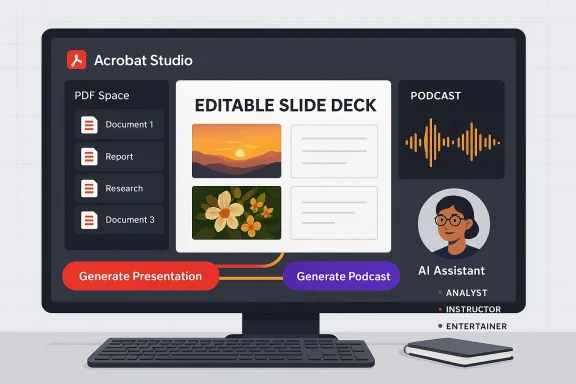
Adobe’s Acrobat has quietly — and decisively — moved beyond being just the world’s most ubiquitous PDF reader: Acrobat Studio stitches Acrobat Pro, Adobe Express Premium and new AI agents into a single, AI-first workspace that can turn dense documents into slide decks, podcast-style audio and editable, chat-driven PDFs in minutes. This is not a tweak to menus; it’s a redefinition of the PDF as a multimodal work surface for productivity and creativity.
Acrobat Studio builds on Adobe’s long stewardship of the PDF format and the company’s recent investments in generative AI and creative tooling. Adobe announced Acrobat Studio as a new, unified offering that combines three pillars: Acrobat’s PDF productivity tools, Adobe Express’ design and template engine, and customizable AI Assistants that live in collaborative “PDF Spaces.” The goal is to let users move from insight to deliverable without switching apps — extract the essentials from contracts, reports or web pages, then convert that output into a ready-made presentation or an audio summary, and revise the result with conversational commands. This change matters because PDFs have traditionally been a dead-end in workflows: good for sharing but costly to reuse. Acrobat Studio reframes PDFs as sources rather than sinks, embedding generative flows that reuse text, tables, annotations and even web links held in a single workspace. Adobe positions Acrobat Studio both as an individual productivity tool and as an enterprise-ready hub with governance, encryption and deployment controls designed for corporate IT.
Source: Il Sole 24 ORE Adobe launches Acrobat Studio: AI that turns PDFs into presentations and podcasts
 Background
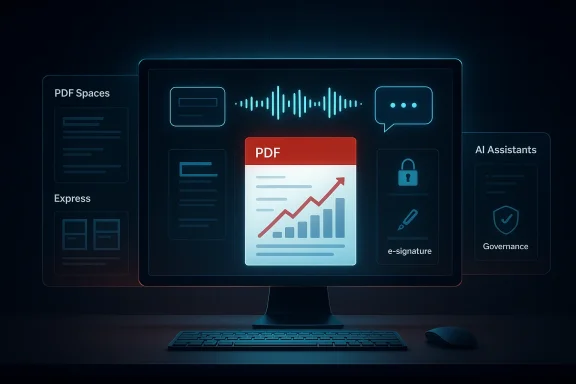
Acrobat Studio builds on Adobe’s long stewardship of the PDF format and the company’s recent investments in generative AI and creative tooling. Adobe announced Acrobat Studio as a new, unified offering that combines three pillars: Acrobat’s PDF productivity tools, Adobe Express’ design and template engine, and customizable AI Assistants that live in collaborative “PDF Spaces.” The goal is to let users move from insight to deliverable without switching apps — extract the essentials from contracts, reports or web pages, then convert that output into a ready-made presentation or an audio summary, and revise the result with conversational commands. This change matters because PDFs have traditionally been a dead-end in workflows: good for sharing but costly to reuse. Acrobat Studio reframes PDFs as sources rather than sinks, embedding generative flows that reuse text, tables, annotations and even web links held in a single workspace. Adobe positions Acrobat Studio both as an individual productivity tool and as an enterprise-ready hub with governance, encryption and deployment controls designed for corporate IT. What Acrobat Studio actually does — feature overview
PDF Spaces: contextual workspaces
- PDF Spaces are curated collections of files, web pages and transcriptions that act as a single, shareable knowledge hub. Upload reports, meeting transcripts, support documents, or point the space at web links — the AI Assistant then indexes and reasons across that set.
- Spaces can be shared with collaborators who interact with the same assistant, preserving context and reducing rework. Adobe highlights use cases from sales proposals to student study guides.
Generate presentation: one-click slide decks from documents
- The Generate presentation feature analyzes the materials stored in a PDF Space, extracts structure and key points, and produces a draft deck using Adobe Express templates and design logic.
- Users select tone and length; Acrobat Studio proposes an outline, then pushes the outline into Express to generate slides with images, suggested slide-level copy and layouts. Everything is editable in the same interface — swap images (including Adobe Stock or Firefly-generated images), adjust fonts, add animations and refine copy.
Generate podcast: audio summaries for “on-the-go” review
- Generate podcast converts long documents, notes and transcripts into podcast-style audio summaries that are meant to be listened to while commuting or doing other tasks. The output is not a raw text-to-speech readout but a produced, narrative-style audio overview.
- Independent coverage reports that Adobe is currently using third-party transcription and voice models behind some audio flows; however, Adobe’s official blog focuses on the feature promise rather than model-level details, so exact model choices can change and should be treated as vendor experimentation.
Chat-driven PDF editing
- Acrobat Studio’s AI Assistant supports conversational editing: remove pages or images, search-and-replace across a document, add e-signatures, set passwords, and more — all via plain-English chat commands. The UI also includes an enhanced Help Panel that provides step-by-step guidance and troubleshooting via chat.
Adobe Express integration and creative continuity
- Rather than exporting produced content into another app, Acrobat Studio embeds Adobe Express Premium capabilities for visual polish and brand consistency. That includes templates, brand kits, Adobe Stock access and Firefly generative image/video tools — enabling a single flow from extracted insight to a promotional asset, training deck or client-ready deliverable.
Verification and corroboration of the claims
Adobe’s newsroom post and product blog outline the features and positioning for Acrobat Studio and confirm the new workflows and pricing structure. The official press release states Acrobat Studio’s unification of Acrobat tools, Express creation capabilities and AI Assistants, and provides the baseline product availability and pricing. Independent press outlets have reported the same headline features. The Verge’s coverage highlights the Generate presentation and Generate podcast features, and it notes specific technical details reported during testing — including that Adobe’s Generate podcast currently leverages a Microsoft GPT model for transcription and a Google voice model for TTS in experiments — a detail Adobe’s public posts do not specify. Because Adobe’s official materials do not name underlying third-party model providers for audio, that particular claim is corroborated by press reporting but not confirmed by Adobe, so it should be treated as provisional. European and specialist outlets mirrored the product description and contextualized how the features compare to other AI document assistants (NotebookLM, Microsoft Copilot and Google Workspace). Coverage across multiple independent outlets confirms the feature set — presentations from PDF material, podcast-style audio summaries, chat-driven edits and Express integration — giving reasonable confidence that the headline claims are accurate. Where outlets name specific models or technical partners, treat those as journalistic finds that may be subject to change and verify against vendor statements for contractual or security assessments.Strengths: why Acrobat Studio could matter to Windows users and enterprises
- Workflow consolidation: By combining PDF authoring, creative design and AI agents in one workspace, Acrobat Studio reduces context switching and hand-offs between apps. Teams can move from source materials to polished deliverable — slide deck, infographic or narrated overview — without export/import overhead.
- Design quality without expertise: Using Adobe Express templates plus Firefly-generated imagery gives non-designers fast access to professional-grade visual layouts and brand applications, lowering the barrier for polished presentations and marketing assets.
- Multimodal outputs: The ability to generate audio and visual deliverables from the same document corpus is a genuine differentiator. Not every document assistant creates both slide decks and podcast-style audio with the same underlying context.
- Enterprise controls: Adobe stresses encryption, sandboxing and admin deployment — critical for regulated industries where document handling, retention and e-signature audit trails matter. For many IT shops, replacing a patchwork of tools with one vendor that offers SLAs and enterprise governance is attractive.
- Familiarity and reach: Acrobat is already ubiquitous in enterprise environments; embedding generative AI into that footprint improves discoverability and adoption compared with unfamiliar standalone products. Adobe’s claim that Acrobat influences trillions of PDFs in circulation reinforces the scale advantage, though IT should still validate migration and training impacts.
Risks, caveats and critical weaknesses
- Data exfiltration and privacy: Any feature that sends document text to cloud models raises concern for IP, personal data and regulated content. Acrobat Studio’s chat, summarization and audio pipelines will, by necessity, call cloud services for model processing unless Adobe provides on-device options — so organisations must evaluate contractual non-training clauses, retention policies and regional data residency assurances before onboarding sensitive content. Adobe advertises enterprise controls, but the precise contract terms matter.
- Model provenance and hallucination risk: Generated slide copy and audio summaries can sound authoritative while being inaccurate. For legal, financial or clinical materials, even small hallucinations or mis-summarizations carry outsized risk. The chat-editing convenience can amplify the danger of unverified changes being accepted as fact. Organizations should institute human review gates for all AI-generated content.
- Opaque third-party models (where present): Press reporting that Adobe is using third-party transcription and voice models — for example, Microsoft or Google components cited by journalists — introduces extra contractual layers and potential compliance questions. Adobe’s public materials do not disclose all model suppliers, so IT teams should demand explicit vendor confirmation (and non-training or processing guarantees) when assessing security posture. This is especially important for sectors like healthcare, government or finance.
- Export fidelity and lock-in: While Express templates promise quick deck generation, teams that require exact PowerPoint fidelity, custom animations or strict brand-lockdown may find automated exports imperfect. As with other AI-driven slide tools, generated decks can require manual cleanup for high-stakes, client-facing assets. Plan for export checks and a rollback strategy.
- Cost and licensing complexity: Acrobat Studio is a new subscription tier and Adobe is repositioning product bundles. Early access pricing has been reported, but large teams should expect nuanced enterprise pricing and potential seat-based licensing for premium Express content and Firefly generations. Budget the full cost of seats, API usage and enterprise support.
Practical guidance and an IT checklist before rolling Acrobat Studio into production
- Start with a small pilot: pick one group (sales enablement, legal or marketing) and a set of representative projects to validate output fidelity, review cycles and the AI assistant’s behavior.
- Validate data flows: request a vendor whitepaper on data handling and non-training guarantees. If your documents contain regulated data, insist on contractual assurances about retention and model-training exclusions.
- Define review gates: require human sign-off for any AI-generated content used in legal documents, external communications, regulatory filings or executive presentations.
- Test export fidelity: generate several decks and confirm that exports preserve fonts, table data, charts and animations required downstream (e.g., PowerPoint exports for board decks).
- Audit logs and e-signature trails: ensure Acrobat Studio’s auditing, e-signature certificates and admin logs meet your compliance requirements.
- Train users: include officials and power users in pilot training so they understand limitations (hallucinations, prompt best-practices, citation verification).
- Have a rollback plan: export production content before committing it to Acrobat Studio and keep an export/recovery strategy in case vendor changes disrupt workflows.
How Acrobat Studio compares with likely competitors
- Microsoft Copilot (PowerPoint + Office): Copilot’s core strength is tenant grounding and Microsoft Graph integration for internal data, with rigorous enterprise controls for M365 tenants. Copilot is native to the Office ecosystem and may better preserve PowerPoint fidelity. Acrobat Studio’s advantage is that it merges PDF-first workflows with Express design and multimodal outputs like audio. Choose Copilot when fidelity to Office formats and tenant governance are paramount; choose Acrobat Studio when PDF-based corpora and creative Express templates matter more.
- Google Workspace (Gemini/NotebookLM): Google’s NotebookLM audio overview work is similar to Adobe’s Generate podcast concept. Google’s strength is cloud-scale search and workspace integration for Drive-based corpora. Acrobat Studio distinguishes itself by tightly integrating design tools and PDF editor capabilities, and by leaning on Adobe’s creative asset ecosystem.
- Specialist slide builders (Canva, Beautiful.ai, Visme, Gamma): These tools produce excellent visual decks quickly; some offer narration and AI layouts. Adobe’s unique combination is the ability to turn PDF source material into a polished artifact inside the same document workspace and then iterate in Adobe Express. If slide material originates from PDFs, Acrobat Studio simplifies the pipeline. If you need deep analytics, interactivity or web-native story formats, specialist vendors may still lead.
A closer look at the podcast feature — what to verify
Adobe’s marketing paints Generate podcast as a production-ready convenience: take a 300-page report and receive a clutch-ready audio summary. Independent reporting indicates Adobe is experimenting with a hybrid model stack for transcription and TTS; journalists reported Microsoft and Google models appearing in initial testing. Adobe’s public blog describes behavior and uses but does not disclose exact suppliers or ISAs for audio models. For a corporate adoption decision, verify:- whether transcription or voice models persist on Adobe’s servers,
- whether audio outputs are stored and for how long,
- whether customer content is used for model training or improvement,
- the quality controls for spoken summaries (speaker persona, narrator style, speed, accuracy),
- support for speaker-attribution or preserving sensitive segments (redaction before synthesis).
Legal and IP considerations
- Copyright and source attribution: AI-generated imagery and copy used in external communications must respect licensing; Firefly aims to use licensed Adobe Stock and public-domain sources, but check enterprise licensing terms for commercial indemnities.
- E-signature and recordkeeping: Acrobat’s reputation in certified e-signatures is a plus, but adding AI to workflows complicates chain-of-custody expectations; preserve audit trails.
- Model liability: Require clarity on whether Adobe assumes responsibility for downstream uses of generated content, especially for regulated outputs that could be relied upon in legal or financial decisions. If the vendor disclaims training or uses of customer data, get that in writing.
Final assessment — what Acrobat Studio delivers and what to watch
Acrobat Studio is a substantive productization of what many vendors have hinted at for years: the union of document productivity, creative tooling and generative AI agents. For teams already deep in PDF-heavy workflows — legal, finance, sales enablement and education — the promise of turning documents into slide decks, podcasts and conversationally editable PDFs with minimal context switching is a real productivity multiplier. Adobe’s engineering advantage is the close coupling to Express templates, Firefly visuals and Acrobat’s mature PDF toolset; that combination is novel and potentially sticky. However, the real-world value depends on governance, accuracy and trust. AI convenience must be tempered by human review, contractual clarity on data usage, and a careful pilot strategy that measures both time-savings and error rates. Particular points to verify with Adobe before broad enterprise adoption include model suppliers for audio/transcription, explicit non-training contractual language (if required), regional data residency options and the precise audit logging available for e-sign and AI actions. Journalistic coverage has already flagged some implementation details — such as third-party model use for audio — that Adobe’s official posts do not fully disclose, so procurement teams should ask pointed, written questions.Actionable next steps for Windows-focused teams
- Pilot Acrobat Studio with a defined dataset (10–20 representative PDFs) and measure:
- Time to first-draft slides vs. manual creation.
- Number of factual edits required after AI generation.
- Audio summary accuracy vs. source material.
- Request vendor documents on: data retention, non-training guarantees, encryption at rest/in transit, regional hosting and incident response SLAs.
- Configure workspace policies: DLP rules that prevent uploading regulated documents to Acrobat Spaces until legal signs off.
- Pair Acrobat Studio outputs with verification workflows: include mandatory sign-offs for financial or legal statements before distribution.
Source: Il Sole 24 ORE Adobe launches Acrobat Studio: AI that turns PDFs into presentations and podcasts