

Google’s Workspace Studio is now generally available, and with it the company is placing a high‑stakes bet: make AI agents something workers actually use, by building them into the apps people open every day and letting non‑developers design, deploy, and manage agents with templates and natural language prompts.
This release — explicitly powered by Gemini 3 — brings agent creation into Gmail, Drive, Docs, Sheets, Chat and Workspace side panels, adds ready‑made templates and third‑party connectors, and aims to shorten the distance between a business need and an automated solution. Google’s product announcement frames Workspace Studio as a democratized no‑code agent workbench; independent coverage confirms the rollout and shows how the company hopes to wrestle enterprise automation away from siloed scripts and external chat plugins.
Google says Workspace Studio is designed to solve what it calls the “real agent problem”: enterprises can build capable AI automations, but employees rarely change habits enough to use them. Instead of requiring users to jump to separate chat UIs or standalone tools, Workspace Studio surfaces agents inside the same collaboration surfaces employees already use — inboxes, files, and chat windows. That integration model is central to Google’s argument that adoption, not just capability, is the gating factor for productivity wins. This product sits inside a broader Google strategy to sell not just models, but a managed platform: models + connectors + agent tooling + governance packaged for enterprise procurement. The enterprise play mirrors moves from other hyperscalers and aims to compete directly with Microsoft’s Copilot family and third‑party assistants that organizations currently bolt into Slack, Teams, or internal apps. Analysts and product briefs show the same theme: platform integration and governance matter as much as raw model IQ.
But distribution alone isn’t enough. Workspace Studio couples distribution with:
Key governance imperatives:
Vendor lock‑in is a real concern. Agents that are tightly coupled to Workspace metadata, Google’s agent definitions, and proprietary connectors are harder to migrate. Negotiating exportable agent definitions, logs, and guaranteed data portability clauses is prudent for long‑term flexibility. Independent product analyses advise insisting on exportable artifacts and clear contractual protections for migration.
The upside is real: faster briefing cycles, automated triage, and fewer hours spent on repetitive tasks. The downside is equally concrete: increased attack surface, vendor coupling and unpredictable costs if agents are deployed without strict controls. For IT leaders and security teams, the right posture is pragmatic and staged: pilot narrowly, measure rigorously, insist on auditability and data portability, and scale only after governance gates prove reliable in practice. If Workspace Studio’s promise is realized, it will change where and how work gets done inside enterprises — but success depends less on the product’s shiny features than on disciplined, security‑minded operationalization of agentic automation.
Source: BizzBuzz Google Workspace Studio Takes on the ‘Real Agent Problem’: Helping Employees Actually Use AI Tools
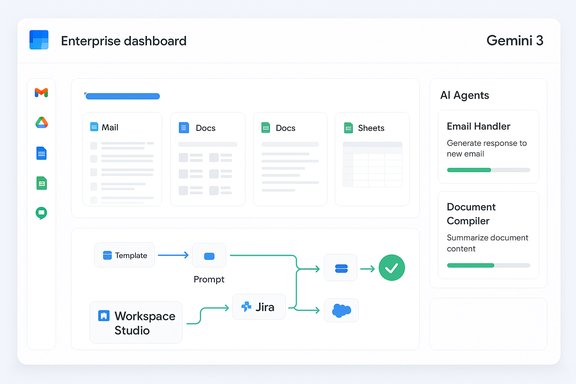
This release — explicitly powered by Gemini 3 — brings agent creation into Gmail, Drive, Docs, Sheets, Chat and Workspace side panels, adds ready‑made templates and third‑party connectors, and aims to shorten the distance between a business need and an automated solution. Google’s product announcement frames Workspace Studio as a democratized no‑code agent workbench; independent coverage confirms the rollout and shows how the company hopes to wrestle enterprise automation away from siloed scripts and external chat plugins.
 Background
Google says Workspace Studio is designed to solve what it calls the “real agent problem”: enterprises can build capable AI automations, but employees rarely change habits enough to use them. Instead of requiring users to jump to separate chat UIs or standalone tools, Workspace Studio surfaces agents inside the same collaboration surfaces employees already use — inboxes, files, and chat windows. That integration model is central to Google’s argument that adoption, not just capability, is the gating factor for productivity wins. This product sits inside a broader Google strategy to sell not just models, but a managed platform: models + connectors + agent tooling + governance packaged for enterprise procurement. The enterprise play mirrors moves from other hyperscalers and aims to compete directly with Microsoft’s Copilot family and third‑party assistants that organizations currently bolt into Slack, Teams, or internal apps. Analysts and product briefs show the same theme: platform integration and governance matter as much as raw model IQ.What Google announced — the essentials
- Workspace Studio is Generally Available and described as the central place to design, manage, and share AI agents inside Google Workspace. The official product blog states that agents can be built in minutes using Gemini 3’s reasoning and multimodal understanding.
- Agents created in Workspace Studio can be surfaced inside Gmail, Drive, Docs, Sheets and Chat via side panels and inline actions, reducing context switching. The Workspace Studio landing page and multiple reports confirm these in‑app surfaces.
- The product offers templates and a prompt‑based design interface (no code required), plus pre‑configured steps for common workflows such as turning emails into tasks or creating Jira issues when files are added to folders. Google’s marketing materials emphasize templates for rapid agent creation.
- Workspace Studio integrates with popular third‑party services (Salesforce, Jira, Asana and others) so agents can execute end‑to‑end workflows rather than only working with Workspace content. Google documentation and independent coverage list these connectors as a core capability.
- The service is powered by Gemini 3 and leverages Gemini’s multimodal reasoning and longer‑context model variants to handle multi‑step tasks and large documents. Google’s product announcement explicitly names Gemini 3 as the reasoning engine.
Why Workspace Studio matters: the adoption problem and Google’s answer
The “real agent problem” is not just technical; it is behavioral. Many organizations have built bots, integrated chat assistants or created RPA scripts, only to watch usage stagnate because agents lived in a separate UI or required a different workflow. Embedding agents into Gmail, Drive and Chat reduces friction: agents become part of existing habits rather than a novel app that must be learned. Google makes this explicit in its messaging and product design. Google’s reach is the competitive advantage here. Millions of workers already use Workspace apps daily, which gives Workspace Studio a natural distribution advantage and immediate context (calendars, files, threads) to ground agent outputs. In practice, that means an agent can reference the exact file an email mentions or use meeting context already present in the calendar — a type of contextual grounding that standalone assistants struggle to reproduce without extra connectors.But distribution alone isn’t enough. Workspace Studio couples distribution with:
- Templates and a prompt‑first builder so non‑technical users can create useful agents quickly.
- Side‑panel management so agents’ activity is observable and controllable from the same app where they act.
- Enterprise‑grade connectors and governance controls so IT can manage permissions and audit agent actions.
What Workspace Studio actually does — features and UX
Templates and prompt‑based authoring
Workspace Studio’s builder uses natural language prompts and pre‑built steps to convert a user’s intent into an agent workflow. Example templates include automations like: auto‑create tasks when files land in a folder, convert flagged emails to Jira issues, or summarize incoming attachments and post summaries to a team chat. The official product pages show a mix of templates plus a visual flow editor that non‑developers can use.Side‑panel monitoring and in‑app controls
Agents are surfaced and monitored within the side panels of Gmail, Drive and Chat. This design is intended to keep users informed about what agents are doing, provide progress indicators, and allow easy revocation of permissions or edits to agent logic — all without leaving the active workspace. Early reporting on Gemini integration across Workspace apps corroborates these side‑panel surfaces.Connectors and end‑to‑end automation
Workspace Studio ships with native connectors to major SaaS platforms and enterprise systems, enabling agents to both read and write across systems (e.g., create CRM entries, open tickets, or post status updates). That connector set is critical: effective agentic automation requires reaching outside Workspace into the operational systems where actual work gets recorded and executed. Google’s product blog and third‑party writeups detail these connector capabilities.Extensibility for developers
While the front door is no‑code, the platform also supports developer extensions: scripts, custom steps, and Vertex AI integrations for teams that need production‑grade functions. That hybrid model (citizen builder + developer extensibility) is a standard enterprise pattern for modern automation platforms.The technical underpinnings: Gemini 3, multimodality and long context
Workspace Studio’s capabilities are tightly coupled to Gemini’s reasoning and multimodal features. Google positions Gemini 3 as the engine that can understand documents, images and conversations in concert — making multi‑step, context‑heavy automations feasible. The official Workspace announcement names Gemini 3 and emphasizes multimodal understanding as a core enabler. Separately, Google’s Vertex AI model documentation shows that high‑capacity Gemini variants (for example, the 2.5 Pro lineage) support very large context windows — in the million‑token class — which materially reduces the need for complex chunking or retrieval tricks when agents reason across long documents and multi‑hour transcripts. Those technical details are published in Vertex AI and Gemini model pages and are a genuine differentiator for long‑form, enterprise reasoning tasks; IT teams should nevertheless confirm which model tier their tenancy receives, because quotas and availability are model‑tier and region‑dependent. Caveat: not all Gemini variants expose identical capabilities, and some large‑context features are gated to higher model tiers or specific Vertex AI profiles. Enterprises must validate entitlements and regional availability with Google Cloud sales before assuming unlimited access.Governance, security and the new operational discipline (AgentOps)
Agents are more powerful — and riskier — than standard chatbots because they can act (modify documents, create tickets, move data). That shift raises new operational demands that security teams must treat as first‑class responsibilities. The emerging discipline is often called AgentOps: lifecycle management, credential scoping, observability, testing, and human‑in‑the‑loop checkpoints for actions that matter. Technical and security writeups emphasize that agents require SRE‑style runbooks, audit trails and red‑team testing.Key governance imperatives:
- Least privilege: grant agents only the connectors and folder access needed for their specific job.
- Tamper‑evident logs: require auditable trails of prompts, sources used, and downstream API calls.
- Human gates: mandate approval steps for agents that perform external actions or change critical records.
- Adversarial testing: run prompt‑injection and exfiltration scenarios to validate defenses.
Cost, procurement and vendor lock‑in
Google packages models, connectors and agent tooling into enterprise subscriptions that place it in the same procurement conversation as Microsoft Copilot and ChatGPT Enterprise. Headline seat prices have been reported for related Gemini Enterprise offerings in the low‑$20s to ~$30 per user per month range, but those figures are planning anchors not full TCO. Real costs depend on Vertex AI inference consumption, premium connectors, storage/retention of logs, and on‑prem hardware if required. Procurement teams must model usage scenarios carefully.Vendor lock‑in is a real concern. Agents that are tightly coupled to Workspace metadata, Google’s agent definitions, and proprietary connectors are harder to migrate. Negotiating exportable agent definitions, logs, and guaranteed data portability clauses is prudent for long‑term flexibility. Independent product analyses advise insisting on exportable artifacts and clear contractual protections for migration.
How Workspace Studio stacks up against the competition
- Microsoft Copilot: Microsoft’s Copilot family emphasizes deep Office integration and Purview governance. Copilot’s advantage is native Microsoft Graph grounding for Microsoft 365 tenants; its agent and Copilot Studio features are targeted at Office‑centric workflows. Google’s counter is distribution inside Workspace and web grounding via Search. Enterprise buyers will weigh ecosystem fit heavily.
- OpenAI / ChatGPT Enterprise: OpenAI’s plugin and enterprise tooling emphasize platform neutrality and plugin ecosystems. Organizations wanting multi‑cloud flexibility sometimes favor that neutrality, but must build their own connectors and governance surfaces. Google’s advantage is pre‑built Workspace embedding and native connectors.
- Specialist vendors and cloud rivals: AWS, IBM and others are building agent runtimes and agent marketplaces; the market is converging on two strategies — full‑stack agent platforms (Google, Microsoft, AWS) versus plugin‑centric ecosystems (OpenAI, niche players). Each approach has tradeoffs in governance, portability and integration effort.
Practical rollout guidance — a 90‑day pilot playbook
- Define the business outcome (days 0–30)
- Pick 1–3 high‑value, low‑blast‑radius workflows (e.g., meeting summarization, internal research briefs, ticket triage).
- Establish measurable KPIs (time saved, error rate, human escalation frequency).
- Scope data access and governance (days 0–30)
- Classify data by sensitivity (public, internal, confidential, regulated).
- Apply least‑privilege connectors and scoped agent permissions.
- Run a controlled pilot (days 30–90)
- Use a small user cohort (10–50 seats) and instrument usage, model consumption and error rates.
- Perform red‑team tests: prompt injection, privileged escalation, connector misconfigurations.
- Negotiate contracts and finalize SLAs (days 60–90)
- Insist on exportable agent definitions, explicit non‑training clauses for enterprise data where required, and transparent compute pricing for Vertex AI usage.
- Operate and iterate
- Integrate agent logs into security monitoring.
- Update training materials to teach end users how to verify agent outputs and maintain prompt hygiene.
Strengths, real advantages and the biggest risks
Strengths
- Native distribution inside apps users already open — reduces adoption friction and boosts discoverability.
- No‑code + developer extensibility — democratizes agent creation while allowing engineering guardrails where needed.
- Long‑context multimodal models — real capability for large‑document and transcript reasoning that simplifies agent logic for research, legal and engineering workloads.
Risks and caveats
- Governance complexity: agents that act require robust AgentOps practices; misconfiguration can lead to data exfiltration or unintended actions.
- Cost unpredictability: headline per‑seat prices hide variable Vertex AI compute, context caching, and premium connector charges. Procurement teams must model consumption carefully.
- Vendor lock‑in: deeply coupled agent definitions and connectors increase migration costs; demand exportability.
- Model behavior and legal exposure: hallucinations and reasoning errors are possible; human‑in‑the‑loop gates and verifiable provenance are required for high‑stakes outputs.
What to watch next
- Depth and quality of partner‑validated agents in any agent marketplace or Agent Store — a richer catalog will reduce build time for common workflows.
- Pricing clarity for Vertex AI compute, token usage, and agent execution frequency — enterprises need predictable models to forecast ROI.
- Third‑party audits or compliance attestations (confidential computing, data residency and non‑training guarantees) that validate enterprise assurances.
- Practical adoption signals: do templates and in‑app experiences translate to sustained usage beyond pilot teams, or do agents remain a novelty? Early product design suggests the former, but real adoption requires governance and measurable wins.
Conclusion
Google Workspace Studio is a consequential step in the ongoing shift from AI as a drafting assistant to AI as an operational collaborator inside the tools knowledge workers already use. By marrying Gemini 3’s multimodal reasoning with in‑app surfaces, templates and enterprise connectors, Google has built a pathway that could materially accelerate agent adoption — provided enterprises treat governance, cost modeling and AgentOps as first‑class responsibilities.The upside is real: faster briefing cycles, automated triage, and fewer hours spent on repetitive tasks. The downside is equally concrete: increased attack surface, vendor coupling and unpredictable costs if agents are deployed without strict controls. For IT leaders and security teams, the right posture is pragmatic and staged: pilot narrowly, measure rigorously, insist on auditability and data portability, and scale only after governance gates prove reliable in practice. If Workspace Studio’s promise is realized, it will change where and how work gets done inside enterprises — but success depends less on the product’s shiny features than on disciplined, security‑minded operationalization of agentic automation.
Source: BizzBuzz Google Workspace Studio Takes on the ‘Real Agent Problem’: Helping Employees Actually Use AI Tools
