

Google’s Workspace Studio pushes agentic AI from pilot projects into everyday work by letting non‑developers build and run no‑code AI agents inside Gmail, Drive, Docs, Sheets and Chat — a shift that promises major productivity gains but demands a new operational discipline from IT and security teams. The product, announced as generally available on December 3, 2025, uses Gemini 3 for reasoning and multimodal understanding, ships with templates and third‑party connectors, and intentionally forces a conversation about governance, cost modeling and AgentOps before widespread adoption.
Google unveiled Workspace Studio after months of previews under names like Workspace Flows and as part of the broader Gemini/Workspace push to embed generative AI into core productivity apps. The explicit intent is to move beyond single‑turn drafting assistants and toward agentic automations that can plan, execute multi‑step workflows, and take actions with the same context that drives human work — calendar entries, email threads, files and meeting transcripts. The Workspace product team frames Studio as a no‑code workbench that puts “the full potential of agentic AI into the hands of everyone,” while Google’s admin communications stress staged rollout, admin controls and usage limits. Why this matters now: enterprises already wrestle with low adoption of standalone bots and custom automations that sit outside users’ daily UIs. Embedding agents directly in the apps people open every day reduces friction and gives Google a practical distribution advantage for agent adoption — but it also centralizes risk inside the same apps that store most organizations’ sensitive data.
For IT and security leaders: treat Workspace Studio as an operational program, not a hero feature. Start narrow, instrument everything, demand exportability, and build AgentOps capability alongside pilots. Done right, agents will reclaim hours from repetitive tasks; done carelessly, they will create a new class of operational and data‑loss incidents. The balance between productivity and risk will be decided not by the AI itself, but by how organizations choose to govern and operate it.
Workspace Studio marks the next phase in bringing AI from assistance to execution. The promise is large; the playbook for capturing it is straightforward but non‑trivial: pilot with discipline, design for least privilege, instrument for observability, and treat agents as first‑class operational entities. If organizations make those investments, this generation of no‑code AI agents could change how routine knowledge work is organized — and who gets to build the automation that shapes it.
Source: Computerworld With Workspace Studio, Google wants workers to build their own AI agents
 Background
Google unveiled Workspace Studio after months of previews under names like Workspace Flows and as part of the broader Gemini/Workspace push to embed generative AI into core productivity apps. The explicit intent is to move beyond single‑turn drafting assistants and toward agentic automations that can plan, execute multi‑step workflows, and take actions with the same context that drives human work — calendar entries, email threads, files and meeting transcripts. The Workspace product team frames Studio as a no‑code workbench that puts “the full potential of agentic AI into the hands of everyone,” while Google’s admin communications stress staged rollout, admin controls and usage limits. Why this matters now: enterprises already wrestle with low adoption of standalone bots and custom automations that sit outside users’ daily UIs. Embedding agents directly in the apps people open every day reduces friction and gives Google a practical distribution advantage for agent adoption — but it also centralizes risk inside the same apps that store most organizations’ sensitive data.What Workspace Studio is — the essentials
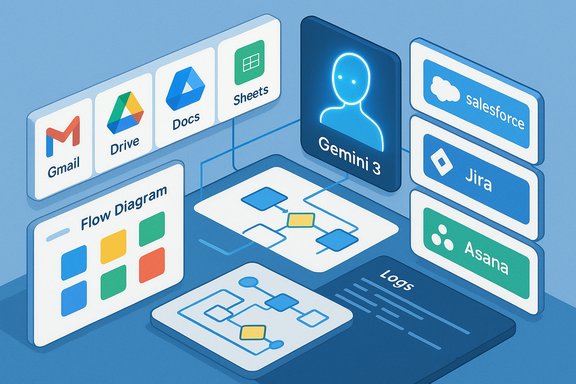
- No‑code agent builder: Start from templates or describe a workflow in plain English; Gemini 3 and the Studio UI translate intent into a multi‑step agent.
- In‑app surfaces: Agents appear in side panels and context menus inside Gmail, Drive, Docs, Sheets and Chat, so actions are surfaced where work happens.
- Connectors and extensibility: First‑party connectors to major SaaS (Salesforce, Jira, Asana, Mailchimp) plus webhooks, Apps Script steps and Vertex AI integrations let agents read and write across systems.
- Templates and an agent catalog: Prebuilt agents accelerate common automations — email triage, meeting summaries, ticket creation — and can be customized for local processes.
- Limits and quotas: At launch Google caps the number of agents a tenant can create and how often they run; an agent may have up to 20 steps, and tenants can create up to 100 agents (with Gmail‑starter agent constraints also applying). Google will expose usage limits in admin consoles and adjust promotional limits over time.
The technology behind it: Gemini 3 and long‑context reasoning
Workspace Studio’s engine is Google’s Gemini family — specifically Gemini 3 in the initial announcements — which Google positions as a multimodal reasoning model able to understand text, images and other media in context. Gemini’s long‑context variants (exposed through Vertex AI) provide extremely large input windows (in the million‑token class for certain Pro variants) that materially change how agents reason about long documents, multi‑hour transcripts or large codebases without complex chunking. That capability is central to Studio’s promise of robust, multi‑step workflows that don’t lose context. Practical consequences of large‑context models:- Agents can analyze entire contracts, long meeting transcripts, or project repositories in a single session, reducing the need for fragile retrieval pipelines.
- Large context windows reduce engineering overhead for certain RAG patterns, but they are also tied to premium model tiers and region‑specific availability — so entitlements matter.
Key features and user experience
Natural‑language authoring and templates
The intent‑first builder is core to Studio’s UX: type a plain‑English instruction (e.g., “If an email contains a client invoice, extract the invoice number, add a row to this Sheet and notify Finance in Chat”) and Studio composes an agent that maps triggers, extracts variables and wires actions. Templates cover common scenarios so users can tinker and test rather than build from scratch.Multi‑step orchestration and action steps
Agents can be chained into flows from simple single‑step automations to complex sequences that touch multiple apps. Google enforces a step limit per agent (maximum 20 steps) to reduce runaway complexity, and Studio provides side‑panel activity logs so users can inspect runs, diagnose failures and revoke permissions.Deep Workspace integration
Because agents operate within Workspace, they inherit app context: the exact file an email references, the meeting transcript, the sheet that tracks a project. This grounding improves relevance and reduces user friction. The tradeoff is that the same distribution that enables adoption also centralizes potential data‑flow risk.Extensibility for developers
While Studio is explicitly no‑code on the surface, it supports escalation paths for developers: Apps Script custom steps, webhooks, and Vertex AI model hooks let engineering teams convert prototypes into production workflows. This citizen‑builder + developer‑guardrail model is standard enterprise practice for modern automation platforms.Availability, limits and administrative controls
- General availability announced December 3, 2025, with staged rollout to eligible Business, Enterprise and Education editions; admin console controls appear for Rapid Release domains and staged rollout plans for other domains.
- Limits are explicit: tenants can create up to 100 agents, agents may have up to 20 steps, and a Gmail‑starter limit restricts how many Gmail‑triggered agents can be active. Active agents and run frequency are bounded by a daily run limit that resets every 24 hours.
- Admins can enable/disable Studio at the OU/group level and will get configuration knobs for sharing, allowed connectors, and permitted external domains. Google warns that some features (external sending, robust webhooks) will arrive in subsequent weeks and months.
What Google and early customers claim — and what’s verifiable
Google and its product teams report that customers in the Gemini Alpha program used Studio agents to complete over 20 million tasks in a recent 30‑day window during the preview — a concrete signal of real usage beyond demos. Google’s launch blog and product posts repeat that 20‑million figure. Independent coverage (press outlets covering the launch) echoes the claim. That said, enterprises should treat usage and productivity lift numbers as planning inputs to be validated in their own pilots. Other commonly reported claims — for example, comparative performance numbers against specific competitors (e.g., “30% faster” than a rival) — are often vendor or press sourced and lack independent, reproducible benchmarks at launch. Treat these comparative metrics as unverifiable until third‑party tests publish reproducible results.Strengths: what Workspace Studio brings to teams
- Rapid prototyping in users’ flow: Embedding agents into Workspace reduces context switching and shortens the path from idea to working automation.
- Democratized automation: Natural‑language authoring and templates lower the bar for citizen developers to close simple process gaps without waiting for IT.
- Multimodal, long‑context reasoning: Gemini’s high‑capacity variants enable agents to reason across long documents and transcripts that previously required heavy engineering.
- Hybrid maturity path: The no‑code front door plus developer extension points lets teams prototype quickly and promote durable automation to engineering standards when needed.
Risks and governance concerns
The upside is real, but every capability introduces operational risk. The biggest governance and security issues are:- Data governance and least privilege: Agents act with the permissions of their creators. If misconfigured, an agent could extract and forward sensitive content to an external connector. Admins must enforce least‑privilege connectors and DLP application to agent runs. Google documents admin controls and warns that integration helper apps and OAuth consents may be required for some connectors.
- Agentic sprawl: Hundreds of user‑created agents across a tenant can create a management nightmare — divergent behaviors, duplicate automations, hidden costs. The discipline of AgentOps (lifecycle management, credential rotation, observability and red‑teaming) becomes necessary.
- Overtrust and hallucinations: Agents that “reason” can make plausible but incorrect inferences. Human‑in‑the‑loop gates, approval steps and conservative defaults for high‑risk actions (send‑to‑external, bulk‑delete, financial updates) are essential.
- Cost unpredictability and TCO: Headline seat prices don’t capture Vertex AI inference consumption, premium connector fees, or storage/retention costs for logs and artifacts. Model routing and context caching also affect bills. Procurement teams must model consumption.
- Exportability and vendor lock‑in: Deeply coupled agent definitions and owned connector flows can be hard to migrate. Insist on exportable agent definitions and explicit contractual protections for portability.
How Workspace Studio compares to competitors
- Microsoft Copilot / Copilot Actions: Microsoft has pushed agents and actions inside Microsoft 365 with its own governance surfaces (Purview, Copilot Control System) and deep Graph grounding. Copilot’s strength is native Microsoft Graph context for Office‑centric tenants. Google’s counter is Workspace distribution and Gemini‑powered reasoning. Each vendor’s choice is often driven by where an organization’s data lives.
- OpenAI and plugin ecosystems: OpenAI emphasizes plugin-driven extensibility and cross‑platform neutrality; organizations that want multi‑cloud flexibility may favor that model but must build governance and connectors themselves. Google’s pivot trades some neutrality for a turnkey Workspace embedding and prebuilt connectors.
- Cloud vendor alternatives (AWS, IBM): Other hyperscalers are shipping agent runtimes and marketplaces; the market will bifurcate between full‑stack agent platforms (Google, Microsoft, AWS) and plugin‑centric ecosystems. The right choice depends on the tenant’s operational needs and governance posture.
Practical rollout guidance — a 90‑day pilot playbook
A staged, measurable pilot limits risk while generating evidence for scale.- Day 0–30: Define outcomes and governance
- Pick 1–3 high‑value, low‑blast‑radius automations (meeting summaries, email triage, internal status reports).
- Create a governance committee (IT, security, legal, power users). Classify data sensitivity and set least‑privilege connector policies.
- Day 30–60: Controlled pilot
- Enroll a small cohort (10–50 seats). Instrument runs, model consumption, error rates and human escalation frequency.
- Require test runs and explicit human approval before agents perform irreversible actions. Use the side‑panel activity logs for traceability.
- Day 60–90: Red‑team and contract negotiation
- Run adversarial tests (prompt injection, exfil scenarios, connector misconfigurations).
- Negotiate contract terms: exportability of agent definitions, non‑training clauses for enterprise data where needed, clear pricing for Vertex AI inference and premium connectors.
- Operate and iterate
- Integrate agent logs into SIEM and retention plans. Maintain an “agent registry” with ownership, scope and validation date. Educate end users about prompt hygiene and how to verify agent outputs before acting on them.
Recommended guardrails and configuration checklist
- Enforce least privilege for connectors and limit which integrations can be installed tenant‑wide.
- Set conservative defaults for agent actions that affect external sharing, record changes, or mass edits.
- Require a human approval step for any agent action that modifies financial records, legal documents, or access controls.
- Maintain tamper‑evident logs for prompts, inputs, outputs and downstream API calls; integrate them into centralized monitoring.
- Insist on exportable agent definitions and migration rights in procurement documents.
- Model Vertex AI consumption under realistic workloads; test context caching and routing to control compute spend.
Real‑world examples and early signals
Reported use cases from the Gemini Alpha and early pilots include:- Email triage and prioritization: detecting invoices and urgent customer messages, extracting invoice numbers and routing for payment.
- Meeting summaries and follow‑ups: extracting action items from meeting transcripts and appending them to project trackers.
- Document pre‑screening for legal: flagging missing clauses or signatures and routing documents for human review.
- Cross‑app orchestration: create Jira issues or Salesforce records when Drive files land in specific folders, collapsing manual handoffs.
The long view: AgentOps is the new must‑have skillset
The shift to agentic automation elevates operational disciplines previously reserved for developers and SREs. AgentOps — lifecycle management, credential and token hygiene, observability, cost control, testing and human‑in‑the‑loop design — becomes a first‑class capability for organizations that want to scale agents beyond experiment. Tools and processes that treat agents like managed principals (with SLOs, runbooks and audit trails) will separate successful deployments from those that drift into expensive, insecure sprawl.Final analysis: a pragmatic but cautious opportunity
Workspace Studio is consequential: it lowers the bar to agentic automation and embeds those automations directly into the context where work gets done. When paired with Gemini’s long‑context reasoning, Studio can convert previously expensive automations (contract review, research synthesis, cross‑system triage) into minutes of work. Early usage numbers and customer anecdotes suggest real uptake beyond toy demos. That advantage comes with real responsibilities. The product’s distribution power increases the importance of governance, and the technical promises (large context windows, multimodal understanding) must be validated against regional entitlements, model tiers, and cost realities. Comparative performance claims should be validated by neutral benchmarks before procurement decisions hinge on them.For IT and security leaders: treat Workspace Studio as an operational program, not a hero feature. Start narrow, instrument everything, demand exportability, and build AgentOps capability alongside pilots. Done right, agents will reclaim hours from repetitive tasks; done carelessly, they will create a new class of operational and data‑loss incidents. The balance between productivity and risk will be decided not by the AI itself, but by how organizations choose to govern and operate it.
Workspace Studio marks the next phase in bringing AI from assistance to execution. The promise is large; the playbook for capturing it is straightforward but non‑trivial: pilot with discipline, design for least privilege, instrument for observability, and treat agents as first‑class operational entities. If organizations make those investments, this generation of no‑code AI agents could change how routine knowledge work is organized — and who gets to build the automation that shapes it.
Source: Computerworld With Workspace Studio, Google wants workers to build their own AI agents
