

Google Has Mistaken Presence for Product-Market Fit
The most revealing thing about the current Gemini backlash is that it is not really about whether Gemini works. In its best moments, Gemini is useful: it can summarize a thread, pull structure out of a messy document, draft an awkward email, or turn a pile of Drive files into something closer to a first pass. The complaint is not that generative AI has no place in productivity software.
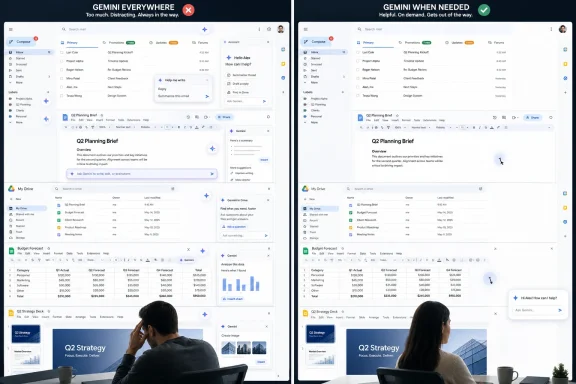
The complaint is that Google is behaving as if every surface must advertise that place all the time. The sparkle icon, the side panel, the prompt bar, the suggested action, the contextual nudge — each one may be defensible in isolation. Together, they start to feel like a product manager’s OKR made visible.
This is the old software industry disease in a new AI wrapper. A company builds a feature it desperately needs users to adopt, then uses the interface as a distribution weapon. The interface stops being a quiet agreement between user and machine and becomes a billboard for the vendor’s strategy.
That matters more in Workspace than it would in a novelty app. Gmail is not a playground for most people. Docs is not a demo surface. Drive is not a marketing funnel. These are working environments, and working environments become hostile when they keep interrupting the mental model that made them useful in the first place.
The Copilot Warning Was Sitting in Plain Sight
Microsoft has already run the experiment Google appears determined to repeat. Copilot began as an ambitious attempt to make AI a connective tissue across Windows, Microsoft 365, Edge, Teams, and developer tools. In theory, that is a coherent vision: one assistant, many contexts, persistent access to the work a user is already doing.
In practice, many Windows users experienced the rollout as a kind of AI wallpapering. Copilot appeared on the taskbar, in Edge, in Office apps, in Windows search-adjacent surfaces, and eventually even on keyboards through a dedicated key on some new PCs. The message was unmistakable: Microsoft wanted Copilot to become part of the default grammar of personal computing.
The backlash was equally unmistakable. Users who had not asked for an assistant saw it occupying scarce interface real estate. Administrators worried about controls, privacy, licensing, and explainability. Enthusiasts saw another layer of promotional sludge on top of an operating system already criticized for ads, recommendations, account nudges, and settings churn.
The lesson was not that Copilot was doomed. The lesson was that forced adjacency is not adoption. A button is not consent. A default icon is not trust. A contextual prompt is not proof that the context is right.
Google should understand this better than almost anyone. The company’s empire was built on a deceptively simple bargain: ask for something, get an answer. The more Gemini shows up before the user has asked, the more Google risks violating the instinct that made its products feel powerful in the first place.
Workspace Is More Sensitive Than Windows Because the Work Is Already There
There is a temptation to treat this as a generic “AI fatigue” story, but Workspace changes the stakes. Windows is the operating system layer; it mediates the device. Workspace is where the drafts, contracts, lesson plans, invoices, medical-office memos, nonprofit budgets, school records, hiring notes, and internal debates live.
That makes Gemini’s expansion both more promising and more fraught. An assistant inside Drive can be genuinely better than a chatbot in another tab because it can see the documents that matter. A writing tool inside Docs can be better than a blank prompt box because it understands the file already open. A summary inside Gmail can save real time because email overload is not a theoretical problem.
But the same proximity that makes the assistant useful also makes it feel invasive. When AI appears inside the document, beside the inbox, at the bottom of the editor, and across the file browser, users are reminded that their working context is now potential model context. Google can publish controls, assurances, and admin settings, but the user experience still carries a psychological signal: the system is looking for opportunities to interpret your work.
That signal is hard to manage. Google wants Gemini to feel ambient, but ambient software can quickly become uncanny. The difference between “available when needed” and “watching from the corner” is often a few pixels, a few repeated prompts, and one badly timed suggestion.
Enterprise IT feels this more sharply than consumers do. A personal Gmail user may roll their eyes at a sparkle icon. A school district, law firm, hospital group, or government contractor has to ask harder questions: which data is eligible for processing, which users can invoke which capabilities, what audit trail exists, and whether the assistant’s presence changes user behavior before policy catches up.
The Best Gemini Features Are Being Undermined by Gemini Branding
The irony is that Google has some genuinely strong Workspace AI ideas. “Help me create” in Docs, if grounded well in Drive, Gmail, Chat, and the web, is exactly the kind of feature that could turn a blank page into a workable draft. Gemini in Sheets, when it helps create tables or classify data, attacks a real pain point for users who understand their business problem better than spreadsheet syntax.
Drive summaries and file-aware Q&A are similarly sensible. Most organizations do not suffer from a lack of files; they suffer from a lack of retrieval, memory, and synthesis. If Gemini can help a project manager find the latest plan, summarize what changed, and draft a status update without spelunking through folders, that is not gimmickry. That is productivity software doing its job.
The trouble is that useful AI becomes less useful when every useful moment is wrapped in conspicuous AI theater. Google does not need to remind users constantly that Gemini exists. If the feature saves time, users will remember. If it does not, no amount of sparkle will make it feel essential.
This is where Apple’s slower, quieter AI posture has an advantage, at least rhetorically. Apple Intelligence has plenty of open questions, and Apple has hardly been immune to overpromising. But Apple’s preferred pitch is less “look at the assistant” and more “the thing you were doing now works a bit differently.” That framing matters because the most successful AI may not feel like a separate character in the room.
Google, by contrast, is making Gemini into a brand mascot inside the workflow. The assistant is not just a capability; it is a recurring visual presence. That may help Google communicate its AI seriousness to investors and executives, but it risks teaching users to associate Gemini with interruption before they associate it with relief.
AI Assistants Become Annoying When They Compete With Muscle Memory
Productivity software is built on habits. People know where the compose button is, where comments appear, how to scan Drive, how to move through a spreadsheet, and how much visual noise they can ignore. Even small interface changes can feel disproportionate because they disturb routines repeated hundreds of times a week.
AI vendors often underestimate this because they evaluate features by capability, not by cognitive rent. A side panel that can summarize a document looks valuable in a demo. In daily use, it also occupies space, shifts attention, adds another icon to parse, and asks the user to decide whether this is a moment for ordinary work or AI-assisted work.
That decision has a cost. If Gemini is visible everywhere, users must continuously reject it everywhere. They may not click the icon, but they still process its presence. Over time, that processing becomes irritation, and irritation is fatal to adoption because it reframes the feature as something to defend against.
Microsoft ran into precisely this pattern with Copilot. The company’s most defensible AI features were often buried under the perception that Copilot was being pushed too hard. Once users decide a feature is corporate agenda made manifest, even good implementations have to fight uphill.
Google is approaching that threshold. The phrase “Gemini creep” lands because it captures an emotional truth: the assistant is not arriving as a single coherent upgrade. It is spreading. That verb matters. Users tolerate tools they summon; they resent features that seem to colonize.
Google’s Business Incentive Is Obvious, Which Is Part of the Problem
None of this is happening in a vacuum. Google is in a brutal AI contest with Microsoft, OpenAI, Anthropic, Meta, and a growing field of specialized enterprise vendors. The company cannot afford for Gemini to be perceived as a chatbot off to the side while Microsoft sells Copilot as the AI layer for work.
Workspace is therefore strategic real estate. Gmail, Docs, Sheets, Slides, Drive, Meet, and Chat are not just apps; they are daily distribution channels into organizations. If Gemini becomes the default assistant inside those tools, Google gains usage, training feedback, subscription leverage, and a stronger enterprise story.
That explains the aggression, but it does not excuse the execution. Users can sense when an interface decision primarily serves the vendor’s go-to-market needs. They may not describe it in those terms, but they know when a button is there because it helps them and when it is there because the company needs the button to be there.
The subscription angle sharpens the discomfort. Google has folded more AI into Workspace plans and continues to position Gemini as a premium productivity enhancer. Enterprise buyers may be willing to pay for that if the value is measurable. They will be less enthusiastic if the rollout feels like a visual tax imposed across every app before governance, training, and user readiness are mature.
This is the adoption paradox of enterprise AI. Vendors want ubiquity because ubiquity creates habit. Enterprises want control because control prevents chaos. End users want agency because agency is the difference between assistance and coercion. A rollout that privileges the first and neglects the second and third will produce resistance even when the underlying technology is impressive.
The Admin Console Cannot Solve a Trust Problem by Itself
Google can point to admin controls, data protection promises, and Workspace configuration options. Those are necessary, especially for regulated organizations and larger IT departments. But controls buried in an admin console do not fully answer a user experience complaint that happens on the screen every day.
For administrators, the practical questions are familiar. Can Gemini be disabled by organizational unit? Are prompts and outputs logged in a way that supports compliance without creating a new privacy headache? Are users clearly told when Workspace data is being used as context? Can organizations separate experimental capabilities from generally available ones?
Those questions matter because AI features collapse boundaries that older software kept separate. Search, drafting, summarization, classification, and automation used to be distinct actions. Gemini wants to blend them into a conversational interface that can traverse mail, chat, documents, slides, and spreadsheets. That is powerful, but it also means old permission assumptions become harder to reason about.
A file-aware assistant is only as trustworthy as the permission model it respects, the logs it leaves, and the mistakes it does not make invisible. If a user asks Gemini to build a draft from Drive and Gmail, the output may feel authoritative simply because it is formatted and contextual. But the assistant can still omit, misread, overemphasize, or hallucinate. In business settings, a polished wrong answer can be more dangerous than an obvious blank.
This is why the visual creep matters beyond aesthetics. The more Gemini is normalized as part of the workspace, the more users may lean on it casually. That can be good when the task is low risk. It can be disastrous when the task involves legal language, personnel decisions, financial assumptions, incident response, or customer commitments.
The AI Arms Race Is Flattening Product Judgment
The industry’s AI frenzy has created a strange sameness among major platforms. Microsoft wants Copilot everywhere. Google wants Gemini everywhere. Meta wants AI in messaging and social surfaces. OpenAI wants ChatGPT to become a workbench, agent, search tool, coding partner, and operating layer for digital tasks.
The strategic logic is understandable: whoever owns the assistant may own the next interface. If users begin tasks by asking an AI rather than opening an app, the assistant becomes the new start menu, search box, command palette, and help system rolled into one. No platform owner wants to be demoted beneath someone else’s agent.
But this fear is flattening product judgment. Instead of asking where AI improves the experience, companies ask where they can insert AI before a competitor does. The result is a wave of assistants that appear in places where the user’s intent is weak, ambiguous, or already satisfied by existing workflows.
That is how you get AI buttons in interfaces that do not need another button. It is how you get prompts that solve demo problems more often than lived problems. It is how “helpful” turns into “present,” and “present” turns into “persistent.”
Google’s risk is not that Gemini will be worse than Copilot. In some domains, it may be better. The risk is that Google will let competitive anxiety override the product restraint that separates a trusted assistant from a pop-up with a language model attached.
The Standalone Gemini App Shows the Better Path
The most favorable version of Gemini is the one users intentionally open. In a standalone app, the contract is clear: the user has chosen an AI-first interaction. They bring a task, ask a question, upload context, or experiment. The assistant is not intruding because the assistant is the point.
That clarity changes the emotional texture of the product. A mediocre answer in the Gemini app is a failed attempt. A mediocre suggestion injected into Gmail is an interruption. The same model can feel useful or presumptuous depending on whether the user invited it.
Workspace integration should borrow more from that consent model. The best version of Gemini in Google’s apps would be powerful, discoverable, and quiet. It would appear when summoned, offer contextual entry points where intent is obvious, and then get out of the way. It would not need to glitter from every corner of the interface.
There is an old design lesson here: defaults shape behavior, but restraint preserves trust. Google does not have to hide Gemini. It has to stop treating visibility as the primary measure of success. If a feature is good, power users will find it, admins will enable it deliberately, and organizations will train around it.
The alternative is the Copilot path: ship the surface area first, then spend the next year explaining, moving, renaming, disabling, and rationalizing pieces of the rollout after users have already formed an opinion. That is expensive. Worse, it teaches customers that the vendor’s first instinct is to push, not listen.
Where Google Can Still Avoid the Copilot Trap
Google has not yet lost the plot. Gemini’s Workspace expansion is still at a stage where the company can adjust the balance between ambition and intrusion. The right move is not retreat; it is discipline.
First, Google should make Gemini’s presence more adaptive. A user who never opens the side panel should not be reminded of it constantly. A user who frequently summarizes email threads may deserve a more prominent summary affordance in Gmail. A classroom administrator, a solo consultant, and a corporate finance analyst do not need the same AI surface density.
Second, Google should make opt-down controls as visible as opt-in prompts. If a user can summon Gemini from a bottom bar, that same experience should make it easy to minimize or hide the bar without spelunking through settings. If an organization enables Gemini, admins should be able to define where it appears, not merely whether the service is available.
Third, Google should stop over-branding ordinary productivity improvements. If Docs can suggest a better structure, it does not always need to announce that Gemini has arrived. If Drive can summarize a file list, that can be a Drive capability. The more every improvement is branded as Gemini, the more Gemini becomes accountable for every annoyance.
Finally, Google should treat enterprise adoption as a change-management problem, not just a licensing problem. AI in Workspace changes workflows, data habits, review practices, and user expectations. The companies that succeed with it will need guidance, governance templates, training materials, and realistic warnings about where human review remains non-negotiable.
The Sparkle Icon Is Now a Governance Signal
The small irony of the sparkle icon is that it was supposed to make AI feel approachable. In practice, it has become a marker of vendor intent. When users see it everywhere, they do not merely see a feature; they see a company trying to redefine the workspace around its AI strategy.
That is why the current criticism has resonance beyond Google fans or AI skeptics. Windows users have lived through years of interface decisions that blurred the line between operating system, service promotion, cloud upsell, and AI experiment. They know what it feels like when the device starts to feel less owned.
Workspace users are now confronting a softer but related anxiety. Their documents, inboxes, meetings, and files are becoming surfaces for a model-mediated workflow that may or may not fit the way they actually work. Even if Google’s privacy and security posture is solid, the interface can still create distrust if it makes the user feel managed rather than assisted.
For IT pros, that distrust becomes a support burden. Users ask whether Gemini is reading everything. Managers ask whether outputs can be relied on. Legal teams ask whether sensitive documents are being processed. Security teams ask whether prompts can leak context. The sparkle icon becomes the visible tip of a much larger governance iceberg.
Google’s challenge is to make Gemini boring in the best possible way. Boring means predictable controls, clear boundaries, sparse interface placement, and features that succeed quietly. Boring is what enterprise software earns after the demo stage. It is also what AI desperately needs if it is going to graduate from executive keynote material to ordinary infrastructure.
The Workspace AI Fight Will Be Won by the Company That Learns to Disappear
The near-term fight between Gemini and Copilot is being framed as a capability race. Which assistant can summarize better? Which can generate more polished slides? Which can pull richer context from email and files? Which can turn a prompt into a spreadsheet that does not embarrass everyone in the room?
Those things matter, but they are not the whole contest. The deeper race is about trust, and trust is often built by restraint. The assistant that wins may be the one users notice least because it appears at the right moment, performs the job, and vanishes.
Microsoft’s Copilot experience shows how quickly a platform owner can squander goodwill by making AI feel unavoidable. Google has the benefit of that warning and the burden of its own ambition. It can decide that Gemini should be a pervasive brand presence, or it can decide that Gemini should be a capability woven into Workspace with enough humility to let the work remain central.
The second path is harder to market but easier to live with. It requires Google to measure success by completed tasks, reduced friction, and admin confidence rather than by icon impressions and feature surface count. It requires patience at a moment when the AI market rewards spectacle.
But if Google wants Gemini to become indispensable, it has to stop making users feel surrounded by it. The most durable productivity tools do not win by shouting from every corner. They win by becoming the thing people reach for because the last time they used it, it helped.
The Copilot Lesson Google Should Steal Before Users Force It To
Google still has room to turn Gemini’s Workspace expansion into a model for AI integration rather than another case study in platform overreach. The concrete lessons are already visible.
- Gemini is most defensible when users clearly invoke it for a task, not when Google treats every app surface as an invitation to advertise AI.
- Workspace integrations are more sensitive than consumer chatbot features because they sit next to business records, schoolwork, legal drafts, customer data, and internal communications.
- Admin controls must be paired with user-level visibility controls, because governance cannot fix an interface that feels pushy every day.
- Google should let some AI features behave like ordinary app improvements instead of branding every improvement as a Gemini moment.
- The strongest competitive answer to Microsoft Copilot is not more sparkle icons, but a calmer assistant that respects muscle memory, intent, and organizational policy.
Google’s opportunity is still enormous, because Workspace is exactly where AI can be useful when it is grounded in real context and governed with care. But the company is approaching the point where distribution starts to look like desperation, and users are unusually good at detecting that shift. If Gemini is going to avoid going full Copilot, Google needs to learn the most counterintuitive lesson of the AI platform era: the assistant that earns the right to be everywhere may be the one that first proves it knows when to stay out of the way.
References
- 9to5google.com 9to5google.com