

Microsoft’s Ignite 2025 keynote framed a simple but seismic pivot: AI agents are no longer experimental helpers — they are becoming first-class, identity-backed members of the enterprise, and Microsoft’s Agent 365 is the control plane designed to manage them at scale. This announcement, positioned as the antidote to agent sprawl, folds identity, governance, telemetry and security into a single admin surface and ties the agent story back into nearly every product Microsoft showed at Ignite — from Word and Excel to Entra, Defender, Purview and Azure Foundry.
Microsoft’s Agent 365 is described as a centralized control plane for AI agents that can register, secure, observe and govern agents built in Microsoft tooling, open-source frameworks, or third-party platforms. The product is available initially through the Frontier early-access program and is surfaced through the Microsoft 365 Admin Center so tenant administrators can treat agents like managed, auditable workforce entities. Agent 365 is explicitly positioned to leverage Microsoft’s existing identity, security and compliance stack — Microsoft Entra, Defender and Purview — and to integrate with productivity surfaces such as Microsoft 365 apps and Work IQ. Microsoft’s public messaging and partner reporting make three connected points that define the Agent 365 value proposition:
Agent 365 won’t eliminate all risk:
However, Agent 365 is not a turnkey governance guarantee. It transfers the responsibility for safe agent operation from accidental to deliberate action: enterprises must update threat models, procurement processes and lifecycle governance to reap the promised benefits. The next months will be decisive: formal licensing details, partner SLAs, and early customer case studies will determine whether Agent 365 becomes the industry’s de facto agent control plane or simply another useful but incomplete governance toolbox. The shift is clear: agents are now core infrastructure, and Agent 365 is Microsoft’s bid to make managing that infrastructure part of everyday IT operations rather than an experiment left to developers and shadow projects.
Source: Constellation Research Microsoft launches Agent 365, a parade of AI agents at Ignite 2025
 Background / Overview
Microsoft’s Agent 365 is described as a centralized control plane for AI agents that can register, secure, observe and govern agents built in Microsoft tooling, open-source frameworks, or third-party platforms. The product is available initially through the Frontier early-access program and is surfaced through the Microsoft 365 Admin Center so tenant administrators can treat agents like managed, auditable workforce entities. Agent 365 is explicitly positioned to leverage Microsoft’s existing identity, security and compliance stack — Microsoft Entra, Defender and Purview — and to integrate with productivity surfaces such as Microsoft 365 apps and Work IQ. Microsoft’s public messaging and partner reporting make three connected points that define the Agent 365 value proposition:- Agents need identity, lifecycle and governance to be safe and auditable in enterprises.
- Enterprises prefer extending existing management and identity plumbing to new technology rather than rebuilding new silos.
- Interoperability standards (Model Context Protocol, agent-to-agent patterns) and an ecosystem of third-party agents make a horizontal control plane necessary.
What Agent 365 actually does — a practical breakdown
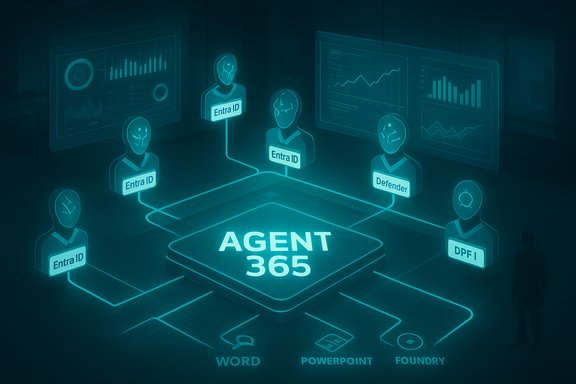
Microsoft frames Agent 365 around five core functions: Registry, Access Control, Visualization, Interop and Security. Each is targeted at a concrete pain point that has blocked agent deployments at scale.Registry: a single source of truth
The registry inventories every agent in a tenant — including agents that are registered through Microsoft platforms, imported from external vendors, or appearing as “shadow agents” discovered by telemetry. This inventory model assigns an agent identity (Entra Agent ID) to enable lifecycle actions such as deprovisioning, access reviews and conditional access policies. This identity-first design is the central architectural choice that separates Agent 365 from ad hoc bot registries.Access Control: enforce least privilege for agents
Agents can be assigned scoped permissions and must follow authorization boundaries similar to human users. Microsoft is connecting Entra lifecycles, conditional access, and approval workflows to agents so admins can require intent-capture or per-action approval for sensitive operations. This reduces the risk of runaway or overly permissive agents.Visualization & Observability: telemetry, dashboards, alerts
Agent 365 surfaces fleet-wide telemetry — health, activity, connections between agents and data — and provides dashboards and alerts so IT can track usage, cost and unusual activity across an agent estate. Observability is a governance enabler: every agent action should be traceable for audit and forensic analysis.Interop: standards and ecosystem
Microsoft is building Agent 365 to manage agents regardless of where the agent originated. Interoperability is supported by Model Context Protocol (MCP) implementations and Agent Framework patterns, and Microsoft is leaning on both standards and partner integrations (Adobe, Databricks, ServiceNow, SAP and others) to make Agent 365 a cross-vendor control plane. The aim is to let enterprises treat agents from different vendors as first-class, manageable resources.Security: Defender, Purview and Foundry
Agent 365 integrates existing security layers — Microsoft Defender for runtime protection, Microsoft Purview for data governance, and Foundry Control Plane for developer-focused observability and guardrails — to reduce attack surface and manage data flows. Microsoft’s documentation and Book of News highlight these integrations as central to the product story. These capabilities map directly to the common enterprise checklist for production services: identity, least-privilege access, monitoring, interoperability and incident response.The broader product context: not just a single feature
Agent 365 does not stand alone — it is the control plane that ties together a set of agent-focused investments Microsoft announced at Ignite and earlier in 2025. Key adjacent components include:- Copilot Studio — low-code and pro-code authoring environment for building agents, with testing, evaluations and real-time monitoring capabilities. Agents built in Copilot Studio get an Entra Agent ID and can be published to an in-product Agent Store.
- Azure AI Foundry & Agent Framework — a developer-grade runtime and SDK for orchestrating multi-agent compositions with observability and model-choice plumbing.
- Agent Store — an M365 marketplace surfaced inside Copilot and Teams where users can discover, request and deploy agents with tenant admin approval flows.
- Work IQ — the intelligence layer powering Microsoft 365 Copilots and agents; enables agent scenarios for Word, Excel, PowerPoint and more.
The product portfolio unveiled at Ignite — agent highlights
Ignite 2025 was emphatic: nearly every product announcement had an “agent” hook. Notable agent launches and previews include:- Work IQ-powered productivity agents: Word Agent, Excel Agent, PowerPoint Agent — agents that act inside documents using Agent Mode (stepwise plans that can be reviewed and rolled back).
- Workforce & HR agents: Workforce Insights Agent, People Agent, Learning Agent — focused on manager dashboards, people discovery by skills/roles, and microlearning.
- Business agents: Sales Development Agent (Frontier preview) — an autonomous agent that can research, qualify and engage prospects and hand off to humans; demoed to promising effect.
- Admin, IT and security agents: Teams Admin Agent, SharePoint Admin Agent, multiple Intune agents (Change Review, Policy Configuration, Device Offboarding), Entra agents for access review and app lifecycle management, Purview agents for data posture and alert triage, and Defender’s Threat Hunting Agent. These agents aim to reduce administrative toil by automating low-risk procedural work and accelerating analyst workflows.
- Automated agent evaluations and testing harnesses
- A “computer use” capability to automate web and desktop tasks where APIs don’t exist
- Real-time monitoring and an Entra Agent ID for every published agent.
Verification and cross-checking: what’s confirmed, what’s rumor
Microsoft’s Book of News and official blog posts confirm the core architecture and availability through Frontier and the Microsoft 365 Admin Center, and they list the five core Agent 365 functions and integrations with Entra, Defender and Purview. Those are primary, verifiable claims. Independent reporting (The Verge, GeekWire, MSDynamicsWorld, The Register and other outlets) corroborates the narrative that:- Agent 365 is positioned as a governance-first control plane for agents,
- Agents will be assigned identities and can be managed through tenant controls,
- Multiple prebuilt agents and admin-focused agents were announced at Ignite.
- The existence of a specific SKU named “A365” or the final licensing mechanics for agent identities was reported in some admin screenshots and community reporting but has not been universally confirmed in official SKU documents. This should be treated as provisional until Microsoft publishes formal licensing guidance.
- Certain hardware thresholds (for on-device inference or NPU TOPS baselines for Copilot+ PCs) have been floated by various teams; those numbers have been marked by Microsoft as provisional and subject to change. Treat hardware performance claims as indicative, not contractual.
Strengths and opportunities: why Agent 365 matters
- Extends familiar admin tooling to agents
Agent 365’s biggest practical strength is that it reuses systems enterprises already trust — Entra (identity), Purview (data governance), Defender (security). That significantly shortens the runway for conservative IT shops to pilot agents. Enterprises can apply established lifecycles (onboarding, access reviews, deprovisioning) to machine identities instead of inventing a new process. - Reduces the “shadow agent” risk
Centralized inventory and telemetry aim to prevent rogue agents from proliferating outside governance, an increasingly important problem as low-code tooling and open-source agents make it easy to spin up autonomous capabilities. Comprehensive observability helps security teams triage incidents faster. - Ecosystem leverage and platform lock-in tradeoffs
Microsoft’s sweeping integration across apps — Word/Excel/PowerPoint agents, security agents, admin agents — makes the platform attractive to organizations that already standardize on Microsoft 365. For many customers, the friction of agent adoption will be lower inside this stack than piecing together disparate solutions. - Operationalizing agents with lifecycle tooling
Copilot Studio’s testing and evaluation features, combined with Foundry’s runtime observability, create a plausible pipeline from prototype to production — something many organizations lacked before. These lifecycle controls are essential to move agents from curiosities to repeatable business assets.
Risks, unanswered questions and practical concerns
- Identity and threat models for machine principals
Giving agents Entra identities is powerful — and risky. Machine identities can be phished, misconfigured or abused. Every organization must include agents in the same threat models applied to service accounts and system principals: monitoring, conditional access, and credential vaulting are not optional. - Data leakage and external model routing
Microsoft’s multi-model posture and third-party model routing (e.g., Anthropic models in some Copilot flows) improve capability but complicate data residency and contractual obligations. When an agent routes work to a non-Microsoft model hosted outside the tenant boundary, that creates new compliance and telemetry blind spots that legal and procurement teams must manage. - Operational complexity and cost management
A shift from seat-based licensing to mixed licensing models (agent identities, pooled credits, consumption metering) requires finance and procurement teams to rethink cost allocation. Agents will act continuously in some scenarios, producing steady consumption; without caps and reporting, bills can surprise organizations. Treat agents like headcount and assign cost centers early. - Governance maturity gap
Agent 365 provides the tools, but successful deployment requires updated organizational processes: owner assignment for each agent, runbooks, human-in-the-loop thresholds for high-risk decision points, SLOs for agent performance and explicit auditing policies. Without those changes, Agent 365 risks being a logo of governance without operational effect. - Liability, auditability and explainability
Agents that write into official documents, adjust financial models or take action on behalf of employees create new legal and audit questions. Organizations should require explainability artifacts and plan for deterministic rollback and human sign-offs for legal or financial actions.
Recommendations for IT and security leaders
- Start with a safety-first pilot
- Identify a small set of low-risk, high-value agent scenarios (summaries, read-only knowledge agents) and pilot them through Copilot Studio and Agent 365.
- Require an assigned owner, a cost center and a simple ROI metric before agent publication.
- Treat agents as production services
- Enforce Entra lifecycle rules, include agents in access reviews, and apply conditional access and credential vaulting for agent credentials.
- Require per-action or high-risk approvals for write operations until trust metrics justify automation.
- Implement telemetry and alerting
- Use Agent 365’s dashboards to monitor agent behavior and set anomaly alerts — unusual patterns should trigger triage playbooks.
- Lock down third-party routing
- Until model routing governance is fully validated, require explicit approval before enabling external model routing or third-party hosting for sensitive agents.
- Define human-in-the-loop thresholds
- For legal, financial or compliance-impacting actions, require human sign-off and retain tamper-evident logs for every agent action.
- Control costs proactively
- Set consumption caps, require budget approvals for agent runtime, and treat agent runtime as part of IT capacity planning.
- Build an agent review board
- Governance should include representatives from legal, security, finance and the sponsoring business unit to review agent behavior and approve changes.
How to get started technically (practical steps)
- Enable the Frontier preview for your tenant and confirm Agent 365 exposure in the Microsoft 365 Admin Center. Agent 365 is being rolled into the Admin Center via Frontier as a first-entry point for tenants.
- Inventory existing agent-like tools and bots:
- Catalogue any Copilot Studio builds, Power Platform flows, RPA scripts and third-party agents currently in use.
- Register agents in Entra and assign an owner:
- Use Entra Agent ID registration and ensure agents are included in access reviews and conditional access policies.
- Publish a test agent from Copilot Studio to an internal Agent Store:
- Use Copilot Studio’s evaluation and prompt-testing features to build a test suite before publishing.
- Configure Purview and Defender policies:
- Apply data classification, DLP rules and runtime protection to agent interactions and the data channels they use.
- Put monitoring and alerting in place from Day 1:
- Use the Agent 365 visualization and Foundry Control Plane to capture telemetry and set thresholds for anomalous behavior.
A reality check: what Agent 365 will — and won’t — buy you
Agent 365 buys a lot of operational comfort: unified inventory, Entra identity, admin approval flows and integrated telemetry reduce friction for conservative enterprises. It is the “control plane” Microsoft promised — not a magic wand that removes the need for governance or for rethinking processes.Agent 365 won’t eliminate all risk:
- It cannot prevent logic errors or business rule mistakes baked into an agent’s design.
- It does not remove the need for human judgment on high-stakes decisions.
- It will not fully eliminate vendor complexity when agents route work to third-party models or services.
What to watch next
- Licensing clarity: Expect Microsoft to publish detailed licensing and billing guidance for agent identities and consumption. Current screenshots and community reports about an “A365” SKU are indicative but not definitive. Until SKU docs arrive, plan pilots without relying on an assumed licensing model.
- Third-party integrations and SLAs: Watch how partners (ServiceNow, SAP, Adobe, Databricks) publish operational integrations and SLAs for running agents through Agent 365. Several vendors announced integrations at Ignite; customers should validate SLAs and telemetry access.
- Standards adoption: The Model Context Protocol (MCP) and Agent-to-Agent patterns will shape multi-vendor agent choreography. Evaluate how MCP servers are implemented in your architecture and insist on secure, signed MCP endpoints.
- On-device and Windows integration: Windows’ Agent Workspace and Copilot+ device story are maturing; verify hardware requirements and test local inference scenarios carefully. Hardware thresholds and NPU baselines are presently provisional.
Conclusion
Agent 365 is Microsoft’s attempt to industrialize AI agents in enterprises by offering a single control plane that reuses the identity, compliance and security primitives IT already trusts. It solves immediate operational problems — discovery, inventory, lifecycle, authorization and telemetry — while knitting agent capabilities across the Microsoft ecosystem into a coherent platform. For organizations that already standardize on Microsoft 365 and Azure, Agent 365 materially shortens the path from pilot to production.However, Agent 365 is not a turnkey governance guarantee. It transfers the responsibility for safe agent operation from accidental to deliberate action: enterprises must update threat models, procurement processes and lifecycle governance to reap the promised benefits. The next months will be decisive: formal licensing details, partner SLAs, and early customer case studies will determine whether Agent 365 becomes the industry’s de facto agent control plane or simply another useful but incomplete governance toolbox. The shift is clear: agents are now core infrastructure, and Agent 365 is Microsoft’s bid to make managing that infrastructure part of everyday IT operations rather than an experiment left to developers and shadow projects.
Source: Constellation Research Microsoft launches Agent 365, a parade of AI agents at Ignite 2025
