

Agent Mode in Excel has arrived as more than a flashy demo: it turns Copilot from a sidebar suggestion engine into an active, in-canvas collaborator that can plan multi-step workflows, edit your workbook directly, and iterate until results pass basic validation — and Microsoft says the desktop rollout is now generally available on Windows (with Mac rolling out soon), extending the web-first preview into the apps most Excel users rely on every day.
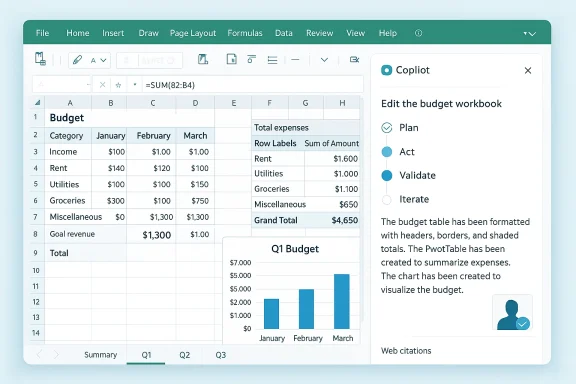
Microsoft has been steadily moving Copilot from single-shot suggestions to what it calls “agentic” productivity: AI that plans, acts, validates, and iterates inside Office artifacts. Agent Mode is the practical realization of that idea for Excel — a mode that accepts an outcome-based brief (for example, “build a loan amortization schedule with monthly payments and a chart”) and then executes a sequence of workbook edits to produce native Excel artifacts: tables, formulas, PivotTables, charts and validation sheets. That workflow is surfaced to users as a visible plan and editable changes rather than as opaque text output.
Why Excel first? Excel is both ubiquitous and brittle: small formula mistakes can cascade into big errors, and many valuable spreadsheet workflows still require specialist knowledge. Agent Mode aims to democratize that craft by producing native Excel constructs — not closed, cloud-only blobs — so outputs are editable, auditable, and (ideally) teachable. Microsoft’s messaging emphasizes the plan → act → validate → iterate loop as a key design principle.
Key capabilities include:
Access requirements:
But the feature is not a plug-and-play replacement for expertise. Accuracy limits, model variability, governance, data residency, and cost models are real constraints that must be managed deliberately. For the cautious IT leader, the right approach is measured adoption: pilot Agent Mode on low-risk workflows, harden governance (logging, sign-offs, model routing), and expand use once verification processes are proven.
For individual users and small teams, Agent Mode can feel revolutionary: a capable assistant that writes formulas, builds dashboards, and fetches web-grounded figures without leaving Excel. For enterprises, it’s an operational question: can you enforce the controls needed to trust agentic outputs in mission-critical reporting? If the answer is “yes, with policy and oversight,” Agent Mode delivers a productivity level-up that’s both practical and defensible. If the answer is “not yet,” then Agent Mode is still an exceptional prototyping and learning tool, but not a replacement for rigorous human review.
Agent Mode in Excel demonstrates what the next generation of productivity tools looks like: native artifacts, multi-step agent workflows, and selectable reasoning models. It brings tangible value today while also forcing IT and governance teams to codify how modern AI assistants should be used, audited, and trusted. The most prudent path forward is straightforward: pilot, govern, measure, and then scale — because the speed gains are real, but so are the responsibilities that come with them.
Source: Windows Central Excel's new Agent Mode is the productivity level-up we actually need
 Background / Overview
Microsoft has been steadily moving Copilot from single-shot suggestions to what it calls “agentic” productivity: AI that plans, acts, validates, and iterates inside Office artifacts. Agent Mode is the practical realization of that idea for Excel — a mode that accepts an outcome-based brief (for example, “build a loan amortization schedule with monthly payments and a chart”) and then executes a sequence of workbook edits to produce native Excel artifacts: tables, formulas, PivotTables, charts and validation sheets. That workflow is surfaced to users as a visible plan and editable changes rather than as opaque text output. Why Excel first? Excel is both ubiquitous and brittle: small formula mistakes can cascade into big errors, and many valuable spreadsheet workflows still require specialist knowledge. Agent Mode aims to democratize that craft by producing native Excel constructs — not closed, cloud-only blobs — so outputs are editable, auditable, and (ideally) teachable. Microsoft’s messaging emphasizes the plan → act → validate → iterate loop as a key design principle.
What Agent Mode does — the practical feature set
Agent Mode is not a single trick; it’s a toolkit for end-to-end spreadsheet work. The experience is integrated inside the Copilot pane and designed to take a plain-English brief and convert it to a sequence of reproducible workbook steps.Key capabilities include:
- Direct workbook edits: Agents create and modify worksheets, insert formulas, build PivotTables and charts, and apply formatting — all as native Excel objects you can inspect and change.
- Multi-step workflows: Agent Mode decomposes ambitious briefs (report generation, scenario modeling, reconciliation) into discrete steps and executes them in order, asking clarifying questions if needed.
- Formula generation and repair: The agent can generate complex formulas from natural language and attempt to fix broken formulas, with explanations of the logic used. This is arguably one of the most immediately useful features for power users.
- Integrated web grounding: Agents can pull up-to-date web data and ground inserted values with citations, reducing the need to copy/paste external figures. Microsoft implemented web search integration during the preview.
- Multi-model choice: Tenants and users can choose between OpenAI and Anthropic reasoning models for some workflows, letting organizations test different model behaviors and safety profiles.
- Validation sheets and checks: Agent Mode produces reconciliation and validation artifacts so you can see whether totals add up and where the agent had to make assumptions. The product surfaces those steps so a human can verify or revert edits.
Availability and licensing — who can use Agent Mode now
Microsoft moved Agent Mode from web preview into desktop during January 2026. The official desktop general availability note lists Windows as generally available on Jan 27, 2026, and Mac rolling out over the following days; Excel for the web had already launched earlier.Access requirements:
- Commercial Microsoft 365 Copilot customers can enable Agent Mode through tenant admin controls.
- Consumer tiers: Microsoft 365 Personal, Family, and Premium subscribers can access Agent Mode, with Personal and Family using an AI credit model — however, consumer availability is restricted geographically (Agent Mode is not yet available in the EU or UK for Personal/Family as of the desktop announcement). Administrators and tenant controls govern Frontier / preview opt-ins for business customers.
Model plumbing: OpenAI, Anthropic, and what that means
One of the design moves that matters is Microsoft’s support for multiple reasoning providers. By default Copilot will route tasks to whatever model Microsoft determines is best, but users can select alternatives where offered.- OpenAI’s GPT-5.2 (the latest GPT-5 series release) is being used broadly in Copilot and is explicitly positioned by OpenAI as a high-capability agentic model that handles complex multi-step tasks, long-context reasoning, and code execution. GPT-5.2’s public launch notes show it’s optimized for agentic, professional workflows.
- Anthropic’s Claude family (including recent Opus/4.x variants) has been integrated into Microsoft’s Copilot flows and is offered as an alternative reasoning style inside Agent Mode in Excel. Independent reporting and the product documentation reference Claude Opus 4.5 availability for agentic tasks.
- Different models exhibit different reasoning styles — depth of chain-of-thought, conservatism on uncertain claims, or how they format formulas and explain logic.
- For regulated or high-risk use cases, being able to A/B test outputs from two model families gives teams a practical way to evaluate accuracy, hallucination patterns, and explainability.
- Model routing and provider selection introduce governance overhead (you must track which model produced what output and retain reproducible records).
Real-world scenarios where Agent Mode helps (and how to use it)
Microsoft and reviewers have highlighted a set of high-impact, pragmatic scenarios that show the tool’s value.- Create workbooks from a brief: Build a formatted budget, loan calculator, or monthly close workbook complete with formulas and charts. Start with an outcome-based prompt and refine.
- Scenario modeling: Run what-if analyses with adjustable assumptions (revenue forecasts, hiring scenarios) and produce pivotable outputs that refresh when inputs change.
- Large-data analysis: Ask the agent to highlight anomalies, calculate trends, and surface summary tables for large data ranges. Agent Mode can generate formula-driven analysis and a written summary.
- Formula rescue: Fix broken formulas or generate dynamic formulas across linked sheets. The agent will often produce an explanation of the formula chain it created.
- Visualizations: Create PivotTables, charts, and dashboards through conversation. The produced artifacts are native and recalc when underlying data changes.
- Open Excel (Web, Windows, or Mac) and sign in with an eligible Microsoft 365 account.
- Open Copilot and select Agent Mode from the Tools menu.
- Provide an outcome-focused prompt (e.g., “Create a monthly budget tracker with categories, totals, and a 12-month rolling chart; highlight months where any category increases >10% vs prior month”). Review the plan and the inserted artifacts; verify formulas.
What Microsoft improved during public preview — and why that matters
Microsoft used the public preview to harden several fragile points:- Integrated web search: Agents can now pull in current data with citations, crucial for tasks that depend on up-to-date external figures. This reduces manual context switching.
- Model switcher: Preview telemetry led Microsoft to add an explicit model-choice control so users can compare OpenAI and Anthropic outputs for the same task.
- Performance and reliability: Improvements targeted formula repair, PivotTable generation, workbook creation and general task success rates — areas early testers emphasized.
Critical analysis — strengths
- Genuine productivity uplift for common, repetitive tasks. Automating table creation, consolidations, and initial dashboard drafts saves real analyst hours and reduces tedious manual steps. Generate-first, inspect-later is a sensible approach for exploratory work.
- Lower barrier for non-experts. Agent Mode democratizes higher-end Excel capabilities without forcing users to learn complex nested formulas or Power Query syntax; the agent inserts formulas and explains them, which supports learning.
- Native artifacts preserve editability. Producing real Excel formulas, tables, PivotTables and Power Query transforms (where applicable) means outputs can be hardened into production models by power users. This is a major advantage over black-box exports.
- Model choice and web grounding provide useful options. The ability to route to different reasoning models and pull web data with citations helps teams tailor accuracy, safety, and cost trade-offs.
Critical analysis — risks, limits, and governance concerns
No AI feature is risk-free; Agent Mode brings a set of practical and policy-level concerns organizations must address.- Accuracy and hallucination risk. Even with validation steps, formula chains and model-generated logic can include errors or incorrect assumptions. Human verification remains mandatory for financial, compliance, or regulatory outputs. Microsoft’s own guidance and preview notes stress that agent outputs need human review.
- Auditability and reproducibility. Models and training data evolve. If an agent run is not fully versioned (model version, prompt text, web grounding snapshots), reproducing outcomes months later can be difficult. Organizations must log agent runs and retain snapshots of both the workbook and the agent’s plan.
- Data privacy and residency. Agent Mode relies on cloud model execution and may route data to third-party providers. Sensitive PII, IP, or regulated data should not be submitted to agent workflows without confirming contractual protections, DLP rules, and tenant-level routing. Note that consumer rollout exclusions (EU/UK) reflect regulatory and data residency complexities.
- Model variability. Different models can produce different formulas for the same brief. That variability complicates standard operating procedures and can introduce hidden drift in repeatable processes. Teams must decide and lock down model choices for high-stakes workflows.
- Skill erosion and over-reliance. If teams accept agent outputs without understanding them, analytical skills can atrophy. Best practice is to use Agent Mode to accelerate iteration while keeping domain experts accountable for sign-off.
- Cost and AI credit management. On consumer plans that use AI credits, heavy usage of Agent Mode (especially multi-step runs that call web search or advanced models) can incur noticeable charges. Enterprises must track consumption and budget for Copilot usage.
Practical governance checklist before wide deployment
- Confirm license coverage and regional availability for your tenant and end users.
- Pilot with sanitized datasets and capture baseline accuracy metrics (reconciliation, totals, scenario checks).
- Require human sign-off and version-snapshots for any agent-generated spreadsheet that feeds financial or regulated reporting.
- Configure model-routing policies and lock model choices for critical workflows to avoid drift.
- Integrate agent run logging with your compliance/audit systems; store the prompt, plan, model version, and web citations.
- Train users on how to prompt (outcome-based prompts), how to read the agent’s plan, and how to validate inserted formulas and reconciling sheets.
The bottom line — is Agent Mode the productivity level-up we need?
Agent Mode in Excel is a meaningful step: it converts Copilot from a suggestion box into an active collaborator that can complete multi-step spreadsheet tasks end-to-end and produce native, inspectable Excel artifacts. For analysts, finance teams, and power users, that translates into real time savings and fewer context switches. The built-in validation and the fact that generated outputs are real Excel constructs are important design choices that make adoption plausible in enterprise workflows rather than just a novelty.But the feature is not a plug-and-play replacement for expertise. Accuracy limits, model variability, governance, data residency, and cost models are real constraints that must be managed deliberately. For the cautious IT leader, the right approach is measured adoption: pilot Agent Mode on low-risk workflows, harden governance (logging, sign-offs, model routing), and expand use once verification processes are proven.
For individual users and small teams, Agent Mode can feel revolutionary: a capable assistant that writes formulas, builds dashboards, and fetches web-grounded figures without leaving Excel. For enterprises, it’s an operational question: can you enforce the controls needed to trust agentic outputs in mission-critical reporting? If the answer is “yes, with policy and oversight,” Agent Mode delivers a productivity level-up that’s both practical and defensible. If the answer is “not yet,” then Agent Mode is still an exceptional prototyping and learning tool, but not a replacement for rigorous human review.
Agent Mode in Excel demonstrates what the next generation of productivity tools looks like: native artifacts, multi-step agent workflows, and selectable reasoning models. It brings tangible value today while also forcing IT and governance teams to codify how modern AI assistants should be used, audited, and trusted. The most prudent path forward is straightforward: pilot, govern, measure, and then scale — because the speed gains are real, but so are the responsibilities that come with them.
Source: Windows Central Excel's new Agent Mode is the productivity level-up we actually need
