

What if you could cut hours of tedious spreadsheet work down to minutes by letting Excel do the heavy lifting for you? Microsoft’s Copilot Agent Mode for Excel promises exactly that: an agentic layer that plans, executes, validates, and iterates multi-step spreadsheet workflows inside the workbook. The feature can consolidate sheets, run reconciliation checks, and surface validation artifacts — effectively turning repetitive data prep and reconciliation into a near‑autonomous process while keeping every change editable and auditable. The practical upsides—time saved, fewer manual errors, and faster turnaround on financial or operational tasks—are real, but so are the governance, accuracy, and auditing trade‑offs organizations must manage before they hand mission‑critical spreadsheets to an AI agent.
Agent Mode is the newest, high‑impact layer of Copilot inside Excel. Rather than returning a text answer or a single formula suggestion, it decomposes a natural‑language brief into a plan, runs the plan inside your workbook, validates results, and then iterates with human steering. The agent’s actions appear as editable workbook changes (sheets created, formulas inserted, PivotTables and charts produced), and the UI exposes the execution plan and intermediate steps so you can inspect, revert, or refine what the agent did. That design is intentional: speed without complete opacity. Microsoft publishes Agent Mode guidance as a web‑first capability requiring Copilot‑eligible licensing; it is available in Excel for the web as part of the Frontier preview and is being rolled out to desktop builds via Insider channels and staged release windows. The feature supports multiple language locales and allows administrators to control Frontier opt‑in and model provider routing (OpenAI / Anthropic) at the tenant level. These are definable prerequisites: licensed accounts, cloud‑saved workbooks (OneDrive or SharePoint with AutoSave on for many actions), and optionally Frontier opt‑in to try the most experimental capabilities.
A realistic performance expectation:
That said, it is not a silver bullet. Human oversight, robust DLP and licensing controls, reproducibility practices, and explicit validation rules remain essential. Product demonstrations and early user reports show reliable consolidation and useful validation artifacts, but organizations should test Agent Mode against their specific datasets and controls before handing it responsibility for mission‑critical reporting. The balance is clear: use Agent Mode to accelerate and democratize spreadsheet craftsmanship, but treat its outputs as collaborators' first drafts until you’ve validated them for your governance needs.
This article synthesizes a practical hands‑on perspective with Microsoft’s published capabilities and community reporting to give Windows users and IT managers a clear, actionable picture of what Copilot Agent Mode for Excel can do today—and what to watch for tomorrow.
Source: Geeky Gadgets MS Copilot’s Excel Agent Cleans, Validates & Speeds Checks : 10x Your Productivity
 Background / Overview
Agent Mode is the newest, high‑impact layer of Copilot inside Excel. Rather than returning a text answer or a single formula suggestion, it decomposes a natural‑language brief into a plan, runs the plan inside your workbook, validates results, and then iterates with human steering. The agent’s actions appear as editable workbook changes (sheets created, formulas inserted, PivotTables and charts produced), and the UI exposes the execution plan and intermediate steps so you can inspect, revert, or refine what the agent did. That design is intentional: speed without complete opacity. Microsoft publishes Agent Mode guidance as a web‑first capability requiring Copilot‑eligible licensing; it is available in Excel for the web as part of the Frontier preview and is being rolled out to desktop builds via Insider channels and staged release windows. The feature supports multiple language locales and allows administrators to control Frontier opt‑in and model provider routing (OpenAI / Anthropic) at the tenant level. These are definable prerequisites: licensed accounts, cloud‑saved workbooks (OneDrive or SharePoint with AutoSave on for many actions), and optionally Frontier opt‑in to try the most experimental capabilities. What the Geeky Gadgets brief reported — distilled
- Copilot Excel Agent Mode consolidates data from multiple sheets into a single, unified table while preserving headers and formats and automatically removing duplicate header rows during consolidation. This reduces manual merging and the common problem of repeated header rows from appended exports.
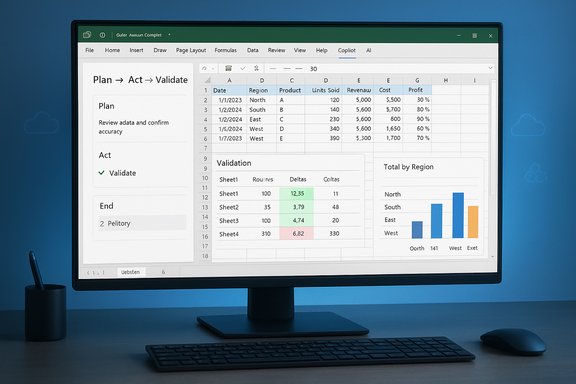
- The agent generates a validation sheet that reconciles row counts and highlights discrepancies between source sheets, surfacing mismatched transaction counts and row‑level anomalies.
- Reconciliation workflows are simplified: the agent flags transaction mismatches, summarizes differences, and can display first/last transaction dates and totals to give quick situational awareness.
- The brief praised the productivity gains — claiming “10x” improvements in common reconciliation and consolidation tasks — while noting opportunities for improvement such as automated validation of transaction amounts and more transparent formulas rather than indirect references.
How Agent Mode actually executes consolidation and validation (technical view)
Agent Mode is an orchestration layer that uses Excel’s native primitives — tables, formulas, PivotTables, Power Query where appropriate, and formatting rules — in combination with model‑driven planning. In practice, that means:- The agent recognizes table structures in each worksheet (Excel Tables or well‑formed ranges) and plans a merge into a unified table.
- It uses Excel formulas and table operations rather than embedding closed, opaque data blobs; the resulting workbook contains real formulas and tables you can inspect and edit.
- For validation, the agent can create summary sheets that count rows per source, compute reconciliation deltas, and highlight mismatches with conditional formatting or flagged rows. Microsoft describes this validation loop as a core experience: plan, execute, validate, and surface reasoning for human review.
- Agent Mode is web‑first (Excel for the web) and requires appropriate subscription/licensing; desktop parity follows preview channels.
- Many Copilot actions require files to be saved in OneDrive/SharePoint and for AutoSave to be enabled; local files are limited.
- Frontier participants can toggle underlying models (Anthropic’s Claude versus OpenAI models) for experimental validation, which influences reasoning style and may slightly change outputs. Admins control model provider permissions.
Step‑by‑step: a realistic workflow for consolidating credit‑card statements
Below is a representative sequence of actions Agent Mode will typically plan and execute for a common business task: consolidating multiple cardholder statements into one reconciled ledger.- Prepare source sheets: ensure each source statement is in an Excel Table or clearly labeled range.
- Launch Copilot → Tools → Agent Mode and submit a brief: for example, “Consolidate all cardholder sheets into a master transactions table; preserve headers; remove duplicate header rows; produce a validation sheet that reconciles row counts by cardholder and flag mismatched transactions.”
- Agent Mode analyzes the workbook and presents a plan (list of steps) in the pane for approval.
- On approval, the agent creates a new consolidated sheet:
- Converts ranges to Tables where missing.
- Appends table rows while normalizing column names and formats.
- Removes duplicated header rows discovered mid‑document.
- Agent Mode creates a validation sheet:
- Computes row counts per source and per consolidated grouping.
- Produces difference columns and highlights negative deltas.
- Optionally inserts first/last transaction date fields and a totals row for quick checks.
- The agent surfaces mismatched rows, and the user reviews flagged items, adds corrections, or requests the agent to re‑run a focused reconciliation (for instance, to match by transaction ID instead of exact amount).
Strengths: where Copilot’s Excel Agent Mode shines
- Speed on repetitive ETL tasks: Multi‑sheet consolidation, header normalization, and basic type conversion that used to require hours of painstaking formula work can be accomplished in minutes. The agent handles brittle manual steps (remove header rows, unify date formats, trim whitespace) reliably in many observed cases.
- Visible, auditable changes: Because the agent uses native Excel tables and formulas, the outputs are transparent and editable—operators can inspect formulas the agent wrote and see the plan before committing changes. That lowers the risk of silent, non‑traceable transformations.
- Built‑in validation loop: Agent Mode does not end at “create this table”; it runs reconciliation checks and surfaces discrepancies, which materially reduces the human time needed to find and triage mismatches. This is especially valuable in finance and operations workflows.
- Model and tooling flexibility: Frontier previews allow choice of model providers (Anthropic / OpenAI) and experimentation with different reasoning styles, which can be useful if your team prefers conservative summarization versus aggressive transformation. Admin gating lets IT control which agents and models run in the tenant.
- Lowered skill barrier: Non‑power users can generate fairly advanced data workflows without deep Excel expertise, democratizing tasks like month‑end reconciliations and cross‑sheet analyses. The agent’s explain‑and‑insert pattern helps users learn by inspection.
Risks, limitations, and governance gaps to watch
- Not a replacement for human review: Microsoft’s own benchmarks and guidance recommend human verification for high‑stakes reports. Agent Mode’s SpreadsheetBench results indicate performance improvements but not parity with expert human work in all cases. Do not auto‑publish agent‑generated financials without human sign‑off.
- Dependency on cloud storage and licensing: Many agent features require files to be saved to OneDrive/SharePoint with AutoSave on, and a Copilot‑eligible license or Frontier opt‑in. That creates deployment friction for organizations with local‑only datasets or constrained licensing budgets.
- Behavioral variability across model providers: Routing workloads to Anthropic vs OpenAI may produce different results; reproducibility over time requires versioning and snapshotting because model updates can change agent behavior. Maintain a process for recording agent runs and decisions.
- Potential for subtle numerical errors: The agent can create formula chains and indirect references that look correct but may fail edge‑case checks (e.g., missing duplicate transactions with unmatched micro‑amounts or currency formatting misinterpretations). The Geeky Gadgets brief flagged that transaction amount validation was an area for improvement; that criticism is valid: reconcile totals should be automatically validated at both row and aggregate levels. Where precision matters, require a dual‑entry or cross‑system reconciliation.
- Data governance and privacy concerns: Agent Mode processes workbook content in Microsoft’s cloud model pipeline. Organizations must confirm DLP policies, data residency, and contractual protections before enabling Frontier features across sensitive datasets. Admins should pilot with sanitized data and apply strict tenant controls where needed.
Practical governance checklist for IT and finance teams
- Licensing & access:
- Confirm which users/tenants have Copilot or Microsoft 365 Premium entitlements.
- Decide which groups can opt into Frontier features and which cannot.
- Storage & autosave:
- Require OneDrive/SharePoint storage and AutoSave for agent workflows you want to govern.
- Data classification:
- Tag sensitive workbooks and exclude them from Agent Mode until DLP assessments are complete.
- Change control & audit trails:
- Require human approval steps for agent‑generated reconciliations (a checklist or sign‑off cell).
- Save version snapshots before/after agent runs for reproducibility.
- Testing & acceptance:
- Run pilot validations with canonical datasets; compare agent outputs to baseline manual reconciliations.
- Model and connector controls:
- Decide whether to allow Anthropic/OpenAI routing; configure tenant controls and monitoring.
- Training & upskilling:
- Train power users on how to inspect formulas, interpret the agent’s plan, and validate totals.
Measured improvements and realistic expectations
Claims of “10x productivity” are compelling and useful as a marketing shorthand, but practical gains depend heavily on dataset cleanliness, task type, and governance posture. When source sheets are well‑structured tables with consistent schemas, consolidation and reconciliation tasks can be reduced from hours to minutes—yielding multiple‑fold improvements in throughput. However, for messy data (inconsistent headers, mixed date formats, embedded descriptive rows), the agent will still help, but the human-in-the-loop time shifts from mechanical reformatting to exception triage and validation.A realistic performance expectation:
- Clean, normalised datasets: 5–10x speed improvement in consolidation and reconciliation.
- Moderately messy datasets: 2–4x improvement after an initial human cleanup pass.
- Highly unstructured imports or regulatory reconciliations: modest improvement; agent helps with structure but human audit remains the bulk of the work.
Opportunities for product improvement (and what to ask for as a user)
- Add automated transaction‑amount validation in the validation sheet as a default: compare sums at source vs consolidated and highlight per‑transaction deltas beyond tolerance thresholds.
- Expose the agent’s chosen formula patterns in a more explicit audit trail (not just the plan but the exact formula tokens and their provenance).
- Provide a built‑in reconciliation template library for common workflows (bank statements, credit cards, AR aging) with configurable tolerance rules and reconciliation statuses.
- Allow exportable, machine‑readable execution logs that can be ingested into SIEM or GRC systems for compliance reporting.
- Offer on‑device or tenant‑isolated execution modes for sensitive environments where routing to third‑party models is restricted.
A short guide: how to pilot Agent Mode safely in your team
- Phase 1 — Discovery:
- Identify 2–3 repeatable reconciliation tasks (credit card consolidation, supplier invoice matching, monthly expense rollups).
- Create sanitized sample datasets and measure baseline manual completion times.
- Phase 2 — Controlled pilot:
- Enable Agent Mode for a small pilot group via Frontier or Insiders Beta.
- Run the same tasks with Agent Mode and document time saved, number of exceptions flagged, and types of errors discovered.
- Phase 3 — Governance & rollback:
- Implement the governance checklist above (storage, sign‑off, logs).
- Require a human sign‑off cell before agent changes are published to official reports.
- Phase 4 — Scale and train:
- Capture best practices, create internal templates, and train the broader team on how to inspect agent plans and formula outputs.
Conclusion: powerful acceleration with caveats
Copilot’s Agent Mode in Excel is a transformational productivity feature for anyone who spends time consolidating data, reconciling transactions, or building multi‑sheet reports. It brings auditable automation into a tool that has historically required manual formula work and brittle macros. When used with appropriate governance, Agent Mode can dramatically reduce time spent on repetitive ETL and reconciliation work, freeing analysts to focus on interpretation and exceptions.That said, it is not a silver bullet. Human oversight, robust DLP and licensing controls, reproducibility practices, and explicit validation rules remain essential. Product demonstrations and early user reports show reliable consolidation and useful validation artifacts, but organizations should test Agent Mode against their specific datasets and controls before handing it responsibility for mission‑critical reporting. The balance is clear: use Agent Mode to accelerate and democratize spreadsheet craftsmanship, but treat its outputs as collaborators' first drafts until you’ve validated them for your governance needs.
This article synthesizes a practical hands‑on perspective with Microsoft’s published capabilities and community reporting to give Windows users and IT managers a clear, actionable picture of what Copilot Agent Mode for Excel can do today—and what to watch for tomorrow.
Source: Geeky Gadgets MS Copilot’s Excel Agent Cleans, Validates & Speeds Checks : 10x Your Productivity
