

Microsoft’s latest Insider preview surfaces Agent Workspace — a contained, system-level environment that lets AI agents run under their own account and desktop so they can perform clicks, typing, app launches and file operations in parallel with a human user.
Microsoft is pushing Windows 11 toward what it calls an agentic future: OS‑level primitives that allow AI helpers to do, not just suggest. The company has begun previewing a collection of capabilities — grouped under Copilot Voice, Copilot Vision and Copilot Actions — and the Agent Workspace is the architectural core that enables these agentic automations on-device. Official documentation and blog posts describe Agent Workspace as a lightweight, runtime‑isolated Windows session where an agent runs under a distinct, low‑privilege Windows account and has a scoped set of permissions to access files and apps. The feature is currently gated behind an experimental toggle for Windows Insiders and Copilot Labs participants, and Microsoft emphasizes opt‑in defaults and staged rollouts while it gathers telemetry and feedback. Early reporting and forum previews indicate the preview exposes a Settings path such as Settings → System → AI components → Agent tools → Experimental agentic features; enabling the toggle provisions agent accounts and the workspace runtime on the device.
That said, the model expands attack surfaces and operational complexity. The usefulness of Agent Workspace will be determined less by its promise than by the quality of the permissions UX, the granularity of enterprise controls, the completeness of audit logs, and the robustness of signing/revocation workflows. Until those pieces are proven at scale, enterprises and security teams should test cautiously and establish policies before enabling agentic features from preview to production.
Agent Workspace is a major step toward making AI a proactive actor on the PC rather than a passive advisor. The architecture demonstrates thoughtful tradeoffs, but the real work is now: delivering UX clarity, enterprise integration, and hardened controls so agentic power becomes a productivity multiplier — not a new systemic risk.
Source: Analytics Insight Windows 11 Tests Agent Workspace, Bringing AI Closer to System-Level Control
 Background and overview
Microsoft is pushing Windows 11 toward what it calls an agentic future: OS‑level primitives that allow AI helpers to do, not just suggest. The company has begun previewing a collection of capabilities — grouped under Copilot Voice, Copilot Vision and Copilot Actions — and the Agent Workspace is the architectural core that enables these agentic automations on-device. Official documentation and blog posts describe Agent Workspace as a lightweight, runtime‑isolated Windows session where an agent runs under a distinct, low‑privilege Windows account and has a scoped set of permissions to access files and apps. The feature is currently gated behind an experimental toggle for Windows Insiders and Copilot Labs participants, and Microsoft emphasizes opt‑in defaults and staged rollouts while it gathers telemetry and feedback. Early reporting and forum previews indicate the preview exposes a Settings path such as Settings → System → AI components → Agent tools → Experimental agentic features; enabling the toggle provisions agent accounts and the workspace runtime on the device.What Agent Workspace actually is
A contained desktop with its own identity
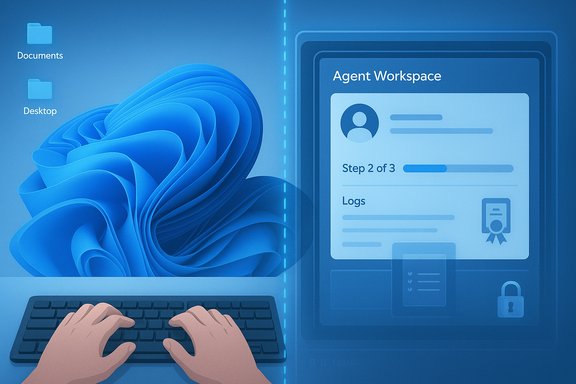
Agent Workspace is not a browser tab, plugin, or simple background process: it’s a separate Windows session tied to a distinct standard Windows account created specifically for an agent. That identity separation is central to Microsoft’s claim that agent actions will be auditable and distinguishable from user actions, enabling ACLs, Intune/MDM policy, and revocation to be applied at the agent principal level. Microsoft has described the workspace as a runtime isolation boundary that gives agents a desktop of their own while limiting visibility into the user’s primary session. The workspace is intended to be lightweight — more efficient than a full virtual machine for common UI automation tasks — with CPU and memory scaled by activity.How agents operate (the user‑facing flow)
In preview, the typical flow is:- Enable the experimental toggle in Settings (administrator permission required).
- Initiate a Copilot action (for example, “Organize my vacation photos, remove duplicates and make a summary doc”).
- Copilot provisions an Agent Workspace and runs the agent inside that contained session.
- The user watches step‑by‑step progress, can pause/stop the agent, or take over the workspace at any time.
Technical implementation notes
Independent coverage and Microsoft’s support documentation indicate the preview uses a separate Windows session (a Remote Desktop child session model in some briefings) rather than a full VM or Windows Sandbox instance. That design allows the agent to interact with apps’ UIs in parallel to the user while remaining session‑isolated. Agents are also cryptographically signed so the platform can validate and, if necessary, revoke an agent’s certificate.What Agent Workspace can do today (preview capabilities)
- Perform UI‑level automation: click, type, scroll, open apps, manipulate menus.
- Work on local files in scoped locations (initially known folders such as Documents, Desktop, Downloads, Pictures).
- Chain multi‑step workflows across desktop and web apps (e.g., extract tables from PDFs into Excel, batch‑process images, assemble files into a report and draft an email).
- Run continuously in the background when granted permissions, while providing visible logs and progress in the Agent Workspace UI.
Why Microsoft built Agent Workspace — the promised benefits
- Separation of identity and accountability. By making agents first‑class principals with dedicated accounts, the platform enables ACLs, logging, and enterprise controls that treat agents similarly to service accounts. This is a major design decision for governance and incident response.
- Human‑in‑the‑loop transparency. The visible Workspace UI and step‑by‑step logs are meant to keep users informed and able to intervene when an agent acts — critical for trust and usability.
- Performance vs. security tradeoff. A separate session (rather than a full VM) aims to provide reasonable isolation without the overhead of virtualization, making everyday automation practical on consumer hardware. Microsoft says hardware requirements don’t change for Windows 11, and the runtime is optimized to scale with activity.
- Scoped access and least privilege. Agents begin with minimal permissions limited to known folders and require explicit authorization to expand access. For cloud resources, standard OAuth connector flows are used to obtain consent. This preserves the principle of least privilege during early preview.
Critical security and privacy analysis — strengths and gaps
Strengths: platform‑level guardrails that matter
- Agent accounts and signing create enforcement points. Turning agents into named principals the OS can govern is meaningful. It lets administrators apply group policy, DLP, EDR and ACLs to agents independently of human users. That significantly improves enterprise manageability over ad‑hoc automation.
- Visible, interruptible execution reduces “silent action” risk. For many users, being able to watch each step and seize control reduces the danger of an assistant making irreversible changes without notice. The requirement for explicit confirmation on sensitive steps is a useful safeguard.
- Signed agents and revocation enable supply‑chain responses. If a third‑party agent is compromised, signature checks and certificate revocation provide a way to block and remediate at scale — an essential control for a platform where agents can act on many machines.
Gaps and attack surface expansions to watch
- Persistent background agents enlarge the threat model. Allowing agents to run continuously and access user folders (even if initially scoped) increases exposure. A long‑running agent that is compromised or misconfigured can be a vector for data exfiltration, file modification, or lateral movement. The risk is heightened on machines that mix personal and work data.
- Permission models must be granular and discoverable. Early reporting shows agents defaulting to access known folders; claims that some folders might be accessible without per‑action prompts appear in the wild. Microsoft’s documentation stresses explicit consent, but early hands‑on reports vary — this inconsistency warrants caution until permission dialogs and audit surfaces are finalized. Flag any claim of “default full access” as unverified unless Microsoft’s final docs confirm it.
- Human‑readable audit trails and forensic readiness are undecided. Agent actions must be clearly logged in formats consumable by SIEMs and EDRs. Microsoft indicates logs and non‑repudiation but enterprises will need to validate that logs include sufficient detail (who, what, when, which files) and that DLP/EDR policies can intercept or block agent actions. Until integration details with enterprise telemetry are published and tested, this is an area of operational risk.
- Cross‑prompt injection and prompt‑level attacks. Any agent that parses user files and executes plans is potentially susceptible to manipulated inputs (malicious documents that cause an agent to perform harmful actions). Microsoft has called out these agentic attack classes in its security discussions, but mitigation depends on model behavior controls and on‑device filtering — both evolving areas with no single silver bullet.
Practical security tradeoffs
The Agent Workspace model trades some strict containment (a full VM) for usability and performance. That tradeoff can be acceptable — if adequate compensating controls exist: enforced minimum permissions, explicit grant surfaces, clear per‑action confirmations, signed agents, robust logging, and strong enterprise policy integration. Where those compensating controls are immature, organizations should treat Agent Workspace as a new attack surface requiring policy, monitoring and testing.Enterprise and IT governance implications
Policy and configuration
IT teams will need new policies to manage agent principals:- Decide whether to enable Experimental agentic features at a device or OU level.
- Define allowed agent publishers and signers; maintain denial lists and revocation processes.
- Integrate agent identities with existing policy engines (Intune, GPO).
- Map agent access to DLP and EDR rules so agents are treated as distinct actors in alerts and response workflows.
Endpoint protection and detection engineering
Security teams must validate that endpoint protections can:- Detect anomalous agent behavior distinct from human users.
- Intercept and block file system calls originating from agent account contexts.
- Correlate agent audit trails into SIEM alerts and playbooks.
Data classification and least privilege
Because agents may access user content, organizations should:- Reclassify sensitive folders and apply stricter ACLs that deny agent accounts by default.
- Use separate work profiles or dedicated devices for high‑sensitivity workflows where agents are not permitted.
- Require per‑file or per‑folder consent flows for operations involving regulated data.
User guidance — how to approach Agent Workspace today
- Treat Agent Workspace as experimental. It is off by default and limited to Windows Insiders/Copilot Labs in preview. Only enable it on test devices or non‑sensitive personal machines until controls stabilize.
- Apply the principle of least privilege. Grant agents access only to the specific folders and files they need. Monitor the agent’s activity logs and revoke access immediately if anything unexpected appears.
- Watch for audit and confirmation behavior. If agents perform sensitive steps without clear prompts, treat that as a red flag and disable the feature until Microsoft clarifies consent flows. Several hands‑on reports differ on how prompts are surfaced, so verify behavior in your environment.
- Keep endpoint protections current. Ensure antivirus/EDR signatures and platform updates are applied; Microsoft plans to integrate agent signing with revocation mechanisms that EDRs can leverage.
How to evaluate Agent Workspace in a test plan (recommended steps)
- Join the Windows Insider program and enable Copilot Labs on a controlled test device.
- Opt into Experimental agentic features on an isolated machine and provision an Agent Workspace.
- Execute representative workflows (file processing, multi‑app sequences) and collect logs for forensic completeness: agent identity, API calls, file reads/writes, timestamps.
- Test negative cases and malicious inputs: malformed documents, link injections, and attempts at privilege escalation to assess resilience.
- Validate policy enforcement: deny agent accounts access to a protected folder and ensure actions are blocked and logged.
- Measure resource impact on foreground performance for typical user workloads.
Broader product and market implications
Windows is positioning itself as a platform where AI is not just a cloud service but a first‑class OS capability that can act locally. That shift has strategic advantages:- It preserves the PC’s role as a productivity hub by automating repetitive, multi‑app tasks that are otherwise manual.
- It creates a new extension model for third‑party developers to build agentic apps that operate in a controlled, system‑governed way.
- It differentiates Windows in the ongoing platform race where Apple and Google are also advancing integrated AI features for their ecosystems.
Where reporting and the documentation diverge — flagged uncertainties
Multiple independent reports and early hands‑on writeups align on the broad design choices: agent accounts, workspaces, scoped known folders, signing and opt‑in toggles. However, there are discrepancies in early coverage about defaults and the exact set of folders agents may access without per‑action prompts. Some outlets have suggested broader default access to media folders, while Microsoft’s docs emphasize explicit consent and restricted known folders during preview. Until Microsoft finalizes UX and consent dialogs, any hard claim that agents "automatically get access to Documents and Desktop by default" should be treated cautiously. Another area still evolving is the exact isolation mechanism. While Microsoft and BleepingComputer describe use of Remote Desktop child sessions, the low‑level plumbing and its interaction with existing sandboxing or VM features may change during development; that implementation detail matters for advanced threat modeling and forensics. Treat session architecture descriptions as provisional until Microsoft ships stable SDKs and admin tooling.Final assessment — pragmatic optimism with disciplined skepticism
Agent Workspace is the clearest evidence yet that Microsoft intends to make Windows 11 an agentic OS — one where AI can act on behalf of users at the system level. The architecture Microsoft has sketched balances usability and control: identity separation, runtime isolation, signed agents, visible execution, and scoped permissioning are sensible building blocks for trustworthy automation.That said, the model expands attack surfaces and operational complexity. The usefulness of Agent Workspace will be determined less by its promise than by the quality of the permissions UX, the granularity of enterprise controls, the completeness of audit logs, and the robustness of signing/revocation workflows. Until those pieces are proven at scale, enterprises and security teams should test cautiously and establish policies before enabling agentic features from preview to production.
Quick checklist for Windows users and IT teams
- Keep the feature off on production or sensitive devices until controls and enterprise‑grade auditing are validated.
- Test in a sandboxed Insider lab: join Copilot Labs and validate agent UX and logs.
- Define policy: permitted agent publishers, allowed folders, and revocation procedures.
- Monitor agent telemetry: ensure SIEM/EDR ingest includes agent identity attribution and file operation detail.
- Educate end users: make clear what an agent can and cannot do, and how to pause or take over a workspace.
Agent Workspace is a major step toward making AI a proactive actor on the PC rather than a passive advisor. The architecture demonstrates thoughtful tradeoffs, but the real work is now: delivering UX clarity, enterprise integration, and hardened controls so agentic power becomes a productivity multiplier — not a new systemic risk.
Source: Analytics Insight Windows 11 Tests Agent Workspace, Bringing AI Closer to System-Level Control
