

Microsoft is quietly placing a new kind of helper inside Windows 11: an experimental Agent Workspace that lets AI agents run in a separate, permissioned desktop to open apps, click and type, and manipulate files on your behalf — all while promising visibility, revocable access, and auditable agent identities.
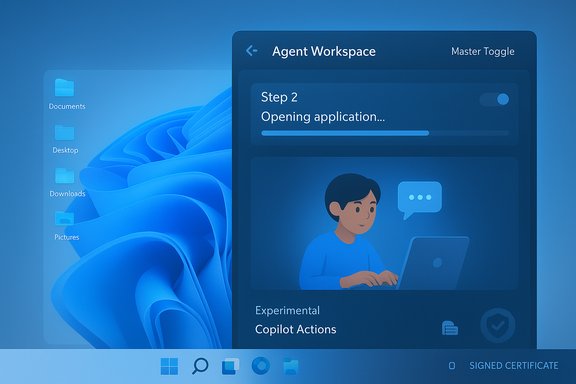
Microsoft’s Copilot evolution has been gradual but unmistakable: from an in‑OS chat assistant to voice, vision, and now agentic automation that can do rather than just suggest. The Agent Workspace is the platform primitive that underpins this shift — a lightweight, contained Windows session where an AI agent runs under its own account and completes multi‑step tasks in the background while the user continues to work. Microsoft describes the capability as experimental, opt‑in, and initially available in a private developer preview for Windows Insiders. In practice, Copilot Actions — the user‑facing experience that uses Agent Workspace — translates natural‑language instructions into a plan (open apps, click buttons, manipulate files) and executes it inside the workspace, showing step‑by‑step progress and giving the user the ability to pause, stop, or take control. The preview is deliberately conservative: features are off by default, access is scoped to common user folders, and agents run under distinct, signed accounts designed to be auditable and manageable by OS and enterprise controls.
Settings > System > AI components > Agent tools > Experimental agentic features.
Turning this on provisions the agent runtime, creates agent accounts when needed, and enables Copilot Actions flows surfaced through the Copilot app / Copilot Labs. Microsoft emphasizes the feature is off by default and that the rollout to Insiders is staged.
Agent Workspace is a pivotal experiment in the evolution of Windows as an “AI PC.” It pushes the OS from passive assistant to active automator while attempting to fold those powers into the familiar constructs of accounts, ACLs, and sessions. The coming months will determine whether Microsoft can make that transition both useful and safe; until then, careful testing, conservative policies, and informed consent are the prudent path forward.
Source: Gadgets 360 https://www.gadgets360.com/ai/news/...agentic-experiences-features-details-9657694/
 Background / Overview
Microsoft’s Copilot evolution has been gradual but unmistakable: from an in‑OS chat assistant to voice, vision, and now agentic automation that can do rather than just suggest. The Agent Workspace is the platform primitive that underpins this shift — a lightweight, contained Windows session where an AI agent runs under its own account and completes multi‑step tasks in the background while the user continues to work. Microsoft describes the capability as experimental, opt‑in, and initially available in a private developer preview for Windows Insiders. In practice, Copilot Actions — the user‑facing experience that uses Agent Workspace — translates natural‑language instructions into a plan (open apps, click buttons, manipulate files) and executes it inside the workspace, showing step‑by‑step progress and giving the user the ability to pause, stop, or take control. The preview is deliberately conservative: features are off by default, access is scoped to common user folders, and agents run under distinct, signed accounts designed to be auditable and manageable by OS and enterprise controls. What Microsoft announced — the essentials
What an Agent Workspace actually is
- A contained, runtime‑isolated desktop session where an agent executes UI automation (click, type, scroll), runs apps, and processes files independently of your interactive session. Microsoft positions this as lighter than a full virtual machine but stronger than in‑process automation.
- Agent accounts — each agent runs under a dedicated standard (non‑admin) Windows account so its actions are distinct in logs, ACLs, and policy enforcement. Treating agents as first‑class principals allows administrators and the OS to apply familiar governance controls.
- Scoped file access — agents start with access to a limited set of user folders (commonly known folders such as Documents, Desktop, Downloads, Pictures, and in some reports Music and Videos) and must request explicit permission for anything beyond that. The exact list reported in previews varies slightly across early hands‑on accounts.
- Signing and revocation — agents are expected to be cryptographically signed so Windows and enterprise defenses can revoke or block compromised agent binaries.
Where to enable it (preview path)
The experimental toggle is surfaced in Settings at:Settings > System > AI components > Agent tools > Experimental agentic features.
Turning this on provisions the agent runtime, creates agent accounts when needed, and enables Copilot Actions flows surfaced through the Copilot app / Copilot Labs. Microsoft emphasizes the feature is off by default and that the rollout to Insiders is staged.
How it works — technical anatomy and user flow
Agent lifecycle and runtime isolation
When a Copilot Action is requested, Windows can provision an Agent Workspace and an associated agent account. The workspace is implemented as a separate Windows session — sometimes described as a Remote Desktop child session — that provides a distinct desktop, process space, and windowing environment for the agent to operate in parallel to the user’s session. This approach aims to balance responsiveness with isolation: lighter than hypervisor VM isolation, but giving a visible containment boundary you can observe and interrupt.Identity and auditing
Because each agent runs under its own account, agent actions are attributable and can be audited in the same way as human or service account actions. That enables administrators to apply ACLs, DLP policies, Intune/MDM controls, and SIEM logging to agent principals separately from the logged‑in user. This is a critical change: it brings agent governance into established enterprise workflows rather than relying on opaque app‑level permissions.Permission model and user controls
- Master opt‑in toggle in Settings.
- Per‑operation consent: agents request access to files/folders and will ask for explicit permission for sensitive steps.
- Visible, human‑in‑the‑loop execution: the Agent Workspace shows step‑by‑step activity and exposes pause/stop/takeover controls.
- Revocation and trust controls via signing and certificate management.
Early capabilities and practical examples
Microsoft and early previews demonstrate productivity patterns aimed at repetitive, cross‑app chores:- Batch image edits: resize, convert formats, deduplicate, and group photos into collections.
- Data extraction: extract tables or structured data from PDFs into Excel or other Office formats.
- File assembly: gather documents and images, assemble a report (Word/PowerPoint), and prepare an email with attachments.
- Multistep UI automation: filling multi‑page web forms or orchestrating sequences across desktop and web apps where APIs don’t exist.
Independent confirmation and rollout status
Multiple reputable outlets and Microsoft’s own documentation corroborate the core claims: the Agent Workspace concept, the Settings toggle for Experimental agentic features, and the opt‑in, staged rollout through Windows Insider and Copilot Labs channels. Microsoft’s support page explicitly describes Agent Workspace as a separate contained space for agents and confirms the private developer preview availability for Insiders. Independent reporting from PCWorld, BleepingComputer, and others confirms the Settings path, the visible workspace model, and the requirement that Copilot Actions be toggled on and gated behind Insider/Copilot Labs participation. These independent sources also reinforce that availability is staged and not yet broadly distributed.Security and privacy analysis — strengths
Microsoft’s preview architecture embeds several meaningful defensive patterns that improve the baseline risk posture for agentic automation:- Identity separation with agent accounts: making agents first‑class principals lets the OS and administrators apply policy and auditing in familiar ways. This is a practical and significant improvement over ad‑hoc automation processes that run under the user account.
- Visible, interruptible execution: showing the agent’s desktop and step‑by‑step actions reduces surprises and gives users a direct control point to stop or take over operations, strengthening transparency.
- Least‑privilege default and scoped file access: beginning with known folders and requiring explicit permission uplift limits the immediate data exposure surface during preview. This approach narrows the blast radius for early testing.
- Signing and revocation: requiring cryptographic signatures for agents introduces a revocation path for compromised or malicious agents, enabling coordinated responses from Microsoft and security tooling.
- Phased, opt‑in preview model: gating the feature behind a master toggle, Insider channels, and Copilot Labs lets Microsoft collect telemetry and harden controls before mass deployment. That conservative rollout is appropriate for a feature that materially changes what software on your PC can do.
Risks, gaps, and practical concerns
Despite the guardrails, agentic automation introduces new attack surfaces and usability risks that deserve close scrutiny.1) Data exfiltration and cross‑prompt injection
Agents that can read and interact with local files, even in known folders, create opportunities for exfiltration if an agent is compromised or misbehaves. Microsoft warns of risks including hallucinations and cross‑prompt injection attacks that could lead to unexpected outputs or, in worst cases, malware installation. These are not theoretical concerns — agents that can click and type can be manipulated to open external content, exfiltrate text, or execute secondary workflows if the platform’s confirmation mechanisms fail. Microsoft lists such risks in its preview security guidance.2) Supply‑chain and signing limits
Signing adds a revocation capability, but attackers have a track record of abusing legitimate signing channels or finding ways to run unsigned code via privilege escalation. The real security benefit depends on robust certificate lifecycle management, effective revocation propagation, and endpoint controls (EDR, DLP) that can reliably interpose on agent actions. The preview documents promise signing but operationalizing it across third‑party agents and enterprise deployments will be non‑trivial.3) Privacy and telemetry ambiguity
Microsoft affirms privacy commitments, but preview documentation does not yet comprehensively detail how data an agent reads on‑device will be used for telemetry or model improvement, particularly where cloud reasoning is involved. Some heavy reasoning may offload to cloud models unless the device qualifies as Copilot+ hardware with local NPUs; users and admins need explicit clarity on data flows, retention, and opt‑outs. That gap is flagged in early reporting and remains an open governance question.4) Resource usage and background activity
Early testers report agents can remain active in the background and consume CPU, memory, or NPU cycles depending on the workload. On devices without dedicated NPUs or with constrained hardware, agents may impact foreground performance. Microsoft claims no change to Windows 11 hardware requirements, but real‑world performance effects will vary by device and workload and must be measured at scale.5) Usability, accidental consent, and social engineering
The master toggle helps, but users may still unintentionally grant permissions (e.g., by attaching folders to a Copilot action or clicking through prompts). Agents that can operate across apps amplify the consequences of social engineering: a maliciously crafted prompt or a compromised agent could attempt to coax additional permissions or open sensitive content. Strong consent UX, friction for high‑risk actions, and enterprise policy defaults will be essential mitigations.Recommendations for users and administrators
If you’re an everyday Windows 11 user or an IT admin evaluating Agent Workspace and Copilot Actions for your environment, consider the following practical guidance.For individual users
- Keep the feature off by default unless you understand the model and are comfortable with the permissions requested. Microsoft ships it disabled for a reason.
- If you enable the toggle, only grant access to folders you intentionally want the agent to manipulate (Documents, Desktop, Downloads, Pictures, etc.. Treat access as you would any app permission.
- Monitor Agent Workspace activity and use pause/stop/takeover controls to inspect what the agent is doing. Don’t leave unattended tasks touching highly sensitive content.
For IT administrators
- Treat agents like service accounts: apply ACLs, DLP rules, and Intune policies to agent principals where possible. Plan to integrate agent auditing into your SIEM workflows.
- Start by limiting or disabling the feature in enterprise images until Microsoft and your security stack provide mature integrations for DLP, EDR, and certificate revocation. Staged pilot programs will reveal real‑world behavior.
- Demand clear vendor commitments on signing, revocation propagation, telemetry handling, and on‑device vs cloud inference for any third‑party agents you allow in your estate. Without those guarantees, the supply‑chain risk remains significant.
What to watch in future releases
- Detailed privacy/telemetry disclosures: how agents handle local data, whether content is persisted, and the conditions under which on‑device context is sent to cloud LLMs. This needs explicit documentation and per‑action consent UX.
- Enterprise integrations: DLP, EDR, Intune, Entra/MSA hooks for agent accounts, and certificate lifecycle tooling so organizations can rapidly revoke a compromised agent.
- Fine‑grained policy controls: ability to whitelist/blacklist agents, restrict folder scopes centrally, and require admin approval for high‑risk agent tasks.
- Performance profiles: clearer guidance for low‑powered devices and behavior when NPUs are present or absent. Microsoft’s claim that hardware requirements are unchanged will need validation across many hardware classes.
Final analysis — promise vs. peril
Agent Workspace represents a foundational shift in what an operating system can allow an assistant to do on a user’s behalf. The promise is compelling: real productivity gains from automations that span apps, improved accessibility for users who struggle with complex UIs, and a platform that treats agents as governable principals rather than opaque processes. Microsoft’s early design choices — separate agent accounts, visible runtime isolation, scoped folder access, and signing — are meaningful steps toward a defensible architecture for agentic automation. But the stakes are high. Giving software the ability to click, type, and open files creates novel attack surfaces. The decisive question is not whether agents can be convenient — they can — but whether the governing controls, telemetry transparency, enterprise integrations, and UX safeguards will mature fast enough to mitigate misuse, data leakage, and supply‑chain abuse. For now, Microsoft’s phased, opt‑in preview is the right approach: it lets real‑world testing surface the hard edge cases before a broad rollout. Users and admins should treat the feature with healthy caution, pilot it in controlled settings, and insist on clear answers about data handling and revocation promises before enabling agentic automation at scale.Agent Workspace is a pivotal experiment in the evolution of Windows as an “AI PC.” It pushes the OS from passive assistant to active automator while attempting to fold those powers into the familiar constructs of accounts, ACLs, and sessions. The coming months will determine whether Microsoft can make that transition both useful and safe; until then, careful testing, conservative policies, and informed consent are the prudent path forward.
Source: Gadgets 360 https://www.gadgets360.com/ai/news/...agentic-experiences-features-details-9657694/
