

AI-powered anime character creation has reached the point where anyone with an idea—and a few well‑crafted words—can produce polished, anime‑style visuals and build a character’s personality, backstory, and scenes without traditional drawing skills.
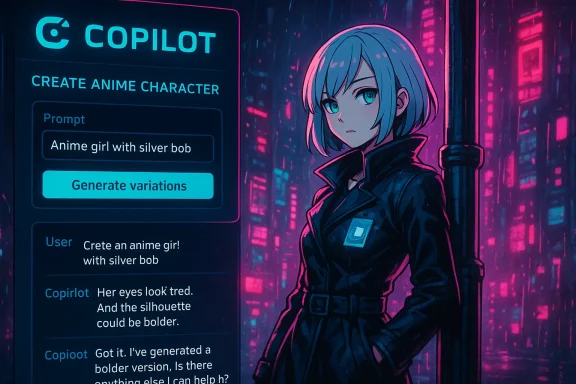
AI anime generators convert natural‑language prompts into visuals that mimic anime aesthetics: linework, exaggerated facial features, stylized hair, and genre cues such as “shōnen” or “slice‑of‑life.” These systems combine large‑scale image and text models trained on millions of images and captions, mapping words like “glowing cyan eyes” and “ragged leather jacket” to recognizable visual patterns. Microsoft’s Copilot ecosystem brings an important twist: it pairs image generation with conversational refinement, letting you iterate on a character through back‑and‑forth prompts rather than starting from scratch each time.
This fusion—text-to-image plus an interactive assistant—reframes creative work as a dialogue. Instead of repeating prompt rewrites in a separate generator, you describe, review, and refine within a single Copilot session. Microsoft has integrated these capabilities into tools such as Copilot in Paint (Cocreator), Copilot Designer, and broader Copilot experiences, which offer generative fill, style controls, and provenance features intended to make creation easier while attempting to address safety and authenticity concerns.
Prompt scaffold:
Keep the first prompt focused on the character’s silhouette and emotional core; it’s easier to add visual detail later than to remove clutter.
When inspecting outputs, prioritize composition, expression, and pose over minute details. Ask targeted follow-ups such as:
“Character: Rei Kōzuki — silver bob, cyan eyes, left cheek scar, height 165 cm, winter trench.”
Then append specific requests:
Practical checklist before you publish or monetize an AI‑generated anime character:
Source: Microsoft How to Create Characters with AI Anime Generators | Microsoft Copilot
 Background
AI anime generators convert natural‑language prompts into visuals that mimic anime aesthetics: linework, exaggerated facial features, stylized hair, and genre cues such as “shōnen” or “slice‑of‑life.” These systems combine large‑scale image and text models trained on millions of images and captions, mapping words like “glowing cyan eyes” and “ragged leather jacket” to recognizable visual patterns. Microsoft’s Copilot ecosystem brings an important twist: it pairs image generation with conversational refinement, letting you iterate on a character through back‑and‑forth prompts rather than starting from scratch each time.This fusion—text-to-image plus an interactive assistant—reframes creative work as a dialogue. Instead of repeating prompt rewrites in a separate generator, you describe, review, and refine within a single Copilot session. Microsoft has integrated these capabilities into tools such as Copilot in Paint (Cocreator), Copilot Designer, and broader Copilot experiences, which offer generative fill, style controls, and provenance features intended to make creation easier while attempting to address safety and authenticity concerns.
What an AI anime generator actually does
AI anime generators perform three core tasks:- Interpret a prompt: the model parses nouns (subject), adjectives (appearance), context (setting), and stylistic labels (genre, era).
- Synthesize visual concepts: it maps linguistic tokens to learned visual features—hair shapes, shading styles, eye designs—and composes them into an image.
- Offer variations and refinements: most systems can produce multiple outputs, re‑seed results, or apply edits via masks and generative fill.
Why use Copilot for anime characters
Copilot’s selling points for character work are practical and creative:- Conversational refinement: Instead of disjointed prompt-and-retry loops, Copilot lets you refine a character through questions like “make the eyes more tired” or “try a bolder silhouette,” preserving context so each change feels incremental and coherent.
- Integrated tooling: Copilot features such as generative fill and style selection are embedded in familiar apps (Paint, Designer), lowering the friction between ideation and final output.
- Provenance and safety: Copilot implements content filtering and content‑credentials (C2PA manifests) in its workflow and will often run safety checks in the cloud while allowing on‑device generation on supported Copilot+ PCs.
- Unified storytelling space: You can create the visual, then immediately ask Copilot to write the character’s backstory, outline a manga chapter, or draft dialogue, keeping visual and narrative work tightly coupled.
Step‑by‑step: create an anime character with Copilot (expanded)
Below is a pragmatic, repeatable workflow you can follow to generate high‑quality anime characters and convert them into usable assets.Step 1 — Start with a vivid scaffolding prompt
Begin with a concise, descriptive prompt that covers high‑impact traits: silhouette, hair, eyes, clothing, color accents, expression, and genre. Keep it concise but specific—think 15–40 words.Prompt scaffold:
- Subject + age/role: “teenage detective”
- Key visual traits: “silver bob haircut, asymmetric bangs”
- Clothing and props: “leather trench coat, holo-badge”
- Expression and pose: “sardonic smirk, leaning on a lamppost”
- Style and lighting: “neon cyberpunk palette, cel‑shaded, anime 3/4 view”
Keep the first prompt focused on the character’s silhouette and emotional core; it’s easier to add visual detail later than to remove clutter.
Step 2 — Generate and inspect
Ask Copilot to render several variations. Use the “Make 4 variations” or “Regenerate” approach to sample the model’s interpretation space.When inspecting outputs, prioritize composition, expression, and pose over minute details. Ask targeted follow-ups such as:
- “Make the eyes narrower and more tired.”
- “Switch the color accent from cyan to magenta.”
- “Try a softer line weight and pastel palette.”
Step 3 — Focused edits and compositing
Use generative fill or selection tools for local edits. For example:- Mask the jacket area and request “add silver buckles and a shoulder pauldron.”
- Replace background via “swap lamppost scene for rainy alley with neon signs.”
Step 4 — Batch consistency and character sheets
For a character sheet (turnaround, expressions, outfits), maintain a single session and reuse a consistent prompt prefix that defines identity attributes. Example prefix:“Character: Rei Kōzuki — silver bob, cyan eyes, left cheek scar, height 165 cm, winter trench.”
Then append specific requests:
- “Rei Kōzuki — front view, neutral expression.”
- “Rei Kōzuki — 3/4 view, determined expression.”
- “Rei Kōzuki — casual outfit, smiling.”
Step 5 — Turn visuals into narrative
Ask Copilot to generate a backstory, voice lines, or a short scene. Example: “Write a 500‑word scene of Rei discovering her first holo‑badge, focusing on sensory details and internal conflict.” Copilot can also suggest names, relationships, and episode outlines.Prompt recipes and templates
- Minimal base prompt (fast prototyping): “Anime girl, shoulder‑length pink hair, star hairclip, cheerful, pastel colors, headshot.”
- Genre switcher: “Same character but reimagine as dark fantasy: tattered cloak, moonlit, muted palette, ethereal glow.”
- Style anchor + negative tags: “Shōjo manga linework, high contrast, soft blush—no photorealism, no text, avoid over‑saturated neon.”
- Avatar for streaming (tight crop): “Clean headshot, 512×512, transparent background, simple expression, high contrast lines.”
- VTuber rig prep: “Neutral T‑pose, turnarounds at 0°/90°/180°, clear arm separation, layered clothing.”
Practical tips for better AI anime results
- Start broad then refine. A short base prompt plus iterative adjustments yields more control than one over‑detailed prompt.
- Use style labels carefully. Terms like “shōnen,” “shōjo,” “mecha,” or “Studio‑inspired” steer the model but can trigger safety filters or reproduction of recognizable styles; prefer genre descriptors over named living artists when possible.
- Control composition with simple camera and lighting cues. “3/4 view,” “three‑quarter profile,” “rim light,” and “soft fill” are informative and reproducible.
- Use sketches or masks to lock poses. If you want precise anatomy or a consistent silhouette, provide a rough sketch as input.
- Iterate for continuity. When you need multiple images of the same character, keep a single Copilot session/context and reuse key identity attributes.
- Watch for hands, text, and logos. AI generators still produce malformed hands and nonsensical text. If the image will be used in branding, pay close attention to these areas and use masks or manual corrections.
- Save prompt history and exports. Keep a log of prompts and edits—useful for reproducibility, provenance, and later edits.
- Use C2PA provenance where available. Copilot adds content credentials to generated images in some workflows; preserve the manifest to document creation provenance.
Post‑processing and making the character yours
Raw AI output is a starting point. To make a character usable in projects, follow these production steps:- Clean up in a raster editor: fix anatomy, remove artifacts, and tidy edges.
- Redraw or trace key lines for crisp vector art if you plan to scale the asset.
- Add bespoke elements: unique tattoos, insignia, or hand‑drawn shading that signal human authorship.
- Create multiple states (expressions, outfits) and assemble a character sheet for easy reference.
- Export layered PSDs or vector files for game engines, VTuber rigs, or print.
Legal and ethical considerations (what creators must know)
AI art sits at a legally and ethically complex intersection. Key realities:- Human authorship is central. Major copyright authorities have repeatedly stated that purely machine‑generated works—where the human role is limited to prompts—are unlikely to qualify for copyright protection. If you expect to register or assert exclusive rights, add demonstrable human creative input: redraw lines, integrate original backgrounds, or substantially transform the output.
- Training data issues and style imitation. AI models are trained on massive image datasets that can include copyrighted works. Producing outputs that closely replicate a living artist’s recognizable style or a specific copyrighted character can expose you to infringement risk. Governments and industry groups have flagged this problem, and rights holders are actively pushing for tools and policies to prevent unauthorized style replication.
- Platform and enforcement variance. Moderation and IP enforcement on art marketplaces and social platforms are inconsistent. Many systems flag exact matches but struggle to detect stylistic derivatives. That means an AI‑generated fan image might remain available until manually reported.
- Commercial use risks. Selling merchandise or commercializing an AI image increases exposure to takedowns and legal claims. Even if a tool’s terms state you can use generated images commercially, underlying copyright and trademark laws still apply.
- Privacy and misrepresentation. Avoid generating images that impersonate living people, especially minors, or that infringe on personal privacy and publicity rights.
- Safety and content policy. Copilot and similar systems implement filters against hateful, explicit, or harmful content—but filters are imperfect. You are ultimately responsible for how you use generated imagery.
Risks, limitations, and governance
- Style drift and inconsistency. When producing multiple images of a single character, the model may alter proportions, scars, or small identifiers across generations. Rigorous prompt prefixes and reference images mitigate this but don’t eliminate it.
- Hallucinated details. AI can invent logos, marks, or text that looks plausible but is meaningless—or worse, replicates a real trademark unintentionally.
- Anatomy and fine detail errors. Hands, fingers, and complex poses are recurring failure modes.
- Policy and platform changes. Generative‑AI rules, platform licensing, and national policy are evolving fast. What’s permitted or technically supported today may change, so avoid treating tool outputs as permanent legal cover.
- Ethical questions about labor and style. Artist communities and policymakers continue to debate whether training on scraped art without consent is fair. Respect community norms and err on the side of attribution, compensation, or avoiding close mimics of living artists.
Advanced workflows and use cases
Building a VTuber avatar
- Generate a headshot + neutral pose + turnarounds in a single Copilot session.
- Export layered files; redraw inner mouth and eyelids for rigging.
- Create expression sheets and mouth visemes for live lip sync.
- Composite in a streaming rig (OBS, VTube Studio), keeping C2PA manifest if provenance matters.
From concept art to manga page
- Use Copilot to design characters, then ask it to outline a three‑page manga scene.
- Generate multiple panel thumbnails, refine the camera angles, and export high‑res panels.
- Redraw panel linework by hand for legal clarity and stylistic consistency.
Game NPC generator
- Create a prompt template for NPC archetypes (“merchant, grizzled, 45, scarred”), batch‑generate faces, then tweak outfits and props.
- Tag each file with metadata (role, voice, stats) kept in your project asset database.
Troubleshooting common problems
- Output too noisy or overstuffed: simplify the prompt; remove secondary adjectives.
- Inconsistent character details across images: use a single session and a fixed identity prefix; provide a reference image.
- Bad hands or text: mask and regenerate specific areas; redraw text by hand.
- Style too derivative: swap explicit style names for broader descriptors (e.g., “classic 1990s cel shading” instead of a living artist’s name).
- Low contrast or flat lighting: add lighting cues (“rim light,” “strong three‑point lighting”) to prompt.
Where Copilot shines and where human craft still matters
Copilot is exceptionally useful for:- Rapid ideation and iteration of character looks.
- Producing multiple stylistic variations quickly.
- Converting a visual idea into a narrative or scene outline in the same session.
- Lowering the barrier for non‑artists to prototype avatars, covers, and concept art.
- Delivering consistent series art across many images (professional comic pages, animation assets).
- Crafting legally defensible, original artwork with clear creative authorship.
- Making nuanced artistic decisions about composition that hinge on cultural or emotional subtleties.
- Final quality control: fixing anatomical issues, refining linework, and ensuring brand alignment.
Final takeaways and responsible practice
AI anime generators transform how characters are conceived and iterated—but they are tools, not replacements for artistic judgment. Microsoft Copilot’s conversational approach and integrated image tools accelerate ideation and sketching, while features like generative fill and content credentials help manage provenance and safety. However, creators must remain vigilant: copyright and style‑use rules are unsettled; models can reproduce or approximate copyrighted content; and outputs often require human finishing to be legally and artistically robust.Practical checklist before you publish or monetize an AI‑generated anime character:
- Do an IP audit: ensure no trademarks, logos, or unmistakable likenesses are present.
- Add human creative work: redraw, recompose, or add original elements to meet human‑authorship standards.
- Keep prompt and edit logs for provenance and potential disputes.
- Use content credentials and preserve manifests when available.
- Review the tool’s current terms of service and your local laws before commercial use.
- Consider contacting an IP attorney for high‑value projects.
Source: Microsoft How to Create Characters with AI Anime Generators | Microsoft Copilot
