

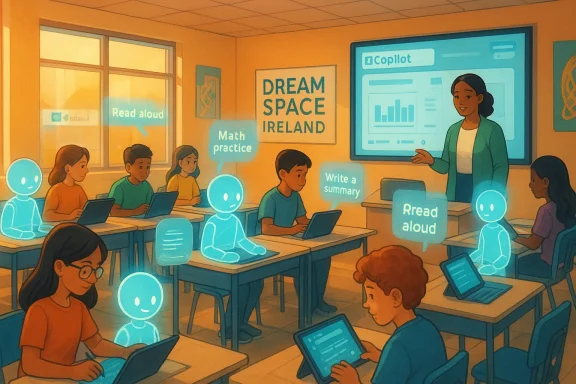
The classroom of 2026 looks less like a single physical stage and more like an expanding ecosystem — one where teachers deploy AI assistants, students engage with adaptive tutors, and lesson plans are modular, data-infused and continuously iterated.
The story of AI in schools is no longer theoretical. Across Ireland and beyond, educators are piloting and adopting tools that promise to reduce administrative overhead, personalise learning and introduce students to the digital literacy they will need in the workforce. Microsoft’s Dream Space teacher programmes and a wave of new education-focused features in Microsoft 365 — including Copilot-powered experiences and the company’s newly announced Elevate for Educators initiative — are both emblematic of that shift and a driver behind it. These programmes pair classroom case studies with survey research showing high levels of teacher interest in AI, but also large gaps in training and confidence that must be bridged.
This feature examines how teachers are using AI now, what the most tangible benefits look like, where the pedagogical and equity risks appear, and what school leaders and IT teams must do to get implementation right. It draws on Microsoft’s Dream Space narrative and broader coverage of Microsoft’s global educator initiatives, while setting those developments against independent reporting and education-industry analysis.
Independent education press and analyst coverage has echoed the same themes while adding scrutiny about how training is delivered and which educators are being reached. Coverage of Microsoft’s global Elevate for Educators programme shows the company moving to provide industry-recognised credentials, global communities of practice, and education-specific Copilot features intended to reduce friction for teachers. Independent reporting highlights that corporate programmes can expand access quickly, but outcomes depend heavily on how training is contextualised and assessed at the school level.
1.) Establish a clear policy framework first. Define acceptable use, data-handling rules, and a sign-off process for teacher-configured agents.
2.) Start with teacher-led pilots. Use structured PD (professional development) sessions, mentorship cohorts and time-bound trials to build evidence before scaling.
3.) Insist on enterprise data protections and admin controls. Use vendor features that support document-level access permissions, activity logs and exportability.
4.) Rework assessment to focus on artefacts that demonstrate thinking and application (projects, portfolios, oral exams, live demonstrations).
5.) Create a support structure: one or two teacher ‘AI champions’, a central IT contact, and a district-level curriculum advisor to align prompts and outputs to standards.
6.) Monitor outcomes, not features: measure time saved on admin, changes in pedagogical time, student engagement and differential attainment across cohorts.
These steps align with both Microsoft’s Dream Space emphasis on teacher capacity-building and independent recommendations for staged, evidence-focused rollouts.
Why this matters: scalable, well-structured PD reduces variance in implementation quality. But success depends on local adaptation — credentials are useful, but cannot replace contextualised CPD that embeds AI practice into everyday classroom decision-making.
The classroom beyond the blackboard is not an AI utopia or dystopia; it is a design problem. When schools design with teachers and learners at the centre — insist on data protections, measure real educational outcomes, and invest in teacher judgement — AI becomes a powerful assistant for the long, human work of learning.
Source: Microsoft Source Beyond the blackboard: How AI is empowering teachers and students in the classroom - Source EMEA
 Background / Overview
The story of AI in schools is no longer theoretical. Across Ireland and beyond, educators are piloting and adopting tools that promise to reduce administrative overhead, personalise learning and introduce students to the digital literacy they will need in the workforce. Microsoft’s Dream Space teacher programmes and a wave of new education-focused features in Microsoft 365 — including Copilot-powered experiences and the company’s newly announced Elevate for Educators initiative — are both emblematic of that shift and a driver behind it. These programmes pair classroom case studies with survey research showing high levels of teacher interest in AI, but also large gaps in training and confidence that must be bridged.This feature examines how teachers are using AI now, what the most tangible benefits look like, where the pedagogical and equity risks appear, and what school leaders and IT teams must do to get implementation right. It draws on Microsoft’s Dream Space narrative and broader coverage of Microsoft’s global educator initiatives, while setting those developments against independent reporting and education-industry analysis.
How teachers are using AI today
From lesson prep to out-of-hours tutoring
Teachers report using AI in two broad ways: as a time-saver for planning and administration, and as a learning support that augments classroom instruction. In practical terms, that looks like:- AI-assisted lesson planning and differentiation (generating standards-aligned lesson outlines, starter activities, and one-pagers).
- Automated marking supports and formative-checkpoint generation (scaffolding feedback on written work and practical tasks).
- On-demand student-facing assistants configured to the local curriculum (student study agents that can answer targeted questions and provide worked examples outside class time).
Real classroom example (a practitioner’s view)
In published classroom vignettes, teachers describe a shift in where they invest their professional energy. Instead of spending hours on repetitive admin tasks and handout creation, they use AI to draft materials and then spend the saved time on pedagogical design and direct student support. For many teachers, that change is felt as a return to the core of teaching: diagnosing confusion, modeling thinking, and coaching students through practice. These are practitioner-reported outcomes rather than controlled trial results, and so they should be interpreted as promising evidence rather than conclusive proof.The evidence: what researchers and surveys say
Microsoft’s recent survey work in Ireland — titled “Digital Learning in the Era of AI” — reported strong adoption of digital tools among teachers: 87% said they already use digital technologies to improve productivity and classroom time, and 72% said they supported increased use of AI tools in the classroom. At the same time, 83% said they lacked formal AI training, underscoring a readiness-experience gap. These headline figures reveal both momentum and a clear implementation barrier: teachers are interested, but the training that makes use safe, effective and equitable is widely missing.Independent education press and analyst coverage has echoed the same themes while adding scrutiny about how training is delivered and which educators are being reached. Coverage of Microsoft’s global Elevate for Educators programme shows the company moving to provide industry-recognised credentials, global communities of practice, and education-specific Copilot features intended to reduce friction for teachers. Independent reporting highlights that corporate programmes can expand access quickly, but outcomes depend heavily on how training is contextualised and assessed at the school level.
What’s changing in the tools (features to watch)
Microsoft Dream Space and teacher academies
Dream Space is an immersive, research-based STEM and AI learning hub run by Microsoft in Ireland. Its Teacher Academy offers structured, multi-week programmes that include prompt-engineering basics, responsible AI use, and hands-on classroom pilots. The model emphasises teacher confidence-building, community practice, and classroom-ready resources. For schools with limited in-house AI expertise, such programmes provide a pragmatic starting point for implementation.Microsoft 365 Copilot, Teach features and student agents
Microsoft has embedded new education-focused AI features into its productivity stack. These include Copilot-based lesson and resource creation tools, and previews of student-facing features described in recent product announcements (for example, Study & Learn-style agents designed to provide scaffolded practice). The aim: integrate AI into familiar teacher workflows (Word, Teams, OneNote) to reduce cognitive and administrative load rather than introduce new standalone apps. Independent reporting confirms Microsoft is promoting these education-specific capabilities and bundled educator supports as part of the broader Elevate push.Practical benefits observed in classrooms
- Faster resource creation: Teachers report producing clearer, more consistent materials in less time. That frees synchronous class time for interaction, discussion and tailored support.
- Personalisation at scale: AI helps adapt activities to different ability levels quickly (scaffolded worksheets, differentiated starter tasks), enabling blended groups to follow one teacher-led sequence while receiving tailored inputs.
- Student agency and revision: Configured study agents allow students to ask targeted questions after school hours; teachers report these reduce simple content queries and raise the quality of in-person engagement. These are teacher-reported benefits drawn from pilot programmes.
Risks and caveats: where things can go wrong
AI’s potential in education comes with real and diverse risks. Any school planning a rollout should evaluate and plan for the following core concerns.1) Accuracy, hallucination and false confidence
Generative models can produce fluent but incorrect information — a phenomenon known as hallucination. When AI-generated content is used for formative assessment or as a study aid, those errors can mislead learners. Teachers must vet and validate outputs, and systems should be configured to surface sources and confidence levels where possible. This remains a practical constraint on the use of large language models in high-stakes learning contexts.2) Unequal implementation and digital divides
Survey data shows adoption varies by region and school readiness. Where devices, connectivity, or teacher training lag, benefits concentrate in digitally advanced classrooms — deepening existing inequalities. National and district-level strategies should prioritise hardware provisioning, connectivity, and professional learning to avoid exacerbating gaps that already exist.3) Privacy, data governance and pupil safety
Using AI agents trained on school documents and student work raises questions about data residency, consent, and future reuse of pupil data. Schools must insist on enterprise-grade data protection, clear policies about what data is uploaded, and contractual guarantees from vendors about model training and derivative use. Technology alone doesn’t solve governance; clear board-level policies and parental engagement are required.4) Assessment integrity and the learning process
AI can both accelerate learning and shortcut it. If assessment systems do not evolve, there is a risk of students relying on AI to produce answers that mask genuine learning gaps. Educators must redesign assessment to value process, reflection and authentic tasks that require demonstration of skills beyond text generation. Independent commentators stress that assessment reform is a strategic priority, not a side project.How to implement responsibly: a pragmatic playbook
Below are practical steps for school leaders, IT directors and heads of department who want to pilot or scale AI in classrooms responsibly.1.) Establish a clear policy framework first. Define acceptable use, data-handling rules, and a sign-off process for teacher-configured agents.
2.) Start with teacher-led pilots. Use structured PD (professional development) sessions, mentorship cohorts and time-bound trials to build evidence before scaling.
3.) Insist on enterprise data protections and admin controls. Use vendor features that support document-level access permissions, activity logs and exportability.
4.) Rework assessment to focus on artefacts that demonstrate thinking and application (projects, portfolios, oral exams, live demonstrations).
5.) Create a support structure: one or two teacher ‘AI champions’, a central IT contact, and a district-level curriculum advisor to align prompts and outputs to standards.
6.) Monitor outcomes, not features: measure time saved on admin, changes in pedagogical time, student engagement and differential attainment across cohorts.
These steps align with both Microsoft’s Dream Space emphasis on teacher capacity-building and independent recommendations for staged, evidence-focused rollouts.
Training and credentials: Microsoft Elevate for Educators and what it means
Microsoft’s Elevate for Educators is a global programme that bundles educator communities, free AI credentials, curricular resources and education-specific Copilot tooling. Launched as part of a broader Microsoft Elevate initiative, its aim is to provide self-paced courses, live sessions and industry-aligned credentials in multiple languages. Independent education coverage recognises the scale Microsoft can bring to teacher skilling, but also warns that corporate credentialing must complement local teacher education standards to avoid fragmentation.Why this matters: scalable, well-structured PD reduces variance in implementation quality. But success depends on local adaptation — credentials are useful, but cannot replace contextualised CPD that embeds AI practice into everyday classroom decision-making.
Equity, inclusion and accessibility — design considerations
AI’s promise to personalise learning can also be its equity Achilles heel if not intentionally designed. Schools should:- Prioritise inclusive content that reflects diverse cultural contexts and language needs.
- Use adaptive features to support learners with special education needs (for example, text simplification, read-aloud, scaffolded prompts).
- Track differential outcomes to ensure technology does not advantage one demographic group over another.
Procurement and IT governance: what technologists should require
From an IT and procurement standpoint, the checklist is straightforward but non-negotiable:- Enterprise licensing and contractual clarity on data use and model retraining.
- Administrative controls for content filtering, student access and logging.
- Device and network readiness: think about offline-first fallbacks for connectivity-limited contexts.
- A staged support model: pilot phase, secure scaling, continuous monitoring and decommissioning criteria.
The classroom teacher’s trade-off: human judgement vs automation
Teachers who adopt AI consistently frame it as an assistant, not a replacement. The human work of teaching — designing authenticity, reading emotional cues, holding students to standards — remains central. AI augments capacity: it handles routine drafting, suggests alternatives, and provides immediate practice opportunities. The critical trade-off is ensuring that the time saved is redeployed to high-value teacher work rather than absorbed by new technology management tasks. Long-term gains depend on systems that reduce cognitive load rather than replace one set of burdens with another.Global and policy context: why national strategy matters
National policy shapes whether AI becomes a widening equity gap or a systemic uplift. Microsoft’s programmes — Dream Space in Ireland and Elevate for Educators in multiple countries — signal industry willingness to invest in teacher skilling at scale. But governments must set guardrails: mandatory training standards, procurement frameworks, and clear guidance on assessment reform. Where national guidance is present and aligned to curriculum goals, schools can accelerate adoption with reduced risk; where it is absent, adoption tends to be patchy and dependent on local capacity.What to watch next (practical signals for schools)
- How teacher credential completions translate into classroom practice: are badges correlated with measurable changes in pedagogy and student outcomes?
- Student-facing agent pilots: whether study agents improve retention of core concepts or simply increase task completion rates.
- Assessment reform: glimpses of new evaluation frameworks that emphasise process and applied skills over factual recall.
Conclusion
AI is remaking how time is spent in classrooms: when implemented well, it returns hours to teachers, provides personalised learning paths for students, and helps embed digital literacy into everyday learning. But the change is not automatic. It requires disciplined governance, context-rich training, redesign of assessment, and an insistence that technology is a tool under professional control — not a shortcut around teaching. Microsoft’s Dream Space programmes and the global Elevate for Educators initiative offer practical scaffolding for schools that want to experiment responsibly. Yet, as independent reporting reminds us, corporate scale must be matched by local curricular leadership to ensure AI serves the mission of education rather than reshaping it to fit the technology.The classroom beyond the blackboard is not an AI utopia or dystopia; it is a design problem. When schools design with teachers and learners at the centre — insist on data protections, measure real educational outcomes, and invest in teacher judgement — AI becomes a powerful assistant for the long, human work of learning.
Source: Microsoft Source Beyond the blackboard: How AI is empowering teachers and students in the classroom - Source EMEA
