

Artificial intelligence tools have moved into ordinary work through products such as ChatGPT, Microsoft Copilot, Grammarly, Canva, search engines, smartphones, office suites, email clients, and collaboration platforms, making 2026 a practical moment for beginners to start experimenting rather than waiting for formal training. The point is not that everyone must become an AI engineer. The point is that AI literacy is becoming a basic workplace skill, like spreadsheet literacy or search literacy before it. People who learn by doing now will be better prepared for the software, policies, risks, and expectations already arriving at their desks.
For years, artificial intelligence was something most people encountered indirectly. It sorted inboxes, recommended search results, filtered photos, ranked social feeds, and routed customer-service chats, but it rarely asked the user to participate. Generative AI changed that relationship because the user is now part of the interface: type a request, refine the answer, check the result, and decide what to do next.
That shift explains why AI feels both mundane and disruptive. It is mundane because the first use case may be as simple as “summarize this document” or “draft a polite reply.” It is disruptive because those small acts touch work that used to define professional competence: writing, researching, organizing, analyzing, designing, and presenting.
The right response is not panic, and it is not blind enthusiasm. The right response is controlled exposure. Beginners should experiment with AI tools precisely because experimentation reveals both the productivity gains and the failure modes faster than any slide deck or corporate webinar can.
Formal training eventually catches up, but informal learning usually comes first. A worker discovers that a chatbot can turn rough meeting notes into a coherent recap. A manager realizes Copilot can summarize an email thread before a decision meeting. A student uses Grammarly to identify tone problems in a paper. A small-business owner asks Canva to generate variations of a flyer.
None of these examples requires advanced technical skill. They require curiosity, judgment, and a willingness to revise the first answer. That is why the most useful AI skill for beginners is not “prompt engineering” in the overhyped sense. It is the habit of treating the machine’s output as a draft, not a verdict.
The blank page is one of the great productivity bottlenecks. It slows emails, reports, presentations, lesson plans, documentation, agendas, proposals, and status updates. AI is well suited to producing a first version that a human can reject, reshape, or improve.
That matters because many workplace tasks are not blocked by lack of intelligence. They are blocked by context switching, fatigue, formatting chores, and the need to translate half-formed thoughts into a usable structure. AI can help with that first layer of organization.
A presentation, for example, may still require expertise, taste, and domain knowledge. But an AI assistant can generate a rough outline, propose section headings, condense background notes, suggest slide titles, or turn a dense paragraph into a table. The human remains responsible for what is true, persuasive, ethical, and appropriate.
ChatGPT is often the easiest place to begin because the interface is conversational. A user can ask for an explanation, request a rewrite, paste text for summarization, brainstorm names, draft a message, or compare options. It is not necessary to understand neural networks to learn that “make this shorter and warmer” produces a different result from “rewrite this for a legal audience.”
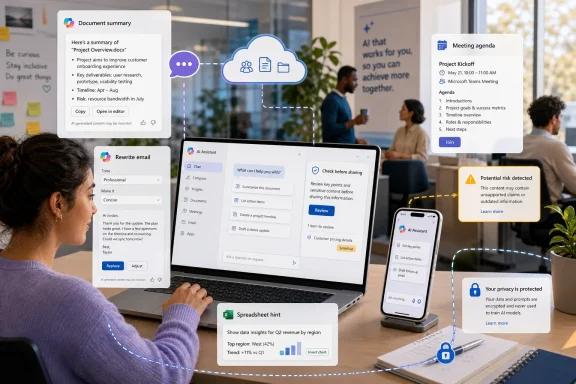
Microsoft Copilot matters for a different reason: it brings AI into the software millions of workers already use. In Word, Excel, Outlook, Teams, and PowerPoint, the appeal is not novelty but proximity. If an assistant can summarize a meeting, draft an email response, help analyze a spreadsheet, or turn notes into a presentation outline inside the tool where the work already lives, experimentation becomes part of the workflow rather than a separate hobby.
Grammarly is another useful gateway because writing support is concrete. A beginner does not have to imagine a radical future of AI agents to understand a clearer sentence, a better tone suggestion, or a warning that a message sounds too abrupt. Canva plays a similar role for design, where AI-assisted templates, image tools, and layout suggestions can help non-designers produce acceptable visual materials without learning professional design software first.
This is why experimentation must include verification from the beginning. If an AI tool summarizes an internal document, compare the summary with the original. If it explains a policy, check the source policy. If it produces numbers, inspect the calculation. If it cites a study, confirm that the study exists and says what the tool claims it says.
The now-familiar term hallucination can make the problem sound exotic, but the practical lesson is simple: AI can fabricate, omit, misread, or overgeneralize. It can also produce outdated information or flatten important nuance. The more consequential the topic, the less acceptable it is to trust the output without review.
Healthcare, finance, law, compliance, security, and employment decisions deserve special caution. AI can be useful in those settings, but it should not be treated as a private oracle. In high-stakes contexts, it is a drafting and research aid at most, not a substitute for qualified judgment.
That concern is not theoretical. Employees may be tempted to paste customer records, proprietary plans, confidential emails, protected health information, financial documents, contracts, source code, or personnel records into public AI systems because the tool feels helpful. Convenience can become a data-governance problem in seconds.
The practical rule is straightforward: do not enter sensitive or confidential information into an AI service unless your organization explicitly permits that use and has approved the tool. Enterprise versions of AI products may offer different privacy, compliance, and data-handling terms than consumer versions. That distinction matters.
For WindowsForum readers, this is where AI adoption becomes an IT issue rather than a personal productivity trick. Sysadmins and IT leaders will increasingly need policies that distinguish acceptable experimentation from risky data leakage. A workforce that experiments is useful; a workforce that experiments with regulated data in unapproved tools is a liability.
The strategic logic is obvious. Microsoft does not want users to think of AI as a destination; it wants AI to be present where work happens. A summary in Outlook, a rewritten paragraph in Word, a meeting recap in Teams, or a formula suggestion in Excel may be less glamorous than a science-fiction chatbot, but those are the places where productivity habits form.
This also changes the training problem. If Copilot is embedded in familiar applications, the barrier to entry falls. But the governance burden rises because AI access becomes entangled with identity, permissions, document storage, retention policies, meeting transcripts, SharePoint sites, and organizational data.
That is why IT departments should not treat AI literacy as a soft skill owned only by HR or training teams. It is part of endpoint management, information protection, identity governance, records retention, and security awareness. The user’s prompt is now part of the enterprise computing environment.
The useful middle ground is small, repeatable experimentation. Ask an AI assistant to summarize a public article. Have it rewrite an email in a more professional tone. Use it to produce three versions of a meeting agenda. Ask it to explain an unfamiliar concept at different levels of complexity. Compare the outputs and notice what improves when you give clearer context.
This approach works because it builds intuition. Beginners learn that AI performs better when given role, audience, format, and constraints. They learn that shorter prompts are not always better. They learn that asking for alternatives can produce better results than accepting the first answer. They learn that the tool is strongest when the user already has enough knowledge to judge the output.
Experimentation also exposes disappointment early. Some tasks will take longer with AI than without it. Some outputs will be generic. Some summaries will miss the point. Some design suggestions will look polished but wrong. That is not failure; it is calibration.
Drafting is often a good candidate. So are summarization, brainstorming, formatting, classification, translation, simplification, and the creation of first-pass outlines. These tasks usually benefit from speed, variation, and structure.
Final judgment is a weaker candidate. So are accountability, confidential decision-making, sensitive communication, legal interpretation, medical advice, security approvals, and anything where a plausible error could cause harm. These tasks require human ownership even if AI helps prepare the material.
The distinction is not always obvious, which is why practice matters. The beginner who uses AI only once during a crisis will not know where to trust it. The beginner who has used it repeatedly on low-risk tasks will have a better sense of when it is useful, when it is mediocre, and when it should be avoided.
Employees need to know which tools are approved, what data may be entered, what outputs require review, how AI-assisted work should be disclosed, and where the technology is prohibited. Vague encouragement is not enough. Vague prohibition is not enough either.
Managers also need to model realistic expectations. If leadership treats AI as magic, employees will hide failures and exaggerate gains. If leadership treats AI as cheating, employees will either avoid useful tools or use them quietly. Neither outcome helps the organization learn.
The healthier message is that AI is a tool for augmentation under human accountability. That framing leaves room for productivity while preserving responsibility. It also acknowledges that adoption is not just a software rollout but a change in work habits.
A beginner should not start by asking AI to produce a final legal memo, diagnose a medical condition, or design a company-wide security policy. A beginner should start by summarizing a public article, generating a packing list, rewriting a routine email, creating a meeting agenda, or turning messy notes into an outline.
These exercises are low-risk and immediately revealing. They show how the model handles ambiguity. They show whether the user’s prompt is too vague. They show how quickly a generic answer can become useful after two or three follow-up instructions.
They also make AI less intimidating. Once a user sees that the interface is mostly plain language, the mystery recedes. The technology is still complex under the hood, but the practical act of using it becomes familiar.
 The AI Shift Is No Longer Waiting for Permission
For years, artificial intelligence was something most people encountered indirectly. It sorted inboxes, recommended search results, filtered photos, ranked social feeds, and routed customer-service chats, but it rarely asked the user to participate. Generative AI changed that relationship because the user is now part of the interface: type a request, refine the answer, check the result, and decide what to do next.That shift explains why AI feels both mundane and disruptive. It is mundane because the first use case may be as simple as “summarize this document” or “draft a polite reply.” It is disruptive because those small acts touch work that used to define professional competence: writing, researching, organizing, analyzing, designing, and presenting.
The right response is not panic, and it is not blind enthusiasm. The right response is controlled exposure. Beginners should experiment with AI tools precisely because experimentation reveals both the productivity gains and the failure modes faster than any slide deck or corporate webinar can.
The Workers Who Learn Informally Will Not Stay Beginners for Long
One of the more revealing facts about workplace AI adoption is that many employees are not waiting for official programs. They are learning from colleagues, social media examples, trial and error, and the repeated friction of daily work. That pattern should sound familiar to anyone who remembers how spreadsheets, search engines, smartphones, and cloud storage entered the office.Formal training eventually catches up, but informal learning usually comes first. A worker discovers that a chatbot can turn rough meeting notes into a coherent recap. A manager realizes Copilot can summarize an email thread before a decision meeting. A student uses Grammarly to identify tone problems in a paper. A small-business owner asks Canva to generate variations of a flyer.
None of these examples requires advanced technical skill. They require curiosity, judgment, and a willingness to revise the first answer. That is why the most useful AI skill for beginners is not “prompt engineering” in the overhyped sense. It is the habit of treating the machine’s output as a draft, not a verdict.
Productivity Begins Where the Blank Page Ends
The most immediate value of AI tools is not that they produce perfect work. They rarely do. Their more reliable contribution is that they reduce the cost of starting.The blank page is one of the great productivity bottlenecks. It slows emails, reports, presentations, lesson plans, documentation, agendas, proposals, and status updates. AI is well suited to producing a first version that a human can reject, reshape, or improve.
That matters because many workplace tasks are not blocked by lack of intelligence. They are blocked by context switching, fatigue, formatting chores, and the need to translate half-formed thoughts into a usable structure. AI can help with that first layer of organization.
A presentation, for example, may still require expertise, taste, and domain knowledge. But an AI assistant can generate a rough outline, propose section headings, condense background notes, suggest slide titles, or turn a dense paragraph into a table. The human remains responsible for what is true, persuasive, ethical, and appropriate.
The Best Beginner Tools Hide the Machinery
The reason tools like ChatGPT, Microsoft Copilot, Grammarly, and Canva matter is not simply that they are powerful. It is that they make AI approachable. They replace programming-style interaction with ordinary language.ChatGPT is often the easiest place to begin because the interface is conversational. A user can ask for an explanation, request a rewrite, paste text for summarization, brainstorm names, draft a message, or compare options. It is not necessary to understand neural networks to learn that “make this shorter and warmer” produces a different result from “rewrite this for a legal audience.”
Microsoft Copilot matters for a different reason: it brings AI into the software millions of workers already use. In Word, Excel, Outlook, Teams, and PowerPoint, the appeal is not novelty but proximity. If an assistant can summarize a meeting, draft an email response, help analyze a spreadsheet, or turn notes into a presentation outline inside the tool where the work already lives, experimentation becomes part of the workflow rather than a separate hobby.
Grammarly is another useful gateway because writing support is concrete. A beginner does not have to imagine a radical future of AI agents to understand a clearer sentence, a better tone suggestion, or a warning that a message sounds too abrupt. Canva plays a similar role for design, where AI-assisted templates, image tools, and layout suggestions can help non-designers produce acceptable visual materials without learning professional design software first.
AI Literacy Is Really Judgment Literacy
The biggest mistake beginners make is assuming that an AI answer is authoritative because it sounds confident. Generative AI systems are fluent by design. Fluency is not the same as truth.This is why experimentation must include verification from the beginning. If an AI tool summarizes an internal document, compare the summary with the original. If it explains a policy, check the source policy. If it produces numbers, inspect the calculation. If it cites a study, confirm that the study exists and says what the tool claims it says.
The now-familiar term hallucination can make the problem sound exotic, but the practical lesson is simple: AI can fabricate, omit, misread, or overgeneralize. It can also produce outdated information or flatten important nuance. The more consequential the topic, the less acceptable it is to trust the output without review.
Healthcare, finance, law, compliance, security, and employment decisions deserve special caution. AI can be useful in those settings, but it should not be treated as a private oracle. In high-stakes contexts, it is a drafting and research aid at most, not a substitute for qualified judgment.
Privacy Is the Boundary Beginners Must Learn Early
The fastest way to misuse AI is to paste sensitive information into the wrong tool. Beginners often focus on whether an AI answer is good, but organizations are just as concerned with where the input goes, who can access it, how it is stored, and whether it can be used to train future systems.That concern is not theoretical. Employees may be tempted to paste customer records, proprietary plans, confidential emails, protected health information, financial documents, contracts, source code, or personnel records into public AI systems because the tool feels helpful. Convenience can become a data-governance problem in seconds.
The practical rule is straightforward: do not enter sensitive or confidential information into an AI service unless your organization explicitly permits that use and has approved the tool. Enterprise versions of AI products may offer different privacy, compliance, and data-handling terms than consumer versions. That distinction matters.
For WindowsForum readers, this is where AI adoption becomes an IT issue rather than a personal productivity trick. Sysadmins and IT leaders will increasingly need policies that distinguish acceptable experimentation from risky data leakage. A workforce that experiments is useful; a workforce that experiments with regulated data in unapproved tools is a liability.
Copilot Makes AI a Windows and Microsoft 365 Story
For Microsoft users, AI experimentation is no longer confined to a browser tab. Copilot is part of Microsoft’s broader effort to make AI a layer across Windows, Microsoft 365, Edge, Teams, Outlook, Word, Excel, PowerPoint, and enterprise search. That makes AI adoption especially relevant for the Windows ecosystem.The strategic logic is obvious. Microsoft does not want users to think of AI as a destination; it wants AI to be present where work happens. A summary in Outlook, a rewritten paragraph in Word, a meeting recap in Teams, or a formula suggestion in Excel may be less glamorous than a science-fiction chatbot, but those are the places where productivity habits form.
This also changes the training problem. If Copilot is embedded in familiar applications, the barrier to entry falls. But the governance burden rises because AI access becomes entangled with identity, permissions, document storage, retention policies, meeting transcripts, SharePoint sites, and organizational data.
That is why IT departments should not treat AI literacy as a soft skill owned only by HR or training teams. It is part of endpoint management, information protection, identity governance, records retention, and security awareness. The user’s prompt is now part of the enterprise computing environment.
Experimentation Beats AI Theater
A great deal of AI discourse is still trapped between marketing fantasy and cultural dread. Vendors promise reinvention. Critics warn of displacement, bias, surveillance, and error. Both sides have evidence, but neither helps a beginner decide what to do on Monday morning.The useful middle ground is small, repeatable experimentation. Ask an AI assistant to summarize a public article. Have it rewrite an email in a more professional tone. Use it to produce three versions of a meeting agenda. Ask it to explain an unfamiliar concept at different levels of complexity. Compare the outputs and notice what improves when you give clearer context.
This approach works because it builds intuition. Beginners learn that AI performs better when given role, audience, format, and constraints. They learn that shorter prompts are not always better. They learn that asking for alternatives can produce better results than accepting the first answer. They learn that the tool is strongest when the user already has enough knowledge to judge the output.
Experimentation also exposes disappointment early. Some tasks will take longer with AI than without it. Some outputs will be generic. Some summaries will miss the point. Some design suggestions will look polished but wrong. That is not failure; it is calibration.
The Real Skill Is Knowing Which Tasks to Delegate
AI is often described as a productivity assistant, but that phrase can be misleading if it implies that every task should pass through a model. The smarter habit is to identify which parts of a task are safe to accelerate.Drafting is often a good candidate. So are summarization, brainstorming, formatting, classification, translation, simplification, and the creation of first-pass outlines. These tasks usually benefit from speed, variation, and structure.
Final judgment is a weaker candidate. So are accountability, confidential decision-making, sensitive communication, legal interpretation, medical advice, security approvals, and anything where a plausible error could cause harm. These tasks require human ownership even if AI helps prepare the material.
The distinction is not always obvious, which is why practice matters. The beginner who uses AI only once during a crisis will not know where to trust it. The beginner who has used it repeatedly on low-risk tasks will have a better sense of when it is useful, when it is mediocre, and when it should be avoided.
Managers Need to Stop Pretending This Is Optional
Organizations face a choice. They can pretend employees are not using AI until a policy violation occurs, or they can create clear rules that make responsible use easier than reckless use. The second path is harder, but it is the only realistic one.Employees need to know which tools are approved, what data may be entered, what outputs require review, how AI-assisted work should be disclosed, and where the technology is prohibited. Vague encouragement is not enough. Vague prohibition is not enough either.
Managers also need to model realistic expectations. If leadership treats AI as magic, employees will hide failures and exaggerate gains. If leadership treats AI as cheating, employees will either avoid useful tools or use them quietly. Neither outcome helps the organization learn.
The healthier message is that AI is a tool for augmentation under human accountability. That framing leaves room for productivity while preserving responsibility. It also acknowledges that adoption is not just a software rollout but a change in work habits.
Beginners Should Start With Boring Tasks
The safest first AI projects are not dramatic. They are boring. That is their virtue.A beginner should not start by asking AI to produce a final legal memo, diagnose a medical condition, or design a company-wide security policy. A beginner should start by summarizing a public article, generating a packing list, rewriting a routine email, creating a meeting agenda, or turning messy notes into an outline.
These exercises are low-risk and immediately revealing. They show how the model handles ambiguity. They show whether the user’s prompt is too vague. They show how quickly a generic answer can become useful after two or three follow-up instructions.
They also make AI less intimidating. Once a user sees that the interface is mostly plain language, the mystery recedes. The technology is still complex under the hood, but the practical act of using it becomes familiar.
The AI Habit Worth Building Now
The concrete case for experimenting with AI is not that every tool is mature or every vendor promise is true. It is that AI-mediated work is becoming common enough that ignorance is now its own risk. Near-term competence is built through small, deliberate practice.- Users should begin with low-risk tasks such as summaries, outlines, agendas, rewrites, brainstorming, and formatting.
- Every AI-generated answer that matters should be checked against reliable sources, original documents, or human expertise.
- Sensitive, confidential, regulated, or proprietary data should stay out of public AI tools unless policy explicitly allows it.
- Microsoft 365 users should pay particular attention to Copilot because AI is being built directly into the applications many organizations already depend on.
- The best beginner mindset is to treat AI as a fast junior assistant: useful, tireless, sometimes impressive, and never ultimately accountable.
- Organizations should provide clear AI guidance now because employees are likely to experiment whether formal policy exists or not.
References
- Primary source: MedLearn Publishing
Published: 2026-06-22T17:51:16.289773
Why You Should Begin Experimenting with Artificial Intelligence Tools – ICD10monitor
Artificial intelligence (AI) has rapidly transitioned from a futuristic concept to an everyday workplace and personal productivity tool. What was once limited to technology companies and research laboratories is now embedded in email systems, smartphones, search engines, scheduling applications...medlearn.com - Related coverage: tomshardware.com
Half of all US employees now use artificial intelligence at work, crossing landmark threshold for first time — Gallup data shows daily and weekly usage hitting all-time high of 28% in Q1 2026, with 65% feeling positive about its impact on produ
There's no stopping the growth of AI in the workforcewww.tomshardware.com - Related coverage: gallup.com
Global Indicator: Artificial Intelligence - Gallup
Explore U.S. employees’ reported use of, comfort with and the level of manager support received with AI integration in the workplace. www.gallup.com
