

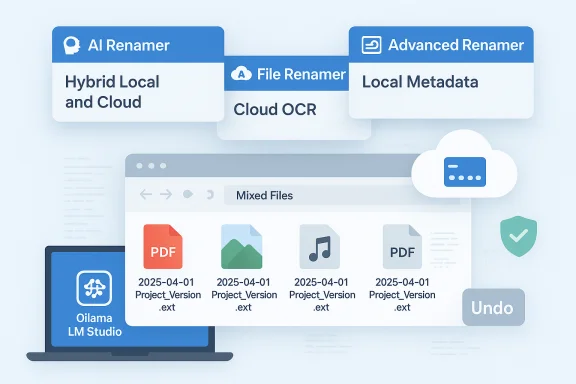
AI-powered file renaming has quietly become one of those small, delightfully practical uses of artificial intelligence that actually saves time instead of creating more meetings about AI strategy; a fresh crop of Windows tools released in 2025 promises to turn a tedious maintenance task into something fast, accurate, and—critically—configurable to different privacy needs. The recent roundup that highlighted three standouts—AI Renamer, File Renamer AI, and Advanced Renamer—shows a clear split in vendor approaches: hybrid local/cloud flexibility, cloud-first OCR power, and power-user, local-only metadata depth respectively.
AI-driven renaming tools analyze file contents—text inside documents, OCR’d text inside images, media metadata such as EXIF/ID3—and then propose descriptive, standardized filenames so entire libraries can be made searchable and consistent with minimal manual effort. This is particularly important for users with large photo collections, media archives, document stores, or any environment where random camera-generated names and inconsistent conventions break automation and retrieval. The concept is simple, but implementation choices—cloud vs local models, OCR quality, metadata handling, preview and undo features, and pricing—make a big difference in real-world suitability. The three products discussed below were selected because they represent distinct trade-offs that matter for Windows users: instant local processing with a one-time fee, low-cost cloud-based credit pricing with strong OCR, and a mature local batch-renamer with deep metadata support and licensing suitable for individuals and businesses. These trade-offs directly influence privacy, speed, scale, and total cost of ownership.
Source: Alphr New AI File Renaming Tools Released in 2025 for Windows
 Background / Overview
AI-driven renaming tools analyze file contents—text inside documents, OCR’d text inside images, media metadata such as EXIF/ID3—and then propose descriptive, standardized filenames so entire libraries can be made searchable and consistent with minimal manual effort. This is particularly important for users with large photo collections, media archives, document stores, or any environment where random camera-generated names and inconsistent conventions break automation and retrieval. The concept is simple, but implementation choices—cloud vs local models, OCR quality, metadata handling, preview and undo features, and pricing—make a big difference in real-world suitability. The three products discussed below were selected because they represent distinct trade-offs that matter for Windows users: instant local processing with a one-time fee, low-cost cloud-based credit pricing with strong OCR, and a mature local batch-renamer with deep metadata support and licensing suitable for individuals and businesses. These trade-offs directly influence privacy, speed, scale, and total cost of ownership.What the new tools are and what they promise
AI Renamer — Best for document-heavy workflows and hybrid privacy control
AI Renamer is positioned as a hybrid solution that supports both a local, one-time-purchase mode and a cloud credits mode for heavier or centralized processing. The vendor emphasizes a minimal UI: drag-and-drop to begin batch analysis, review suggested names inline, and accept or edit before committing. The local package is a single $19 one-time purchase that enables unlimited renaming without credits; cloud processing is handled via a credit pack model (examples discussed by vendors include 200 credits for $10 and 1,000 credits for $50). The product site confirms the local/cloud split and pricing tiers and highlights integration with local model hosts such as Ollama/LM Studio for on-device inference. Why this matters:- Local mode gives you no ongoing costs and keeps file contents on-device—useful for financial, legal, or medical records where cloud uploads are disallowed.
- Cloud mode is convenient for users who want instant, scalable processing without dealing with local model hosting or hardware limitations.
- The preview-and-accept UX reduces accidental renames and adds a safety net for large batches.
File Renamer AI — Best for media libraries and OCR accuracy
File Renamer AI is a cloud-first service that focuses on media (images, video, and audio) and promotes strong OCR and media-specific parsing. The product uses a credit model (one rename per credit in common implementations) and advertises very low prices at scale—pricing pages show promotional packs such as 1,000 credits for pricing that translates to a few dollars (examples on vendor pages list CAD and USD pricing options). Because it is cloud-only, the devs claim fast, server-side processing allowing hundreds of files processed in seconds with results packaged for download as a ZIP. Why this matters:- OCR and media parsing are hard problems; offloading them to a cloud service with GPU-backed inference often yields better accuracy and much faster throughput.
- Cloud-based renaming works well for users who already trust cloud workflows (e.g., uploading for cloud backup or editing pipelines).
- Low entry price for bulk credit packs makes it cost-effective for one-off large cleanup jobs.
Advanced Renamer — Best for local users needing advanced features and metadata controls
Advanced Renamer is a long-established, local-first batch renamer that has evolved to include powerful metadata-driven methods including EXIF/XMP for photos and video, ID3 tags for audio, GPS tokens, timestamp conversions, and flexible pattern engines. The project has formalized license tiers: a free personal tier with limits (for example, a free batch ceiling and method limits), a paid personal license for more frequent personal use, and commercial licensing for business deployments. Official pages show the product is actively maintained with version updates and metadata/writer improvements. The product is local-only, and the website lists free use limits (for light personal use) and paid one-time licenses for heavier or commercial users. Why this matters:- Local-only processing protects sensitive files and avoids cloud egress.
- Rich metadata token set allows deterministic renaming based on camera model, GPS coordinates, recording dates, sample rates, and other fields that many cloud tools either ignore or standardize differently.
- Undo and preview are key to safe large-scale changes.
Technical validation and cross-checks
To ensure the product claims are accurate and actionable, key technical elements were validated against vendor pages and recent release notes:- AI Renamer’s hybrid licensing and local-model integration options are documented on vendor pages and aggregated tool directories, which confirm a $19 local purchase option and credit pack cloud pricing. Independent tool listings echo the local/offline model support (Ollama/LM Studio) and the credit-based cloud option.
- File Renamer AI’s credit pricing and cloud-only architecture are corroborated on its pricing page; published tiers confirm that credits are used per-rename and that larger packs give per-rename discounts. The vendor’s page explicitly lists product limits such as batch sizes and supported formats.
- Advanced Renamer’s metadata improvements and licensing model are explicitly shown in the product’s release notes and license comparison pages. Recent version logs list enhancements to the metadata writer, new collision rules, and better EXIF/XMP handling—demonstrating continuing investment in large-batch UX and reliability.
Strengths — what these tools do well
- Speed and scale: Cloud-backed services or well-optimized local inference can rename hundreds to thousands of files in seconds to minutes for typical libraries, removing hours of manual work. This was a key performance point in the coverage and vendor pages.
- Metadata-driven accuracy: Tools that incorporate EXIF/XMP and ID3 data produce deterministic, reversible naming schemes that aid automation and search pipelines, reducing the need for manual corrections. Advanced Renamer’s recent updates explicitly improve metadata writing and large-batch UI.
- Flexible privacy models: Hybrid apps that offer both local and cloud modes (AI Renamer being the prime example) let users choose privacy or speed depending on the job. The local-mode, one-time purchase model is a strong choice for high-sensitivity environments.
- Preview and undo safety nets: Local tools typically provide a live preview and undo capability; cloud services have begun to provide downloadable results and previews before final commit—both reduce risk when operating at scale.
Risks and limitations — what to watch for
- Privacy and compliance: Cloud-only services (File Renamer AI) send file contents to external servers. This is a non-starter for regulated industries unless files are redacted or vendor contracts include strict Data Processing Addendum terms. Hybrid services reduce but do not eliminate the risk if cloud mode is used without controls.
- Credit-pricing complexity: Credit-based pricing can be inexpensive for many use cases but opaque in edge cases (e.g., multi-page PDFs, long videos are sometimes charged differently). Confirm the vendor’s counting method and test on representative samples before bulk purchases.
- Accuracy and hallucinations: AI renamers rely on model inference; if a file is ambiguous or the OCR misreads text, suggested names can be misleading or incorrect. That’s why preview and bulk-sample testing are mandatory before applying changes across an archive. When possible, couple AI renaming with metadata tokens for determinism.
- Name collisions and filesystem constraints: Automated renames can create collisions (same output name for more than one input) or exceed filesystem maximum lengths. Quality tools offer collision rules (append numbers or alpha suffixes) and pre-batch validation—still, always preview and stage changes. Advanced Renamer’s release notes include new collision handling improvements that help mitigate this risk.
- Operational integration: If you use automated pipelines (media ingestion, backups, sync services), be careful: changing filenames en masse can break references, playlists, databases, or linked metadata. Always stage a rename with a copy-first approach or update dependent systems in tandem.
Practical workflow recommendations
- Test on a representative subset first.
- Pick 1–2% of your library that reflects edge cases (multi-page documents, scans, HEIC/RAW images, long audio tracks).
- Run the renamer, review suggested outputs, and iterate on naming templates before committing.
- Use preview/undo aggressively.
- Prefer tools that show a side-by-side old vs new column and provide an undo mechanism for batch operations. Local tools almost always provide robust undo.
- Combine AI suggestions with deterministic tokens.
- Use AI to extract subjects or titles, but append deterministic tokens such as dates, camera IDs, or incremental counters to avoid ambiguity and keep uniqueness.
- Protect originals with a copy-first approach.
- For large or irreplaceable libraries, rename a copied folder and validate downstream systems before replacing primary archives.
- Check vendor data policies before cloud uploads.
- If using cloud renaming, verify retention, deletion, and processing policies and confirm that the vendor offers deletion on demand if required.
- Automate naming conventions for future-proofing.
- Standardize patterns (e.g., YYYY-MM-DD_subject_location.ext) and create documentation for the team so future imports follow the same scheme.
- Plan for integration with search and DAM.
- If you use digital asset management (DAM) or search tools, align filenames with metadata fields those systems index to maximize discoverability.
Side-by-side comparison (decision points)
- Privacy-sensitive, local-only: Advanced Renamer (local, powerful metadata tokens, one-time license for heavy personal/commercial use).
- Hybrid local/cloud convenience: AI Renamer (local one-time purchase for on-device inference; cloud credits for scale or heavier models).
- Media/OCR-heavy and per-job economics: File Renamer AI (cloud-first OCR and media parsing, low per-job cost with credits).
Enterprise and IT considerations
- For IT teams, the decisive factors are data residency, auditability, and repeatability. Local tools are easier to vet because no egress occurs and operations are reproducible, but they require device resources for model inference and software distribution. Hybrid tools can be deployed with policies that restrict cloud mode for sensitive directories only, but that requires policy enforcement, training, and technical controls (for example, group policy, endpoint config management, or network egress filtering). Power-user updates to renaming utilities such as PowerRename (from Microsoft PowerToys) also add local alternatives and metadata tokenization for photos—these are worth considering as part of a broader strategy.
- License management: Tools with per-user commercial licenses require tracking for compliance. Advanced Renamer explicitly requires commercial licensing for any work-related use; purchase terms are designed to be perpetual and non-subscription. Confirm license counts and deployment methods (volume, deployment keys, or offline activations) prior to organization-wide adoption.
- Automation and scripting: If you have existing ingestion scripts or watch-folder workflows, choose a renamer that exposes CLI options or APIs. Local tools often have better CLI integration; cloud services may provide REST APIs but introduce authentication and network dependencies.
What to do next — a short action plan
- Define goals: Are you standardizing photos, media assets, documents, or a mix? Decide what metadata matters most (date, camera, subject, client name).
- Select the tool family based on privacy and scale:
- Local-only + metadata depth → Advanced Renamer.
- Hybrid flexibility → AI Renamer (local for regular sensitive jobs, cloud credits for bulk).
- Quick OCR-heavy jobs and low cost per-file → File Renamer AI.
- Run a pilot: pick 200–1,000 files reflecting your edge cases, test both AI suggestions and deterministic tokens, and verify downstream compatibility.
- Document the naming convention and update any dependent scripts or databases.
- For organizations: pilot on non-sensitive content first and involve legal or security teams for cloud tools.
Final assessment
The 2025 wave of AI file renaming tools marks a useful, practical maturation of AI utility software—powerful enough to substantially reduce busywork and flexible enough to fit different privacy and scale needs. AI Renamer offers the attractive hybrid path for users who need both privacy and occasional cloud horsepower, File Renamer AI is compelling for bulk media/OCR tasks where cloud performance and low per-rename costs matter, and Advanced Renamer remains the go-to option for users who demand local processing, deep metadata support, and predictable, license-backed use for commercial contexts. Technical validation across vendor pages and release notes confirms the core claims around pricing, feature sets, and metadata support, but real-world reliability depends on testing with your own files and constraints. Adopting any of these tools should be done intentionally: test, preview, and document. With the right conventions and safeguards, AI renamers move tedious housekeeping into an automated, auditable step of your content lifecycle—freeing time for creative work and making archives discoverable and useful again.Source: Alphr New AI File Renaming Tools Released in 2025 for Windows
