

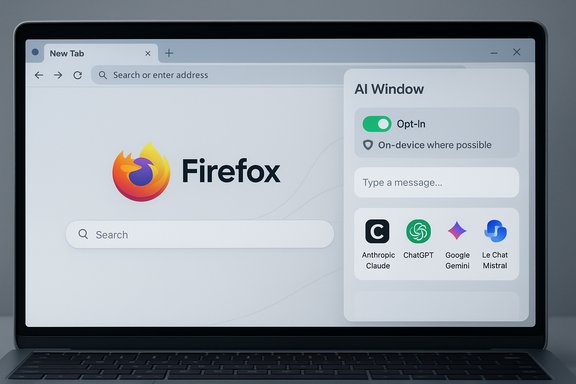
Mozilla has quietly outlined the next phase of its AI strategy for Firefox with AI Window, a new, opt‑in sidebar‑style browsing mode that aims to give users conversational AI assistance without forcing a single vendor, sacrificing privacy, or baking AI into every corner of the browser experience.
Mozilla’s announcement positions AI Window as part of a broader commitment to user choice, transparency, and openness. Rather than following the path of deeply integrated agentic browsers that make AI the default interface, Mozilla is offering an optional “third window” alongside the classic browsing window and Private Browsing. The company has already shipped several optional AI capabilities this year — including a chatbot sidebar, Shake to Summarize on iOS, on‑device translation, and an automatic alt‑text generator — and AI Window is presented as the logical next step in that incremental, opt‑in rollout.
This is a deliberate strategic contrast to browsers that ship tightly coupled AI ecosystems or single‑provider agents. Mozilla’s stated intent is to support users who are heavy AI consumers, those who open AI tools occasionally, and those who don’t want AI exposure at all — and to let everyone choose when and how AI participates in their browsing.
Confirmed or explicitly stated:
That said, practical success will hinge on execution. Mozilla must make the defaults safe and private, keep resource consumption reasonable, be explicit about what runs locally versus in the cloud, and provide the enterprise and accessibility controls that users expect from a mature browser. If it does, AI Window could become a model for how AI should be added to consumer software: useful, optional, and transparent.
For now, AI Window is promising but experimental — an important evolution in Firefox’s long‑running mission to give users more ways to interact with the web while keeping control in their hands. The next few release notes and product pages will determine whether the idea translates into daily value without unintended costs.
Source: MobiGyaan Mozilla announces AI Window: Firefox's new user-controlled AI panel
 Background
Mozilla’s announcement positions AI Window as part of a broader commitment to user choice, transparency, and openness. Rather than following the path of deeply integrated agentic browsers that make AI the default interface, Mozilla is offering an optional “third window” alongside the classic browsing window and Private Browsing. The company has already shipped several optional AI capabilities this year — including a chatbot sidebar, Shake to Summarize on iOS, on‑device translation, and an automatic alt‑text generator — and AI Window is presented as the logical next step in that incremental, opt‑in rollout.This is a deliberate strategic contrast to browsers that ship tightly coupled AI ecosystems or single‑provider agents. Mozilla’s stated intent is to support users who are heavy AI consumers, those who open AI tools occasionally, and those who don’t want AI exposure at all — and to let everyone choose when and how AI participates in their browsing.
What is AI Window?
AI Window is described as an optional, user‑controlled AI panel built into Firefox. Key characteristics Mozilla emphasizes include:- Opt‑in by design: the AI Window isn’t forced on users; it’s an extra browsing mode you open when you want it.
- User control: toggleable at any time, designed to preserve choice and agency.
- Compatible with Private Window mode: Mozilla says privacy controls are respected and that AI functionality will coexist with existing privacy features.
- A natural extension of browsing: it’s a panel to summarize pages, run tasks, chat with assistants, and access tools without switching tabs or leaving the current page.
How AI Window fits into Firefox’s UI model
Rather than being a modal or an overlay that hijacks the primary browsing flow, AI Window is being positioned as a dedicated browsing mode: you can open the AI Window when you want to do tasks that benefit from conversational help (summaries, follow‑ups, research assistance), and close it when you don’t. This design respects the mental model many users have — browsing is browsing, and AI is a tool you open and close.Confirmed predecessor features and the technical baseline
AI Window is not emerging from nowhere. Mozilla has built a clear foundation of experimental AI features over the past months:- AI chatbot sidebar — an optional sidebar that lets users pick among multiple chatbot providers and use them while browsing.
- Shake to Summarize (iOS) — a one‑tap / shake gesture to generate short page summaries on iPhone; on newer iPhones this can run on‑device with Apple Intelligence, falling back to Mozilla’s cloud in older devices.
- Automatic alt‑text generation — experimental AI that produces short alt text for images and PDFs; notably the model used for this runs locally on device and the UI warns when alt text was auto‑generated.
- On‑device translation — Firefox’s translations have moved toward an on‑device model to avoid sending page text to third‑party cloud services.
- Smart link previews and tab‑group naming suggestions — AI features that generate previews or suggest names/groupings for tab clusters using local models.
Features to expect (confirmed, early, and likely)
Mozilla has disclosed a high‑level set of capabilities for AI Window; other features are plausible based on the company’s roadmap and recent feature rollouts.Confirmed or explicitly stated:
- Chat with an AI assistant in a persistent pane without switching tabs.
- Summarize pages and portions of pages from within the panel.
- Access tools and task‑oriented workflows tied to browsing context.
- A choose your model approach — Firefox supports multiple providers in other AI features and intends to avoid single‑vendor lock‑in.
- Integration with Firefox’s existing AI provider framework (which already lists Anthropic Claude, ChatGPT, Google Gemini, Le Chat Mistral, and Microsoft Copilot in recent builds).
- On‑device model support for certain lightweight tasks, especially where privacy is a priority.
- Tight user controls: global and per‑window toggles, privacy settings that determine whether data is processed locally or sent to a provider.
- Developer and extension hooks to allow third‑party integrations and custom assistants (consistent with Mozilla’s openness pledge).
- Exact list of default models available inside AI Window at launch.
- Whether certain tasks will be free, subscription‑gated, account‑linked, or limited by quotas.
- The degree of offline functionality (how many capabilities will work without internet access).
- Enterprise controls and admin toggles for managed Firefox installations.
Mozilla’s multi‑provider stance and technical architecture
One of the clearest policy choices in Mozilla’s announcement is multi‑provider support: where some browsers tightly lock users into a single model and backend, Firefox is explicitly building tooling to let people choose which assistant they want.- The existing Firefox AI sidebar already exposes several providers — Anthropic Claude, ChatGPT, Google Gemini, Le Chat Mistral, with Microsoft Copilot added in later versions — and users can switch providers on demand.
- Mozilla emphasizes local models where possible: features such as tab suggestions, translations, and alt‑text generation rely on on‑device or local runtimes rather than routing everything to Mozilla’s servers or to third‑party clouds.
- The hybrid approach — local processing for privacy‑sensitive or lightweight tasks, external models for heavier or specialized jobs — is Mozilla’s stated architecture for balancing privacy and capability.
Strengths: why AI Window could be meaningful for users
- User agency — AI Window’s opt‑in design treats AI as a tool rather than a replacement browsing paradigm. Many users and privacy advocates prefer explicit opt‑in models.
- Provider flexibility — the ability to choose and swap models lowers vendor lock‑in risk and encourages competition among AI providers.
- Privacy‑first engineering — pushing models to run on device for translation, alt text, and some tab suggestions reduces data exposure and aligns with Firefox’s brand.
- Seamless context — an assistant that lives in a dedicated panel can leverage current tab context to speed research, summarize content, and perform follow‑through tasks without flipping tabs.
- Developer openness — if Firefox exposes APIs and extension hooks for AI Window, the web platform benefits from a modular ecosystem of assistants rather than a single closed agent.
Risks and trade‑offs
No major platform change is risk‑free. AI Window raises several potential problems Mozilla needs to manage well.1. Performance and resource usage
Modern generative models are resource‑intensive. Firefox’s recent experiments with local AI have already prompted performance complaints from some users (reports of CPU spikes were reported with earlier local AI features). Running local models or continuous inference inside the browser can increase CPU, memory, and power consumption — especially on laptops and older hardware. Mozilla will have to provide clear toggles, throttles, and model size options to avoid degrading the browsing experience.2. Accuracy and hallucinations
Generative models hallucinate. Summaries and assistant responses will inevitably contain mistakes. Mozilla’s stance of encouraging user review and making clear when content is AI‑generated helps, but AI Window will need guardrails: provenance, citations for facts, and easy ways to verify claims produced by the assistant.3. Privacy complexity in hybrid modes
A hybrid architecture that runs some tasks locally and others on cloud providers can be confusing for users. It’s easy for people to misinterpret what stays on‑device and what is sent to third parties. Clear UI indicators, simple privacy controls, and transparent defaults (e.g., local first, cloud only with opt‑in) are essential.4. Monetization and feature gating
Mozilla hasn’t clarified whether advanced assistant features will be free, subscription‑gated, or tied to provider accounts. Introducing paid tiers or provider sign‑ups could fragment the experience and undermine the openness message if it results in better features being behind paywalls.5. Accessibility and bias concerns
Auto‑generated accessibility content such as alt text is a convenience, but it can introduce errors or biased descriptions. Mozilla’s approach of prompting human review and adding disclaimers is responsible; continued user feedback mechanisms, model improvement transparency, and support for human overrides will be necessary.6. Fragmentation of user experience
Supporting many providers — local models, multiple cloud providers, open‑source runtimes — increases complexity for both users and support teams. Mozilla must design a consistent UX so that switching providers doesn’t yield wildly different behaviors or inconsistent privacy implications.How AI Window compares to competitor strategies
Several browsers are pursuing different AI approaches:- A small number of browsers are shipping deeply integrated agent modes that replace the default browsing UI with an assistant‑centric interface and often favor a single provider.
- Others embed a search/assistant panel but tie the experience tightly to their own cloud service.
Practical guidance for users and administrators
For end users:- Treat AI Window as experimental initially — sign up for previews if you want early access and provide feedback.
- Learn the privacy controls: check whether a given task is processed on your device or sent to a cloud provider.
- If you’re on older hardware, monitor resource use and disable on‑device inference features if you see CPU or battery regressions.
- Always review AI-generated content (summaries, alt text) before relying on it, especially for accessibility or factual accuracy.
- Watch for enterprise controls from Mozilla (policy keys, group policy templates) to manage AI features across fleets.
- Consider defaulting AI Window and other experimental AI features to off in managed deployments until controls and telemetry are clear.
- Evaluate which providers are allowed for compliance reasons and how provider data‑handling aligns with organizational policies.
What Mozilla still needs to clarify
- Launch timing and availability: AI Window is currently invite‑only; the exact public release schedule and regional availability remain unspecified.
- Provider list and default provider: Will AI Window ship with the same provider options as the sidebar chatbot? Which providers will be recommended by default?
- Pricing and account requirements: Will core AI Window functionality be free for all users, or will advanced features require paid provider accounts or subscriptions?
- Resource management: Concrete guidance on system requirements, model sizes, and power‑efficient modes is needed so users can make informed choices.
- Enterprise controls: Clear documentation for managed environments — administrators will need policy controls to enforce company rules about AI use and data flow.
- Provenance and citations: How will AI Window surface the origin of facts and provide citations when the assistant makes factual claims?
Early takeaways and a checklist for power users
- AI Window is a welcome design choice for people who want assistant integration without ceding control of the browsing experience.
- Users who value privacy will appreciate the on‑device processing decisions that already appear in Firefox’s AI portfolio.
- Power users should keep an eye on resource behavior and test the feature in controlled settings before enabling it in day‑to‑day workflows.
- Accessibility teams should monitor automatic alt‑text behavior closely; the feature is useful but not a replacement for thoughtful human descriptions.
- Update Firefox to the latest Nightly or Beta channel if you want early access (where appropriate).
- Join Mozilla’s waitlist or preview program if you want to try AI Window.
- Review current AI preferences in Firefox (sidebar chatbot provider settings, translation model downloads, alt‑text toggles).
- Prepare to disable AI features globally if you’re in a privacy‑sensitive environment.
Conclusion
AI Window is Mozilla’s answer to a simple, yet consequential challenge: add AI to the browser in a way that preserves user agency, supports multiple providers, and keeps privacy front and center. It’s a pragmatic alternative to both the “AI everywhere” and the “no AI” extremes, and it builds on a portfolio of features that already emphasize local processing and explicit user choice.That said, practical success will hinge on execution. Mozilla must make the defaults safe and private, keep resource consumption reasonable, be explicit about what runs locally versus in the cloud, and provide the enterprise and accessibility controls that users expect from a mature browser. If it does, AI Window could become a model for how AI should be added to consumer software: useful, optional, and transparent.
For now, AI Window is promising but experimental — an important evolution in Firefox’s long‑running mission to give users more ways to interact with the web while keeping control in their hands. The next few release notes and product pages will determine whether the idea translates into daily value without unintended costs.
Source: MobiGyaan Mozilla announces AI Window: Firefox's new user-controlled AI panel
