
Windows Central argued on June 26, 2026, that Microsoft should move a proposed PowerToys utility called AltWindowCycle into Windows 11, because it would let users cycle through windows belonging to the current app with an Alt-plus-backtick shortcut. The pitch sounds small, almost comically so, but that is exactly why it matters. Windows has spent years becoming more ambitious about AI, recovery, gaming overlays, widgets, and cloud identity, while leaving some of the oldest desktop-navigation paper cuts untouched. AltWindowCycle is a reminder that operating systems earn loyalty not only through grand platforms, but through keystrokes that disappear into muscle memory.
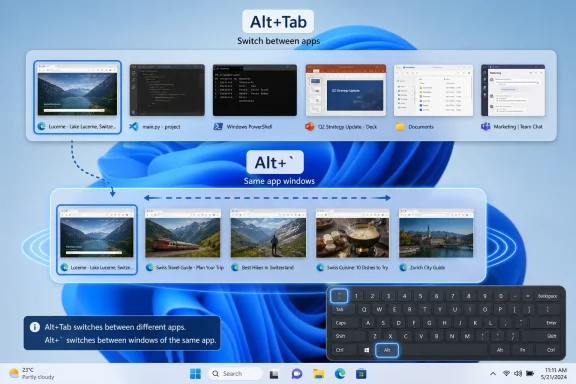
AltWindowCycle is not trying to reinvent multitasking. According to the Windows Central report, the proposed PowerToys utility would work like Alt+Tab, but limit the switcher to windows from the same process, making it useful for juggling multiple browser windows, terminals, editors, or document instances. In plain English, it gives Windows users a fast way to say: keep me in this app, but move me to the other window.
That distinction matters because modern desktop work is no longer organized neatly by application. A single browser may contain personal research, admin portals, cloud dashboards, documentation, and a video call. A single terminal app may contain local shells, SSH sessions, build logs, and elevated prompts. A single editor may span projects, workspaces, or detached windows on different monitors.
Windows already has Alt+Tab, Task View, Snap layouts, virtual desktops, taskbar previews, and a long list of windowing affordances. The problem is not that Windows lacks ways to switch windows. The problem is that it often lacks the right grain of switching: not every context change is a jump to another app, and not every app is a single workspace.
That is why this proposal feels bigger than its code footprint. It addresses a real cognitive mismatch in Windows 11: the shell understands apps, windows, desktops, and monitors, but it still does not consistently understand the way people move between closely related work surfaces inside the same app.
That does not mean Windows 11 simply copied FancyZones. The operating system version is more approachable, more constrained, and more broadly integrated. That is how this pipeline should work. PowerToys can serve the impatient and the exacting; Windows can absorb the ideas that survive contact with real users.
AltWindowCycle sits in that same category, but arguably with an even stronger case for promotion. FancyZones is powerful, but it asks users to design layouts, learn zone behavior, and decide whether they want to alter the basic window-management model. A same-app window cycle shortcut asks much less. It simply adds a missing path next to a shortcut everyone already understands.
That is the difference between a power-user utility and a mainstream affordance. Many PowerToys features are deliberately specialized: bulk rename workflows, hosts-file editing, mouse highlighters, environment-variable managers, command palettes, preview handlers, and utilities for people who already know they need utilities. AltWindowCycle is not like that. It is the kind of thing users discover accidentally, use twice, and then resent losing on every PC that does not have it.
Windows has always been more window-centric than app-centric in some respects, which may explain why this never became a default. Alt+Tab historically showed windows, not abstract app groups. The taskbar exposed each window, then grouped them, then changed grouping behavior across versions and settings. Windows users learned to navigate through a mixture of thumbnails, taskbar buttons, keyboard shortcuts, and sheer spatial memory.
But the modern app landscape has changed the cost of that ambiguity. Browsers are operating systems inside the operating system. Electron apps often behave like desktop apps while secretly sharing process models and window behaviors. Terminal, Visual Studio Code, Office, Teams, Edge, Chrome, and administrative consoles can all produce multiple windows that are related but not interchangeable. In that world, a shortcut scoped to the current app is not a Mac affectation. It is a way to reduce noise.
Microsoft does not need to imitate macOS slavishly to justify the feature. The better argument is that Windows already has the ingredients for this behavior, but not the default binding that makes it feel native. The operating system has enough window metadata, process information, app identity, and shell infrastructure to know when a user is asking for the next sibling rather than the next stranger.
The feature should be described in human terms: switch between windows in the current app. That phrase belongs in Settings, shortcut documentation, accessibility guidance, and onboarding surfaces. The keyboard shortcut can become the brand. Alt+` is memorable precisely because it sits near Alt+Tab on many keyboards and maps nicely to the concept of “a smaller tab cycle.”
There are caveats. Keyboard layouts differ. The backtick key is not equally prominent or convenient everywhere. International layouts, compact laptops, remapped keyboards, accessibility devices, and enterprise-standard images all complicate any universal shortcut. Microsoft would need to treat the binding as configurable, discoverable, and respectful of existing input methods.
But none of those caveats are fatal. Windows already handles a messy world of keyboard layouts and shortcut conflicts. The correct response is not to avoid shipping useful shortcuts; it is to expose them sanely, document them clearly, and give administrators a way to manage them.
Consider a teacher with three browser windows: gradebook, lesson plan, and student resources. Consider a help desk technician with several remote sessions open. Consider a project manager with multiple Excel files, Teams chats, and browser dashboards. Consider a developer splitting work between a terminal window running logs and another connected to production infrastructure. None of these people are “power users” in the cultural sense. They are just doing modern work.
Alt+Tab is too broad for these moments. Taskbar thumbnails are visual but slower. Task View is powerful but heavy. Snap groups help with layout but not necessarily with quick same-app cycling. A same-app shortcut occupies a narrow lane that Windows has left underdeveloped.
This is where Microsoft’s Windows 11 design language sometimes gets in its own way. The company has spent substantial effort making window management more visible: hover targets, rounded corners, snap flyouts, animated transitions, and layout suggestions. Those are useful. But the most valuable interface improvements often become invisible after adoption. A good keyboard shortcut is not a feature you admire; it is a feature you stop thinking about.
That matters for administrators who have watched Windows accumulate features with policy implications. Widgets, Copilot experiences, cloud recommendations, consumer account prompts, search integrations, and notification surfaces can all trigger governance questions. A keyboard shortcut that cycles through same-app windows is refreshingly boring. Boring is underrated in enterprise IT.
There would still be work to do. Microsoft would need Group Policy or configuration-service-provider support if the shortcut can be disabled or remapped. It would need to avoid breaking line-of-business applications that already trap unusual key combinations. It would need predictable behavior across virtual desktops, Remote Desktop sessions, elevated windows, and apps with nonstandard window ownership.
But those are implementation details of the kind Windows already lives with. The enterprise objection to many shell changes is that Microsoft sometimes turns user-interface experiments into unavoidable behavior. AltWindowCycle could avoid that trap by being simple, documented, and controllable. The moment it becomes a configurable shell shortcut rather than a marketing surface, it becomes easy to defend.
These are not pedantic questions. Windows is full of applications whose windows do not map cleanly to a single intuitive category. Browsers spawn multiple processes by design. Office apps may expose documents as separate windows but share common application identity. Terminal tabs are not windows, but terminal windows can contain many tabs. Some apps use helper processes, broker processes, embedded web views, or custom chrome that may confuse simplistic process-based grouping.
If AltWindowCycle remains a PowerToys experiment, rough edges are acceptable. If it moves into Windows, Microsoft must decide whether “same process” is good enough or whether the shell should use a more user-facing definition of app identity. The latter is harder, but it is probably the right direction.
The goal should not be technical purity. The goal should be that pressing the shortcut produces the window the user expected. If Edge has three windows open, users expect to cycle among Edge windows, not only those sharing a particular process relationship. If Word has multiple documents open, users expect Word documents. If a web app is pinned as its own app, users may expect it to behave separately from the main browser. That is where the engineering challenge becomes a product decision.
Microsoft has an advantage here because the Windows shell already performs app grouping in the taskbar and switchers. It has decades of scars from trying to make window identity legible. AltWindowCycle would force the company to refine that model in a way users could feel immediately.
That does not mean Alt+` is automatically accessible. A shortcut can be hard to press, hard to discover, or awkward on non-US layouts. It can conflict with assistive technology or app-specific bindings. If Microsoft ships this in Windows, it should not bury the behavior in an enthusiast corner of Settings.
The right implementation would make the command visible in keyboard shortcut documentation, remappable through system settings, and consistent with Narrator and focus behavior. It should provide predictable announcements when switching windows. It should also avoid treating accessibility as a postscript to power-user demand.
This is another reason PowerToys is a useful incubator but not the final destination. PowerToys can prove that a shortcut is desirable. Windows must prove that it is inclusive, manageable, and stable enough for the population that does not read GitHub pull requests.
AltWindowCycle belongs to that second category. Nobody buys a PC because it can cycle through same-app windows. Nobody writes a procurement memo around it. Yet once the shortcut becomes habitual, its absence makes a machine feel less finished.
This is why Windows Central’s argument lands. The feature is not glamorous, but it sits precisely where Windows 11 still needs polish: the daily seam between multiple apps, multiple windows, and multiple contexts. Microsoft’s challenge is not to prove that Windows can do more. It is to prove that Windows can make common work feel less jagged.
There is a lesson here for the broader PowerToys pipeline. Microsoft should not import every clever utility into Windows. That would turn the operating system into a junk drawer and make administrators rightly nervous. But it should be more aggressive about identifying PowerToys features that meet three tests: they solve a universal interaction problem, they have a low support burden, and they can be explained without a tutorial.
AltWindowCycle appears to meet those tests better than many larger features. It is small enough to ship quietly and useful enough to matter immediately.
Microsoft could treat PowerToys more explicitly as a public lab for shell improvements. Not every utility would graduate. Some would remain niche forever. Others would inform simplified Windows features, as FancyZones arguably did with the evolution of snapping. The key is to make the graduation path feel intentional rather than accidental.
A same-app window cycle command would be an ideal candidate for that model because it can begin as an opt-in experiment, gather telemetry and feedback from the users most likely to stress it, and then move into Windows once the semantics are settled. PowerToys users can help answer the hard questions: which windows should appear, what shortcut conflicts exist, how it behaves across virtual desktops, and whether process-based grouping matches user expectations.
But the final step still matters. If Microsoft leaves the feature only in PowerToys, it sends the familiar message that Windows’ best workflow fixes are reserved for people willing to install and configure an add-on. That may be acceptable for exotic utilities. It is less acceptable for a shortcut that brings Windows closer to a baseline behavior many users already know from other desktop environments.
AltWindowCycle would not add another panel, feed, assistant, account prompt, background service, or monetizable surface. It would add a coherent counterpart to Alt+Tab. That is the rare kind of addition that can make an existing system easier to reason about rather than more cluttered.
The real risk is incoherence. If Microsoft ships the shortcut but defines “same app” differently from the taskbar, users will distrust it. If it works in Win32 apps but not packaged apps, or across some virtual desktops but not others, it will feel like another half-finished shell experiment. If the shortcut is hard-coded without regard for keyboard layouts, it will create frustration outside the narrow world of US desktop keyboards.
Those are solvable risks, but they require Microsoft to treat the feature as part of the shell rather than a transplanted utility. The right question is not “Should PowerToys be bundled with Windows?” It is “Which PowerToys ideas deserve to become Windows behaviors?” AltWindowCycle deserves that conversation.
 A Tiny Shortcut Exposes a Very Old Windows Blind Spot
AltWindowCycle is not trying to reinvent multitasking. According to the Windows Central report, the proposed PowerToys utility would work like Alt+Tab, but limit the switcher to windows from the same process, making it useful for juggling multiple browser windows, terminals, editors, or document instances. In plain English, it gives Windows users a fast way to say: keep me in this app, but move me to the other window.That distinction matters because modern desktop work is no longer organized neatly by application. A single browser may contain personal research, admin portals, cloud dashboards, documentation, and a video call. A single terminal app may contain local shells, SSH sessions, build logs, and elevated prompts. A single editor may span projects, workspaces, or detached windows on different monitors.
Windows already has Alt+Tab, Task View, Snap layouts, virtual desktops, taskbar previews, and a long list of windowing affordances. The problem is not that Windows lacks ways to switch windows. The problem is that it often lacks the right grain of switching: not every context change is a jump to another app, and not every app is a single workspace.
That is why this proposal feels bigger than its code footprint. It addresses a real cognitive mismatch in Windows 11: the shell understands apps, windows, desktops, and monitors, but it still does not consistently understand the way people move between closely related work surfaces inside the same app.
PowerToys Keeps Finding the Missing Middle of Windows
PowerToys has become Microsoft’s unofficial proving ground for features too useful to ignore and too opinionated to ship immediately in the operating system. FancyZones is the obvious precedent. Long before Windows 11 made Snap layouts a marquee feature, PowerToys users were already building custom zones and training themselves to think of the desktop as structured space rather than a pile of rectangles.That does not mean Windows 11 simply copied FancyZones. The operating system version is more approachable, more constrained, and more broadly integrated. That is how this pipeline should work. PowerToys can serve the impatient and the exacting; Windows can absorb the ideas that survive contact with real users.
AltWindowCycle sits in that same category, but arguably with an even stronger case for promotion. FancyZones is powerful, but it asks users to design layouts, learn zone behavior, and decide whether they want to alter the basic window-management model. A same-app window cycle shortcut asks much less. It simply adds a missing path next to a shortcut everyone already understands.
That is the difference between a power-user utility and a mainstream affordance. Many PowerToys features are deliberately specialized: bulk rename workflows, hosts-file editing, mouse highlighters, environment-variable managers, command palettes, preview handlers, and utilities for people who already know they need utilities. AltWindowCycle is not like that. It is the kind of thing users discover accidentally, use twice, and then resent losing on every PC that does not have it.
macOS and Linux Have Already Normalized the Behavior
Part of the frustration is that this is not a speculative interface idea. macOS users have long been familiar with Command+backtick for moving among windows in the current app. Some Linux desktop environments and window managers expose comparable behavior through Alt+backtick or configurable shortcuts. The exact semantics differ across platforms, but the mental model is established: the global switcher moves across apps; the local switcher moves within the app you are already using.Windows has always been more window-centric than app-centric in some respects, which may explain why this never became a default. Alt+Tab historically showed windows, not abstract app groups. The taskbar exposed each window, then grouped them, then changed grouping behavior across versions and settings. Windows users learned to navigate through a mixture of thumbnails, taskbar buttons, keyboard shortcuts, and sheer spatial memory.
But the modern app landscape has changed the cost of that ambiguity. Browsers are operating systems inside the operating system. Electron apps often behave like desktop apps while secretly sharing process models and window behaviors. Terminal, Visual Studio Code, Office, Teams, Edge, Chrome, and administrative consoles can all produce multiple windows that are related but not interchangeable. In that world, a shortcut scoped to the current app is not a Mac affectation. It is a way to reduce noise.
Microsoft does not need to imitate macOS slavishly to justify the feature. The better argument is that Windows already has the ingredients for this behavior, but not the default binding that makes it feel native. The operating system has enough window metadata, process information, app identity, and shell infrastructure to know when a user is asking for the next sibling rather than the next stranger.
The Name Is Ugly, but the Idea Is Clean
AltWindowCycle sounds like a branch name that escaped into public. That is fine for a GitHub pull request and terrible for a Windows feature. If Microsoft ever ships this broadly, it should not ask ordinary users to remember “AltWindowCycle” any more than it asks them to remember the internal machinery behind Snap Assist.The feature should be described in human terms: switch between windows in the current app. That phrase belongs in Settings, shortcut documentation, accessibility guidance, and onboarding surfaces. The keyboard shortcut can become the brand. Alt+` is memorable precisely because it sits near Alt+Tab on many keyboards and maps nicely to the concept of “a smaller tab cycle.”
There are caveats. Keyboard layouts differ. The backtick key is not equally prominent or convenient everywhere. International layouts, compact laptops, remapped keyboards, accessibility devices, and enterprise-standard images all complicate any universal shortcut. Microsoft would need to treat the binding as configurable, discoverable, and respectful of existing input methods.
But none of those caveats are fatal. Windows already handles a messy world of keyboard layouts and shortcut conflicts. The correct response is not to avoid shipping useful shortcuts; it is to expose them sanely, document them clearly, and give administrators a way to manage them.
This Is a Multitasking Feature, Not a Power-User Trophy
The strongest case for bringing AltWindowCycle into Windows 11 is not that enthusiasts want it. Enthusiasts can install PowerToys. They can remap keys, run preview builds, and tolerate the occasional rough edge. The stronger case is that ordinary users increasingly live in multi-window apps without realizing they have crossed into power-user territory.Consider a teacher with three browser windows: gradebook, lesson plan, and student resources. Consider a help desk technician with several remote sessions open. Consider a project manager with multiple Excel files, Teams chats, and browser dashboards. Consider a developer splitting work between a terminal window running logs and another connected to production infrastructure. None of these people are “power users” in the cultural sense. They are just doing modern work.
Alt+Tab is too broad for these moments. Taskbar thumbnails are visual but slower. Task View is powerful but heavy. Snap groups help with layout but not necessarily with quick same-app cycling. A same-app shortcut occupies a narrow lane that Windows has left underdeveloped.
This is where Microsoft’s Windows 11 design language sometimes gets in its own way. The company has spent substantial effort making window management more visible: hover targets, rounded corners, snap flyouts, animated transitions, and layout suggestions. Those are useful. But the most valuable interface improvements often become invisible after adoption. A good keyboard shortcut is not a feature you admire; it is a feature you stop thinking about.
The Enterprise Case Is Stronger Than It Looks
At first glance, same-app window cycling sounds like a personal productivity flourish. In managed environments, however, the smallness of the feature is an asset. It does not require new cloud services, new account models, new data flows, or a dramatic retraining campaign. It is a local shell behavior that can be explained in one sentence.That matters for administrators who have watched Windows accumulate features with policy implications. Widgets, Copilot experiences, cloud recommendations, consumer account prompts, search integrations, and notification surfaces can all trigger governance questions. A keyboard shortcut that cycles through same-app windows is refreshingly boring. Boring is underrated in enterprise IT.
There would still be work to do. Microsoft would need Group Policy or configuration-service-provider support if the shortcut can be disabled or remapped. It would need to avoid breaking line-of-business applications that already trap unusual key combinations. It would need predictable behavior across virtual desktops, Remote Desktop sessions, elevated windows, and apps with nonstandard window ownership.
But those are implementation details of the kind Windows already lives with. The enterprise objection to many shell changes is that Microsoft sometimes turns user-interface experiments into unavoidable behavior. AltWindowCycle could avoid that trap by being simple, documented, and controllable. The moment it becomes a configurable shell shortcut rather than a marketing surface, it becomes easy to defend.
The Hard Part Is Defining “Same App”
The phrase “same app” sounds simple until Windows has to enforce it. Is the scope the same process, as the pull request description reportedly says? The same executable? The same AppUserModelID? The same packaged app identity? The same browser profile? The same terminal host? The same Progressive Web App container?These are not pedantic questions. Windows is full of applications whose windows do not map cleanly to a single intuitive category. Browsers spawn multiple processes by design. Office apps may expose documents as separate windows but share common application identity. Terminal tabs are not windows, but terminal windows can contain many tabs. Some apps use helper processes, broker processes, embedded web views, or custom chrome that may confuse simplistic process-based grouping.
If AltWindowCycle remains a PowerToys experiment, rough edges are acceptable. If it moves into Windows, Microsoft must decide whether “same process” is good enough or whether the shell should use a more user-facing definition of app identity. The latter is harder, but it is probably the right direction.
The goal should not be technical purity. The goal should be that pressing the shortcut produces the window the user expected. If Edge has three windows open, users expect to cycle among Edge windows, not only those sharing a particular process relationship. If Word has multiple documents open, users expect Word documents. If a web app is pinned as its own app, users may expect it to behave separately from the main browser. That is where the engineering challenge becomes a product decision.
Microsoft has an advantage here because the Windows shell already performs app grouping in the taskbar and switchers. It has decades of scars from trying to make window identity legible. AltWindowCycle would force the company to refine that model in a way users could feel immediately.
The Shortcut Must Respect Accessibility, Not Merely Productivity
Keyboard-first features are often framed as productivity tools, but they also intersect with accessibility. For users who struggle with precise mouse movement, taskbar thumbnail hunting, or visually scanning a crowded desktop, a scoped keyboard shortcut can reduce friction. For screen-reader users or people working with magnification, limiting the switching set can be more than convenient; it can be clarifying.That does not mean Alt+` is automatically accessible. A shortcut can be hard to press, hard to discover, or awkward on non-US layouts. It can conflict with assistive technology or app-specific bindings. If Microsoft ships this in Windows, it should not bury the behavior in an enthusiast corner of Settings.
The right implementation would make the command visible in keyboard shortcut documentation, remappable through system settings, and consistent with Narrator and focus behavior. It should provide predictable announcements when switching windows. It should also avoid treating accessibility as a postscript to power-user demand.
This is another reason PowerToys is a useful incubator but not the final destination. PowerToys can prove that a shortcut is desirable. Windows must prove that it is inclusive, manageable, and stable enough for the population that does not read GitHub pull requests.
Windows 11 Needs Fewer Spectacles and More Muscle Memory
Microsoft’s recent Windows strategy has often emphasized highly visible features. Some are valuable, some are controversial, and some arrive before they are fully mature. But desktop operating systems are not judged only by the features that appear in launch videos. They are judged by the accumulation of tiny interactions users perform hundreds of times a week.AltWindowCycle belongs to that second category. Nobody buys a PC because it can cycle through same-app windows. Nobody writes a procurement memo around it. Yet once the shortcut becomes habitual, its absence makes a machine feel less finished.
This is why Windows Central’s argument lands. The feature is not glamorous, but it sits precisely where Windows 11 still needs polish: the daily seam between multiple apps, multiple windows, and multiple contexts. Microsoft’s challenge is not to prove that Windows can do more. It is to prove that Windows can make common work feel less jagged.
There is a lesson here for the broader PowerToys pipeline. Microsoft should not import every clever utility into Windows. That would turn the operating system into a junk drawer and make administrators rightly nervous. But it should be more aggressive about identifying PowerToys features that meet three tests: they solve a universal interaction problem, they have a low support burden, and they can be explained without a tutorial.
AltWindowCycle appears to meet those tests better than many larger features. It is small enough to ship quietly and useful enough to matter immediately.
The PowerToys-to-Windows Pipeline Needs a Clearer Door
PowerToys occupies a strange place in Microsoft’s ecosystem. It is official but optional, experimental but polished, beloved by enthusiasts but invisible to many Windows users. That ambiguity is part of its charm, yet it also creates an accountability gap. When a PowerToys feature solves an obvious Windows problem, users are left wondering why the operating system itself remains incomplete.Microsoft could treat PowerToys more explicitly as a public lab for shell improvements. Not every utility would graduate. Some would remain niche forever. Others would inform simplified Windows features, as FancyZones arguably did with the evolution of snapping. The key is to make the graduation path feel intentional rather than accidental.
A same-app window cycle command would be an ideal candidate for that model because it can begin as an opt-in experiment, gather telemetry and feedback from the users most likely to stress it, and then move into Windows once the semantics are settled. PowerToys users can help answer the hard questions: which windows should appear, what shortcut conflicts exist, how it behaves across virtual desktops, and whether process-based grouping matches user expectations.
But the final step still matters. If Microsoft leaves the feature only in PowerToys, it sends the familiar message that Windows’ best workflow fixes are reserved for people willing to install and configure an add-on. That may be acceptable for exotic utilities. It is less acceptable for a shortcut that brings Windows closer to a baseline behavior many users already know from other desktop environments.
The Risk Is Not Bloat; It Is Incoherence
The obvious counterargument is that Windows already has too many features, too many toggles, and too many partially overlapping ways to manage windows. That criticism is fair. But bloat is not measured only by feature count. It is measured by whether additions make the system harder to understand.AltWindowCycle would not add another panel, feed, assistant, account prompt, background service, or monetizable surface. It would add a coherent counterpart to Alt+Tab. That is the rare kind of addition that can make an existing system easier to reason about rather than more cluttered.
The real risk is incoherence. If Microsoft ships the shortcut but defines “same app” differently from the taskbar, users will distrust it. If it works in Win32 apps but not packaged apps, or across some virtual desktops but not others, it will feel like another half-finished shell experiment. If the shortcut is hard-coded without regard for keyboard layouts, it will create frustration outside the narrow world of US desktop keyboards.
Those are solvable risks, but they require Microsoft to treat the feature as part of the shell rather than a transplanted utility. The right question is not “Should PowerToys be bundled with Windows?” It is “Which PowerToys ideas deserve to become Windows behaviors?” AltWindowCycle deserves that conversation.
The Shortcut Microsoft Should Not Leave in the Lab
The case for AltWindowCycle is strongest when stripped of hype. It is a proposed PowerToys utility, not a promised Windows feature. It is reportedly early, not finished. Its name is awkward, its shortcut needs careful localization, and its app-grouping behavior will require judgment. Even so, the concept is exactly the kind of desktop refinement Windows 11 should be better at shipping.- Microsoft should treat same-app window cycling as a shell feature, not merely as a PowerToys convenience.
- The default behavior should match how users understand app identity, even when the underlying process model is more complicated.
- The shortcut should be configurable, documented, and manageable for enterprise environments.
- The feature should be tested against browsers, terminals, Office apps, virtual desktops, Remote Desktop sessions, and multi-monitor setups before it graduates.
- PowerToys should remain the proving ground, but not the permanent home, for small interaction fixes that clearly belong in Windows.
References
- Primary source: Windows Central
Published: Fri, 26 Jun 2026 08:33:24 GMT
Forget PowerToys, Windows 11 needs this feature immediately | Windows Central
Microsoft is testing a new PowerToys utility called AltWindowCycle that brings same-app window switching to Windows.www.windowscentral.com - Official source: github.com
Pull requests · microsoft/PowerToys · GitHub
Microsoft PowerToys is a collection of utilities that supercharge productivity and customization on Windows - Pull requests · microsoft/PowerToys github.com
- Related coverage: techradar.com
I'm transforming Windows 11 in 2026 using PowerToys – here's how you can too | TechRadar
PowerToys isn't just for power-userswww.techradar.com - Related coverage: visualstudiomagazine.com
Microsoft PowerToys Getting New PowerShell Module -- Visual Studio Magazine
Microsoft is polishing up a new PowerToys utility to improve the user experience on PowerShell in Windows 10 and 11 by suggesting installations of missing components through WinGet packages.visualstudiomagazine.com - Related coverage: allthings.how
PowerToys Light Switch on Windows 11 keeps undoing manual toggles
A bug in version 0.95.0 forces the scheduled theme back after hotkey switches.allthings.how - Related coverage: pcgamer.com
Upcoming PowerToys utility will finally let you set light and dark mode to cycle on a schedule in Windows 11 | PC Gamer
The difference? Night and day.www.pcgamer.com
- Related coverage: thedigitallifestyle.com
Loading…
thedigitallifestyle.com - Related coverage: gitee.com
Login - Gitee
Gitee.com(码云) 是 OSCHINA.NET 推出的代码托管平台,支持 Git 和 SVN,提供免费的私有仓库托管。目前已有超过 1400万的开发者选择 Gitee。gitee.com