

Google’s push to run Android as a genuine desktop OS — the project that’s been cropping up in leaks under the codename “Aluminium OS” — is the clearest signal yet that the company wants more than another niche Chromebook variant; it wants a real Windows and macOS competitor, and that ambition will live or die on five deceptively simple productivity primitives.
Over the past year the industry has seen a coordinated set of moves: Qualcomm’s Snapdragon X2 family promises much greater on‑device AI and Arm laptop performance, and Google’s internal discussion about a unified, large‑screen Android has leaked into job listings and repository artifacts. Those two ingredients — new silicon tuned for laptops plus a desktop‑centric Android build — form the technical backbone for what vendors are calling “Android on PC.” Multiple outlets have independently reported the Aluminium OS codename and flagged Google’s plan to fold Gemini and on‑device AI into this new desktop surface. That said, the jump from engineering branches and OEM roadmaps to a polished retail experience is massive. History shows that platform transitions succeed when software primitives, developer tooling, and ecosystem incentives align with hardware availability. Lenovo and other OEMs have cautioned that Android‑first laptops will only scale beyond education and light consumer use if the ecosystem solves driver parity, enterprise management, and app compatibility.
This article takes the Android Police wishlist — five core things an Android desktop must get right to be a credible Windows replacement — and expands it into a practical engineering and market roadmap. Each point is verified against public documentation, platform limitations, and independent reporting; where claims are speculative, that uncertainty is called out.
What “desktop‑class” means
Key bottlenecks
Final note on verifiability
Source: Android Police Android desktop needs to get these 5 things right to replace my Windows PC
 Background
Over the past year the industry has seen a coordinated set of moves: Qualcomm’s Snapdragon X2 family promises much greater on‑device AI and Arm laptop performance, and Google’s internal discussion about a unified, large‑screen Android has leaked into job listings and repository artifacts. Those two ingredients — new silicon tuned for laptops plus a desktop‑centric Android build — form the technical backbone for what vendors are calling “Android on PC.” Multiple outlets have independently reported the Aluminium OS codename and flagged Google’s plan to fold Gemini and on‑device AI into this new desktop surface. That said, the jump from engineering branches and OEM roadmaps to a polished retail experience is massive. History shows that platform transitions succeed when software primitives, developer tooling, and ecosystem incentives align with hardware availability. Lenovo and other OEMs have cautioned that Android‑first laptops will only scale beyond education and light consumer use if the ecosystem solves driver parity, enterprise management, and app compatibility.This article takes the Android Police wishlist — five core things an Android desktop must get right to be a credible Windows replacement — and expands it into a practical engineering and market roadmap. Each point is verified against public documentation, platform limitations, and independent reporting; where claims are speculative, that uncertainty is called out.
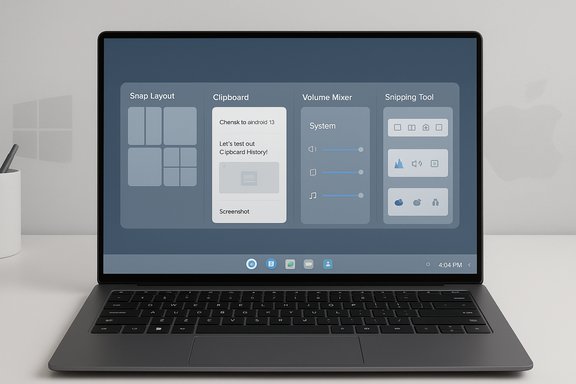
Multitasking: Snap layouts, flexible tiling, and predictable windowing
The most visible Windows productivity advantage is mature window management. Windows 11’s Snap layouts, Snap Assist and Snap Groups let users compose predictable multi‑window layouts with keyboard or mouse gestures; Microsoft’s documentation explains how the system tailors layouts to screen size and remembers arrangements across external displays. Any Android desktop that wants to be “productive” must replicate that behavior and then make it feel natural for mouse/keyboard users, not just touch. Why this matters- Users expect a predictable, fast way to tile 2–4 apps and restore saved workspaces. Desktop workflows for research, writing, reference, and light content creation exploit that capacity constantly.
- Developers need consistent windowing primitives (resize behavior, minimum/maximum sizes, focus handling) to build apps that behave like desktop software rather than stretched phone UIs.
- First‑class Snap layouts (show on hover and via keyboard like Win+Z) with adaptive presets for 2/3/4 window grids and the ability to save and recall layout groups.
- A stable windowing API and behavioral contract in AOSP / Android for large screens: explicit focus rules, keyboard navigation, high‑DPI scaling guidance, and standard titlebar affordances.
- Optional enhancement layers such as a power user “FancyZones” equivalent to keep pro users happy.
- Microsoft documents Snap layouts and shows how layouts map to screen size and orientation; this is the behavior Android desktop must emulate to match expectations.
- Industry coverage of Android‑on‑PC stresses that developer tooling and windowing APIs are a known gap that Google will need to close if Android laptops are to move beyond consumer niches.
- Rewriting the developer mental model is the hardest part. Developers who ship phone‑first code won’t suddenly add complex keyboard and multi‑window workflows without clear toolchains, emulators, and incentives. A polished window manager without a critical mass of desktop‑aware apps will feel like window dressing.
Clipboard history: true parity with Windows, cross‑device persistence, and rich paste options
Clipboard history is one of those invisible productivity multipliers. Windows 11 stores up to 25 clipboard items, supports pinning, and can sync across devices under a Microsoft account; users can paste items with formatting or as plain text. Android desktop must match those expectations — including cross‑device paste from phones — to avoid becoming a productivity dead end. Where Chrome OS and Android currently stand- Chrome OS includes a built‑in clipboard manager, but it’s intentionally small: the UI surfaces the last five copied items and lacks persistent pinning that survives long sessions in a way Windows implements. This is a practical shortcoming that will matter to power users.
- At least 25 items in local clipboard history, with granular item types (text, HTML, images), persistent pinning, and an option to paste with formatting preserved or as plain text.
- Native cross‑device clipboard sync across Android phone + Android desktop with user controls and privacy safeguards (opt‑in sync over the user’s account).
- Developer hooks so apps can advertise paste‑behavior (e.g., “paste as rich text” vs “paste plain”), avoiding the clumsy “all plain text” fallback.
- Windows docs and explainers describe the 25‑item default and pin behavior; Android desktop can’t claim parity until it supports the same capacities and sync semantics.
- Chrome OS’s five‑item clipboard is well documented in multiple guides and explains why “more is better” for desktop users. Improving this in Aluminium OS would directly address a usability gap.
- Cross‑device clipboard sync must be transparent, optional, and private-by‑design. Enterprises will demand on‑prem or admin‑controlled options; consumers will want obvious opt‑outs.
Per‑app sound control: a native volume mixer, not an app store workaround
Desktop users expect control: one app louder, another muted. Windows has a native volume mixer and modern “App volume and device preferences” to govern per‑process audio levels; this is something Android and many Chromebooks lack natively. For users who mix calls, music, and media, a per‑app mixer is non‑negotiable. Current Android reality- Stock Android exposes global stream volumes (media, calls, notifications), but per‑app volume mixing is not a universal platform feature. OEMs such as Samsung provide richer per‑app audio control (Sound Assistant) and third‑party utilities exist, but they rely on accessibility hooks and are limited. That means native, system‑level per‑app volume remains a distinctive Windows advantage.
- A native volume mixer UI that lists active apps (or app windows) and provides persistent sliders and output routing choices.
- System APIs for audio session management so apps can gracefully expose audio streams (e.g., video calls vs media playback) and allow prioritized ducking or simultaneous low‑latency mixes.
- Per‑output routing (headset versus HDMI) and the ability to remember app‑to‑device mappings.
- Audio mixing is solved in modern OS kernels; the challenge is integrating a clean UI, developer audio session APIs, and driver support for professional audio peripherals. Qualcomm’s Snapdragon X2 family and modern Linux/Android audio stacks are capable — the missing piece is product prioritization and API stability.
Screenshot and screen‑recording parity: a desktop‑class capture tool
Power users rely on quick, precise capture tools. Windows’ Snipping Tool supports Rectangular, Window, Fullscreen, and Freeform captures and has built‑in screen recording; it’s integrated with keyboard shortcuts and an editor for annotations. macOS adds the convenience of showing pixel dimensions while dragging a selection, which designers and creators use to get precise sizes. An Android desktop must combine the best of these behaviors. Desired features- Keyboard launches (e.g., a configurable PrintScreen behavior), Rectangular/Freeform/Window/Fullscreen modes and immediate post‑capture editing.
- Integrated screen recording that can record a rectangle or the whole display to MP4 with basic markup tools.
- Optional pixel readout overlay during drag for precision cropping (a feature macOS users value and one that’s small to implement at the UI layer).
- Microsoft documents the Snipping Tool modes and ms‑screenclip protocol for launching specific capture modes; those exact capabilities are the baseline an Android desktop must match.
- macOS’s Shift‑Command‑4 crosshair cursor displays dimensions while drawing a selection; this is a low‑friction UX win Android desktop can copy.
- Screen capture needs hardware/driver cooperation for efficient recording at high resolution. OEMs shipping cheap silicon without proper drivers risk poor recording performance; Google must certify baseline performance for devices to carry the “Android desktop” label.
Desktop‑class apps: developer tooling, incentives, and migration paths
This is the million‑dollar problem: mobile apps can be stretched to larger screens, but they aren’t desktop apps by default. The platform must create a compelling path to desktop‑grade applications so users don’t feel they’re running “phone apps in huge windows.”What “desktop‑class” means
- Feature parity with desktop counterparts (toolbar UI, keyboard shortcuts, file system access, drag & drop, multi‑window support).
- High‑DPI UI guidelines, pointer and keyboard focus models, and predictable multi‑monitor/resolution behavior.
- Native integration for professional features (export pipelines, plugin ecosystems, high‑performance compute) where appropriate.
- Publish a robust Android desktop SDK with stable windowing APIs, pointer and input contracts, and recommended UX patterns.
- Provide reference implementations, emulator images, and compatibility test suites so developers can validate desktop behavior on real hardware.
- Offer distribution incentives: featured placement in a desktop‑aware Play Store, developer grants, or simplified licensing for apps that ship desktop‑optimized builds.
- Support progressive binary strategies: encourage multiplatform builds (Android / Linux / native Arm) and build tooling that makes porting low friction.
- Without a commercial reason to invest engineering hours, many app vendors will not prioritize desktop builds. Microsoft’s UWP and various “unified” approaches taught a similar lesson: tooling isn’t enough — platform maintainers must also make it attractive for developers to commit.
- Legacy Windows x86/x64 apps will remain a barrier for many professional users. Google can mitigate this through:
- Cloud streaming / Cloud PC partnerships for heavy workloads
- Efficient emulation or virtualization for specific classes of legacy apps
- A clear enterprise compatibility story and certified device program for peripherals and pro hardware.
The wider platform question: Aluminium OS, Qualcomm silicon, and timing
The technical pieces are aligning: Qualcomm’s Snapdragon X2 family touts dramatically improved NPUs (up to ~80 TOPS in the X2 line), stronger CPUs and GPU updates targeted at laptop workloads, and an ecosystem that already pushes Windows‑on‑Arm. That silicon makes on‑device AI and sustained efficiency plausible for thin, fanless designs — and explains why Google and partners may pivot hard at this moment. What’s verifiable today- Qualcomm publicly announced the X2 family with NPU figures and timelines, and multiple outlets covered the Snapdragon Summit announcements including the 80 TOPS claims. Hardware availability is expected in 2026 for many OEMs’ Windows and potentially Android laptop designs.
- The exact product name, commercial launch calendar, and which OEM models will ship Aluminium OS out of the box are not yet confirmed by Google. Job listings, repo artifacts and media leaks indicate engineering momentum, but they are not proof of retail timing. Treat any specific ship date as provisional until Google and OEMs announce devices.
How likely is a Windows replacement on Day One?
Short answer: unlikely. Long answer: plausible over a multi‑year horizon for many consumers, plausible as a niche or secondary device for professionals who already use cloud or web workflows.Key bottlenecks
- App ecosystem maturity: professional creative, CAD, DAW, and engineering tools remain Windows/macOS incumbents.
- Driver/peripheral parity: pro audio, capture cards, specialized printers and vendor utilities are still Windows‑first.
- Enterprise management and legacy app story: enterprises expect long update windows, Group Policy‑level control and signed drivers — those are unresolved in Android laptop discussions.
- Students, education deployments, light productivity and cloud‑first professionals
- Secondary machines for mobile‑centric users who want excellent battery life and seamless phone integration
- Regions and segments where low BOM cost and battery life drive adoption
- Day‑one parity on the five primitives above (multitasking, clipboard history with pin + sync, per‑app sound control, desktop‑class screenshot/recording, and real desktop‑grade apps).
- A credible device and support program: clearly documented OEM update windows, peripheral certification, and an enterprise management story.
Conclusion
Google’s Aluminium OS ambition is real — a confluence of leaked product names, job postings, and the new Arm silicon generation makes a polished Android desktop feasible for the first time. But hardware and internal code branches won’t win users; execution on core desktop primitives will. Multitasking, durable clipboard history, a native per‑app volume mixer, a full‑featured capture and recording tool, and a viable path for desktop‑class apps are all small in scope but huge in consequence. Without them, Android on laptops will feel like a phone OS with a keyboard attached — efficient, battery savvy, and pleasant for light tasks, but not a drop‑in replacement for a Windows professional workflow. Google can learn from Microsoft’s missteps and successes: provide developer tools and catalog incentives, partner tightly with silicon vendors and OEMs for reference firmware and certified drivers, and be transparent about update cadences and enterprise features. If Aluminium OS launches with those pieces in place, it won’t need to be a wholesale replacement for Windows — it just needs to be a compelling alternative for a very large slice of users. If it ships without them, it will be yet another interesting experiment that fails to displace a decades‑deep incumbent.Final note on verifiability
- Public evidence for the Aluminium codename, Android desktop efforts, and Qualcomm’s Snapdragon X2 specs is available but not definitive proof of a retail ship schedule; treat product dates and OEM commitments as provisional.
Source: Android Police Android desktop needs to get these 5 things right to replace my Windows PC
