

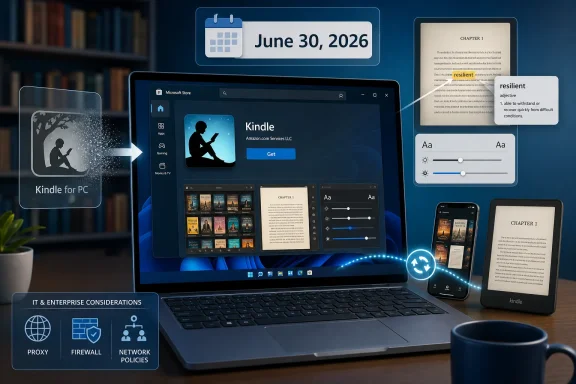
Amazon has released a new Kindle app for Windows through Microsoft Store in early June 2026, replacing legacy Kindle for PC software scheduled to stop working on June 30, while bringing device-like reading features to Windows 11—and, according to early listings, Windows 10—PCs. That sounds like a tidy app refresh, but it is really a platform migration with a deadline attached. For Windows readers, the upgrade is less about a shinier bookshelf than about Amazon deciding where the Kindle ecosystem is allowed to live next. The PC is still welcome in Kindle country, but only on more controlled terms.
For years, Kindle on Windows has felt like a tolerated side door into Amazon’s reading empire. It worked, it synced, and it kept a vast back catalog accessible, but it rarely felt like the place where Amazon’s best reading ideas arrived first. The new app changes that posture by trying to make the PC experience look and behave more like the Kindle apps and Kindle devices people already use elsewhere.
The feature list is not revolutionary if you live on a Kindle Paperwhite, a Fire tablet, or the iPad app. Adjustable fonts, margins, colors, built-in dictionary lookup, Wikipedia integration, reading-progress sync, and support for comics are table stakes in 2026. But on Windows, table stakes matter, because the old Kindle for PC app has long carried the faint smell of maintenance mode.
The most consequential detail is not any one feature. It is that Amazon is moving the center of gravity from a traditional downloadable desktop app to a Store-distributed Windows application. That changes installation, updating, trust, discoverability, and potentially the kinds of system integrations Amazon can use.
For ordinary readers, the pitch is simple: install the new app, sign in, keep reading. For IT pros and power users, the story is more complicated. A reading app can still be a line-of-business dependency when it is used by students, reviewers, researchers, attorneys, accessibility users, and anyone whose workflow depends on offline access to purchased books.
The old app’s retirement also lands in a familiar modern software pattern: vendors present a migration as modernization, while customers experience it as a deadline. The new app may well be faster, cleaner, and better suited to modern Windows. But the calendar is doing as much work as the code.
There is also a communication problem. Reports and early user experiences have not been perfectly aligned on Windows 10 support. T3 says the new software supports Windows 10 as well as Windows 11, while earlier reporting around the retirement notice emphasized a Windows 11 replacement. If the Microsoft Store listing does indeed allow Windows 10 installation, that softens the blow considerably. If availability varies by region, device, or Store rollout state, confusion will continue right up to the shutdown date.
This is the kind of ambiguity that Windows users know too well. “Available” can mean listed but not installable, installable but crashing, supported but not recommended, or accessible only after a staged rollout catches up with your region. The UK availability hiccup described by T3 is not unusual for Store launches, but it is not harmless when a legacy app has an execution date.
But for WindowsForum readers, Store distribution is never just distribution. It changes who controls the channel, how deployment is managed, and what happens on systems where the Store is disabled, restricted, or unavailable. Plenty of corporate, educational, and government PCs do not behave like a home laptop with a Microsoft account and a permissive Store policy.
That means the new Kindle app is not only competing with the old Kindle for PC on features. It is competing with the old app’s deployment model. A Win32 installer can be archived, pushed, blocked, wrapped, version-pinned, or deployed through familiar endpoint-management tooling. A Store app can also be managed, but the operational path is different, and not every organization has its Store governance in good shape.
There is a consumer version of the same issue. Some Windows users deliberately avoid the Microsoft Store because they distrust it, dislike Microsoft account prompts, or have had bad experiences with Store licensing and updates. Amazon is betting those users are a small enough minority—or a manageable enough support burden—to move anyway.
That bet is not irrational. The classic desktop app is a relic of a different Kindle era. Maintaining old code across Windows versions, display scaling changes, authentication flows, DRM updates, and accessibility expectations is not free. If Amazon wants the PC reader to keep pace with the rest of Kindle, consolidating around a modern app package is the obvious engineering move.
If the new Kindle app truly supports Windows 10, Amazon avoids the harshest version of the story. It can say the old app is going away, but the Windows PC remains supported across both mainstream desktop generations. That is a much easier sell.
If Windows 10 support is partial, temporary, or regionally inconsistent, the optics become worse. Amazon would be retiring a legacy application that worked on older PCs and replacing it with something that may require a newer OS, a working Microsoft Store configuration, and whatever dependencies the new app brings along. That is a lot of friction for software whose core job is to display text.
The practical advice for users is therefore boring but important: test before June 30. Install the new app on the exact machine where you read, confirm your library appears, open representative books, check offline behavior, verify notes and highlights, and make sure the app survives a reboot. Do not wait until the old app stops working to discover that your Store account, region, enterprise policy, or OS version is the real blocker.
Lookup functions are similarly important. Kindle’s dictionary and Wikipedia integrations are part of what made the platform more than a file viewer. On a desktop, where a browser is always one Alt-Tab away, built-in lookup might sound redundant. In practice, keeping the lookup inside the reading flow reduces context switching and helps preserve the feeling that the book—not the web—is the main event.
Progress sync remains Kindle’s killer feature across devices. The reason many people tolerate Amazon’s lock-in is that the system remembers where they are. Start on a Paperwhite, continue on a phone, finish a chapter on a PC at lunch: that choreography only works if the desktop app is reliable.
The addition of drag-and-drop document handling is also notable. Kindle has long been more than an Amazon bookstore terminal; it is a personal reading system for PDFs, manuscripts, reports, class material, and exported documents. If the Windows app handles personal documents cleanly and syncs them predictably, it becomes more useful to students and professionals who treat Kindle as a reading queue rather than merely a retail shelf.
On Windows, that shift makes obvious sense. A PC display is far better suited to comics, technical books, textbooks, and illustrated material than a six-inch monochrome e-reader. If Amazon wants users to buy and read visual content through Kindle, the Windows app should be one of the strongest clients in the lineup.
The irony is that the PC may be the best Kindle device for some of the content Amazon now wants to emphasize. A laptop or desktop monitor can display full-color pages, zoomed panels, maps, diagrams, and scanned layouts with fewer compromises. Guided View is not just a comic-book nicety; it is a way to make paneled visual storytelling work across screen sizes.
This also ties the Windows app to Amazon’s broader post-Comixology repair job. The Comixology integration into Kindle was messy and unpopular with some longtime comics readers. A more capable Windows app will not undo that history, but it can make Kindle feel less hostile to visual libraries that never belonged comfortably on basic e-ink hardware.
When a vendor turns off an app, users notice how dependent their libraries are on authentication, device registration, DRM compatibility, and cloud sync. The book still exists in the account, but access depends on supported clients. That is acceptable to many customers until the supported-client list moves in a way that excludes their hardware or workflow.
This is why the Kindle for PC transition will attract more anxiety than a normal app update. The desktop app has historically been important to people who want local access, bigger screens, keyboard navigation, or a way to manage reading outside dedicated Kindle devices. It has also been important to edge cases Amazon does not necessarily design around: researchers with citations, reviewers with advance copies, accessibility users with custom Windows setups, and readers in low-connectivity environments.
Amazon is not unique here. Streaming services, game stores, productivity suites, and cloud libraries all make similar tradeoffs. But books carry a different cultural expectation. A reader expects a purchased book to outlast an app generation, and when it does not feel that way, the trust cost is real.
Amazon’s Kindle history on Windows fits that broader instability. The company has had Store-era Kindle apps before, traditional desktop apps, web reading, and mobile apps that briefly seemed relevant to Windows through the now-deprecated Windows Subsystem for Android. The result is not a straight line of progress so much as a long negotiation over which Windows platform Amazon considers worth supporting.
That history matters because it affects user trust. If the new app is excellent, the past becomes trivia. If it is buggy, region-limited, or missing old capabilities, users will see it as another forced migration in a long chain of half-commitments to Windows.
The early reports of installation hiccups and availability confusion should not be overread. New app rollouts often wobble. But Amazon has given itself less room for wobble by putting June 30 on the old app’s tombstone.
A browser reader depends on browser behavior, web session persistence, network conditions, and whatever offline capabilities Amazon chooses to expose. It also lives in the most distraction-heavy environment on the PC. Reading in a browser tab is convenient, but it competes directly with email, work dashboards, social media, and every other tab-shaped interruption.
For managed environments, the web reader can be simpler than a Store app. There is no app package to deploy, and access can be governed through normal browser and identity policies. But that simplicity cuts both ways. Browser-based access can be easier to block, harder to support offline, and less comfortable for long sessions.
The new Windows app therefore has to justify its existence by being more than a wrapper around the web. It needs to feel native enough, stable enough, and offline-capable enough to earn a place on the taskbar. Otherwise users will reasonably ask why the old app had to die.
There is a defensible version of that strategy. Ancient devices create security, commerce, compatibility, and support headaches. Certificates expire, wireless standards change, store experiences become hard to maintain, and payment flows have to meet modern requirements. No platform owner can support everything forever.
But the emotional effect is cumulative. A longtime Kindle customer may hear, in quick succession, that an old e-reader is losing store access and that the old PC app is being discontinued. Even if both decisions are technically reasonable, together they reinforce the sense that Kindle access is contingent on staying current with Amazon’s preferred clients.
That is the bargain of cloud libraries in one sentence: convenience today, compliance tomorrow. Amazon has built one of the most successful reading ecosystems in history on that bargain. The new Windows app is an attempt to make the convenience side stronger before users dwell too much on the compliance side.
In those contexts, the new app raises governance questions. Can it be deployed without consumer-account friction? Does it behave under standard user permissions? Can updates be controlled or at least monitored? Does it store content in predictable locations? Does it respect enterprise proxy, firewall, and data-loss-prevention tooling?
None of those questions are glamorous, but they determine whether a Store-first app is welcomed or quietly blocked. A consumer can click Install and move on. An administrator has to think about policy, support tickets, user data, and what happens when the app breaks the week before exams or during a litigation review.
Amazon’s best path is transparency. If the company wants Windows users to trust the new app, it should clearly document supported Windows versions, regional availability, offline behavior, migration steps, and feature gaps compared with the legacy client. Silence creates a vacuum, and Windows power users will fill that vacuum with screenshots, Reddit threads, registry guesses, and justified suspicion.
Amazon has advantages here. It controls the Kindle service, the account system, the DRM stack, and the reading platform. It knows how to build Kindle clients across iOS, Android, macOS, Fire OS, and its own e-readers. A good Windows app is not beyond its capabilities.
But Windows remains uniquely messy. Display scaling, multiple monitors, locked-down profiles, old GPUs, regional Store behavior, antivirus interference, and legacy account states all create edge cases. The legacy app survived in part because users learned its quirks. The new app starts over.
That is why Amazon should resist the temptation to measure success by install counts alone. The real test is whether readers stop thinking about the migration. If the app becomes invisible—open book, read book, sync position—it will have succeeded. If it becomes another platform chore, the old app will be remembered more fondly than it deserves.
 Amazon Finally Treats the Windows Reader Like a First-Class Kindle
For years, Kindle on Windows has felt like a tolerated side door into Amazon’s reading empire. It worked, it synced, and it kept a vast back catalog accessible, but it rarely felt like the place where Amazon’s best reading ideas arrived first. The new app changes that posture by trying to make the PC experience look and behave more like the Kindle apps and Kindle devices people already use elsewhere.The feature list is not revolutionary if you live on a Kindle Paperwhite, a Fire tablet, or the iPad app. Adjustable fonts, margins, colors, built-in dictionary lookup, Wikipedia integration, reading-progress sync, and support for comics are table stakes in 2026. But on Windows, table stakes matter, because the old Kindle for PC app has long carried the faint smell of maintenance mode.
The most consequential detail is not any one feature. It is that Amazon is moving the center of gravity from a traditional downloadable desktop app to a Store-distributed Windows application. That changes installation, updating, trust, discoverability, and potentially the kinds of system integrations Amazon can use.
For ordinary readers, the pitch is simple: install the new app, sign in, keep reading. For IT pros and power users, the story is more complicated. A reading app can still be a line-of-business dependency when it is used by students, reviewers, researchers, attorneys, accessibility users, and anyone whose workflow depends on offline access to purchased books.
The June 30 Deadline Turns an Upgrade Into a Cutover
Amazon’s decision to end the legacy Kindle for PC app on June 30, 2026, gives this launch a sharper edge than a normal app refresh. Users are not merely being invited to try a new client; they are being pushed off the old one. That distinction matters because Kindle libraries are not just collections of files sitting neutrally on a disk. They are account-bound, DRM-managed catalogs mediated by Amazon’s software.The old app’s retirement also lands in a familiar modern software pattern: vendors present a migration as modernization, while customers experience it as a deadline. The new app may well be faster, cleaner, and better suited to modern Windows. But the calendar is doing as much work as the code.
There is also a communication problem. Reports and early user experiences have not been perfectly aligned on Windows 10 support. T3 says the new software supports Windows 10 as well as Windows 11, while earlier reporting around the retirement notice emphasized a Windows 11 replacement. If the Microsoft Store listing does indeed allow Windows 10 installation, that softens the blow considerably. If availability varies by region, device, or Store rollout state, confusion will continue right up to the shutdown date.
This is the kind of ambiguity that Windows users know too well. “Available” can mean listed but not installable, installable but crashing, supported but not recommended, or accessible only after a staged rollout catches up with your region. The UK availability hiccup described by T3 is not unusual for Store launches, but it is not harmless when a legacy app has an execution date.
The Microsoft Store Is the Quiet Power Move
The move to Microsoft Store distribution is easy to frame as a convenience. Store apps update automatically, users avoid sketchy download mirrors, and Microsoft gets a cleaner software supply chain. For most consumers, that is probably a net positive.But for WindowsForum readers, Store distribution is never just distribution. It changes who controls the channel, how deployment is managed, and what happens on systems where the Store is disabled, restricted, or unavailable. Plenty of corporate, educational, and government PCs do not behave like a home laptop with a Microsoft account and a permissive Store policy.
That means the new Kindle app is not only competing with the old Kindle for PC on features. It is competing with the old app’s deployment model. A Win32 installer can be archived, pushed, blocked, wrapped, version-pinned, or deployed through familiar endpoint-management tooling. A Store app can also be managed, but the operational path is different, and not every organization has its Store governance in good shape.
There is a consumer version of the same issue. Some Windows users deliberately avoid the Microsoft Store because they distrust it, dislike Microsoft account prompts, or have had bad experiences with Store licensing and updates. Amazon is betting those users are a small enough minority—or a manageable enough support burden—to move anyway.
That bet is not irrational. The classic desktop app is a relic of a different Kindle era. Maintaining old code across Windows versions, display scaling changes, authentication flows, DRM updates, and accessibility expectations is not free. If Amazon wants the PC reader to keep pace with the rest of Kindle, consolidating around a modern app package is the obvious engineering move.
Windows 10 Support Is the Detail That Decides the Mood
The Windows 10 question is central because 2026 is not a normal year for Windows support. Microsoft ended standard support for Windows 10 in October 2025, but the installed base remains enormous, especially among users with older PCs that either cannot upgrade to Windows 11 or have no compelling reason to do so. For a Kindle reader, the operating system requirement is not an abstract platform preference. It is the difference between reading a purchased library on an existing machine and being nudged toward new hardware.If the new Kindle app truly supports Windows 10, Amazon avoids the harshest version of the story. It can say the old app is going away, but the Windows PC remains supported across both mainstream desktop generations. That is a much easier sell.
If Windows 10 support is partial, temporary, or regionally inconsistent, the optics become worse. Amazon would be retiring a legacy application that worked on older PCs and replacing it with something that may require a newer OS, a working Microsoft Store configuration, and whatever dependencies the new app brings along. That is a lot of friction for software whose core job is to display text.
The practical advice for users is therefore boring but important: test before June 30. Install the new app on the exact machine where you read, confirm your library appears, open representative books, check offline behavior, verify notes and highlights, and make sure the app survives a reboot. Do not wait until the old app stops working to discover that your Store account, region, enterprise policy, or OS version is the real blocker.
The Feature Upgrade Is Real, Even If It Is Not Radical
The new app’s reading features bring Windows closer to the modern Kindle baseline. Page customization is the biggest everyday improvement because reading comfort on a PC varies wildly by display size, scaling, lighting, and eyesight. Font selection, margins, color themes, and layout controls are not cosmetic extras; they are accessibility features in everyday clothing.Lookup functions are similarly important. Kindle’s dictionary and Wikipedia integrations are part of what made the platform more than a file viewer. On a desktop, where a browser is always one Alt-Tab away, built-in lookup might sound redundant. In practice, keeping the lookup inside the reading flow reduces context switching and helps preserve the feeling that the book—not the web—is the main event.
Progress sync remains Kindle’s killer feature across devices. The reason many people tolerate Amazon’s lock-in is that the system remembers where they are. Start on a Paperwhite, continue on a phone, finish a chapter on a PC at lunch: that choreography only works if the desktop app is reliable.
The addition of drag-and-drop document handling is also notable. Kindle has long been more than an Amazon bookstore terminal; it is a personal reading system for PDFs, manuscripts, reports, class material, and exported documents. If the Windows app handles personal documents cleanly and syncs them predictably, it becomes more useful to students and professionals who treat Kindle as a reading queue rather than merely a retail shelf.
Comics and Color Are No Longer a Side Quest
Support for graphic novels and Comixology Guided View points to a broader shift in Kindle’s identity. Amazon has spent years trying to make Kindle work for more than black-and-white prose. The Colorsoft line, the larger Scribe devices, and comics integration all move Kindle toward a richer media library without fully becoming a tablet.On Windows, that shift makes obvious sense. A PC display is far better suited to comics, technical books, textbooks, and illustrated material than a six-inch monochrome e-reader. If Amazon wants users to buy and read visual content through Kindle, the Windows app should be one of the strongest clients in the lineup.
The irony is that the PC may be the best Kindle device for some of the content Amazon now wants to emphasize. A laptop or desktop monitor can display full-color pages, zoomed panels, maps, diagrams, and scanned layouts with fewer compromises. Guided View is not just a comic-book nicety; it is a way to make paneled visual storytelling work across screen sizes.
This also ties the Windows app to Amazon’s broader post-Comixology repair job. The Comixology integration into Kindle was messy and unpopular with some longtime comics readers. A more capable Windows app will not undo that history, but it can make Kindle feel less hostile to visual libraries that never belonged comfortably on basic e-ink hardware.
The Old App’s Death Reopens the Ownership Argument
Every Kindle software migration eventually leads back to the same uncomfortable question: what does it mean to “own” a Kindle book? Most users understand, at least vaguely, that they are buying licensed access inside Amazon’s ecosystem rather than a plain file they can treat like a paperback. But retirement deadlines make that abstraction concrete.When a vendor turns off an app, users notice how dependent their libraries are on authentication, device registration, DRM compatibility, and cloud sync. The book still exists in the account, but access depends on supported clients. That is acceptable to many customers until the supported-client list moves in a way that excludes their hardware or workflow.
This is why the Kindle for PC transition will attract more anxiety than a normal app update. The desktop app has historically been important to people who want local access, bigger screens, keyboard navigation, or a way to manage reading outside dedicated Kindle devices. It has also been important to edge cases Amazon does not necessarily design around: researchers with citations, reviewers with advance copies, accessibility users with custom Windows setups, and readers in low-connectivity environments.
Amazon is not unique here. Streaming services, game stores, productivity suites, and cloud libraries all make similar tradeoffs. But books carry a different cultural expectation. A reader expects a purchased book to outlast an app generation, and when it does not feel that way, the trust cost is real.
Windows Users Have Seen This Store-First Movie Before
There is a particularly Windows-flavored fatigue around app platform shifts. Microsoft has spent more than a decade trying to make the Store matter, from the Windows 8 app model through UWP to today’s more flexible Store packaging. Developers have moved in, moved out, and moved back depending on incentives, APIs, and user behavior.Amazon’s Kindle history on Windows fits that broader instability. The company has had Store-era Kindle apps before, traditional desktop apps, web reading, and mobile apps that briefly seemed relevant to Windows through the now-deprecated Windows Subsystem for Android. The result is not a straight line of progress so much as a long negotiation over which Windows platform Amazon considers worth supporting.
That history matters because it affects user trust. If the new app is excellent, the past becomes trivia. If it is buggy, region-limited, or missing old capabilities, users will see it as another forced migration in a long chain of half-commitments to Windows.
The early reports of installation hiccups and availability confusion should not be overread. New app rollouts often wobble. But Amazon has given itself less room for wobble by putting June 30 on the old app’s tombstone.
The Web Reader Is a Safety Net, Not a Replacement
Kindle for Web remains the obvious fallback for people who cannot or will not install the new app. It is useful, broadly accessible, and good enough for many casual reading sessions. But it is not the same as a full desktop client.A browser reader depends on browser behavior, web session persistence, network conditions, and whatever offline capabilities Amazon chooses to expose. It also lives in the most distraction-heavy environment on the PC. Reading in a browser tab is convenient, but it competes directly with email, work dashboards, social media, and every other tab-shaped interruption.
For managed environments, the web reader can be simpler than a Store app. There is no app package to deploy, and access can be governed through normal browser and identity policies. But that simplicity cuts both ways. Browser-based access can be easier to block, harder to support offline, and less comfortable for long sessions.
The new Windows app therefore has to justify its existence by being more than a wrapper around the web. It needs to feel native enough, stable enough, and offline-capable enough to earn a place on the taskbar. Otherwise users will reasonably ask why the old app had to die.
Amazon’s Timing Collides With the End of Old Kindle Hardware
The Windows app transition is happening alongside another Kindle ecosystem cleanup: Amazon has also been winding down support for some very old Kindle devices, particularly models from 2012 and earlier. The details differ by device and region, but the message is consistent. Amazon is pruning the oldest branches of the Kindle tree.There is a defensible version of that strategy. Ancient devices create security, commerce, compatibility, and support headaches. Certificates expire, wireless standards change, store experiences become hard to maintain, and payment flows have to meet modern requirements. No platform owner can support everything forever.
But the emotional effect is cumulative. A longtime Kindle customer may hear, in quick succession, that an old e-reader is losing store access and that the old PC app is being discontinued. Even if both decisions are technically reasonable, together they reinforce the sense that Kindle access is contingent on staying current with Amazon’s preferred clients.
That is the bargain of cloud libraries in one sentence: convenience today, compliance tomorrow. Amazon has built one of the most successful reading ecosystems in history on that bargain. The new Windows app is an attempt to make the convenience side stronger before users dwell too much on the compliance side.
Enterprise IT Will Care Less About Books Than Control
It is tempting to treat Kindle as a purely consumer app, but that misses how Windows software actually spreads. Employees install reading apps on work laptops. Universities rely on digital books and review copies. Researchers annotate material across devices. Accessibility offices support users who read on PCs because e-readers or phones do not meet their needs.In those contexts, the new app raises governance questions. Can it be deployed without consumer-account friction? Does it behave under standard user permissions? Can updates be controlled or at least monitored? Does it store content in predictable locations? Does it respect enterprise proxy, firewall, and data-loss-prevention tooling?
None of those questions are glamorous, but they determine whether a Store-first app is welcomed or quietly blocked. A consumer can click Install and move on. An administrator has to think about policy, support tickets, user data, and what happens when the app breaks the week before exams or during a litigation review.
Amazon’s best path is transparency. If the company wants Windows users to trust the new app, it should clearly document supported Windows versions, regional availability, offline behavior, migration steps, and feature gaps compared with the legacy client. Silence creates a vacuum, and Windows power users will fill that vacuum with screenshots, Reddit threads, registry guesses, and justified suspicion.
The New App Must Win on Reliability, Not Novelty
The most important thing the new Kindle app can do is boring: open every time. A reading app that crashes, loses sync, hides books, mishandles notes, or fails offline is worse than an ugly legacy app that works. The deadline makes reliability the product’s first feature.Amazon has advantages here. It controls the Kindle service, the account system, the DRM stack, and the reading platform. It knows how to build Kindle clients across iOS, Android, macOS, Fire OS, and its own e-readers. A good Windows app is not beyond its capabilities.
But Windows remains uniquely messy. Display scaling, multiple monitors, locked-down profiles, old GPUs, regional Store behavior, antivirus interference, and legacy account states all create edge cases. The legacy app survived in part because users learned its quirks. The new app starts over.
That is why Amazon should resist the temptation to measure success by install counts alone. The real test is whether readers stop thinking about the migration. If the app becomes invisible—open book, read book, sync position—it will have succeeded. If it becomes another platform chore, the old app will be remembered more fondly than it deserves.
The Practical Reading List Before June 30
Amazon’s Windows Kindle reset is not a crisis for most users, but it is a deadline worth treating seriously. The new app appears to be the future of Kindle reading on Windows, and the old app’s retirement means passive users can become stranded by inaction.- Install the new Kindle app before June 30, 2026, on the exact Windows PC where you expect to read.
- Confirm whether your Windows 10 or Windows 11 device can actually install and launch the Store version in your region.
- Open several book types, including standard Kindle books, personal documents, comics, and graphic novels if you use them.
- Check that notes, highlights, bookmarks, and reading position sync correctly across your Kindle devices and apps.
- Test offline reading before you need it, because a reading app that only works when everything is online is not a full replacement.
- If you manage PCs for others, verify Store policy, deployment options, and user-account requirements before the legacy app stops working.
References
- Primary source: t3.com
Published: Fri, 05 Jun 2026 15:00:00 GMT
Loading…
www.t3.com - Related coverage: techradar.com
Loading…
www.techradar.com - Related coverage: epubor.com
Amazon to Discontinue Legacy Kindle for PC on June 30, 2026
Amazon will discontinue the Kindle for PC app on June 30, 2026. Learn how this affects your eBook backups, DRM removal.www.epubor.com
- Related coverage: heise.de

Amazon: Kindle app for PC moves to the Microsoft Store
Amazon will no longer offer the current Kindle app for PC after June 30. It will be replaced by a new version from the Microsoft Store.www.heise.de
- Related coverage: tomsguide.com
Loading…
www.tomsguide.com - Related coverage: bild.de
Loading…
www.bild.de
- Official source: support.microsoft.com
Loading…
support.microsoft.com - Related coverage: computerbase.de

Stichtag 30. Juni 2026: Amazon soll „Kindle für PC“-App einstellen wollen
Anwender sollen beim Update auf Version 2.9.1 von Kindle für PC die Meldung erhalten, dass Amazon die Anwendung zum 30. Juni 2026 einstellt.www.computerbase.de
- Related coverage: blog.the-ebook-reader.com

Amazon Pulling the Plug on Kindle for PC on June 30th
Amazon is discontinuing the current Kindle for PC app on June 30th, and they're releasing a new Kindle app for Windows 11 on the Microsoft Store.blog.the-ebook-reader.com
- Related coverage: windowsforum.com
Loading…
windowsforum.com - Related coverage: cincodias.elpais.com

Amazon pone fecha de caducidad a varios Kindle antiguos: estos son los modelos afectados
Son varios los libros electrónicos de la conocida tienda online los que van a perder el soporte en este año 2026 y, por lo tanto, no es mala idea plantearse su cambio.cincodias.elpais.com
- Related coverage: kiplinger.com

Your Older Kindle Might Become Useless After May 20
Amazon is dropping support for older Kindles in May. Will you be forced to upgrade? www.kiplinger.com
- Related coverage: as.com
Loading…
as.com - Official source: answers.microsoft.com
Loading…
answers.microsoft.com - Official source: learn.microsoft.com
Loading…
learn.microsoft.com - Related coverage: drwindows.de
Loading…
www.drwindows.de - Related coverage: windowscentral.com
Loading…
www.windowscentral.com - Related coverage: gizmodo.com
Loading…
gizmodo.com - Related coverage: surface-online.com
Loading…
surface-online.com - Related coverage: stow-ma.gov
Loading…
www.stow-ma.gov - Related coverage: s3-us-west-2.amazonaws.com
Loading…
s3-us-west-2.amazonaws.com