

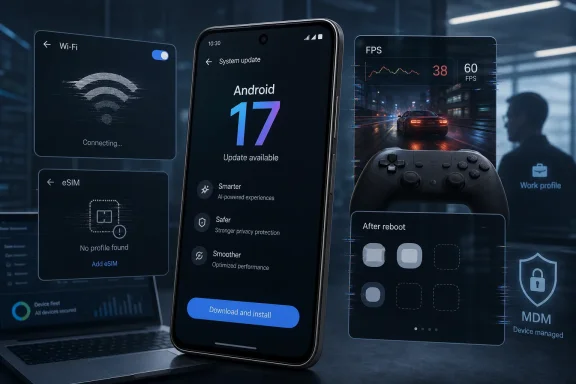
Google’s Android 17 rollout reached Pixel phones in June 2026, and early user reports now point to four especially disruptive problems: Wi-Fi failures inside specific apps, eSIM instability, reduced game performance, and disappearing widgets. That does not make Android 17 a disaster, but it does make the first stable build feel less stable than the word implies. For Pixel owners, the question is no longer whether the update has interesting new features. It is whether those features are worth becoming a volunteer test case for Google’s next patch cycle.
The uncomfortable part is that these are not merely cosmetic complaints. A missing widget is annoying; a broken eSIM can turn a premium phone into a Wi-Fi-only device. A game stutter may sound trivial until it becomes evidence of a deeper scheduler, graphics-driver, or thermal-management regression. Wi-Fi that appears connected while apps behave as if the phone is offline is the kind of bug that makes users distrust the device itself.
Android has always been a story about scale, fragmentation, and controlled chaos. Pixel phones are supposed to be the cleaner version of that story: Google’s hardware, Google’s software, Google’s update pipeline. When the cleanest path to Android 17 still produces this many rough edges, the lesson is not that users should panic. It is that “day one” Android updates have become a risk-management decision, even on the phones built to receive them first.
The modern Android release cycle has become impressively fast and strangely opaque. Google now moves from developer previews to betas to stable releases with the cadence of a cloud service, but phones are not browser tabs or container images. They are alarm clocks, car keys, payment devices, work terminals, medical portals, and sometimes the only working connection a user has.
Android 17’s arrival on Pixel devices followed the familiar script. Pixel owners got the update first, press coverage focused on the new features, and early adopters began installing it within hours. Then the reports began to accumulate: Wi-Fi that worked for some apps but not others, widgets vanishing from home screens, touch behavior feeling wrong, eSIM profiles becoming unreliable, and GPU performance slipping in games that had previously run acceptably.
That sequence matters because Pixel is the reference Android experience. Samsung, OnePlus, Motorola, Xiaomi, and others will all adapt Android 17 through their own skins, drivers, carrier testing, and regional schedules. Pixel users accept the trade-off of receiving Android first because they expect fewer middlemen and faster fixes. But receiving Android first also means absorbing the earliest blast radius.
The issue is not that software has bugs. Every major operating system release does. The issue is that the affected areas are core trust surfaces: networking, cellular identity, input, graphics, and the launcher. These are not obscure enterprise APIs or fringe accessibility regressions. They are the parts of a phone that make a phone feel dependable.
Google’s saving grace is that some fixes are already visible in the Android 17 QPR1 beta track, including a fix for widgets disappearing after reboot. But that also creates an awkward split-brain reality. The fix may exist somewhere in Google’s pipeline, while ordinary users on the stable channel still wait for it to arrive in a public monthly or quarterly update.
A clean failure tells the user what to do. If Wi-Fi will not connect, you switch networks, reboot the router, toggle airplane mode, or fall back to mobile data. But a partial failure wastes time. The user opens Gmail, Search, Gemini, Weather, or another app, sees it hang, checks the Wi-Fi icon, assumes the app is broken, then discovers another app may work fine on the same connection.
Some users have speculated about IPv6 interaction with routers, DNS behavior, VPN-style workarounds, or app-specific network handling. That speculation may or may not prove correct, and it should not be treated as a confirmed root cause. What matters is that Android 17 appears, for some Pixel owners, to have introduced a networking state where the operating system and individual applications disagree about whether the internet is reachable.
For consumers, the practical consequence is data leakage in the financial sense: people burn mobile data because Wi-Fi cannot be trusted. For enterprise users, the consequence is worse. A phone that silently fails on Wi-Fi but works on cellular can undermine mobile-device-management assumptions, conditional-access checks, and user support scripts that assume the network layer is binary.
This is also the kind of bug that can produce bad troubleshooting advice. Factory resets, router changes, private DNS toggles, VPNs, and beta-channel enrollment all become folk remedies. Some may help in isolated cases. None should be necessary after installing a stable OS release on a supported Pixel.
The U.S. Pixel lineup has increasingly pushed users toward eSIM, and the broader industry has followed Apple’s lead in treating removable SIM cards as yesterday’s technology. That strategy only works if eSIM management is boringly reliable. When it is not, the user cannot simply pop out a card, move it to another phone, and get on with the day.
A broken eSIM path also creates support confusion. Is the carrier at fault? Is the profile corrupt? Did the Android update damage modem firmware? Did a flash process fail to preserve radio state? Should the user erase the eSIM, request a new QR code, downgrade Android, or contact Google support? Each of those steps carries its own risk, especially if the device is the user’s only working line.
The reports are not yet evidence of a universal Android 17 defect. Some users updated without eSIM trouble, and anecdotal reports suggest the problem may be more common among devices flashed manually than those updated over the air. But the threshold for concern is lower here. A small number of broken eSIM activations is still a serious quality problem because the failure disables a primary function.
Google and carriers have spent years convincing users that eSIM is simpler, safer, and more flexible than plastic SIM cards. Android 17’s reported eSIM failures show the fragility underneath that pitch. When the digital credential breaks, the “simpler” system can become more dependent on support queues, account portals, carrier rules, and firmware behavior than the old tray-and-card ritual ever was.
That is why the Android 17 GPU-performance complaints have landed with force. Users have reported stutter, lag, and poor frame pacing in titles that previously ran smoothly enough, including games that are hardly elite stress tests. When casual or midweight games begin to hitch on expensive phones, the problem becomes visible to ordinary users, not just benchmark obsessives.
The likely causes could range from GPU drivers to power management, scheduler changes, thermal thresholds, game mode behavior, background compilation, or a bug in Android’s graphics stack. Without confirmation from Google, anything more specific would be guesswork. But the effect is straightforward: Android 17 has made some Pixel devices feel slower.
That perception is damaging because Tensor already carries a complicated reputation. Google’s chips have improved over generations, but they still invite comparisons with Qualcomm and Apple silicon. A stable OS update that reportedly drags game performance downward reinforces the least flattering interpretation of Pixel hardware: that Google’s software magic can only do so much when drivers and sustained performance lag behind competitors.
There is also a broader ecosystem concern. Android gaming depends on predictable device behavior across OS updates. If developers cannot trust that a stable Android release will preserve GPU behavior on Google’s own phones, they must add yet another variable to an already fragmented testing matrix. That is a tax on developers, and it eventually becomes a tax on users.
Reports suggest the Android 17 widget problem is tied in many cases to work profiles, including enterprise-managed or sandboxed-profile setups. Users have described widgets disappearing from the home screen and becoming unavailable in the widget picker, sometimes after a reboot. Google’s QPR1 beta notes indicate that a fix is in progress for widgets disappearing or becoming unavailable after restart, which strongly suggests this is more than random launcher weirdness.
The work-profile angle matters. Android Enterprise is one of Google’s strongest arguments against the idea that iOS owns the managed-mobile world. Work profiles let companies separate corporate data from personal data while allowing employees to use one device. But that separation depends on a dense set of permissions, profile boundaries, launcher integration, and administrative policies.
When a work-profile widget setting can apparently poison the broader widget experience, it reveals how much hidden machinery sits under a simple long-press on the home screen. The user sees missing clocks, calendars, and search bars. The administrator sees a possible interaction between Android Enterprise policy, managed-profile state, and launcher access. Google sees a bug in the plumbing. Everyone loses time.
This is also why the bug is more important than its visual footprint. Enterprise users are often the slowest to update precisely because they know seemingly minor UI regressions can indicate deeper management problems. If Android 17 trips over work-profile widgets on Pixels, cautious IT departments will read that as a reason to delay rollout across fleets, even if most devices would never hit the bug.
The less generous reading is that Pixel’s stable channel is increasingly being used as the last stage of broad compatibility testing. Google can run betas, dogfood builds, emulator tests, device labs, and partner validation, but the real complexity only appears when millions of users bring their routers, carriers, work profiles, apps, games, and habits into the mix. That reality is not unique to Google, but Pixel users are unusually exposed to it.
The timing does not help. Android 17 is arriving in an era when phone updates are less about obvious, theatrical redesigns and more about incremental features, AI integrations, privacy controls, and platform refinements. That makes bugs more visible than benefits. If the update’s headline features feel modest but the regressions hit networking, cellular service, and home-screen basics, users will remember the regressions.
Google’s challenge is that it sells Pixel as the pure Android experience while also using Pixel as the forward edge of Android deployment. Those two roles are in tension. The pure experience should feel polished. The forward edge will always find the cracks first.
Microsoft users know this pattern well. Windows feature updates spent years teaching administrators to wait for the first cumulative patch, monitor telemetry, and delay deployment until early adopters flushed out the worst issues. Pixel owners are now learning a mobile version of the same lesson: being first is not always being best served.
For IT departments, the answer is even clearer. Android 17 should go through a staged rollout, not a fleet-wide push. Test devices should include the same MDM policies, work-profile widget permissions, carrier profiles, VPNs, private DNS settings, Wi-Fi networks, and productivity apps that employees actually use. The bug reports so far suggest that clean test phones may miss the very problems that matter.
Developers should also pay attention. The Wi-Fi and GPU complaints may not be app bugs, but users rarely make that distinction. If an app fails only on Android 17 over Wi-Fi, the app developer gets the bad review. If a game stutters only after the OS update, the game developer still gets support tickets. Android’s platform regressions become ecosystem support costs.
Power users face a separate temptation: jumping to QPR betas to escape stable-channel bugs. That may work in some cases, especially where a fix is already present in beta notes. But it trades one risk profile for another. A beta that fixes widgets may introduce another regression, and downgrading afterward can be painful or destructive.
The right posture is neither panic nor blind trust. It is the posture administrators already use for Windows, macOS, iOS, and server platforms: read the reports, wait for the first patch if necessary, and treat major updates as operational changes rather than free candy.
Communication is part of the fix. Google does not need to litigate every Reddit thread, but it does need to distinguish confirmed bugs from isolated reports. Users can tolerate bugs better when they know a company has reproduced them. Administrators can plan around known issues. Developers can stop wasting hours chasing platform behavior that is not theirs to solve.
The eSIM issue deserves special handling because the consequences are severe. If the risk is limited to flashing images through a particular tool, Google should say so clearly. If over-the-air updates can trigger it, users need warnings before they install. If carriers must reissue profiles, that guidance should be explicit. Silence leaves users guessing at the worst possible layer of the stack.
The Wi-Fi and GPU reports also need more than vague “stability improvements.” Android users are accustomed to changelogs that compress real repairs into bland language. But when a release affects networking and performance on flagship devices, specificity builds trust. It tells users that the company found the bug, not merely that it changed some code and hoped.
Pixel’s reputation has always been built on the promise that Google can close the loop faster than everyone else. Android 17 is now testing that promise in public.
The changelog addresses several early Android 17 problems, including certain apps unexpectedly closing or failing to launch, system widgets showing incorrect colors or contrast, and some devices failing to load Android or becoming stuck in a boot loop under certain conditions. Pixel 10 Pro Fold owners also get a fix for navigation buttons shifting alignment after folding and unfolding the device.
Importantly, this does not appear to resolve the main widget-disappearance bug discussed earlier. Android Central notes that Google’s July patch includes a smaller widget-related fix, but the specific issue where home-screen widgets disappear or become unavailable after reboot remains tied to the Android 17 QPR1 beta track. Google has reached Platform Stability for Android 17 QPR1 Beta 6, so that larger fix is still likely headed for the first quarterly release rather than this monthly patch.
For Pixel owners and IT admins, the practical takeaway is mixed: Google is already shipping post-launch repairs, but the July update is not the all-clear for every Android 17 regression. Devices affected by app crashes or boot-loop behavior should prioritize the patch, while organizations waiting on the work-profile/widget fix may still want to hold broader Android 17 deployment until the QPR update lands.

The uncomfortable part is that these are not merely cosmetic complaints. A missing widget is annoying; a broken eSIM can turn a premium phone into a Wi-Fi-only device. A game stutter may sound trivial until it becomes evidence of a deeper scheduler, graphics-driver, or thermal-management regression. Wi-Fi that appears connected while apps behave as if the phone is offline is the kind of bug that makes users distrust the device itself.
Android has always been a story about scale, fragmentation, and controlled chaos. Pixel phones are supposed to be the cleaner version of that story: Google’s hardware, Google’s software, Google’s update pipeline. When the cleanest path to Android 17 still produces this many rough edges, the lesson is not that users should panic. It is that “day one” Android updates have become a risk-management decision, even on the phones built to receive them first.
 The Stable Build Arrived Before the Confidence Did
The modern Android release cycle has become impressively fast and strangely opaque. Google now moves from developer previews to betas to stable releases with the cadence of a cloud service, but phones are not browser tabs or container images. They are alarm clocks, car keys, payment devices, work terminals, medical portals, and sometimes the only working connection a user has.Android 17’s arrival on Pixel devices followed the familiar script. Pixel owners got the update first, press coverage focused on the new features, and early adopters began installing it within hours. Then the reports began to accumulate: Wi-Fi that worked for some apps but not others, widgets vanishing from home screens, touch behavior feeling wrong, eSIM profiles becoming unreliable, and GPU performance slipping in games that had previously run acceptably.
That sequence matters because Pixel is the reference Android experience. Samsung, OnePlus, Motorola, Xiaomi, and others will all adapt Android 17 through their own skins, drivers, carrier testing, and regional schedules. Pixel users accept the trade-off of receiving Android first because they expect fewer middlemen and faster fixes. But receiving Android first also means absorbing the earliest blast radius.
The issue is not that software has bugs. Every major operating system release does. The issue is that the affected areas are core trust surfaces: networking, cellular identity, input, graphics, and the launcher. These are not obscure enterprise APIs or fringe accessibility regressions. They are the parts of a phone that make a phone feel dependable.
Google’s saving grace is that some fixes are already visible in the Android 17 QPR1 beta track, including a fix for widgets disappearing after reboot. But that also creates an awkward split-brain reality. The fix may exist somewhere in Google’s pipeline, while ordinary users on the stable channel still wait for it to arrive in a public monthly or quarterly update.
Wi-Fi That Looks Connected Is Worse Than Wi-Fi That Fails
The Wi-Fi reports are especially irritating because they describe a failure mode that users cannot easily diagnose. The phone shows Wi-Fi as connected, yet certain apps behave as if the connection is broken. Some reports emphasize Google apps, while others mention services such as TikTok or the Play Store. That is a messier problem than a simple “cannot join network” bug.A clean failure tells the user what to do. If Wi-Fi will not connect, you switch networks, reboot the router, toggle airplane mode, or fall back to mobile data. But a partial failure wastes time. The user opens Gmail, Search, Gemini, Weather, or another app, sees it hang, checks the Wi-Fi icon, assumes the app is broken, then discovers another app may work fine on the same connection.
Some users have speculated about IPv6 interaction with routers, DNS behavior, VPN-style workarounds, or app-specific network handling. That speculation may or may not prove correct, and it should not be treated as a confirmed root cause. What matters is that Android 17 appears, for some Pixel owners, to have introduced a networking state where the operating system and individual applications disagree about whether the internet is reachable.
For consumers, the practical consequence is data leakage in the financial sense: people burn mobile data because Wi-Fi cannot be trusted. For enterprise users, the consequence is worse. A phone that silently fails on Wi-Fi but works on cellular can undermine mobile-device-management assumptions, conditional-access checks, and user support scripts that assume the network layer is binary.
This is also the kind of bug that can produce bad troubleshooting advice. Factory resets, router changes, private DNS toggles, VPNs, and beta-channel enrollment all become folk remedies. Some may help in isolated cases. None should be necessary after installing a stable OS release on a supported Pixel.
The eSIM Reports Hit the Phone at Its Most Basic Layer
The eSIM issue is the most serious of the four because it threatens the device’s identity as a phone. Several Pixel users have reported that eSIM profiles disappeared, switched off, or failed to re-enable after installing or flashing Android 17. Some accounts involve Google’s Android Flash Tool rather than a standard over-the-air update, which may prove important, but that distinction will not comfort users whose cellular service stopped working.The U.S. Pixel lineup has increasingly pushed users toward eSIM, and the broader industry has followed Apple’s lead in treating removable SIM cards as yesterday’s technology. That strategy only works if eSIM management is boringly reliable. When it is not, the user cannot simply pop out a card, move it to another phone, and get on with the day.
A broken eSIM path also creates support confusion. Is the carrier at fault? Is the profile corrupt? Did the Android update damage modem firmware? Did a flash process fail to preserve radio state? Should the user erase the eSIM, request a new QR code, downgrade Android, or contact Google support? Each of those steps carries its own risk, especially if the device is the user’s only working line.
The reports are not yet evidence of a universal Android 17 defect. Some users updated without eSIM trouble, and anecdotal reports suggest the problem may be more common among devices flashed manually than those updated over the air. But the threshold for concern is lower here. A small number of broken eSIM activations is still a serious quality problem because the failure disables a primary function.
Google and carriers have spent years convincing users that eSIM is simpler, safer, and more flexible than plastic SIM cards. Android 17’s reported eSIM failures show the fragility underneath that pitch. When the digital credential breaks, the “simpler” system can become more dependent on support queues, account portals, carrier rules, and firmware behavior than the old tray-and-card ritual ever was.
GPU Regressions Make Tensor’s Reputation Problem Harder to Ignore
Pixel phones have never been gaming-first devices, but that is not the same as saying performance does not matter. Google’s Tensor chips are built around AI features, imaging pipelines, and vertical integration rather than benchmark domination. Pixel buyers know this. They do not expect Snapdragon-leading frame rates, but they do expect yesterday’s playable games to remain playable after today’s OS update.That is why the Android 17 GPU-performance complaints have landed with force. Users have reported stutter, lag, and poor frame pacing in titles that previously ran smoothly enough, including games that are hardly elite stress tests. When casual or midweight games begin to hitch on expensive phones, the problem becomes visible to ordinary users, not just benchmark obsessives.
The likely causes could range from GPU drivers to power management, scheduler changes, thermal thresholds, game mode behavior, background compilation, or a bug in Android’s graphics stack. Without confirmation from Google, anything more specific would be guesswork. But the effect is straightforward: Android 17 has made some Pixel devices feel slower.
That perception is damaging because Tensor already carries a complicated reputation. Google’s chips have improved over generations, but they still invite comparisons with Qualcomm and Apple silicon. A stable OS update that reportedly drags game performance downward reinforces the least flattering interpretation of Pixel hardware: that Google’s software magic can only do so much when drivers and sustained performance lag behind competitors.
There is also a broader ecosystem concern. Android gaming depends on predictable device behavior across OS updates. If developers cannot trust that a stable Android release will preserve GPU behavior on Google’s own phones, they must add yet another variable to an already fragmented testing matrix. That is a tax on developers, and it eventually becomes a tax on users.
Disappearing Widgets Expose the Hidden Complexity of Work Profiles
The vanishing-widget bug sounds small until you understand what it disrupts. Widgets are not just decorations. They are glanceable interfaces for calendars, weather, tasks, notes, smart-home controls, media, authentication prompts, and workplace apps. On Android, they are part of the operating system’s promise that the home screen is not merely an app drawer with wallpaper.Reports suggest the Android 17 widget problem is tied in many cases to work profiles, including enterprise-managed or sandboxed-profile setups. Users have described widgets disappearing from the home screen and becoming unavailable in the widget picker, sometimes after a reboot. Google’s QPR1 beta notes indicate that a fix is in progress for widgets disappearing or becoming unavailable after restart, which strongly suggests this is more than random launcher weirdness.
The work-profile angle matters. Android Enterprise is one of Google’s strongest arguments against the idea that iOS owns the managed-mobile world. Work profiles let companies separate corporate data from personal data while allowing employees to use one device. But that separation depends on a dense set of permissions, profile boundaries, launcher integration, and administrative policies.
When a work-profile widget setting can apparently poison the broader widget experience, it reveals how much hidden machinery sits under a simple long-press on the home screen. The user sees missing clocks, calendars, and search bars. The administrator sees a possible interaction between Android Enterprise policy, managed-profile state, and launcher access. Google sees a bug in the plumbing. Everyone loses time.
This is also why the bug is more important than its visual footprint. Enterprise users are often the slowest to update precisely because they know seemingly minor UI regressions can indicate deeper management problems. If Android 17 trips over work-profile widgets on Pixels, cautious IT departments will read that as a reason to delay rollout across fleets, even if most devices would never hit the bug.
The Pattern Is More Troubling Than Any Single Bug
Each of these problems can be explained away in isolation. Wi-Fi bugs happen. eSIM failures may be limited to certain install paths. GPU performance can be patched. Widget disappearance has an identified beta-track fix. A generous reading says Android 17 is simply going through the normal turbulence of a major operating-system release.The less generous reading is that Pixel’s stable channel is increasingly being used as the last stage of broad compatibility testing. Google can run betas, dogfood builds, emulator tests, device labs, and partner validation, but the real complexity only appears when millions of users bring their routers, carriers, work profiles, apps, games, and habits into the mix. That reality is not unique to Google, but Pixel users are unusually exposed to it.
The timing does not help. Android 17 is arriving in an era when phone updates are less about obvious, theatrical redesigns and more about incremental features, AI integrations, privacy controls, and platform refinements. That makes bugs more visible than benefits. If the update’s headline features feel modest but the regressions hit networking, cellular service, and home-screen basics, users will remember the regressions.
Google’s challenge is that it sells Pixel as the pure Android experience while also using Pixel as the forward edge of Android deployment. Those two roles are in tension. The pure experience should feel polished. The forward edge will always find the cracks first.
Microsoft users know this pattern well. Windows feature updates spent years teaching administrators to wait for the first cumulative patch, monitor telemetry, and delay deployment until early adopters flushed out the worst issues. Pixel owners are now learning a mobile version of the same lesson: being first is not always being best served.
The Update Button Now Belongs in Change Management
For casual users, the simplest advice is to wait if the phone is mission-critical. That may sound strange in a world where security updates are essential, but major version jumps are not the same as monthly security patches. If a Pixel is working well on Android 16 and it contains the user’s primary eSIM, work profile, travel authentication apps, and payment cards, delaying Android 17 for a few weeks is a rational choice.For IT departments, the answer is even clearer. Android 17 should go through a staged rollout, not a fleet-wide push. Test devices should include the same MDM policies, work-profile widget permissions, carrier profiles, VPNs, private DNS settings, Wi-Fi networks, and productivity apps that employees actually use. The bug reports so far suggest that clean test phones may miss the very problems that matter.
Developers should also pay attention. The Wi-Fi and GPU complaints may not be app bugs, but users rarely make that distinction. If an app fails only on Android 17 over Wi-Fi, the app developer gets the bad review. If a game stutters only after the OS update, the game developer still gets support tickets. Android’s platform regressions become ecosystem support costs.
Power users face a separate temptation: jumping to QPR betas to escape stable-channel bugs. That may work in some cases, especially where a fix is already present in beta notes. But it trades one risk profile for another. A beta that fixes widgets may introduce another regression, and downgrading afterward can be painful or destructive.
The right posture is neither panic nor blind trust. It is the posture administrators already use for Windows, macOS, iOS, and server platforms: read the reports, wait for the first patch if necessary, and treat major updates as operational changes rather than free candy.
Google’s First Patch Will Decide the Story Pixel Owners Tell
The next Android 17 patch cycle matters more than the launch announcement did. If Google quickly fixes the widget bug, clarifies the Wi-Fi behavior, acknowledges any eSIM risk, and addresses GPU performance regressions, the story becomes familiar and survivable: rough launch, rapid correction. If the issues linger across multiple monthly releases, Android 17 becomes a cautionary tale.Communication is part of the fix. Google does not need to litigate every Reddit thread, but it does need to distinguish confirmed bugs from isolated reports. Users can tolerate bugs better when they know a company has reproduced them. Administrators can plan around known issues. Developers can stop wasting hours chasing platform behavior that is not theirs to solve.
The eSIM issue deserves special handling because the consequences are severe. If the risk is limited to flashing images through a particular tool, Google should say so clearly. If over-the-air updates can trigger it, users need warnings before they install. If carriers must reissue profiles, that guidance should be explicit. Silence leaves users guessing at the worst possible layer of the stack.
The Wi-Fi and GPU reports also need more than vague “stability improvements.” Android users are accustomed to changelogs that compress real repairs into bland language. But when a release affects networking and performance on flagship devices, specificity builds trust. It tells users that the company found the bug, not merely that it changed some code and hoped.
Pixel’s reputation has always been built on the promise that Google can close the loop faster than everyone else. Android 17 is now testing that promise in public.
Before Pixel Owners Tap Install, the Risk Has a Shape
Android 17 is not unusable for everyone, and many Pixel owners will install it without seeing any of these problems. But the current reports are concrete enough to justify caution, especially for people who depend on their phones for work, travel, or mobile-only connectivity. The safest position is to treat Android 17 as a release worth watching for one more patch cycle unless a new feature is genuinely worth the risk.- Pixel owners who rely on eSIM as their only cellular line should be especially cautious about manually flashing Android 17 images.
- Users with work profiles should watch for widget problems, particularly after rebooting or changing managed-profile policies.
- Anyone seeing app-specific Wi-Fi failures should test the same apps on mobile data before assuming the app or router is solely at fault.
- Gamers on Pixel 8, Pixel 9, and Pixel 10-class devices should expect possible performance variance until Google clarifies or patches the reported GPU regressions.
- Administrators should pilot Android 17 with real MDM policies, carrier configurations, and workplace apps before approving broad deployment.
- Users who already updated should monitor Google’s issue tracking and monthly patch notes rather than relying on factory resets as a first response.
Update: July Pixel patch fixes some Android 17 bugs, but not the disappearing-widget issue (July 8, 2026)
Google has now started rolling out its July 2026 Pixel security update, which Android Central describes as the first monthly patch after Android 17’s launch. The update applies to Pixel 6 through Pixel 10-series devices, with global builds listed as CP2A.260705.006 and availability rolling out in phases over the week.The changelog addresses several early Android 17 problems, including certain apps unexpectedly closing or failing to launch, system widgets showing incorrect colors or contrast, and some devices failing to load Android or becoming stuck in a boot loop under certain conditions. Pixel 10 Pro Fold owners also get a fix for navigation buttons shifting alignment after folding and unfolding the device.
Importantly, this does not appear to resolve the main widget-disappearance bug discussed earlier. Android Central notes that Google’s July patch includes a smaller widget-related fix, but the specific issue where home-screen widgets disappear or become unavailable after reboot remains tied to the Android 17 QPR1 beta track. Google has reached Platform Stability for Android 17 QPR1 Beta 6, so that larger fix is still likely headed for the first quarterly release rather than this monthly patch.
For Pixel owners and IT admins, the practical takeaway is mixed: Google is already shipping post-launch repairs, but the July update is not the all-clear for every Android 17 regression. Devices affected by app crashes or boot-loop behavior should prioritize the patch, while organizations waiting on the work-profile/widget fix may still want to hold broader Android 17 deployment until the QPR update lands.
The first post-Android 17 update is rolling out for Pixels with security and bug fixes | Android Central
Google's first monthly patch is also the first update for Android 17.
www.androidcentral.com
References
- Primary source: aol.com
Published: 2026-07-02T19:50:11.771414
4 Android 17 Problems That Need To Be Fixed - AOL
Android 17 got you down? You're not alone. The new update feels more like an unfinished beta. Here are 4 glaring issues currently driving everyone crazy.www.aol.com - Related coverage: androidcentral.com
Android 17 is making Pixel widgets vanish, but Google already has a fix in the works | Android Central
Some Android 17 users are reporting missing home screen widgets after updating.www.androidcentral.com - Related coverage: phonearena.com
Some Pixel units updated to Android 17 have trouble with bizarre bug - PhoneArena
Android 17 has delivered a bug to some Pixel users preventing them from using certain apps while Wi-Fi is enabled.www.phonearena.com - Related coverage: androidauthority.com
Android 17's strangest Pixel bug so far involves disappearing widgets (Updated)
Android 17 is causing Home Screen widgets to disappear for Pixel users. Early reports suggest the issue is affecting work-managed devices.www.androidauthority.com - Related coverage: wirefly.com
Pixel Users Report Missing Widgets After Android 17 Update | Wirefly
Shortly after the release, some Google Pixel owners say the Android 17 update is making home screen widgets disappear. In some of those cases, those widgets also vanish from the widget picker, so they can’t simply be added back. Reports mention missing Clock, Calendar, Gemini, Keep, search bar...www.wirefly.com
- Official source: 9to5google.com
Google Pixel owners report Wi-Fi, gaming issues on Android 17
The stable Android 17 update landed on Google Pixel phones earlier this month, but it hasn’t gone off without a...9to5google.com
- Related coverage: megamobilecontent.com
- Related coverage: techadvisor.com
Android 17 has had a Nightmare First Week - Tech Advisor
The Android 17 bug reports continue to mount, this time affecting 5G connectivity and touchscreen operation.www.techadvisor.com - Related coverage: techradar.com
Android 17 is causing touchscreen issues for some Pixel owners — but there’s a potential workaround | TechRadar
Turn off triple-tapwww.techradar.com - Related coverage: cincodias.elpais.com
- Related coverage: tomsguide.com
Android 17 officially rolls out to Pixel devices with new features — screen reactions, bubbles, gaming mode, and more | Tom's Guide
Google's massive June 2026 software drop delivers Android 17's productivity and security overhauls to Pixel devices, alongside new Wear OS 7 features.www.tomsguide.com - Related coverage: developer.android.com
Last edited:

