

Microsoft’s Copilot emerged as the clear favorite in Android Central’s recent reader poll — a decisive result that surprised many because broader usage and traffic data paint a much more complicated picture of which AI chatbots people actually use in the wild.
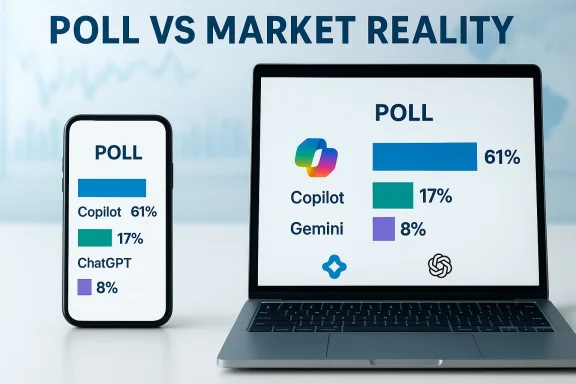
Android Central asked its readers which AI chatbot they prefer, and of the more than 1,600 respondents, 61% selected Microsoft Copilot, with Google’s Gemini at 17% and OpenAI’s ChatGPT at 8%. The story included a selection of reader comments that explain why Copilot is favored by that audience: many cited reliability in productivity contexts, native integration with Office and Windows, and voice interactions as deciding factors.
That outcome is newsworthy because it runs counter to multiple third‑party measurements of market share and web traffic, which show ChatGPT and Gemini often leading usage metrics while Copilot’s web footprint remains modest by some measures. In other words, a community poll of engaged readers — especially a site focused on Android and mobile tech — reveals preference patterns that don’t map cleanly to global market statistics. This divergence is the kernel of the broader story: people choose AI assistants for different reasons, and where you ask them changes the answer.
But not everyone loves that integration. Organizations and users who prefer minimal AI surface or want to avoid potential data exposure have options: Copilot can be hidden, disabled through settings, Group Policy, or Registry edits, and administrators can limit access via enterprise controls. If Copilot is deployed in a managed environment, IT should document how Copilot accesses documents and what telemetry, if any, is sent to Microsoft.
However, that single poll is not a substitute for the kind of market, telemetry, and empirical testing that measures adoption at scale or quantifies hallucination rates across models. Broader usage metrics and independent reporting show a more nuanced landscape: ChatGPT and Gemini continue to command major mindshare and traffic in many contexts, while Copilot’s role is especially prominent where Microsoft’s integrated approach is available.
The bottom line for users and IT teams is pragmatic: pick the assistant that fits your task, verify outputs, and design your workflows so that AI amplifies human judgment rather than replaces it. The poll is a clear reminder that preference is as much about context and convenience as it is about raw model performance — and that reality will keep the AI assistant space dynamic for the foreseeable future.
Source: Android Central We asked what AI chatbot you prefer to use, and the top answer may surprise you
 Background
Android Central asked its readers which AI chatbot they prefer, and of the more than 1,600 respondents, 61% selected Microsoft Copilot, with Google’s Gemini at 17% and OpenAI’s ChatGPT at 8%. The story included a selection of reader comments that explain why Copilot is favored by that audience: many cited reliability in productivity contexts, native integration with Office and Windows, and voice interactions as deciding factors.That outcome is newsworthy because it runs counter to multiple third‑party measurements of market share and web traffic, which show ChatGPT and Gemini often leading usage metrics while Copilot’s web footprint remains modest by some measures. In other words, a community poll of engaged readers — especially a site focused on Android and mobile tech — reveals preference patterns that don’t map cleanly to global market statistics. This divergence is the kernel of the broader story: people choose AI assistants for different reasons, and where you ask them changes the answer.
Why the poll result matters — and why you should be cautious reading it
Polls are snapshots of a specific audience, not universal truth
Reader polls reflect the tastes and working contexts of the audience that votes. Android Central’s readership is tech‑savvy, mobile‑focused, and likely to have strong opinions shaped by device ecosystems, workplace tools, and which apps they encounter most often. That makes the poll a useful temperature check for Android Central’s community, but it is not a representative survey of all consumers, enterprises, or global users. Treat the 61% figure as a valuable data point about this community — not as definitive proof that Copilot “wins” across all markets.Other polls and traffic metrics tell different stories
Independent polls and traffic analyses often show different leaders. For example, Android Authority’s community polling in 2024 found Gemini and ChatGPT in the lead with Copilot trailing — a result that underscores how polls differ by audience and timing. Meanwhile, web‑traffic and market‑share analyses reported by outlets such as PCWorld and other industry trackers suggest Copilot’s web usage is small compared with ChatGPT or Gemini in many contexts. Those data come from broader user bases or telemetry and reflect a different slice of behavior than reader comment threads.What readers actually said — themes from the comments
Android Central’s article collects illustrative comments that illuminate why some people prefer one assistant over another. The recurring themes are:- Workplace integration: Copilot’s link to Microsoft 365 and Windows is a major plus for readers who live in Office documents, Outlook, and Excel. Integration reduces friction and keeps AI suggestions inside workflows people already use every day.
- Perceived reliability: Several commenters said Copilot “doesn’t hallucinate or gaslight as much,” or “never seems to go off the wall.” Those are user perceptions rather than validated comparisons; they matter for adoption but are subjective.
- Task specialization: Readers reported using different bots for different tasks — Gemini for images and generative media, Perplexity or Claude for research and spreadsheets, Replit for coding agents. This multi‑assistant workflow is common among power users.
The market picture: adoption, usage and traffic are messy
Copilot’s reach vs. broader usage metrics
The Android Central poll shows Copilot is beloved among its voters, but industry reporting suggests Copilot’s web market share and traffic are still modest in some measures. Recent coverage summarizing web usage and third‑party traffic studies reports Copilot with a relatively small share of direct web visits compared with ChatGPT and Gemini. Those same reports note growth pockets for Copilot — particularly when Microsoft bundles it inside Windows, Microsoft 365, or the Xbox ecosystem — but they caution that surface popularity in a specific audience doesn’t automatically translate to broad market dominance.Why numbers diverge
There are several reasons metrics differ:- Access pathways: Copilot is embedded in Office and Windows. Users who interact with Copilot inside Outlook, Word, or a taskbar shortcut may not generate the same “web traffic” profiles that standalone web apps produce, making some traffic metrics underestimate Copilot use. Microsoft’s strategy has emphasized embedded experiences rather than a single web portal.
- Audience and geography: Polls sample different audiences. Android Central’s readers are not the same as general consumers tracked by panel surveys or ad‑network telemetry. Regional preferences and device ecosystems affect which assistant someone uses day to day.
- Task versus browsing metrics: Many people use multiple assistants for specific tasks: image generation, code, productivity, or quick search. Counting “which chatbot has the most visits” is not the same as counting “which assistant users rely on for work.”
Technical reliability and hallucinations: the hard truth
Hallucinations are a universal problem — and not limited to one brand
One major theme in reader comments was reliability: several voters said Copilot “doesn’t hallucinate as much.” That’s a meaningful user impression, but independent research and industry reporting make two things clear:- All large language models (LLMs) can hallucinate. Peer‑reviewed research and academic reporting document hallucination risks across major LLMs, and legal and medical communities have warned about the consequences of relying on AI without human oversight. These phenomena — sometimes called “hallucinations” or “AI gaslighting” — have produced high‑profile failures in multiple systems.
- Model behavior varies by configuration and the presence of external tools. When models are given access to up‑to‑date retrieval tools (web search, RAG — retrieval‑augmented generation — or trusted data connectors), they can substantially reduce temporal errors. But RAG systems themselves can fail when retrieval returns bad or outdated sources. Tests of real‑world deployments repeatedly show that even models with strong benchmark scores can fail spectacularly on factual, time‑sensitive, or citation tasks if not properly configured.
Why some people feel Copilot is more "calm"
Users who prefer Copilot often point to two platform realities:- Integrated context: Copilot can use productivity context — your open document, calendar, or organization’s tenant policies — to tailor responses, which feels more useful for office tasks and reduces the friction of copy‑pasting. That closeness to a user’s workflow reduces the number of obvious, surface‑level mismatches users encounter.
- Constrained prompts and enterprise controls: Organizational controls and preset templates inside Microsoft 365 can prevent certain risky reply modes, which creates a perception of fewer hallucinations even if the underlying model capability is similar. In short, interface and guardrails shape the user experience as much as model architecture does.
Why people use multiple assistants — and how to do it deliberately
Strengths by task (general pattern)
- Microsoft Copilot: Productivity, in‑app assistance, document summarization, and workflow shortcuts when using Microsoft 365 and Windows. Good for users who want AI embedded in office workflows.
- Google Gemini: Strong multimodal capabilities, especially for image generation and integration with Google services. Gemini is often chosen by people who want generative images or deep device/Google‑ecosystem integration.
- OpenAI ChatGPT: Generalist assistant with large ecosystem of plugins, broad knowledge base, and frequent model updates. Good for creative drafting, ideation, and a large plugin ecosystem.
- Claude, Perplexity, Grok and others: Niche strengths in research, citation‑anchoring, real‑time news, or developer‑centric workflows.
A practical multi‑assistant workflow (recommended)
- Define the task. Is this creative, factual, or code? Choose the assistant that historically performs best on that task.
- Use retrieval for facts. For research or time‑sensitive work, prefer a model with reliable RAG or in‑tool web search.
- Cross‑check critical outputs. For any result you’ll act on, query a second model or check a trusted source.
- Lock down privacy and compliance. For corporate documents or personal data, use enterprise editions, on‑tenant deployments, or vendor controls.
- Keep a human reviewer in the loop. Especially for legal, medical, or financial decisions.
Risks and governance — what Windows and enterprise users should watch for
Licensing and cost
Copilot is frequently bundled into Microsoft 365 offerings and Windows experiences as a paid or add‑on feature. Enterprises should map licensing costs and seat use to realistic adoption, because underuse of paid seats has been widely reported in large organizations. Evaluate actual usage before committing to broad licensing purchases.Privacy and data leakage
When you let an AI agent access email, documents, or third‑party apps, you create exposure pathways for sensitive data. Microsoft and Google have enterprise controls, but admins must configure them and educate users about what Copilot or Gemini will and will not surface or retain. That’s especially important for regulated industries.Overreliance and automation complacency
The ease of generating plausible content can encourage users to accept outputs at face value. High‑impact fields (medicine, law, engineering) require strict human verification. Research in clinical and legal communities documents real harms arising from hallucinated citations and erroneous reasoning. Treat AI as an assistant — not an unquestioned authority.Vendor lock‑in and workflow dependence
Embedding Copilot into Office is powerful for productivity, but it increases dependency on Microsoft’s platform. Organizations should assess portability, data export options, and contingency plans in case product direction changes or pricing shifts.The Windows angle: Copilot on the desktop — convenience, controversy, control
Microsoft has pushed Copilot into Windows as a built‑in experience and is enhancing it with features like Copilot Vision and a quick‑access UI on the taskbar. For many Windows users, the assistant is the path of least resistance: press a shortcut, ask for help, and receive an answer inside your current app. That tight integration explains some of the positive sentiment Android Central readers expressed.But not everyone loves that integration. Organizations and users who prefer minimal AI surface or want to avoid potential data exposure have options: Copilot can be hidden, disabled through settings, Group Policy, or Registry edits, and administrators can limit access via enterprise controls. If Copilot is deployed in a managed environment, IT should document how Copilot accesses documents and what telemetry, if any, is sent to Microsoft.
What this means for users and the market going forward
- User preferences will remain fragmented. Ecosystem ties (Microsoft, Google, OpenAI) and task specialization will keep multiple assistants in active use. Community polls reveal local preferences; market metrics reveal broader trends. Expect both to coexist and change with each product update.
- Integration wins pockets of loyalty. Embedding AI inside apps where people already work reduces friction and can create durable user habits — even when that assistant isn’t the traffic leader on the open web. That’s an important strategic advantage for Microsoft and Google.
- Reliability remains the decisive battleground. Improvements in retrieval, uncertainty calibration, and provenance will shape which assistants get trusted for high‑stakes tasks. As researchers and vendors publish results on factuality and hallucination mitigation, adoption patterns will evolve.
Practical advice for readers: choose and use AI assistants wisely
- Match the tool to the task.
- Use Copilot for in‑document drafting, meeting summaries, and Windows‑centric workflows.
- Use Gemini for creative image generation and services tied to Google’s ecosystem.
- Use ChatGPT or Claude for broad exploration, plugins, or longform reasoning where a model’s plugin ecosystem helps.
- Always verify time‑sensitive facts. Ask the assistant what its knowledge cutoff is and confirm with an authoritative source or a retrieval‑enabled setting if the answer matters.
- Cross‑validate critical outputs. Run the same prompt through a second assistant or ask for citations, then check those citations.
- Use enterprise features for sensitive data. If you’re in a company, use tenant‑based deployments, data governance, and admin controls to keep proprietary information safe.
- Keep human oversight. No matter how “human‑like” a voice mode sounds, outcomes must be reviewed before you act on them in regulated or safety‑critical contexts.
Final analysis: what the poll tells us and what it doesn’t
Android Central’s poll provides a window into the preferences of its engaged readers: Copilot resonates strongly with that audience because it slots into the productivity workflows and device contexts they care about. That is valuable information for product teams, power users, and anyone tracking sentiment within Android‑focused tech communities.However, that single poll is not a substitute for the kind of market, telemetry, and empirical testing that measures adoption at scale or quantifies hallucination rates across models. Broader usage metrics and independent reporting show a more nuanced landscape: ChatGPT and Gemini continue to command major mindshare and traffic in many contexts, while Copilot’s role is especially prominent where Microsoft’s integrated approach is available.
The bottom line for users and IT teams is pragmatic: pick the assistant that fits your task, verify outputs, and design your workflows so that AI amplifies human judgment rather than replaces it. The poll is a clear reminder that preference is as much about context and convenience as it is about raw model performance — and that reality will keep the AI assistant space dynamic for the foreseeable future.
Source: Android Central We asked what AI chatbot you prefer to use, and the top answer may surprise you