

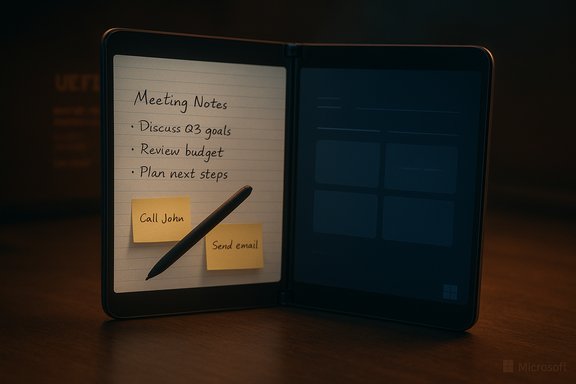
Microsoft’s shelved dual‑screen phone OS — the long‑rumored Andromeda — has finally been pulled into the daylight: a leaked build has been packaged into a flashable image and made runnable on the original Surface Duo, giving enthusiasts the first hands‑on look at the mobile Windows that never shipped. What started as an internal experiment to reimagine Windows for a digital pocket notebook and pen‑first interactions has been resurrected by community efforts and independent developers, producing a playable, if very rough, incarnation of Andromeda OS on the Duo’s dual displays. This release is both a fascinating piece of technical archaeology and a cautionary tale: the images demonstrate the promise of the design while underlining why Microsoft ultimately abandoned the project and shipped Android instead.
If you value preservation, experimentation, and a closer look at what might have been, the Andromeda images and the community work around them are compelling and worth studying. If you are considering trying the images yourself, follow the project documentation scrupulously: back up everything, verify firmware compatibility, understand the legal ambiguities, and expect an experimental experience rather than a polished product. The story of Andromeda’s resurrection on Duo is, above all, a reminder of how hardware, software, and ecosystems must align — and how fragile that alignment can be when one of the pieces is missing.
Source: Windows Central https://www.windowscentral.com/hard...aked-and-you-can-now-try-it-on-a-surface-duo/
 Background and context
What was Andromeda?
Andromeda was an internal Microsoft project to build a modern, mobile‑first version of Windows tailored to a new dual‑screen, pen‑centric form factor. It evolved from the same modular Windows Core OS workstreams that produced Windows 10X, prioritizing a lightweight shell, fast ink and pen interactions, and a rethought home experience — a journal‑style home screen that treated a phone like a digital pocket notebook. The project was active through 2017 and into 2018 before Microsoft shelved the effort and repurposed the hardware for an Android‑based Surface Duo. Contemporary reporting and reconstructed artifacts show Andromeda as an ambitious departure from legacy Windows Phone, with strong emphasis on inking, gestures, and a dual‑screen UX.The Surface Duo and the pivot to Android
Microsoft reworked the Andromeda hardware into the Surface Duo family and shipped the first Duo in September 2020 running Android instead of Windows. The Duo’s hardware — two 5.6‑inch AMOLED panels that form an 8.1‑inch total canvas, a Qualcomm Snapdragon 855 SoC, 6GB RAM, and a 3,577 mAh dual battery — was optimized for multi‑app workflows and pen input, but Microsoft opted for Android to solve the app‑ecosystem problem and speed time‑to‑market. The Duo concept has since become part of the wider Surface experiment with dual displays and foldables. Verified device specs and official documentation confirm the Duo’s key hardware profile, which constrains what a Windows port can realistically achieve on the device.What leaked, who ported it, and how you can run it
The leak and the community release
A recently publicized release, hosted under community WOA/DuoWOA efforts, contains UEFI images, driver bundles, platform support files and a packaged FFU suitable for the Surface Duo 1st Gen. The WOA‑Project repositories on GitHub explicitly list Andromeda‑era platform assets and dual‑boot images, and they include compatibility matrices and strong warnings about the specific OTA/firmware versions the images require. Those repository release notes and the package metadata are the authoritative public artifacts documenting the release.Who made it runnable on Duo?
The effort that brought Andromeda builds to the Duo hardware traces to a handful of developers who have been porting Windows variants to Surface Duo family devices for years. Notably, developer Gustave Monce (who previously brought Windows 10, Windows 11 and Windows 10X builds to Duo hardware in community projects) packaged a leaked Andromeda build and provided an FFU image and flashing utility to ease installation for experienced tinkerers. Independent coverage and developer posts confirm Monce’s role in this porting work and his history of Surface Duo Windows experimentation.What you actually get
The builds let a Surface Duo boot a version of the Andromeda/Windows Core UI and show many of the original UX concepts in situ:- A journal‑style home screen and pen‑forward setup flow that foregrounds inking.
- Live Tile–like Start behaviors and a shell that uses edge gestures for system UI, approximating the concept of an always‑ready digital notebook overlaying a Windows environment.
- Apps that default to left‑screen placement and can be dragged or spanned across to the right screen; multitasking behaviors are present, albeit rough.
The hard reality: what works and what doesn’t
Functional areas that are operational
- Boot and core UI: The UEFI and shell boot to a functional desktop and journal UI, demonstrating the original shell concepts.
- Basic rendering and display layout: Dual‑screen rendering and window placement mechanics are visible and largely as intended.
- Many userland apps and UWP‑style experiences launch and run, giving a convincing demonstration of the original vision.
Critical missing pieces and limitations
The public release and early testing logs make it clear the build is unfinished and experimental — many core device subsystems are nonfunctional or partially implemented:- Sensors and modem: Accelerometer, gyroscope, magnetometer and the cellular modem stacks are not fully integrated, meaning motion gestures, location, and mobile network connectivity are offline under Windows. This is a deep technical gap because phone modem integration typically involves proprietary baseband firmware and vendor HALs that aren’t trivially ported.
- Power management: Panel backlight control, sleep and suspend pathways are incomplete, resulting in unreliable brightness behavior and the inability to properly sleep or resume the device. This is a major usability and safety concern — battery management requires tight coordination between UEFI/ACPI, SoC drivers and the OS scheduler.
- Thermal and battery behavior: Without vendor‑tuned power profiles, the port can run hot and drain battery rapidly. Early testers report elevated temperatures under load — a normal consequence of missing power gating and thermal policies.
- Touch and some input paths: Depending on the image and the flash process, touch or multi‑touch behavior may be degraded or nonfunctional; many experimental installs rely on external input (Bluetooth mouse/keyboard or USB peripherals) for control.
- Carrier and certification gaps: Even if a modem driver is created, restoring voice, SMS and carrier certification (for lawful operation and network access) is an additional and nontrivial step that is unlikely to be resolved in a community port without vendor cooperation.
Technical anatomy: why this port is hard
Porting a desktop‑class Windows image to smartphone silicon and hardware is an order‑of‑magnitude engineering challenge. The key technical barriers are:- UEFI and ACPI compatibility: Booting Windows on ARM devices requires a robust UEFI implementation that exposes accurate ACPI tables and platform capabilities. The community uses Project Mu UEFI variants tailored for the Duo, but mismatches in firmware/bootloader versions are a common cause of bricked devices. The release artifacts include Project Mu UEFI images, but they must be paired with specific Android OTA/firmware versions for safety.
- Driver ecosystem: GPU/display, audio, battery, touchscreen, thermal and baseband drivers are platform‑specific and typically provided only as binary blobs for Android or vendor Linux stacks. Translating or reimplementing those drivers for Windows (or creating reliable shims) is labor‑intensive and often blocked by lack of documentation or proprietary firmware.
- Modem and carrier stacks: Mobile modems run separate baseband firmware that communicates via proprietary interfaces; reusing Android modem stacks in Windows is rarely straightforward and can demand reverse engineering or vendor cooperation and carrier recertification.
- Power and thermal management: Modern phones use aggressive vendor power management tuned at driver and firmware levels. Without equivalent Windows power policies and working drivers, the OS will not idle efficiently and thermal throttling may be missing, leading to heat and battery issues.
Safety, legal and practical warnings
The community releases contain multiple explicit warnings; these are not optional precautions:- Wipe and backups: Installing the FFU or dual‑boot images will wipe Android user data. Even dual‑boot setups require careful partition backups. Back up all data before attempting any install.
- Firmware matching: Images target specific Microsoft OTA/bootloader firmware versions (for Duo 1, the GitHub matrix cites 2022.902.48). Flashing an incompatible firmware or device variant can brick the display, break touch input or render the device unbootable. Verify your device’s OTA version before proceeding.
- Warranty and carrier impact: Modifying firmware will void warranties and may violate carrier or device support terms. Community builds are not carrier‑certified and can break cellular functions.
- Thermal and battery risks: Elevated operating temperatures and faster battery drain are expected. Running such experimental builds for prolonged sessions can accelerate hardware wear or damage. Use caution and limit stress testing.
- Security implications: Custom community images lack the rigorous security vetting and signing processes of official firmware. Sensitive functions tied to secure enclaves, attestation or certified modem stacks may be unavailable or compromised. Treat installs as lab experiments only.
How the installation flow looks at a high level
This is a high‑level summary aimed at technically proficient readers; it is not a how‑to or a replacement for the community’s installation documentation.- Confirm device variant and firmware (OTA) version and match it against the release’s compatibility table.
- Back up all partitions: boot, vbmeta, EFS, userdata, and collect a stock recovery image that you can restore later if needed.
- Use the provided "fastboot boot" images to test‑boot the UEFI without permanently flashing the phone — this is the recommended first step to avoid irreversible changes.
- If the test boot is successful, follow the project's dual‑boot guide to flash the dual‑boot image; understand that flashing will likely break future Android OTA updates until you restore stock boot images.
- Install the recommended driver bundles and test core functionality (display, input, audio). Expect iterative fixes to drivers and ACPI tables.
Why this matters: preservation, research, and what it tells us about Microsoft’s mobile work
This release is significant on multiple levels:- Preservation and transparency: The release gives engineers, historians and journalists an artifact to study. It documents design choices, UI experiments, and the real engineering surface of Microsoft’s multi‑year attempt to reinvent Windows for mobile pocket computers. That kind of primary material is rare for canceled internal OS efforts.
- Proof that the vision was feasible: Bootable images and working UI components show that Microsoft had built a functioning shell and platform pieces. The port demonstrates that parts of Andromeda were operational and not purely vaporware — a vindication of the engineering work even if the project was incomplete.
- A lesson about ecosystems and integration: The missing modem, sensor and power integration make clear why Microsoft chose Android for the shipping Duo: the engineering cost and carrier work to make a commercial phone are enormous and bottlenecked by proprietary blobs and certification pathways. The community port cannot magically recreate those missing supply‑chain and certification steps.
Critical analysis: strengths, weaknesses, and long‑term implications
Strengths
- UX innovation: Andromeda’s journal home, gesture layers and inking focus present a cohesive, differentiated concept for pocket computing that still reads as modern. Those design experiments remain relevant for future dual‑screen and pen‑first devices.
- Community engineering: The WOA‑Project and independent porters show how open collaboration can preserve and extend device lifecycles beyond vendor support, producing research artifacts and technical knowledge that otherwise would be lost.
Weaknesses and real risks
- Incomplete hardware integration: The missing modem, sensor, and power management drivers are not minor polish items — they are deep platform requirements that typically need vendor binaries or cooperation. Without them, the platform cannot be a true phone.
- Safety and warranty concerns: Elevated thermal output and the risk of bricking make these images risky for casual users. The lack of carrier certification also means some functionality (voice, SMS) will never reach shipping quality solely via community effort.
- Legal and licensing ambiguity: The provenance of some firmware blobs and redistribution rights can be unclear. Until maintainers provide explicit licensing details for included binaries, redistributing or deploying those components may carry legal risk — readers should treat any redistributable binaries with caution. This particular area contains unverifiable or incomplete public documentation and should be treated as tentative unless clarified by the maintainers.
Long‑term implications
- For Microsoft: The Andromeda artifacts are evidence that the company experimented seriously with a mobile Windows, and that strategic decisions (app ecosystem, certification, and product risk) drove the shift to Android for Duo. The artifacts may influence future Surface designs or pen‑centric UI work.
- For the hobbyist ecosystem: These releases will spur driver work, deeper documentation, and likely incremental improvements. However, they will not remove the core barriers that kept Andromeda from shipping: the carrier and vendor integration work and commercial scale required for a modern smartphone.
- For historians and UX designers: The port will be a valuable case study showing how design vision and platform reality collide, and what tradeoffs are necessary when reimagining an OS for a radically different hardware form factor.
What remains unverifiable and why we should be cautious
Not all claims circulating around the release can be fully validated from public artifacts:- Exact provenance of the leaked Andromeda build: While the community porters and release notes reference Andromeda‑era images and internal build lineage, precise Microsoft internal build IDs and chain‑of‑custody for the leaked binaries are not uniformly documented in the public release. Until cryptographic hashes and provenance metadata are provided by the maintainers, treat assertions about the precise build origin as tentative.
- Complete legal status of redistributed blobs: The release includes driver bundles and firmware artifacts; determining whether each included binary is redistributable under vendor licenses requires per‑component legal review. Public documentation is currently incomplete on this point; readers should assume ambiguity unless the maintainers publish clear licensing statements.
Conclusion
The ability to boot Andromeda OS on a real Surface Duo is a rare and remarkable moment for Windows‑platform archaeology: it transforms long‑speculated screenshots and leaks into a working, explorable artifact. The port illuminates both the ingenuity of Microsoft’s abandoned vision — a pen‑and‑journal centric OS for a pocketable dual‑screen device — and the unglamorous engineering realities that prompted the company to pivot to Android. For tinkerers and historians, the release is a treasure trove; for anyone expecting a ready‑to‑use Windows phone replacement, the practical truth remains that modem stacks, driver integration, power management and carrier certifications are nontrivial obstacles that community projects alone cannot fully overcome.If you value preservation, experimentation, and a closer look at what might have been, the Andromeda images and the community work around them are compelling and worth studying. If you are considering trying the images yourself, follow the project documentation scrupulously: back up everything, verify firmware compatibility, understand the legal ambiguities, and expect an experimental experience rather than a polished product. The story of Andromeda’s resurrection on Duo is, above all, a reminder of how hardware, software, and ecosystems must align — and how fragile that alignment can be when one of the pieces is missing.
Source: Windows Central https://www.windowscentral.com/hard...aked-and-you-can-now-try-it-on-a-surface-duo/
