Apple’s AI strategy is starting to look less like a race to build the smartest model and more like a contest to control the places where AI gets used. According to the PYMNTS piece and the reporting it cites, Apple is leaning into a familiar playbook: keep the hardware, the distribution layer, and the default user experience under its own roof, while letting partners and third-party models do more of the heavy lifting in the background. That approach may sound conservative, but in a market where AI is becoming deeply embedded in daily workflows, it could prove surprisingly durable. The question is whether that posture is a shrewd reset or a quiet surrender.
Apple has rarely won by being first into a category. Instead, it has often waited, watched, and then arrived with a product strategy that makes the category feel inevitable, polished, and tightly integrated. That is the lens through which the company’s current AI posture should be understood. The latest reporting suggests Apple is not trying to outgun OpenAI, Google, or Meta on frontier model capability, but rather to position AI inside the iPhone, Mac, App Store, and adjacent services where it already has enormous leverage.
That matters because AI is no longer just a feature set. It is increasingly becoming the interface layer through which people search, plan, create, and buy. PYMNTS Intelligence has described this shift as movement toward persistent environments, where usage becomes habitual and app-led rather than browser-led. In the underlying data, 52% of AI’s most devoted users now access the technology through installed apps rather than browsers, and 83% have tried ChatGPT, compared with 48% for Gemini and 30% for Copilot. That concentration is a reminder that early access points matter; once consumers settle into a habit, switching gets harder.
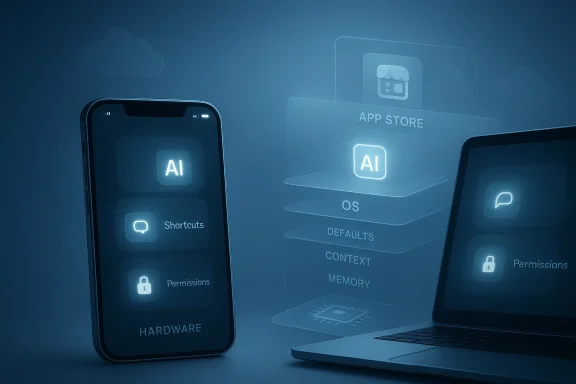
Apple’s instinct, historically, is to own the moments that matter without necessarily owning every piece of the technology stack. The App Store is the clearest precedent. Apple supplies the platform, shapes the rules, and takes a share of the revenue while allowing others to compete inside the ecosystem. The current AI debate asks whether that model can translate to a domain that is far more foundational than apps or media subscriptions. AI is not just a destination anymore; it is becoming the next layer of the operating system itself. That is why the analogy to search only goes so far. Search is something you go to. AI is becoming something that sits underneath nearly everything.
Apple’s recent executive reshuffling also reinforces the idea that the company is preparing for a more selective AI strategy rather than an all-out frontal assault. Reporting around the appointment of Amar Subramanya to lead Apple AI, along with John Giannandrea’s transition into an advisory role ahead of retirement, suggests a company still trying to stabilize its technical leadership while moving closer to a product model centered on device integration and on-device inference. That backdrop makes the App Store and hardware emphasis feel less like a slogan and more like a corporate thesis.
The release of ChatGPT created a public benchmark Apple was not prepared for. Unlike prior consumer-tech waves, this one arrived with immediate utility, rapid iteration, and a visible application layer that users could adopt without waiting for a device refresh cycle. Rivals like Google, Meta, Microsoft, and OpenAI moved quickly to turn AI into a core part of their platforms, while Apple’s reputation for perfectionism translated into caution. In a fast-moving category, caution can read as slowness.
The PYMNTS framing captures the strategic dilemma. If AI is becoming the default interface, then distribution becomes as important as model quality. Consumers do not necessarily care which lab trained the model behind the curtain. They care whether the service is already on the phone, embedded in the operating system, or woven into a workflow they already use. That is where Apple still has real power: on billions of devices, through the operating system layer, and via the app economy that it helps regulate.
The company’s hardware-first instincts also make sense in a world where AI workloads are increasingly split between cloud and device. On-device AI is attractive because it can improve latency, reduce dependency on network connectivity, and align with Apple’s privacy narrative. The logic is not that Apple will be the smartest AI provider in the market; it is that Apple will be the best place for AI to live when it needs to feel seamless, personal, and dependable. That is a subtler claim, but it may be a more defensible one.
At the same time, the market context is shifting quickly. PYMNTS reporting suggests consumers are not merely trying AI once and moving on. They are developing routines, moving into app-based interactions, and in some cases replacing prior workflows altogether. That means Apple’s distribution advantage may become more valuable over time, even if its model ambitions remain comparatively restrained. The long game is not just about competing with OpenAI or Google on raw capability. It is about making AI feel native to the Apple experience in a way that reinforces retention, trust, and monetization.
That strategy is appealing because it preserves Apple’s strongest competitive advantage: ecosystem control. If AI becomes another layer of app-like activity, then controlling the store, the operating system, and the defaults could be more valuable than having the most powerful model. Apple has spent more than a decade proving that a platform can monetize consumer behavior even when it does not directly create every popular service on top of it.
This is why Gurman’s reported point about Apple effectively conceding the AI race lands with force. The company may not be conceding the market so much as conceding the frontier-model race while trying to dominate the downstream user experience. That could be rational. It is also a sign that Apple sees the highest-value opportunities as being in distribution, not discovery.
That is a much harder battle to win by merely licensing or integrating external models. It requires product coherence, not just model access. It also requires that Apple make AI feel dependable enough to be deeply embedded without undermining the trust premium the company has spent years cultivating. In other words, Apple cannot just add AI. It has to make AI feel like part of the operating system’s emotional contract with the user.
The shift from destination to infrastructure is exactly what makes AI monetization so interesting. A search query might happen a few times a day. An OS-level AI assistant could participate in dozens of micro-decisions, many of them invisible. That gives platform owners more surfaces to shape engagement, but it also raises the cost of failure. When the system sits at the center of the experience, mistakes are more disruptive.
There is also a consumer psychology angle. Many users do not want to manage a separate AI relationship. They want assistance that is already there, already signed in, and already context-aware. Apple can provide that if it owns the hardware and system layer. The company may not need to outcompete OpenAI in the lab if it can outperform everyone else in the lived experience of using AI on a phone or laptop. That is a very Apple-like bet.
This matters because Apple’s strongest business position is also app-centric. The company controls the mobile operating system, the app store, and the primary hardware environment where millions of people spend their day. If AI usage is migrating into apps, then Apple has a natural platform advantage. It can shape discovery, permissions, billing, and placement in ways that affect where AI attention flows.
Apple understands habit formation better than most companies. It has spent years engineering repetition into its ecosystem through notifications, continuity, and device sync. AI can fit neatly into that pattern if it is framed as a companion to the iPhone and Mac experience rather than as a separate destination. That is probably the heart of the company’s current thinking.
The consequence is that AI may behave less like a single product market and more like an ecosystem of interfaces. Browser-based access will still matter, especially for power users and desktop workflows, but app-led behavior appears to be where the stronger habits form. That is exactly the territory where Apple excels.
That is why the company’s rumored emphasis on hardware is not a retreat from AI. It may actually be the most Apple way to compete in AI. The company can deliver a compelling experience without having to claim model supremacy, because it owns the physical and software environment where the experience happens. If AI is to become ambient, then the device itself matters more than ever.
That gives Apple a credible answer to competitors that are still centered on cloud-first AI. Cloud services can be powerful, but they also introduce latency, connectivity dependence, and privacy concerns. Apple can frame its hardware strategy as the safer, faster, and more integrated route.
There is also a commercial risk in over-indexing on hardware cycles. AI adoption is happening continuously, while hardware refresh cycles are slower. If Apple leans too heavily on a “wait for the next device” strategy, it may cede mindshare to rivals that can iterate faster in software. That tension will likely define the next phase of Apple’s AI push.
At the same time, Siri has been a symbol of Apple’s AI struggles for years. Users know when an assistant is useful and when it is merely present. If Apple wants to turn Siri into a serious strategic asset, it has to do more than tighten integration. It has to make the assistant genuinely capable in the moments that matter. That is a higher bar than polished branding.
The danger is that extensions can become a workaround rather than a breakthrough. If users still feel they need to leave the Apple environment to get serious AI work done, then the experience will look incomplete. Apple’s real challenge is to make the handoff invisible enough that users see one continuous interaction rather than a patchwork of services.
For Google, this creates a mixed picture. Google has model strength, search distribution, and Android reach, but it lacks Apple’s tight hardware control over premium devices. Microsoft has powerful enterprise distribution and a strong position in productivity workflows, yet it does not own the dominant consumer handset ecosystem. OpenAI has mindshare and product velocity, but it still relies heavily on partners and platforms for distribution. Meta has enormous user reach, but its AI story is more fragmented across services and devices.
The competitive question is less “Who has the best model?” and more “Who controls the default experience?” That shift favors Apple in consumer hardware and favors Microsoft in enterprise productivity. It is less favorable for players whose success depends on building direct user relationships without owning the device layer.
The risk for rivals is that Apple’s approach turns AI into a platform tax rather than a standalone category victory. If Apple owns the user relationship, then everyone else becomes a supplier into Apple’s ecosystem. That is not the same as winning the market, but it is a very lucrative place to be.
Consumers also tend to value convenience over abstraction. They do not necessarily care whether an AI model is frontier-leading if the result is fast, helpful, and accessible in the moment. Apple’s hardware and software integration is well suited to that kind of experience. It may not thrill power users first, but it can normalize AI for mainstream users quickly.
That said, the consumer-enterprise boundary is blurring. Employees often bring expectations from personal devices into the workplace. If Apple makes AI feel effortless on the iPhone and Mac, that user experience can shape enterprise expectations over time. In that sense, Apple’s consumer strategy can still influence corporate purchasing and policy debates indirectly.
The consumer story is therefore not just about convenience. It is about behavioral lock-in. Once AI becomes part of a person’s daily routine, the platform that hosts that routine gains a durable advantage. Apple understands that better than almost anyone.
The opportunity is not just to sell more hardware. It is to make the iPhone and Mac the preferred places where people encounter AI first, then keep coming back to it. That creates monetization opportunities across devices, services, app distribution, and future subscriptions.
There is also a strategic danger in becoming too dependent on others for innovation. If third-party AI models drive the most compelling experiences, Apple may end up with the platform burden but not the innovation credit. That would be a familiar but uncomfortable position for a company that likes to define the experience end-to-end.
Finally, there is a broader market concern. If AI becomes too concentrated in a few ecosystem gatekeepers, innovation may narrow and competition may become less visible. Apple’s approach could be commercially rational while still contributing to a more closed AI landscape. That tension will not disappear just because the user experience improves.
There is a real possibility that Apple’s best AI business is not a direct model business at all. It may be a distribution business, a device business, and a trust business bundled into one. That would not be a failure. It would be an Apple-style adaptation to a market that is changing faster than its brand usually does. The question is whether that adaptation arrives soon enough to preserve Apple’s influence over the next interface era.
Source: PYMNTS.com Apple Centering AI Plans on App Store and Hardware | PYMNTS.com
 Overview
Apple has rarely won by being first into a category. Instead, it has often waited, watched, and then arrived with a product strategy that makes the category feel inevitable, polished, and tightly integrated. That is the lens through which the company’s current AI posture should be understood. The latest reporting suggests Apple is not trying to outgun OpenAI, Google, or Meta on frontier model capability, but rather to position AI inside the iPhone, Mac, App Store, and adjacent services where it already has enormous leverage.That matters because AI is no longer just a feature set. It is increasingly becoming the interface layer through which people search, plan, create, and buy. PYMNTS Intelligence has described this shift as movement toward persistent environments, where usage becomes habitual and app-led rather than browser-led. In the underlying data, 52% of AI’s most devoted users now access the technology through installed apps rather than browsers, and 83% have tried ChatGPT, compared with 48% for Gemini and 30% for Copilot. That concentration is a reminder that early access points matter; once consumers settle into a habit, switching gets harder.
Apple’s instinct, historically, is to own the moments that matter without necessarily owning every piece of the technology stack. The App Store is the clearest precedent. Apple supplies the platform, shapes the rules, and takes a share of the revenue while allowing others to compete inside the ecosystem. The current AI debate asks whether that model can translate to a domain that is far more foundational than apps or media subscriptions. AI is not just a destination anymore; it is becoming the next layer of the operating system itself. That is why the analogy to search only goes so far. Search is something you go to. AI is becoming something that sits underneath nearly everything.
Apple’s recent executive reshuffling also reinforces the idea that the company is preparing for a more selective AI strategy rather than an all-out frontal assault. Reporting around the appointment of Amar Subramanya to lead Apple AI, along with John Giannandrea’s transition into an advisory role ahead of retirement, suggests a company still trying to stabilize its technical leadership while moving closer to a product model centered on device integration and on-device inference. That backdrop makes the App Store and hardware emphasis feel less like a slogan and more like a corporate thesis.
Background
Apple’s current position did not appear overnight. For years, the company has built its brand around privacy, silicon integration, and tightly managed user experience, even when the broader industry was moving toward cloud-first or service-first models. That philosophy worked beautifully in smartphones, wearables, and laptops, where Apple could differentiate through vertical integration, custom chips, and a curated software ecosystem. But generative AI has exposed a harder reality: the companies with the largest model ecosystems, the deepest developer mindshare, and the most aggressive product cadence have set the pace.The release of ChatGPT created a public benchmark Apple was not prepared for. Unlike prior consumer-tech waves, this one arrived with immediate utility, rapid iteration, and a visible application layer that users could adopt without waiting for a device refresh cycle. Rivals like Google, Meta, Microsoft, and OpenAI moved quickly to turn AI into a core part of their platforms, while Apple’s reputation for perfectionism translated into caution. In a fast-moving category, caution can read as slowness.
The PYMNTS framing captures the strategic dilemma. If AI is becoming the default interface, then distribution becomes as important as model quality. Consumers do not necessarily care which lab trained the model behind the curtain. They care whether the service is already on the phone, embedded in the operating system, or woven into a workflow they already use. That is where Apple still has real power: on billions of devices, through the operating system layer, and via the app economy that it helps regulate.
The company’s hardware-first instincts also make sense in a world where AI workloads are increasingly split between cloud and device. On-device AI is attractive because it can improve latency, reduce dependency on network connectivity, and align with Apple’s privacy narrative. The logic is not that Apple will be the smartest AI provider in the market; it is that Apple will be the best place for AI to live when it needs to feel seamless, personal, and dependable. That is a subtler claim, but it may be a more defensible one.
At the same time, the market context is shifting quickly. PYMNTS reporting suggests consumers are not merely trying AI once and moving on. They are developing routines, moving into app-based interactions, and in some cases replacing prior workflows altogether. That means Apple’s distribution advantage may become more valuable over time, even if its model ambitions remain comparatively restrained. The long game is not just about competing with OpenAI or Google on raw capability. It is about making AI feel native to the Apple experience in a way that reinforces retention, trust, and monetization.
Why Apple’s App Store Logic Still Matters
Apple’s App Store business model offers the clearest hint of how the company may approach AI. The company does not need to own every popular app to profit from the platform. It needs to set the terms, own the distribution, and ensure that the platform remains the default route for discovery and engagement. In AI, that could translate into a system where Apple supplies the shell, the interfaces, and the device-level controls, while third-party models and apps provide much of the intelligence behind the scenes.That strategy is appealing because it preserves Apple’s strongest competitive advantage: ecosystem control. If AI becomes another layer of app-like activity, then controlling the store, the operating system, and the defaults could be more valuable than having the most powerful model. Apple has spent more than a decade proving that a platform can monetize consumer behavior even when it does not directly create every popular service on top of it.
The economic analogy
The App Store analogy also explains why Apple may prefer revenue participation over outright model supremacy. It can take a share of subscriptions, manage app discovery, and still market itself as the company that protects privacy and simplifies the experience. That is an elegant business if AI remains modular enough to be packaged, routed, and distributed through app-like interfaces. It is less elegant if AI becomes a universal layer that bypasses apps entirely.- Apple benefits when AI is distributed through owned surfaces.
- The company wins if consumers treat AI as a feature of the device, not a destination site.
- Third-party models can still create value if Apple controls the funnel.
- Revenue-sharing may be more realistic than model domination.
- The App Store precedent suggests Apple wants to be the landlord, not necessarily every tenant.
App Store precedent, AI exception
Apple’s success with the App Store came from striking a balance between openness and control. It allowed competition among apps while preserving a tightly managed experience and a lucrative tollbooth. But AI may resist that same structure because the most valuable interactions may happen within the assistant layer rather than inside discrete third-party apps. If the assistant owns the workflow, the store becomes less central.This is why Gurman’s reported point about Apple effectively conceding the AI race lands with force. The company may not be conceding the market so much as conceding the frontier-model race while trying to dominate the downstream user experience. That could be rational. It is also a sign that Apple sees the highest-value opportunities as being in distribution, not discovery.
- AI may compress the distance between app, search, and operating system.
- Apple’s platform rules could matter more than its model size.
- Monetization may shift from app installs to AI sessions.
- User trust and privacy messaging remain key differentiators.
- Apple’s role as gatekeeper could become more controversial.
AI as the New Operating System Layer
One of the most important ideas in the PYMNTS reporting is that AI is becoming the next-generation OS rather than just another app category. That framing is important because operating systems do more than host software. They orchestrate identity, permissions, defaults, multitasking, notifications, and access to hardware. If AI gets promoted into that role, then the strategic question changes dramatically. It is no longer about whether Apple has the best chatbot. It is about whether Apple can govern the intelligence layer that mediates the user’s entire relationship with the device.That is a much harder battle to win by merely licensing or integrating external models. It requires product coherence, not just model access. It also requires that Apple make AI feel dependable enough to be deeply embedded without undermining the trust premium the company has spent years cultivating. In other words, Apple cannot just add AI. It has to make AI feel like part of the operating system’s emotional contract with the user.
Why the OS framing is powerful
The OS framing also clarifies why the search analogy is incomplete. Search is a tool you summon. An operating system is the environment you live in. If AI becomes ambient, contextual, and persistent, then it starts to influence nearly every action a user takes. That makes control of defaults, memory, permissions, and context far more consequential than model scorecards.The shift from destination to infrastructure is exactly what makes AI monetization so interesting. A search query might happen a few times a day. An OS-level AI assistant could participate in dozens of micro-decisions, many of them invisible. That gives platform owners more surfaces to shape engagement, but it also raises the cost of failure. When the system sits at the center of the experience, mistakes are more disruptive.
- OS-level AI is about governance, not just capability.
- Context and memory become strategic assets.
- Defaults can shape behavior at scale.
- Failures are more visible when AI is embedded everywhere.
- Apple’s privacy reputation becomes a product feature, not just a marketing line.
There is also a consumer psychology angle. Many users do not want to manage a separate AI relationship. They want assistance that is already there, already signed in, and already context-aware. Apple can provide that if it owns the hardware and system layer. The company may not need to outcompete OpenAI in the lab if it can outperform everyone else in the lived experience of using AI on a phone or laptop. That is a very Apple-like bet.
App-Based AI Usage Is Changing the Market
PYMNTS Intelligence’s findings reinforce the case for Apple’s distribution-first approach. The data show that 52% of AI’s most devoted users access the technology through installed apps, and that app-based behavior is becoming associated with stronger retention, more persistent identity, and greater habit formation. Those are not trivial details. They suggest the market is evolving away from one-off curiosity and toward routines that live inside mobile software.This matters because Apple’s strongest business position is also app-centric. The company controls the mobile operating system, the app store, and the primary hardware environment where millions of people spend their day. If AI usage is migrating into apps, then Apple has a natural platform advantage. It can shape discovery, permissions, billing, and placement in ways that affect where AI attention flows.
Habit formation and retention
The most interesting part of the PYMNTS data is not just that users are trying AI, but that a meaningful share are replacing older methods with it. In the report, 43% of users engaging through dedicated AI platforms say they have fully replaced previous methods rather than layering AI on top of existing workflows. That is the kind of behavior that creates durable product attachment. Once a user replaces an old habit, the new one becomes much harder to dislodge.Apple understands habit formation better than most companies. It has spent years engineering repetition into its ecosystem through notifications, continuity, and device sync. AI can fit neatly into that pattern if it is framed as a companion to the iPhone and Mac experience rather than as a separate destination. That is probably the heart of the company’s current thinking.
- App-based AI encourages repeat usage.
- Saved context increases switching costs.
- Mobile access makes AI more spontaneous.
- Persistent identity strengthens lock-in.
- Notifications and shortcuts can turn AI into a daily habit.
The consequence is that AI may behave less like a single product market and more like an ecosystem of interfaces. Browser-based access will still matter, especially for power users and desktop workflows, but app-led behavior appears to be where the stronger habits form. That is exactly the territory where Apple excels.
Hardware as the Real Battleground
If AI is the new OS layer, hardware becomes the battlefield where experience is won or lost. Apple has long treated hardware as the anchor of its brand promise, and AI only intensifies that logic. Device performance, battery life, thermal efficiency, microphone quality, camera systems, and neural acceleration all affect whether AI feels magical or merely available. Apple’s advantage is that it can optimize all of those variables together.That is why the company’s rumored emphasis on hardware is not a retreat from AI. It may actually be the most Apple way to compete in AI. The company can deliver a compelling experience without having to claim model supremacy, because it owns the physical and software environment where the experience happens. If AI is to become ambient, then the device itself matters more than ever.
The silicon advantage
Apple Silicon already demonstrated how powerful vertical integration can be when the company aligns software, hardware, and chip design. AI gives that formula a new purpose. On-device inference, low-latency responses, and battery-friendly compute all benefit from custom silicon. As AI workloads become more frequent and more personal, users may value responsiveness and privacy as much as raw benchmark performance.That gives Apple a credible answer to competitors that are still centered on cloud-first AI. Cloud services can be powerful, but they also introduce latency, connectivity dependence, and privacy concerns. Apple can frame its hardware strategy as the safer, faster, and more integrated route.
- Custom silicon can support on-device intelligence.
- Battery efficiency becomes a user-facing AI feature.
- Privacy messaging is stronger when data stays local.
- Tight hardware/software integration improves consistency.
- AI readiness could become a standard buying criterion.
There is also a commercial risk in over-indexing on hardware cycles. AI adoption is happening continuously, while hardware refresh cycles are slower. If Apple leans too heavily on a “wait for the next device” strategy, it may cede mindshare to rivals that can iterate faster in software. That tension will likely define the next phase of Apple’s AI push.
Siri, Extensions, and the Limits of Control
The reported emphasis on iOS 27 and the Siri Extensions program suggests Apple is not simply walking away from AI. It is trying to reframe Siri as a controlled, extensible layer rather than a direct competitor to the biggest frontier models. That has obvious advantages. Apple can preserve user trust, keep the experience coherent, and avoid overpromising on capabilities it may not want to own end-to-end.At the same time, Siri has been a symbol of Apple’s AI struggles for years. Users know when an assistant is useful and when it is merely present. If Apple wants to turn Siri into a serious strategic asset, it has to do more than tighten integration. It has to make the assistant genuinely capable in the moments that matter. That is a higher bar than polished branding.
Extensions as a compromise
Siri Extensions may be the right compromise if Apple is willing to let specialized partners carry some of the intelligence burden. That would let the company maintain control of the interface while widening the assistant’s practical utility. It is a classic Apple move: keep the seams hidden, but allow the ecosystem to supply depth where necessary.The danger is that extensions can become a workaround rather than a breakthrough. If users still feel they need to leave the Apple environment to get serious AI work done, then the experience will look incomplete. Apple’s real challenge is to make the handoff invisible enough that users see one continuous interaction rather than a patchwork of services.
- Siri must feel reliable, not merely present.
- Extensions can expand utility without surrendering control.
- Apple needs visible gains in everyday tasks.
- User frustration is more damaging in assistants than in many other apps.
- Consistency across devices will matter more than one-off demos.
Competitive Implications for Google, Microsoft, OpenAI, and Meta
Apple’s posture has obvious implications for the rest of the industry. If the company is not trying to win the frontier-model race, then its competitors are effectively competing for the layers Apple is willing to delegate. That is a strange dynamic. It means Apple can benefit from the innovation of rivals while avoiding the expense and volatility of trying to beat them at their own game.For Google, this creates a mixed picture. Google has model strength, search distribution, and Android reach, but it lacks Apple’s tight hardware control over premium devices. Microsoft has powerful enterprise distribution and a strong position in productivity workflows, yet it does not own the dominant consumer handset ecosystem. OpenAI has mindshare and product velocity, but it still relies heavily on partners and platforms for distribution. Meta has enormous user reach, but its AI story is more fragmented across services and devices.
The platform chessboard
Apple’s role may be to sit above this contest and monetize the participation of others. If users come to rely on third-party models through Apple surfaces, Apple can still extract value without bearing all the cost of model development. That is powerful, but it also means Apple is vulnerable if rivals stop playing nicely or if the best AI experiences migrate elsewhere.The competitive question is less “Who has the best model?” and more “Who controls the default experience?” That shift favors Apple in consumer hardware and favors Microsoft in enterprise productivity. It is less favorable for players whose success depends on building direct user relationships without owning the device layer.
- Google retains search and Android advantages.
- Microsoft has deep enterprise distribution.
- OpenAI has brand momentum and user attention.
- Meta can spread AI through social surfaces.
- Apple controls premium hardware and interface defaults.
The risk for rivals is that Apple’s approach turns AI into a platform tax rather than a standalone category victory. If Apple owns the user relationship, then everyone else becomes a supplier into Apple’s ecosystem. That is not the same as winning the market, but it is a very lucrative place to be.
Consumer and Enterprise Impact
For consumers, Apple’s strategy may produce a more familiar and less intimidating AI experience. That is probably the best case for Apple. People who already trust the company to manage privacy, security, and device continuity may be more willing to use AI if it feels built into the phone rather than imposed by a standalone app. The result could be gradual adoption through everyday tasks instead of dramatic experimentation.Consumers also tend to value convenience over abstraction. They do not necessarily care whether an AI model is frontier-leading if the result is fast, helpful, and accessible in the moment. Apple’s hardware and software integration is well suited to that kind of experience. It may not thrill power users first, but it can normalize AI for mainstream users quickly.
Different rules for enterprise
Enterprise is a different story. Companies care about manageability, compliance, governance, integration, and predictable lifecycles. Apple has made progress in business adoption, but it does not dominate enterprise the way Microsoft does. That means Apple’s AI story will probably matter more as a device and productivity enhancer than as a platform for deep organizational AI transformation.That said, the consumer-enterprise boundary is blurring. Employees often bring expectations from personal devices into the workplace. If Apple makes AI feel effortless on the iPhone and Mac, that user experience can shape enterprise expectations over time. In that sense, Apple’s consumer strategy can still influence corporate purchasing and policy debates indirectly.
- Consumer adoption depends on frictionless access.
- Enterprise adoption depends on governance and manageability.
- Apple is stronger in the former than the latter.
- Device trust can still influence workplace expectations.
- The two markets may converge around productivity workflows.
The consumer story is therefore not just about convenience. It is about behavioral lock-in. Once AI becomes part of a person’s daily routine, the platform that hosts that routine gains a durable advantage. Apple understands that better than almost anyone.
Strengths and Opportunities
Apple’s current AI posture has real strengths, and they are not limited to brand prestige. The company is playing to the parts of the market where it already has structural leverage, and that is often how it has won before. If AI becomes more ambient, more app-based, and more device-centered, Apple can turn those trends into a stronger platform business.The opportunity is not just to sell more hardware. It is to make the iPhone and Mac the preferred places where people encounter AI first, then keep coming back to it. That creates monetization opportunities across devices, services, app distribution, and future subscriptions.
- Hardware integration can make AI feel faster and more private.
- App Store control gives Apple leverage over distribution.
- On-device compute supports privacy and responsiveness.
- Ecosystem continuity can deepen user retention.
- Premium brand trust may lower adoption resistance.
- Revenue-sharing potential could extend the App Store model into AI.
- Device loyalty could keep users inside Apple’s stack even if third-party models do the heavy lifting.
Risks and Concerns
The downside of Apple’s strategy is that it may look elegant on paper while lagging in visible capability. If consumers judge AI primarily by what it can do today, not by where it runs, Apple could appear behind the curve. That is especially risky in a category defined by rapid iteration and headline-grabbing model improvements.There is also a strategic danger in becoming too dependent on others for innovation. If third-party AI models drive the most compelling experiences, Apple may end up with the platform burden but not the innovation credit. That would be a familiar but uncomfortable position for a company that likes to define the experience end-to-end.
- Apple could be seen as behind in capability.
- Partner dependence may dilute product differentiation.
- Siri expectations remain hard to reset.
- Overreliance on hardware cycles could slow adoption.
- App Store-style monetization may not map cleanly to AI.
- Users may prefer standalone AI apps if they evolve faster.
- Competitors could bypass Apple by building stronger cross-platform habits.
Finally, there is a broader market concern. If AI becomes too concentrated in a few ecosystem gatekeepers, innovation may narrow and competition may become less visible. Apple’s approach could be commercially rational while still contributing to a more closed AI landscape. That tension will not disappear just because the user experience improves.
Looking Ahead
The next phase of Apple’s AI strategy will likely be judged less by speeches and more by the practical shape of the experience inside iOS, iPadOS, and macOS. If the company can make AI feel native, reliable, and useful without forcing users into a new behavior model, it may not matter that Apple was not first to the frontier-model party. What will matter is whether it becomes the company users think of when they want AI to work quietly in the background.There is a real possibility that Apple’s best AI business is not a direct model business at all. It may be a distribution business, a device business, and a trust business bundled into one. That would not be a failure. It would be an Apple-style adaptation to a market that is changing faster than its brand usually does. The question is whether that adaptation arrives soon enough to preserve Apple’s influence over the next interface era.
- Watch for deeper Siri Extensions integrations.
- Track whether AI features become more prominent in iOS 27.
- Monitor how Apple frames privacy versus capability.
- See whether the App Store gains new AI monetization hooks.
- Pay attention to hardware launches that emphasize AI readiness.
- Observe whether developers embrace Apple’s AI surfaces or route around them.
- Look for signs that users are shifting from experimentation to routine AI dependence.
Source: PYMNTS.com Apple Centering AI Plans on App Store and Hardware | PYMNTS.com