

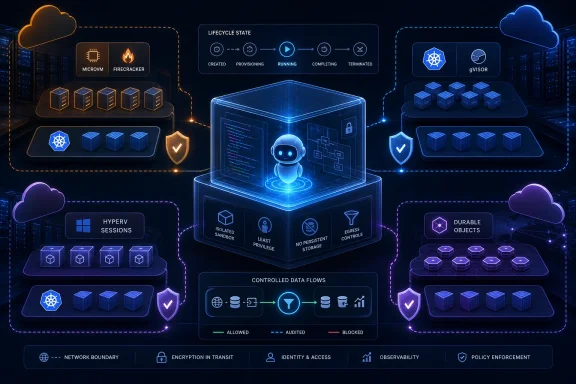
The race to give AI agents a safe place to execute code has reached a decisive milestone: AWS, Google Cloud, Microsoft Azure, and Cloudflare now all offer managed sandbox environments as cloud-native primitives. Yet the apparent convergence hides a much more consequential reality. Each provider has made a different architectural bet about where isolation belongs, how long an environment should live, who manages its state, and how much control developers should retain.
That distinction matters because an AI agent that can write code but cannot run it is limited to suggestions. An agent that can execute code, drive a browser, inspect files, transform data, test an application, or invoke a command-line tool becomes operationally useful—and potentially operationally dangerous. The sandbox is the boundary between an ambitious assistant and a production incident.
For developers building on Windows, Azure, AWS, Google Cloud, and Cloudflare, this wave of agent sandbox services is more than another AI feature rollout. It marks the arrival of isolated code execution as a standard layer of modern application architecture, alongside storage, queues, functions, containers, and identity services.
The cloud providers agree on the problem. They do not agree on the solution.
The central question is deceptively simple: Where should code written by an AI agent actually run?
Running generated code directly inside an application process is a poor answer. Even a seemingly harmless Python script can consume memory, loop forever, inspect environment variables, access mounted files, make outbound requests, or exploit a vulnerable dependency. The danger grows when an agent has access to browser automation, build tools, database clients, package managers, shell commands, or cloud SDKs.
Traditional approaches left developers with uncomfortable choices:
At the product level, all four providers now offer a recognizable pattern:
That is a meaningful design choice. A microVM generally offers a stronger isolation boundary than a conventional container because the tenant workload is separated through hardware-assisted virtualization and a dedicated guest kernel. For agent workloads that execute arbitrary commands, download dependencies, compile software, or process untrusted artifacts, that boundary is especially attractive.
AWS also treats the sandbox as something closer to a durable session than a one-shot function invocation. A MicroVM can:
AWS has also exposed lifecycle hooks for startup, suspension, resumption, and termination. That gives teams an opportunity to initialize per-tenant state, flush writes, refresh credentials, close network connections, and clean up session-specific resources.
For a Windows developer building a browser-based AI coding environment, this can resemble a managed counterpart to spinning up a fresh WSL or Hyper-V-backed environment per user—but without operating the underlying infrastructure.
The eight-hour maximum lifetime is a clear architectural boundary. Teams that need persistent workspaces lasting days, weeks, or months must still build external state management and orchestration. The service also relies on AWS’s supported architecture and regional availability model, so portability and processor compatibility require planning.
Most importantly, a Firecracker microVM does not automatically solve identity governance. If developers deliberately give the sandbox powerful cloud credentials, unrestricted network access, or access to sensitive data stores, the code can still misuse those permissions.
Isolation limits blast radius. It does not decide whether the action itself is authorized.
The first is GKE Agent Sandbox, which extends Kubernetes with a purpose-built controller, custom resources, warm pools, stable sandbox identities, persistent storage options, and security-focused runtimes such as gVisor. The second is Cloud Run sandboxes, a public-preview feature aimed at making sandbox execution available directly from an existing serverless application.
The contrast between the two tells an important story about the agent infrastructure market.
Its underlying model is familiar to infrastructure teams:
For AI workloads, the gVisor angle is significant. gVisor is a security-focused container runtime that interposes a userspace kernel layer between the container workload and the host kernel. It is not the same architectural model as a microVM, but it is designed to reduce the host kernel attack surface exposed to untrusted containers.
The activation mechanism is strikingly simple: deploy with the
That means a service can take generated code, write it to a temporary location, run it through the sandbox launcher, collect the output, and return a result to the agent workflow. The developer experience is closer to calling a local tool than provisioning a separate infrastructure resource.
Google has demonstrated a Cloud Run service that started, executed, and stopped 1,000 sandboxes at an average of roughly 500 milliseconds each. That performance claim should be treated as a demonstration scenario rather than a universal production latency guarantee, but it illustrates the intended use case: high-throughput, short-lived agent tasks.
That is an elegant cost and deployment model, because Google does not charge a separate sandbox premium. It also means developers must recognize the resource-sharing relationship. A runaway script, memory-heavy package installation, aggressive headless browser process, or malicious fork-style workload can compete with the application that launched it.
The containment boundary may separate the sandbox’s security context from the parent service, but it does not create unlimited independent compute capacity. Production designs need hard timeouts, strict memory expectations, concurrency controls, request backpressure, and well-defined per-task resource budgets.
For lightweight, bursty work, Cloud Run sandboxes could be extremely compelling. For CPU-heavy compilation, long-lived browser sessions, or high-volume multi-tenant execution, the parent-instance resource model demands careful testing.
Azure has reported that Microsoft Copilot uses more than 400,000 dynamic sessions per day, with each user conversation assigned its own Hyper-V-isolated session. That figure is notable not just because of its scale, but because it demonstrates that sandboxed code execution is already a core production dependency for large-scale AI applications.
Azure’s model centers on session pools.
A session pool maintains prewarmed, ready-to-allocate environments. When an application needs to execute code, it references a session identifier through a management endpoint. Azure allocates an existing session or creates one from the pool, avoiding the slower startup path of building a new environment from scratch.
This differs sharply from AWS’s suspend-and-resume microVM lifecycle. Azure starts from prewarmed capacity and identifies sessions through a pool. AWS creates a named MicroVM session that can be directly suspended and resumed. Both can provide low latency, but their operational metaphors are different.
That sounds obvious, but it is easy to get wrong in application code. Session IDs must be unpredictable, isolated by tenant, and protected from exposure in URLs, browser logs, telemetry, or support tooling. A platform’s Hyper-V boundary cannot protect one user from another if the application accidentally routes both users to the same session.
Azure also blocks outbound network requests by default in its dynamic sessions model unless network access is configured. That is a strong default for code interpreters and reduces the likelihood that generated code can freely contact external services.
The application logic runs in a Worker. A Durable Object provides a persistent identity, routes operations, and manages lifecycle. The actual code runs inside a Linux container environment, with each container isolated inside its own virtual machine.
This makes Cloudflare’s design neither a simple serverless subprocess model nor a conventional cloud VM service. It is a distributed application pattern where stateful coordination and execution are explicitly connected.
The flow typically looks like this:
For example, an AI website builder could use a Durable Object to hold one customer’s workspace, run generated code inside the associated sandbox, expose a preview URL, and coordinate browser-based edits through a Worker.
The architecture is powerful, but it also means the sandbox is connected to Cloudflare-specific programming concepts. Developers gain tight integration with Workers and Durable Objects, while accepting more platform coupling than they would with a generic container API.
It is not.
A sandbox answers: Can this code break out and compromise the host application or another tenant?
Governance answers different questions:
The most secure architecture therefore uses multiple layers:
A Windows application can invoke a cloud-hosted sandbox as an isolated tool execution layer. That is useful for:
That distinction is important. A local Windows Sandbox is useful when a person needs to inspect a suspicious executable or test a local change. A managed cloud sandbox is intended for application-controlled, programmatic, repeatable execution at service scale.
But the differences remain substantial.
AWS is strongest when a team needs VM-grade isolation, long interactive sessions, lifecycle hooks, direct networking control, and snapshot-backed suspend-resume behavior.
Google Cloud Run is strongest when developers want the simplest possible integration into a serverless service and can work within the parent instance’s resource model.
GKE Agent Sandbox is strongest when teams need Kubernetes-native control, persistent sandbox identities, custom templates, warm pools, and detailed infrastructure policy.
Azure Container Apps dynamic sessions are strongest for pool-based, low-latency code interpreter workloads and organizations deeply invested in Azure’s AI and application platform.
Cloudflare Sandboxes are strongest when execution must be tightly integrated with Workers, Durable Objects, globally distributed state, and edge application delivery.
The competition will likely narrow some gaps over time. More providers will add warm pools, snapshotting, state persistence, restricted networking, SDK integrations, policy controls, and browser automation support. Yet the architectural decisions underneath these features are difficult to erase.
A Firecracker microVM, a Hyper-V session, a gVisor-backed Kubernetes sandbox, a Cloud Run execution boundary, and a VM-backed Cloudflare Container may all be sold as “agent sandboxes.” They are still different products with different assumptions about performance, isolation, state, portability, cost, and operations.
The major shift is not simply that agents can now run code safely. It is that developers can choose where the safety boundary lives: inside a dedicated microVM, behind Hyper-V isolation, through a hardened Kubernetes runtime, within a serverless service instance, or as part of an edge-native stateful application stack.
That choice will shape more than latency and pricing. It will influence how teams handle credentials, data residency, session persistence, network permissions, observability, portability, and incident response.
Every major cloud now agrees that an agent should not execute arbitrary code directly on the trusted host. The real competition has moved to the harder question: who controls what that code is allowed to do once it is safely contained?
That distinction matters because an AI agent that can write code but cannot run it is limited to suggestions. An agent that can execute code, drive a browser, inspect files, transform data, test an application, or invoke a command-line tool becomes operationally useful—and potentially operationally dangerous. The sandbox is the boundary between an ambitious assistant and a production incident.
For developers building on Windows, Azure, AWS, Google Cloud, and Cloudflare, this wave of agent sandbox services is more than another AI feature rollout. It marks the arrival of isolated code execution as a standard layer of modern application architecture, alongside storage, queues, functions, containers, and identity services.
The cloud providers agree on the problem. They do not agree on the solution.
 Overview: The New Cloud Primitive for AI Agents
The central question is deceptively simple: Where should code written by an AI agent actually run?Running generated code directly inside an application process is a poor answer. Even a seemingly harmless Python script can consume memory, loop forever, inspect environment variables, access mounted files, make outbound requests, or exploit a vulnerable dependency. The danger grows when an agent has access to browser automation, build tools, database clients, package managers, shell commands, or cloud SDKs.
Traditional approaches left developers with uncomfortable choices:
- Run the code in the same container or virtual machine as the application.
- Operate a Kubernetes cluster with hardened runtime configurations.
- Build a sandboxing system from scratch around containers, virtual machines, cgroups, namespaces, seccomp policies, network controls, and credential management.
- Buy a specialized third-party microVM service.
- Avoid execution entirely and keep the agent limited to text output.
At the product level, all four providers now offer a recognizable pattern:
- A trusted application receives a user request or agent-generated plan.
- The application creates or selects an isolated execution environment.
- Untrusted code runs inside that environment.
- Outputs, files, logs, or structured results return to the application.
- The environment is terminated, recycled, suspended, or retained according to the platform’s lifecycle model.
Four Clouds, Four Definitions of Isolation
The most important development is not that every major cloud has a sandbox. It is that each provider has chosen a different underlying security and operational model.AWS: Firecracker MicroVMs With Persistent Session State
AWS has built its offering around Lambda MicroVMs, which use Firecracker-based virtualization. Each execution environment is a dedicated microVM with its own guest operating system boundary, rather than merely another process inside a shared container runtime.That is a meaningful design choice. A microVM generally offers a stronger isolation boundary than a conventional container because the tenant workload is separated through hardware-assisted virtualization and a dedicated guest kernel. For agent workloads that execute arbitrary commands, download dependencies, compile software, or process untrusted artifacts, that boundary is especially attractive.
AWS also treats the sandbox as something closer to a durable session than a one-shot function invocation. A MicroVM can:
- Start from a prepared snapshot.
- Run a full Linux workload.
- Expose a dedicated HTTPS endpoint.
- Maintain memory and disk state while active.
- Suspend when idle.
- Resume later with state restored.
- Remain available for up to eight hours.
The AWS Strength: A Real Session-Oriented Compute Boundary
The strongest aspect of AWS Lambda MicroVMs is the combination of VM-level isolation and stateful suspend-resume behavior. It provides a more natural fit for longer agent tasks than traditional serverless functions, which were designed around short, stateless execution.AWS has also exposed lifecycle hooks for startup, suspension, resumption, and termination. That gives teams an opportunity to initialize per-tenant state, flush writes, refresh credentials, close network connections, and clean up session-specific resources.
For a Windows developer building a browser-based AI coding environment, this can resemble a managed counterpart to spinning up a fresh WSL or Hyper-V-backed environment per user—but without operating the underlying infrastructure.
The AWS Risks: Limits Still Define the Product
Lambda MicroVMs are not a replacement for unrestricted virtual machines or long-lived development desktops.The eight-hour maximum lifetime is a clear architectural boundary. Teams that need persistent workspaces lasting days, weeks, or months must still build external state management and orchestration. The service also relies on AWS’s supported architecture and regional availability model, so portability and processor compatibility require planning.
Most importantly, a Firecracker microVM does not automatically solve identity governance. If developers deliberately give the sandbox powerful cloud credentials, unrestricted network access, or access to sensitive data stores, the code can still misuse those permissions.
Isolation limits blast radius. It does not decide whether the action itself is authorized.
Google Cloud: Two Sandbox Paths, Two Different Trade-Offs
Google Cloud is notable because it now has two visibly different sandbox approaches.The first is GKE Agent Sandbox, which extends Kubernetes with a purpose-built controller, custom resources, warm pools, stable sandbox identities, persistent storage options, and security-focused runtimes such as gVisor. The second is Cloud Run sandboxes, a public-preview feature aimed at making sandbox execution available directly from an existing serverless application.
The contrast between the two tells an important story about the agent infrastructure market.
GKE Agent Sandbox: Kubernetes-Native Control
GKE Agent Sandbox is designed for teams that already operate in the Kubernetes ecosystem and need control over templates, images, policies, networking, persistent identity, pools, and orchestration.Its underlying model is familiar to infrastructure teams:
- A sandbox is represented through Kubernetes-native resources.
- A controller manages lifecycle and allocation.
- Warm pools reduce provisioning latency.
- A sandbox can have stable network identity and state.
- Sandboxed workloads can use gVisor-based isolation.
- Network access follows a default-deny approach unless explicitly configured.
For AI workloads, the gVisor angle is significant. gVisor is a security-focused container runtime that interposes a userspace kernel layer between the container workload and the host kernel. It is not the same architectural model as a microVM, but it is designed to reduce the host kernel attack surface exposed to untrusted containers.
Cloud Run Sandboxes: A Subprocess-Style Developer Experience
Cloud Run sandboxes take almost the opposite approach. Rather than requiring developers to create and manage a Kubernetes resource model, Google enables sandboxing from within a Cloud Run service.The activation mechanism is strikingly simple: deploy with the
--sandbox-launcher option, then invoke the mounted sandbox command from application code using a normal subprocess call.That means a service can take generated code, write it to a temporary location, run it through the sandbox launcher, collect the output, and return a result to the agent workflow. The developer experience is closer to calling a local tool than provisioning a separate infrastructure resource.
Google has demonstrated a Cloud Run service that started, executed, and stopped 1,000 sandboxes at an average of roughly 500 milliseconds each. That performance claim should be treated as a demonstration scenario rather than a universal production latency guarantee, but it illustrates the intended use case: high-throughput, short-lived agent tasks.
Cloud Run’s Security Model Is More Opinionated
Cloud Run sandboxes ship with several carefully designed defaults:- The sandbox does not inherit the parent Cloud Run service’s environment variables.
- The sandbox cannot query the Google Cloud metadata server.
- Outbound network access is denied by default.
- The sandbox receives a read-only view of the container filesystem.
- Writes go to an isolated temporary memory overlay.
- Sandbox-created files disappear when execution ends unless explicitly exported.
The Cloud Run Trade-Off: Shared Resource Pressure
Cloud Run’s simplicity has an important implication: sandboxes use the CPU and memory already allocated to the parent Cloud Run instance.That is an elegant cost and deployment model, because Google does not charge a separate sandbox premium. It also means developers must recognize the resource-sharing relationship. A runaway script, memory-heavy package installation, aggressive headless browser process, or malicious fork-style workload can compete with the application that launched it.
The containment boundary may separate the sandbox’s security context from the parent service, but it does not create unlimited independent compute capacity. Production designs need hard timeouts, strict memory expectations, concurrency controls, request backpressure, and well-defined per-task resource budgets.
For lightweight, bursty work, Cloud Run sandboxes could be extremely compelling. For CPU-heavy compilation, long-lived browser sessions, or high-volume multi-tenant execution, the parent-instance resource model demands careful testing.
Microsoft Azure: Dynamic Sessions Arrived Early
Microsoft reached this pattern before the latest AWS and Google launches with Azure Container Apps dynamic sessions. The service has been available since 2024 and is already closely associated with Microsoft’s own AI product portfolio.Azure has reported that Microsoft Copilot uses more than 400,000 dynamic sessions per day, with each user conversation assigned its own Hyper-V-isolated session. That figure is notable not just because of its scale, but because it demonstrates that sandboxed code execution is already a core production dependency for large-scale AI applications.
Azure’s model centers on session pools.
A session pool maintains prewarmed, ready-to-allocate environments. When an application needs to execute code, it references a session identifier through a management endpoint. Azure allocates an existing session or creates one from the pool, avoiding the slower startup path of building a new environment from scratch.
Hyper-V Isolation and Pool-Based Allocation
The Azure architecture combines several useful characteristics:- Hyper-V isolation between sessions and the host environment.
- Prewarmed pools for low-latency allocation.
- Automatic scaling for bursty workloads.
- Built-in code interpreter sessions.
- Custom container sessions for specialized runtimes.
- Configurable lifecycle and cooldown behavior.
- Optional outbound network controls.
This differs sharply from AWS’s suspend-and-resume microVM lifecycle. Azure starts from prewarmed capacity and identifies sessions through a pool. AWS creates a named MicroVM session that can be directly suspended and resumed. Both can provide low latency, but their operational metaphors are different.
Azure’s Security Warning Matters
Azure’s documentation makes an important point that applies across every cloud: users of the same session can access files and environment variables within that session.That sounds obvious, but it is easy to get wrong in application code. Session IDs must be unpredictable, isolated by tenant, and protected from exposure in URLs, browser logs, telemetry, or support tooling. A platform’s Hyper-V boundary cannot protect one user from another if the application accidentally routes both users to the same session.
Azure also blocks outbound network requests by default in its dynamic sessions model unless network access is configured. That is a strong default for code interpreters and reduces the likelihood that generated code can freely contact external services.
Cloudflare: Edge-Native Sandboxes Built Around Durable Objects
Cloudflare’s Sandbox SDK takes a distinctly edge-native route. It combines Workers, Durable Objects, and Containers into a layered sandbox architecture.The application logic runs in a Worker. A Durable Object provides a persistent identity, routes operations, and manages lifecycle. The actual code runs inside a Linux container environment, with each container isolated inside its own virtual machine.
This makes Cloudflare’s design neither a simple serverless subprocess model nor a conventional cloud VM service. It is a distributed application pattern where stateful coordination and execution are explicitly connected.
Why Durable Objects Change the Model
Durable Objects give each sandbox a stable, unique identity. The same sandbox identifier routes back to the same logical instance, allowing an agent session to retain files, processes, local state, and context across multiple operations.The flow typically looks like this:
- A Worker receives an agent request.
- The Worker obtains a sandbox through the Sandbox SDK.
- The SDK resolves the request through a Durable Object.
- The Durable Object manages the associated container.
- The container runs commands and returns output.
- The Worker sends structured results back to the application or user.
Cloudflare’s Strength: Stateful Edge Coordination
Cloudflare’s design is particularly attractive for applications that combine real-time interaction, global edge delivery, persistent per-user state, and code execution. It is less about creating a generic isolated VM and more about composing sandbox execution into the Cloudflare developer platform.For example, an AI website builder could use a Durable Object to hold one customer’s workspace, run generated code inside the associated sandbox, expose a preview URL, and coordinate browser-based edits through a Worker.
The architecture is powerful, but it also means the sandbox is connected to Cloudflare-specific programming concepts. Developers gain tight integration with Workers and Durable Objects, while accepting more platform coupling than they would with a generic container API.
Containment Is Not Governance
The biggest risk in the current sandbox conversation is the temptation to treat isolation as a complete security strategy.It is not.
A sandbox answers: Can this code break out and compromise the host application or another tenant?
Governance answers different questions:
- Should the agent be allowed to access this customer record?
- Which API calls may it make?
- Which domains may it contact?
- Can it read production logs?
- Can it invoke cloud services?
- Can it create, delete, or modify infrastructure?
- Is the requested action consistent with the user’s authorization?
- Can the organization audit and revoke the action?
The most secure architecture therefore uses multiple layers:
- Strong execution isolation through a microVM, Hyper-V boundary, VM-backed container, or hardened runtime.
- Least-privilege identity with narrowly scoped, short-lived credentials.
- Default-deny network access with explicit egress allowlists.
- Per-tenant session isolation and unpredictable identifiers.
- CPU, memory, process, filesystem, and timeout limits.
- Input validation and output handling to prevent injection into downstream systems.
- Audit logging for commands, network requests, files, and tool calls.
- Human approval gates for destructive or high-impact operations.
What This Means for Windows Developers and IT Teams
For Windows-centric organizations, these services can simplify a long-standing challenge: providing Linux-capable execution environments to agents and users without granting broad access to Windows hosts, developer workstations, build servers, or shared application containers.A Windows application can invoke a cloud-hosted sandbox as an isolated tool execution layer. That is useful for:
- Running generated Python, Node.js, R, or shell scripts.
- Building secure code interpreters into internal applications.
- Performing data analysis without exposing application servers.
- Executing user-submitted plugins or automation scripts.
- Creating disposable test environments for DevOps workflows.
- Hosting browser automation or web research agents.
- Evaluating code patches before they reach a build pipeline.
- Providing isolated developer workspaces for training and experimentation.
That distinction is important. A local Windows Sandbox is useful when a person needs to inspect a suspicious executable or test a local change. A managed cloud sandbox is intended for application-controlled, programmatic, repeatable execution at service scale.
The Market Is Commoditizing, but It Is Not Yet a Commodity
At first glance, the emergence of four major cloud sandbox services looks like rapid commoditization. The core product promise is now broadly familiar: send untrusted code somewhere isolated, get an answer back, and avoid managing a fleet of virtual machines.But the differences remain substantial.
AWS is strongest when a team needs VM-grade isolation, long interactive sessions, lifecycle hooks, direct networking control, and snapshot-backed suspend-resume behavior.
Google Cloud Run is strongest when developers want the simplest possible integration into a serverless service and can work within the parent instance’s resource model.
GKE Agent Sandbox is strongest when teams need Kubernetes-native control, persistent sandbox identities, custom templates, warm pools, and detailed infrastructure policy.
Azure Container Apps dynamic sessions are strongest for pool-based, low-latency code interpreter workloads and organizations deeply invested in Azure’s AI and application platform.
Cloudflare Sandboxes are strongest when execution must be tightly integrated with Workers, Durable Objects, globally distributed state, and edge application delivery.
The competition will likely narrow some gaps over time. More providers will add warm pools, snapshotting, state persistence, restricted networking, SDK integrations, policy controls, and browser automation support. Yet the architectural decisions underneath these features are difficult to erase.
A Firecracker microVM, a Hyper-V session, a gVisor-backed Kubernetes sandbox, a Cloud Run execution boundary, and a VM-backed Cloudflare Container may all be sold as “agent sandboxes.” They are still different products with different assumptions about performance, isolation, state, portability, cost, and operations.
Conclusion: AI Execution Has Become a First-Class Infrastructure Decision
The arrival of managed agent sandboxes across AWS, Google Cloud, Microsoft Azure, and Cloudflare confirms that AI-generated code execution is no longer an edge case. It is becoming a routine part of application design.The major shift is not simply that agents can now run code safely. It is that developers can choose where the safety boundary lives: inside a dedicated microVM, behind Hyper-V isolation, through a hardened Kubernetes runtime, within a serverless service instance, or as part of an edge-native stateful application stack.
That choice will shape more than latency and pricing. It will influence how teams handle credentials, data residency, session persistence, network permissions, observability, portability, and incident response.
Every major cloud now agrees that an agent should not execute arbitrary code directly on the trusted host. The real competition has moved to the harder question: who controls what that code is allowed to do once it is safely contained?
References
- Primary source: The New Stack
Published: 2026-07-24T16:04:54+00:00
- Official source: cloud.google.com
Google Cloud Run sandboxes are in public preview | Google Cloud Blog
Today, at WeAreDevelopers World Congress, we are announcing Google Cloud Run sandboxes in public preview. Cloud Run sandboxes are a native, secure, and ultra-fast runtime environment built specifically for executing untrusted code and agent workloads, starting in milliseconds.cloud.google.com
- Official source: learn.microsoft.com
Dynamic sessions in Azure Container Apps | Microsoft Learn
Learn about dynamic sessions in Azure Container Apps.learn.microsoft.com - Official source: techcommunity.microsoft.com
Azure Container Apps dynamic sessions general availability, and more | Microsoft Community Hub
Python code interpreter and custom sessions are now GA. JavaScript code interpreter in public preview. Microsoft Copilot uses Azure Container Apps dynamic... techcommunity.microsoft.com
- Official source: docs.cloud.google.com
Enable Agent Sandbox on GKE | GKE AI/ML | Google Cloud Documentation
Learn how to enable the Agent Sandbox feature on a Google Kubernetes Engine (GKE) cluster, and how to create a sandboxed environment on the cluster to safely execute untrusted code.docs.cloud.google.com